
Registering Regular Expressions-Based Supply Nets
If you do not know the names of the nets that exist down the hierarchy, there are some naming conventions followed. Here are the steps to register the regular expressions-based supply nets.
-
Specify regular expressions for nets in the Power Nets or Ground Nets fields on the Supply Nets tab of the Power Manager Setup form.
For example, if you addvddas a regular expression, such asiovdd,avddd1, or any net name that contains this is considered as power net. Similarly, ifGNDis specified as a regular expression, names such asGNDA,GNDD, and so on, are considered as ground nets. Also, if[v][V],[d][D], and[d][D]are defined as regular expressions, all combinations are considered, such asvdd,VdD,VDD,Vdd, and so on. - Specify the registration information in the Pwell, Nwell, Deep Pwell, or Deep Nwell fields on the Supply Nets tab of the Power Manager Setup form.
-
Click OK.
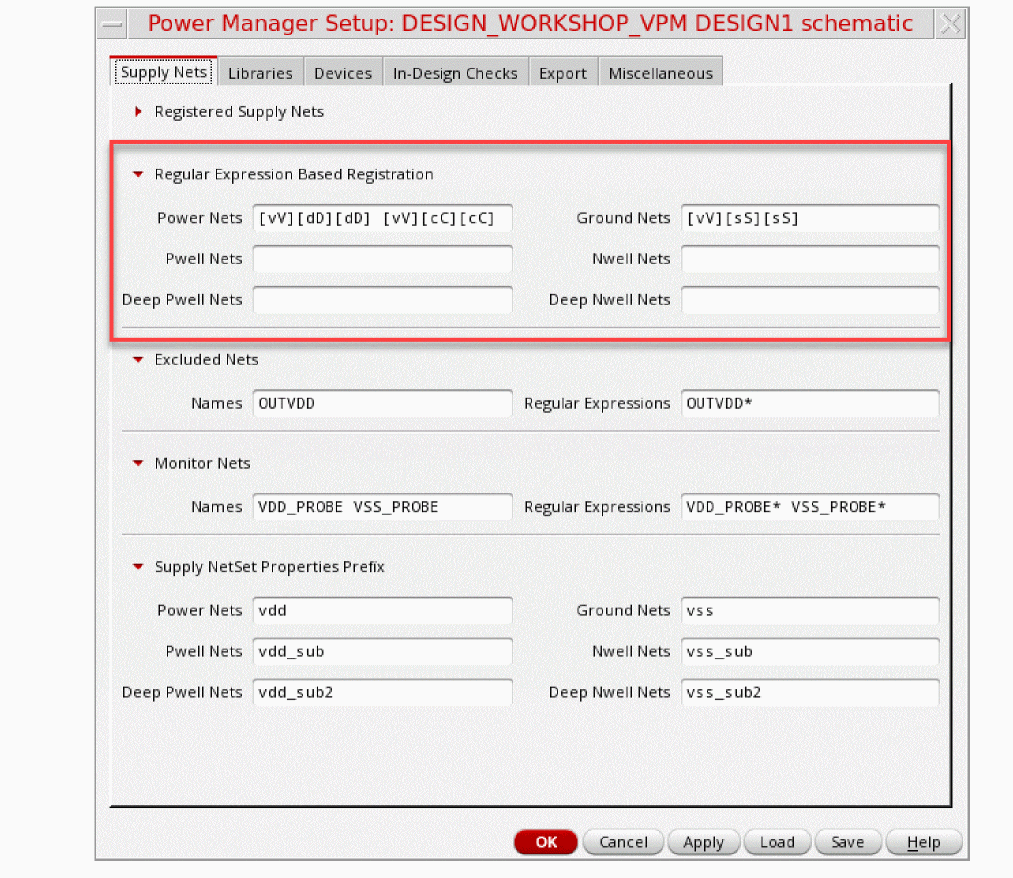
Power Manager checks for the presence of the registered nets and identifies them as power or ground nets. These registered nets are used to create power domains.
Related Topics
Registering Name-Based Supply Nets
Registering Supply Set and Power Domain
Loading Power Intent Extraction Options from a File
Saving Power Intent Extraction Options to a File
Return to top