
Launching the Track Pattern Assistant
Use one of the following methods to access the Track Pattern assistant:
- Select Window – Assistants – Track Pattern.
- Right-click in the main menu and select Assistants – Track Pattern.
Once selected, the Track Pattern assistant is added as a docked assistant pane within the current session window. By default, the Track Pattern assistant is positioned on the right side of the layout window.
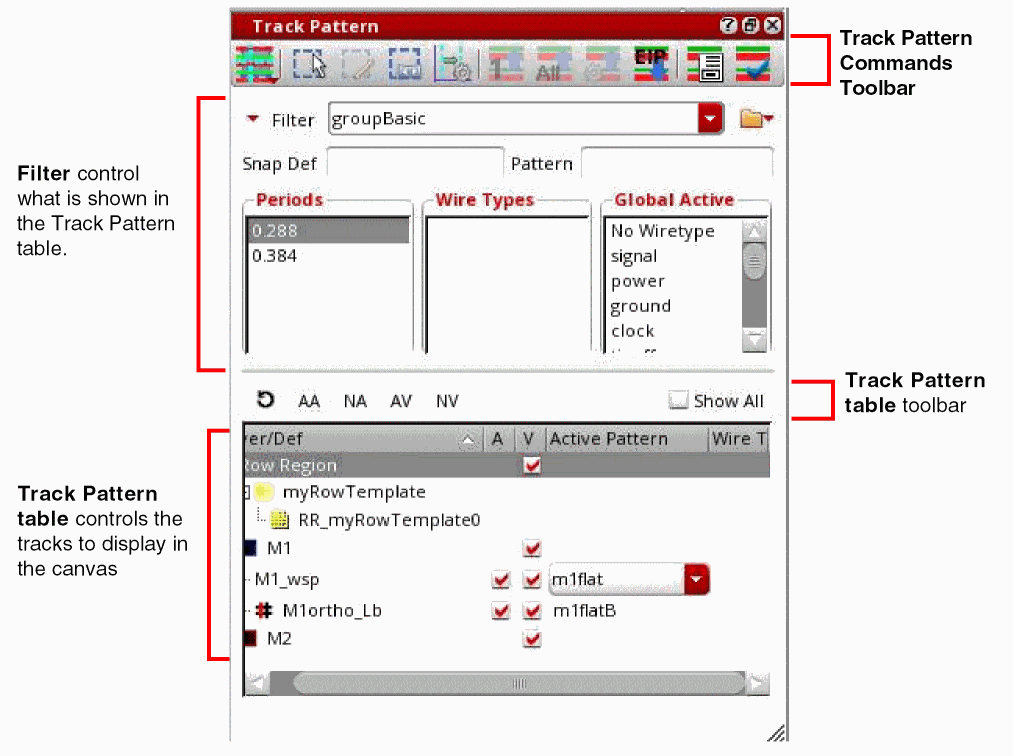
The Track Pattern assistant Graphical User Interface (GUI) is divided into sections:
-
The top section has a toolbar that contains buttons for Track Pattern commands. You can open the following forms:
- Choosing the Track Pattern Display Mode
- Creating Width Spacing Pattern Regions
- Editing Width Spacing Pattern Regions
- Stretching Width Spacing Pattern Regions
- Choosing the Track Pattern Display Mode
- Choosing the Track Pattern Display Mode
- Choosing the Track Pattern Display Mode
- Pulling Up Patterns from a Subcell
- Pushing down WSSPDefs in EIP
- Launching the WSP Manager
- Launching the WSP Active Checker
- The next section shows filters that control what is shown in the Track Pattern table. For more information, see Track Pattern Assistant Filters. There are also fields for saving, loading, and deleting filter settings, as described in Saving and Restoring Filter Settings.
- Using controls in the Display section, you can choose which active patterns are visible in the canvas. These controls are described in the Controlling the Visibility of Track Patterns section.
- The bottom section shows the Track Pattern table of active patterns for WSSPDefs and SPDefs grouped by layer with display controls to show or hide the active patterns in the canvas. For more information, see Specifying the Active Patterns.
- The bottom-left corner of the form shows the Track Pattern assistant scope, described in Track Pattern Table.
Pattern flipping can be specified for global grids, as described in Choosing the Track Pattern Display Mode, and for regions as described in Creating Width Spacing Pattern Regions and Editing Width Spacing Pattern Regions.
Related Topics
Track Pattern Assistant Filters
Track Pattern Assistant Customization
Return to top