
Creating and Deleting a Constraint Group
A constraint group is a collection of constraints and process rules created for a technology database or a specific design. Constraint groups can be created, edited, and deleted using the Routing Constraint Manager and can be applied to nets, specific constraints (bus and netclass for instance), and designs.
Constraint groups exist in particular technology databases and can be made up of multiple sub-constraint groups.
For a constraint group (and the process rules contained in them) to be applied to an object, design, or technology database, it must be a member of the default constraint group for that design or technology.
Creating a Constraint Group
- Open a design in Layout MXL.
-
Choose Window – Assistants – Routing.
Alternatively, right-click anywhere on the layout window menu bar and choose Assistants – Routing.
The Routing assistant is displayed. -
Click Routing Constraint Manager
 on the Routing assistant toolbar.
 - Select few nets in the Net column of the Nets tab in the Routing Constraint Manager.
-
Click the Apply Constraint Group
 button on the Routing Constraint Manager toolbar.
 -
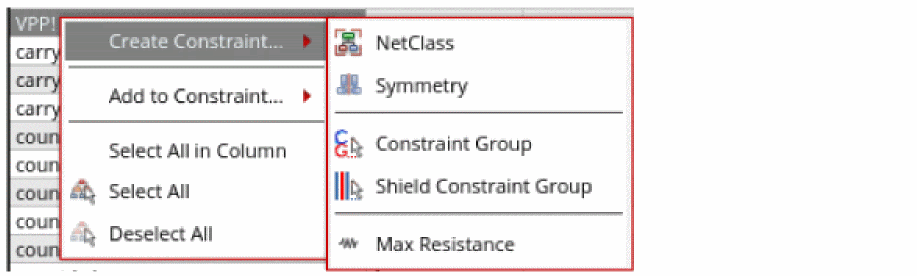
Alternatively, right-click a net in the Nets column of the constraints table.
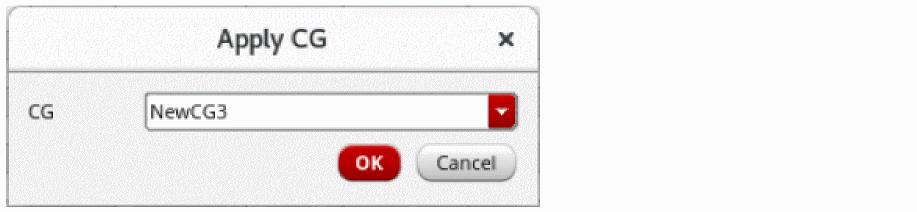
A menu is displayed. - Specify the name of the constraint group that you want to create in the CG field.
-
Click OK.
A new constraint group is added to the selected net and displayed in the Process Rule Overrides column of the constraints table.
Deleting a Constraint Group
- Right-click the constraint group name that you want to delete from the Process Rule Overrides column.
-
Click Delete Constraint Group.
The constraint group is deleted.
Related Topics
Adding and Removing a Net from a Constraint Group
Setting up a Constraint on a Net
Return to top