
11
Analyses
This chapter discusses the following topics:
- Types of Analyses
- Analysis Parameters
- Probes in Analyses
- Multiple Analyses
- Multiple Analyses in a Subcircuit
- DC Analysis
- AC Analysis
- Transient Analysis
- Fault Analysis
- Pole Zero Analysis
- Loopfinder Analysis
- Other Analyses (sens, fourier, dcmatch, and stb)
- Sweep Analysis
- Monte Carlo Analysis
- Spectre Reliability Analysis
- SpectreThermal Analysis
Types of Analyses
This section gives a brief description of the Spectre® circuit simulator analyses you can specify. Spectre analyses frequently let you sweep parameters, estimate or specify the DC solution, specify options that promote convergence, and select annotation options. You can specify sequences of analyses, any number in any order. For a more detailed description of each analysis and its parameters, consult the Spectre online help (spectre -h).
-
DC analysis (
dc)—Finds the DC operating point or DC transfer curves of the circuit. -
AC/small signal analyses
-
AC analysis (
ac)—Linearizes the circuit about the DC operating point and computes the steady-state response of the circuit to a given small-signal sinusoidal stimulus. This analysis is useful for obtaining small-signal transfer functions. -
Noise analysis (
noise)—Linearizes the circuit about the DC operating point and computes the total-noise spectral density at the output. The output can be either a voltage or a current. If you specify an input probe, the Spectre simulator computes the transfer function and the equivalent input-referred noise for a noise-free network. -
Transfer function analysis (
xf)—Linearizes the circuit about the DC operating point and performs a small-signal analysis. It calculates the transfer function from every source in the circuit to a specified output. The output can be either a voltage or a current. -
S-parameter analysis (
sp)—Linearizes the circuit about the DC operating point and computes S-parameters of the circuit taken as an N-port. You define the ports of the circuit withportstatements. You must place at least oneportstatement in the circuit. The Spectre simulator turns on each port sequentially and performs a linear small-signal analysis. The Spectre simulator converts the response of the circuit at each port into S-parameters.
-
AC analysis (
-
Transient analyses
-
Transient analysis (
tran)—Computes the transient response of the circuit over a specified time interval. You can specify initial conditions for this analysis. If you do not specify initial conditions, the analysis starts from the DC steady-state solution. You can influence the speed of the simulation by setting parameters that control accuracy requirements and the number of data points saved. For more information about the transient analysis, see Transient Analysis. -
Time-domain reflectometer analysis (
tdr)—Linearizes the circuit about the DC operating point and computes the reflection and transmission coefficients versus time. This is the time-domain equivalent of the S-parameter analysis.
-
Transient analysis (
-
Pole Zero analysis (
pz)— Linearizes the circuit about the DC operating point and computes the poles and zeros of the linearized network. -
RF analyses
- Envelope Analysis (envlp) — Computes the envelope response of a circuit. The simulator automatically determines the clock period by looking through all the sources with the specified name. Envelope-following analysis is most efficient for circuits where the modulation bandwidth is orders of magnitude lower than the clock frequency. This is typically the case, for example, in circuits where the clock is the only fast varying signal and other input signals have a spectrum whose frequency range is orders of magnitude lower than the clock frequency. For another example, the down conversion of two closely placed frequencies can also generate a slow-varying modulation envelope. The analysis generates two types of output files, a voltage versus time (td) file, and an amplitude/phase versus time (fd) file for each of specified harmonic of the clock fundamental.
- Harmonic Balance Steady State Analysis (HB) — Uses harmonic balance (in the frequency domain) to compute the response of circuits that have either one fundamental frequency (periodic steady-state, PSS) or that have multiple fundamental frequencies (Quasi-Periodic Steady State, QPSS). The simulation time required for an HB analysis is independent of the time-constants of the circuit. This analysis also determines the circuit’s periodic or quasi-periodic operating point, which can then be used during a periodic or quasi-periodic time-varying small-signal analysis, such as HBAC or HBnoise.
- Periodic Analyses — Spectre RF adds periodic large (PSS) and small-signal analyses (PAC, PSP, PXF, Pnoise, and Pstb) to Spectre simulation.
- Quasi-Periodic Analyses — Spectre RF adds quasi-periodic large (QPSS) and small-signal analyses (QPAC, QPSP, QPXF, and QPnoise) to Spectre L simulation. For more information about the quasi-periodic analyses.
-
Other analyses
-
Sensitivity analysis (
sens)—Determines the sensitivity of output variables to input design parameters. The results are expressed as a ratio of the change in an output analysis variable to the change in an input design parameter. The output for thesenscommand is sent to the rawfile or to an ASCII file. For more information about sensitivity analysis, see “Sensitivity Analysis on page 418”. -
Fourier analysis (
fourier)—Measures the Fourier coefficients of two different signals at a specified fundamental frequency without loading the circuit. The algorithm used is based on the Fourier integral rather than the discrete Fourier transform and therefore is not subject to aliasing. Even on broad-band signals, it computes a small number of Fourier coefficients accurately and efficiently. Therefore, this Fourier analysis is suitable on clocked sinusoids generated by sigma-delta converters, pulse-width modulators, digital-to-analog converters, sample-and-holds, and switched-capacitor filters as well as on the traditional low-distortion sinusoids produced by amplifiers or filters. -
DC Match Analysis (
dcmatch)—Computes the statistical deviation in the DC operating point of the circuit caused by device mismatch. For more information about the dcmatch analysis, see DC Match Analysis -
Stability Analysis (stb)—Linearizes the circuit about the DC operating point and computes loop gain, gain margin, and phase margin for a specific feedback loop or an active device. The stability of the circuit can be determined from the loop gain waveform. The
probeparameter must be specified to perform stability analysis.
-
Sensitivity analysis (
-
Advanced analyses
-
Sweep analysis (
sweep)—Sweeps a parameter executing a list of analyses (or multiple analyses) for each value of the parameter. The sweeps can be linear or logarithmic. Swept parameters return to their original values after the analysis. Sweep statements can be nested. For more information about the sweep analysis, see Sweep Analysis. -
Fault analysis (
fault)—Provides a transistor-level simulation capability that can be enabled in an analog test methodology to improve test coverage by identifying critical test patterns. Spectre transient fault analysis is very fast in handling a large numbers of faults. Spectre direct fault analysis provides high accuracy results when full fault analysis precision is required. For more information, see Fault Analysis. -
Monte Carlo analysis (
montecarlo)—Varies netlist parameters according to specified distributions and correlations, runs nested child analyses, and extracts specified circuit-performance measurements. You can apply both process and device-to-device mismatch variations and tag device instances as correlated or “matched pairs.” Use the Cadence analog circuit design environment Calculator expressions to measure the circuit performance. You can use the analog design environment graphics tools to plot scalar performance data, such as slew rates and bandwidths, as a histogram or scattergram. You can also display waveform data as cloud (family) plots. For more information about the Monte Carlo analysis, see Monte Carlo Analysis. For more information about using the Monte Carlo analysis with the analog design environment, see the Advanced Analysis Tools User Guide.
-
Sweep analysis (
- Hot-electron degradation analysis—Lets you control the age of the circuit when simulating hot-electron degradation. For more information about the hot-electron degradation analysis, see “Special Analysis (Hot-Electron Degradation)”
Analysis Parameters
You specify parameter values for analysis and control statements just as you specify those for component and model statements, but many analysis parameters have no assigned default values. You must assign values to these parameters if you want to use them. To assign values to these parameters, simply follow the parameter keyword with an equal sign (=) and your selected value. For example, to set the points per decade (dec) value to 10, you enter dec=10.
When analysis parameters do have default values, these values are given in the parameter listings for that analysis in the Spectre online help (spectre -h).
A listing like the following tells you that the default value for parameter lin is 50 steps:
Specifying Parameter Defaults in a File
You can use the +paramdefault command-line option to enable Spectre to read and apply the default values of parameters from a specified file. This enables you to specify the default values of the analysis parameters without the need to modify the netlist.
The syntax to specify the +paramdefault command-line option is as follows:
% spectre +paramdefault <filename> ....
<filename> is the name of the file containing the default values for parameters. The file should contain only the primitive analysis name (and/or option analysis), parameter name, and parameter value in one line. The following is an example of a parameter default file:
# Example comment for parameter defaults
tran compression wildcardonly
tran annotate estimated
options wfmaxsize 30GB
The parameter value can be a string or double. For double values, scientific notation (for example, 1.54E+06) and unit suffix (for example, 1.54M) are supported. Expressions are not supported.
Spectre reads the parameter defaults from the specified file and applies them before applying the netlist parameters. Therefore, if the same parameter is specified in the netlist, it will have higher priority.
You can use the +paramdefault command-line option multiple times to specify multiple files. For example,
% spectre +paramdefault file1 +paramdefault file2
You can use the =paramdefault <filename> command-line option to read the specified file and ignore all previously specified files. The =paramdefault command-line option ignores only those files (specified using the +paramdefault command-line option) that are specified before it at the command line. For example:
% spectre +paramdefault file1 =paramdefault file2 +paramdefault file3
In the above example, only file1 will be ignored because it has been specified before the =paramdefault option.
You can use the -paramdefault command-line option to disable the reading of any parameter defaults specified.
Probes in Analyses
Some Spectre analyses require that you set probes. Remember the following guidelines when you set probes:
- You can name any component instance as a probe.
- If the probe component measures a branch current, you can use it as either a current probe or a voltage probe. Component instances that do not calculate branch currents can be used only as voltage probes.
-
If the probe component has more than two terminals, you specify which pair of terminals to use as the probe by specifying a port of the probe. In the following instance statement, port 1 is nodes 5 and 8, and port 2 is nodes 2 and 4.
bjt1 5 8 2 4 bmod1
-
If the probe component measures more than one branch current, you specify which branch current to use as the probe by specifying a port. In the following instance statement, current port 1 is the branch from node 4 to node 5, and port 2 is the branch from node 8 to node 9.
tline2 4 5 8 9 tline
- Every component has a default probe type and port number.
In the following example, the netlist contains a resistor named Rocm and a voltage source named Vcm. These components are used as probes for the noise analysis statement. The parameters oprobe and iprobe specify the probe components, and the parameters oportv and iportv specify the port numbers.
cmNoise noise start=1k stop=1G dec=10 oprobe=Rocm oportv=1 iprobe=Vcm iportv=1
Multiple Analyses
This netlist demonstrates the Spectre simulator’s ability to run many analyses in the order you prefer. In this example, the Spectre simulator completely characterizes an operational amplifier in one run. In analysis OpPoint, the program computes the DC solution and saves it to a state file whose name is derived from the name of the netlist file. On subsequent runs, the Spectre simulator reads the state information contained in this state file and speeds analysis by using this state information as an initial estimate of the solution.
Analysis Drift computes DC solutions as a function of temperature. The Spectre simulator computes the solution at the initial temperature and saves this solution to a state file to use as an estimate in the next analysis and in subsequent simulations.
Analysis XferVsTemp computes the small-signal characteristics of the amplifier versus temperature. Analysis XferVsTemp starts up quickly because it begins with the initial temperature of the DC solution that was placed in a state file by the previous analysis.
Analysis LoopGain computes the loop gain of an amplifier in closed-loop configuration. Analysis LoopGain starts quickly because it begins with the initial temperature of the DC solution that was placed in a state file during analysis OpPoint.
Analysis XferVsFreq computes several small-signal quantities of interest such as closed-loop gain, the rejection ratio of the positive and negative power supply, and output resistance. The analysis again starts quickly because the operating point remains from the previous analysis.
Analysis StepResponse computes the step response that permits the measurement of the slew-rate and settling times. The alter statement please4 then changes the input stimulus from a pulse to a sine wave. Finally, the Spectre simulator computes the response to a sine wave in order to calculate distortion.
// ua741 operational amplifier
global gnd vcc vee
simulator lang=spectre
Spectre options audit=detailed limit=delta maxdeltav=0.3 \
    save=lvlpub nestlvl=1
// ua741 operational amplifier
model NPNdiode  diode   is=.1f  imax=5m
model NPNbjt    bjt type=npn bf=80 vaf=50 imax=5m \
    cje=3p cjc=2p cjs=2p tf=.3n tr=6n rb=100
model PNPbjt    bjt type=pnp bf=10 vaf=50 imax=5m \
    cje=6p cjc=4p tf=1n tr=20n rb=20
subckt ua741 (pIn nIn out)
// Transistors
    Q1 1 pIn 3 vee NPNbjt
    Q2 1 nIn 2 vee NPNbjt
    Q3 5 16 3 vcc PNPbjt
    Q4 4 16 2 vcc PNPbjt
    Q5 5 8 7 vee NPNbjt
    Q6 4 8 6 vee NPNbjt
    Q7  vcc 5 8 vee NPNbjt
    Q9  16 1 vcc vcc PNPbjt
    Q14 vcc 13 15 vee NPNbjt
    Q16 vcc 4 9 vee NPNbjt
    Q17 11 9 10 vee NPNbjt
    Q18 13 12 17 vee NPNbjt
    Q20 vee 17 14 vcc PNPbjt
    Q23 vee 11 17 vcc PNPbjt
// Diodes
    Q8  vcc 1 NPNdiode
    Q19 13 12 NPNdiode
// Resistors
    R1  7 vee resistor r=1k
    R2  6 vee resistor r=1k
    R3  8 vee resistor r=50k
    R4  9 vee resistor r=50k
    R5  10 vee resistor r=100
    R6  12 17 resistor r=40k
    R8  15 out resistor r=27
    R9  14 out resistor r=22
// Capacitors
    C1  4 11 capacitor c=30p
// Current Sources
    I1  16 vee isource dc=19u
    I2  vcc 11 isource dc=550u
    I3  vcc 13 isource dc=180u
ends ua741
// Sources
Vpos     vcc gnd vsource dc=15
Vneg     vee gnd vsource dc=-15
Vin     pin gnd vsource type=pulse dc=0 \
  val0=0 val1=10 width=100u period=200u rise=2u\
  fall=2u td1=0 tau1=20u td2=100u tau2=100u \
  freq=10k ampl=10 delay=5u \
  file="sine10" scale=10.0 stretch=200.0e-6
Vfb     nin out vsource
// Op Amps
OA1     pin nin out ua741
// Resistors
Rload   out gnd resistor r=10k
// Analyses
// DC operating point
     please1 alter param=temp value=25 annotate=no
     OpPoint dc print=yes readns="%C:r.dc25"
     write="%C:r.dc25"
// Temperature Dependence
    Drift dc start=0 stop=50.0 step=1 param=temp \
     readns="%C:r.dc0" write="%C:r.dc0"
 XferVsTemp xf start=0 stop=50 step=1 probe=Rload \
  param=temp freq=1kHz readns="%C:r.dc0"
// Gain
    please2 alter dev=Vfb param=mag value=1 annotate=no
    LoopGain ac start=1 stop=10M dec=10 readns="%C:r.dc25"
    please3 alter dev=Vfb param=mag value=0 annotate=no
// XF
    XferVsFreq xf start=1_Hz stop=10M dec=10 probe=Rload
// Transient
    StepResponse tran stop=250u
    please4 alter dev=Vin param=type value=sine
    SineResponse tran stop=150u
Multiple Analyses in a Subcircuit
You might want to run complex sets of analyses many times during a simulation. To simplify this process, you can group the set of analyses into a subcircuit. Because subcircuit definitions can contain analyses and control statements, you can put the analyses inside a single subcircuit and perform the multiple analyses with one call to the subcircuit. The Spectre simulator performs the analyses in the order you specify them in the subcircuit definition. Generally, you do not mix components and analyses in the same subcircuit definition. For more information about formats for subcircuit definitions and subcircuit calls, see
Example
The following example illustrates how to create and call subcircuits that contain analyses.
Creating Analysis Subcircuits
subckt sweepVcc()
    parameters start=0 stop=10 Ib=0 omega=1G steps=100
    setIbb alter dev=Ibb param=dc value=Ib
    SwpVccDC dc start=start stop=stop dev=Vcc lin=steps/2SwpVccAC ac dev=Vcc start=start stop=stop lin=steps \freq=omega/6.283185
ends sweepVcc
This example defines a subcircuit called sweepVcc that contains the following:
-
A list of parameters with default values for
start,stop,Ib,omega, andsteps
This list of defaults is optional.
These defaults are for the subcircuit call. For example, if you callsweepVccand do not specify values for thestartandstopparameters in the subcircuit call, the sweeps for analysesSwpVccDCandSwpVccACstart at 0 and end at 10, the values specified as defaults. If, however, you specifystart=1andstop=5as parameter values in the subcircuit call, thestartandstopparameters inSwpVccDCandSwpVccACtake the values 1 and 5, respectively. -
A control statement,
setIbb, which alters thedcparameter of the component namedIbbto the numerical value ofIb -
Two analysis statements,
SwpVccDCandSwpVccAC, which run a DC analysis followed by an AC analysis
Calling Analysis Subcircuits
Each subcircuit call for sweepVcc in the netlist causes all the analyses in the sweepVcc to be performed. Each of the following statements is a subcircuit call to subcircuit sweepVcc:
Ibb1uA sweepVcc stop=2 Ib=1u
Ibb3uA sweepVcc stop=2 Ib=3u
Ibb10uA sweepVcc stop=2 Ib=10u
Ibb30uA sweepVcc stop=2 Ib=30u
Ibb100uA sweepVcc stop=2 Ib=100u
Note the following important syntax features:
- Each subcircuit call has a unique name.
-
Each subcircuit call overrides the default values for the
stopandIbparameters. -
The
start,steps, andomegaparameters are not defined in the subcircuit calls. They take the default values assigned in the subcircuit.
DC Analysis
The DC analysis finds the DC operating point or DC transfer curves of the circuit. To generate transfer curves, specify a parameter and a sweep range. The swept parameter can be circuit temperature, a device instance parameter, a device model parameter, a netlist parameter, or a subcircuit parameter for a particular subcircuit instance. You can sweep the circuit temperature by giving the parameter name as param=temp with no dev, mod, or sub parameter. You can sweep a top-level netlist parameter by giving the parameter name with no dev, mod, or sub parameter. You can sweep a subcircuit parameter for a particular subcircuit instance by specifying the subcircuit instance name with the sub parameter and the subcircuit parameter name with the param parameter. After the analysis has completed, the modified parameter returns to its original value.
Namedcparameter=value...
You can specify sweep limits by giving the end points or by providing the center value and the span of the sweep. Steps can be linear or logarithmic, and you can specify the number of steps or the size of each step. You can give a step size parameter (step, lin, log, dec) and determine whether the sweep is linear or logarithmic. If you do not give a step size parameter, the sweep is linear when the ratio of stop to start values is less than 10, and logarithmic when this ratio is 10 or greater. If you specify the oppoint parameter, Spectre computes and outputs the linearized model for each nonlinear component.
Nodesets help find the DC or initial transient solution. You can supply them in the circuit description file with nodeset statements, or in a separate file using the readns parameter. When nodesets are given, Spectre computes an initial guess of the solution by performing a DC analysis while forcing the specified values onto nodes by using a voltage source in series with a resistor whose resistance is rforce. Spectre then removes these voltage sources and resistors and computes the true solution from this initial guess.
Nodesets have two important uses. First, if a circuit has two or more solutions, nodesets can bias the simulator towards computing the desired one. Second, they are a convergence aid. By estimating the solution of the largest possible number of nodes, you might be able to eliminate a convergence problem or dramatically speed convergence.
When you simulate the same circuit many times, we suggest that you use both the write and readns parameters and give the same filename to both parameters. The DC analysis then converges quickly even if the circuit has changed somewhat since the last simulation, and the nodeset file is automatically updated.
You may specify values to force for the DC analysis by setting the parameter force. The values used to force signals are specified by using the force file, the ic statement, or the ic parameter on the capacitors and inductors. The force parameter controls the interaction of various methods of setting the force values. The effects of individual settings are
If you specify a force file with the readforce parameter, force values read from the file are used, and any ic statements are ignored.
Once you specify the force conditions, the Spectre simulator computes the DC analysis with the specified nodes forced to the given value by using a voltage source in series with a resistor whose resistance is rforce (see options).
Selecting a Continuation Method
The Spectre simulator normally starts with an initial estimate and then tries to find the solution for a circuit using the Newton-Raphson method. If this attempt fails, the Spectre simulator automatically tries several continuation methods to find a solution and tells you which method was successful. Continuation methods modify the circuit so that the solution is easy to compute and then gradually change the circuit back to its original form. Continuation methods are robust, but they are slower than the Newton-Raphson method.
If you need to modify and resimulate a circuit that was solved with a continuation method, you probably want to save simulation time by directly selecting the continuation method you know was previously successful.
You can select the continuation method with the homotopy parameter of the set or options statements. In addition to the default setting, all, five settings are possible for this parameter – gmin stepping (gmin), source stepping (source), the pseudotransient method (ptran), damped pseudotransient method (dptran), and none. You can prevent the use of continuation methods by setting the homotopy parameter to none.
From the MMSIM6.2.1 release onwards, you can specify more than one homotopy method and the Spectre circuit simulator tries them in the order in which they are specified.
In the following example, the Spectre circuit simulator tries the gmin stepping solution to help dc converge. If it fails to converge, then Spectre tries the source stepping solution.
dc1 dc homotopy=[gmin source]
Enabling Fast DC Simulation
In some situations, especially for larger circuits, it can be difficult to converge to the exact DC operating point, and Spectre can spend a significant time converging to the final solution. The +fastdc command-line option enables you to speed up the DC simulation in Spectre and APS for large-scale circuits and for cases where DC convergence is very slow, or there is a difficulty in DC convergence. The DC solution from +fastdc is generally an approximate solution, but it is sufficient to start transient analysis. Since the solution is not the exact DC, measurements made at the DC point, or a simulation that requires a very accurate DC solution may have problems with the +fastdc command-line option.
The +fastdc command-line option accepts a set of values, ranging from 0-4. The default is 4, which is the fastest solution. 0 is the most accurate, and is very close to the exact DC solution, and as a result, it is the slowest of the 5 settings. It is recommended to first use the +fastdc command-line option when DC convergence is a problem, either slow or difficult. Then, if the circuit or measurements require a more accurate solution reduce the value of +fastdc option.
The fast DC simulation can be turned on from the command line as shown below.
% spectre +fastdc ...
% spectre +aps +fastdc ...
AC Analysis
The AC analysis linearizes the circuit about the DC operating point and computes the response to all specified small sinusoidal stimulus. For more information on specifying small sinusoidal stimulus, see
The Spectre simulator can perform the analysis while sweeping a parameter. The parameter can be frequency, temperature, component instance parameter, component model parameter, or netlist parameter. If changing a parameter affects the DC operating point, the operating point is recomputed on each step. You can sweep the circuit temperature by giving the parameter name as temp with no dev or mod parameter. You can sweep a netlist parameter by giving the parameter name with no dev or mod parameter. After the analysis has completed, the modified parameter returns to its original value.
Nameacparameter=value...
You can specify sweep limits by giving the end points or by providing the center value and the span of the sweep. Steps can be linear or logarithmic, and you can specify the number of steps or the size of each step. You can give a step size parameter (step, lin, log, dec) to determine whether the sweep is linear or logarithmic. If you do not give a step size parameter, the sweep is linear when the ratio of stop to start values is less than 10, and logarithmic when this ratio is 10 or greater. All frequencies are in Hertz.
The small-signal analysis begins by linearizing the circuit about an operating point. By default, this analysis computes the operating point if it is not known or recomputes it if any significant component or circuit parameter has changed. However, if a previous analysis computed an operating point, you can set prevoppoint=yes to avoid recomputing it. For example, if you use this option when the previous analysis was a transient analysis, the operating point is the state of the circuit on the final time point.
S-Parameter Analysis
The S-Parameter (sp) analysis is the most useful linear small signal analysis for low noise amplifiers. It linearizes the circuit about the DC operating point and computes the S-parameters of the circuit taken as an N-port. In the netlist, the port statements define the ports of the circuit. Each active port is turned on sequentially, and a linear small-signal analysis is performed. Spectre converts the response of the circuit at each active port into S-parameters and outputs these parameters. There must be at least one active port statement in the circuit.
If the list of active ports is specified with the ports parameter, the ports are numbered sequentially from one in the order given. Otherwise, all ports present in the circuit are active, and the port numbers used are those that were assigned on the port statements.
You can use the file parameter to specify a file that enables Spectre to output the S-parameters into the specified file, which can later be read-in by the nport component. For example:
sp sp ports=[RF] file=my_file
In the above example, Spectre will output the S-parameters to the file my_file.
By default, Spectre outputs the data in spectre format. You can also output the data in touchstone format by using the datafmt parameter with the sp analysis statement in the netlist file.
Spectre can perform AC/SP analysis while sweeping a parameter. The parameter can be frequency, temperature, component instance parameter, component model parameter, or netlist parameter. If changing a parameter affects the DC operating point, the operating point is recomputed at each step. After the analysis is complete, the modified parameter returns to its original value.
You can define sweep limits by specifying the end points or the center value and span of the sweep. Steps can be linear or logarithmic, and you can specify the number of steps or the size of each step. You can specify a step size parameter (step, lin, log, or dec) to determine whether the sweep is linear or logarithmic. If you do not specify a step size parameter, the sweep is linear when the ratio of stop to start values is less than 10 and logarithmic when this ratio is 10 or greater. All frequencies are in Hertz. For example:
sp sp ports[RF PORT0] start=500M stop=4G lin=8 file=my_file
The above statement will output the following in the file my_file.
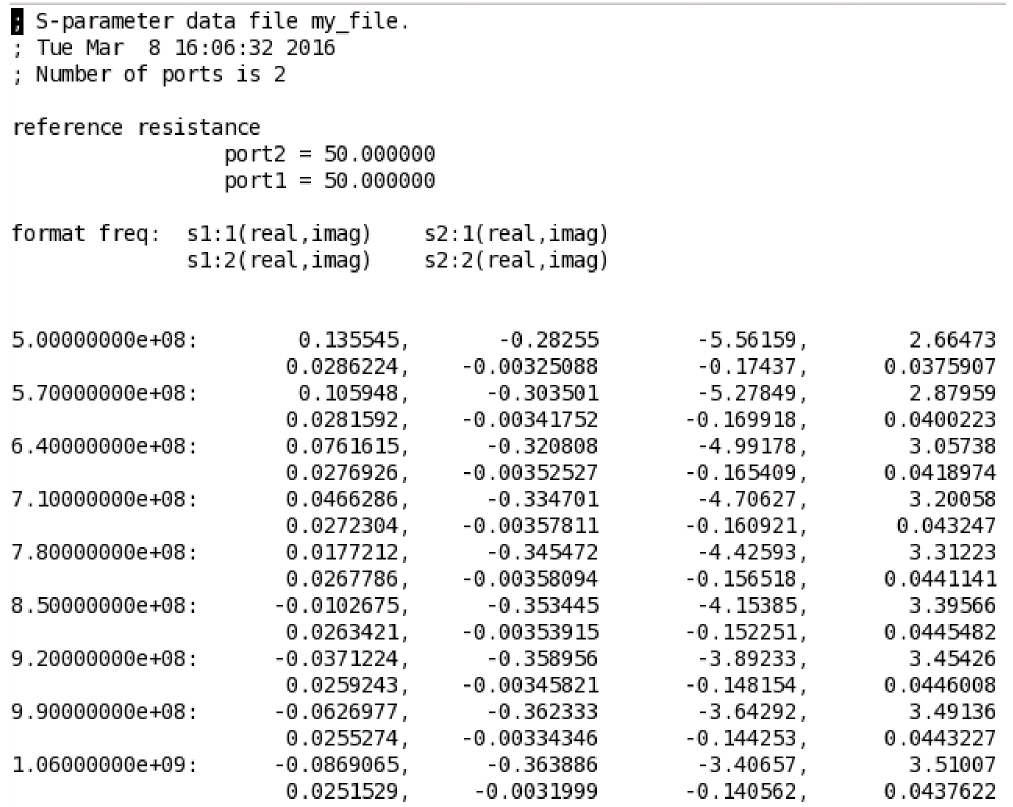
If donoise=yes is specified, the noise correlation matrix is computed. In addition, if the output is specified using oprobe, the amount that each noise source contributes to the output is computed. Finally, if an input is also specified (using iprobe), the two-port noise parameters are computed (F, Fmin, NF, NFmin, Gopt, Bopt, and Rn).
If the mode parameter is set to mm, differential and common-mode S-parameters (denoted as mixed-mode S-parameters) are calculated. For mode=mm, there must be 2N, with N > 1, active port statements in the circuit. The mixed-mode S-parameters are calculated referring to the pairing of the ports, with the port numbers ordered in pair as (1,2) (3,4), and so on in the ports list. With mode=mm, Spectre calculates differential-to-differential, differential-to-common, common-to-differential, and common-to-common S-parameters. A combination of mixed-mode and standard S-parameters is calculated if the mode parameter is set to, say, m12m34s5. Then, additional differential-to-standard, common-to-standard, standard-to-differential, and standard-to-common S-parameters are calculated. In the example of mode=m12m34s5, the standard single-end port is port number 5, the two mixed-mode port pairs are (1,2) and (3,4); with Spectre placing restriction of the number on active ports to 5 given in the port list.
Spectre also supports sprobes in S-parameter analysis. Sprobe is a special component to allow in-situ probing of impedances and S parameters looking out of the two terminals. If the sprobes parameter is specified, the parameters S1, S2, Z1, Z2, and StabIndex of the specified sprobe are computed and output to a raw file. Here S1 is the scattering parameter looking left from the sprobe, S2 is the scattering parameter looking right from the sprobe, Z1 is the impedance looking left from the sprobe, Z2 is the impedance looking right from the sprobe, and StabIndex is the stability Index. Gamma1 and Gamma2 are the reflection impedance coefficients. However, since Gamma1=S1 and Gamma2=S2, they do not require recalculation.
Sprobe is defined in spectre.cfg; therefore, it is automatically included in the Spectre flow.
Sprobe can be specified independently in a single sp statement or an sprobe and a normal S-parameter analysis can be specified in a single sp statement, as shown below.
Single sprobe calculation in one sp analysis
sprobe1 (1 2) sprobe
sp0 sp sprobes=[sprobe1] <parameter=value>
Sprobes and normal S-Parameter analysis in a single sp statement
sprobe1 (1 2) sprobe
sprobe2 (3 4) sprobe
sp0 sp ports=[p1 p2] sprobes=[sprobe1 sprobe2] ...
If both sprobes and ports are specified, ports are used to compute the normal S parameters and sprobes are used to compute the sprobe parameters.
The parameters are output in the <netlist_name>.raw directory, as follows:
-
The standard s, y, z parameters are output to the file
<sp_analysis_name>.sp. -
The sprobe S1, S2, Z1, and Z2 parameters are output to the file
<sp_analysis_name>.sprobe.sp. -
StabIndexis output to the file<sp_analysis_name>.sprobe-StabIndex.sp
You can open the file in the Virtuoso Visualization and Analysis tool and plot the results.
For more information on S-Parameter analysis options, refer to S-Parameter Analysis (sp) section in the Spectre Circuit Simulator Reference manual.
Transient Analysis
The transient analysis computes the transient response of a circuit over the specified interval.
You can adjust transient analysis parameters in several ways to meet the needs of your simulation. Setting parameters that control the error tolerances, the integration method, and the amount of data saved lets you choose between maximum speed and greatest accuracy in a simulation.
This section also tells you about parameters you can set that improve transient analysis convergence.
Sweeping Parameters During Transient Analysis
You can modify temperature, tolerance, and design parameter settings at device, subcircuit, or model level during a transient analysis.
Nametran param=param_name, { param_vec=[ t1 val1 t2 val2...] | param_file=file}, [ dev=d1| mod=m1| sub=s1], param_step=time
Example 1
dotran tran stop=100ns \
param=temp param_vec=[0ns 20 50ns 25 100ns 75] param_step=0
This statement begins the simulation at a temperature of 20C, increases the temperature to 25C at 50ns, and increases the temperature to 75C at 100ns.
Example 2
dotran tran stop=100ns \
param=temp param_vec=[0ns 20 50ns 25 100ns 75] param_step=10n
This statement increases the temperature by 1C every 10ns from 0ns to 50ns, and by 10C every 10ns from 50ns to 100ns.
Example 3
dotran tran stop=100ns \
param=reltol param_vec=[0ns 1.0e-3 100ns 1.0e-2] param_step=0 ]
In this example, the relative convergence tolerance reltol is 1e-3 at the beginning of the simulation, and is changed to 1e-2 at 100ns.
Example 4
dotran tran stop=2u \
    noisefmax=10G noiseseed=1 param=isnoisy param_vec=[0ns 0 500ns 1 ]
This statement turns transient noise off from time 0 to 500ns and turns it back on at 500ns.
Example 5
pset1 paramset {
    time reltol temp p1 m1:l
    0n   1e-3   27   1  1u
    10n  1e-3   50   2  1u
    20n  1e-4   50   2  2u
    30n  1e-5   75   3  2u
}
dotran tran paramset=pset1 stop=100n param_step=0
This paramset statement changes multiple parameters during the transient simulation. The values of the reltol, temp, p1, and m1:l parameters change at the timepoints specified in the paramset table.
Example 6
tran2 tran stop=100n param=reltol param_file=reltol.txt
reltol.txt:
; vector definition for reltol
tscale 1.0e-9
time value
10    1e-4
50    1e-3
This statement changes the reltol value to 1e-4 at 10ns, and changes the reltol value to 1e-3 at 50ns.
Balancing Accuracy and Speed
The following list displays the Spectre circuit simulator parameters that trade accuracy for speed. See spectre -h options for more information on any of these parameters.
-
Tolerance control parameters –
reltol,vabstol, andiabstol -
Transient control parameters –
errpreset,relref,lteratio,method, andmaxstep -
Parasitic node reduction parameter –
maxrsd
The errpreset Parameter
errpreset is a transient analysis parameter that works in a way similar to speed except that it has fewer settings and controls fewer parameters. You can set errpreset to three different values:
At liberal, the simulation is fast but less accurate. The liberal setting is suitable for digital circuits or analog circuits that have only short time constants. At moderate, the default setting, simulation accuracy approximates a SPICE2 style simulator. At conservative, the simulation is the most accurate but also slowest. The conservative setting is appropriate for sensitive analog circuits. If you still require more accuracy than that provided by conservative, tighten error tolerance by setting reltol to a smaller value.
Description of errpreset Parameter Settings
The effect of errpreset on other parameters is shown in the following table. In this table, T = stop − start.
| errpreset | reltol | relref | method | maxstep | lteratio |
|---|---|---|---|---|---|
The description in the previous table has the following exceptions:
-
The
errpresetparameter sets the value ofreltolas described in the table, except that the value ofreltolcannot be larger than 0.01. -
Except for
reltolandmaxstep,errpresetdoes not change the value of any parameters you have specified. -
With
maxstep, the specified value in the preceding table is an upper bound. You can always specify a smallermaxstepvalue.
If you need to check the errpreset settings for a simulation, you can find these values in the log file.
Uses for errpreset
You adjust errpreset to the speed and accuracy requirements of a particular simulation. For example, you might set errpreset to liberal for your first simulation to see if the circuit works. After debugging the circuit, you might switch to moderate to get more accurate results. If the application requires high accuracy, or if you want to verify that the moderate solution is reasonable, you set errpreset to conservative.
You might also have different errpreset settings for different types of circuits. For logic gate circuits, the liberal setting is probably sufficient. A moderate setting might be better for analog circuits. Circuits that are sensitive to errors or circuits that require exceptional accuracy might require a conservative setting.
Tolerance Control Parameters
You can control the accuracy of the solution to the discretized equation by setting the reltol and xabstol (where x is the access quantity, such as v or i) parameters in an options or set statement. These parameters determine how well the circuit conserves charge and how accurately the Spectre simulator computes circuit dynamics and steady-state or equilibrium points.
You can set the integration error or the errors in the computation of the circuit dynamics (such as time constants), relative to reltol and abstol by setting the lteratio parameter.
ToleranceNR = abstol + reltol*Ref
ToleranceLTE = ToleranceNR *lteratio
The Ref value is determined by your setting for relref, the relative error parameter, as explained in
In the previous equations, ToleranceNR is a convergence criterion that bounds the amount by which Kirchhoff’s Current Law is not satisfied as well as the allowable difference in computed values in the last two Newton-Raphson (NR) iterations of the simulation. ToleranceLTE is the allowable difference at any time step between the computed solution and a predicted solution derived from a polynomial extrapolation of the solutions from the previous few time steps. If this difference is greater than ToleranceLTE, the Spectre simulator shortens the time step until the difference is acceptable.
From the previous equations, you can see that tightening reltol to create more strict convergence criteria also diminishes the allowable local truncation error (ToleranceLTE). You might not want the truncation error tolerance tightened because this adjustment can increase simulation time. You can prevent the decrease in the time step by increasing the lteratio parameter to compensate for the tightening of reltol.
Adjusting Relative Error Parameters
You determine the treatment of the relative error with the relref parameter. The relref parameter determines which values the Spectre simulator uses to compute whether the relative error tolerance (reltol) requirements are satisfied.
You can set relref to the following options:
-
The
relref=pointlocalsetting compares the relative errors in quantities at each node relative to the current value of that node. -
The
relref=alllocalsetting compares the relative errors in quantities at each node to the largest value of that node for all past time points. -
The
relref=sigglobalorrelref=allglobalsettings compare relative errors in each of the circuit signals to the maximum of all the signals in the circuit. -
In addition, the
relref=allglobalsetting compares equation residues (the amount by which Kirchhoff’s Current Law [also known as Kirchhoff’s Flow Law] is not satisfied) for each node to the maximum current floating onto the node at any time in that node’s past history.
Setting the Integration Method
The method parameter specifies the integration method. You can set the method parameter to adjust the speed and accuracy of the simulation. The Spectre simulator uses three different integration methods: the backward-Euler method, the trapezoidal rule, and the second-order Gear method. The method parameter has six possible settings that permit different combinations of these three methods to be used.The following table shows the possible settings and what integration methods are allowed with each:
| Backward-Euler | Trapezoidal Rule | Second-Order Gear | |
|---|---|---|---|
|
|
|
|
|
|
|
|
|
|
|
|
|
|
|
|
|
|
|
|
|
|
|
|
|
|
|
|
|
The trapezoidal rule is usually the best setting if you want high accuracy. This method can exhibit point-to-point ringing, but you can control this by tightening the error tolerances. The trapezoidal method is usually not a good choice to run with loose error tolerances because it is sensitive to errors from previous time steps. If you need to use very loose tolerances to get a quick answer, it is better to use second-order Gear.
While second-order Gear is more accurate than backward-Euler, both methods can overestimate a system’s stability. This effect is less with second-order Gear. You can also reduce this effect if you request high accuracy.
Artificial numerical damping can reduce accuracy when you simulate
low-loss (high-Q) resonators such as oscillators and filters. Second-order Gear shows this damping, and backward-Euler exhibits heavy damping.
Improving Transient Analysis Convergence
If the circuit you simulate can have infinitely fast transitions (for example, a circuit that contains nodes with no capacitance), the Spectre simulator might have convergence problems. To avoid these problems, set cmin, which is the minimum capacitance to ground at each node, to a physically reasonable nonzero value.
You also might want to adjust the time-step parameters, step and maxstep. step is a suggested time step you can enter. Its default value is .001*(stop - start). maxstep is the largest time step permitted.
Controlling the Amount of Output Data
The Spectre simulator normally saves all computed data in the transient analysis. Sometimes you might not need this much data, and you might want to save only selected results. At other times, you might need to decrease the time interval between data points to get a more precise measurement of the activity of the circuit. You can control the number of output data points the Spectre simulator saves for the transient analysis in these ways:
- With strobing, which lets you select the time interval between the data points the Spectre simulator saves. The simulator forces a time step on each point it saves, so the data is computed, not interpolated.
- With skipping time points, which lets you select how many data points the Spectre simulator saves
- With data compression, which eliminates repetitive recording of signal values that are unchanged
-
With the
outputstartparameter, which lets you specify the time when the Spectre simulator starts saving data points -
With the
infotimeparameter, which lets you specify specific times to save operating-point data instead of for all time points
Changing the Time Interval between Data Points (Strobing)
Strobing changes the interval between data points. You use strobing to eliminate some unwanted high-frequency signal from the output, just as a strobe light appears to freeze rapidly rotating machinery. With strobing, you can demodulate AM signals or hide the effect of the clock in clocked waveforms. You can also dramatically improve the accuracy of external Fast Fourier Transform (FFT) routines. To perform strobing, you set the following parameters in the transient analysis:
-
strobeperiod: Sets the time interval between the data points that the Spectre simulator saves.strobestepis equivalent tostrobeperiod. -
skipstart(optional), which tells the Spectre simulator when to start strobing. This parameter is also used to skip data points.strobestartis equivalent toskipstart. -
skipstop(optional), which tells the Spectre simulator when to stop strobing. This parameter is also used to skip data points.strobestopis equivalent toskipstop. -
strobedelay(optional), which lets you set a delay between theskipstarttime and the first strobepointstrobeoutput=strobeonly -
strobeoutput: Specifies which time points to output during strobe. Possible values arestrobeonly,all, andnone. -
strobefreq: This is the reciprocal ofstrobeperiod(strobestep). -
sstrobetimes=[...]: Specifies times in ascending order when strobe output is to be performed.
Telling the Spectre Simulator How Many Data Points to Save
By telling the Spectre simulator to save only every Nth data point, you can reduce the size of the results database generated by the Spectre simulator. You tell the Spectre simulator to save every Nth data point with the following parameters:
-
With the
skipcountparameter, which you set to N to make the Spectre simulator save every Nth data point -
The
skipstartparameter, which tells the Spectre simulator when to start skipping parameters. This parameter is also used in strobing. -
The
skipstopparameter, which tells the Spectre simulator when to stop skipping parameters. This parameter is also used in strobing.
Examples of Strobing and Skipping
In the following example, the Spectre simulator starts skipping data points at Time=10 seconds and continues to skip points until Time=35 seconds. During this 25-second period, the Spectre simulator saves only every third data point.
ExSkipSt tran skipstart=10 skipstop=35 skipcount=3
In this example, the Spectre simulator starts strobing at Time=5 seconds and continues until Time=20 seconds. During this 15-second period, the Spectre simulator saves data points every 10 seconds.
ExStrobe tran skipstart=5 skipstop=20 strobeperiod=10
This example is identical to the previous one except that it sets a delay of 2 seconds between the skipstart time and the first strobe point.
ExStrobe2 tran skipstart=5 skipstop=20 strobeperiod=10 strobedelay=2
In the following example, Spectre starts strobing at 100.01ns (skipstart+strobedelay) with a strobe period of 20ps. The strobing is ending at 200ns.
tran1 tran skipstart=100ns skipstop=200n strobeperiod=20p strobedelay=10p
In the following example, the user given strobe points are enforced.
tr1 tran stop=20n strobetimes=[3.23n 5.01n 10.17n 15.98n 16.11n 19.01n]
Waveform Compression
Some circuits, such as mixed analog and digital designs and circuits with switching power supplies, have substantial amounts of signal latency. If unchanged signal values for these circuits are repetitively written for each time point to a transient analysis output file, this output file can become very large. You can reduce the size of output files for such transient analyses with the Spectre simulator’s waveform compression feature. With waveform compression, the Spectre simulator writes output data for a signal only when the value of that signal changes.
Using waveform compression is not always appropriate. The Spectre simulator writes fewer signal values when you turn on waveform compression, but it must write more data for every signal value it records. For circuits with small amounts of signal latency, waveform compression might actually increase the size of the output file.
You can enable waveform compression globally, for user-defined hierarchy levels, or for individual save statements.
You can turn on waveform compression globally by adding the parameter compression=all | no | wildcardonly to the transient analysis command line in a Spectre netlist. The all option enables compression globally, no (default) disables compression, and wildcardonly compresses waveforms produced by save statements using wildcards and settings like save=all, currents=all, subcktprobelvl=n. For example:
DoTran1 tran stop=20e-6 compression=all
You can add the parameter complvl=1|2|... in the transient analysis statement to define the level up to which the compression should be enabled. complvl=1 lets the signals at all hierarchical levels to be compressed, including the top level. complvl=2 compresses all signals on hierarchical level 2 and below. You can set complvl=2 to keep the signals from the top hierarchical level uncompressed. For example:
DoTran2 tran stop=20e-6 complvl=2
complvl parameter takes precedence over the compression parameter. Therefore, if both parameters are set in the tran statement, the compression parameter is ignored.
You can set compression=yes|no in the save statement to define whether the signals in the save statement should be compressed. The signals in the save statement are not compressed by default. Setting compression=yes forces the compression of the signals in the save statement. For example:
save * compression=yes
compression parameter in the save statement takes precedence over the complvl and compression parameters specified in the tran statement. For example:save g s d compression=no
tran1 tran complvl=1 compression=all save=all
In the above example, Spectre will compress all signals except the voltage for g, s, and d.
You can set compreltol=0.001, compvabstol=1.0e-3V, compiabstol=1.0e-12A parameters in the tran statement to customize the compression algorithm. For example:
DoTran3 tran stop=20e-6 compreltol=0.005 compvabstol=5.0e-3V compiabstol=1.0e-11A
You cannot apply waveform compression to operating-point parameters, including terminal currents that are calculated internally rather than with current probes. If you want waveform compression for terminal currents, you must specify that these currents be calculated with current probes. You can specify that all currents be calculated with current probes by placing useprobes=yes in an options statement.
reltol.save statements with overlapping compression scope are specified, the compression statement specified later takes higher precedence.Telling Spectre to Save Operating-Point Data at Specific Times
In addition to saving operating-point data in a dc analysis, Spectre allows this data to be saved at user-specified times during a transient analysis. This data can saved as a waveform or text information. See Chapter 13, “Specifying Output Options,” to learn how to select and save this data using the info analysis.
The parameters infonames and infotimes are used to define which info analyses needs to be performed at which time point. By default, the time points and the analyses defined using these parameters are paired.
tr1 tran stop=10n infotimes=[2n 5n] infonames=[info1 info2]
info1 info what=oppoint where=file file=info1
info2 info what=captab where=file file=info2
In the above example, the operating-point analysis info1 is performed at 2ns, and the captap calculation info2 is performed at 5ns.
You can use the infotime_pair=no parameter to unpair the times points and analyses defined using the infotimes and infonames parameters. In that case, all analyses specified using the infonames parameter is performed at all times specified using the infotimes parameter. For example:
tr1 tran stop=10n infotimes=[2n 5n] infonames=[info1] infotime_pair=no
info1 info what=oppoint where=file file=oppoint_file
In the above example the operating point analysis info1 is performed at 2ns and 5ns, and the operating-point information for both time points is written into the file oppoint_file.
You can use the optype parameter from the info analysis to output the operating point information related to currents, voltages, or the complete operating point information in a SPICE-compatible format. The optype parameter accepts the following values.
current - Output operating point information related to node voltages and currents
voltage - Output operating point information related to voltages only
all - Output complete operating point information including currents and voltage.
The node voltages are stored in a file with extension .ic0 and the vsource current and device information is saved in a file with extension .op0.
The optype based SPICE-compatible operating point output can be written for selected subcircuits only (subckt), and for selected hierarchical levels (depth).
opinfo info what=oppoint optype=voltage subckt=pll depth=2
The above command will write only the node voltages for nodes inside the subckt pll with a hierarchical depth of 2.
You can use the oppoint parameter of the info analysis to output the operating point information for devices and stacked devices, and node voltages and currents. The oppoint parameter accepts the following values:
node - Report only node voltages and source currents
dev - Report the operating point information of only the devices
subckt - Report the operating point information of only the stacked devices
alldev - Report the operating point information of regular and stacked devices
all - Report devices, stacked devices and node voltage/source currents
The operating point information is stored based on the value specified for the where parameter. For example, if you specify where=file, by default, the operating point information is stored in a *.oppoint file. You can change the file name using the file parameter. If you do not specify the where parameter, the operating point information is saved in the log file.
opinfo info what=oppoint where=file oppoint=dev
The above command saves the operating point information of only the devices in a file.
Calculating Transient Noise
Transient noise provides the benefit of examining the effects of large signal noise on many types of systems. It gives you the opportunity to examine the impact of noise in the time domain on various circuit types without requiring access to the SpectreRF analyses. This capability is an extension to the current transient analysis, and is accompanied by enhancements to several calculator functions, allowing you to calculate multiple occurrences of measurements such as risetime and overshoot. Spectre provides both a single run and multiple run method of simulating transient noise. The single run method, which involves a single transient run over several cycles of operation, is best suited for applications where undesirable start-up behavior is present. The multiple run method, which involves a statistical sweep of several iterations over a single period, is recommended for users who are able to take advantage of distributed processing.
Set the following parameters to calculate noise during a transient analysis.
Example
tr1 tran stop=4u noisefmax=5G noisefmin=1Meg noiseseed=1 noisescale=10 \
param=isnoisy param_vec=[0 1 10ns 0 50ns 1]
tr1 tran stop=4u noisefmax=5G noiseupdate=step noiseseed=1 noisescale=10
Performing Small-Signal Analyses during a Transient Analysis
You can perform an AC and/or noise analysis at specific times during a transient analysis. The Spectre circuit simulator stops the transient analysis at the specified times, saves operating point information, and performs the AC and/or noise analysis.
This type of simulation is useful when you want to run an AC analysis after getting past specific start-up behavior, or when there is more than one point along the transient run that can be thought of as steady-state.
The syntax for performing a small-signal analysis during transient analysis is:
Nametran stop=stopactimes=timeacnames=name
mytran tran stop=5n actimes=[3n 4n] acnames=[myac noise1]
myac ac …
noise1 (1 0) noise …
In the above example, myac analysis will be called at 3n and noise1 analysis will be called at 4n. You can specify actime_pair= no to call both myac and noise1 analyses at both time points. For example:
mytran tran stop=5n actimes=[3n 4n] acnames=[myac noise1] actime_pair=no
myac ac …
noise1 (1 0) noise …
In the above example, both myac and noise1 analyses will be called at 3n and 4n.
Performing DCMatch Analysis during a Transient Analysis
You can perform DCMatch analysis at specific times during a transient analysis. The Spectre circuit simulator stops the transient analysis at the specified time, and performs DCMatch analysis.
The syntax for performing DCMatch analysis during transient analysis is:
Name tran stop=stop infonames=[name] infotimes=[time]
|
The time at which the transient analysis is to be put on hold and dcmatch analysis needs to be performed. |
Example
Name tran stop=10n infonames=[dcmatch1] infotimes=[1n]
In the above example, dcmatch1 analysis will be called at 1n.
Generating EMIR Output During Transient Analysis
You can use transient analysis in Spectre/Spectre APS to generate the binary tranName_emir_vavo.db database file, which can be directly used by VAVO/VAEO for electro-migration (EM) and IR-drop analysis. This significantly improves the efficiency and capability of Spectre in the VAVO/VAEO flow.
The syntax for generating EMIR output during transient analysis is as follows:
Name tran [emirformat=vavo|none] [emirstart=time] [emirstop=time] [emirfile=dbfileName]
Example
tran1 tran stop=15s errpreset=moderate emirformat=vavo emirfile="testDB" emirstart=1s emirstop=15s
Calculates the required information for EM and IR analysis and saves it in the tran1_emir_vavo.db file.
Performing Event-Triggered Analysis During Transient Analysis
At times, you may want to trigger an action in transient analysis whenever there is a change in the circuit behavior. For example, when the voltage at node n1(v(n1)) crosses vdd/2, you may want to enable asserts. The event-triggered analysis enables you to capture events in the circuit and perform actions based on those events.
The general form of an event expression is "@(basic_event, N) + delay".
Here, N is the selector of the event. A positive value for N means the Nth occurrence of the basic_event needs to be selected. A negative value means the Nth occurrence and the occurrence just before the Nth occurrence of the basic_event needs to be selected. A value 0 means all occurrences of the basic_event need to be selected. If N is not specified, it means the first occurrence of the basic_event needs to be selected.
delay specifies the delay time after the selected event occurrences. You should specify a positive value for delay.
Both N and delay are optional. However, if specified, they must be a constant SFE expression. For example, the following event expression is valid:
"@(assert1, myparam0 + 1) + myparam1+myparam2"
The following event expressions are invalid:
“@(assert1) + V(out)"
"@(assert1) +@(event)"
The event name should be enclosed within parentheses. In addition, when specifying an event expression in the netlist, you must enclose the expression within double quotes or parentheses. For example, "@(event)" or (@(event)).
You can capture the following events during transient analysis:
-
An explicit time (number/parameter)
@(time),@(param_name) -
Time when the design variable changes from zero to non-zero
@(inst_name:variable_name) -
Time when an assert is triggered
@(assert_name) -
Time when a measurement completes
@(meas_name) -
Delay event
@(event) +10n -
Event selection
@(event,2)
You may perform the following actions when an event is triggered:
-
Run the analysis specified at
actimes/infotimes - Change a dynamic parameter
- Enable/disable asserts
- Enable/disable diagnostics
Example1
simulator lang=spice
.measure vout_avg avg v(out) from=1u to=5u
simulator lang=spectre
tran tran stop=10u param=reltol param_vec=[0 1e-4 "@(vout_avg)" 1e-2]
In the above example, the value of reltol will change from 1e-4 to 1e-2 after the measurement vout_avg is finished.
Example2
assert1 assert expr="v(out)>vdd/2"
tran tran stop=10u infotimes=["@(assert1)"] infoname=op_info
op_info info what=oppoint where=file
In the above example, the operating information will be output to a file when assert1 is triggered for the first time.
Fault Analysis
Spectre fault analysis provides a transistor-level simulation capability that can be enabled in an analog test methodology to improve test coverage by identifying critical test patterns. Spectre transient fault analysis is very fast in handling a large numbers of faults. Spectre direct fault analysis provides high accuracy results when full fault analysis precision is required.
Analog Test Overview
A typical analog test methodology consists of defect creation, fault analysis, and test optimization for better test vector, or better defect coverage.
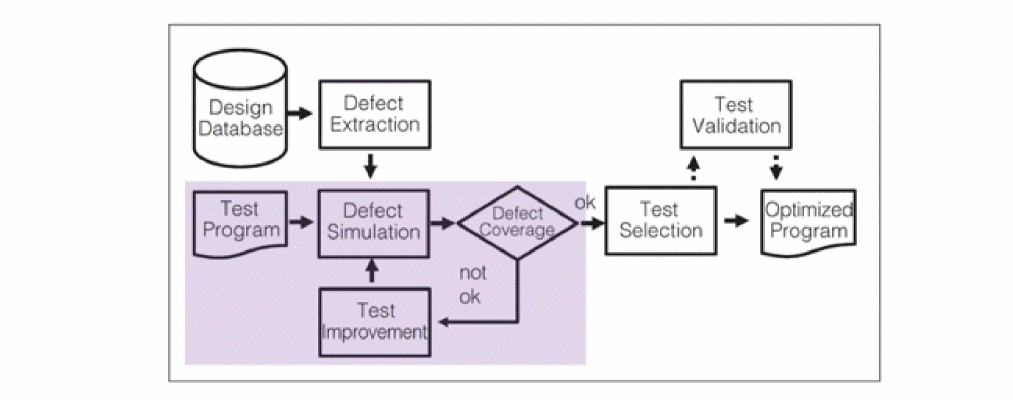
Defect Creation
Design defects are the input to fault analysis. Realistic defects can be extracted from the schematic design according to certain rules, or from the layout, based on the design geometry.
Fault Analysis
The defects are modeled as faults and provided to the Spectre circuit simulator to perform fault analysis. Without any simulation performance optimization, a complete fault analysis can take significant amount of time when the number of defects is large.
Application of Fault Analysis
Spectre analog fault analysis provides the capability to estimate fault coverage by generating a detection matrix. In addition, it can be used as part of functional safety analysis.
The defect detection matrix can be obtained by comparing the faulty simulation results with nominal (faultless) data. You can further optimize the test to improve the defect coverage based on the defect detection matrix.
In functional safety applications, fault detection is tracked for both functional and diagnostic modules, but reported separately. Functional safety report can be generated based on fault analysis results.
Defect Detection Matrix
The following figure shows an example of detection matrix created by processing the fault simulation:

Test engineers can use the detection matrix to identify the optimum test vector and fault time points, or to minimize the subset of production tests to meet the required percentage of defect coverage. For example, the fault points at 3.0ms, and 4.5ms, capture most of the defects.
Functional Safety Report
If the faults are detected by asserts by specifying the boundaries, a functional safety report can be generated based on the assert violation output, as shown below.
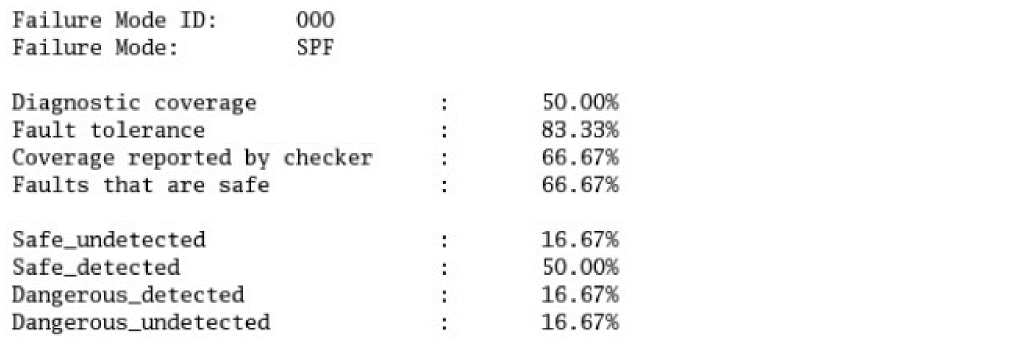
Fault detection is enabled for both functional and diagnostic modules and is classified according to the ISO 26262 standard that classifies safe/dangerous and detected/undetected defects.
Fault Analysis Technology
You can perform fault analysis in Spectre by using one of the following approaches:
- Direct Fault analysis. In the direct fault analysis flow, faults are injected at the beginning of each analysis type, such as dc, ac, transient, and so on. This mode provides the most accurate results. However, when the number of faults is large, the simulation takes much longer to complete.
-
Transient Fault Analysis: Transient fault analysis addresses the challenge of long simulation time. In this simulation flow, a circuit with fault list is simulated together with the fault times specified on the time axis. Spectre starts regular transient analysis till the time it reaches the fault time point. At each fault time, the following actions are performed:
- A fault-free transient state is saved
- A fault is injected into the circuit
- With fault-free state used as the initial condition, transient fault simulation is continued with regular time step control and accuracy settings
- The result is saved and the database is cleaned when all fault solutions are found
- Fault-free transient simulation is restored and continues till the next test time point
Fault List
In fault analysis, it is mandatory to specify a fault list that defines the type and location of faults. The fault list can be extracted from the schematic design, the layout design, or from customized fault creation tools. Spectre supports bridge (short), open, and custom faults.
The following is the syntax to specify faults in a fault block:
name faults <parameter=value> [weight_factor=<expression>] \ [weight_expr=<expression>] [sub=subckt_model |inst=instance] {
bridge {
<name> ( <node1> <node2> ) r = <expression> [dev=<instance>] \
[weight=value] ]
}
short {
<name> ( <node1> <node2> ) r = <expression> [dev=<instance>] [weight=value]
}
open {
        <name> ( <node>  ) r = <expression> [ c = <expression> ] [weight=value]
     { instance1[:terminal] [instance2[:terminal2]]… }
    }
    custom {
     <name_ins> (<node1> <node2...) <subckt_mode1 [param=<expr>]
  <name_rep1ace> (<node1> <node2...) <subckt_mode1 [param=<expr>]
     original_inst=<name_orig>
  <name_open> (<node>) fault_subckt=<subckt_model> [param=<expr>]
     {instance1[:terminal1][instance2[:terminal2]...}
}
parametric {
  <name> faultalter param=<name> value=<value> [dev=<name> | mod=<name> |
  sub=<name>] [weight=<value>] [sample=<value>]
 }
}
The faults block is used to specify the fault groups to be simulated in fault analysis. Each block may contain several sub-blocks with keywords according to the type of fault – bridge (or equivalently short), open, custom, and parametric.
The bridge block (or short block) specifies the resistance value between any two nodes of a circuit. The node names may be specified hierarchically.
Within a faults block, the bridge, short, open, custom, and parametric blocks are optional. If none are specified, a warning message is generated and the faults block is ignored. If more than one bridge, short, open, custom, or parametric blocks are specified within a faults block, they are concatenated and treated as one block. Every fault name in a faults block must be unique. Duplicate names result in an error. You can use global parameters in expression.
More than one faults block may be specified in the netlist and each faults block must have a unique name and a set of parameters associated with it.
The fault block parameters sub=subckt_model and inst=instance enable you to use the local node and instance names in the fault statements within the subcircuit or the subcircuit instance scope. This is useful when the original fault list is created and verified based on one design which is defined later as a subcircuit and instantiated in another bigger design.
For example, in VCO design, one of the bridges is created as
bridge_1 (net10 net20) r=10 dev=M2 //mosn d g
Later, if VCO is included in the PLL design as a subcircuit VCO and instantiated as I0, the fault list has to be modified manually as
bridge_1 (top.I0.net10 top.I0.net20) r=10 dev=top.I0.M2 // mosn d g
If sub=VCO or inst=top.I0 is specified in the fault block, then no modification is needed. Spectre takes care of the node tracing with subcircuit or instance name.
By default, all faults in the list have equal weights while calculating the fault coverage rate. You can use the weight_expr and weight_factor parameters to redefine fault weighting using the weight expression for different faults and fault blocks.
The param and value parameters can be specified with vectors or scalar value.
The optional parameter dev in bridge|short statement refers to the specific instance to which the fault is related.
Bridges
Bridge faults represent catastrophic failures due to two nets being shorted together, where the nets are shorted by a low-value resistor.The fault statement in the bridge (short) block specifies two nodes to be shorted in the netlist and a resistance value specified using parameter r. The node names may be specified hierarchically.
The following example shows the sequential insertion and analysis of bridge.
R1 (a b) resistor r=1k
R2 (a d) resistor r=1k
M1 (d a bb bb) nmos
M2 (a g dd dd) nmos
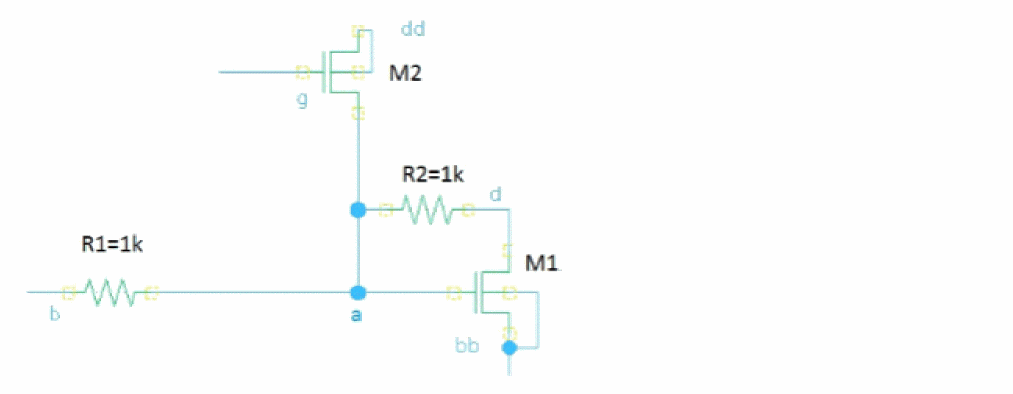
The bridge_1 instance in the following example performs insertion of a 10 Ohm resistor between terminals g and s of M2.
parameters resBridge=10
Bridges faults {
bridge {
bridge_1 (g a) r=resBridge dev=M2 //mosn g s
}
}
The commented notations in the fault statement are included as additional information about a faulty device. In the above example, mosn is the model name (it can be a primitive, or a subcircuit name) and g and s are the names of the shorted pins.
The net connectivity after the insertion of bridge_1 can be described by the following netlist:
R1 (a b) resistor r=1k
R2 (a d) resistor r=1k
M1 (d a bb bb) nmos
M2 (a g dd dd) nmos
Rbridge_1 (g a) resistor r=10
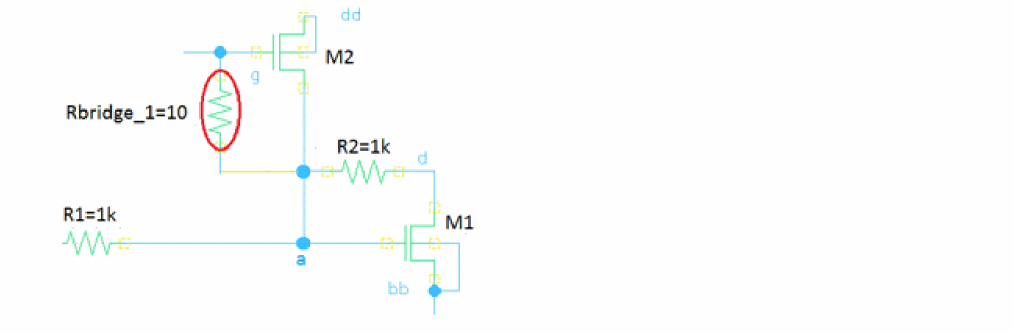
When fault simulation starts, Spectre adjusts the connectivity accordingly.
Opens
Open faults represent catastrophic failures due to a break in a net, where open is represented by a high-value resistor. The open can also be represented as an impedance or a shunt combination of a resistor and capacitor. The open block specifies the nodes that are split into two.
The node in the statement is the name of the net that is broken by the open fault. The parameter r specifies the resistance between the new fault node and the original node. An optional parameter c specifies the capacitance between the new fault node and the original node.
The last block describes the topology change providing the list of the instances or terminals to be connected to the new node. All terminals or instances, not specified in the list, remain connected to the original node. If no instance list is specified, a warning message is generated and the fault is ignored.
The terminals are specified either by name, or numerically, starting from 1. That is, terminal number 1 is the first terminal of the instance. If the specified terminal number of an instance in the instance list is not connected to the original node, an error message is generated. If no terminal list is specified for an instance, all terminals of that instance, connected to the original node, are connected to the new node. The node and instance names can be specified hierarchically. Device and subcircuit instances can be used for topology change description.
The example netlist below illustrates the open fault injection. The open fault instance open_1 requests splitting the node a into two nodes, where the original node a stays connected to R1 and R2, and the new node x is connected to M1:g and M2:d. A 1 GOhm resistor is inserted between the original and new nodes.
parameters resOpen=1e9
Opens faults {
open {
open_1 (a) r=resOpen { M2:d M1:g } //mosn g
}
}
The connectivity after the insertion of open_1 can be described by the following netlist:
R1 (x b) resistor r=1k
R2 (x d) resistor r=1k
M1 (d x bb bb) nmos
M2 (x g dd dd) nmos
Ropen_1 (a x) resistor r=1e9
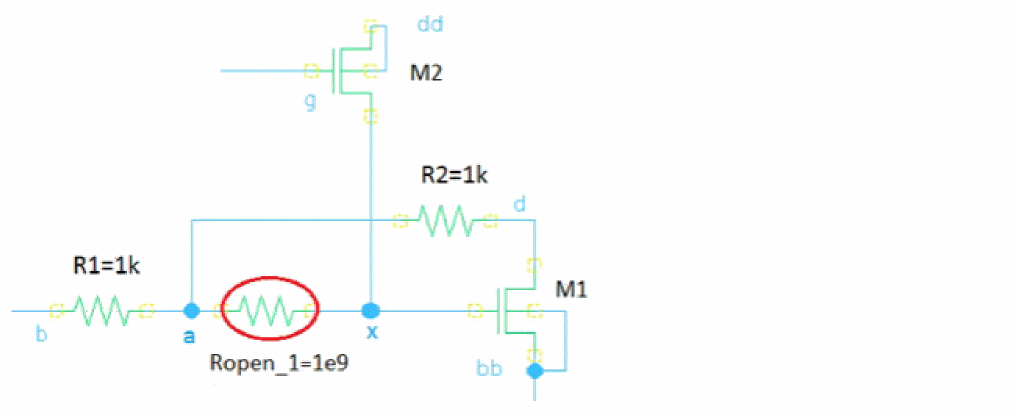
You can use the definition of the open fault to probe the voltage or current at the new node (x). In the example below, the terminals specified in the open fault will be connected to the new node.
open_1 (a) r=resOpen { M2:d M1:g }
Use the save statement to probe the voltage at the new node, as shown below.
save a M2.d
save a M1.g
The current through the open fault should be very small. To verify the current value, you can use the save statement, as follows:
save M2:d
save M1:g
When the open instance statement contains several terminals, any terminal can be used in the save statement.
Probing of current and voltage at the new node is available in direct fault analysis and detailed raw files are saved when faultsave=all is used. These signals are not saved in tran_faults.raw and table files.
M2.d as a fault detection signal.Custom Faults
Spectre supports three types of custom faults: custom insertion, custom replacement and custom open. The custom fault model is specified as a subcircuit and defined outside the fault block. The custom subcircuit instances are specified in the custom fault block. Spectre injects the custom instances into the original netlist when fault simulation is requested and applies the connectivity accordingly.
For insertion faults, the number of terminals in the custom fault statement must match the number of terminals of the custom subcircuit.
For replacement faults, the number of terminals in the custom fault statement must match the number of terminals of the custom subcircuit and the device or the subcircuit instance to be replaced.
The custom open fault statement and the custom subcircuit must have two terminals always. A warning message is generated when an inconsistent terminal number is detected.
You can use a Verilog-A model as a faulty subcircuit by including it as a part of the Spectre subcircuit definition.
The custom fault injection and simulation is compatible with all available direct fault analysis (DFA) and transient fault analysis (TFA) parameters, similar to bridge and open faults.
The following example netlists and schematics are used to illustrate the sequential insertion and analysis of different types of custom faults:
Custom Insertion Fault
For custom insertion fault, the customized subcircuit instance is connected to the nodes specified in the fault statement to perform fault simulation. The example below shows that fault instance I0 is inserted into the nominal circuit by not connecting n1 and n2.
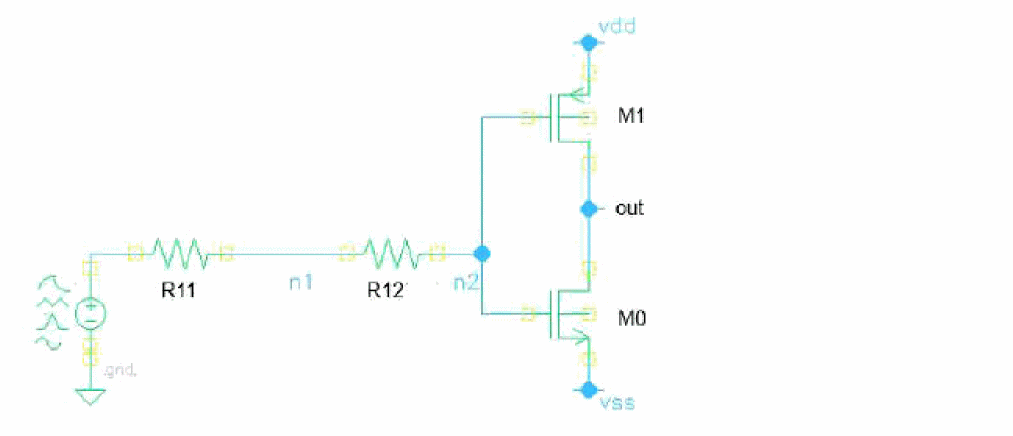
InsertBlock faults paramsubckt=1n {
custom {
I0 (n1 n2) insFaultRC
}
}
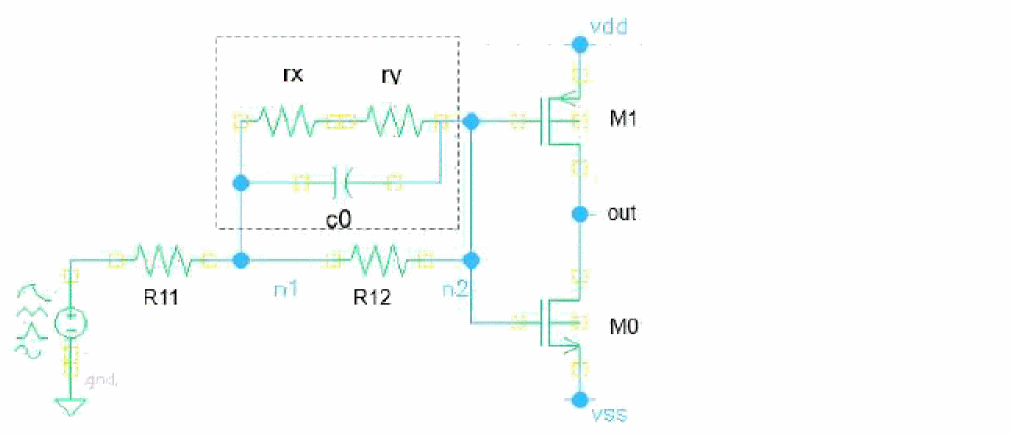
subckt insFaultRC n11 n22
rx (n11 net0) resistor r=100
ry (net0 n22) resistor r=200
c1 (n11 n22) capacitor c=100f
ends insFaultRC
The circuit connectivity with the custom insertion fault injected is shown in the following figure:
Custom Replacement Fault
For the custom replacement fault, the device or subcircuit instance specified as original_inst is replaced by the custom subcircuit. The order and number of terminals should match.
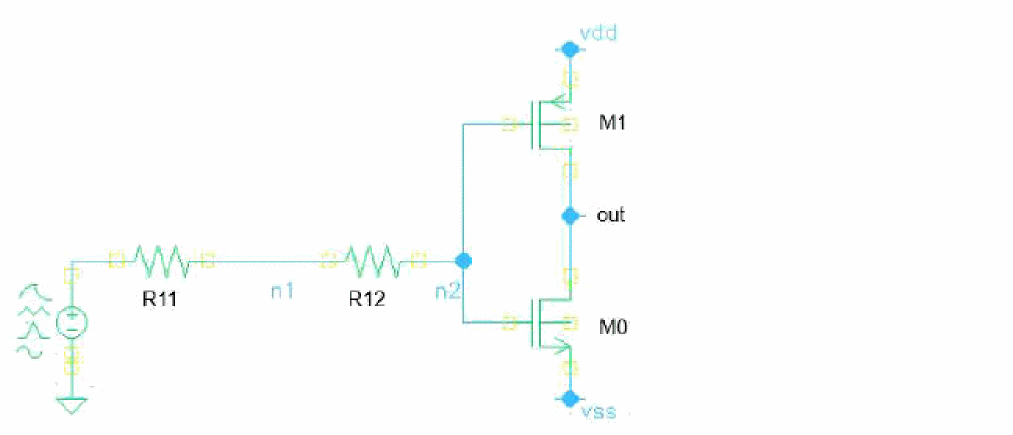
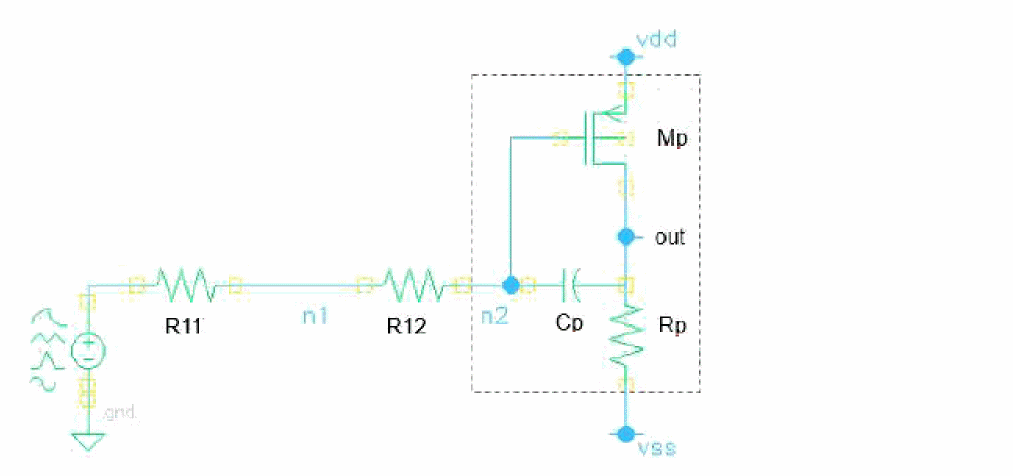
ReplaceBlock faults paramsubckt=1p {
custom {
I0 (n2 out vdd vss) replFaultSubckt original_inst=I1.INV0
}
}
subckt replFaultSubckt in out vdd vss
Mp (vdd in out out) pch w=2u l=0.1u
Cp (in out) capacitor c=1p
Rp (out vss) resistor r=1k
ends replFaultSubckt
The above example shows how the original instance defined with original_inst=I1.INV0 in the above figure is replaced by the fault subcircuit of replFaultSubckt and schematic changes, as shown below.
Custom Open Fault
For custom open fault, the node specified in the open statement is split into two nodes and the custom subcircuit fault is inserted. The valid terminal number for custom open subcircuit is 2.
The terminal connectivity is handled similarly to the regular open faults. The first terminal of custom subcircuit is connected to the original node while the second terminal is connected to the new node.
In the following example, the two terminal instances get inserted between the original node N1 and the new node X.
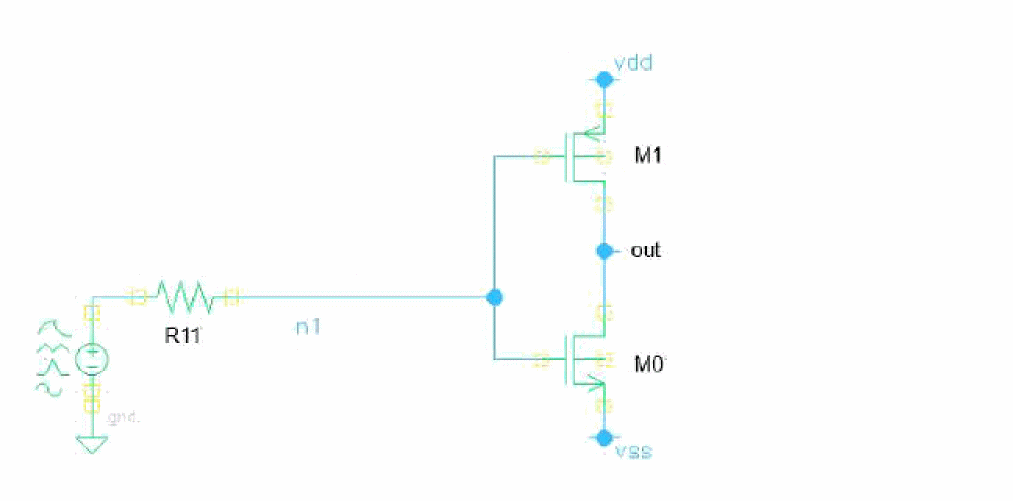
OpenBlock faults paramsubckt=1n {
custom {
I0 (n1) opnFaultSubckt {M1:g M0:g}
}
}
subckt opnFaultSubckt in out
Rx (in out) resistor r=1k
Co (in out) capacitor c=1p
Lo (in net) inductor l=10n
Ro (net out) resistor r=100
ends opnFaultSubckt
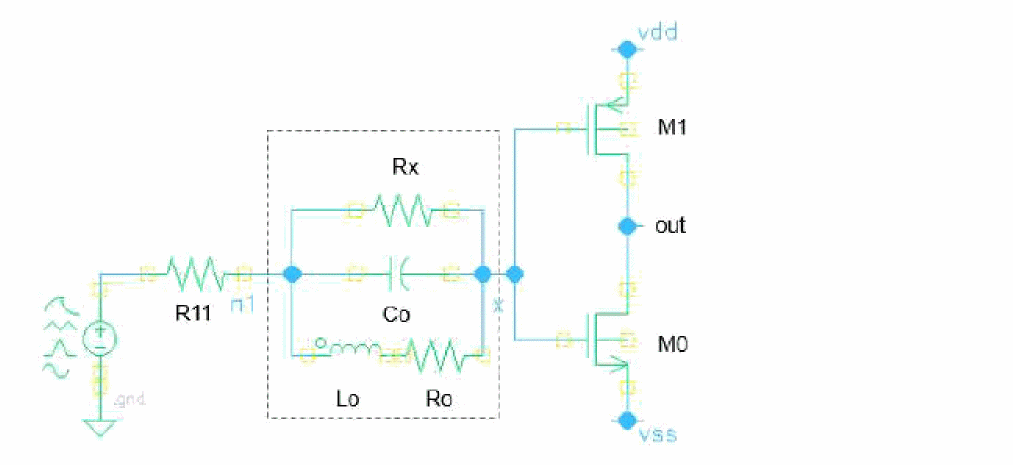
Extended Custom Open Model for MOS Gate Open
The subcircuit based on resistive divider can be considered as one of custom gate open models for a MOS device.
The custom gate open subcircuit can be defined as below.
//n1 existing gate, n2-g n3-d n4-s
subckt Rdiv4 n1 n2 n3 n4
parameters amplf=0.9
r1 (n1 n2) resistor r=1T                   //gu g
r2 (n1 n3) resistor r=1T*(1-amplf)         //gu d
r3 (n1 n4) resistor r=1T*amplf             //gu s
ends Rdiv4

customgen options faultcustompreserve=[Rdiv4]
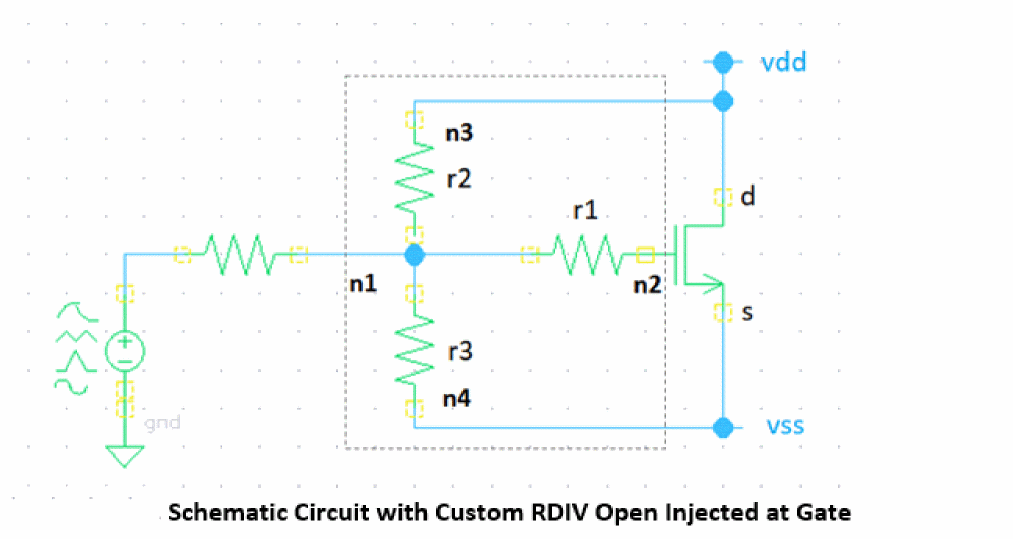
When generating custom open gate of resistive divider with info analysis, the order of terminal names specified in faultterminal=[..] for a transistor must follow the connectivity of custom subcircuit, i.g. gate (n2), drain (n3) and source (n4). Node n1 defined in custom subcircuit is reserved for the existing gate to be opened while n2 is the new node created at gate.
opnG1 info what=customopen faultdev=bsim4 faultterminal=[g d s] faultcustom=RDIV
opnG2 info what=customopen faultdev=[nch pch] faultterminal=[2 1 3] faultcustom=RDIV
Voltage Controlled Voltage Source Based Model
The subcircuit based on voltage controlled voltage source also can be used to simulate the open gate of a MOS device. A sample of subcircuit definition is shown below.
//n1-existing gate, n2-g pos-d neg-s
subckt XOPN n1 n2 pos neg
   VS1 ( n1 neg pos neg ) vcvs gain=0.1
   R1 ( n1 n2 ) resistor r=1T
ends XOPN
customgen options faultcustompreserve=[XOPN]
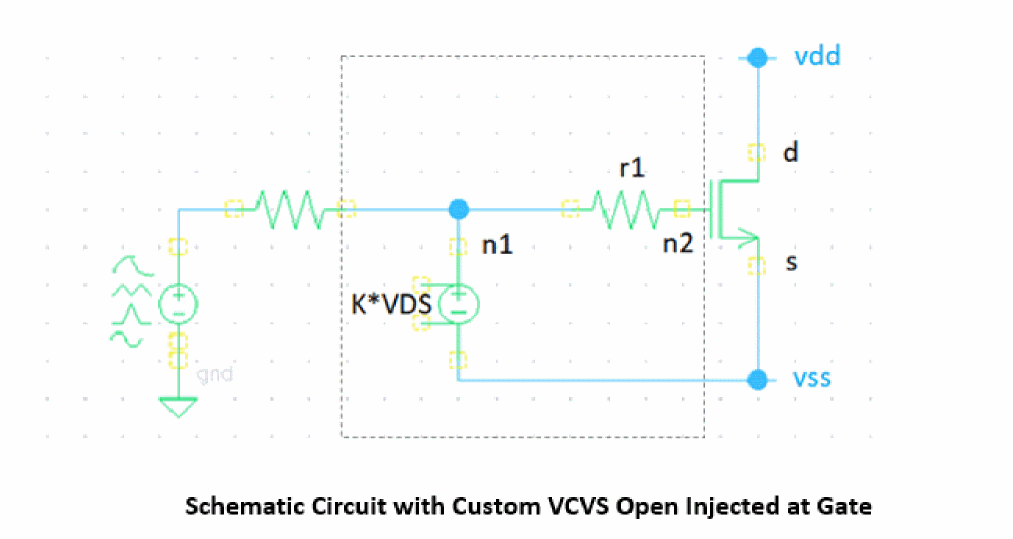
To generate the custom open gate fault list based on the resistive divider model in info analysis, the order of terminal names specified in faultterminal=[..] for a transistor must follow the connectivity of custom subcircuit, i.g. gate (n2), drain (pos) and source (neg). Node n1 defined in custom subcircuit is reserved for the existing gate to be opened, while n2 is the new node created at gate.
opnG1 info what=customopen faultdev=bsim4 faultterminal=[g d s] faultcustom=XOPN
opnG2 info what=customopen faultdev=[nch pch] faultterminal=[2 1 3] faultcustom=XOPN
Custom Faults with Multiple Bridges
There is a way to support multiple bridges with custom subcircuit approach. First, define a couple of bridges and connect to different ports in the subcircuit. Next, create faults by instantiating the subcircuit manually.
subckt Two_Bridges (n11 n22 n33 n44)
    r1 (n11 n22) resistor r=10
    r2 (n33 n44) resistor r=10
ends Two_Bridges

multiBridges faults {
    custom {
     mB1 ( n0 n1 out vdd) Two_Bridges
  mB2 ( n1 n2 out vdd) Two_Bridges
 }
}
With the first fault mB1, the bridge r1 is shorting R11 while the r2 is shorting the drain and source of PM0 simultaneously and the second fault mB2, the r1 is shorting R12 while the r2 is shorting the drain and source of PM0 simultaneously.
Parametric Faults
Parametric (or soft) faults are used to simulate the variations in the principal parameters of circuit elements. They do not change the topology of the circuit. A parametric fault can be a process parameter, or the first-order electrical characteristic of a circuit element.
The parametric block specifies the faultalter statements for multiple parameters to be changed. The circuit temperature, a device instance parameter, a device model parameter, a netlist parameter or a particular subcircuit instance can be used in the faultalter statement.
paramFaults faults {
    parametric {
        paramFault_1 faultalter dev=vd param=dc value=-5
        paramFault_2 faultalter dev=vd param=dc value=0
        paramFault_3 faultalter dev=vd param=dc value=5
}
}
In the example above, three dc values are specified with the faultalter statement.
You can also change the sub-circuit instance parameter, model parameter and global parameter.
softFaults faults {
    parametric {
     subFault_1 faultalter sub=INV param=w value=700n
     modFault_2 faultalter mod=NMOS param=vth0 value=0.65
     gloFault_3 faultalter param=temp value=125
}
}
Creating a Fault List
To perform fault analysis, a fault list is a critical input to model the defect of an analog test. The Spectre info analysis generates the fault list, based on primitives, models, or subcircuits of a given design. Three types of the resistive fault are supported with info: bridges, opens, and custom faults.
Syntax for Fault Creation
nameList info
what=bridges|opens|customreplace|custominsert|customopen|faultparam [where=file] [file=filename.scs] [faultblock=nameBlock] [faultdev=[…]] [faultcustom=faultsubckt] [faultres=resValue] [faultcap=capValue] [faultterminals=[…]] [faultrule=2427] [faultcollapse=yes] [weight_expr=expression] [weight_factor=1] [faultlocal=no] [faultduplicate=no] [faultparam=name] [faultvalues=[…]] [faultpercentage=[…]] [faultfile=filename] [faultstart=val1] [faultstop=val2] [faultstep=val3] [inst=[…]] [subckt=[…]] [xinst=[…]] [xsubckt=[…]]
The following parameters are specified with the what argument of the info statement:
Fault List Generation for Spectre X
When generating a fault list for Spectre X simulations, it is recommended to set the faultmerge Spectre option to yes, which is its default value.
When running simulations with this fault list, set the +postlpreset command-line option to off because if the circuit is eligible for fault reduction and +postlpreset=off of not set, some faults from the list may get ignored during simulation.
Fault Collapsing and Weighting Function
In analog fault simulation, fault collapsing implies that any number of defects that result in the same circuit topology can be collapsed into a single defect for simulation purpose. For example, two or more faults are called equivalent when they short the same nets related to different circuit instances. In Spectre, fault collapsing is the process of detection of equivalent faults and taking them into consideration while calculating the detection coverage.
By default, Spectre applies m factor as weight values during the fault list generation. In Spectre APS, in addition to the m factor, the topology optimization for parallel devices is taken into account as a factor to weight values during fault generation. Such m factor application to fault weighting is set by default in both Spectre and Spectre APS unless faultcollapse=no specified in info analysis.
The following table shows the weighting calculation with different options and fault types:
Spectre provides the possibility of fault weighting instead of using the equal weight. The expression including the circuit or instance parameters can be used as the weighting function. For example, the area of a MOS device can be considered as a weight for the bridge or open faults related to those devices.
The weighting function is specified in the faults statement as an expression using the keyword weight_expr, which may include parameters belonging to the dev instance from the bridge statement, or instance from curly brackets in the open fault statement. The supported weighting function expression is the same as the expression supported by the assert statement. For example, device parameters and its operating points can be used with arithmetic operators. The weighting function expression is evaluated for every fault in a given fault block only once per simulation during the fault activation process.
With faultcollapse=no, Spectre generates a fault list without grading, that is with weight values equal 1. In such cases, m factor is excluded from consideration. If you need to estimate the weighting expression values without collapsing factors (including m factor), you can specify faultcollapse=no in the info analysis statement.
Note that the weighting expression is supported for bridges and opens only, not for custom, or parametric faults. Nevertheless, constant weight_expr or weight_factor is still applicable.
The following two bridges are an example of equivalent faults that can be collapsed during simulation:
bridge_1 (vp10 I12.Y) r=10 dev=I12.I0.MN1 //g45n1svt g s
bridge_2 (vp10 I12.Y) r=10 dev=I12.I0.MP1 //g45p1svt g s
During fault generation, if you specify the fault collapsing option faultcollapse=yes in info analysis, the above fault list will be represented as one fault statement with the weight value as 2.
bridge_1 (vp10 I12.Y) r=10 dev=[I12.I0.MN1 I12.I0.MP1] weight=2
In the above example, we considered that original faults, bridge_1 and bridge_2, have weight=1, which is default value. All faults have default weight of 1 if the weighting expression is not provided.
If the given weighting expression cannot be evaluated for some faults in the fault list, those faults will have the weight equals 0.
During fault collapsing, the final weight is calculated as the sum of weights of all equivalent faults.
If the original fault list is generated with faultcollapse=no, fault collapsing can be applied before performing simulation using faultcollapse=yes in the transient analysis.
The following figure shows the fault list generated with info analysis with the given weighting expression.
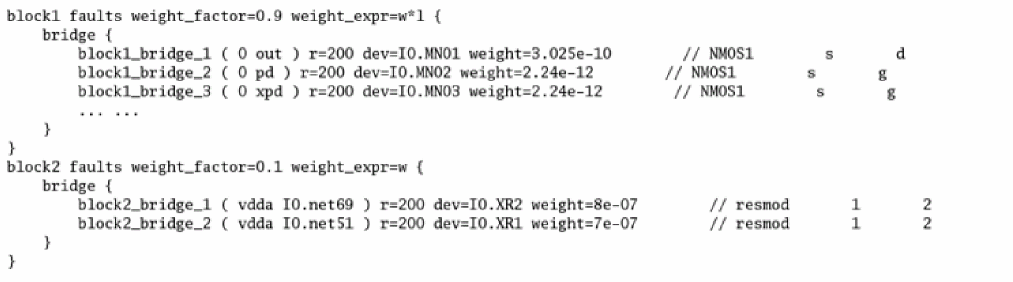
If the parameter weight is specified in the individual fault and weight_expr is also specified in the faults statement, like the fault list in above example, then, the explicit fault value has higher priority and weighting expression is not evaluated for that fault. This rule allows you to adjust some weight values manually before or after the fault list is generated and the given expression is evaluated.
If some of the device terminals are shorted, the weight multiplier for that device is based on the number of shorted terminals. For example, let us consider bridge_fault (n1 n2) for the following scenario.
info what=bridges faultdev=mosn faultterminals=[ d g s b]
1) M0 (n1 n2 n3 n4) mosn …
multiplier = 1
2) M0 (n1 n2 n2 n3) mosn …
multiplier = 2
3) M0 (n1 n2 n2 n2) mosn …
multiplier = 3
4) M0 (n1 n1 n2 n2) mosn …
multiplier = 4
In general, multiplier = number_of_shorted_terminals_at_n1 * number_of_shorted_terminals_at_n2 for bridge inserted between n1 and n2.
If weight_expr=constant_value is same for all the bridges before collapsing, then weight_after_collapsing = multiplier * const. If you manually assign different weights for each bridge connected to different terminals, then weight_after_collapsing = sum (weights_for_each_collapsed_bridge).
Open fault collapsing is different from the bridge collapsing since the collapsing condition for open faults is encountered lesser than bridge collapsing.
When two open faults are equivalent, they can be collapsed only if the union of all the terminals from {…} of both the statements is exactly the full set of terminals connected to the given node.
Spectre can handle the collapsing of only two opens because of the complexity that arises when too many terminals are connected to the same node. Below are a few examples explaining how the open faults collapsing works.
-
Open faults defined on the same node but containing no identical terminals disconnected from a given node can be collapsed.
open_1 ( 2 ) r=1e9 { R }open_2 ( 2 ) r=1e9 { C }
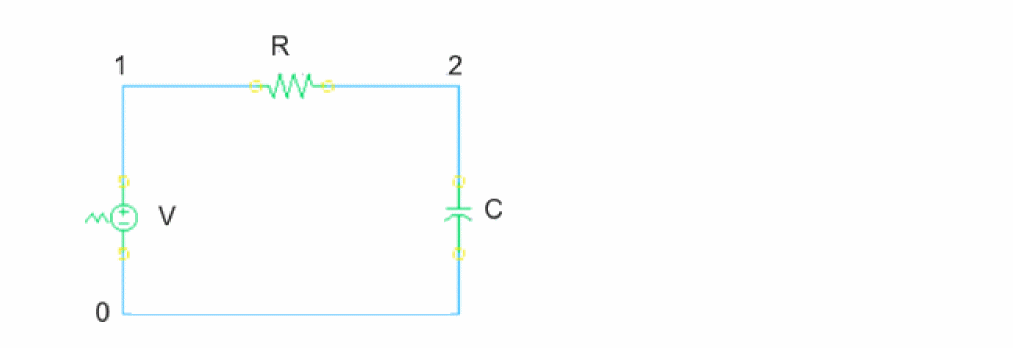
-
In the following schematic, each set of the equivalent opens for node
net05can be collapsed.
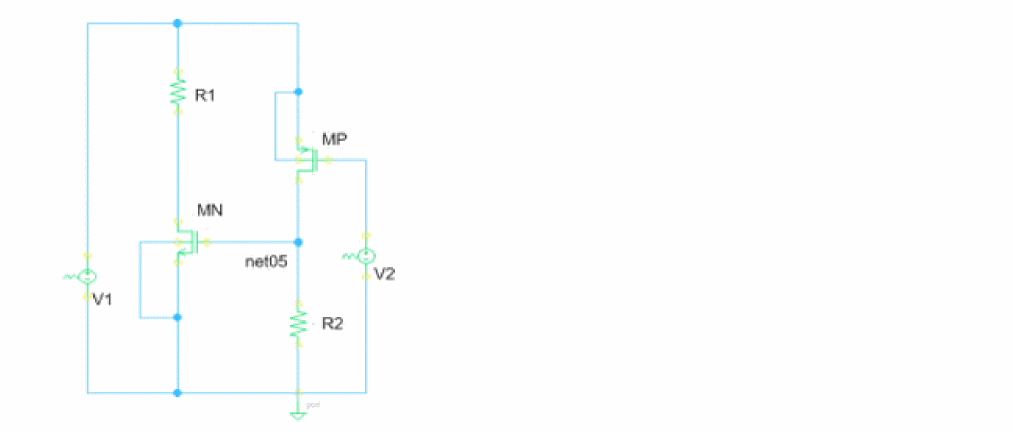
Opn1 (net05) r=1G {MN:g} and Opn2 (net05) r=1G {MP:d R2:1}
Opn3 (net05) r=1G {MP:d} and Opn4 (net05) r=1G {MN:g R2:1}
Opn5 (net05) r=1G {R2:1} and Opn6 (net05) r=1G {MN:g MP:d}
-
For two-terminal primitives, open faults for each terminal, for example,
open_1andopen_3shown below, are identical but redundant faults. Two separate opens are generated independent of thefaultruleparameter in theinfostatement whenfaultcollapseis set tono. This behavior is aligned with IEEE2427. Whenfaultcollapseis set toyes, one open fault withweight=2is generated.open_1 ( 2 ) r=1e9 { R }
open_3 ( 1 ) r=1e9 { R }
For non two-terminal primitives, during open fault generation, when faultcollapse=no is set, the m factor is ignored according to the rule in the above table; weight=1 is evaluated for every instance when no weight expression is given. If weight_expr=w*l is set, the weight is evaluated using 3u*2u=6e-12 for the following instance.
When faultcollapse=yes (which is the default) and weight_expr=w*l is given, Spectre APS evaluates the expression and applies the m factor during collapsing by using 3u*2u*2=12e-12. The weight=2 is evaluated when no expression is defined.
The open faults related to the parallel devices can be collapsed only in the Spectre APS mode. They are taken into account as extra factors to weight_expr values. However, the collapsing of parallel opens is not supported in Spectre baseline.
Limiting in Weight Expression
When the faultdev parameter is not specified or contains multiple types of devices or models, the weighting function in weight_expr may not be evaluated for some of the models. This occurs when the weighting function contains the parameter which does not belong to all models where the fault list is generated. In such situations, Spectre generates a warning message and assigns 0 as weight for that fault. To avoid 0 weight values, you can use the functions fmin and fmax with weight_expr.
In the following example, the use of fmax prevents the weight from becoming zero if the fault instance does not have parameters w (width), or l (length). If w*l cannot be evaluated, 1e-12 is assigned as the weight value.
weight_expr=fmax(w*l, 1e-12)
You can use fmin to limit the weight_expr values. In the following example, fmin clamps the maximum resistance which is used as the weighting function:
weight_expr=fmin(0.1, 0.001*r)
Weighted Likelihood Calculation
Some faults are more likely to occur than others; therefore, a test that detects the more likely faults will have a higher coverage than the one that detects the less likely faults. For this reason, Spectre allows you to calculate the defect coverage using the likelihood-weighted sum of the detected faults divided by the likelihood-weighted sum of all simulated faults. The parameters weight_expr and/or weight_factor in the faults statement can be used to specify weighted likelihood of the faults during fault list generation, or for an existing fault list.
The likelihood of a fault occurrence can be based on the circuit element area, proximity of the adjacent interconnect, length of the interconnect, or other factors. The weighting function expression weight_expr can be used to specify these types of effects, based on each device instance for a particular fault.
Defects can also be weighted by their potential impact on performance, safety, or reliability. For example, open and shorts may have different impact and likelihood for different applications. The weight_factor parameter allows you to specify the likelihood for all faults in a given fault block. It is a constant value for a specific block.
When the fault list consists of total N number of faults in one or multiple blocks, Spectre calculates the total weight by adding the weight of each fault. The weighted likelihood of the nth fault Wn is the weight value of that specific fault (based on weight_expr evaluation) normalized by the total weight of all faults, as shown below.
 .
.
If a fault list consists of K fault blocks with weight_factor= 
k, and the number of faults in each jth fault block is Nj then the weighted likelihood of the nth fault from the kth fault block is calculated as:

The default value of the weight factor are w=1 and 
=1. The default weighted likelihood value of each fault is given by:

If weight_expr is not specified in the info analysis statement to generate the fault list, the weighted likelihood is calculated based on weight=1 or weight=# due to fault collapsing for the individual fault.
The calculated value of weighted likelihood can be found in the table file when the simulation is completed.
To follow P2427 standard, Spectre skips a fault when its weight equals zero and prints a message indicating the same in the log file. Such faults are classified as Unevaluated in post-processing for the DDM and FuSa reports.
Fault analysis for func_s_bridge_15 :  3 time steps
Fault analysis of func_s_bridge_16 skipped because of zero weight.
Fault analysis for func_s_bridge_17 :  12 time steps
Fault Generation and Simulation With faultcollapse and faultmerge
The total number of generated faults using info analysis can be different with the different option settings of faultcollapse and faultmerge.
Two or more faults are considered equivalent when they produce the same circuit topology when they are injected even if they are related to different circuit instances or terminals. The faultcollapse option regulates the detection of equivalent faults and may reduce the total number of faults to be injected for simulation.
The faultmerge option deals with iterative and parallel device instances during fault list generation. By default, faultmerge=yes, all terminals of iterative or parallel devices are shorted or opened simultaneously. As a result, the generated faults have higher weight values and the total fault count is decreased.
When faultmerge=no is specified, Spectre preserves all instances related to faultdev list, and the faults are generated separately for each iterative or parallel device instances. As a result, the fault count may be higher in the generated list and the fault simulation time may increase.
When the option preserve_inst=all is specified, faultmerge=yes has no effect.
When the number of faults get reduced by collapsing or merging, Spectre changes the weights of faults kept in the final fault list according to the following rules:
-
With
faultcollapse=yesandfaultmerge=yes, the least number of faults are generated. Theweightparameter in thefaultstatement considers the number of merged faults for iterated instances and parallel devices and the number of equivalent faults. This is the default setting in Spectre. -
With
faultcollapse=noandfaultmerge=no, the faults are generated separately for all iterated and parallel instances, and equivalent faults are included in the list. This settings results into the biggest number of faults to be simulated. -
With
faultcollapse=yesandfaultmerge=no, the equivalent faults are collapsed by changing the weighting factors. However, the faults sharing the same nodes but different type of devices in iterated or parallel instances are split into the individual faults. -
With
faultcollapse=noandfaultmerge=yes, the equivalent faults are not collapsed; however, the iterated or parallel instances are considered during fault generation with weighting factors applied.
Creating Open Faults When Two Terminals of an Instance are Connected to the Same Node
There are some applications where the transistors have their terminals tied together for a specific purpose. For example, if a variable capacitor is desired, you may connect the terminals of source and drain together and the capacitance between gate and drain is varied by the voltage crossing it. To create an open fault at the node where there are two terminals of element are shorted, the following syntax and examples cover all the possibilities using which you can generate the open fault:
-
Only the D terminal connects to the new fault node split from the original node
FaultOpen_1 info what=open faultterminals=[D] faultdev=bsim4 faultres=1e+9
Info1_open_1 (VDD) r=1e+9 { I0.MP0:D }
-
Only the S terminal connects to the new fault node
FaultOpen_2 info what=open faultterminals=[S] faultdev=bsim4 faultres=1e+9
Info1_open_2 (VDD) r=1e+9 { I0.MP0:S }
-
Both D and S terminals connect to the new fault node
FaultOpen_3 info what=open faultterminals=[D S] faultdev=bsim4 faultres=1e+9
Info1_open_3 (VDD) r=1e+9 { I0.MP0:D I0.MP0:S }
-
If no
faultterminalsare specified, the open faults are generated for all the terminals ofbsim4where the gate and source terminals are connected to the new fault node.FaultOpen_4 info what=open faultdev=bsim4 faultres=1e+9
Info2_open_1 (VDD) r=1e+9 { I0.MP0:D I0.MP0:S }
Info2_open_2 (VOUT) r=1e+9 { I0.MP0:B }
Info2_open_3 (VIN) r=1e+9 { I0.MP0:G }
If you need both 1) and 2) in one simulation, you can specify two info analyses and save the results to the same file.
Custom Fault Generation
To generate the custom fault list using info analysis, you need to define the faulty subcircuits, include the definition in the nominal netlist, and set the option faultcustompreserve.
faultcustomperserve [name]: specifies the list of subcircuit names to be used for custom insertion, replacement, or open generation.
Generating Faults at the Schematic Boundaries for a Subcircuit
Spectre enables you to generate faults for a subcircuit at the schematic boundaries only, and not for all primitives within the subcircuit.
subckt pmos d g s b
parameters l=1u w=10u
M0 d2 g2 s2 b2 pchmod l=l w=w
rd d d2 resistor r=1
rg g g2 resistor r=1
rs s s2 resistor r=1
rb b b2 resistor r=1
ends pmos
model pchmod bsim4 type=p mobmod=0 capmod=2 version=4.21 toxe=3e-9 vth0=-0.42
…
To generate faults for a subcircuit at the schematic boundaries, you need to define the options for subcircuit names in the vector, along with the option faultmacro=yes.
opt options mosmacro=[pmos] faultmacro=yes
short_block info what=bridges where=file faultdev=[pmos] \
file="fault_list.scs" faultblock="bfault" faultres=10
Using the info analysis and options defined above, the fault list is generated as below.
bfault faults {
bridge {
bfault_bridge_1 ( 0 d ) r=10 dev=MP // pmos d g
bfault_bridge_2 ( 0 g ) r=10 dev=MP // pmos d s
bfault_bridge_3 ( 0 s ) r=10 dev=MP // pmos d b
bfault_bridge_4 ( d g ) r=10 dev=MP // pmos g s
bfault_bridge_5 ( d s ) r=10 dev=MP // pmos g b
bfault_bridge_6 ( g s ) r=10 dev=MP // pmos s b
}
}
Generating Faults According to IEEE P2427 Standard
You can use the option faultrule=2427 in the info statement to generate faults that comply with the IEEE P2427 standard. Using faultrule=2427 in the info statement enables you to generate the bridge or open fault list without specifying the faultdev and faultterminals parameters. Spectre generates all possible faults for all devices according to the requirements of the device terminals from IEEE P2427. The following table lists the number of faults for each type of device when no other fault parameter is specified:
| Primitive/Device | Terminal Index for Bridges | Terminal Index for Opens |
If faultdev and faultterminals parameters are specified along with faultrule=2427, faultdev and faultterminals values are processed instead of the predefined values. Rest of the devices that are not specified in faultdev retain the predefined values.
For example, if both bsim4 and bsim3v3 models are used in the same netlist with the following info statement, Spectre will generate 3 bridges for each bsim4 device and 1 bridge for each bsim3v3 instance.
Bridge_2427 info what=bridges faultrule=2427 faultdev=bsim3v3 \
faultterminals=[d s]
With the same info statement, with faultrule=none, Spectre will generate only 1 bridge per each bsim3v3 instance and skip all the other devices.
Bridge_None info what=bridges faultrule=none faultdev=bsim3v3 \
faultterminals=[d s]
For options mosmacro=[subcktName] and faultmacro=yes, the type of device or primitive is unknown with no predefined rule when faultrule=2427 is applied; all the terminals are taken into consideration during the fault generation.
Examples on Fault generation Using info Analysis
Following are some examples on fault generation using info analysis:
-
The following example creates bridge faults across drain, gate, and source terminals for primitive
bsim4only within the scope of subcircuit instanceI1.xosc.FaultList1 info what=bridges where=file file=faultList1.scs faultblock=b4Bridges faultdev=bsim4 faultterminals=[d g s] faultres=10 inst=I1.xosc
-
The following example creates bridge faults for subcircuit instance
INVacross first and second terminals within the scope of subcircuitxmem.FaultList2 info what=bridges where=file file=faultList2.scs faultblock=invBridges faultdev=INV faultterminals=[1 2] faultres=10 subckt=xmem
-
The following example generates stuck-at faults by specifying the nets
vddandgndusing thefaultstuckatparameter andwhat=bridges, as shown below.FaultListStuckat info what=bridges faultstuckat=[vdd gnd] where=file file=faultStuckat.scs faultblock=b4stuckat faultdev=bsim4 faultterminals=[d g s] faultres=10 inst=I1.xosc
-
The following example creates open faults for
bsim4transistors at gate and drain terminals by inserting1Gresistors. The transistors in subcircuit instance ofI0.xmemare excluded.FaultList3 info what=opens where=file file=faultList3.scs faultblock=b4Opens fauldev=bsim4 faultterminals=[g d] faultres=1G xinst=I0.xmem
-
The following example creates open faults for all resistor instances at the first terminal by inserting a
1Gresistor. The resistors defined in subcircuitxoscare excluded:FaultList4 info what=opens where=file file=faultList4.scs faultblock=resOpens faultdev=resistor faultterminals=[1] faultres=1G xsubckt=xosc
-
When multiple defect parameters are defined in faultres=[100 500 1000], three different fault blocks are generated with different resistor values. The defect parameter sweeping is supported by parameter range(start, stop, step).
BRG1 info what=bridges file=bridges.scs faultdev=bsim4 faultres=[100 500 1000]
BRG2 info what=bridges file=bridges.scs faultdev=bsim4
faultres=[range(100,1000,300)]
-
The following example generates the parametric faults of altering global temperature for the circuit.
FaultParam1 info what=faultparam where=file file=faultList8.scs faultparam=temp faultvalues=[-50 0 25 50]
-
The following example generates the parametric faults with specifying values in percentage. The temperature values altered are 21.6 and 40.5 if nominal temperature is 27.
FaultParam11 info what=faultparam where=file file=faultList88.scs faultparam=temp faultpercentage=[-20 50]
-
The following example generates parametric faults by altering the gate length for all bsim4 devices:
FaultParam2 info what=faultparam where=file file=faultList9.scs faultparam=l faultstart=1p faultstop=5p faultstep=1p faultdev=bsim4
-
The following example generates parametric faults by altering the gate length for all devices in specific subcircuit one by one:
FaultParam3 info what=faultparam where=file file=faultList10.scs faultparam=l faultstart=1p faultstop=5p faultstep=1p faultdev=bsim4 inst=I0.I1
-
The following example generates faults of altering both gate width and length for all bsim4 devices:
FaultParam4 info what=faultparam where=file file=faultList11.scs faultdev=bsim4 faultparam==[w l] faultvalues=[1e-6 1e-5 5e-6 5e-5]
or
FaultParam4 info what=faultparam where=file file=faultList11.scs faultdev=bsim4 faultparam=[w l] faultfile=param.dat
or
FaultParam4 info what=faultparam where=file file=faultList11.scs faultdev=bsim4 faultparam=[w l] faultpercent=[-50 -10 10 50]
-
When multiple defect parameters are defined in
faultres=[100 500 1000], three different fault blocks are generated with different resistor values. The defect parameter sweeping is supported by the parameter range(start, stop, step).BRG1 info what=bridges file=bridges.scs faultdev=bsim4 \ faultres=[100 500 1000]
BRG2 info what=bridges file=bridges.scs faultdev=bsim4 \
faultres=[range(100,1000,300)]
-
The following example generates custom faults of
faultsubcktto replace bsim4 devices.FaultList5 info what=customreplace where=file file=faultList5.scs faultcustom=faultsubckt faultdev=bsim4
-
The following example generates the parametric faults of altering the default value of a model parameter.
FaultParam5 info what=faultparam where=file file=faultList12.scs faultparam=tox faultstart=4n faultstop=10n faultstep=2n faultdev=mosn
-
The following example generates the parametric faults of altering the value of a subcircuit parameter.
faultparam6Faultparam6 info what=faultparam where=file file=faultList13.scs faultparam=res faultvalues=[1e3 2e3 10e3] faultdev=I1.I1
-
The following example generates the parametric faults of altering the parameters of a circuit element.
Faultparam7 info what=faultparam file= faultList14.scs faultdev=vsource faultparam=[val1 rise fall] faultstart=[1 1m 1.5m] faultstep=[1 0.1m 0.1m] faultstop=7
-
The following example generates open faults of
faultsubcktto be inserted at each terminal ofbsim4devices.FaultList7 info what=customopen where=file file=faultList7.scs faultcustom=faultsubckt faultdev=bsim4 faultterminals=[d g s]
Custom fault subcircuit must have the same matching number of terminals asThe following two examples show the notations of custom insertion. The original resistor instances offaultdev. Iffaultdevhas more terminals than the custom fault subcircuit, thenfaultterminalsis used for matching.R11andR12will be inserted with sub-circuitfault_to_insertin parallel.custom {
insTest_insert_1 ( n0 n1 ) fault_to_insert // R11 resistor
insTest_insert_2 ( n1 n2 ) fault_to_insert // R12 resistor
}
For custom replacement, the original instanceX1which instantiates sub-circuit ofinvxwill be replaced byfault_to_replace.custom {
repTest_replace_1 ( n2 out vdd vss ) fault_to_replace original_inst=X1 // X1 invx
}
For the custom open, the commenting notation explains the terminal index 2 of resistorRinsplits into two nodes and subcircuitfault_to_openis inserted in between.custom {
repTest_open_1 ( n2 ) fault_subckt=fault_to_open { Rin:2 } // Rin resistor 2
}
-
The following example generates parametric faults by altering the global temperature for the circuit.
FaultParam1 info what=faultparam where=file file=faultList8.scs faultparam=temp faultvalues=[-50 0 25 50]
-
The following example generates the parametric faults by altering the nominal temperature by a percentage value. The altered temperature values are 21.6 and 40.5 if the nominal temperature is 27.
FaultParam11 info what=faultparam where=file file=faultList88.scs faultparam=temp faultpercentage=[-20 50]
-
The following example generates parametric faults by altering the gate length for all bsim4 devices.
FaultParam2 info what=faultparam where=file file=faultList9.scs faultparam=l faultstart=1p faultstop=5p faultstep=1p faultdev=bsim4
-
The following example generates parametric faults by altering the gate length for all devices in specific subcircuit one by one.
FaultParam3 info what=faultparam where=file file=faultList10.scs faultparam=l faultstart=1p faultstop=5p faultstep=1p faultdev=bsim4 inst=I0.I1
-
The following example generates parametric faults by altering the gate length for one specific device.
FaultParam4 info what=faultparam where=file file=faultList11.scs faultparam=l faultstart=1p faultstop=5p faultstep=1p faultdev=I0.I1.MN1
-
The following example generates parametric faults by altering the default value of a model parameter.
FaultParam5 info what=faultparam where=file file=faultList12.scs faultparam=tox faultstart=5p faultstop=50p faultstep=5p faultdev=mosn
-
The following example generates parametric faults by altering the value of a subcircuit parameter.
Faultparam6 info what=faultparam where=file file=faultList13.scs faultparam=res faultvalues=[1e3 2e3 10e3] faultdev=I1.I1
Fault Generation with Option faultlocal
When faultlocal=yes is enabled with parameter inst=[…] or sub=[…], the local node names for faults are created in fault generation.
When faults are generated with the faultlocal parameter, the subcircuit name is created in fault block, the nodes in fault list are referred to the subcircuit as shown in the following example:
func_s info what=bridges where=file file=faultlist_noweightexpr.scs faultdev=[bsim4] faultterminals=[1 2 3] subckt=pll_reg_bg faultlocal=yes
The fault list for this example is shown below.
func_s faults sub=pll_reg_bg {
   bridge {
      func_s_bridge_1 ( agnd_h vbg ) r=10 dev=[M12 M16] weight=2  // bsim4  s  d
       func_s_bridge_2 ( agnd_h en_hn ) r=10 dev=I0.M6        // bsim4  s  d
       func_s_bridge_3 ( agnd_h en_fh ) r=10 dev=I1.M6        // bsim4  s  d
       func_s_bridge_4 ( agnd_h net097 ) r=10 dev=M11         // bsim4  s  d
       func_s_bridge_5 ( agnd_h net0164 ) r=10 dev=M18        // bsim4  s  d
      }
}
When generating faults without setting parameter faultlocal, or . The nodes in fault list show the hierarchical names from the top level in the circuit.
func_s info what=bridges where=file file=faultlist_noweightexpr.scs faultdev=[bsim4] faultterminals=[1 2 3] subckt=pll_reg_bg
The fault list for this example is shown below.
func_s faults {
   bridge {
      func_s_bridge_1 ( 0 bandgap ) r=10 dev=[I0.M12 I0.M16] weight=2 // bsim4 s  d
        func_s_bridge_2 ( 0 I0.en_hn ) r=10 dev=I0.I0.M6        // bsim4  s  d
       func_s_bridge_3 ( 0 I0.en_fh ) r=10 dev=I0.I1.M6        // bsim4  s  d
       func_s_bridge_4 ( 0 I0.net097 ) r=10 dev=I0.M11         // bsim4  s  d
       func_s_bridge_5 ( 0 I0.net0164 ) r=10 dev=I0.M18        // bsim4  s  d
   }
}
Layout-Based Fault Generation
Spectre info analysis for fault list generation is enhanced to support post-layout circuits with accurate transistor-level netlist (DSPF) using the following parameters.
Spectre identifies at most one short defect per net pair, firstly transistor-shorts would occupy net pairs if the terminals are specified in faultterminals=[…]. After that, net-shorts locations are identified by the largest parasitic coupling capacitor in the net pair. Multiple open defects on the same branch is prevented. Primarily branches are taken by transistor-opens if the terminals are specified in faultterminals=[…]. Next, opens are identified per branch if the parasitic resistor exceeds the threshold.
what=bridges faultterminals=[…]
List of device terminals to be considered for fault generation. By default, all terminals of faultdev are considered.
List of device terminals to be considered for fault generation. By default, [d g s]|[1 2 3] of faultdev are considered. This should be for MOS devices only.
Transistor-shorts and net-shorts can be equivalent and therefore, represented by only one short when their parasitic coupling capacitors located in the same net pair. Parameter weight is not supported for layout-based fault list. Similarly, branch-opens can be ignored if the branch has contained a transistor-open. A major application of faultextract option is to generate net-shorts and branch-opens.
The following examples explain the fault identification for net shorts and transistor shorts in a layout-based netlist:
-
The following example generates only net-shorts
…what=bridges faultextract=spf
-
The following example generates only net-shorts for parasitic C
…what=bridges faultextract=spf faultdev=[capacitor]
-
The following example generates all net-shorts and all transistor-shorts
…what=bridges faultextract=spf faultdev=[*]
-
The following example generates all net-shorts and transistor-shorts for
g45nlsvtandg45plsvt…what=bridges faultextract=spf faultdev=[g45nlsvt g45plsvt]
-
The following example generates only transistor-shorts identical to info analysis with
faultextract=no…what=bridges faultextract=spf faultdev=[resistor g45nlsvt g45plsvt ]
The following examples explain the fault identification for branch opens and transistor opens in layout-based netlist:
-
The following example generates only branch opens:
…what=opens faultextract=spf
-
The following example generates only branch-opens for parasitic R:
…what=opens faultextract=spf faultdev=[resistor]
-
The following example generates all branch opens and all transistor opens:
…what=opens faultextract=spf faultdev=[*]
-
The following example generates all branch opens and transistor opens for
g45nlsvtandg45plsvt:…what=opens faultextract=spf faultdev=[g45nlsvt g45plsvt]
-
The following example generates only transistor-opens, identical to info analysis with
faultextract=no:…what=opens faultextract=spf faultdev=[g45nlsvt g45plsvt]
-
The following examples create net shorts and branch opens:
BridgeList info what=bridges faultextract=spf file=bridges.scs faultcmin=1f
OpenList info what=opens faultextract=spf file=opens.scs faultrmin=0.1
-
With DSPF included in the netlist, you may specify
faultextract=schto create schematic transistor shorts. However, an open fault is not compatible in schematic option.BridgeList info what=bridges faultextract=sch file=bridges.scs faultcmin=1f
Use Model of faultlayer
The parameter faultlayer is valid only when faultextract is specified in info analysis. The detailed use model for faultlayer and faultlevel is given below.
-
When
faultlayer=0, faults generated for all layers, including the connectivity between layers. -
When
faultlayer=[3 5], faults generated only for layer #3 and #5, excluding the connectivity between different layers. -
When
faultlayer=[range(1, 8)], faults generated for all layers from #1 to #8, excluding the connectivity between different layers. -
When
faultlevel=#LVLandfaultlayer=$lvlare both specified, then faults are generated only for the instances with hierarchical depth <=#LVL, and only belonging to the levels of$lvlaccording to LAYER_MAP from dspf.
For example, when faultlevel=2 faultlayer=[4 7] is specified and applied to the dspf file, The hierarchical depth <= 2 (X0/X##/N1) are first filtered and then the same layers of #4 and #7 are applied for fault injection.
C111 VDD X0/X11/N1 3.50548e-18 $X=299.92 $Y=19.5155 $lvl1=2 $lvl2=1
C222 VDD X0/X22/N1 2.91933e-18 $X=299.989 $Y=19.516 $lvl1=2 $lvl2=1
C333 VDD X0/X33/N1 2.83581e-18 $X=300.055 $Y=21.04 $lvl1=3 $lvl2=1
C444 VDD X0/X44/N1 1.49123e-18 $X=300.2605 $Y=22.9175 $lvl1=7 $lvl2=7
C555 VDD X0/X55/N1 1.48015e-18 $X=300.604 $Y=22.9645 $lvl1=7 $lvl2=1
C666 VDD X0/X66/N1 6.02522e-18 $X=300.5905 $Y=15.8025 $lvl1=4 $lvl2=4
Use Model Examples of a Layout-Based Fault Simulation
With the fault list generated with info statement, as well as with faultextract included in the netlist, you can run fault simulation for DFA or TFA with APS or Spectre X. Using Spectre X, APS with +postlayout may reduce the fault universe from the original fault list. Spectre prints warnings in the case when original connectivity cannot be retained.
Post-Layout Fault Simulation
- Include the fault list generated by faultextract=spf.
- If required, include other fault lists generated without faultextract for the given netlist.
- Add Direct Fault Analysis DFA, or Transient Fault Analysis TFA statement into original netlist.
- Perform simulation using Spectre, APS with postlayout=upa/hpa/default, or Spectre X with preset=cx/ax/mx/lx/vx.
Pre-Layout Fault Simulation
- Generate fault lists with faultextract=sch.
- Comment-out ‘dspf_include’ in original netlist or use related schematics netlist for fault simulation only.
- Include fault lists from step 1.
- If required, include other fault lists generated without faultextract for the schematic netlist.
- Add DFA, or TFA statement into the netlist.
- Perform simulation using Spectre, APS, or Spectre X with preset=cx/ax/mx/lx/vx.
Fault Universe Details Saved from Fault Generation
According to IEEE P2427 requirements, Analog Fault Analysis provide a way to save the fault universe information in SQLite DB. A parameter faultuniverse is introduced in info analysis to specify the db file name to save fault universe details.
brg info what=bridges file=faultlist.scs faultuniverse=funiverse.db
opn info what=opens file=faultlist.scs faultuniverse=funiverse.db
You can then use any DB browser for SQLite to open the file and check the contents.
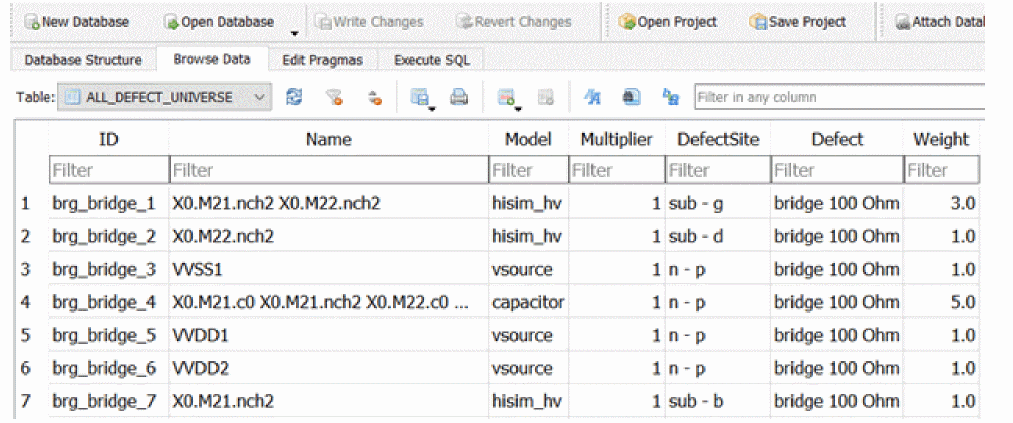
The ALL_DEFECT_UNIVERSE table shows all the faults with the common information as above. Choose MOS-DEFECTS from the Table drop-down list to display the columns for the four terminal nodes, length and width.
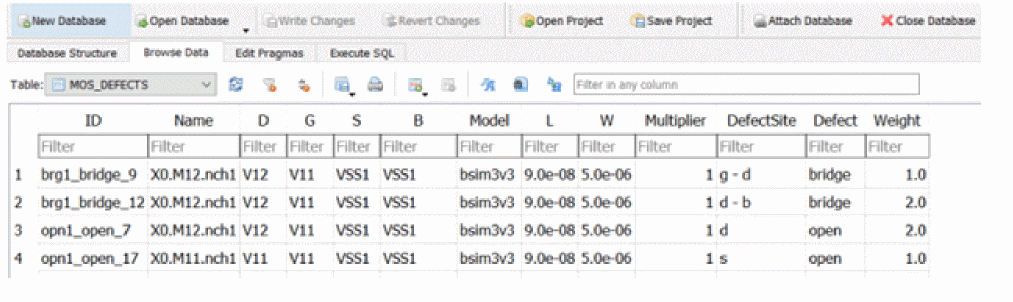
With these tables, it is convenient to analyze or debug the fault issue if needed.
Fault Generation Based on Circuit Activity Analysis
Certain circuit elements that do not affect the intended application of the integrated circuit under any specified operation can be considered as unused circuitry during fault analysis. According to IEEE P2427, defects in unused circuitry can be excluded from calculation of defect coverage. Defects that are likely not to be detected by any conceivable test can be considered as potentially undetectable. Such potentially undetectable defects may be counted as undetected without simulating them according to IEEE P2427.
Performing analysis of DUT activity before generating the defect universe (fault list) lets you identify the unused circuitry, or the circuit elements with no or low activity. Faults related to such elements may be considered as potentially undetectable and are excluded from injection and simulation.
In Spectre fault generation with info analysis, the infonames=[…] parameter is used to trace the activity in transient so that the potentially undetectable faults are assigned by zero weight and excluded from fault simulation.
In the following statements, the transient analysis enables the signal activity tracing for fault generation with infonames=[…] specified
info1 info what=bridges faultdev=bsimcmg faultactivethresh=0.05
info2 info what=opens faultdev=bsimcmg faultactivethresh=0.05
tran1 tran stop=1m infonames=[info1 info2] infotimes=[0.75m 0.75m]
faultactivevabstol=0.11 faultactiveiabstol=5u
The following parameter is supported for activity analysis in info statement:
The following parameters are supported for activity analysis in transient statement:
The example faults below are generated based on the activity tracing in transient analysis, these faults with zero weight are excluded from fault injection and simulation. However, they are saved in the table file. Currently, the faults with zero weight are classified as 'unevaluated' in detailed detection reports.

Fault Generation for Design Hierarchy Extraction
Spectre provides the Design Hierarchy Extraction (DHE) feature that can be used in Cadence Safety Solution. With info analysis, the design hierarchy is saved in a format that is compatible with Midas Safety Platform and is used for FMEDA management.
DHE is enabled with the keyword what=dhe in info analysis.
An example info statement is shown below.
DHE info what=dhe file=topdhe
After the simulation is run successfully, you can use the topdhe.db file, which is saved in the output directory, as an input file for Midas.
The following example shows how to save the design hierarchy in the format that is compatible with Midas Safety Platform and then used for FMEDA management.
DHEParam info what=dhe where=file file="mydhe.txt" dheparams=subckt.txt
where the subckt.txt file contains optional rules mentioned below to calculate the area for specified subcircuit. Wildcards can be used in subcircuit names.
### subckt name : area expr
mcell : l*w*nf*m + l*p*(nf-1)*m
mincap* : ls*ws*mf
fetcap* : wr*lr*multi
Fault Selection and Sampling
Fault injection and simulation can be an extremely time-consuming task for large designs. Spectre provides the capability to perform simulation process for a portion of the original fault list, or to pick only specific faults for debugging purposes. Spectre scoping option allows to simulate the fault injection for different blocks of design separately without changing the complete fault list. The results can be merged during postprocessing.
The following parameters can be applied for selection of a subset of the fault universe during transient or sweep analysis for fault simulation:
Spectre also provides a few sampling techniques in the cases where all possible defect simulation becomes impractical. To enable random fault sampling in Spectre, it is enough to specify just the number of samples you prefer to simulate. Based on the accuracy and simulation time requirements, you can change the default settings of the sampling-related options.
The list of parameters for random fault sampling in sweep (DFA) or transient (TFA) analyses:
There are two choices to specify the number of samples out of the fault universe according to the fault blocks specified by the faults parameter. In the transient or sweep analysis statement, you may use either faultsamplenum=n to set the specific number of samples or faultsampleratio=R to set the percentage (in the range from 0% to R%) to perform random sampling. With the setting of faultsampleratio=[R1 R2], Spectre generates the number of samples between R1% and R2% of total number of faults. The simulation results with incremental percentage sampling can be merged later during postprocessing.
If both faultsamplenum and faultsampleratio are specified in the netlist, the parameter defined later in the statement will overwrite the one defined earlier.
Weighted Random Sampling
When faultsamplemethod=randomweighted, discrete random number distribution is used for fault sampling. Sampling process picks integer values according to the discrete probability distribution where weighted likelihood is considered as a predefined probability of being selected for each fault in the fault list.
Spectre provides the possibility to generate the fault list with the weight assigned to each or some faults based on the netlist information. For instance, we can assume that the likelihood of defects in a transistor is proportional to its area, the likelihood of defects in the design-intend resistors and capacitors can be proportional to their resistance and capacitance respectively. The following info analyses statements can be used in such a case to generate bridge faults:
Info1 info what=bridges faultdev=bsim4 weight_expr=w*l
Info2 info what=bridges faultdev=resistor weight_expr=r weight_factor=1e-12
Info3 info what=bridges faultdev=capacitor weight_expr=c weight_factor=1e5
Here, the parameter weight_factor is used as a proportionality constant to correlate the likelihood of defects related to the different type of devices. You may run the fault generation process a few times to estimate the weight values in different fault blocks, and to adjust weight_factor accordingly before starting fault sampling and simulation.
If the fault list is generated without weight_expr specified, Spectre assigns the weight values based on multiplication factor of related devices, and the number of collapsed faults when the option faultcollapse=yes is used in the fault list generation. The weight values will be integers in such a case and the default weight is 1.
The weighted random sampling can be performed with or without replacement. By default, sampling is performed with replacement, which means that the selected fault remains in the sampling pool and may be sampled again. With this method, the simulated fault number can be fewer than the number of samples. Setting faultsamplereplace=no in sweep or tran statement can disable the replacement of samples.
In the randomweighted sampling method, it is assumed that each fault has an assigned weighted likelihood wi. The weighted likelihood for all faults is normalized before the sampling process starts.

Thus, the fault list contains an absolute value of fault weights, the table file contains the normalized weight values, i.e. the weighted likelihood.
If n samples are selected from the fault list, the simulation consists of N fault statements. The discrete probability distribution is used to draw samples.

The weighted likelihood wi is considered as the probability of the given fault to be selected for simulation.
- The faults with larger weighted likelihood can be sampled multiple times
-
The number of simulations can be less than number of selected samples
n -
The estimated defect coverage is calculated as the ratio of the sum of weighted likelihoods of detected samples
ndto the sum of weighted likelihoods of all samplesn.
- The recurring samples are counted according to the number of times selected
In sampling without replacement:
- Each fault can be sampled only once
- Faults with larger weighted likelihood have higher probability to be drawn
- The number of simulations equals the number of selected samples
-
The estimated defect coverage is the ratio of the sum of weighted likelihoods of detected samples to the sum of weighted likelihoods of all sampled faults.

Confidence interval can be evaluated based on the estimated detection coverage for weighted random sampling using spectre_ddmrpt or spectre_fsrpt.
Uniform Random Sampling
The uniform random sampling method can be selected using faultsamplemethod=randomuniform in sweep or tran statement. This method excludes the weighted likelihood from consideration despite the weight may be included in the fault list. This setting can also be useful when the fault list contains mixed types of faults and the weighting expression can be hard to evaluate for some portion of the faults from the list.
Sampling is performed without replacement by default. Setting faultsamplereplace=no in sweep or tran statement can enable replacement in sampling process.
In randomuniform sampling method, the uniform discrete distribution for integers is used to draw the samples.

Each fault out of N faults from the list has the same probability to be selected for simulation.
- Any fault can be sampled multiple times
- The number of simulations can be less than the number of selected samples
- The estimated defect coverage is defined as the ratio of the detected samples to the total number of samples. The recurring samples are counted according to the number of times selected
In sampling without replacement:
- Any fault can be sampled only once
- The number of simulations equals the number of requested samples
- The estimated defect coverage is the ratio of detected fault samples to the total number of requested samples
Confidence interval can be evaluated based on the estimated detection coverage for uniform random sampling using spectre_ddmrpt or spectre_fsrpt.
Weighted Sorted Sampling
When the fault list includes weighting values, Spectre provides the method to select for simulation only a subset of faults that have the largest weighted likelihood. This approach allows to reduce the simulation time to estimate the defect coverage by excluding from injection the faults that have relatively small weighted likelihood or undefined weight.
The fault list with weight can be generated as described in Weighted Random Sampling, that is, by using weight_expr and weight_factor parameters in info analysis, or by applying the fault collapsing option.
The parameter faultsamplemethod=weightsorted in sweep or tran statement enables the weight sorted sampling. Spectre chooses the requested number of samples with the largest weighted likelihood for the fault simulation. The number of samples can be specified by faultsamplenum or faultsampleratio parameter.
The estimated defect coverage is calculated as the ratio of the sum of weighted likelihoods of detected samples to the sum of weighted likelihood of all the selected samples.
Since the weight sorted sampling is not random, confidence interval estimation is not supported for this method.
Confidence Interval Sampling
Spectre supports two approaches for confidence interval calculation with the given confidence level  : Clopper-Pearson formula and Wald formula.
After the fault simulation is complete, confidence interval can be calculated by using postprocessing utilities spectre_ddmrpt or spectre_fsrpt.
The formula for the Clopper-Pearson exact method forms the confidence interval by using the relationship between binominal distribution and beta distribution.

where, B(? ; a,b) is the beta distribution quantile function with the shape parameters a,b that depend on the number of the total n and the detected nd fault samples. When the proportion or the estimated coverage depends on weighted likelihood, the shape parameters are modified accordingly.

The choice of Wald formula in Spectre includes the finite population correction and the continuity correction for a small sample size.

-
z is
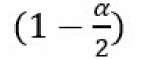
percentile of the standard normal distribution for the requested confidence level .
. -
The likelihood of simulated samples is

-
The proportion of the likelihood of all detected samples to all simulated is

-

when the weighted likelihood is not considered, then wn=n/N, and p=n_d/n.
Benchmark Test of Fault Sampling, Simulation, and Confidence Interval Estimation
The following table represents the experimental results of Spectre random sampling techniques and can be used as a guidance to choose an appropriate approach for fault injection and simulation for designs with a large defect count.
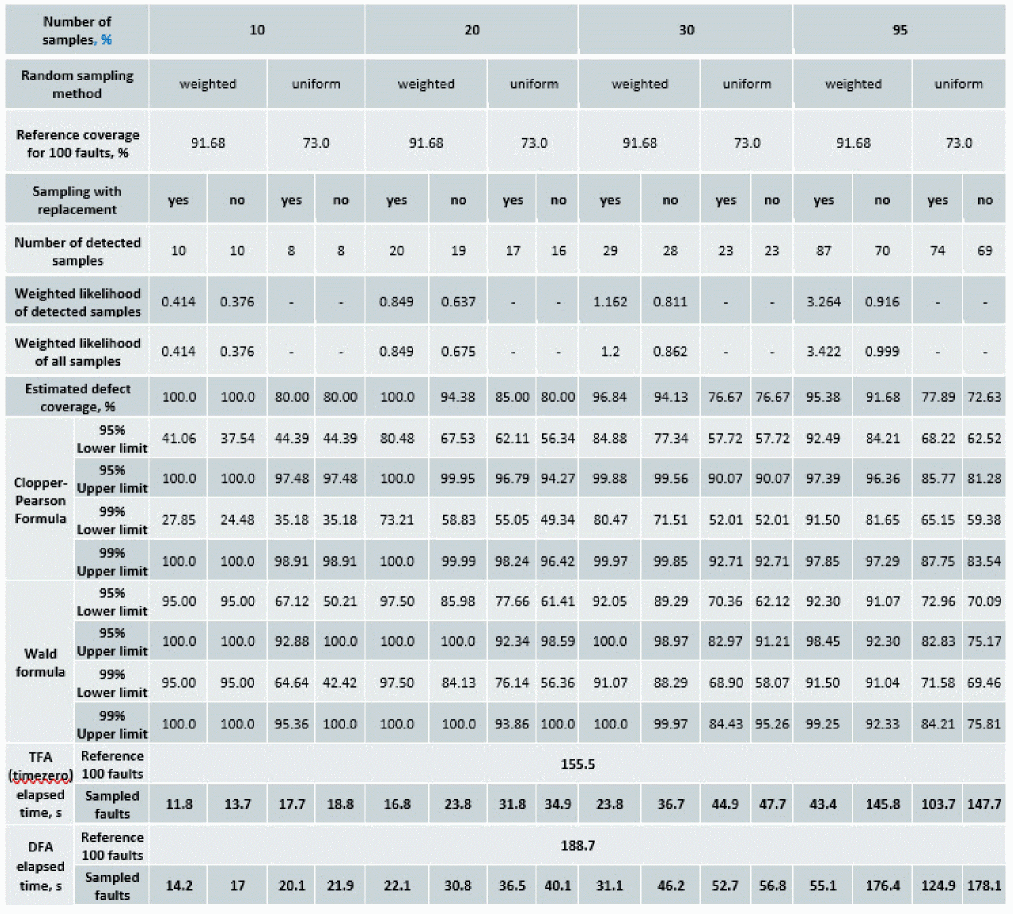
In this example, the fault list consists of the bridges between the gate, drain, and source pins of MOS transistors (faultdev=bsim4 faultterminals=[g d s]), and the opens for the gate and drain terminals of the same devices (faultdev=bsim4 faultterminals=[g d]) from the pll_reg_bg cell of the design under test. After excluding one short that is related to the output signal and ground node, the defect universe includes 58 bridges and 42 opens. For both, bridge and open faults, the gate area was specified as a weighting function, weight_expr=w*l. Spectre asserts were used to specify the detection limits. Also, the faultautostop=all option was enabled during fault injection and simulation to auto-stop transient analysis once the injected fault is detected by the asserts.
When we analyze all faults, the reference defect coverage for this test is 91.65% with fault weighting and 73% without fault weighting.
To begin, a fault count of 100 was selected to perform simulation in a short time and to trace the estimated values in the cases when sample representation is very low. It was then incrementally increased, and then close to the total fault amount was used. Table 3 includes data for the number of samples 10%, 20%, 30%, and 95% of total (for example, faultsampleratio=10). Each sampling choice was simulated with two methods faultsamplemethod=randomweighted, faultsamplemethod=randomuniform. These are shown in the weighted and uniform columns of the table. Each sampling method was performed with and without replacement of samples during the random sampling process. The faultsamplereplace=yes|no setting is shown in the yes and no columns in the table.
The estimated defect coverage is evaluated by spectre_ddmrpt. In case of uniform sampling, it is calculated as the ratio of detected samples to the number of all samples. In case of random weighted sampling, it is calculated as the ratio of the sum of weighted likelihood of detected samples to the sum of weighted likelihoods of all selected samples. The data in the table includes all these values for each sample choice. As expected, the estimated coverage is improved with increasing number of samples. Sampling without replacement has some advantage in accuracy.
For the estimation of confidence interval, spectre_ddmrpt is used with the -cl option to specify the required confidence level (for example, -cl 99), and -cr CP, or -cr W to specify the choice of the preferred formula. As expected, a higher confidence level makes the confidence interval wider. Increasing the sample size reduces the interval. As a rule, sampling with replacement reports a smaller confidence interval.
The last four rows in the table 3 include the fault injection and simulation performance for Spectre APS. Each number represents the elapsed time to perform the transient analysis simulation for each set of samples, and the related random sampling specifications. The simulation was run with two methods, TFA with faultmethod=timezero and DFA. The reference simulation time for all 100 faults is shown for both methods. Sampling with replacement has a considerable advantage in terms of the simulation time in all cases.
In general, as the sample number becomes closer to the total fault number, more precise confidence intervals and estimated defect coverage are expected. When the combination of randomweighted and faultsamplereplaced=yes is used (Spectre default settings), you can expect more accurate confidence interval bounds as well as better performance. In comparison to this, using faultsamplereplaced=no predicts more accurate estimated defect coverage. In addition, fault sampling and simulation in TFA requires less time than in DFA.
Defect Detection Using Weighted Likelihood
With weighting function and weighted likelihood information, Spectre calculates the weighted likelihood for each fault based on its ratio to the total weights within the block. The value of weighted likelihood is saved in fault table file. The weighted likelihood is used to compute the defect coverage in the generation of both detection matrix (with spectre_ddmrpt) and functional safety reports (with spectre_fsrpt), as well as fault sampling selection.
The following example shows the weighted likelihood calculation. Let us consider the fault list which consists of two fault blocks:
block1 faults weight_factor=0.9 weight_expr=w*l {
bridge {
block1_bridge_1 (0 out) r=200 dev=I0.MN01
block1_bridge_2 (0 pd) r=200 dev=I0.MN02
block1_bridge_3 (0 xpd) r=200 dev=I0.MN03
}
}
block2 faults weight_factor=0.1 weight_expr=w {
bridge {
block2_bridge_1 (vdda I0.net69) r=200 dev=I0.XR2
block2_bridge_2 (vdda I0.net51) r=200 dev=I0.XR1
}
}
The total weight is the sum of weight for all faults in each block multiplied by its weight factor. For example:
total_weight = w_block1*0.9 + w_block2*0.1
where w_block1 and w_block2 are calculated as:
w_block1 = I0.MN01.w*I0.MN01.l + I0.MN02.w*I0.MN02.l + I0.MN03.w*I0.MN03.l
w_block2 = I0.XR1.w+ I0.XR2.w
The weighted likelihood for each fault is calculated by taking the weight_factor normalized to total weight factor into account for each fault block:
W_f1 = (0.9*I0.MN01.area)/total_weight
W_f2 = (0.9*I0.MN02.area)/total_weight
W_f3 = (0.9*I0.MN03.area)/total_weight
W_f4 = (0.1*I0.XR1.w)/total_weight
W_f5 = (0.1*I0.XR2.w)/total_weight
The weighted likelihood is calculated for each fault and saved as the parameter weight in the table file which is generated during fault simulation, as shown below.
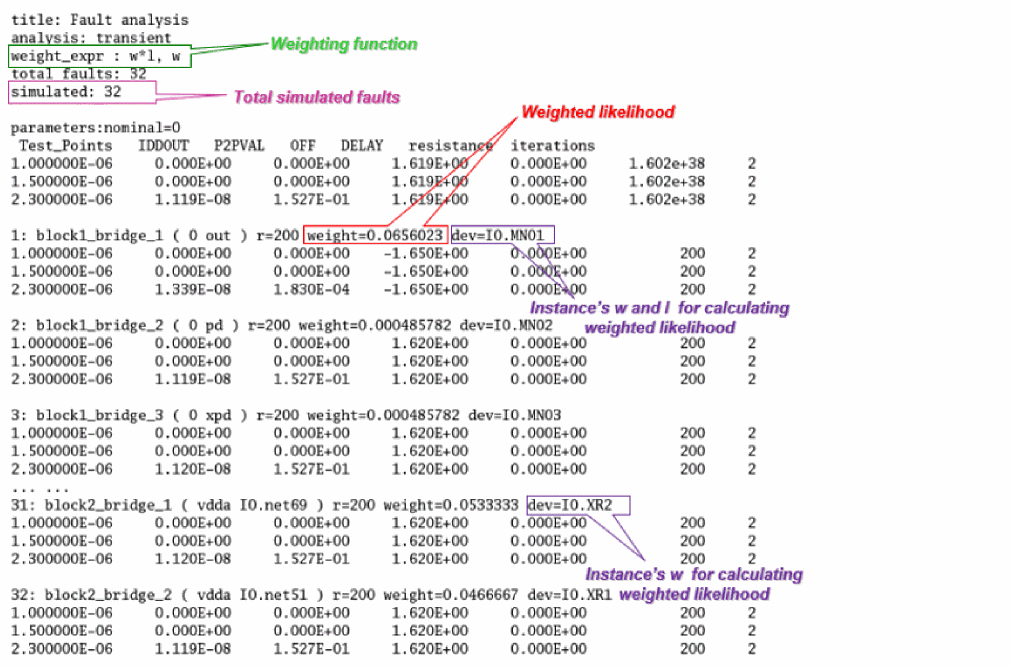
Fault Sampling Output and Confidence Interval Calculation
When fault simulation is performed using random sampling, the fault table file contains the sampling information that includes the sampling method, the total fault number, the number of faults being sampled and simulated.
For the randomweighted and randomuniform sampling methods, the samples can be selected either with or without replacement. When faultsamplereplace=yes is set, then any particular fault can be selected more than once. As a result, the simulated fault number may be less than the number of samples. If a fault was sampled n times, then its statement contains sample=n parameter in the table file. sample=1 is default value, and usually not specified in the table file.
Both sampling methods support the confidence interval calculation by using spectre_ddmrpt or spectre_fsrpt. Both spectre_ddmrpt and spectre_fsrpt allow you to calculate confidence interval when the random sampling-based simulation is finished, or the fault table file is available.
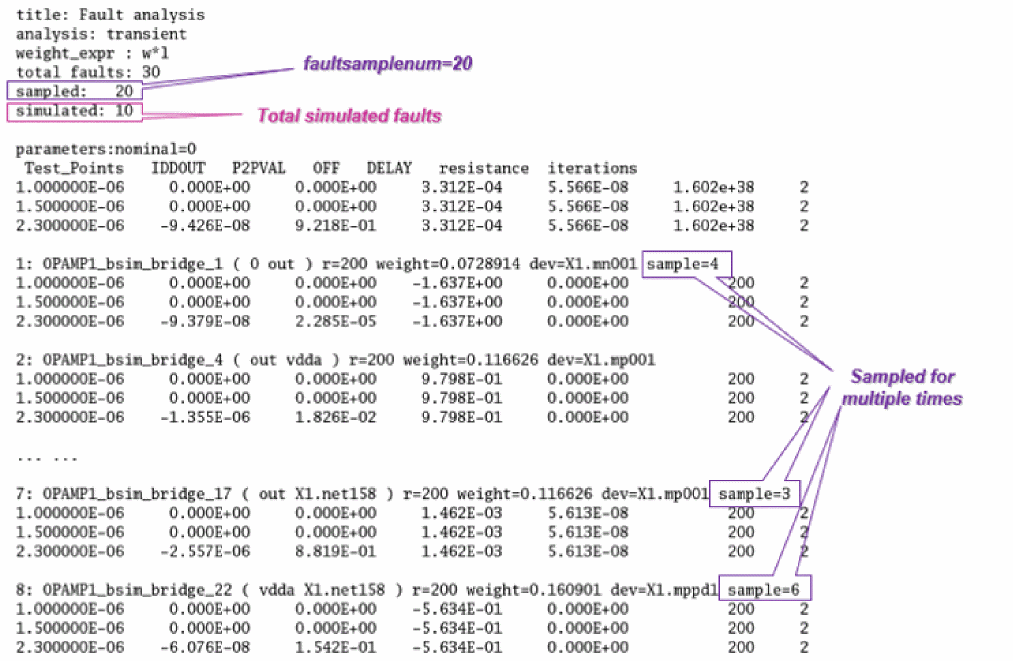
You can choose either Clopper-Pearson or Wald formula using parameter --cr (--confrule) CP|W.
Default confidence level is 95%. The option -cl allows to customize the value.
The following command generates the fault detection report for all signals at faulttime=2.3e-6:
…/bin/spectre_ddmrpt mytest.tranFault.table -t 2.3e-6 -cl 97 -o report_ddmrpt_CI.txt
The confidence interval values are saved for each signal by using the default Clopper-Pearson formula for confidence level 97%.
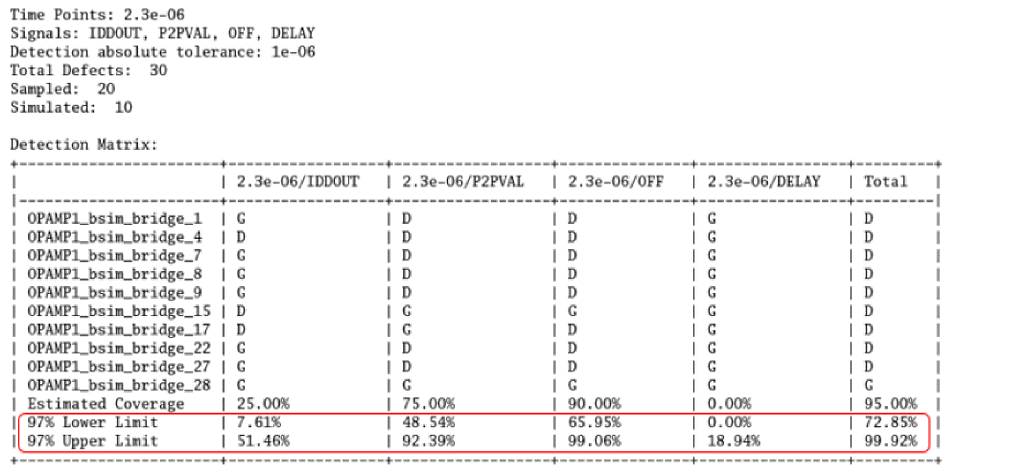
Under some circumstances, you would find the fault number being simulated is inconsistent to what you expect. The table given below shows how Spectre performs the fault simulation with the fault list is provided.
Applying Fault Weighting and Sampling in Fault Simulation
When generating fault list with info analysis, the weighting function can be specified as an expression for each fault and weight factor with constant value for each fault group.
g1_b info what=bridges where=file file=faultlist.scs faultdev=[bsim4]
faultterminals=[d g s] inst=[XI79] weight_expr=w*l weight_factor=0.5
g2_g info what=opens where=file file=faultlist.scs faultdev=[bsim4]
faultterminals=[g] inst=[XI79] weight_expr=w*l weight_factor=0.3
g2_ds info what=opens where=file file=faultlist.scs faultdev=[bsim4]
faultterminals=[d s] inst=[XI79] weight_expr=w*l weight_factor=0.2
Alternatively, you can manually add the weighting value to each fault.
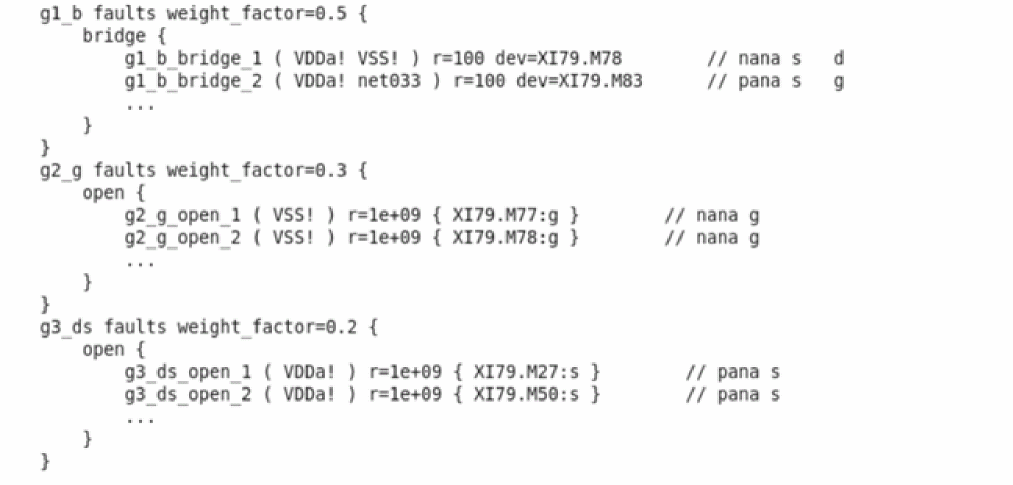
When fault simulation finishes and the fault table is generated, the fault results are saved in fault table file where each fault shows 'weight=#' parameter with weighted likelihood value. The weighted likelihood is normalized weight values according to all defects simulated.
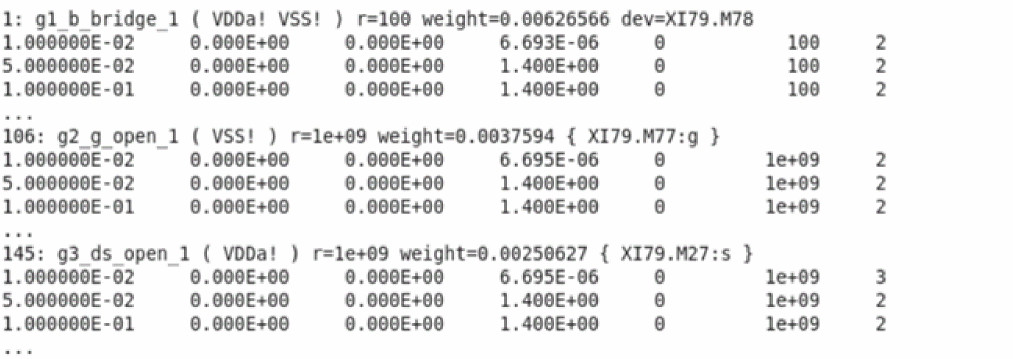
The defect coverage can be calculated based on the weighting of detected faults with spectre_ddmrpt post-processing.
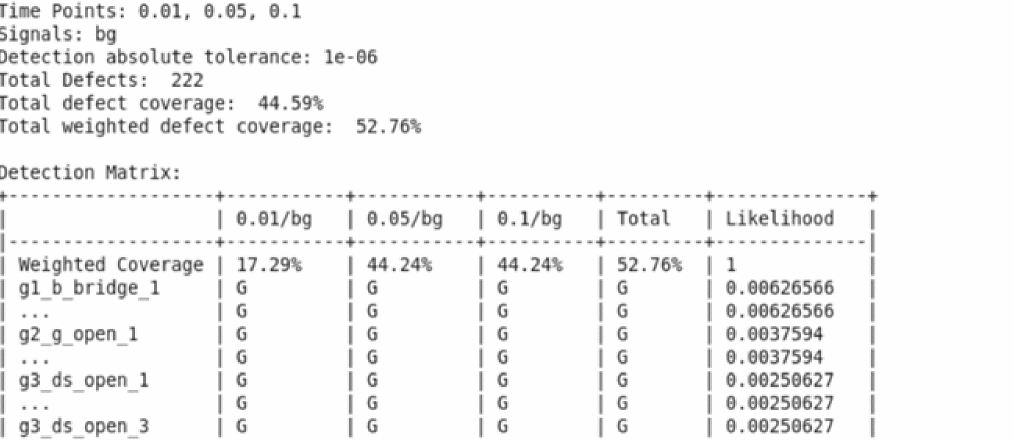
The alternative usage is to enable the auto-stop of fault simulation on the detection criteria set by user. Spectre stops the entire fault simulation when the defect coverage 50% is achieved in the example below. The given confidence level faultconfidlevel can be further specified along with the detection ratio when fault sample method of randomuniform or randomweighted is chosen. Please refer to chapter 4.8.2 for the detail descriptions.
DFA sweep faults=[*] faultsamplemethd=randomweighted faultdetratio=50
faultconfidlevel=95 faultseed=12345
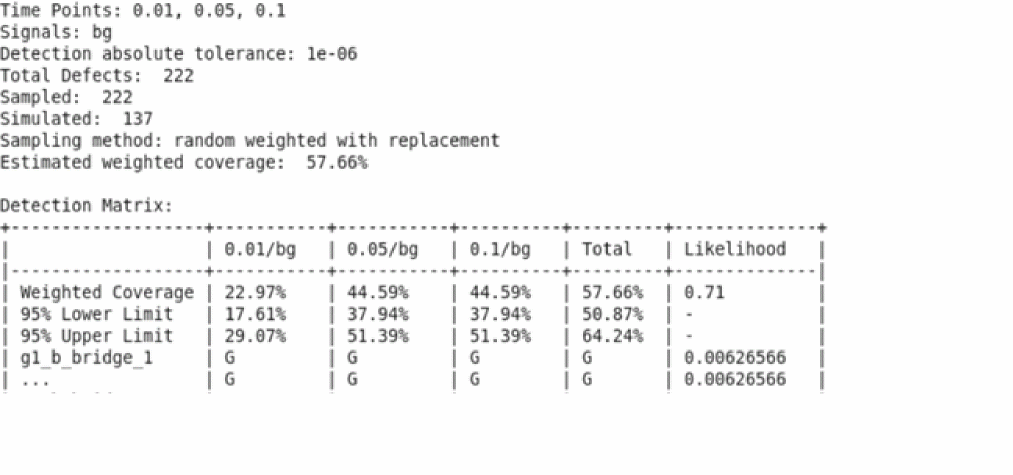
The same setting can be applied to transient statement for TFA simulation.
Assert Checking
Assert violation can be used as a fault detection technique by specifying the boundaries. A fault is detected when an assert violation is triggered. To distinguish the checking of fault analysis from the regular assert check, you can add the safecheck parameter in the assert statement which is used in post-processing of assert violations to generate the functional safety report (see Functional Safety Report Based on Assert Violations).
safecheck=[ none | func | check ]
safecheck=func defines an assert that detects violation in the functional module of the design. safecheck=check defines an assert that detects violation in the diagnostic module (checker) of the design. The violations triggered by safecheck=func show the safety status (Safe or Dangerous), while the violations triggered by safecheck=check indicate the detection status (Detected or Undetected) in the functional safety report. A combination of both types represents the complete functional safety report for a given design. For fault defect detection matrix, defining safecheck=check is sufficient.
The following table lists the built-in functions that are supported by assert checking for fault analysis:
Enabling Asserts for Fault Simulation
Regular asserts are used extensively to check the device operation during the DC, transient, and AC frequency domain analyses. Usually, asserts are defined in the model library to check the safe operation area (SOA) for various devices. The simulation slows down because of the large number of asserts being enabled. Therefore, in fault simulation, asserts are enabled for fault detection only in the checklimit statement using the enable=[fault_assert]option, while the regular asserts are disabled to avoid long simulation time.
checklimit statement is encountered. Therefore, the checklimit statement should be added prior to the analysis where the asserts are applied; for example, sweep or tran analysis.Verilog-A Asserts
In addition to the device-based asserts, Spectre also supports Verilog-A asserts that can be used for fault detection and functional safety analysis.
Following is the syntax to specify an assert in Verilog-A:
$cds_violation(Id, Message, Data, Option);
-
Idrepresents the name of the assert as a constant string -
Messagerepresents the violation message -
Datarepresents the expression of the analog circuit -
Optionrepresents the id number to indicate the type of assert; same as the safecheck parameter in device-based assert. Possible values are:
The example below shows how to generate an assert violation in a Verilog-A application.
module my_va_assert(signal1, signal2);
inout signal1, signal2;
electrical signal1, signal2;
analog begin
if( V(signal1, signal2) > 2.501 ) begin
$cds_violation("assert1", "Input voltage exceeds 2.501!", \
V(signal1, signal2), 2);
end
end
endmodule
The following statement creates an instance of Verilog-A assert, which is the same as creating a regular instance.
AM net1 net2 my_va_assert
In the functional safety report, the assert is printed as
AM.assert1 assert safecheck=check module=my_va_assert
Defining Fault Times
Fault times provide the following two functionalities:
- Faults are injected only at or prior to some given time points in transient fault analysis.
- These time points can be used to save the fault result into a table file. These time points are called fault times.
For fault simulation, you can specify the fault times using any of the following methods:
-
Specify the sweeping points by using the
faultstart,faultstop, andfaultstepparameters -
Specify the discrete time points using the
faulttimesparameter - List the fault times in a separate file to be included in simulation
-
Define the assert and specify the
faulteventparameter
faultstart=0.5m faultstop=1.0m faultstep=0.5m
faultimes = [0.5m 0.75m 1.0m]
faultfile = “./file_test_points.txt”
Fault times in the ./file_test_points.txt file can be defined as follows:
//fault time point
0.5m
0.75m
Specifying Event-Triggered Fault Times
Besides the constant time points for faults to be injected, Spectre provides the flexibility where the time can be determined dynamically as the violation of asserts specified in the faultevent vector. The faultevent vector can contain one, or several event expressions, similar to Spectre event triggered analysis.
The general form of event expression is specified as follows:
"@(basic_event,N) +delay"
N=0 (that is, "@(assert1, 0)") is not supported in current implementation, If you specify 0 as the value for N, only the first occurrence will be processed. The same basic event with different values for N can be specified to cover multiple occurrences. assert1 assert dev=M1 expr="V(d)" min=0 max=0.3
assert2 assert dev=M2 expr="V(g)" min= -0.7 max=0
tranETAtran stop=1u faultmethod=leadtime faultleadtime=100n \
annotate=status faultevent=["@(assert1)" "@(assert2, 2) + 5n"]
In the example above, Spectre will first perform the nominal transient simulation to collect two fault times; the first violation triggered by assert1, and the second assert violation issued by assert2 with 5ns in delay. The nominal simulation will stop automatically, and the transient fault simulation will start with faulttimes set at event times.
You can use the faultevent parameter along with static fault times specified in transient analysis statement.
Stopping Fault Simulation Automatically
You can use the faultautostop parameter in the transient statement to stop the fault simulation automatically based on the assert violation. The faultautostop parameter is supported in both direct and transient fault analysis. Possible values for faultautostop are: no, func, check, both, and all.
Ensure that asserts do not get violated for the nominal transient simulation because they are the golden reference data. You can use the faultsafecheck parameter to terminate the fault simulation if the violation is triggered during the nominal run. The default value for the faultsafecheck parameter is no.
Stopping the Fault Simulation Automatically on Detection Coverage
You can also stop the fault simulation automatically when the required fault detection rate is achieved. The detection rate monitoring is based on the assert violations, therefore, faultautostop is required to be defined in the same analysis. Spectre starts the detection rate tracing with the value given to faultdetratio when the first R% of faults are injected.
faultdevratio=R – Stops the fault simulation automatically when the specified detection ratio is achieved, where R is the percentage of detected faults out of the total fault numbers.
Setting faultdetratio=80 means that the simulation will stop when fault detection rate is 80% of the total number of faults.
You need to specify faultautostop=func|check|both|all with faultdetratio.
Stopping the simulation automatically based on the detection rate is supported in both direct and transient fault analysis. The feature is compatible with fault sampling, the detection ratio is calculated according to number of samples specified.
You can further specify the detection ratio to be achieved with the given confidence level faultconfidlevel for the fault sample methods randomuniform or randomweighted only.
The following are the prerequisites to perform the autostop based on the detection coverage:
-
Specify one or a few Spectre
assertstatements, or a Verilog-A assert with thesafecheckparameter to trace fault detection status. -
Add
faultautostop=check|func|both|allin transient analysis -
Add
faultdetratio=Rin the transient (TFA) statement, or sweep (DFA) analysis, whereR%is the expected detection coverage ratio.
The following table shows the use model and the autostop criteria based on the parameters specified in the tran or sweep statement:
Fault simulation in the job distribution mode is compatible with this feature while the faultdetratio is calculated for each process locally.
Exiting Fault Analysis Based on Maximum Time Limit
When fault simulation takes much longer than the nominal simulation time, you can use faultlimtime parameter to set the absolute time (in hours) to exit the current fault simulation. There is no default value. The following message is generated in the log file when the elapsed time is reached during slow fault simulation.
Simulation of fault bridge_1 achieved limit 0.1 h. Analysis 'myDirect-001_myfault' was terminated at 21.822 us.
(Remove 'faultlimtime' parameter to avoid early termination.)
Number of accepted tran steps = 241
Exiting Fault Analysis Because of Convergence Difficulty
A fault injection into the circuit may cause circuit instability, problems with convergence, or trigger oscillations that can result in more time steps and longer simulation time. With faultlimsteps=yes as default, Spectre monitors the number of time steps taken in fault analysis and automatically exits the simulation when the step count becomes huge in comparison to the nominal simulation. The following message is displayed in the log file when a fault simulation is exited. The iterations saved in table file are set to 0 to indicate early termination.
Simulation of fault bridge_22 is too slow. Analysis 'directfault-022_tran' was terminated at 1.92212 ms.
(Specify 'faultlimsteps=no' to avoid early termination.)
Number of accepted tran steps = 62594
Notice from spectre during transient analysis `directfault-022_tran', during Sweep analysis `directfault'.
Trapezoidal ringing is detected during tran analysis.
Please use method=trap for better results and performance.
To prevent early termination, specify faultlimsteps=no in the tran statement.
The maximum steps allowed to perform one fault simulation can be explicitly set with the parameter faultmaxsteps=N. The simulation will be terminated if it does not complete earlier than the specified step count.
swp-001_dfa: time = 51.17 us (2.56 %), step = 2.864 us (143 m%)
swp-001_dfa: time = 171.3 us (8.56 %), step = 40 us (2 %)
swp-001_dfa: time = 251.3 us (12.6 %), step = 40 us (2 %)
Simulation of fault func_s_bridge_30 achieved limit 1000 steps. Analysis 'swp-001_dfa' was terminated at 1000 step.
(Remove 'faultmaxsteps' parameter to avoid early termination.)
Files Generated for Fault Simulation
Fault Table File
The fault simulation results are saved in a table file where solutions at the fault times are grouped for each fault. The saving is limited to the signals specified in the save statement. The name of the table file is netlistname.tranname.table.
The following is a sample table file:
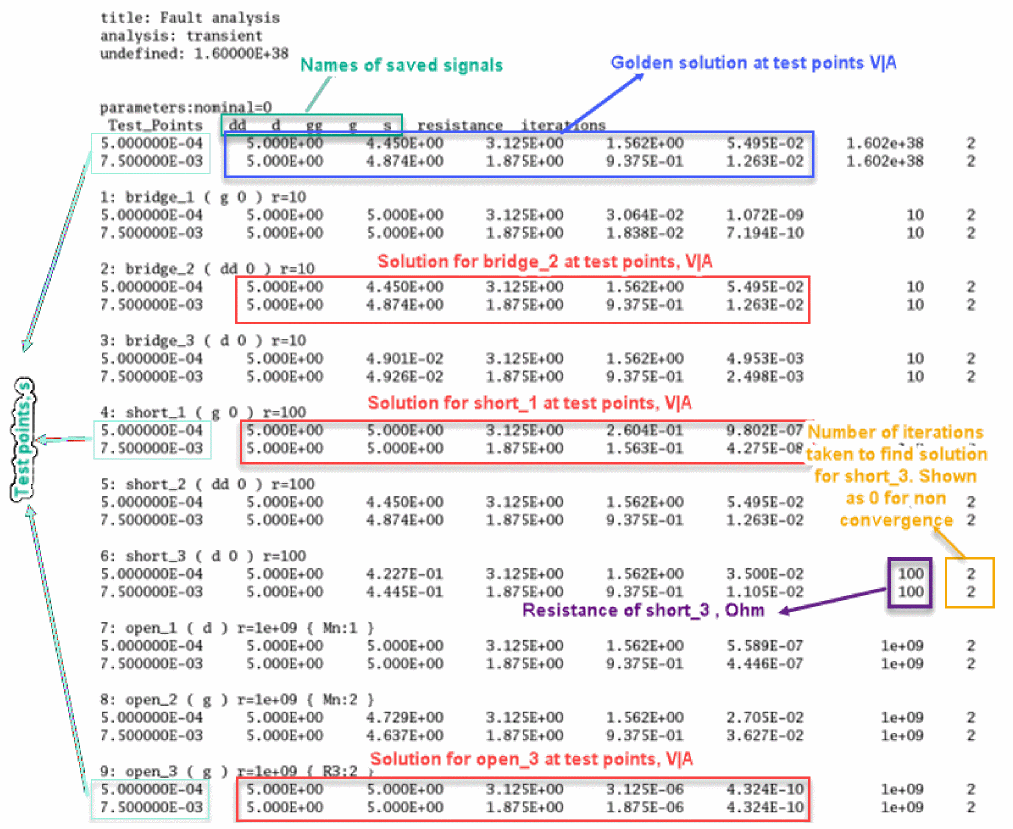
iterations=0 or iterations=1 has a special meaning in the table. If a fault simulation fails to converge or is terminated by Spectre due to slow simulation with faultlimsteps=yes, the value of iterations is set to 0. The value 1 indicates that the fault simulation has been stopped automatically.When no fault time point is specified for fault simulation, the only time point for fault result saved is the transient stop time, as shown in the table below.
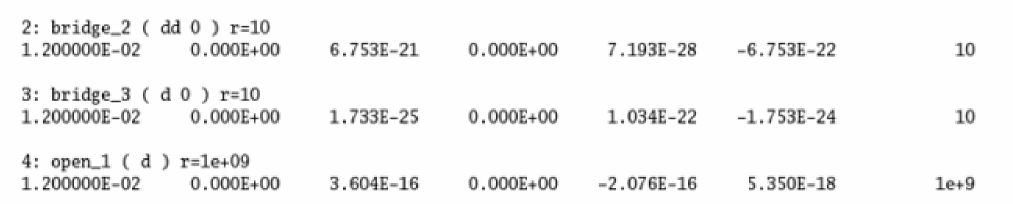
Assert Violation Database
If asserts are defined in the netlist for fault detection, the assert violations, by default, are saved in an SQL database. You can use the checklimitdest=both option to save the results in both log file and SQL database.
The assert violations are also saved in the fault table file as 0 or 1, where, 0 indicates that a fault in undetected and 1 indicates that the fault is detected.
Spectre Direct Fault Analysis
Direct fault analysis uses sweep to iterate over the fault list and run the nested child analyses, such as tran, dc, ac, and so on.
Use Model
The following is the use model for Spectre direct fault analysis:
DirectName sweep faults=[ * | faultblock1...] nominal=[yes|no] [faultsid=[...]] [faultsname=[...]][faultsinst=[...]] faulttablefmt=[txt|bin] faultsamplenum=sampleNumfaultsampleratio=[R1 R2] faultseed=seedValuefaultsamplemethod=faultMethodfaultsamplereplace=[yes|no] faultsort=[yes|no]
faultcollapse=[yes|no] faultduplicate=[yes|no] faultsave=testpointsfaultddm=filePathfaultdb=filePathfaultleadtime=[...]sfaultmaxiters=maxItersanalysisName tran|dc|ac
}
You can use the savedatainseparatedir parameter with possible values of no (default), yes, and name to save the results in separate directories.The directory is named as SAFE_separate/<dirNumber>/mytran.tran.tran where <dirNumber> corresponds to the sweep index when the savedatainseparatedir=yes, and fault name when savedatainseparatedir=name.
Direct Fault Simulation for Transient Analysis
The following is the syntax for direct fault simulation for transient analysis.
DirectName sweep faults=[ * | faultblock1...] nominal=[yes|no][faultsid=[
...]][faultsname=[...]][faultsinst=[...]]{
TranName tran stop=10u step=1p
}
The following is an example of running the transient simulation for all faults blocks including the fault-free simulation before the direct fault analysis starts.
Directfault sweep faults=[*] nominal=yes {
tran1 tran start=0 stop=3e-3 annotate=status
}
The following example shows that only second, fourth, fifth, sixth, seventh, and eighth faults are selected to run direct fault analysis.
Selectfault sweep faults=[*] faultsid=[2 range(4,8)] {
tran1 tran start=0 stop=3e-3 annotate=status
}
Direct Fault Simulation for DC Analysis
The following is an example of direct fault simulation for DC analysis:
DirectName sweep faults=[ * | faultblock1...] nominal=[yes|no][faultsid=[
...]][faultsname=[...]][faultsinst=[...]]
{
DCName dc
}
dev, mod, or param is not supported.Direct Fault Simulation for Other Analyses
For other analyses, such as AC analysis, Spectre can perform simulation, but does not support post-processing for functional safety report.
DirectName sweep faults=[ * | faultblock1...] nominal=[yes|no][faultsid=[
...]][faultsname=[...]][faultsinst=[...]]
{
ACName ac start=1e3 stop=1e9
}
Functional Safety Report Based on Assert Violations
When a fault simulation is performed, a functional safety report is generated based on the result of assert violation that contains important information for analog fault test. Spectre provides the capability to measure the functional safety of the design using single-point fault metric (SPFM) and latent fault metric (LFM).
In the functional safety application, a design includes two modules, a functional module and a safety mechanism module. The safecheck=func parameter is used to track the functional module while safecheck=check is used for checking the safety mechanism module. Both safecheck=func and safecheck=check are mandatory to generate the functional safety report.
Spectre contains an executable file named spectre_fsrpt that is designed to post-process the log files and the assert violations when fault simulation is complete.
The functional safety report consists of safety report summary, detection summary, list of observation points, and diagnostic and detection detail matrix. If safecheck=check is specified, the column Detection is generated. If both safecheck=func and safecheck=check are specified, the column Safety is generated. The last section displays the coverage summary in percentage, as shown in the following figure.
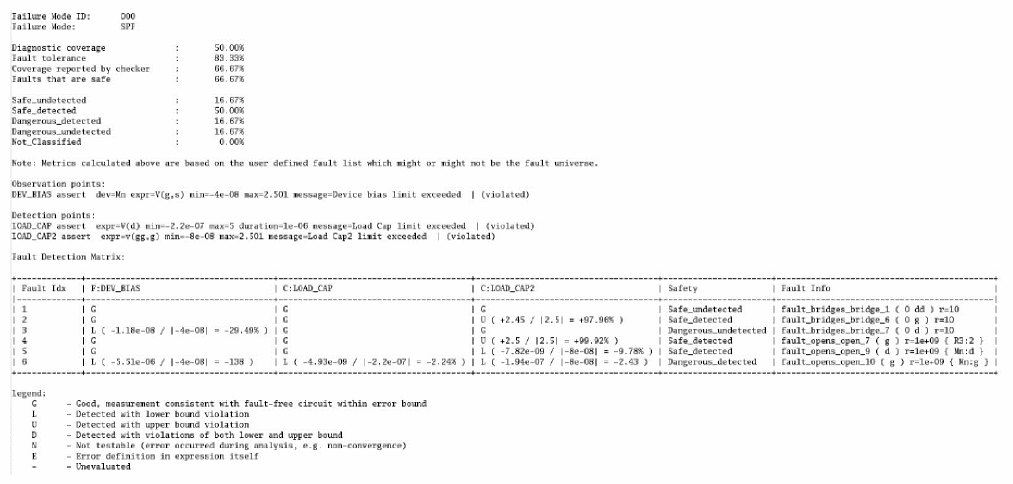
-
The legend for functional and safety check is as follows:
-
G: Not detected, measurement consistent with fault-free circuit within error bound -
D: Detected, no clear definition of lower or upper bound (multiple violations, ...) -
L: Detected with lower bound violation -
U: Detected with upper bound violation -
E: Error definition in expression itself -
N: Untestable (non-convergence, any failure of fault simulation, fixed power / ground value, ...) -
-: Cannot evaluate (wrong expression, or asserts not violated prior toautostoptriggered by the another assert)
-
- Detection summary displays the following information:
-
Safety Summary
-
C1(Safe_undetected)when fault is undetected by bothsafecheck=funcandsafecheck=[check] -
C2 (Safe_detected)when fault is undetected bysafecheck=funcbut detected bysafecheck=[check] -
C3(Dangerous_detected)when fault is detected by bothsafecheck=funcandsafecheck=[check] -
C4(Dangerous_undetected)when fault is detected bysafecheck=funcbut undetected bysafecheck=[check]
-
- Peak violation of asserts
-
Summary in Percentage (Total=C1+C2+C3+C4)
- Diagnostic coverage = [ C3/(C3+C4) ]
- Fault tolerance = [ (C1+C2+C3)/Total ]
- Coverage reported by checker = [ (C2+C3)/Total ]
- Faults that are safe = [(C1+C2)/Total]
- Safe_undetected = C1/Total
- Safe_detected = C2/Total
- Dangerous_detected = C3/Total
- Dangerous_undetected = C4/Total
- Fault coverage = Detected / (Detected + Undetected) x100%
When fault sampling is applied in DFA with faultsamplemethod=randomweighted or faultsamplemethod=randomuniform, the confidence interval metrics are calculated and included in the FuSa report automatically based on the default confidence level 95%.
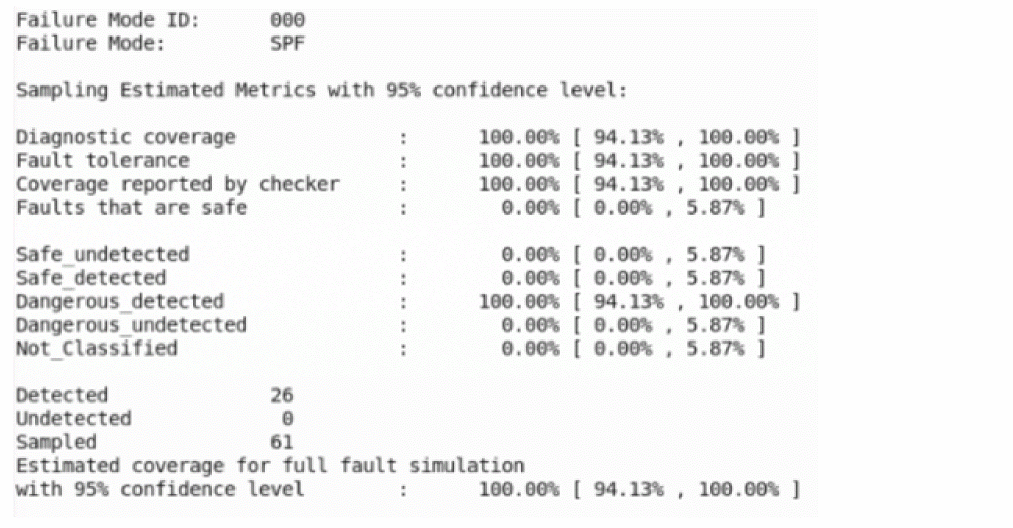
Using Spectre for Functional Safety Verification
Fault analysis can be used to simulate the diagnostic coverage by simulating each failure mode in the design identified in the FMEDA Verification Plan. In the FMEDA Verification Plan, the failure modes are defined, as well as, the type of fault metrics are analyzed. The results are reported in terms of Single Point Fault (SPF), or Latent Fault (LF).
Single Point Fault (SPF)
Single point faults are faults in a functional module that violate the safety goal. The purpose of the analysis is to identify if the dangerous faults are detected by the safety mechanism.
Let us discuss this with an example of a voltage regulator design, as shown below.
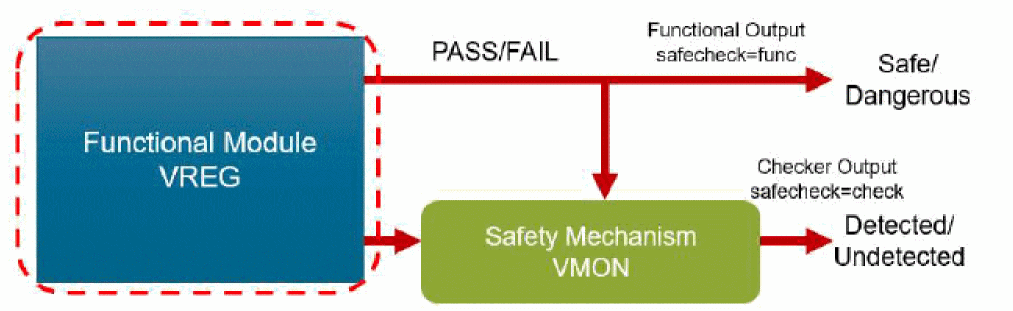
In the figure above, VREG block is the functional module and VMON block is the safety mechanism module.
To illustrate single point faults, consider a voltage regulator used in an ECU. The voltage regulator (VREG) block is the functional module. The safety mechanism or checker is a window comparator used to monitor the output in VREG. If the output of VREG is outside the safe operating range, then the VMON block will report that a dangerous condition has been detected at the output of VREG.
In Spectre Fault Analysis, two types of assertions are defined. A safecheck=func assertion is used to check the output of the functional module and determine if the safety goal has been violated. safecheck=check is used to monitor the output of the safety mechanism and determine if the violations of the safety goal have been detected.
The diagnostic coverage report is generated based on the violations of the safety goal from the functional module and the ability of the safety mechanism to detect those violations. The report is shown below.
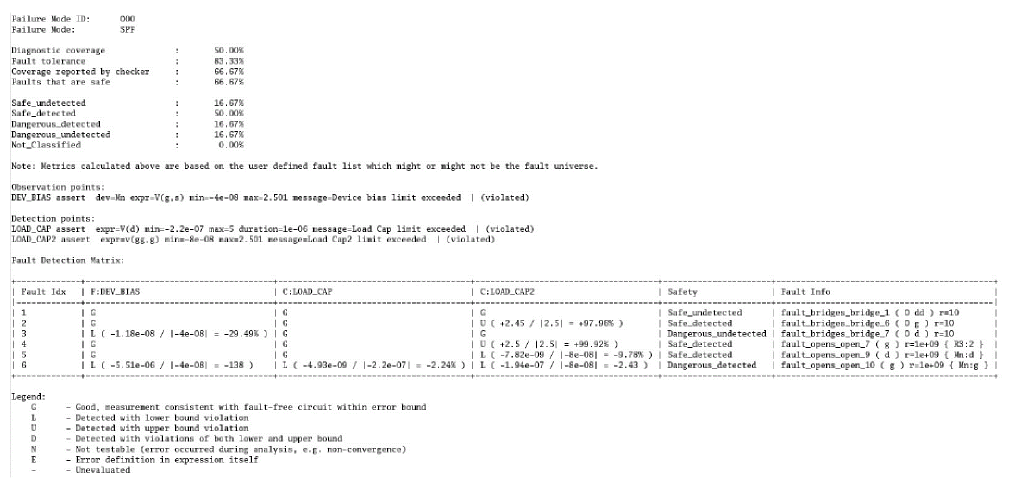
Latent Faults
Latent faults are the faults in the safety mechanism. These faults do not become active until a fault occurs in the functional module. In the Voltage Regular example, the faults in VMON block are active when the output of VREG is in a dangerous state. Since there is a fault in the VMON block, the dangerous fault may not be detected. So a latent fault is a fault in the safety mechanism module (checker/diagnostic module) which results in a functional failure not being detected.
To test for a latent fault, the input of VMON is forced to a dangerous state and the output of the safety mechanism is monitored to check if the fault is detected. The detection is performed by a separate diagnostic block used to monitor the safety mechanism. An example of a diagnostic block for the safety mechanism might be redundancy to improve the diagnostic coverage. In the example, three VMON blocks are used and if two or more detections are made, it means that there is a fault. Another approach for detecting latent faults would be to use an Analog Built-In Self-Testing (ABIST) block to periodically monitor whether or not the safety mechanism can detect failures. For example, use a DAC to apply a dangerous state at the input of the VMON block to monitor if it is detected.
Latent Faults can be of the following two types:
-
Latent Fault Continuous (LF-C): If the output of the safety mechanism is monitored continuously to identify the latent faults, a continuous safety mechanism for latent faults is used. Simulating for latent faults when a continuously monitoring checker is used is equivalent to simulating for single point faults. The safety mechanism becomes the functional module of the test and the checker is the safety mechanism of the test, as shown in the following figure.
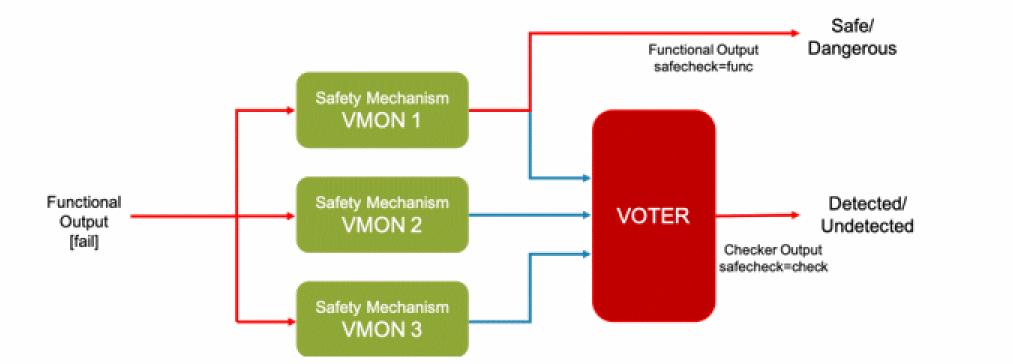
-
Latent Fault Periodic (LF-P): If the output of the safety mechanism is monitored periodically to identify latent faults, then a periodic safety mechanism for latent faults is used. An example of simulating for latent faults with periodic monitoring using analog Build-In Self-Testing (ABIST) module is shown below.
LF-P is a two-step process.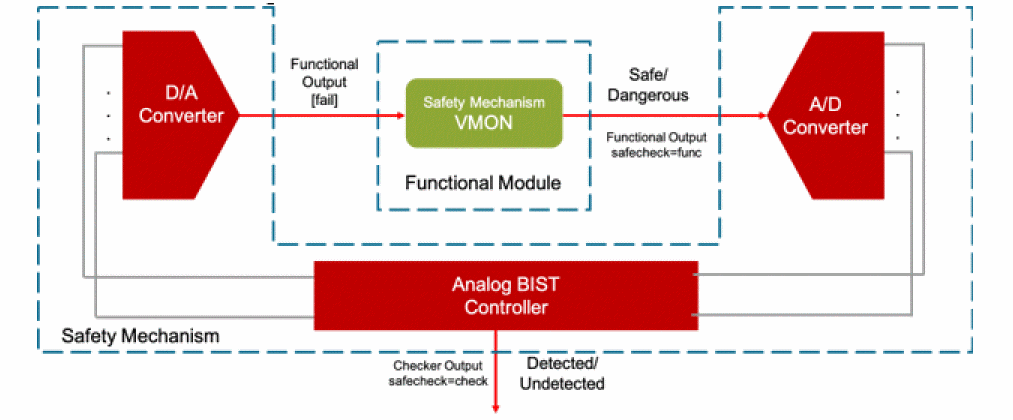
-
In the first step:
- Asserts are defined for both functional and checker blocks. Fault simulation is performed when functional asserts are enabled, and checker asserts are disabled.
-
Faults that are detected as Dangerous are identified to be used in the second step. The report contains the Safe and Dangerous faults classification.
%spectre_fsrpt -FM LFP -FMID 000 dfa_1.log -dang \
fault_list_dang.scs -o LFP_func.fsrp
t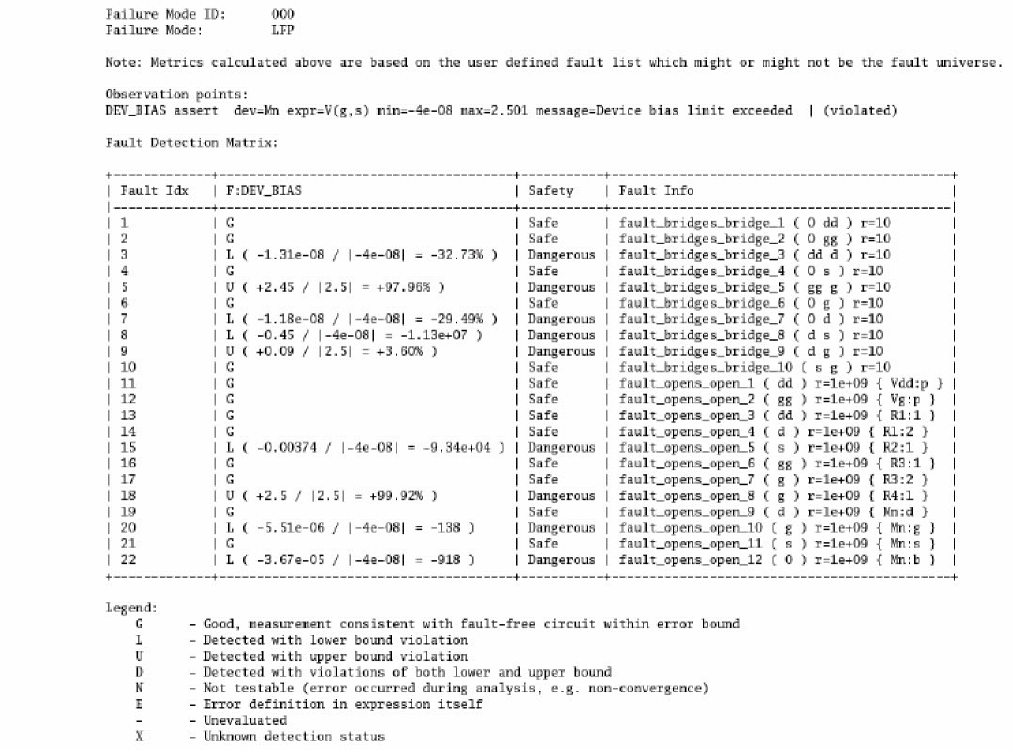
-
In the second step:
- Dangerous fault list is included in the netlist. Checker asserts are enabled and functional asserts are disabled to perform simulation.
-
A report is generated that contains the Detected and Undetected faults classifications for all the dangerous faults.
% spectre_fsrpt -FM LFP -FMID 111 dfa_2.log -o LFP_check.fsrpt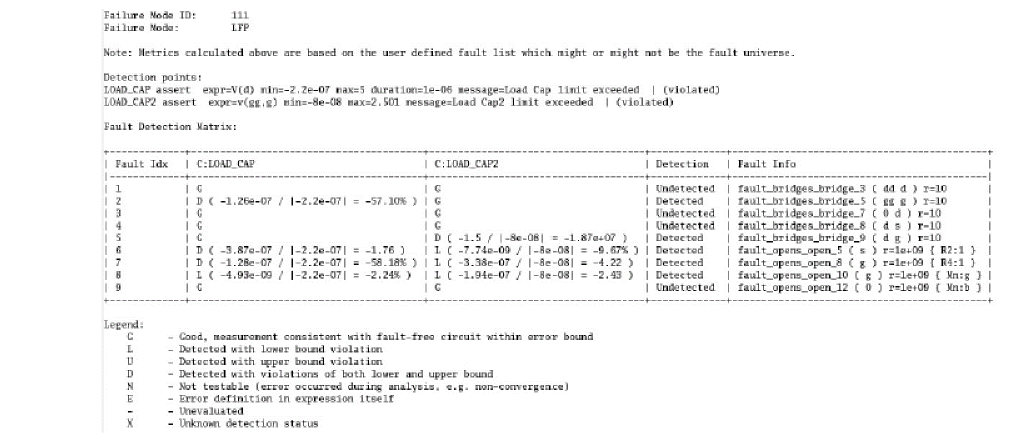
-
You can merge
LFP_func.fsrptandLFP_check.fsrptto getSD,SU,DD,DUclassification and calculate the diagnostic coverage.%spectre_fsrpt LFP_func.fsrpt LFP_check.fsrpt -FM LFP -FMID 222 -o LFP_full.fsrpt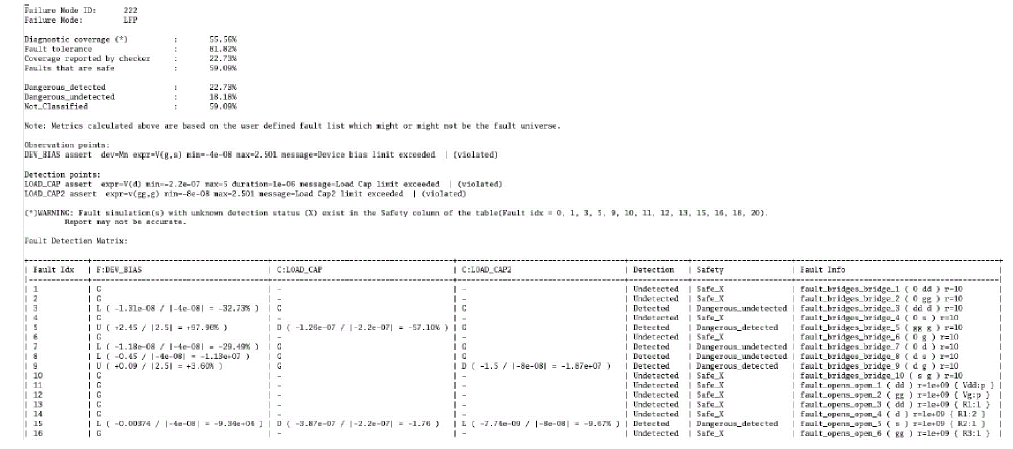
-
In the first step:
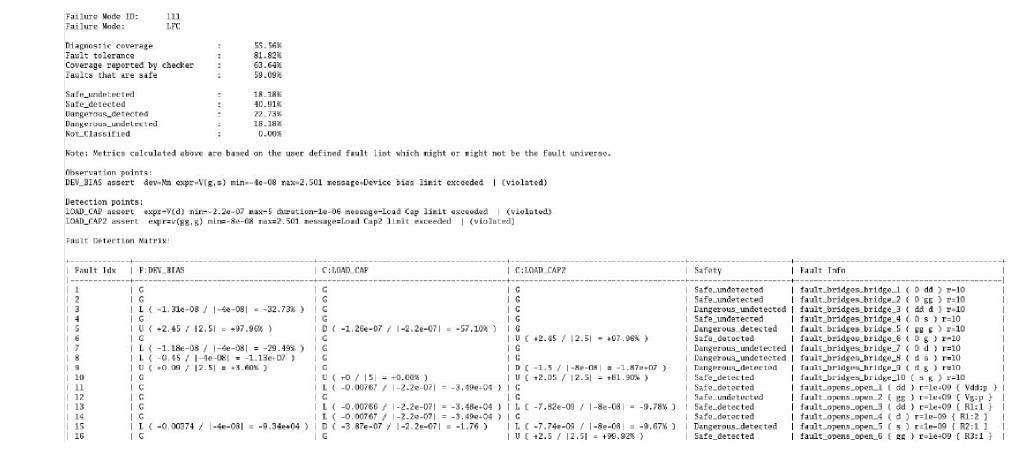
Getting Started With Direct Fault Analysis Using Asserts
The following example of Direct Fault Analysis provides a guidance on how to generate the functional safety report based on the assert setup approach.
Direct fault analysis evaluates the asserts with safecheck throughout the simulation. The faultstart and faultstop options only affect the creation of the table file. Direct fault analysis can also be used for generating the fault detection report. Refer to Spectre Transient Fault Analysis for defect detection matrix generation based on fault table file.
Preparing and Starting Direct Fault Analysis
Once the fault list is ready, you need to set up the direct fault analysis, as shown below.
-
Specify the asserts to be checked for both functional and diagnostic modules, as shown below, as shown below.
DEV_BIAS assert safecheck=func dev=Mn expr="V(g,s)" min=-4e-8 max=2.501 message="Device bias limit exceeded"
LOAD_CAP assert safecheck=check expr="V(d)" min=-22e-8 max=5 duration=1u message="Load Cap limit exceeded"
LOAD_CAP2 assert safecheck=check expr="v(gg,g)" min=-8e-8 max=2.501 message="Load Cap2 limit exceeded"
-
Enable
checklimitfor fault simulation related asserts only followed by the direct fault analysis statement.faultcheck checklimit enable=[ DEV_BIAS LOAD_CAP LOAD_CAP2 ]
-
Specify the direct fault analysis statement for running child transient analysis for all faults, as shown below.
-
Without specifying the fault times
Directfault sweep faults=[*] {
tran1 tran start=0 stop=3e-3 annotate=status
}
-
By specifying the fault times, the fault result is saved in a table file at the fault time points.
Directfault sweep faults=[*] {
tran1 tran start=0 stop=3e-3 annotate=status faulttimes=[0.5m 7.5m]
}
-
Without specifying the fault times
-
Run the simulation as follows.
%spectre +aps report_dfa.scs +log report_dfa.log -o out_fusa_dfa/
Viewing Data Output
In the log file, the list of faults is reported in the Circuit inventory section, as shown below.
Circuit inventory:
nodes 6
assert 5
mos11010 1
resistor 6
vsource 2
Design checks inventory:
bridge 10
assert 3
open 12
SAFE: nominal_SAFE = 0 (0 %) -----> fault free simulation, index=0
++++++++++++++++++++++++++++
Time for SAFE itNum=0: CPU = 9.999 ms, elapsed = 10.07294798 s.
Time accumulated: CPU = 304.953 ms, elapsed = 41.14494801 s.
Peak resident memory used = 46.5 Mbytes.
Notice from spectre at faults_SAFE = 0 during transient analysis `SAFE-000_tran1',
during Sweep analysis `SAFE'.
No checklimit analysis defined for asserts. A default checklimit analysis
'SpectreChecklimitAnal' has been created with all asserts enabled.
The following asserts will be enabled for all subsequent analyses until the next
checklimit analysis statement is found:
DEV_BIAS : ON
LOAD_CAP : ON
LOAD_CAP2 : ON
**********************************************************
Transient Analysis `SAFE-000_tran1': time = (0 s -> 12 ms)
**********************************************************
DC simulation time: CPU = 999 us, elapsed = 353.8131714 us.
... ...
SAFE-000_tran1: time = 300.3 us (2.5 %), step = 17.95 us (150 m%)
SAFE-000_tran1: time = 987.7 us (8.23 %), step = 93.86 us (782 m%)
SAFE-000_tran1: time = 1.655 ms (13.8 %), step = 240 us (2 %)
SAFE-000_tran1: time = 2.135 ms (17.8 %), step = 240 us (2 %)
SAFE-000_tran1: time = 2.808 ms (23.4 %), step = 192.3 us (1.6 %)
SAFE-000_tran1: time = 3.315 ms (27.6 %), step = 17.41 us (145 m%)
... ...
+++++++++++++++++++++++++++++++++++++++
SAFE: bridge_1_SAFE = 1 (11.11111111 %) ---> Sweeps from 1st fault
               bridge_1_SAFE;index=1
+++++++++++++++++++++++++++++++++++++++
Time for SAFE itNum=1: CPU = 0 s, elapsed = 179.0523529 us.
Time accumulated: CPU = 350.946 ms, elapsed = 41.21105385 s.
Peak resident memory used = 48.2 Mbytes.
**********************************************************
Transient Analysis `SAFE-001_tran1': time = (0 s -> 12 ms)
**********************************************************
DC simulation time: CPU = 0 s, elapsed = 174.0455627 us.
... ...
SAFE-001_tran1: time = 969.6 us (8.08 %), step = 85.16 us (710 m%)
SAFE-001_tran1: time = 1.62 ms (13.5 %), step = 240 us (2 %)
SAFE-001_tran1: time = 2.34 ms (19.5 %), step = 240 us (2 %)
SAFE-001_tran1: time = 2.82 ms (23.5 %), step = 240 us (2 %)
The data is saved in the raw directory (out_fusa_dfa/report_dfa.raw/) with the following names:
-
Sweep for transient analysis:
[SweepName-sweepIndex_TranName].tran.tran, for example,SAFE-001_tran1.tran.tran -
Assert violations are saved in sqldb format: NetlistName
.sqldb, for example,direct_fault.sqldb -
Sweep for transient assert violation if a violation is triggered:
[SweepName-sweepIndex_TranNameViolations].violations, for example,SAFE-007_tran1Violations.violations
When the raw data is plotted in the waveform viewer, each curve represents one fault result with the fault id shown in the legend, as shown below. id=0 is the nominal fault-free result. The fault table file shows more details about the fault id associated with the fault statement.
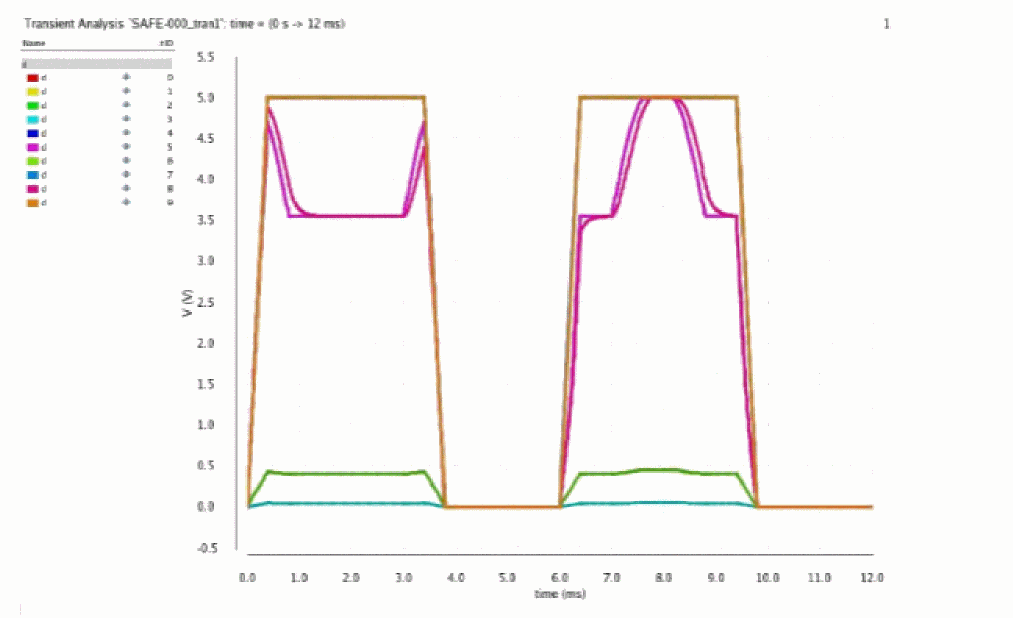
Post-processing for Functional Safety Report
You can use the Spectre binary spectre_fsrpt to generate the functional safety report based on the assert violation for Direct Fault Analysis on screen, or direct the output to a file. The script reads the log file and looks for the path of sqldb file for violations.
%.../bin/spectre_fsrpt out_fusa_dfa/report_dfa.log
%.../bin/spectre_fsrpt out_fusa_dfa/report_dfa.log -o FuSa_dfa.txt
You may run a few fault tests with the same test bench for different fault lists and generate one functional safety report for each test. The spectre_fsrpt binary helps you merge all these reports to a complete one.
The following is an example of running three fault simulations for different fault lists:
spectre +aps direct_fault_1.scs -outdir out_merge_1/
spectre +aps direct_fault_2.scs -outdir out_merge_2/
spectre +aps direct_fault_3.scs -outdir out_merge_3
The following is an example of generating three functional safety reports for different simulations:
%…/bin/spectre_fsrpt out_merge_1/f1_dfa_merge_1.log -o FuSa_1.txt
%…/bin/spectre_fsrpt out_merge_2/f1_dfa_merge_2.log -o FuSa_2.txt
%…/bin/spectre_fsrpt out_merge_3/f1_dfa_merge_3.log -o FuSa_3.txt
The following is an example of merging three reports into one functional safety report:
%…/bin/spectre_fsrpt FuSa_1.txt FuSa_2.txt FuSa_3.txt -o FuSa_Full.txt
You can extract the new fault list for the C1(SU), C2(SD), C3(DD), and C4(DU) (see Functional Safety Report Based on Assert Violations for definition of C1, C2, C3, and C4) categories to a file for further simulation during the generation of the functional safety report, as shown below.
%…/bin/spectre_fsrpt out_fusa_dfa/report_dfa.log -o FuSa_dfa.txt \
-DU DU_Fault_List.scs
%…/bin/spectre_fsrpt out_fusa_dfa/report_dfa.log -o FuSa_dfa.txt \
-DD DD_Fault_List.scs
%…/bin/spectre_fsrpt out_fusa_dfa/report_dfa.log -o FuSa_dfa.txt \
-SD SD_Fault_List.scs
%…/bin/spectre_fsrpt out_fusa_dfa/report_dfa.log -o FuSa_dfa.txt \
-SU SU_Fault_List.scs
In addition to the options, such as -DU, -SU, -SD, and -DD, you can save the fault lists to a file based on either Detection or Safety column in the report using the following options:
-
-safefilename saves all faults from report withSafe_*status%…/bin/spectre_fsrpt out_fusa_dfa/report_dfa.log -o FuSa_dfa.txt \
-safe safe_Fault_List.scs
-
-dangfilename saves all faults from report withDangerous_*status%…/bin/spectre_fsrpt out_fusa_dfa/report_dfa.log -o FuSa_dfa.txt \
-dang dangerous_Fault_List.scs
-
-detfilename saves all faults from report with*_Detectedstatus%…/bin/spectre_fsrpt out_fusa_dfa/report_dfa.log -o FuSa_dfa.txt \
-det detected_Fault_List.scs
-
-undetfilename saves all faults from report with*_Undetectedstatus%…/bin/spectre_fsrpt out_fusa_dfa/report_dfa.log -o FuSa_dfa.txt \
-undet undetected_Fault_List.scs
When the fault simulation only contains one type of assert and the report has either Detection or Safety column, the -DU, -SU, -SD, and -DD options are not applicable and spectre_fsrpt generates a warning and ignores the request.
-
Options
-safe, and-dangcan be used only whenSafetycolumn exists in the report.%…/bin/spectre_fsrpt out_fusa_dfa/report_dfa.log -o Func_dfa.txt \
-safe safe_Fault_List.scs
%…/bin/spectre_fsrpt out_fusa_dfa/report_dfa.log -o Func_dfa.txt \
-dang dangerous_Fault_List.scs
-
Options
-detand-undetcan be used when theDetectioncolumn exists in the report.%…/bin/spectre_fsrpt out_fusa_dfa/report_dfa.log -o Check_dfa.txt \
-det detected_Fault_List.scs
%…/bin/spectre_fsrpt out_fusa_dfa/report_dfa.log -o Check_dfa.txt \
-undet detected_Fault_List.scs
In the functional safety report, the solutions and violations are listed for the detected faults in relative percentage, as shown below.

With parameter -s --short added in command line, spectre_fsrpt generates the table without solutions display, as shown below.

Including or excluding Instances with the Given Hierarchical Name
While generating the defect coverage based on hierarchy or design scope in the netlist, you can apply the scope parameters -i or -I to include or -x to exclude a subset of the fault list that belongs to the specified subcircuit instances.
%spectre_fsrpt inp.log ---inst ""X1 Xa*""
%spectre_fsrpt inp.log ---xinst ""X1.X*""
Generating a Report Based on the Name of Signals/Asserts
Use parameter -s to generate the report only for the selected signals or asserts. You can specify a comma-separated list of signals or asserts to specify multiple signals or asserts. Wildcards '''' and '''' are also supported when an expression is enclosed in quotes.
%spectre_fsrpt -sh -s avg_qqq, vgs_g45n1svt_LEV1 out/input.log
> report_signals.txt

%spectre_fsrpt -sh -s avg_qqq''vgs_g45n1svt_LEV'' out/input.log
> report_wilds.txt

Merging Reports for the Faults with Same Connection but Different Fault ID
By default, same fault is included only once when merging the report files. With parameter -r (--incredund) specified in command, spectre_fsrpt includes redundant faults with different IDs into a combined report when merging several report files.
%spectre_fsrpt -r spfm_1.rpt spfm_2.rpt > merge_incl.rpt
Using the faultautostop Feature in Direct Fault Analysis
You can use the faultautostop parameter to enable the autostop feature in direct fault analysis. Fault simulation stops whenever an assert violation is triggered for the defined check. The example shows that autostop has been enabled by using faultautostop=both, which is required for functional safety report generation. You can also set faultautostop=func or faultautostop=check, if required.
SAFE sweep faults=[ * ] {
tran1 tran stop=12e-3 annotate=status faulttimes=[5m 6.5m] \
faultautostop=both
}
When faultautostop=func|check|both|all, the violation triggered by at least one of the asserts causes the simulation to stop automatically. Asserts that are not violated before autostop are marked as untestable (-) in the functional safety report.
The format of the output table file of signals and currents remains the same; they are independent of autostop. All data for the time points after the autostop gets replicated from the last found solution and the iterations value is set to 1, as shown in the following figure.

The log file displays a message about autostop and the fault simulation getting terminated, as shown in red below.
Fault analysis for bridge_1 : 22 time steps
Intrinsic bridge_1 analysis time: CPU = 62.991 ms, elapsed = 74.63693619 ms.
DC simulation time: CPU = 1 ms, elapsed = 536.9186401 us.
Fault analysis for bridge_2 : 361 time steps
Intrinsic bridge_2 analysis time: CPU = 17.997 ms, elapsed = 18.2697773 ms.
DC simulation time: CPU = 0 s, elapsed = 524.9977112 us.
Fault analysis for bridge_3 : 183 time steps
Intrinsic bridge_3 analysis time: CPU = 9.999 ms, elapsed = 10.31899452 ms.
DC simulation time: CPU = 0 s, elapsed = 522.1366882 us.
Fault analysis for open_1 : 182 time steps
Intrinsic open_1 analysis time: CPU = 9.998 ms, elapsed = 10.59818268 ms.
DC simulation time: CPU = 0 s, elapsed = 493.0496216 us.
Warning from spectre at time = 3.8 ms during transient analysis `timezero'.
WARNING (SPECTRE-4103): LOAD_CAP2.open_2: Instance , Load Cap2 limit exceeded.
Expression `v(gg,g)' having value -121.3205893e-09 has exceeded its lower bound `-80e-09'.
Fault open_2 detected with assert. Analysis terminated due to autostop at 3.8 ms.
Warning from spectre at time = 3.8 ms during transient analysis `timezero'.
WARNING (SPECTRE-4121): LOAD_CAP2.open_2: instance , Load Cap2 limit exceeded.
Expression `v(gg,g)' exceeds its lower bound `-80e-09' . Peak value was -121.3205893e-
09 at time 3.8e-03. Total duration of overshoot was 0.
Fault analysis for open_2 : 5159 time steps
Intrinsic open_2 analysis time: CPU = 227.965 ms, elapsed = 228.9030552 ms.
DC simulation time: CPU = 0 s, elapsed = 524.0440369 us.
Warning from spectre at time = 400.2020912 us during transient analysis `timezero'
WARNING (SPECTRE-4104): LOAD_CAP2.open_3: Instance , Load Cap2 limit exceeded.
Expression `v(gg,g)' having value 2.501260569 has exceeded its upper bound `2.501'.
Fault open_3 detected with assert. Analysis terminated due to autostop at 400.2020912 us
Improving Performance
Direct fault analysis provides the most accurate results; however, it takes long to complete the simulation when the fault list is long, or the nominal simulation is slow. To speed up the simulation for direct fault analysis, you can use the distribute option to distribute a sweep analysis across multiple machines. Using the fork, lsf, or sge option, you can choose to launch the child processes. You can use the command-line option +mp=<numprocesses> to specify the number of child processes to be launched.
Job Distribution
To enable the distributed mode of Direct Fault Analysis, use +mp at the Spectre command line. With the following statement, the master job requests one CPU and issues three new bsub commands with the same set of bsub parameters used for the master. The master job and the first child job forked from the master are run in one CPU, while the remaining child jobs are distributed in different CPUs. In case the first (forked) child job completes sooner, it waits for all the distributed child jobs to finish and then the results of all the jobs are merged.
%bsub -R "(OSNAME==Linux)" "spectre +aps -mt +mp=3 direct_fault.scs -outdir fullpath/out_dfa_mp/"
You can set different LSF queues for the master and child jobs using the environment variable CDS_MMSIM_MP_QUEUE. Setting this variable to a particular queue submits the distributed jobs in that queue. The master job runs in the original queue specified in the bsub command while submitting the job.
For example, if you set the value of the CDS_MMSIM_MP_QUEUE environment variable to batch (setenv CDS_MMSIM_MP_QUEUE batch) and run the test case containing sweep analysis and +mp in a bsub command with interactive queue, the parent job is run in the interactive queue and the distributed jobs are run in batch queue in LSF.
You can enable multithreading for each job. The following examples shows that each job runs with mt=4 on one host:
%bsub –R “(OSNAME==Linux) span[hosts=1]” -n 4 “spectre +aps +mt=lsf +mp=3
direct_fault.scs –outdir fullpath/out_dfa_mp/“
To run the distribution on one machine, you may use the following command with a single thread.
%spectre +aps -mt +mp=3 direct_fault.scs –outdir out_dfa_mp/
During DFA, it is hard to predict the expected performance for a group of faults since it depends on many factors, such as type of faults, detectability, triggered oscillation, and so on. You can use the faultsort option for better load balancing. When faultsort is set to no, the order of faults to be simulated is based on random sampling. As a result, the faults assigned to a specific process are simulated according to the number of samples.
myDFA sweep faults=[*] faultsort=no {
DFA tran start=0 stop=100p annotate=status faultautostop=check
}
The default setting faultsort=yes keeps the existing order according to the faults defined in the fault list.
Using the Automated Three-Step Process
To provide a more convenient way to perform functional safety analysis, an automated three steps process is implemented to integrate the fault generation, direct fault simulation, and perform post-processing for functional safety report. You can use the +fsa command-line option to automate the process of performing functional safety analysis. You need at least one assert statement with the safecheck parameter specified in the netlist to run the automated flow.
Specifying the Fault List
To run functional safety analysis, the existing fault list can be included, or a new fault list can be generated using info analysis. Following three scenarios are possible:
-
infoanalysis for fault generation precedes the direct fault analysis (sweep analysis) or transient fault analysis (transient analysis) in the netlist
or -
A fault list is included in the netlist and direct fault analysis (sweep analysis) or transient fault analysis (transient analysis) is specified
or -
infoanalysis for fault generation precedes direct fault analysis or transient fault analysis, and a fault list is included in the netlist. In this case, both fault lists will be used in direct fault analysis.
If neither info analysis for fault generation is specified nor the fault list is included in the netlist, Spectre generates an error message and skips fault simulation.
Performing Direct Fault Analysis with +fsa
You need to define a sweep or tran analysis in the netlist to perform either direct fault analysis or transient fault analysis for the automated simulation. Following are the rules to handle the faults parameter in the sweep or tran statement:
-
If a fault list is included in the netlist, the
faultsparameter keeps the functionality as defined (faults=[*], orfaults=[block_1]) -
If
infoanalysis for fault generation is specified, withoutfaultblock=block_name, thenfaults=[*]will enforce all generated faults to be considered in direct fault analysis or transient fault analysis -
If
infoanalysis hasfaultblock=block_name specified, then the name of the block can be used infaults=[block_name]
Fault scoping parameters in sweep (faultsid, faultsname, faultsinst) are supported.
When direct fault analysis completes, spectre_fsrpt runs automatically to generate the functional safety report. The data is saved as log_file_name.fsrpt in the same path as the regular log file.
Enabling One Step Simulation
If the info statement for fault generation is defined in the netlist and transient statement is specified either for direct fault analysis or transient fault analysis, Spectre performs one step simulation for the faults created by the info statement.
Spectre Transient Fault Analysis
Spectre direct fault analysis is applicable only for small-sized designs, or a small fault count. In most practical cases, direct method may take months or years to finish the simulation.
Spectre transient fault analysis improves the performance of analog fault simulation and delivers results with the required accuracy, within reasonable time. Spectre uses the abstraction of only applying the faults at user-defined transient time points (fault times). Different methods are available for injecting the faults at the fault time points. The methods differ in how long (how many steps/iterations) they inject the fault.
The longer the injection interval, the higher is the chance to match the direct fault simulation reference, and therefore, the better is the accuracy. However, the longer the injection interval, the longer is the simulation time. The shorter the injection interval, the less likely is the chance that the fault will impact the circuit behavior. On the other hand, the simulation time is fast, and it may still provide an initial overview of the fault impact.
The following is the syntax for transient fault analysis:
TFAName tran start=0 stop=50n [faults=[ * | faultblock1...] faulttimes=[…]…]
You can specify the following fault parameters with transient analysis:
When the value of the faultstrobe parameter is set to yes, parameters given in the table below can be used to output the fault simulation points into a fault table file. With the leadtime or timezero method, Spectre saves only faulttimes=[] into a fault table file although fault simulation is run over some time intervals (for example, faultleadtime interval for leadtime, and full transient time for timezero). You can use faultstrobe=yes and the strobestart|strobestop|strobestep|strobeperiod parameters to save additional strobe points into the fault table to save the simulation without injecting the faults too many times.
The parameter skipstart may contain several time points specified incrementally and strobeperiod is applied to every skipstart value. For example, when skipstart=[1n 2n 3n] and strobeperiod=10n, then the strobing time points are 1n, 2n, 3n, 11n, 12n, 13n, 21n, and so on.
Selecting the Fault Analysis Method
The choice of fault simulation method can be specified using the faultmethod=[method] parameter in Spectre transient analysis. Possible values for faultmethod are: linear, maxiters, onestep, leadtime, and timezero.
The unique technology of Spectre’s transient fault analysis, which allows to speed up the performance, is based on temporary fault injection, only in the vicinity of the fault times during transient simulation. When fault-free simulation reaches the fault time, the state of faultless circuit is saved and used as an initial guess for the fault injected circuit. Fault simulation starts at the time point with the method set in the transient analysis statement.
The following methods are supported in transient fault analysis.
-
faultmethod=linear
With a fault injected, Spectre simulates one time step at the fault time and limits the number of Newton iterations to one. Simulation interrupted early allows you to estimate the sensitivity of the design to a particular fault at the given time point. This is the default method and has the fastest performance for fault analysis with limited accuracy. This is the default method. -
faultmethod=maxiters
Spectre integrates the time step at the fault time taking multiple Newton iterations till it converges orfaultmaxitersis reached. The default value is50formaxiters, 10 foronestep, and5for other methods. You can use thefaultrampstepsparameter withmaxitersto improve convergence and reduce the number of iterations required. The resistance of the injected bridge is ramped gradually from a large value to the value specified in the fault list. The recommended value forfaultrampstepsis10. -
faultmethod=onestep
This method performs asmaxitersinitially. However, if the simulation does not converge, it reduces the time step and continues the iterations until a solution is found. Multiple time steps may be needed in some situations, which may affect the simulation performance. -
faultmethod=leadtime
When higher accuracy is needed, defect should be taken into consideration prior to each fault time with the time interval offaultleadtime. For one of the fault time points, for example,faulttime_i, the fault is injected at (faulttime_i-faultleadtime), and Spectre performs the transient fault simulation by using the Newton iteration and time step control tillfaulttime_iis reached. Thefaultleadtimeparameter specifies the leading time intervals where the fault is injected before the fault times whenfaultmethod=leadtime.-
faultleadtime=val: Specifies constant lead time for all fault times -
faultleadtime=[val1]: Specifies different lead times for different points. If the number of fault times is greater than the number of specified intervals, the last lead time is applied for the remaining points.
The optional parameterfaultrampintervalcan be used with thefaultleadtimemethod. This coefficient (between 0 and 1) defines the portion of the lead time interval to ramp up the fault conductance after the fault injection to improve convergence. The default value is0.25.
By default, Spectre uses the nominal simulation states as initial conditions for each fault to start the fault simulation. However, it is difficult to converge to the correct value when the actual fault result is far away from the nominal value. You can usefaultic=yesto enable Spectre to perform dc analysis after the fault injection to find better initial conditions instead of the nominal solution. Possible values areno,bridge,open,custom,param, andall. -
-
faultmethod=timezero
The fault is injected at time zero and a complete transient fault analysis is performed for every time step. However, the faulty result is saved only at the required fault times. This is the most accurate mode; however, the simulation takes much longer.
The following table provides a comparison of the different fault methods:
|
Time step at fault time, or multiple steps (if current step gets rejected) |
All time steps within the interval |
||||
Generating the Defect Detection Matrix Report Based on Fault Table File
To screen the defect devices out of high volume production, it is important to select the effective fault times to measure the critical ports and signals during transient fault analysis.
The tested signals, ports, or currents can be specified using the save statement or measurement definition, just like the transient, dc, and sweep simulation. You can choose to save the complete set of fault analysis results, or the results at each fault time only. This can be controlled by the option faultsave whose default value is testpoints.
faultsave=[testpoints|all|none]
By default, fault analysis saves the fault simulation results only at the fault times and stores them in the tran_faults.tran file. When faultsave=all, the fault_timestep.tran file is saved in addition to the fault time data. It is recommended not to use faultsave=all for large fault lists because it occupies a lot of disk space. In addition, faultsave=all works for all methods except linear.
You can use the faultsave=none option to avoid any simulation slowdown due to waveform saving and also reduce the disk space usage. Simulation results are saved only in the fault table file.
You can use the following two parameters (supported in both DFA and TFA) to choose the format in which to save the file:
-
faultfmt: File format to save the fault simulation data. Possible values arecsv,xl,sql. -
faultdb: File name to save the fault simulation data in the format specified usingfaultfmt.
The following figure shows the sample fault simulation data generated using the above parameters for both formats. The tables are generated as fault IDs/names vs. fault times. For each test port (saved signal), a separate file is generated. The name of the signal is added as a suffix to the faultdb name.
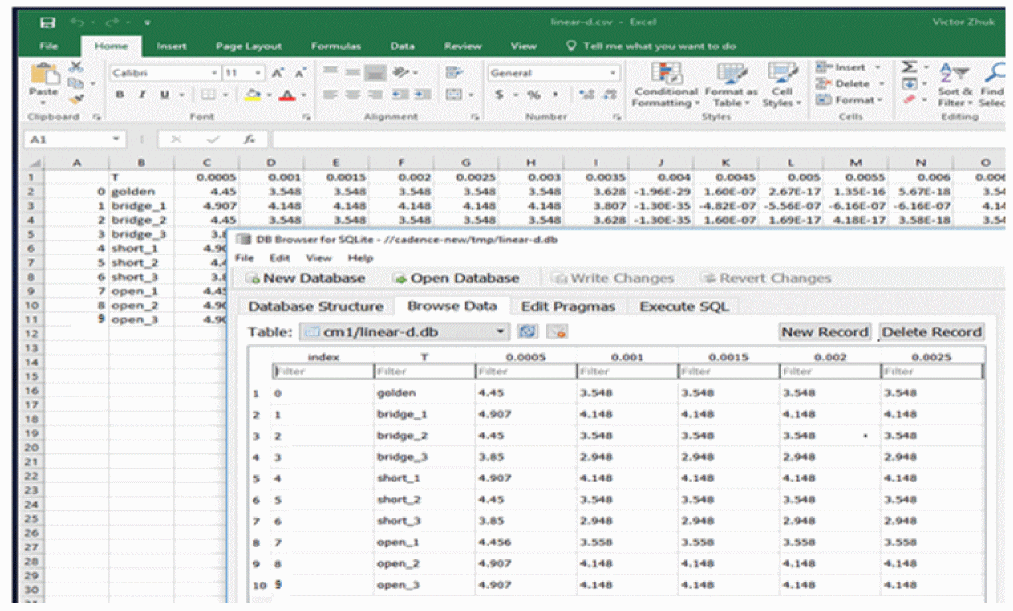
Assert Checking and Autostop in Transient Fault Analysis
Assert checking (see Assert Checking)evaluates the violation continuously over the transient time. Transient fault analysis does the same for fault methods timezero and leadtime. For linear, maxiters and onestep, Spectre evaluates the assert checking only at fault times.
You can enable autostop by using the option faultautostop=func|check|both|all based on the detection of assert violation.
Assert detection is saved in a transient fault table file to provide assert compatibility for direct fault analysis.
Single Point Fault (SPF) and Latent Faults (multiple points) are also applied to Transient Fault Analysis.
Getting Started with Transient Fault Analysis
Preparing and Starting Transient Fault Analysis
Spectre transient fault analysis requires a complete simulation test bench with fault list, fault time(s), test signal(s)/port(s), and the fault method defined using the tran analysis statement. Fault analysis is ignored when this critical information is missing.To perform transient fault analysis, you need to perform the following:
-
Specify the test signals/ports to be checked using the
savestatement, as shown below.save d g s
-
Specify the fault times and fault method and some of the faults in the transient statement, as shown below.
leadtime tran start=0 stop=12e-3 errpreset=conservative maxiters=5
+ faults=[fault_bridges fault_opens ]
+ faultsname=[fault_bridges_bridge_6 fault_bridges_bridge_1
...
...

+ faulttimes=[2.5m 5.5m 7.5m]
+ faultmethod=leadtime faultleadtime=0.1m
-
Run the simulation, as shown below.
%spectre report_tfa_leadtime.scs +l tfa_leadtime.log -outdir out_ddm_tfa/
-
To run a full fault simulation with the faults injected at time zero and enable autostop, use the examples of the transient statement and the Spectre command, as shown below.
timezero tran start=0 stop=12e-3 errpreset=conservative maxiters=5 +
.....
+ faulttimes=[7.5m] faultmethod=timezero
+ faultautostop=all
%spectre tfa_timezero_autostop.scs -outdir out_tfa_autostop/
Viewing Data Output of Transient Fault Analysis
In the log file, the list of faults is reported in circuit inventory, as shown below.
Circuit inventory:
nodes 6
mos11010 1
resistor 5
vsource 2
Design checks inventory:
bridge 10
assert 3
open 12
Fault parameter values:
faultmethod = leadtime
faultleadtime = 100 us
faulttimes = [ 5 ms 5.5 ms 6 ms 6.5 ms ]
The Spectre log file also reports the transient fault simulation by printing the fault numbers which failed to converge at every fault time(s). The counting of time step for each fault is also monitored and printed. If the counting is too large, Spectre switches the faultmethod to maxiters automatically.
The following is an example of the Spectre log file:
**************************************************
Transient Analysis `leadtime': time = (0 s -> 12 ms)
****************************************************
Opening the PSF file out_faults/test_fault.raw/leadtime.tran.tran ...
Important parameter values:
start = 0 s
outputstart = 0 s
stop = 12 ms
step = 12 us
maxstep = 120 us
... ... ...
relref = alllocal
cmin = 0 F
gmin = 1 fS
rabsshort = 1 mOhm
... ... ...
leadtime: time = 300.5 us (2.5 %), step = 3.067 us (25.6 m%)
leadtime: time = 926.3 us (7.72 %), step = 63.13 us (526 m%)
leadtime: time = 1.526 ms (12.7 %), step = 120 us (1 %)
leadtime: time = 2.126 ms (17.7 %), step = 120 us (1 %)
leadtime: time = 2.726 ms (22.7 %), step = 120 us (1 %)
leadtime: time = 3.3 ms (27.5 %), step = 6.726 us (56.1 m%)
leadtime: time = 3.942 ms (32.8 %), step = 58.15 us (485 m%)
Transient fault analysis started at fault time 5 ms.
Fault analysis for fault_bridges_bridge_1 : 2 time steps
Fault analysis for fault_bridges_bridge_2 : 5 time steps
Fault analysis for fault_bridges_bridge_3 : 2 time steps
Fault analysis for fault_opens_open_1 : 2 time steps
Fault analysis for fault_opens_open_2 : 9 time steps
Fault analysis for fault_opens_open_3 : 2 time steps
Transient fault analysis finished at time 5 ms : 6 (100.00%) simulations succeeded.
leadtime: time = 5.1 ms (42.5 %), step = 200 us (1.67 %)
Transient fault analysis started at fault time 5.5 ms.
Fault analysis for fault_bridges_bridge_1 : 3 time steps
Fault analysis for fault_bridges_bridge_2 : 6 time steps
Fault analysis for fault_bridges_bridge_3 : 3 time steps
Fault analysis for fault_opens_open_1 : 3 time steps
Fault analysis for fault_opens_open_2 : 15 time steps
Fault analysis for fault_opens_open_3 : 3 time steps
Transient fault analysis finished at time 5.5 ms : 6 (100.00%) simulations succeeded.
leadtime: time = 5.815 ms (48.5 %), step = 120 us (1 %)
Transient fault analysis started at fault time 6 ms.
Fault analysis for fault_bridges_bridge_1 : 3 time steps
Fault analysis for fault_bridges_bridge_2 : 6 time steps
Fault analysis for fault_bridges_bridge_3 : 3 time steps
Fault analysis for fault_opens_open_1 : 3 time steps
Fault analysis for fault_opens_open_2 : 15 time steps
Fault analysis for fault_opens_open_3 : 3 time steps
Transient fault analysis finished at time 6 ms : 6 (100.00%) simulations succeeded.
leadtime: time = 6.302 ms (52.5 %), step = 5.143 us (42.9 m%)
Transient fault analysis started at fault time 6.5 ms.
Fault analysis for fault_bridges_bridge_1 : 11 time steps
If some of the faults from the list take more time steps than the average step count, Spectre, by default, terminates that simulation and generates a message in the log file, as shown below.
Warning from spectre at time = 79.024 us during transient analysis `Leadtime'.
WARNING (SPECTRE-16872): Transient fault simulation is too slow for b_X123_fault_2 and was terminated at time 100 us.
This approach, along with faultlimsteps=yes, allows you to avoid situations when some run sticks with minimal time stepping, or a fault triggers oscillations and number of steps increase multifold, and therefore, one fault may take hours to finish. It is applied to the leadtime and timezero test methods; however, sometimes, you may see the same warning message with the onestep method. You may note that the simulation finishes when the slow fault is run separately because of no average step count recorded.
To disable the termination of fault simulation due to slow performance, use the faultlimsteps parameter.
-
faultlimsteps=yes: Exit the slow simulation automatically for the faults taking above average number of time steps. Possible values arenoandyes. The default value isyes. -
faultlimsteps=no: Continue fault simulation even if it is slow.
The data is saved in the raw directory (out_test/tfa_test_fault.raw/) with the following names in pairs:
-
Transient analysis:
[TranName].tran.tran, for example,linear.tran.tran -
Transient fault analysis:
[TranName_faults].tran, for example,linear_faults.tran
The waveform plot below shows the fault data saved with the default setting faultsave=testpoints.
- The nominal transient (without faults) is consistent with the golden saved in the fault raw file only at fault times.
-
The fault result of
bridge_2is the same as golden data indicating that the fault is not detectable whilebridge_1andbridge_3are off golden, which shows that the faults are detectable.
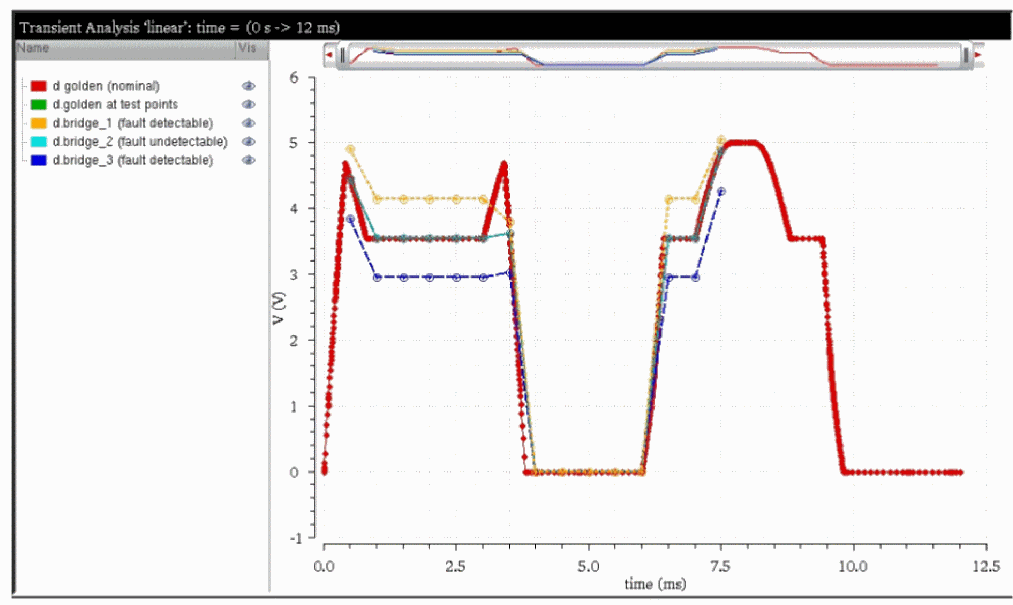
With the option faultsave=all, in addition to the above fault waveforms, extra files are generated for each fault at every fault time in the format [FaultName-TestPointTime].tran.tran. For example, bridge_1-1.00e-03.tran.tran. This option is not recommended because it generates a large data file.
In addition to the raw file, a textual fault table is generated with the name [Nelist].[TranName].table. For example, if the following statements are specified in the netlist,
leadtime tran start=0 stop=12e-3 faultstart=0.5m faultstep=0.5m faultstop=7.5m
+ faultmethod=leadtime faultleadtime=0.1m
linear tran start=0 stop=12e-3 faultstart=0.5m faultstep=0.5m +faultstop=7.5m
maxiters_rampstep tran start=0 stop=12e-3 faultstart=0.5m faultstep=0.5m +faultstop=7.5m faultmethod=maxiters faultrampsteps=10
onestep tran start=0 stop=12e-3 faultstart=0.5m faultstep=0.5m faultstop=7.5m + faultmethod=onestep
the following four tables, corresponding to the four transient statements are generated in the out_test directory.
tfa_test_fault.leadtime.table
tfa_test_fault.linear.table
tfa_test_fault.maxiters_rampstep.table
tfa_test_fault.onestep.table
Post-Processing of Table File for Detection Matrix
Spectre installation contains an executable file spectre_ddmrpt that evaluates the fault table file and generates the defect detection matrix. spectre_ddmrpt reads the fault result and compares the data with the nominal value. A fault is detected when the difference is greater than the tolerance. The criteria are set based on the relative (-r) and absolute (-a) tolerance in the command parameters.
The simplified use model is shown below.
spectre_ddmrpt [-h] [-t TIMEPTS] [-s SIGNALS] [-a ABSTOL] [-r RELTOL]
[-m MERGE [MERGE ...]] [-o OUTPUT] [-p] [-cl CL] [-q]
[--ct] [--ce] [--cd CSVDET] [--cs CSVSOL] [--xd XLSXDET]
[--xs XLSXSOL] [--sd SQLDET] [--ss SQLSOL] [--td TXTDET]
[--ts TXTSOL] [-D DET] [-G UNDET] [-N ERRFAULT]
[-A AUTOSTOP] [-oe OCEAN] [-rf RESULTS_FILE]
[-cf CALC_FILE] [-vf VAR_FILE] [-raw RAW_DIR] [--er ELEMREPORT]
[--du DEFECTUNIV] [-O OCEAN_OUTPUT_FILE] [-P OUTDIR]
FILES [FILES ...]
The following criteria are used to determine whether the fault is detected. The default value for ABSTOL is 0.005 and RELTOL is 5%.
delta(fault_result - nominal_result) >= ABSTOL (5m) + RELTOL (5%) * nominal_result
The values 0 and 1 for the iterations have a special meaning in the table file. All the signals are marked as N for the value 0 if the simulation fails due to convergence issues or is terminated. The signals are marked as D for the value 1 if the simulation is autostopped due to assert violation.
The untestable signal saved as N is not counted in the detection coverage rate. If there is a need to include it, use the option --coverr, as shown below.
…/bin/spectre_ddmrpt --coverr out_ddm_tfa/tfa.leadtime.table -o report_ddm
To generate the defect coverage based on hierarchy or design scope in the netlist, you can apply the scope parameters -i to include or -x to exclude a subset of the fault list that belongs to the specified subcircuit instances.
spectre_ddmrpt inp.table --inst "X1 Xa*"
spectre_ddmrpt inp.table --xinst "X1.X*"
Report of defect coverage can be generated by a subset of faults whose names start with the specified prefix or matching the specified wildcard string.
%…/bin/spectre_ddmrpt top.table -b "bridgeFaults*" -o myreport_block.txt
You can generate the defect detection matrix report automatically right after the fault simulation. You can define any option for running spectre_ddmrpt in a file, for example, ddm_options.txt and set faultddm=ddm_options.txt. Once the fault simulation is performed, spectre_ddmrpt is started automatically to generate the report with the options.
In ddm_options.txt file, the following are defined where the absolute value of 0.04V and relative value of 5% are used for generating the report.
-a 0.04 -r 0.05
In the end of the Spectre log file, the command to run the defect detection report is shown as the following messages.
Processing fault analysis data:
…/bin/spectre_ddmrpt fault_sim/myOPAMP.tranFault.table -a 0.04 -r 0.05
-o fault_sim/myOPAMP.tranFault.ddmrpt -q
The report name is generated in the format [Netlist].[TranName].ddmrpt.
spectre_ddmrpt also performs the following tasks:
-
Output or save the detection matrix into
csv,xls, orsqlformat for every test port, when the detection limit has the simple form as percentage difference from nominal (golden) solution - Compares the detection accuracy of several simulations saved in the table files and outputs the fault detection summary for a given test port, when the detection limit has the simple form as percentage difference from nominal (golden) solution
-
Transform the table data into
csv,xls, orsqlformat (similar to thefaultdbparameter in a transient statement)
You can use the following command to find the description of all the available options:
%…/bin/spectre_ddmrpt -h
Below are some examples of the usage of spectre_ddmrpt.
tfa_test_fault.linear.table file exists.-
%…/bin/spectre_ddmrpt tfa_test_fault.linear.table --cs SOL -s d
The above command processes thetfa_test_fault.linear.tablefile and saves all solutions for signaldinto aSOL.csvfile with the following annotations:Time Points: 0.0005, 0.0045, 0.0075
Signals: d
Detection Matrix:
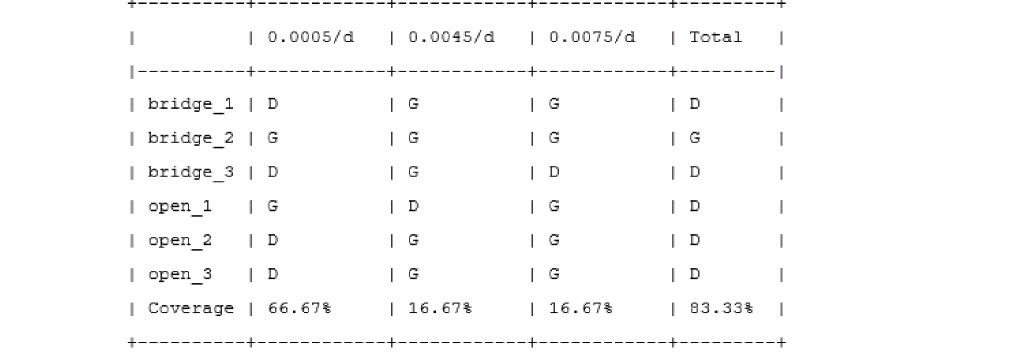
Solution Matrix:
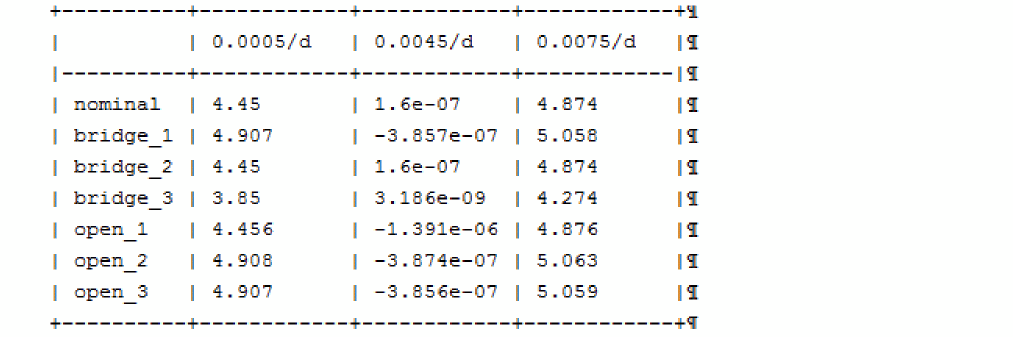
Legend:
G - Good, measurement consistent with fault-free circuit within error bound
D - Detected with violations of error bound
N - Not testable (error occurred during analysis, e.g. non-convergence)
- - Unevaluated
Solution matrix saved to SOL.csv.
The newSOL.csvfile can be used to apply more advanced detection rules using Excel features.
If you have two or more table files (for example,tfa_test_fault.tmezero.table,tfa_test_fault.linear.table, andtfa_test_fault.onestep.table) that result from several fault simulations under the same conditions (same fault times and test ports) but with different methods, or different set of simulation parameters, you can compare the detection accuracy by taking the first table file as reference. -
%.../bin/spectre_ddmrpt tfa_test_fault.timezero.table tfa_test_fault.linear.table tfa_test_fault.onestep.table -s g -t 1.5e-3 -r 5
This command compares the detection with 5% limit for signalgand testpoint at1.5e-3, and generates the following output:
Files: test_fault.leadtime.table (Golden), test_fault.onestep.table (Measured-1),
test_fault.maxiters_rampstep.table (Measured-2)
*** Analysis 1 Time Point: 0.0015 Signal: g ***
Summary:
+--------------+--------------+--------------+
| | Measured-1 | Measured-2 |
|--------------+--------------+--------------|
| Matched | 6 (100.00% ) | 6 (100.00% ) |
| Missed | 0 ( 0.00% ) | 0 ( 0.00% ) |
| False Detect | 0 ( 0.00% ) | 0 ( 0.00% ) |
+--------------+--------------+--------------+
Detection Matrix:
+----------+----------+--------------+--------------+--------------+--------------+
| | Golden | Measured-1 | Matching-1 | Measured-2 | Matching-2 |
|----------+----------+--------------+--------------+--------------+--------------|
| bridge_1 | G | G | Matched | G | Matched |
| bridge_2 | G | G | Matched | G | Matched |
| bridge_3 | G | G | Matched | G | Matched |
| open_1 | G | G | Matched | G | Matched |
| open_2 | G | G | Matched | G | Matched |
| open_3 | G | G | Matched | G | Matched |
+----------+----------+--------------+--------------+--------------+--------------+
Legend:
G - Good, measurement consistent with fault-free circuit within error bound
D - Detected with violations of error bound
N - Not testable (error occurred during analysis, e.g. non-convergence)
- - Unevaluated
Here, Matched confirms that the detection status is similar to the reference (the first column). Missed means that this particular defect was not detected during the simulation unlike the reference data. False_Detect is set to mark the false detection, when the defect was detected despite not being in reference.
Using the file format options in the command line, you can save the matching data and solutions into csv, xlsx, or sql files. The file with the solutions can be used to compare the results with more realistic detection limits applying Excel or SQL functionality.
Merging the Defect Detection Report
When the detection criteria are different for different signals saved in the table file, you can post-process the signal subsets based on the same criterion, and then merge the partial reports with the same fault list. The final report will contain the coverage rate re-calculated for all signals under consideration. To merge the reports, each partial report should be generated in one of csv, xlsx, or sql(db) formats.
…/spectre_ddmrpt noSampling.tran.table -s IDDOUT -t 2.3e-6 -a 1e-6           \
      --xd report_ddmrpt_1 -o text_ddmrpt_1.txt
…/spectre_ddmrpt noSampling.tran.table -s DELAY -t 2.3e-6 -a 5e-8             \
      --xd report_ddmrpt_2 -o text_ddmrpt_2.txt
…/spectre_ddmrpt report_ddmrpt_1.xlsx report_ddmrpt_2.xlsx \
-o report_ddmrpt_final.txt
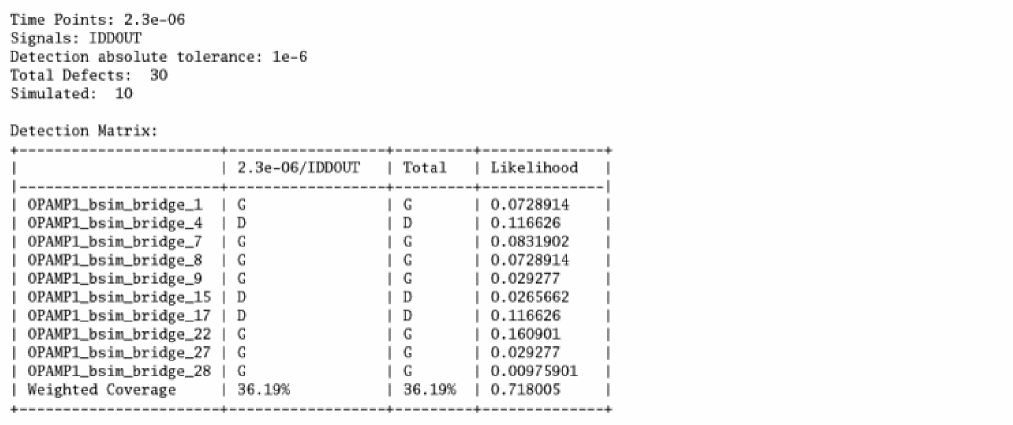
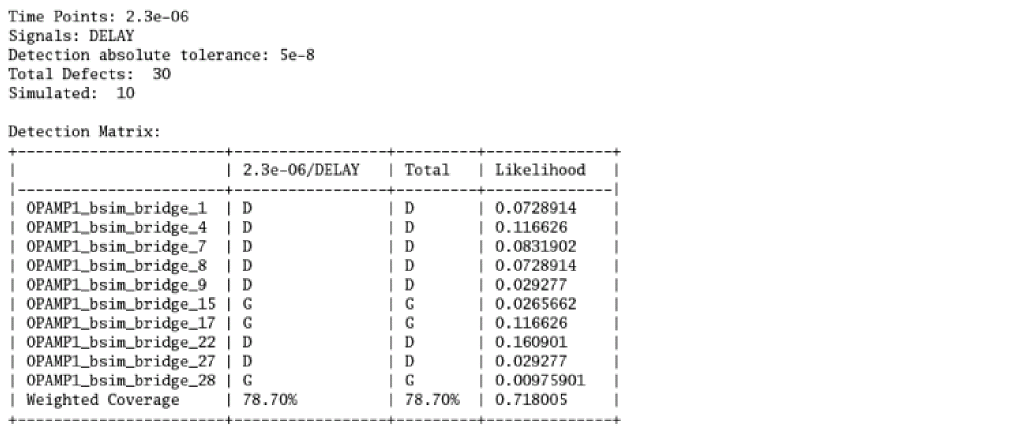
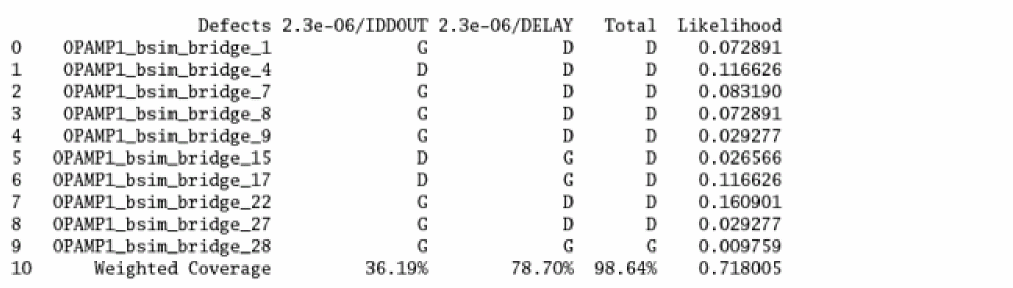
Another possibility to combine multiple reports is that reports are generated based on the fault simulation with the same design and detection limit but different fault lists.
…/spectre_ddmrpt test_tfa_faultlist1/report_tfa_1.leadtime.table \
-s d -t 7.5e-3 --xd report_ddmrpt_f1 -o text_ddmrpt_f1.txt
…/spectre_ddmrpt test_tfa_faultlist2/report_tfa_2.leadtime.table \
-s d -t 7.5e-3 --xd report_ddmrpt_f2 -o text_ddmrpt_f2.txt
…/spectre_ddmrpt report_ddmrpt_f1.xlsx report_ddmrpt_f2.xlsx \
-o report_ddmrpt_fullList.txt
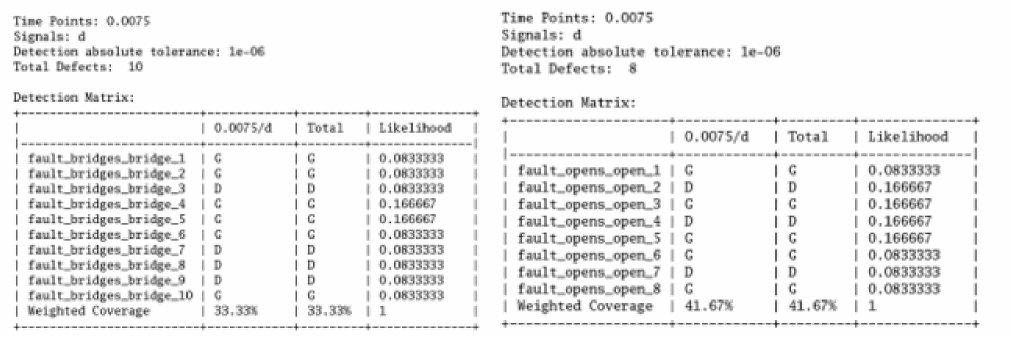
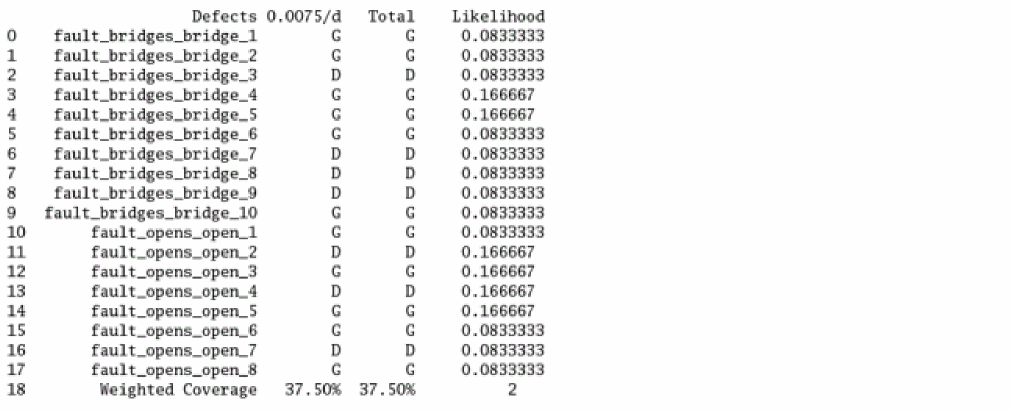
There may also be a situation in which you run the fault simulation for a long fault list, and some of them fail while most of them finish successfully. After making the change for the setup, you will need to rerun these failed faults and the updated fault detection can overwrite those in the existing report. The commands below show how it works. In addition, an example is available in the workshop under the installation. An alternative solution is to specify the faults in original netlist with faultsid=[…] to rerun.
First generate the detection report with following commands.
%spectre +aps input_tfa_leadtime.scs -o out_tfa_org/
%spectre_ddmrpt out_tfa_org/input_tfa_leadtime.tran.table -s VOUT \
-t 0.009 --cd cd_tfa_wiFail > report_tfa_wiFail.txt
Review the result and generate the faults that are not testable to be included for rerun.
%spectre_ddmrpt out_tfa_fail/input_tfa_leadtime_fakeN.tran.table -s VOUT \
-t 0.009 -N fault_notestable.scs --cd cd_tfa_wiFail >
report_tfa_wiFail_cd.txt
Once the fault simulation is done, the detection report is generated only for the faults that are rerun.
%spectre_ddmrpt out_tfa_rerun/input_tfa_leadtime_rerun.tran.table -s VOUT
-t 0.009 --cd cd_tfa_rerunInclu > report_tfa_rerunInclu_cd.txt
Merge the rerun detection in csv format into the original report to get the final detection report.
%spectre_ddmrpt cd_tfa_wiFail.csv cd_tfa_rerunInclu.csv >
report_tfa_final_cd_inclu.txt
Defect Detection Report According to IEEE P2427 Standard
IEEE committee has proposed a standard for some typical devices. For example, the bridge faults take place at terminals of drain, gate, source for MOS device. Spectre provides you the flexibility to choose what terminal you want to select for bridges generation with parameter faultterminals=[…].
In defect detection report (ddm report), Spectre follows the standard to list the coverage rate at the top of the report and separates the coverage rate for each type of the faults, shorts, opens and customs.

Performing Autostop in Transient Fault Analysis
To enable the autostop feature in transient fault analysis, you have to define assert checking, as shown below.
LOAD_CAP2 assert safecheck=check expr="v(gg,g)" min=-8e-8 max=2.501 message="Load Cap2 limit exceeded"
leadtime tran start=0 stop=12e-3 errpreset=conservative maxiters=5
+ faulttimes=[5m 6.5m] faultautostop=check
+ faultmethod=leadtime faultleadtime=0.1m faultsave=all
Once the assert violation is triggered, fault simulation is stopped automatically. The following messages are printed in the log file.
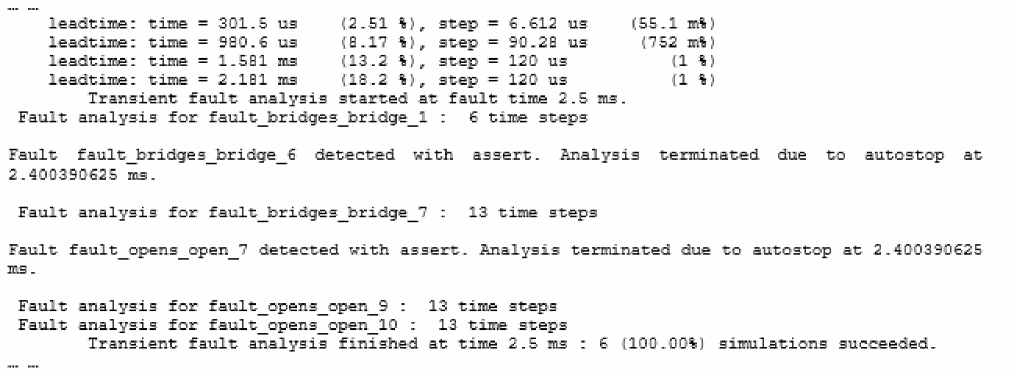
Note that in the above report, both bridge_6 and bridge_7 are stopped automatically due to assert detection.
When the fault simulation is terminated due to faultautostop=all, the detection status and solution are annotated as unevaluated (-)when the test point is set later than the autostop time for the signal saved. However, the asserts keep the values for all the test points despite the autostop time because the violation has a continuous meaning.
The following report shows that autostop is triggered at 60us.

Assert Compatibility
The assert violation results are saved in the fault table file, which is used to store the signals and currents specified in the save statement.
The following figure shows the fault result with asserts saved in the fault table file. The value 1 denotes that the fault is detected with the assert.
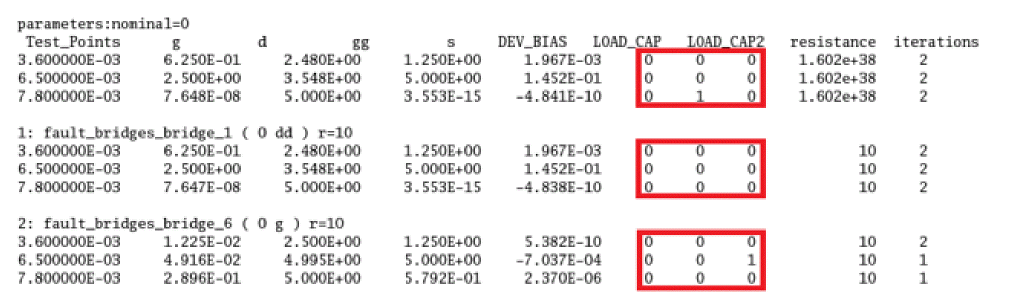
For the timezero method, transient fault analysis evaluates the asserts with safecheck throughout the simulation.
For the leadtime method, transient fault analysis evaluates the asserts with safecheck within the leadtime interval in the simulation.
For linear, maxiters, and onestep methods, transient fault analysis evaluates the asserts with safecheck only at the fault times. In other words, for any given method, asserts with safecheck are evaluated at the same time point or for the same duration as the fault injection time point or duration for that method.
Accuracy and Performance
Spectre transient fault analysis provides a wide range of methods and parameters to perform defect-oriented test simulation. The choice of an appropriate method depends on the size or simulation time of the nominal design, number of defects taken into consideration, accuracy pre-requirements, and CPU resources available. Other factors, such as high circuit sensitivity to some defects, may affect convergence significantly and slow down performance, and, as a result, force changing the method for fault analysis.
Linear method
faultmethod=linear is the default simulation method in Spectre. The simulation time in this case is comparable with the nominal simulation, and only for huge fault lists, it may affect performance.
The linear method is recommended for the initial evaluation of performance and defect detection. This is just a sensitivity approach, where the simulator provides the initial response of the circuit to a particular defect rather than the real solutions and waveforms. As a result, the linear method has the best performance and the worst accuracy.
The linear method always reports “0% fault failed” during simulation at each fault time.
Timezero method
If the simulation time for the nominal netlist is relatively short, or the number of defects is small, faultmethod=timezero method can be used. This method provides the best accuracy. Therefore, you can avoid the experimentation related to the choice of a proper method for the given design. However, the timezero method is the slowest and cannot be recommended for every case.
The status of simulation during timezero method is annotated by message “Fault analysis for bridge_1:32 time steps”.
Some of the defects can change the functionality of the circuit dramatically. For instance, oscillations can be triggered and simulation time may increase manifold. The timezero method monitors the number of time steps taken and terminates the simulation when the step count becomes huge in comparison to the nominal simulation. Such situation is annotated by the warning message “Transient fault simulation is too slow for bridge_1 and was terminated at time 800us”. You can collect the names of the failed faults and rerun the simulation within a separate analysis using the same fault list but specifying faultsname=[bridge_1], or faultsid=[1] in the new analysis statement.
Maxiters method
The rest of the fault methods represent a variety of choices for accuracy versus performance in between linear and timezero methods.
faultmethod=maxiters is also a sensitivity method. However, unlike linear, it provides better accuracy. The maxiters method can be useful when the dynamic response of the circuit is not very important.
You can use several options to control the quality of simulation results.
The transient analysis parameter faultmaxiters enables you to specify the maximum limit for the Newton iteration count while performing the simulation step, after a fault injection. The default value is 50. Decreasing this number may improve performance but degrade accuracy for some faults.
The faultrampsteps parameter can be used with maxiters to improve convergence and reduce the number of iterations required. The recommended value is 10. It represents the maximum number steps allowed in the R-stepping algorithm, when the resistance of the injected bridge is changing gradually from a large value (solution is close to nominal case) to a value specified in the fault list.
The quality of maxiters method can be monitored from the annotations. The faults that have convergence issues generate warnings "Fault simulation failed for bridge_884". The failure means that the convergence criteria was not satisfied for the fault simulation with the given parameters. The mentioned voltages are the solution values for the nominal design before the fault was injected. The big difference may just serve as a confirmation of the fact that shorting these nodes can result in numerical difficulties.
When faultrampsteps is specified and a failure occurs, Spectre generates an extended version of this message, that is, "Fault simulation failed for bridge_44: 3.5V and 0V shorted. (Last converged fault with R=4.604e+03 Ohm)".
The ending of fault simulation at each fault time is annotated as "Fault sensitivity analysis finished at time 2.000000e-04: 92 (7.99%) faults failed." The high percentage of failures indicates that either the simulation parameters have to be adjusted (faultmaxiters, faultrampsteps, faultlimiting), or the fault method maxiters is not appropriate for this design.
Onestep method
When the dynamic response of a circuit is important, or the maxiters method does not provide the required accuracy, faultmethod=onestep can be used. This method performs as maxiters initially. If no convergence is achieved, it reduces the time step and continues the iterations until convergence requirements are satisfied. Therefore, there can be multiple time steps taken until a solution is found at the fault time for every defect. This may affect the simulation performance significantly. You can adjust the simulation parameters (faultmaxiters, faultrampsteps, faultlimiting) to optimize performance.
Leadtime method
In some situations, the onestep method cannot provide the solution while the time step gets reduced to the minimum possible value. The simulation for such defect is considered as failed and is terminated. The final solution is based on the maxiters method. A warning similar to the maxiters method is also generated.
If the design under test (DUT) is time-sensitive, faultmethod=leadtime can be a better choice than the onestep method. The difference between these two methods is only the time where a defect gets injected during the simulation process. The leadtime method requires a mandatory parameter leadtime to specify the time interval to inject the fault. The onestep method takes the defect into consideration at a previous time point, right before the fault time. leadtime uses the same parameters as onestep and maxiters, and supports similar annotations.
The choice of leadtime value is limited by the distance between the fault times. The time interval [testpoint-leadtime, testpoint] cannot contain any other fault times. The operating frequency or a few clock periods may be considered as a choice of value for leadtime. You can use the parameter faultstrobe=yes with Spectre strobing options to save the multiple measurements to a table file within the lead time interval. As a result, the restriction of overlapping lead times can be avoided.
In many situations, the leadtime method has an advantage over onestep. As soon as the defect is taken into consideration ahead of time, it may improve the accuracy of results as well convergence. It is not unusual if leadtime takes less time steps than onestep for the same fault simulation.
You can use the optional parameter faultic to use the dc solution instead of nominal when fault is injected using the leadtime method. The possible values are no, bridge, open, custom, param, and all.
Comparing Accuracy and Performance of Various Methods
For accuracy evaluation of fault methods and performance estimation of Spectre transient fault analysis, direct simulation with the fault injected is required as a reference. In many cases, the direct approach is not realistic for a very long simulation time. To start, it is recommended to select a representative small-to-medium sized design with the fault list that can be simulated within reasonable time using the fault method timezero, or by the direct approach (changing netlist for each defect).
As an alternative, Spectre provides the faultsinst parameter that can be used in the transient statement. faultsinst allows you to select the faults for simulation from one or several blocks in the circuit, without modification of the original fault list. With the limited number of injected faults, the timezero method can produce the reference data within reasonable time.
After performing the simulation for several methods, you can compare the accuracy by means of detection matching using the spectre_ddmrpt Spectre binary that is located in the <installation>/bin directory.
Job Distribution in Transient Fault Analysis
Like direct fault analysis, transient fault analysis also supports job distribution. The command to submit transient fault analysis jobs is the same as direct fault analysis. However, transient fault analysis does not save the fault result over the full transient time but only at the test points specified in faulttimes vector. Fault simulation results are saved in the raw file and the fault table file.
To submit the jobs on farm machine, you can specify the following:
%bsub –R “(OSNAME==Linux)” “spectre +aps -mt +mp=3 tran_fault.scs –outdir fullpath/out_tfa_mp/“
To run the distribution on one machine, you may use the following command with a single thread.
%spectre +aps -mt +mp=3 tran_fault.scs –outdir out_tfa_mp/
Due to the unique fault injection for the transient fault analysis, the data for different jobs need to be combined after the simulation is done in distributed mode. With Virtuoso Visualization and Analysis tool, the data saved for the test points are shown with the job ID in the format tranName-jobID#_faults-tran. You can load the waveforms by selecting the data manually.
leadtime-001_faults-tran
leadtime-002_faults-tran
leadtime-003_faults-tran
PostProcessing with MDL
You can use MDL to postprocess fault data saved in the table file for transient fault analysis. It applies to fault methods timezero, leadtime, onestep, maxiters and linear with fault times defined using faultstart, faultstep, and faultstop. With transient fault analysis leadtime method, you can also use faultstrobe=yes with strobestart, strobestep, and strobestop to output the extra fault data points without injecting the faults at fault times.
For example, the following transient fault analysis statement inserts the fault at 16m, 21m, 26m and 31m with 5m preleading fault interval and saves the extra test points starting at 12m with 0.1m step.
leadtime tran stop=51m faultmethod=leadtime faulttimes=[16m 21m 26m 31m] \
faultleadtime=[5m] faultstrobe=yes strobestart=[12m] strobestop= 31m \
strobestep=1m
The result is saved in the fault table, as shown below.
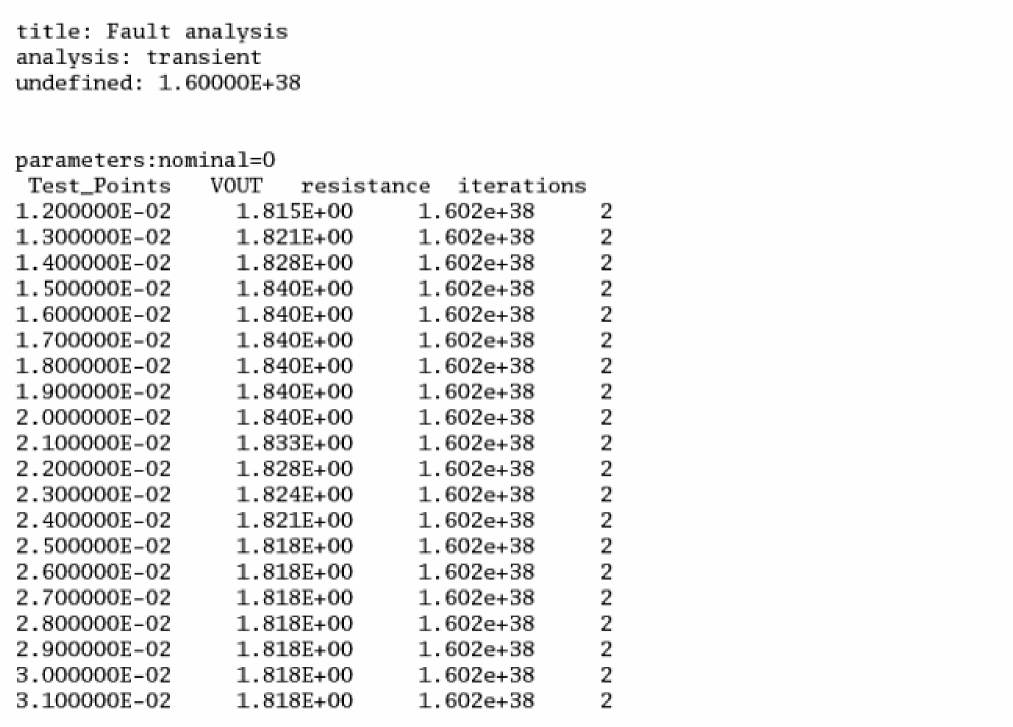
The measurement of fault result can only be postprocessed with MDL. By running MDL postprocessing, the measurements are added as extended columns in the fault table file.
The transient statement and measurements are defined in tfa.mdl as shown below.
alias measurement tran1 {
run leadtime
export real a01=max(V(g))
export real a02=min(V(g))
}
run tran1
You can run either of the following commands to generate the fault table file that includes the measurements.
%spectre +mdlpost -faults -b tfa.mdl -r tfarun.raw
%spectre +mdlpost -faults -b tfa.mdl -r tfarun.raw -tablein tfa.tran.table \
-tableout tfa.new.table
MDL postprocessing generates the measurement data file for all the faults according to the PSF data, as shown below.
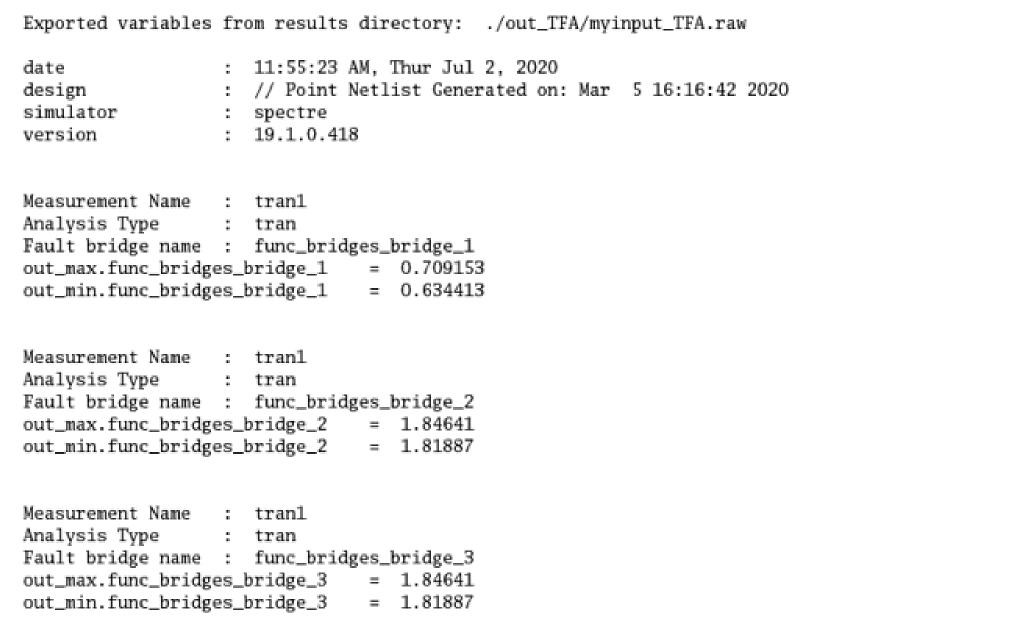
Using Calculator Expression with Ocean
You can also use Ocean expression to perform calculation on the fault result saved in the table file. You need the option savedatainseparatedir=yes in direct fault analysis to save the data in a separate directory.
You can specify the calculation function in a file, for example, my_calculate.txt, as shown below.
out_max=ymax(v("VOUT"))
out_min=ymin(v("VOUT"))
avg = (out_max + out_min)/2.0
Next, run spectre_ddmrpt to save the calculated result to a new file.
The spectre_ddmrpt script for direct fault analysis is slightly different from the one for transient fault analysis.
% spectre_ddmrpt dfa.tran.table -raw dfa.raw -cf my_calculate.txt -rf \
dfa.final.table
For transient fault analysis, you do not have to specify the raw result, as shown below.
% spectre_ddmrpt tfa.tran.table -cf calc.txt -rf tfa.final.table
The signals out_max, out_min, and avg are saved in addition to the existing signals in the final table file. You can then include the measurement of avg in the defect coverage by running the spectre_ddmrpt script.
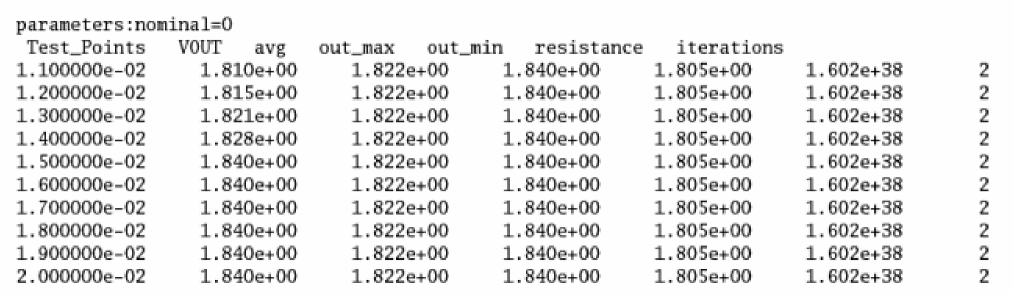
spectre_ddmrpt Command-Line Options
spectre_ddmrpt [-h] [-t TIMEPTS] [-s SIGNALS] [-a ABSTOL] [-r RELTOL]
[-m MERGE [MERGE ...]] [-o OUTPUT] [-p] [-e] [-cl CL]
[-cr {CP,W}] [-i INST] [-x XINST] [-g GROUPNAME] [--hs HIERSTART]
[--hd HIERDEPTH] [--hst HIERSORT] [--er ELEMREPORT] [--du DEFECTUNIV]
[-q] [--ct] [--ce] [--ne] [--cd CSVDET] [--cs CSVSOL] [--xd XLSXDET]
[--xs XLSXSOL] [--sd SQLDET] [--ss SQLSOL] [--td TXTDET] [--ts TXTSOL]
[-D DET] [-G UNDET] [-N ERRFAULT] [-A AUTOSTOP]
[-oe OCEAN] [-rf RESULTS_FILE] [-cf CALC_FILE]
[-vf VAR_FILE] [-raw RAW_DIR] [-O OCEAN_OUTPUT_FILE]
[-P OUTDIR] FILES [FILES ...]
Fault List Saving Options
ADE Expression Compatibility Options
spectre_fsrpt Command-Line Options
Usage
spectre_fsrpt [-h] [-e] [-f FAULTFILE] [-o OUTPUT] [-s] [-p PRIORITY]
[-r] [-cl CL] [-cr {CP,W}] [-i INST] [-x XINST] [-g GROUPNAME] [-s SIGNALS]
[-SU FILENAME] [-SD FILENAME] [-DD FILENAME] [-DU FILENAME]
[-safe FILENAME] [-dang FILENAME] [-det FILENAME]
[-undet FILENAME] [-N FILENAME] [-A FILENAME]
[-FMID FAILURE_MODE_ID] [-FM FAILURE_MODE_TYPE]
[-ft {text,text-usf}] FILE [FILE ...]
Positional Arguments
Pole Zero Analysis
The pole zero analysis linearizes the circuit about the DC operating point and computes the poles and zeros of the linearized network. The analysis generates a finite number of poles and zeros, each being a complex number. If you sweep a parameter, the parameter values corresponding to the current iteration are printed.
The pole zero analysis dense method works best on small to medium sized circuits (circuits with less than a thousand equations). You can use the arnoldi method (iterative sparse solver) on large circuits for better performance.
If you run a pole zero analysis on a frequency dependent component (element whose AC equivalent varies with frequency, such as transmission line or BJT with excess phases), the Spectre circuit simulator approximates the component as AC equivalent conductance and evaluates conductance at 1Hz.
You can set up and run a pole zero analysis through the Analog Design Environment. For more information, see the ADE Explorer User Guide.
Syntax
analysisName[(pnode nnode)]pz[method=arnoldi numpoles=0 numzeros=0 sigmar=0.1 sigmai=0.0 ...]
If you do not specify the input source, the Spectre circuit simulator performs only the pole analysis. For a detailed description of the parameters, see spectre -h pz.
Example 1
myPZ1 pz
Example 2
myPZ2 pz method=arnoldi
Performs pole analysis with the arnoldi method.
Example 3
mypz2 (n1 n2) pz iprobe=VIN
Performs pole zero analysis for a circuit whose input is VIN and output is the voltage difference between nodes n1 and n2.
Example 4
mypz3 (n1 n2) pz iprobe=I1 param=temp start=25 stop=100 step=25
Performs pole zero analysis for a circuit whose input is I1 and output is the voltage difference between nodes n1 and n2.
Output Log File
The output log file contains the following information:
- Complex numbers for poles
- Complex numbers for zeroes
- Gain for zeroes
- Quality factor Q, which can be defined as:

where sign is 1 if real<0 and sign is -1 if real>0. When real is 0, Qfactor is not defined.
If the output of the pole zero analysis contains positive real part poles indicating an unstable circuit, the label **RHP is appended to those poles. An example is shown below:
*****************
PZ Analysis ‘mypz’
******************
Poles (Hertz)
Real Imaginary Qfactor
1 4.5694e+10 0 **RHP -0.5
2 4.2613e+10 0 **RHP -0.5
3 1.4969e+10 0 **RHP -0.5
4 1.4925e+10 0 **RHP -0.5
5 1.0167e+10 0 **RHP -0.5
6 1.0165e+10 0 **RHP -0.5
7 7.3469e+09 0 **RHP -0.5
8 7.3469e+09 0 **RHP -0.5
9 -1.0061e+09 0 0.5
10 -1.0061e+09 0 0.5
11 -1.0235e+09 0 0.5
Loopfinder Analysis
The loopfinder (lf) analysis linearizes the circuit about the DC operating point and identifies the loops that may potentially cause stability problems. The analysis does not require the identification of loops or the use of probes.
The analysis computes the impedance of the nodes at a frequency that is equal to the magnitude of the pole and identifies the high impedance nodes. It displays the impedance of all the high impedance nodes within a loop, sorted by the impedance value.
The loopfinder analysis, by default, uses the direct method to detect the suspected poles. However, this method is computationally intensive and works best on small-to-medium sized circuits. You can use the krylov method (iterative sparse solver) on large circuits for better performance.
Use the dampmax parameter to control the filtering of suspected poles. Setting the value of dampmax to 1 results in the inclusion of all poles. The default value of the dampmax parameter is 0.7. Use the zmin parameter to control the number of nodes in the output. A higher zmin value means that fewer nodes will be displayed in the output for a given loop.
For more information on loopfinder analysis, see LoopFinder Analysis in the Spectre Circuit Simulator Reference manual.
Syntax
analysisName lf <parameter=value>
Example1
mylf lf
Performs loopfinder analysis and computes the impedance of all nodes.
Example 2
mylf lf solver_method=krylov
Performs loopfinder analysis using the krylov method for pole detection.
Example 3
mylf lf dev=R0 param=r start=100 stop=300 step=1
In the above example, loopfinder analysis is performed by sweeping the device parameter r of the device R0 from 100 to 300 at an increment of 1.
Output of the Loopfinder Analysis
Following is a sample output of the loopfinder analysis:
Important complex poles - natural frequency and damping factor
1.11e+03 MHz 0.00175
**********node impedance @wn**************
Natural Frequencies 1.11e+03M
net015                          589.
net23                           1.31e+03
net022                          1.31e+03
net14                           589.
net20                           5.37e+03
Vout                            5.37e+03
******************Loop1*******************
Natural Frequency = 1.11e+03 MHz
Damping Factor = 0.00175
Node Name Impedance@wn
Vout                            5.37e+03
net20                           5.37e+03
net022                          1.31e+03
net23                           1.31e+03
net015                          589.
net14                           589.
Other Analyses (sens, fourier, dcmatch, and stb)
There are four analyses in this category: sens, fourier, dcmatch, and stb.
Sensitivity Analysis
You can supplement the analysis information you automatically receive with the AC and DC analyses by placing sens statements in the netlist. Output for the sens command is sent to the rawfile or to an ASCII file that you can specify with the +sensdata <filename> option of the spectre command.
-
If you set
senstype=partial, Spectre calculates partial sensitivity. This determines the sensitivity of output variables to input design parameters. Results are expressed as a ratio of the change in an output analysis variable to the change in an input design parameter. For example, if V is the output value, and P is the input design parameter, sensitivity is computed as follows:
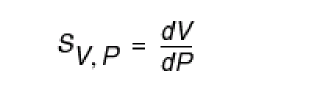
-
If you set
senstype=normalized, Spectre calculates normalized sensitivity, which removes the dependence of results on the magnitude of the output variable and input design parameters. Normalized sensitivity is computed as follows:
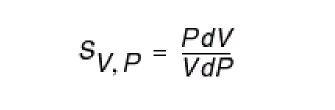
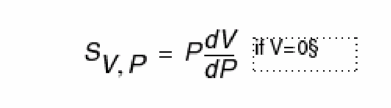 When both P and V are zero, partial sensitivity is used.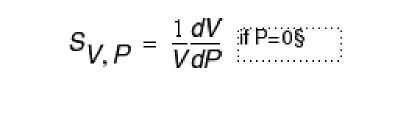
Formatting the sens Command
You format the sens command, as follows:
sens [ (output_variables_list) ] [ to
(design_parameters_list) ] [ for (analyses_list) ]
output_variables_list=ovar1ovar2 ...
design_parameters_list=dpar1dpar2 ...
analyses_list=ana1ana2 ...
The ovari are the output variables whose sensitivities are calculated. These are normally node names, deviceInstance:parameter or modelName:parameter specifications. Examples are 5, n1, and Qout:betadc.
The dparj are the design parameters to which the output variables are sensitive. You can specify them in a format similar to ovari. However, they must be input parameters that you can specify (for example, R1:r). You can use wildcard (*) for device instances and models (for example, *:r) in which case, sensitivity information of the output variables is computed with respect to the specified parameters for all device instances and models.
If you do not specify a to clause, sensitivities of output variables are calculated with respect to all available instance and model parameters.
save statement in Chapter 9, “Specifying Output Options.”The following table shows you the types of design and output parameters that are normally used for both AC and DC analyses:
| AC Analysis | DC Analysis | |
|---|---|---|
You can also specify device instances or models as design parameters without further specifying parameters, but this approach might result in a number of error messages. The Spectre simulator attempts sensitivity analysis for every device parameter and sends an error message for each parameter that cannot be varied. The Spectre simulator does, however, perform the requested sensitivity analysis for appropriate parameters.
The anak are the analyses for which sensitivities are calculated. These can be analysis instance names (for example, opBegin and ac2) or analysis type names (for example, DC and AC).
Examples of the sens Command
The following examples illustrate sens command format:
sens (q1:betadc 2 Out) to (vcc:dc nbjt1:rb) for (analDC)
This command computes DC sensitivities of the betadc operating-point parameter of transistor q1 and of nodes 2 and Out to the dc voltage level of voltage source vcc and to the model parameter rb of nbjt1. The values are computed for DC analysis analDC. The results are stored in the files analDC.vcc:dc and analDC.nbjt1:rb.
sens (1 n2 7) to (q1:area nbjt1:rb) for (analAC)
This command computes AC sensitivities of nodes 1, n2, and 7 to the area parameter of transistor q1 and to the model parameter rb of nbjt1. The values are computed for each frequency of the AC analysis analAC. The results are stored in the files analAC.q1:area and analAC.nbjt1:rb.
sens (vbb:p q1:int_c q1:gm 7) to (q1:area nbjt1:rb) for (analDC1)
This command computes DC sensitivities of the branch current vbb:p, the operating-point parameter gm of transistor q1, the internal collector voltage q1:int_c, and the node 7 voltage to the instance parameter q1:area and the model parameter nbjt:1:rb. The values are computed for analysis analDC1.
sens (1 n2 7) to (*:area) for (analAC)
This command computes the AC sensitivites of nodes 1, n2, and 7 to the area parameter of all device instances and models.
sens (1 n2 7) for (analAC)
This command computes the AC sensitivities of nodes 1, n2, and 7 to all available device and model parameters.
Sensitivity analysis for binned model in subckt
To support sensitivity analysis for binned model defined in subckt, use the option sensbinparam.
sensbinparam=no: default; feature disabled.
sensbinparam=uncorrelated: uncorrelated method.
sensbinparam=correlated: fully-correlated method.
Example:
{
1: type=n vth0=0.59 lmin=3.5e-7 lmax=8.0e-7 wmin=4.0e-7 wmax=8.0e-7 xl=8.66e-8
xw=-2.1e-8
2: type=n vth0=0.51 +lmin=8.0e-7 lmax=1.2e-6 wmin=4.0e-7 wmax=8.0e-7 xl=8.66e-8
xw=-2.1e-8
}
both bins are used by different instances in the netlist. Inside spectre, the model bin name will be nch_1 and nch_2.
Assuming you want the sensitivity of out (output signal) vs vth0 in the model group, the two methods produce results in the following manner:
Uncorrelated
Considering nch_1 and nch_2 are two totally independent uncorrelated models, Spectre treats nch_1 and nch_2 as two separated models.
Spectre perturbs nch_1:vth0, nch_2:vth0 parameter values separately.
The sensitivity report will have
Correlated
Considering nch_1 and nch_2 are 100% correlated, Spectre perturbs nch_1:vth0 and nch_2:vth0 simultaneously, the sensitivity report will just have one out vs nch:vth0.
Fourier Analysis
The ratiometric Fourier analyzer measures the Fourier coefficients of two different signals at a specified fundamental frequency without loading the circuit. The algorithm used is based on the Fourier integral rather than the discrete Fourier transform and therefore is not subject to aliasing. Even on broad-band signals, it computes a small number of Fourier coefficients accurately and efficiently. Therefore, this Fourier analyzer is suitable on clocked sinusoids generated by sigma-delta converters, pulse-width modulators, digital-to-analog converters, sample-and-holds, and switched-capacitor filters as well as on the traditional low-distortion sinusoids produced by amplifiers or filters.
The analyzer is active only during a transient analysis. For each signal, the analyzer prints the magnitude and phase of the harmonics along with the total harmonic distortion at the end of the transient analysis. The total harmonic distortion is found by summing the power in all of the computed harmonics except DC and the fundamental. Consequently, the distortion is not accurate if you request an insufficient number of harmonics. The Fourier analyzer also prints the ratio of the spectrum of the first signal to the fundamental of the second, so you can use the analyzer to compute large signal gains and immittances directly.
If you are concerned about accuracy, perform an additional Fourier transform on a pure sinusoid generated by an independent source. Because both transforms use the same time points, the relative errors measured with the known pure sinusoid are representative of the errors in the other transforms. In practice, this second Fourier transform is performed on the reference signal. To increase the accuracy of the Fourier transform, use the points parameter to increase the number of points. Tightening reltol and setting errpreset=conservative are two other measures to consider.
The accuracy of the magnitude and phase for each harmonic is independent of the number of harmonics computed. Thus, increasing the number of harmonics (while keeping points constant) does not change the magnitude and phase of the low order harmonics, but it does improve the accuracy of the total harmonic distortion computation. However, if you do not specify points, you can increase accuracy by requesting more harmonics, which creates more points.
The large number of points required for accurate results is not a result of aliasing. Many points are needed because a quadratic polynomial interpolates the waveform between the time points. If you use too few time points, the polynomials deviate slightly from the true waveform between time points and all of the computed Fourier coefficients are slightly in error. The algorithm that computes the Fourier integral does accept unevenly spaced time points, but because it uses quadratic interpolation, it is usually more accurate using time steps that are small and nearly evenly spaced.
This device is not supported within altergroup.
Instance Definition
Name [p] [n] [pr] [nr] ModelName parameter=value ...
Name [p] [n] [pr] [nr] fourier parameter=value ...
The signal between terminals p and n is the test or numerator signal. The signal between terminals pr and nr is the reference or denominator signal. Fourier analysis is performed on terminal currents by specifying the term or refterm parameters. If both term and p or n are specified, then the terminal current becomes the numerator and the node voltages become the denominator. By mixing voltages and currents, it is possible to compute large signal immittances.
Model Definition
modelmodelNamefourierparameter=value...
DC Match Analysis
The DCMATCH analysis performs DC device matching analysis for a given output. It computes the deviation in the DC operating point of the circuit due to processing or environmental variation in modeled devices. If method=standard is specified, a set of dcmatch parameters in the model cards are required for each supported device contributing to the deviation. The analysis applies device mismatch models to construct equivalent mismatch current sources to all the devices that are modeled. These current sources will have zero mean and some variance. The variance of the current sources are computed according to device match models. It then computes the 3-sigma variance of dc voltages or currents at user specified outputs due to the mismatch current sources. The simulation results displays the devices rank ordered by their contributions to the outputs.
In addition, for MOSFET devices, it displays threshold voltage mismatch, current factor mismatch, gate voltage mismatch, and drain current mismatch. For bipolar devices, it displays base-emitter junction voltage mismatch. For resistors, it displays resistor mismatches.
The analysis replaces multiple simulation runs by circuit designers for accuracy vs. size analysis. It automatically identifies the set of critical matched components during circuit design. For example, when there are matched pairs in the circuit, the contribution of two matched transistors will be equal in magnitude and opposite in sign. Typical usage are to simulate the output offset voltage of operational amplifiers, estimate the variation in bandgap voltages, and predict the accuracy of current steering DACS.
For method=standard, DCMATCH analysis is available for BSIM3V3, BSIM4, BSIMSOI, EKV, PSP102, PSP103, BJT, VBIC, BHT, RESISTOR, PHY_RES, R3, and resistor-type bsource. If method=statistics is specified, a statistics block is required to list the parameters that are considered as randomly varying. By default, all statistics parameters found in the statistics block are considered in the computation, unless option variations is specified. In this case, device matching models are not used and dcmatch model parameters are not required.
Model Definition
name [pnode nnode] dcmatchparameter=value...
Examples of the dcmatch command
The following example investigates the 3-sigma dc variation at the output of the current flowing through the device vd, which is a voltage source in the circuit netlist. dcmm1 is the name of the analysis, dcmatch is a keyword indicating the dc mismatch analysis, and the parameter settings oprobe=vd and porti=1 specify that the output current is measured at the first port of vd. Device mismatch contributions less than 0.1% of the maximum contribution of all mismatch devices to the output are not reported, as specified by the parameter mth. The mismatch (that is the equivalent mismatch current sources in parallel to all the devices that use model n1) is modeled by the model parameters mvtwl, mvtwl2, mvt0, mbewl, and mbe0.
dcmm1 dcmatch mth=1e-3 oprobe=vd porti=1
model n1 bsim3v3 type=n ...
+ mvtwl=6.15e-9 mvtwl2=2.5e-12 mvt0=0.0 mbewl=16.5e-9 mbe0=0.0
The output of the analysis is displayed on the screen/logfile:
DC Device Matching Analysis ‘mismatch1’ at vd
Local Variation = 3-sigma random device variation
sigmaOut sigmaVth sigmaBeta sigmaVg sigmaIds
-13.8 uA 2.21 mV 357 m% 2.26 mV 1.71 % mp6
-6.99 uA 1.63 mV 269 m% 1.68 mV 1.08 % m01
-2.71 uA 1.11 mV 187 m% 1.16 mV 648 m% m02
-999 nA 769 uV 131 m% 807 uV 428 m% m04x4_4
-999 nA 769 uV 131 m% 807 uV 428 m% m04x4_3
-999 nA 769 uV 131 m% 807 uV 428 m% m04x4_2
-999 nA 769 uV 131 m% 807 uV 428 m% m04x4_1
-999 nA 769 uV 131 m% 807 uV 428 m% m04
-718 nA 1.09 mV 185 m% 1.15 mV 599 m% m40x04
-520 nA 1.55 mV 263 m% 1.63 mV 835 m% m20x04
-378 nA 2.21 mV 376 m% 2.34 mV 1.16 % m10x04
-363 nA 539 uV 92 m% 567 uV 293 m% m08
-131 nA 379 uV 64.9 m% 400 uV 203 m% m16
-46.7 nA 267 uV 45.9 m% 283 uV 142 m% m32
vd =-3.477 mA +/- 15.91 uA (3-sigma variation)
This says that the 3-sigma variation at i(vd) due to the mismatch models is -3.477 mA ±15.91 μA. The -3.477 mA is the dc operating value of i(vdd), and 15.91 μA is the 3-sigma variation due to the device mismatches. The device mp6 contributes the most to the output variation at -13.8 μA followed by m01 which contributes -6.99 μA. The equivalent 3-sigma Vth variation of mp6 is 2.21 mV. The relative 3-sigma beta (current factor) variation of mp6 is 0.357%. The equivalent 3-sigma gate voltage variation is 2.26 mV. The relative 3-sigma Ids variation of mp6 is 1.71%.
The output can also be written in psf, and you can view the table using Analog Design Environment.
The following statement investigates the 3-sigma dc variation on output v(n1,n2). The result of the analysis is printed in a psf file and the cpu statistics of the analysis are generated.
dcmm2 n1 n2 dcmatch mth=1e-3 where=rawfile
In the following example, the output is the voltage drop across the 1st port of r3.
dcmm3 dcmatch mth=1e-3 oprobe=r3 portv=1
For the following statement, the output of the analysis is printed to a file circuitName.info.what.
dcmm4 n3 0 dcmatch mth=1e-3 where=file file="%C:r.info.what"
You can use sweep parameters on the dcmatch analysis to perform sweeps of temperature, parameters, model/instance/subcircuit parameters etc.
In the following example, the device parameter w of the device x1.mp2 is swept from 15μm to 20μm at each increment of 1μm.
dcmm6 n3 0 dcmatch mth=0.01 dev=x1.mp2 param=w
+ start=15e-6 stop=20e-6 step=1e-6 where=rawfile
In the following example, a set of analyses is performed on output v(n3,0) by sweeping the device parameter w of the device mp6 from 80μm to 90μm at each increment of 2μm.
sweep1 sweep dev=mp6 param=w start=80e-6 stop=90e-6 step=2e-6 {
dcmm5 n3 0 dcmatch mth=1e-3 where=rawfile
}
In the following example, temperature is swept from 25°C to 100°C at increment of 25°C.
dcmm7 n3 0 dcmatch mth=0.01 param=temp
+ start=25 stop=100 step=25
For more information on the dcmatch parameters, see the Spectre Circuit Simulator Reference.
If you run the dcmatch analysis in Analog Design Environment, you can access the output through the Results menu and create a table of mismatch contributors.
DC Match Theory
Statistical variation of drain current in a MOSFET is modeled by
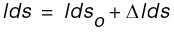
Ids is the total drain to source,
Idso is the nominal current, and
ΔIds is the variation in drain to source current due to local device variation.
If Vout is the output signal of interest, then the variance of Vout due to the ith MOSFET is approximated by

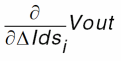
in the equation above is the sensitivity of the output to the drain to source current and can be efficiently obtained by the dcmatch analysis.
Mismatch Models
The term  is the variance of the mismatch current in MOSFET transistors. The mismatch in the current is assumed to be due to a mismatch in the threshold voltage (
 ) and the mismatch in the width to length ratio (
 ). When
 version=0/2, it is approximated as:
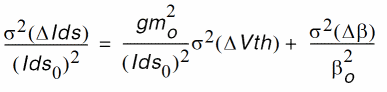
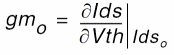

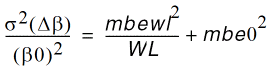
Note that  is computed at the DC bias solution from the device model equations, the values a, b, c, d and e are the mismatch parameters while
  and
and  are device parameters.

There are several parameters that affect the mismatch model.
-
mismatchmodspecifies the equations to be used for the mismatch model -
mismatchdistis the mismatch distance -
mismatchvec1specifies the mismatch Vth width and length parameters -
mismatchvec2specifies the mismatch Beta width and length parameters -
mismatchvec3specifies the mismatch Vth distance parameter -
mismatchvec4is the mismatch Beta distance parameter
When mismatchmod=0, the default mismatch equations are used.

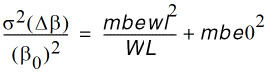
When mismatchmod=1, the unified mismatch equations are used.
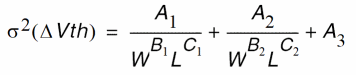
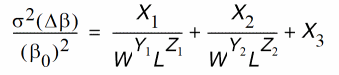
mismatchvec1= [A1, B1, C1, A2, B2, C2, A3 ]
mismatchvec2 =[X1, Y1, Z1, X2, Y2, Z2, X3 ]
When mismatchmod=2, the Pelgrow’s Law mismatch equations are used.
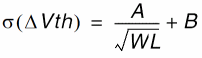
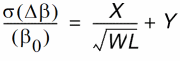
mismatchvec1= [A, B ]
mismatchvec2= [X, Y ]
When mismatchmod=3, the universal mismatch equations are used.
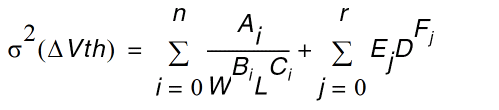
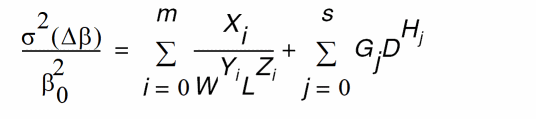
mismatchvec1= [N, A1, B1, C1, …, An, Bn, Cn ]
mismatchvec2= [M, X1, Y1, Z1, …, Xm, Ym, Zm ]
mismatchvec3= [R, E1, F1, …, Er, Fr]
mismatchvec4= [S, G1, H1, …, Gs, Hs]
The bipolar  and the resistor
  are computed for each device provided that the device size, bias point, and mismatch parameters are known.

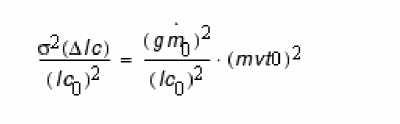
where gm0 is  , Ic0 is the nominal collector current, and
Vbe =mvt0/sqrt(2).
Modified MOSFET Mismatch Models
When version=1/3, the following DC mismatch model is used for BSIM models:

where vth0 and u0 are BSIM model parameters.
New Method to Perform DC Match Analysis
The existing DC Match analysis simulates the statistical mismatch based on device mismatch models and only supports resistor, BJT, and MOSFET devices.
Starting with the MMSIM 12.1.1 release, a new parameter method with possible values of standard and statistics has been added in dcmatch analysis. When method is set to statistics, Spectre computes the statistical variation by:
- Computing the sensitivity of the output signal to any parameters.
-
Considering the statistical definitions and computing the
sigmaOutas results.
The syntax for the new method is as follows:
analysis_name [ (output_node_name) ] dcmatch method=statistics | standard …
The DC Match analysis prints the sensitivity and sigma output for each statistics parameter, and then prints the one sigma variation for output node OUT.
**********************************************
DC Device Matching Analysis `dcmm' at V(OUT,0)
**********************************************
DC simulation time: CPU = 1 ms, elapsed = 998.974 us.
SigmaOut Sensitivity DesignParameter Contribution
16.52 uV 1.168e-05 n_p1_sigma
9.866 uV 6.97615e-06 n_p2_sigma
6.776 uV 4.79167e-06 p_p1_sigma
858.6 nV -6.07093e-07 p_p2_sigma
There are four parameters that contribute zero (or below thresh mth) sensitivity to the output.
V(OUT,0) = 1.649 V +/- 20.42 uV (1-sigma total variation)
ACMatch Analysis
ACMatch analysis linearizes the circuit about the DC operating point and computes the variations of AC responses due to statistical parameters defined in statistics blocks. Only mismatch parameters are considered. The analysis skips the process parameters.
ACMatch takes each parameter defined in the statistics blocks and applies variation one at a time to compute the sensitivity of the output signal with respect to the statistical parameter. Based on the sensitivities computed by this procedure, the total variation of the output is computed by adding the variation contributions from each statistical parameter, assuming that the parameters are mutually independent.
The output result is sorted based on the real part of the output sigma of each parameter (or instance).
You can specify two or less than two nodes with the ACMatch analysis. If you specify one node, the analysis outputs the AC response on that node. If you specify two nodes, the analysis outputs the difference in AC response between the two nodes.
Model Definition
name node1 [node2] acmatch parameter=value...
Examples of Analysis
acmm OUTP acmatch start=1k stop=100G dec=1 where=rawfile groupby=inst
The following statement investigates the 1-sigma ac variation on output v(OUTP). The sweep points have been specified at 1k and 100G and the total sigma of each contributor is grouped by instance name. The results are saved in a psf file.
Following is the output generated by the ACMatch analysis:
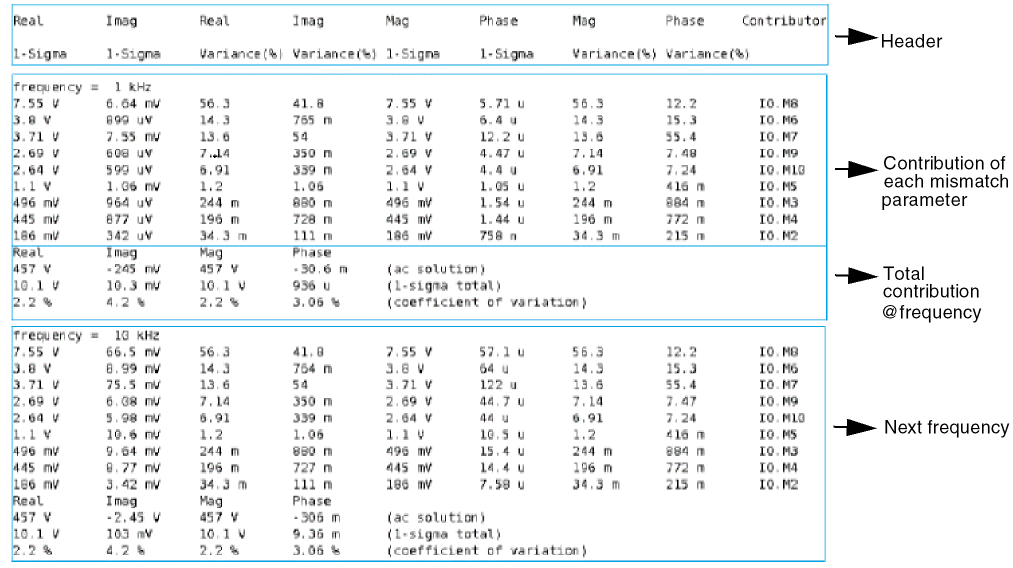
Following is the output generated by ACMatch analysis, grouped by parameter names:
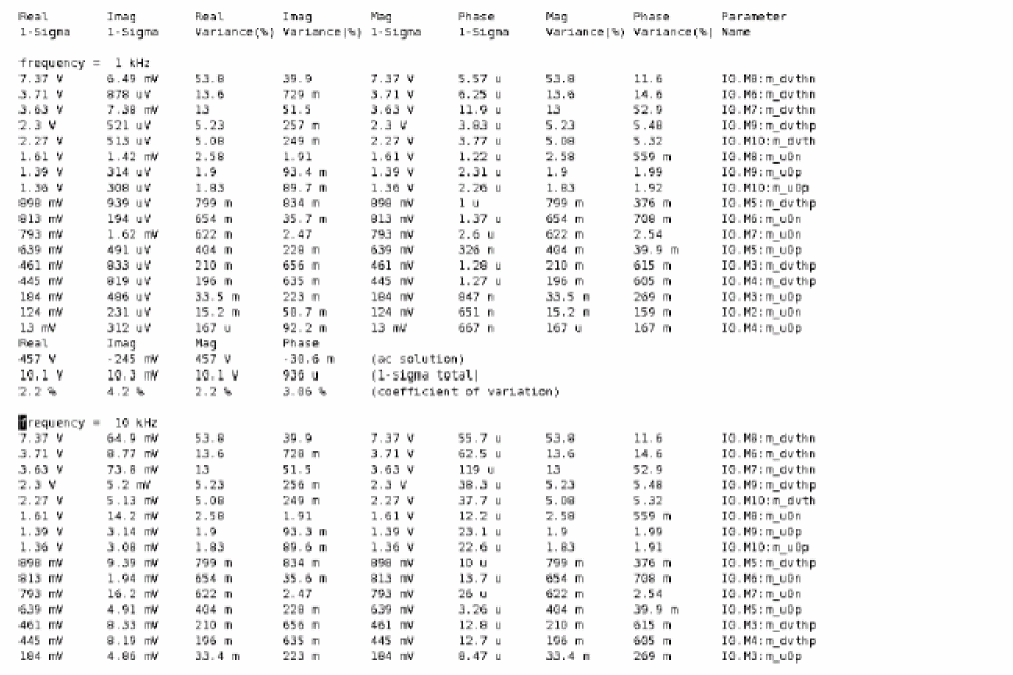
For more information on ACMatch Analysis, refer to the ACMatch Analysis section in the Spectre Circuit Simulator Reference manual
Stability Analysis
The loop-based and device-based algorithms are available in the Spectre circuit simulator for small-signal stability analysis. Both are based on the calculation of Bode’s return ratio. The analysis output are loop gain waveform, gain margin, and phase margin.
Model Definition
namestbparameter=value...
Examples of the stb command
stbloop stb start=1.0 stop=1e12 dec=10 probe=Iprobe
stbdev stb start=1.0 stop=1e12 dec=10 probe=mos1
The analysis parameters are similar to the small-signal ac analysis except for the probe parameter, which must be specified to perform stability analysis. When the probe parameter points to a current probe or voltage source instance, the loop based algorithm will be invoked; when it points to a supported active device instance, the device based algorithm will be invoked.
The gain margin and phase margin are automatically determined from the loop gain waveform by detecting zero-crossing in the gain plot and phase plot. If margins cannot be determined for a particular stability analysis, a log file displays the corresponding reason.
Loop-Based Algorithm
The loop-based algorithm is based on considering the feedback loop as a lumped model with normal and reverse loop transmission. It calculates the true loop gain, which consists of normal loop gain and reverse loop gain. Stability analysis approaches for low-frequency applications assume that signal flows unilaterally through the feedback loop, and they use the normal loop gain to assess the stability of the design. However, the true loop gain provides more accurate stability information for applications involving significant reverse transmission.
You can place a probe component (current probe or zero-DC-valued voltage source) on the feedback loop to identify the loop of interest. The probe component does not change any of the circuit characteristics, and there is no special requirement on the polarity configuration of the probe component.
The loop-based algorithm provides accurate stability information for single-loop circuits and multi-loop circuits in which a probe component can be placed on a critical wire to break all loops. For a multi-loop circuit in which such a wire may not be available, the loop based algorithm can be performed only on individual feedback loops to ensure they are stable. Although the stability of all feedback loops is only a necessary condition for the whole circuit to be stable, the multi-loop circuit tends to be stable if all individual loops are associated with reasonable stability margins.
Stability Analysis of Differential Circuit with Loop-based Algorithm
For the multi-loop circuits, such as differential feedback circuit, a differential stability probe (diffstbprobe) should be inserted to perform the stability analysis by breaking all the feedback loops.
In ADE schematic, you can select the differential probe named as diffstbprobe in analogLib, see Figure 11-1.
Figure 11-1 Differential stb probe in analogLib
With that component of diffstbprobe, there are four nodes defined asIstbprobe (IN1 IN2 OUT1 OUT2) diffstbprobe
Figure 11-2 shows how to connect the probe to the differential circuit.
Figure 11-2 Differential feedback circuit
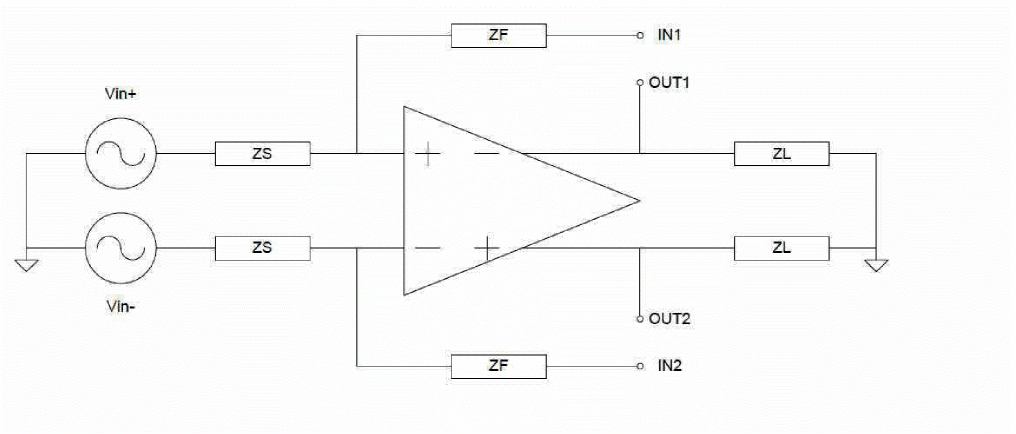
Example of differential mode:
stbloop stb start=1 stop=10G probe= Istbprobe.IPRB_DM
The analysis parameter of probe has to specify as IPRB_DM of a probe instance for differential circuit.
Device Based Algorithm
The device-based algorithm produces accurate stability information for circuits in which a critical active device can be identified such that nulling the dominant gain source of this device renders the whole network to be passive. Examples are multistage amplifier, single-transistor circuit, and S-parameter characterized microwave component.
This algorithm is often applied to assess the stability of circuit design in which local feedback loops cannot be neglected; the loop-based algorithm cannot be performed for these applications because the local feedback loops are inside the devices and are not accessible from the schematic level or netlist level to insert the probe component.
The supported active device and its dominant gain source are summarized in the table below.
In general, the stability information produced by the device-based algorithm can be used to assess the stability of that particular device. Most often, a feedback network consists of a global feedback loop and numerous nested local loops around individual transistors. The loop-based algorithm can determine the stability of the whole network as long as all nested loops are stable, while the device-based algorithm can be used to ensure all local loops are stable.
For more information on the stability analysis parameters, see the Spectre Circuit Simulator Reference.
Sweep Analysis
The sweep analysis sweeps a parameter processing a list of analyses (or multiple analyses) for each value of the parameter.
The sweeps can be linear or logarithmic. Swept parameters return to their original values after the analysis. However, certain other analyses also allow you to sweep a parameter while performing that analysis. For more details, check spectre -h for each of the following analyses. The following table shows you which parameters you can sweep with different analyses.
| Time | TEMP | FREQ | A component instance parameter | A component model parameter | A netlist parameter | |
|---|---|---|---|---|---|---|
|
|
|
|
|
|
||
|
|
|
|
|
|
||
|
|
|
|
|
|
||
|
|
|
|
|
|
||
|
|
|
|
|
|
||
|
|
|
|
|
|
|
|
|
|
|
|
|
|
|
|
|
|
|
|
|
|
|
|
|
|
|
|
|
|
||
|
|
|
|
|
|
||
|
|
|
|
|
|
||
|
|
|
|
|
|
||
|
|
|
|
|
|
||
|
|
|
|
|
|
||
|
|
|
|
|
|
oppoint parameter for a DC analysis, the Spectre simulator computes the linearized model for each nonlinear component. If you specify both a DC sweep and an operating point, the operating point information is generated for the last point in the sweep.Setting Up Parameter Sweeps
To specify a parameter sweep, you must identify the component or circuit parameter you want to sweep and the sweep limits in an analysis statement. A parameter you sweep can be circuit temperature, a device instance parameter, a device model parameter, a netlist parameter, or a subcircuit parameter for a particular subcircuit instance.
Within the sweep analysis only, you specify child analyses statements. These statements must be bound with braces. The opening brace is required at the end of the line defining the sweep.
Specifying the Parameter You Want to Sweep
You specify the components and parameters you want to sweep with the following parameters:
For all analyses that support sweeping, to sweep the circuit temperature, use param=temp with no dev, mod, or sub parameter. You can sweep a top-level netlist parameter by giving the parameter name with no dev, mod, or sub parameter. You can sweep a subcircuit parameter for a particular subcircuit instance by specifying the subcircuit instance name with the sub parameter and the subcircuit parameter name with the param parameter. You can do the same thing for a particular device instance by using dev for the device instance name or for a particular model by using mod for the device model name.
dev, mod, and param unspecified. That is, frequency is the default swept parameter for that analysis.Specifying Parameter Sets You Want to Sweep
For the sweep analysis only, the paramset statement allows you to specify a list of parameters and their values. This can be referred by a sweep analysis to sweep the set of parameters over the values specified. For each iteration of the sweep, the netlist parameters are set to the values specified by a row. The values have to be numbers, and the parameters’ names have to be defined in the input file (netlist) before they are used. The paramset statement is allowed only in the top level of the input file.
The following is the syntax for the paramset statement:
Nameparamset {list of netlist parameterslist of values foreach netlist parameterlist of values foreach netlist parameter...
}
Here is an example of the paramset statement:
parameters p1=1 p2=2 p3=3
data paramset {
    p1 p2 p3
    5  5  5
    4  3  2
}
Combining the paramset statement with the sweep analysis allows you to sweep multiple parameters simultaneously, for example, power supply voltage and temperature.
Setting Sweep Limits
For all analyses that support sweeping, you specify the sweep limits with the parameters in the following table:
| Parameter | Value | Comments |
|---|---|---|
|
Step size for linear sweeps |
||
|
Number of points per decade for log sweeps |
||
If you do not specify the step size, the sweep is linear when the ratio of the stop to the start values is less than 10 and logarithmic when this ratio is 10 or greater. If you specify sweep limits and a values array, the points for both are merged and sorted.
Examples of Parameter Sweep Requests
This sweep statement uses braces to bound the child analyses statements.
swp sweep param=temp values=[-50 0 50 100 125] {
    oppoint dc oppoint=logfile
}
This statement specifies a linear sweep of frequencies from 0 to 0.3 MHz with 100 steps.
Sparams sp stop=0.3MHz lin=100
The previous statement could be written like this and achieve the same result.
Sparams sp center=0.15MHz span=0.3MHz lin=100
This statement specifies a logarithmic sweep of frequencies from 1 kHz through 1 GHz with 10 steps per decade.
cmLoopGain ac start=1k stop=1G dec=10
This statement is identical to the previous one except that the number of steps is set to 55.
cmLoopGain ac start=1k stop=1G log=55
This statement specifies a linear sweep of temperatures from 0 to 50 degrees in 1-degree steps. The frequency for the analysis is 1 kHz.
XferVsTemp xf start=0 stop=50 step=1 probe=Rload param=temp freq=1kHz
This statement uses a vector to specify sweep values for device Vcc. The values specified for the sweep are 0, 2, 6, 7, 8 and 10.
SwpVccDC dc dev=Vcc values=[0 2 6 7 8 10]
Distributed Sweep
You can use the distribute option with the sweep statement to distribute a sweep analysis to further speed up the run time for sweep analysis by using more computer cores across multiple computers. You can use the distribute option with possible values of fork, rsh, ssh, lsf, and sge to specify the method to be used to launch the child processes. In addition, you can use the numprocesses option to specify the number of child processes to be launched for each job.
In distributed sweep analysis, the master process splits the job into the number of tasks specified using the numprocesses option. Each subtask is simulated into its own child subprocess. Once a child process is completed, the results are returned and the master process merges the results including the raw files.
For rsh and ssh methods, you also need to specify the list of hosts to be used for the subprocesses using the +hosts command-line option.
For LSF and SGE methods, you need to use the bsub and qsub options respectively, to submit the job requests.
If any of the child process fails and you still want to have a scalar file by combining the distributed sweep results, you can set the following environment variable:
setenv CDS_MMSIM_DISTRIBUTED_SWEEP_MERGE_RESULTS_ONLY
If a sweep analysis is defined in the netlist and the +mp <numprocesses> command-line option is used, Spectre automatically detects the farm environment (LSF, SGE, RTDA, or Network Computer) and distributes the sweep analysis to the specified number of child processes. If a farm environment is not detected, Spectre uses the fork option to distribute a sweep analysis by creating multiple jobs on a single system.
Monte Carlo Analysis
The montecarlo analysis is a swept analysis with associated child analyses similar to the sweep analysis (see spectre -h sweep). The Monte Carlo analysis refers to “statistics blocks” where statistical distributions and correlations of netlist parameters are specified. (Detailed information on statistics blocks is given in Specifying Parameter Distributions Using Statistics Blocks.) For each iteration of the Monte Carlo analysis, new pseudorandom values are generated for the specified netlist parameters (according to their specified distributions) and the list of child analyses are then executed.
The Cadence design environment Monte Carlo option allows for scalar measurements to be linked with the Monte Carlo analysis. Calculator expressions are specified that can be used to measure circuit output or performance values (such as the slew rate of an operational amplifier). During a Monte Carlo analysis, these measurement statement results vary as the netlist parameters vary for each Monte Carlo iteration and are stored in a scalar data file for post processing. By varying the netlist parameters and evaluating these measurement statements, the Monte Carlo analysis becomes a tool that allows you to examine and predict circuit performance variations that affect yield.
The statistics blocks allow you to specify batch-to-batch (process) and per- instance (mismatch) variations for netlist parameters. These statistically varying netlist parameters can be referenced by models or instances in the main netlist and can represent IC manufacturing process variation or component variations for board-level designs. The following description gives a simplified example of the Monte Carlo analysis flow:
perform nominal run if requested
if any errors in nominal run then stop
for each Monte Carlo iteration {
if process variations specified then
apply “process” variation to parameters
if mismatch variations specified then
for each subcircuit instance {
apply “mismatch” variation to parameters
}
for each child analysis {
run child analysis
evaluate anyexportstatements and
store results in a scalar data file
}
}
The following is the syntax for the Monte Carlo analysis:
Namemontecarloparameter=value... {analysis statements...export statements...
}
- Refers to the statistics block(s) for how and which netlist parameters to vary
- Generates statistical variation (random numbers according to the specified distributions)
- Runs the specified child analyses (similar to the Spectre nested sweep analysis), where the child analyses are either
-
Calculates the export quantities
Each Monte Carlo run processesexportstatements that implicitly refer to the result of the child analyses. These statements calculate scalar circuit output values for performance characteristics, such as slew rate. -
Organizes the export data appropriately
Scalar data, such as bandwidth or slew rate, is calculated from anexportstatement and saved to an ASCII file, which can be used later for plotting a histogram or scattergram. - After the Monte Carlo analysis is complete, all parameters are returned to their original values.
Monte Carlo Analysis Parameters
You use the following parameters for Monte Carlo analysis.
Analysis Parameters
Saving Process Parameters
Saving Mismatch Parameters
Flags
Annotation Parameters
Specifying the First Iteration Number
The advantages of using the firstrun parameter to specify the first iteration number are as follows:
- You can reproduce a particular run from a previous experiment when you know the starting seed and run number but not the corresponding seed.
-
If you are a standalone Spectre user, you can run a Monte Carlo analysis of 100 runs, analyze the results, decide they are acceptable, and then decide to do a second analysis of 100 runs to give a total of 200 runs. By specifying the
firstrun=101for the second analysis, the Spectre simulator retains the data for the first 100 runs and runs only the second 100 runs. This gives the same results and random sequence as if you ran just a single Monte Carlo analysis of 200 runs.
Sample Monte Carlo Analyses
For a Monte Carlo analysis, the Spectre simulator performs a nominal run first, if requested, calculating the specified outputs. If there is any error in the nominal run or in evaluating the export statements after the nominal run, the Monte Carlo analysis stops.
If the nominal run is successful, then, depending on how the variations parameter is set, the Spectre simulator applies process variations to the specified parameters and mismatch variations (if specified) to those parameters for each subcircuit instance. If the export statements are specified, the corresponding performance measurements are saved as a new file or appended to an existing file.
The following Monte Carlo analysis statement specifies (using the default) that a nominal analysis is performed first. The sweep analysis (and all child analyses) are performed, and export statements are evaluated. If the nominal analysis fails, the Spectre simulator gives an error message and will not perform the Monte Carlo analysis. If the nominal analysis succeeds, the Spectre simulator immediately starts the Monte Carlo analysis. The variations parameter specifies that only process variations (variations=process) are applied; this is useful for looking at absolute performance spreads. There is a single child sweep analysis (sw1) so that for each Monte Carlo run, the Spectre simulator sweeps the temperature, performs the dc and transient analyses, and calculates the slew rate. The output of the slew rate calculation is saved in the scalar data file.
mc1 montecarlo variations=process seed=1234 numruns=200 {
    sw1 sweep param=temp values=[-50 27 100] {
     dcop1 dc   // a "child" analysis
  tran1 tran start=0 stop=1u  // another "child" analysis
  // export calculations are sent to the scalardata file
  export slewrate=oceanEval("slewRate(v(\"vout\"),10n,t,30n,t,10,90 )"
 }
}
The following Monte Carlo analysis statement applies only mismatch variations, which are useful for detecting spreads in differential circuit applications. It does not perform a nominal run.
mc2 montecarlo donominal=no variations=mismatch seed=1234 numruns=200 {
    dcop2 dc
    tran2 tran start=0 stop=1u
    export slewrate=oceanEval("slewRate(v(\"vout\"),10n,t,30n,t,10,90 )"
The following Monte Carlo analysis statement applies both process and mismatch variations:
mc3 montecarlo saveprocessparams=yes variations=all numruns=200 {
    dcop3 dc
    tran3 tran start=0 stop=1u
    export slewrate=oceanEval("slewRate(v(\"vout\"),10n,t,30n,t,10,90 )"
}
Specifying Parameter Distributions Using Statistics Blocks
The statistics blocks are used to specify the input statistical variations for a Monte Carlo analysis. A statistics block can contain one or more process blocks (which represent batch-to-batch type variations) and/or one or more mismatch blocks (which represent on-chip or device mismatch variations), in which the distributions for parameters are specified. Statistics blocks can also contain one or more correlation statements to specify the correlations between specified process parameters and/or to specify correlated device instances (such as matched pairs). Statistics blocks can also contain a truncate statement that can be used for generating truncated distributions.
The statistics block contains the distributions for parameters:
- Distributions specified in the process block are sampled once per Monte Carlo run, are applied at global scope, and are used typically to represent batch-to-batch (process) variations.
- Distributions specified in the mismatch block are applied on a per-subcircuit instance basis, are sampled once per subcircuit instance, and are used typically to represent device-to-device (on chip) mismatch for devices on the same chip.
When the same parameter is subject to both process and mismatch variations, the sampled process value becomes the mean for the mismatch random number generator for that particular parameter.
statistics, process, mismatch, vary, truncate, and correlate. Braces ({}) are used to delimit blocks.The following example shows some sample statistics blocks, which are discussed after the example along with syntax requirements.
// define some netlist parameters to represent process parameters
// such as sheet resistance and mismatch factors
parameters rshsp=200 rshpi=5k rshpi_std=0.4K xisn=1 xisp=1 xxx=20000 uuu=200
// define statistical variations, to be used
// with a MonteCarlo analysis.
statistics {
    process {   // process: generate random number once per MC run
        vary rshsp dist=gauss std=12 percent=yes
        vary rshpi dist=gauss std=rshpi_std // rshpi_std is a parameter
        vary xxx dist=lnorm std=12
        vary uuu dist=unif N=10 percent=yes
        ...
    }
    mismatch {  // mismatch: generate a random number per instance
        vary rshsp dist=gauss std=2
        vary xisn dist=gauss std=0.5
        vary xisp dist=gauss std=0.5
    }
    // some process parameters are correlated
    correlate param=[rshsp rshpi] cc=0.6
    // specify a global distribution truncation factor
    truncate tr=6.0     // +/- 6 sigma
}
//  a separate statistics block to specify correlated (i.e. matched)
//components
// where m1 and m2 are subckt instances.
statistics {
    correlate dev=[m1 m2] param=[xisn xisp] cc=0.8
}
//  a separate statistics block to specify correlation with wildcard, where
// `I*.M3' matches multiple subckt instances, for examples, I1.M3, I2.M3, I3.M3, etc..
// Only the asterisk (*) is recognized as a valid wildcard symbol.
statistics {
correlate dev=[ I*.M3 ] param=[misx mixy] cc=0.8
}
In the process block, the process parameter rshsp is varied with a Gaussian distribution, where the standard deviation is 12 percent of the nominal value (percent=yes). When percent is set to yes, the value for the standard deviation (std) is a percentage of the nominal value. When percent is set to no, the specified standard deviation is an absolute number. This means that parameter rshsp should be varied with a normal distribution, where the standard deviation is 12 percent of the nominal value of rshsp. The nominal or mean value for such a distribution is the current value of the parameter just before the Monte Carlo analysis starts. If the nominal value of the parameter rshsp was 200, the preceding example specifies a process distribution for this parameter with a Gaussian distribution with a mean value of 200 and a standard deviation of 24 (12 percent of 200). The parameter rshpi (sheet resistance) varies about its nominal value with a standard deviation of 0.4 K-ohms/square.
In the mismatch block, the parameter rshsp is then subject to further statistical variation on a per-subcircuit instance basis for on-chip variation. Here, it varies a little for each subcircuit instance, this time with a standard deviation of 2. For the first Monte Carlo run, if there are multiple instances of a subcircuit that references parameter rshsp, then (assuming variations=all) it might get a process random value of 210, and then the different instances might get random values of 209.4, 211.2, 210.6, and so on. The parameter xisn also varies on a per-instance basis, with a standard deviation of 0.5. In addition, the parameters rshsp and rshpi are correlated with a correlation coefficient (cc) of 0.6.
The .mcdat file, by default, displays the following statistics parameters in the Statistics section: max, min, mean, variance, stddev, avgdev, avgdev, and failedtimes. You can set the mc_stat_list option parameter to all to output all statistical parameters in the file.
The following is an example of the .mcdat file. The parameters in blue are added when you set the value of mc_stat_list to all.
max 1.68571e-08 27 4.42243e-09
min 1.39394e-08 27 4.03428e-09
mean 1.55027e-08 27 4.19754e-09
variance 3.36186e-19 0 7.31927e-21
stddev 5.79816e-10 0 8.55527e-11
avgdev 4.67287e-10 0 6.99047e-11
skewness 0.0611099 NaN 0.260798
kurtosis -0.213995 NaN -0.403713
Q1 1.50883e-08 27 4.13173e-09
median 1.55056e-08 27 4.19708e-09
Q3 1.58615e-08 27 4.25678e-09
CI_mean_2.5% 1.53877e-08 27 4.18057e-09
CI_mean_97.5% 1.56178e-08 27 4.21452e-09
CI_stddev_2.5% 5.09082e-10 0 7.51159e-11
CI_stddev_97.5% 6.73558e-10 0 9.93845e-11
failedtimes 0 0 0
Multiple Statistics Blocks
You can use multiple statistics blocks, which accumulate or overlay each other. Typically, process variations, mismatch variations, and correlations between process parameters are specified in a single statistics block. This statistics block can be included in a “process” include file, such as the ones shown in the example in
The following statistics block can be used to specify the correlations between matched pairs of devices and probably is placed or included into the main netlist by the designer. These statistics are used in addition to those specified in the statistics block in the preceding section so that the statistics blocks “overlay” or “accumulate.”
// define correlations for "matched" devices q1 and q2
statistics {
correlate dev=[q1 q2] param=[XISN...] cc=0.75
}
Specifying Distributions
Parameter variations are specified using the following syntax:
varyPAR_NAMEdist=type{std=<value> | N=<value>} {percent=yes|no}
Four types of parameter distributions are available: Gaussian, log normal, and uniform, corresponding to the type keywords gauss, lnorm, gamma, and unif, respectively. For both gauss and lnorm distributions, you specify a standard deviation using the std keyword.
parameters DIST_snd=gauss
statistics {
process {
vary AGIDL_snd dist=DIST_snd std=1
}
}
The following distributions (and associated parameters) are supported:
-
Gaussian
This distribution is specified usingdist=gauss. For the Gaussian distribution, the mean value is taken as the current value of the parameter being varied, giving a distribution denoted by Normal(mean,std). Using the example in “Specifying Parameter Distributions Using Statistics Blocks,” parameterrshpiis varied with a distribution of Normal (5k,0.4k). The nominal value for the Gaussian distribution is the value of the parameter before the Monte Carlo analysis is run. The standard deviation can be specified using thestdparameter. If you do not specify thepercentparameter, the standard deviation you specify is taken as an absolute value. If you specifypercent=yes, the standard deviation is calculated from the value of thestdparameter multiplied by the nominal value and divided by 100; that is, the value of thestdparameter specifies the standard deviation as that percentage of the nominal value. -
Log normal
This distribution is specified usingdist=lnorm. The log normal distribution is denoted bylog(x) = Normal( log(mean), std )
where x is the parameter being specified as having a log normal distribution.log() is the natural logarithm function. For parameterxxxin the example in Specifying Parameter Distributions Using Statistics Blocks, the process variation is according tolog(xxx) = Normal( log(20000), 12)
The nominal value for the log normal distribution is the value of the parameter before the Monte Carlo analysis is run. If you specify a normal distribution for a parameterP1whose value is 5000 and you specify a standard deviation of 100, the actual distribution is produced such thatlog(P1) = N( log(5000), 100)
-
Uniform
This distribution is specified usingdist=unif. The uniform distribution for parameterxis generated according to
x= unif(mean-N, mean+N)
such that the mean value is the nominal value of the parameterx, and the parameter is varied about the mean with a range of + N. The standard deviation is not specified for the uniform distribution, but its value can be calculated from the formula std=N/sqrt(3). The nominal value for the uniform distribution is the value of the parameter before the Monte Carlo analysis is run. The uniform interval is specified using the parameterN. For example, specifyingdist=unif N=5for a parameter whose value is 200 results is a uniform distribution in the range 200+N, that is, from 195 to 205. You can also specifypercent=yes, in which case, the range is 200+N%, that is, from 190 to 210.
If the parameters max and min are specified, the nominal value is calculated as(max+min)/2and the uniform interval is calculated as(max-min)/2. -
Log uniform
This distribution is specified usingdist=lunif. The log uniform distribution is denoted bylog(x) = (log(nominal_value) - N, log(nominal_value) + N)
Here,xis the parameter being specified as having a log uniform distribution. The nominal value (nominal_value) is defined asmin*sqrt(max/min)and the value ofNis specified aslog(sqrt(max/min)). The parametersmaxandminspecify the distribution range. - Gamma
Derived parameters that have their default values specified as expressions of other parameters cannot have distributions specified for them. Only parameters that have numeric values specified in their declaration can be subjected to statistical variation.
Parameters that are specified as correlated must have had an appropriate variation specified for them in the statistics block.
For example, if you have the parameters
XISN=XIS+XIB
you cannot specify distribution for XISN or a correlation of this parameter with another.
The percent flag indicates whether the standard deviation std or uniform range N are specified in absolute terms (percent=no) or as a percentage of the mean value (percent=yes). For parameter uuu in the example in rshsp, the process variation is given by Normal( 200, 12%*(200) ), that is, Normal(200, 24). Cadence recommends that you do not use the percent=yes with the log normal distribution.
Changing Parameter Distributions at Runtime
At times, you might want to reproduce the design failures with less MonteCarlo iterations and check the design robustness quickly. You can use the dist=default|unif|gauss parameter to force all parameter distributions to a specified type. In addition, you can use the stdscale parameter scale the deviation by a specified value.
The following examples show how to use stdscale and dist options to force a parameter distribution to the specified type.
-
stdscale=k
Consider a scenario where you have the following in the statistics block:statistics {
mismatch {
vary mymismatch1 dist=gauss std=1
}
}
If you specifystdscale=kin the MonteCarlo statement,std=1of all random variables will be multiplied byk.For example, if you specify the following in the Montecarlo statement:mc1 montecarlo firstrun=1 numruns=5000 dist=unif stdscale=2 {
dc dc
}
the statistics block will change to:statistics {
mismatch {
vary mymismatch1 dist=gauss std=1*k
}
}
-
dist=unif|gauss
When you specifydist=unifordist=gauss, distribution of all random variables is converted touniforgauss.
Consider a scenario where you have the following in the statistics block:statistics {
mymismatch1 = p
mismatch {
vary mymismatch1 dist=gauss std=a
}
}
If you specify the following MonteCarlo statement:mc1 montecarlo numruns=100 variations=mismatch seed=12345 stdscale=k dist=unif
the statistics block will change to:statistics {
mymismatch1 = p
mismatch {
vary mymismatch1 dist=unif N=a*sqrt(3)*k
}
}
Truncation Factor
The default truncation factor for Gaussian distributions (and for the Gaussian distribution underlying the log normal distribution) is 4.0 sigma. Randomly generated values that are outside the range of mean + 4.0 sigma are automatically rejected and regenerated until they fall inside the range. If the truncation factor is less than 0, Spectre does not generate truncated distributions and generates a warning. If the truncation factor is specified as 0, then Spectre generates an error.
You can change the truncation factor using the truncate statement. The following is the syntax:
truncate tr=value
The value of the truncation factor can be a constant or an expression. In addition, you can specify the truncation factor in the process and mismatch blocks. However, if the truncation factor is not specified in the process or mismatch block, then the truncation factor in the statistics block is considered.
Correlation Statements
There are two types of correlation statements that you can use:
-
Process parameter correlation statements
The following is the syntax of the process parameter correlation statement:correlate param=[
This allows you to specify a correlation coefficient between multiple process parameters. You can specify multiple process parameter correlation statements in a statistics block to build a matrix of process parameter correlations. During a Monte Carlo analysis, process parameter values are randomly generated according to the specified distributions and correlations.list of parameters] cc=value -
Instance or mismatch correlation statements (matched devices)
The following is the syntax of the instance or mismatch correlation statement:correlate dev=[
list of subckt instances] {param=[list of parameters]} cc=valuecorrelate dev=[<wildcard expr>] {param=[list of parameters]} cc=<value>
where the device or subcircuit instances to be matched are listed in list of subckt instances, or regular expressions with asterisk (*) and list of parameters specifies exactly which parameters with mismatch variations are to be correlated. Use the instance mismatch correlation statement to specify correlations for particular subcircuit instances. If a subcircuit contains a device, you can effectively use the instance correlation statements to specify that certain devices are correlated (matched) and give the correlation coefficient. You can optionally specify exactly which parameters are to be correlated by giving a list of parameters (each of which must have had distributions specified for it in a mismatch block) or by specifying no parameter list, in which case all parameters with mismatch statistics specified are correlated with the given correlation coefficient. The correlation coefficients are specified in the<value>field and must be between + 1.0.
std and N when specifying distributions. Characterization and Modeling
The following statistics blocks can be used with the example in parameters statement. These statistics blocks are meant to be used in conjunction with the modeling and characterization equations in the inline subcircuit example, for a Monte Carlo analysis only.
statistics {
    process {
       vary RSHSP dist=gauss std=5
       vary RSHPI dist=lnorm std=0.15
       vary SPDW dist=gauss std=0.25
       vary SNDW dist=gauss std=0.25
    }
    correlate param=[RSHSP RSHPI] cc=0.6
    mismatch {
       vary XISN dist=gauss std=1
       vary XBFN dist=gauss std=1
       vary XRSP dist=gauss std=1
    }
}
statistics {
    correlate dev=[R1 R2] cc=0.75
    correlate dev=[TNSA1 TNSA2] cc=0.75
}
Creating same variation for same block in different simulations
At times, it may be necessary to use the same variation of a design in different simulations. This can be achieved by using identical subcircuit and instance definitions for the design in both simulations, and by ordering the netlist with the options statement, as shown below.
opt1 options sortinstance=yes
Applying the Same Variation on an Instance or a Subset of an Instance
You can apply the same variation to an instance regardless of the testbench or the design hierarchy. In addition, if multiple instances of a cell are present in a design, you can set up the simulation such that all the instances or a subset of those instances get the same variation.
To do this, you can add a mismatch id to the instance in the design. If the mismatch id is consistent across all designs, the instance or the subsets of the instance will always have the same mismatch variation, assuming that the MC seed itself is also the same.
You can add the mismatch id in a file in YAML file format and add the YAML file in the monte carlo statement using the config parameter, as shown below.
mc1 montecarlo seed=123345 config="mc.yaml" {
tr1 tran …
}
The following is a sample YAML file.
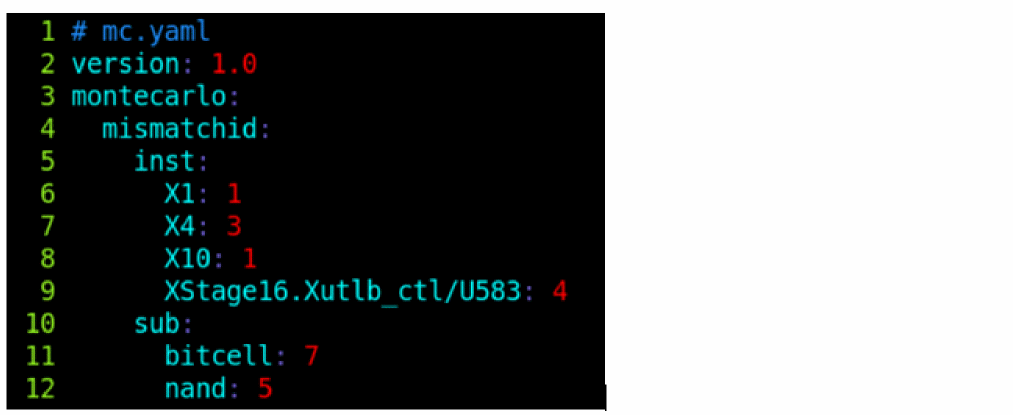
In the above YAML file, there are two entries in the mismatchid block; one for instances and the other for subcircuits. All the instances of the subcircuit bitcell have a mismatch id 7, while the instances of nand have an id of 5. Instances X1 and X10 have the same mismatch id of 1, instance X4 has an id of 3, while XStage16.Xutlb_ctl/U583 has an id of 4.
Each mismatch id defines an independent mismatch variation sequence; instances with the same mismatch id share the same mismatch variations. This also applies to multiple netlists, that is, if we have an instance X1 in netlist1 that shares the same mismatch id with an instance X11 in netlist2, and both monte carlo analyses have the same seed, then X1 and X11 will share the same mismatch variations even though they are in different runs and have different hierarchical names.
Filtering the Variables Generated from the Monte Carlo Analysis
Spectre provides a plugin that you can use to filter the random variables generated from a Monte Carlo run to perform statistical simulation. The plugin accepts or rejects a variable generated from a monte carlo run based on its validity. If a sample is rejected, Spectre generates another sample to replace the rejected sample. The simulation starts only when all the samples are generated. The following is the plugin script:
struct mcRandomVariable {
enum Type {
normal = 0,
uniform = 1,
lognormal = 2
};
mcRandomVariable( const void *ptr ) : dataPtr( ptr ) {}
const char *getInstName();
const char *getParamName();
Type getType();
double getMean();
double getStd();
bool isProcess()
{
return strlen( getInstName() ) == 0;
}
private:
const void *dataPtr;
};
class mciSampleFilter
{
public:
virtual bool begin( std::vector<mcRandomVariable> &rVariables ) = 0;
virtual bool filter( std::vector<double> &rValues ) = 0;
virtual bool end() = 0;
};
extern "C" {
int mciRegisterSampleFilter( mciSampleFilter *pFilter );
}
You can define your own filter class derived from the base class mciSampleFilter.
-
The
beginmethod is called by Spectre at the beginning of the monte carlo analysis, with the vector of all random variables. It must return true to indicate that the plugin is ready to proceed. -
Next, Spectre calls the
filtermethod multiple times with the vector of generated random values. It should return a true or false to indicate the values are accepted or rejected. -
The
endis called by Spectre at the end of the monte carlo analysis.
You also need to add the following function to the plugin code. Spectre will then load the plugin and call this function. The function then registers the filter object using the mciRegisterSampleFilter function.
extern "C"
{
void
mciInstall( void )
{
mySampleFilter *pFilter = new mySampleFilter;
mciRegisterSampleFilter( pFilter );
}
}
Once the code is compiled into a shared library you can load the plugins into Spectre as follows:
export CDS_MMSIM_PLUGINS=${PATH_TO_MC_PLUGIN}/%O/lib/%B/libmcfilter.so
$ spectre -plugin ${PATH_TO_MC_PLUGIN}/%O/lib/%B/libmcfilter.so input.scs
sampling=standard or sampling=lds. In addition, the plugin currently does not support the MDL and MP flows.Distributed Monte Carlo Analysis
You can use the distribute option with the montecarlo statement to distribute a Monte Carlo analysis to further speed up the run time for the analysis by using more computer cores across multiple computers. The distribute option with possible values of lsf, sge, rsh, ssh, fork, nc, and auto is used to specify the method to be used to launch the child processes. You can use the numprocesses option to specify the number of child processes to be launched for each job.
In distributed Monte Carlo analysis, the master process splits the job into the number of tasks specified using the numprocesses option. Each subtask is simulated in its own child subprocess. Once a child process is completed, it returns the results to the master process and the master process merges the results into a single file; including the scalar measurement files.
For lsf and sge methods, you need to use the bsub and qsub options respectively, to submit the initial master run. The master process uses the same settings to split the job into child processes.
In general, the master and child processes run on the same queue. You can use the CDS_MMSIM_MP_QUEUE environment variable to direct the master to run the child processes in alternative queues.
For rsh and ssh methods, you need to specify the list of hosts to be used for the subprocess using the +hosts command-line option.
You can use the fork option to create multiple jobs on a single system.
The following example runs a 2000 point Monte Carlo analysis by splitting the run points into 20 subprocesses. The master process is launched using bsub with four cores reserved. Each child process is launched by the master using the same bsub command arguments.
mc1 montecarlo numruns = 2000 distribute=lsf numprocesses=20
% bsub -R "(OSNAME==Linux) span[hosts=1]" -n 4 "spectre +aps input.scs"
The following example runs a 2000 point Monte Carlo analysis by splitting the run points into 20 subprocesses onto remote systems. The subprocesses are launched using the rsh method on three machines host-1, host-2, and host-3. Each subprocess uses one core.
mc1 montecarlo numruns = 2000 distribute=rsh numprocesses=20
% spectre +aps –mt +hosts='host-1 host-2 host-3' input.scs
The following example is similar to the examples above, however, here, the master splits the 20 subprocesses on the same local machine. Each subprocess uses one core.
mc1 montecarlo numruns = 2000 distribute=fork numprocesses=20
% spectre +aps -mt input.scs
If any of the child process fails and you still want to have a scalar file by combining the distributed Monte Carlo results, you can set the following environment variable:
setenv CDS_MMSIM_DISTRIBUTED_MONTECARLO_MERGE_RESULTS_ONLY
If a Monte Carlo analysis is defined in the netlist and the +mp <numprocesses> command-line option is used, Spectre automatically detects the farm environment (LSF, SGE, RTDA, or Network Computer) and distributes the montecarlo analysis to the specified number of child processes. If a farm environment is not detected, Spectre uses the fork option to distribute a Monte Carlo analysis by creating multiple jobs on a single system.
scalarfile=../monteCarlo/mcdata) to specify the location of file in distributed montecarlo. This is because distributed results are saved in the root directory. If you use a relative path to specify the location, all child processes will refer to the same directory.Spectre Reliability Analysis
Spectre reliability analysis for HCI, NBTI, and/or PBTI is a two-phase simulation flow. The first phase, fresh and stress simulation, calculates the device age or degradation. The second phase, post-stress or aging simulation, simulates the degradation effect on the circuit performance based on the device degradation information obtained during the first phase of stress simulation.
The following figure shows the reliability simulation flow in Spectre:
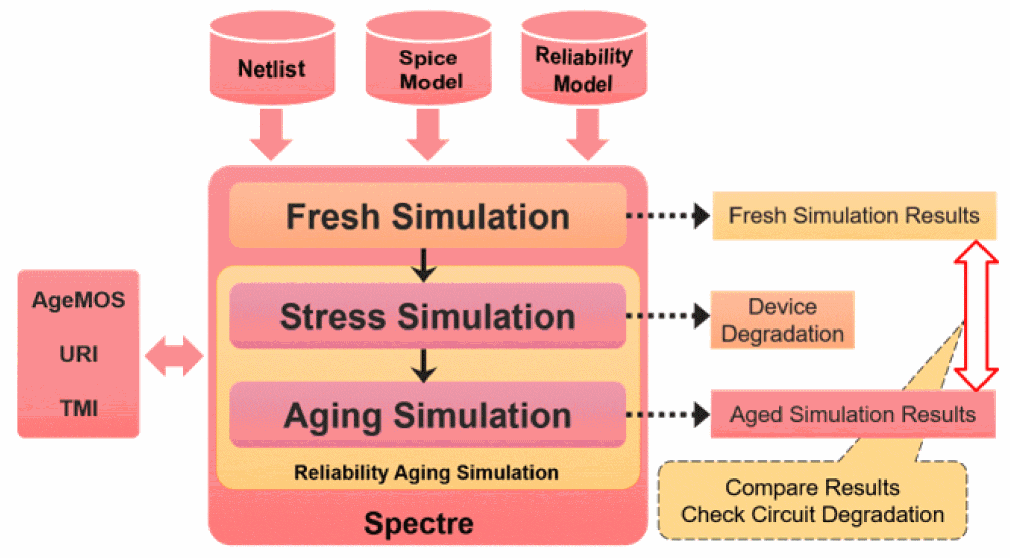
Reliability Simulation Block
Reliability simulation in Spectre is specified by using a reliability block, which is similar to the block statement that is used for Monte Carlo simulation.
A reliability block contains the following control statements:
The following example shows how these statements should be specified within a reliability block:
reliability_run_name reliability [global_options]{
reliability control statements
stress statements
aging/post-stress statements
}
Any fresh simulation settings are provided before the reliability block statements. The reliability block then provides the stress and post-stress simulation.
cx, ax, mx, lx, and vx) support native reliability aging analysis.Reliability Control Statements
The reliability control statements control the reliability simulation. The RelXpert control statement syntax is also supported in the reliability block. For detailed information on the reliability control statements, see the Reliability Control Statements Reference section.
Currently, only the agemos model is supported.
Stress Statements
The stress statements specify or change the stress conditions, and run the stress simulation. Stress statements can be categorized as stress testbench/vectors and simulation statements. Stress testbench statements specify the stress conditions during the stress simulation phase. This is done through alter statements. Stress testbench statements are optional. Stress simulation is performed through another transient statement. A transient statement is required for running stress simulation.
Aging/Post-Stress Statements
The aging statements specify or change the post-stress or end-of-life simulation conditions, and run the aging simulation. Similar to stress statements, the end-of-life conditions are specified through alter statements and run with another transient simulation. You can use the aging_analysis_name reliability control statement to specify dc, ac, noise, info, stb, S-parameter, hb, hbnoise, pss, pnoise, pac, or pxf analysis in addition to transient analysis.
Note: When you use the simmode reliability control statement, the aging_analysis_name control statement is ignored. In addition, for simmode type=stress, all analyses are considered as fresh analyses, and for simmode type=aging, all analyses are considered as aging analyses. This means that all analysis statements from the specified aging analysis to the end of the reliability block are considered as aging analysis with degradation.
Additional Notes
- The reliability feature only supports bsim4, bsim3v3, psp103, bsimsoi, bsimcmg, bsimimg, HiCUM (bht), bsim6 (bsimbulk), BJT, and URI models.
- The reliability feature supports SpectreRF HB, PSS, P Noise, Pole Zero, DC Match, and HB Noise analyses.
-
The two parameters
ageanddeltadmust be specified in the reliability block.
Examples of Reliability Block Setup
Example 1
rel reliablity {
age time = [10y]
deltad value = 0.1
tran_stress tran start = 0.0n step = 1n stop = 10n
change1 alter param = temp value = 25
tran_aged tran start = 0.0n step = 1n stop = 10n
}
The above example runs the stress simulation at the same fresh condition. Then, the aged simulation is run with temp=25C.
Example 2
rel1 reliability {
/* control statements */
age time = [100h]
deltad value=0.1
/* stress testbench */
Change0 alter param=temp value=125
Change1 alter dev=VDD1 value=1.5 /* change VDD condition to 1.5V during stress */
/* stress simulation */
tran_stress tran start=0 stop=1us
/* aging testbench */
Change2 alter dev=VDD1 value=1.2 /* change VDD condition in EOL simulation */
change3 alter param=temp value=25 /* change temp value in EOL simulation */
/* aging simulation */
tran_age tran start=0.5u stop=1us
}
In the above example, reliability simulation is carried with stressing devices for 100h with VDD at 1.5V and temp at 125C. After stress, end of life simulation (aging) is done with VDD at 1.2V and temperature at 25C.
Example 3
rel reliability {
age time=[8y]
gradual_aging_agepoint points=[1y 5y 10y]
tran_stress ...
tran_aged ...
}
- Runs the stress simulation for 1 year, calculates the device age, and updates the models.
- Continues to run the stress simulation using the updated models for 4 years, calculates the device age, and updates the model again.
-
Continues to run the stress simulation using the updated models for 5 years (for total of 10 years), calculates the device age, and updates the model again. Next, runs
tran_agedto generate the waveform.
Example 4
rel reliability {
age time=[8y]
gradual_aging_agestep type=log start=1y stop=10y total_step=5
tran_stress ...
tran_aged ...
}
-
Calculates the time step using the formula
(log(stop_time)-log(start_time))/(total_step-1). - Runs stress simulation for time step=2.25 years, calculates device age, and updates models.
-
Checks if the
total_stepnumber is reached. If not, runs stress simulation again. -
If
total_stepnumber is reached, runs aging transient using the last updated model and generates the degraded waveform.
Example 5
param=VDD value=3.5
param=temp value=125
rel reliability
{
// reliability control statements
age time = [10y]
deltad value = 0.1
gradual_aging_agepoint points = [1y, 3y, 5y, 10y]
gradual_aging_alter time=3y param=VDD value=2.5
gradual_aging_alter time=3y param=TEMP value=100
// fresh/stress simulation.
tran_fresh tran start = 0 step = 1us stop = 10us
// aging testbench statements.
//change1 alter param=rel_temp value=125
// aging simulation statements.
tran_aged tran start = 0 step = 1us stop = 10us }
- Supports multiple transient statements. Whenever a gradual aging statement is reached, it sets the stress time for the following transient statement.
- Runs stress simulation for first 3 years at VDD=3.5V and temp=125, and updates the model.
- Runs stress simulation with updated model for next 7 years at VDD=2.5V and temp=100, and updates the model.
- Runs aging with updated model and generates degraded waveform.
Example 6
rel reliability {
age time = [10yr]
uri_lib file="$OUTPATH/libURI.so"
report_model_param value = yes
aging_analysis_name value="hb_age"
hb_fresh hb oversample=[1] funds=["FLO"] maxharms=[20]
+ errpreset=moderate annotate=status
hbnoise_fresh (IFp IFn) hbnoise start=1K stop=10M maxsideband=20
+ annotate=status
tran_stress tran step=1ns stop=100ns
hb_age hb oversample=[1] funds=["FLO"] maxharms=[20]
+ errpreset=moderate annotate=status
hbnoise_age (IFp IFn) hbnoise start=1K stop=10M maxsideband=20
+ annotate=status
tran_aged tran start = 0 step = 1us stop = 10us }
The fresh RF analysis can be added inside the reliability block or before it.
For aged RF analysis, you must specify the aging analysis name using the aging_analysis_name control statement. This implies that from the specified aging analysis to the end of the reliability block, all included analyses are considered as aging analysis with degradation. In the above example, the aging analysis name is hb_age. As a result, hb_age and hbnoise_age will be considered as aging analysis.
tran_aged, which generates the aging waveform.Example 7
rel reliability {
enable_ade_process value=yes
age time=[10.0000y]
accuracy level=2
aging_analysis_name value="sp_age"
uri_lib file="./relexpert/URILIB.so" debug=0 uri_mode=appendage
tran_stress tran stop=1n errpreset=conservative write="spectre.ic" \
writefinal="spectre.fc" annotate=status maxiters=5
sp_age sp ports=[PORTIN PORTOUT] start=1G stop=1.2G step=0.1G annotate=status
// export E_T=oceanEval("1")
tran_aged tran start = 0 step = 1us stop = 10us
}
Reliability Analysis with Spectre X Distributed Simulation
Use the +xdp option to run reliability analysis with Spectre X distributed simulation. This lets you use more computer cores across multiple computer hosts to further speed up run time of large to very large, mainly postlayout circuits. A circuit is considered as large when there are at least 500,000 nodes.
Reliability Parameters Supported with Spectre X Distributed Simulation
Spectre X distributed simulation supports the following reliability parameters.
Reliability Models Supported with Spectre X Distributed Simulation
Spectre X distributed simulation supports the following reliability models:
- Agebsim4
- Agebsim3v3
- Agebsimsoi
- Agepsp102
- Agehisim2
- Agehisim_hv
- Agebsimcmg
- Ageumos3
- Ageumos4
- Ageumos5
- Ageumos6
- Agepsp103
- Agepsp1020
- Agepsp1021
- Agepsp102e
- Agebsimimg
- Ageutsoi
- Ageutsoi2
- Agelutsoi
- Agebsim6
- Agebsimbulk
- Agehisimhv_va
- Agemos195
- Agesisim2_va
Reliability Control Statements Reference
- accuracy ( *relxpert: .accuracy )
- age ( *relxpert: .age )
- agelevel_only ( *relxpert: .agelevel_only )
- check_neg_aging (*relxpert: .check_neg_aging)
- degradation_check (*relxpert: .degradation_check)
- degradation_check_exception (*relxpert: .degradation_check_exception)
- degradation_check_output (*relxpert: .degradation_check_output)
- degsort (*relxpert: .degsort)
- deg_ratio (*relxpert: .deg_ratio)
- deltad ( *relxpert: .deltad )
- dumpagemodel (*relxpert: .dumpagemodel)
- enable_negative_age (*relxpert .enable_negative_age)
- enable_tmi_uri
- gradual_aging_agepoint (*relxpert: .agepoint)
- gradual_aging_agestep (*relxpert: .agestep)
- idmethod ( *relxpert: .idmethod )
- igatemethod (*relxpert: .igatemethod)
- isubmethod (*relxpert: .isubmethod)
- macrodevice (*relxpert: .macrodevice)
- maskdev ( *relxpert: .maskdev )
- minage ( *relxpert: .minage )
- opmethod (*relxpert: .opmethod )
- output_device_degrad ( *relxpert: .output_device_degrad )
- output_subckt_degrad
- relx_tran ( *relxpert: .relx_tran )
- report_model_param (*relxpert: .report_model_param )
- simmode
- tmi_aging_mode (*relxpert: .tmi_aging_mode)
- uri_lib ( *relxpert: .uri_lib )
- vdsmethod
- User-Defined Reliability Models
accuracy ( *relxpert: .accuracy )
accuracy level={1 | 2}
Description
Specifies methods used in the reliability simulation when performing integration and substrate current calculation.
Arguments
Example
accuracy level = 2
*relxpert: accuracy 2
Specifies that trapezoidal integration will be used and lsub will be calculated when Vgs < Vth.
age ( *relxpert: .age )
age time = { value [value1 value2...]}
Description
Specifies the time at which the transistor degradation and degraded SPICE model parameters are calculated.
Arguments
Example
age time = [10y]
*relxpert: age 10y
Specifies the age time as 10 years.
agelevel_only ( *relxpert: .agelevel_only )
agelevel_only value=[(level_valuemodel_name) (level_valuemodel_name) ...] type=include|exclude
Description
Specifies the age level for performing reliability analysis on the specified model(s). You can specify different age levels for different set of models.
If model_name is not specified, the simulation is performed on all of the devices at the specified age level.
Arguments
Example
agelevel_only value=[(101 pmos1 pmos2) (112 pmos1 pmos2)]
Runs reliability analysis on pmos1 and pmos2 models with age levels 101 and 112.
aging_analysis_name
aging_analysis_name value=analysis_name
Description
Specifies the name of the analysis that needs to be used as aging analysis instead of transient analysis. You cannot specify a stress transient analysis as aging analysis in the reliability block.
Arguments
|
Name of the analysis to be used in aging simulation. Possible values are |
Example
aging_analysis_name value=ac
check_neg_aging (*relxpert: .check_neg_aging)
check_neg_aging type={warn|error|ignore} clamp={yes|no}
Description
Reports the negative degradation values for a model.
Arguments
check_neg_aging type=warn clamp=yes
degradation_check (*relxpert: .degradation_check)
degradation_check type=[warn | error] parameter=[deltad | dvth | didlin | didsat | did | dgm | dgds] value=<degradation_value> {agelevel=agelevel_number}
{sub=[sub1 sub2 sub3 …] | mod=[mod1 mod2 mod3…] | dev=[inst1 inst2 inst3…]}[error=filename]
Description
Checks for device degradation and issues a warning or error if the device's degradation value (in bo0 output) or vth, idlin, idsat, gm, and/or gds degradation (in bt0 output) is greater than the value specified by the value argument.
You can also use reliability warning/error model parameters, such as warn_dvth, error_dvth and so on, to check for device degradation. However, if warning/error model parameters are also specified along with the degradation_check control statement, the degradation_check control statement takes precedence over the model parameters.
You can output the degradation check results to a file using the degradation_check_output filename reliability control statement. You can use the degradation_check_exception filename control statement to specify the devices for which degradation check needs to be skipped.
Arguments
-
You can specify only one of the
sub,mod, ordevarguments in the control statement. A combination is not allowed. If none of these arguments is specified, then all devices are checked for degradation. -
The
agelevelargument can be specified only for thedeltadparameter. In addition, if agelevel is specified for thedeltadparameter, then degradation check is performed only at that agelevel. -
Only one
degradation_checkcontrol statement is allowed. If multiple statements are specified, only the last statement is considered by the simulator.
Example
degradation_check type=warn parameter=deltad value=0.25
The above statement issues a warning if any device's total deltad in bo0 is greater than 0.25.
degradation_check type=error parameter=dvth value=0.7 mod=[ nmos ]
Issues an error if any device with model nmos has d_Vth value greater than 0.7 in bt0.
degradation_check_exception (*relxpert: .degradation_check_exception)
degradation_check_exception file=filename
Description
Excludes the devices specified in the file from degradation check.
Arguments
|
Name of the file containing devices that need to be excluded from degradation check. |
degradation_check_output (*relxpert: .degradation_check_output)
degradation_check_output file = filename
Description
Outputs the device degradation errors and warnings generated by the degradation_check control statement or the reliability model parameters for degradation check to a specified file. The file contains the degradation information in the following format:
| Device | Type | Degradation_Value | Limit_Value | AgeLevel |
Arguments
degsort (*relxpert: .degsort)
degsort {threshold = value | number = value } [phys = value] [item = value] [value=yes|no}
Description
Prints MOS transistors based on the threshold and number settings. The results are sorted in the descending order of degradation.
threshold and number arguments are mutually exclusive. Therefore, only one of them can be specified with degsort to print the sorted device degradation results.Arguments
Example
degsort threshold = 0.1
*relxpert: degsort -threshold 0.1
Prints all MOS transistors that have degradation value greater than 0.1.
deg_ratio (*relxpert: .deg_ratio)
deg_ratio type = { [ include | exclude ] [ hci = hci_ratio_value nbti = nbti_ratio_value pbti = pbti_ratio_value bti = bti_ratio_value hcin = nmos_hci_ratio_value hcip = pmos_hci_ratio_value btin = nmos_bti_ratio_value btip = pmos_bti_ratio_value]
dev = [inst1 inst2 inst3...] }
Description
Specifies the HCI, NBTI, and PBTI degradation weighting ratio for devices in a Spectre simulation. The HCI, NBTI, and PBTI ratio values are specified by using the hci_ratio_value, nbti_ratio_value, pbti_ratio_value, respectively. The HCI ratio values for nmos and pmos are specified using nmos_hci_ratio_value and pmos_hci_ratio_value, respectively. The BTI ratio values for nmos and pmos are specified using nmos_bti_ratio_value and pmos_bti_ratio_value, respectively. The new degradation values for the specified devices is obtained by multiplying the original degradation value.
nbti=nbti_ratio_value is the same as specifying btip=pmos_bti_ratio_value and specifying pbti=pbti_ratio_value is the same as specifying btin=nmos_bti_ratio_value. If hci and hcip/hcin are specified, hcip/hcin will take precedence over hci.Arguments
Example
deg_ratio type=include [ hci = 0.5 nbti = 0.3 pbti = 0.2 ] dev = [I1]
deltad ( *relxpert: .deltad )
deltad value =deltad_value[model_name1|agelevel<val1> agelevel<val2>[model_name2|agelevel<val3>]...][item =value]
Description
Requests the calculation of lifetime for each transistor under the circuit operating conditions. You can use multiple deltad statements for different types of transistors.
Arguments
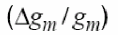 , linear or saturation drain current degradation
 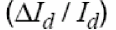 , threshold voltage shift
  , or any other degradation monitor, depending on the definitions of the lifetime parameters H and m.
 Example
deltad value=[“0.1 pmos”]
Specifies that the lifetime calculation will be done under the circuit operating conditions for pmos transistors.
deltad value=["0.1 agelevel101 agelevel102" "50 ageleve103" ]
dumpagemodel (*relxpert: .dumpagemodel)
dumpagemodel file =filenamedev = [devicelist]
Description
Outputs the model card information for aged devices into the specified file.
Arguments
Example
dumpagemodel file = “agedModelFile”
Specifies that the model card information for all the devices be written to the agedModelFile file.
enable_bias_runaway (*relxpert .enable_bias_runaway)
enable_bias_runaway = { yes | no }
Description
Enables the bias runaway detecting flow. This flow checks for positive feedback between the device degradation and stress over the device which might result in an exponential increase in device degradation and failure.
Arguments
|
Specifies whether or not to enable the bias runaway detecting flow. |
Example
enable_bias_runaway value = yes
enable_negative_age (*relxpert .enable_negative_age)
enable_negative_age value = { yes | no }
Description
Enables the negative age value for customer URI output. For internal agelevel, the negative age values cannot be negative. If this option is not specified, all negative age values are set to 0.0.
Arguments
|
Specifies whether or not to enable the negative age value for the customer URI output. The default value is |
Example
enable_negative_age value = yes
enable_tmi_uri
enable_tmi_uri value={yes|no} [tmishe=yes|no]
Description
Enables the TMI and URI flow. By default (value=no and tmishe=no), Spectre only supports the TMI flow if the TMI library is present, otherwise, it supports the URI flow.
If both TMI or URI libraries are present and you want to enable both TMI and URI flow models (for example, TMI for normal SPICE and URI for aging calculation), you can set the value to yes to enable both calculations. If you want to also enable the TMI self-heating flow, set the value of the tmishe parameter to yes. Then, Spectre passes the TMI dtemp value to URI for reliability calculation.
Arguments
|
Enable the self-heating flow and pass the dtemp value to URI for reliability calculation. This option sets the values of the TMI aging parameters |
|
Example
enable_tmi_uri value=yes tmishe=yes
gradual_aging_agepoint (*relxpert: .agepoint)
gradual_aging_agepoint points=[age_point_list] profile=[yes|no]
Description
Specifies the agepoint method for the gradual aging flow. Use this option to define the selected age points to perform reliability simulation or run the simulation independent of the aging points. The results files for each step are suffixed with age point values.
Arguments
Example
gradual_aging_agepoint points=[1y 3y 5y 8y]
Specifies that the simulation be run for age points 1y, 3y, 5y, and 8y.
gradual_aging_agestep (*relxpert: .agestep)
gradual_aging_agestep type=[log|lin] start=start_timestop=stop_timetotal_step=total_step_num
Description
Specifies the agestep method for gradual aging flow. Use this option to define the reliability simulation from the start time to the stop time. The total steps of reliability simulation are specified by total_step_num. Two age step types, linear and logarithm, can be specified.
Arguments
Example
gradual_aging_agestep type=log start=1y stop=10y total_step=6
Specifies that the agestep method will be used for the gradual aging flow where the type of agestep is logarithm, the start and stop time for simulation is 1 year and 10 years, respectively, and the total steps for reliability simulation is 6.
idmethod ( *relxpert: .idmethod )
idmethod type = { ids | idrain | idstatic }
Description
Specifies how the simulator obtains the drain current (Id) to perform reliability calculations. The following types of drain currents, which are available from SPICE, are supported by reliability analysis:
- Dynamic drain current (also called AC drain current) - this is the current that flows in to the drain node.
- Static drain current (also called channel drain current, DC drain current, or Ids).
Arguments
Example
idmethod type=idrain (new format)
*relxpert: idmethod idrain
Specifies the reliability simulator to print dynamic drain current.
igatemethod (*relxpert: .igatemethod)
igatemethod type={calc | spice}
Description
Specifies the method used for obtaining the gate terminal current of a MOSFET.
During MOSFET HCI simulation, the gate terminal current is required for calculating the degradation value. The simulator can either calculate this value using internal Igate model, or obtain it from the built-in SPICE model such as BSIM4 or PSP Igate model.
If this command is not used, the simulator calculates the gate terminal current using internal Igate model.
Arguments
|
Calculates the gate terminal current using the internal Igate model (Default). |
|
|
Obtains the gate terminal current value using built-in SPICE model. |
Example
igatemethod type=spice
*relxpert: igatemethod spice
Specifies that the gate terminal current value should be from built-in SPICE model.
isubmethod (*relxpert: .isubmethod)
isubmethod type={ calc | spice }
Description
Specifies the method used for obtaining substrate terminal current of a MOSFET.
During MOSFET HCI simulation, the substrate terminal current is required for calculating the degradation value. The simulator can either calculate this value using internal Isub model, or obtain it from the built-in SPICE model such as BSIM4 or PSP Isub model.
If this command is not used, the simulator calculates the substrate terminal current using internal Isub model.
Arguments
|
Calculates the substrate terminal current using the internal Isub model (Default). |
|
|
Obtains the substrate terminal current value using built-in SPICE model |
Example
isubmethod type=spice
*relxpert: isubmethod spice
Specifies that the substrate terminal current value should be obtained from the built-in SPICE model.
macrodevice (*relxpert: .macrodevice)
macrodevice type=[appendparams|agemos] sub = [sub1 sub2 sub3 …]
Description
Identifies the subcircuits in the netlist that are actually macro devices and therefore require special handling. You must specify at least one subcircuit.
Arguments
Example
macrodevice type=appendparams sub=[inv]
maskdev ( *relxpert: .maskdev )
maskdev type={include | exclude} { sub = [sub1 sub2 sub3 …] mod = [mod1 mod2 mod3 …] dev = [inst1 inst2 inst3 …] }
Description
- instances which belong to the subcircuit listed in the subckt list
- devices which belong to the model listed in the model list
- devices which are listed in the instance list
Arguments
Example
maskdev type=include sub=[inv] mod=[nmos pmos] dev=[I1 I2 I3 I4]
*relxpert: maskdev include subckt = [inv] model=[nmos pmos] instance=[I1 I2 I3 I4]
Includes the models that belong to the inv subcircuit and the pmos and nmos models. In addition, it includes the l1, l2, l3, and l4 devices.
minage ( *relxpert: .minage )
minage value = minage_value
Description
Sets the smallest Age value for which degraded SPICE model parameters are calculated. This statement speeds up aging calculation by using fresh SPICE model parameters if the transistor Age value is smaller than the specified minage_value.
Arguments
|
Specifies the smallest Age value for which degraded SPICE model parameters are calculated. minage_value can be in decimal notation (xx.xx) or in engineering notation (x.xxe+xx). |
Example
minage value = 0.001
*relxpert: minage 0.001
Specifies that the smallest Age value, 0.001, for which degraded SPICE model parameters are calculated.
opmethod (*relxpert: .opmethod )
opmethod type = { calc | spice }
Description
Specifies whether the Igate or Isub value should be obtained from the SPICE models (for example, BSIM3 or BSIM4) or the internal Igate or Isub equation should be used.
Arguments
|
Calculates the gate and substrate terminal current using the Cadence Igate and Isub model equations (Default). |
|
|
Obtains the gate and substrate terminal current value from the SPICE model. |
Example
opmethod type=spice
*relxpert: opmethod spice
Specifies that the gate and substrate terminal current value should be obtained from the SPICE model.
output_inst_param (*relxpert: .output_inst_param)
output_inst_param list=[param1 param2...]
Description
Specify the names of the instance parameters, defined in URI shared library, to be output into bo0 or psf file.
Arguments
|
Names of the URI instance parameters that need to be added to the |
Example
output_inst_param list=[dtemp leff]
The above statement adds the URI instance parameters dtemp and leff to the bo0 file.
output_she_power (*relxpert: .output_she_power)
output_she_power value=yes|no
Description
Output the device power in the self-heating (SHE) flow. You must set the rel_mode reliability control statement to she or all for this control statement to work.
The device power is calculated using the calcPower() URI function and stored in the .bw0 file.
Argument
|
If set to |
Example
output_she_power value=yes
reset_analysis_param
reset_analysis_param type = { tran | dc | ac }
Description
Replaces the stress and aging analysis parameters defined in the reliability analysis block with the specified analysis.
Arguments
|
Specifies the type of analysis that will replace the stress and aging parameters in the reliability analysis block. |
Example
reset_analysis_param type=tran
output_device_degrad ( *relxpert: .output_device_degrad )
output_device_degrad { vdd = “vdd_value1 [model_list...”] [ “vdd_value2 [model_list...”]]...} [ vdlin = vdlin_value1 [model_list...] [ vdlin_value2 [model_list...]...] [ vgsat = vgsat_value1 [model_list...] [ vgsat_value2 [model_list...]...] [ vglin = vglin_value1 [model_list...] [ vglin_value2 [model_list...]...] [ output_bias_voltage=yes|no ] [ correct_bias_voltage = no|yes ] [keep_zero_result =no|yes] tmi_lib_inc = file_path file = file_path
Description
Outputs the device degradation (gm, gds, Idlin, Idsat, Vth degradation) information to a .bt0 file.
The device degradation calculation is based on following fixed bias conditions:
NMOSFET
-
Idsat:Vds=Vdd,Vgs=VgsatifVgsatis specified for the target model, otherwiseVgs=Vdd. -
Idlin:Vds=VdlinifVdlinis specified for the target model, otherwiseVds=0.05V;Vgs=VglinifVglinis specified for the target model, otherwiseVgs=Vdd. -
gm:Vds=VdlinifVdlinis specified for the target model, otherwiseVds=0.05V;Vgs=VglinifVglinis specified for the target model, otherwiseVgs=Vdd. -
Vth:Vds=VdlinifVdlinis specified for the target model, otherwiseVds=0.05V;Vgs=VglinifVglinis specified for the target model, otherwiseVgs=Vdd. -
Gds:Vds=VdlinifVdlinis specified for the target model, otherwiseVds=0.05V;Vgs=VglinifVglinis specified for the target model, otherwiseVgs=Vdd.
PMOSFET
-
Idsat:Vds=Vdd,Vgs=VgsatifVgsatis specified for the target model, otherwiseVgs=Vdd. -
Idlin:Vds=VdlinifVdlinis specified for the target model, otherwiseVds=-0.05V;Vgs=VglinifVglinis specified for the target model, otherwiseVgs=Vdd. -
gm:Vds=VdlinifVdlinis specified for the target model, otherwiseVds=-0.05V;Vgs=VglinifVglinis specified for the target model, otherwiseVgs=Vdd. -
Vth:Vds=VdlinifVdlinis specified for the target model, otherwiseVds=-0.05V;Vgs=VglinifVglinis specified for the target model, otherwiseVgs=Vdd. -
Gds:Vds=VdlinifVdlinis specified for the target model, otherwiseVds=-0.05V;Vgs=VglinifVglinis specified for the target model, otherwiseVgs=Vdd.
Arguments
Example
output_device_degrad vdd=[“1.2 nch1 nch2” “1.1 pch1 pch2”] tmi_lib_inc=”./model_bmg_1/BSIMCMG_TMI_Model_1_usage.l”
The above example sets the bias voltage for models nch1 and nch2 to 1.2, and the bias voltage for models pch1 and pch2 to 1.1.’
output_subckt_degrad
output_subckt_degrad { sub= sub1 [sub2]...} { vdd = “vdd_value1 [subckt_list...”] [ “vdd_value2 [subckt_list...”]]...} [ vdlin = vdlin_value1 [subckt_list...] [ vdlin_value2 [subckt_list...]...] [ vgsat = vgsat_value1 [subckt_list...] [ vgsat_value2 [subckt_list...]...] [ vglin = vglin_value1 [subckt_list...] [ vglin_value2 [subckt_list...]...] { node = node_name1 [node1_terminals] [node2_name [node2_terminals]]... } { correct_bias_voltage = no|yes } {ivth = “value1 model1” [“value2 model2”]...} ivthn = value ivthp = value file = file_path
Description
Outputs the subcircuit degradation (Idlin, Idsat, Vth degradation) information to a .bt0 file. Since a subcircuit is treated as a MOSFET device, it should have at least four terminals which map to drain (D), source (S), gain (G), and bulk (B) of the MOSFET.
The subcircuit degradation calculation is based on following fixed bias conditions:
NMOSFET
-
Idsat:Vds=Vdd,Vgs=VgsatifVgsatis specified for the target subcircuit, otherwiseVgs=Vdd. -
Idlin:Vds=VdlinifVdlinis specified for the target subcircuit, otherwiseVds=0.05V;Vgs=VglinifVglinis specified for the target subcircuit, otherwiseVgs=0.05. -
Vth:Vds=VdlinifVdlinis specified for the target subcircuit, otherwiseVds=0.05V;Vgs=VglinifVglinis specified for the target subcircuit, otherwiseVgs=0.05.
PMOSFET
Idsat: Vds=Vdd, Vgs=Vgsat if Vgsat is specified for the target subcircuit, otherwise Vgs=Vdd.
Idlin: Vds=Vdlin if Vdlin is specified for the target subcircuit, otherwise Vds=-0.05V; Vgs=Vglin if Vglin is specified for the target subcircuit, otherwise Vgs=0.05.
Vth: Vds=Vdlin if Vdlin is specified for the target subcircuit, otherwise Vds=-0.05V; Vgs=Vglin if Vglin is specified for the target subcircuit, otherwise Vgs=0.05.
Arguments
Example
output_device_degrad sub = [sub1 sub2] vdd=[“1.2 sub1” “1.1 sub2”] tmi_lib_inc=”./model_bmg_1/BSIMCMG_TMI_Model_1_usage.l”
The above example sets the bias voltage for subcircuit sub1 to 1.2 and for subcircuit sub2 to 1.1.
preset (*relxpert: .preset)
preset {age|deg|lifetime} [agelevel=integer] mod=[mod1 mod2...] dev=[dev1 dev2...]
Description
This statement is used to preset the total age, deg (degradation), or lifetime values of devices in the netlist file. If preset is set, Spectre uses the values directly, but does not calculate them. The preset statement is useful if you already know the age|degradation|lifetime of blocks or devices, and want to preset the values in order to speed up the calculation.
If the preset is age, the simulator does not perform age calculation for the specified devices, models, or blocks. Lifetime or degradation calculations are based on the preset age value. If the preset is lifetime or deg, the simulator derives the age from the preset lifetime or degradation values to calculate degradation or lifetime for the specified devices, models, or blocks.
preset reliability option works only for aging analysis in the appendage flow.Arguments
Examples
preset age=1.0001e-5 agelevel=1 dev=x1.mp1
tells the simulator to set the device x1.mp1 NBTI age value to 1.001e-5.
preset deg=1.01e-02 mod=PMOS
tells the simulator to set the degradation value to 1.01e-02 for all devices which use the PMOS model.
preset lifetime=10y agelevel=0 dev=X2*mp1
tells the simulator to set the lifetime value to 10 years for all devices or for devices with hierarchical names that begin with the X2 prefix and end with the mp1 suffix (for example, X2.mp1, X21.mp1, and X2.X22.mp1).
rel_mode (*relxpert: .rel_mode)
rel_mode type=[aging|she|all]
Description
Specifies the type of analysis to be used for obtaining the reliability values of MOSFETs.
For type=she and type=all, the specified device power and temperature rise are calculated using the calcDeltaPower(), calcPower(), and calcTrise() URI functions and stored in the .bw0 and.bh0 files.
You can output the device power (.bw0) in the self-heating flow by using the output_she_power (*relxpert: .output_she_power) control statement.
The URI library can be added using the uri_lib ( *relxpert: .uri_lib ) control statement.
agelevel is used for self-heating calculation. Do not use URI and the internal self-heating model for self-heating calculation at the same time.Arguments
Example
rel_mode type=all
relx_tran ( *relxpert: .relx_tran )
relx_tran start=start_timestop=stop_timemult_win[start_time1 stop_time1 start_time2 stop_time2...]
Description
Specifies the start and stop time for reliability simulation during transient simulation.
Arguments
Example
relx_tran start = 1n stop = 10n
*relxpert: relx_tran 1n 10n
Specifies that the start time for reliability simulation during transient simulation is 1n and the stop time for reliability simulation during transient simulation is 10n.
relx_tran start=100u stop=500n mult_win =[100n 200n 300n 400n 450n 500n]
Perform reliability analysis in the following time windows during transient simulation:
(100n 200n), (300n 400n), and (450 500n).
report_model_param (*relxpert: .report_model_param )
report_model_param value = {yes | no}
Description
Determines whether to print the fresh and aged parameters in the.bm# file. When set to yes, the fresh and aged parameters are printed to the .bm# file.
Arguments
|
Skips printing of the fresh and aged parameters in the |
Example
report_model_param value = yes
*relxpert: report_model_param yes
Prints the fresh and aged parameters in the .bm# file.
simmode
simmode { type = [ stress | aging | all ] } file = filename [tmifile=filename]
Description
Normally, reliability simulation includes stress and aging transient analysis. This option enables you to choose which transient analysis to run in the reliability simulation. The default value is all and runs both stress and aging transient analysis.
Arguments
Example
simmode type = aging file= input.bs0
Specifies that the aging transient simulation be run and the results be saved in the file input.bs0.
tmi_aging_mode (*relxpert: .tmi_aging_mode)
tmi_aging_mode type=[aging|she|all]
Description
This option is used to specify the TMI self-heating or aging mode for the TMI aging flow.
Arguments
Example
tmi_aging_mode type=all
tmi_she_mindtemp (*relxpert: .tmi_she_mindtemp)
tmi_she_mindtemp value=value
Description
Sets the minimum delta temperature induced by self-heating for transistor devices. If the temperature change for a transistor is less than the minimum delta temperature value, the second self-heating run is not required.
Arguments
|
Sets the minimum delta temperature value. The default value is 0.0 and the unit is in celsius. |
Example
tmi_she_mindtemp value=10
*relxpert: .tmi_she_mindtemp value=10
uri_lib ( *relxpert: .uri_lib )
uri_lib file = { "uri_lib_name" } uri_mode= [scaleparam | appendage | appendage1 | apendage2] debug = [ 0 | 1 ] scale_mode = [original | effective]
Description
Loads the Unified Reliability interface (URI) shared library.
Arguments
Example
uri_lib file = "./libURI.so" uri_mode = scaleparam debug =1
*relxpert: uri_lib "./libURI.so" uri_mode = scaleparam debug=1
Specifies the libURI.so URI library and the agemos URI mode. In addition, requests the debug information to be generated.
RELXPERT_URI_LIBS environment variable to set the URI library. If you use both the RELXPERT_URI_LIBS environment variable and the uri_lib control statement, the RELXPERT_URI_LIBS environment variable takes higher precedence over the uri_lib control statement.Example2
The following is an example of using the appendage2 method:
//Reliability block setting for stress simulation
rel reliability {
age time =[10yr]
uri_lib file="uriLib.so" uri_mode=appendage2
simmode type=stress
tran_stress tran stop=10n
}
//Reliability block setting for aging only netlist
rel reliability {
age time =[10yr]
uri_lib file="uriLib.so" uri_mode=appendage2
  simmode type=aging file="input.bs0" //input.bs0 is intermediate file generated
             in stress)
vdsmethod
vdsmethod type = [internal | external]
Description
Specifies how the simulator would use the vds values for reliability calculations. When set to internal, reliability simulation sets vds to use the internal value. If set to external, reliability simulation sets vds to use the external value.
Arguments
Example
vdsmethod type=internal
Aging Monte Carlo Analysis
Spectre reliability analysis supports the following two flows to perform aging MonteCarlo analysis for the agemos and appendage flow:
-
1+N method: In this method, a nominal stress analysis is run first. Next, MonteCarlo analysis is performed on the aging analysis. No variations are performed on the stress analysis.
The following is an example of a reliability block for the stress simulation: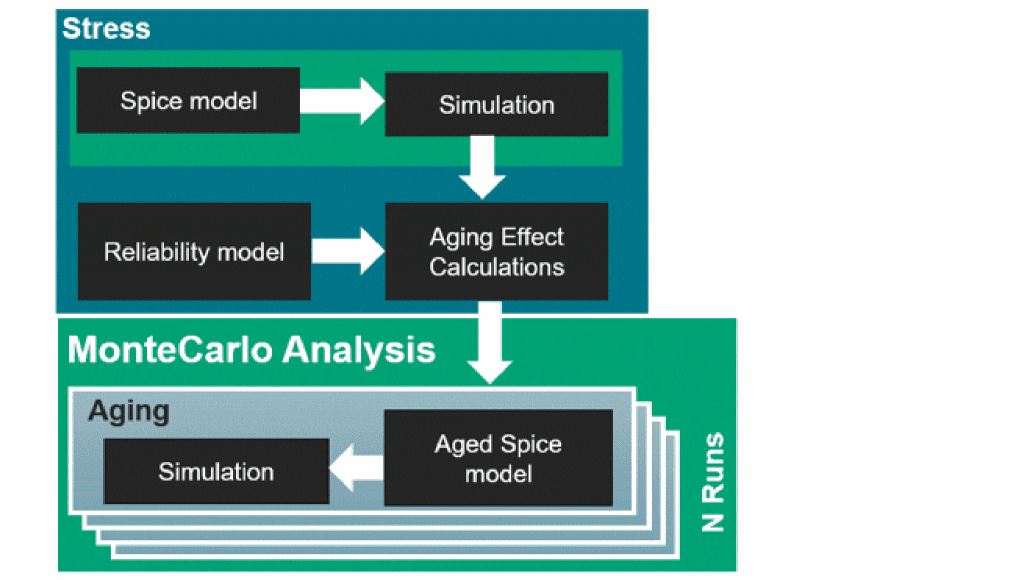
rel reliability {
// reliability control statements
age time = [10y]
deltad value = 0.1
report_model_param value=yes
simmode type=stress
// fresh/stress simulation.
tran_stress tran start = 0 step = 1u stop = 10u
}
The following is an example of a reliability block for the aging Monte Carlo simulation:mc1 montecarlo numruns=100 seed=12345 variations=all sampling=standard \ savedatainseparatedir=yes savefamilyplots=yes {
rel reliability {
// reliability control statements
age time = [10y]
deltad value = 0.1
report_model_param value=yes
// fresh/stress simulation.
simmode type=aging file="stress.bs0"
// aging simulation statements.
tran_aged tran start = 0 step = 1us stop = 10us
}
}
-
N+N method: In this method, Monte Carlo analysis is performed on both stress and aging simulations. This method can be run on a single netlist or separate netlist.
The following is an example of running stress and aging analyses in the same netlist: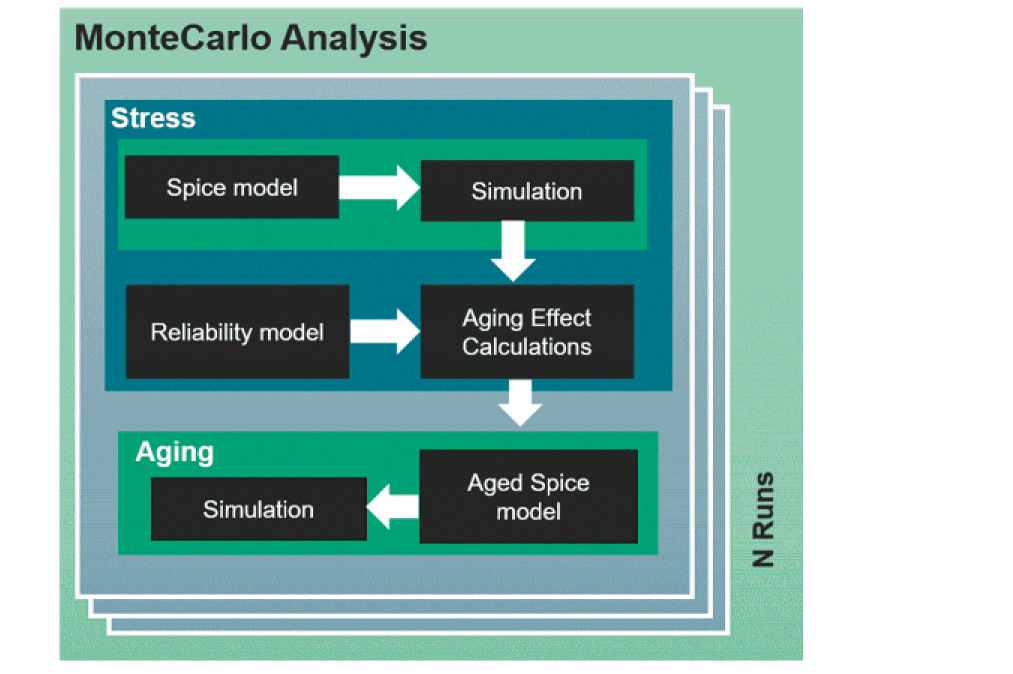
mc1 montecarlo numruns=100 seed=12345 variations=all sampling=standard
savedatainseparatedir=yes savefamilyplots=yes {
rel reliability {
// reliability control statements
age time = [10y]
deltad value = 0.1
report_model_param value=yes
// fresh/stress simulation.
tran_stress tran start = 0 step = 1u stop = 10u
// aging simulation statements.
tran_aged tran start = 0 step = 1us stop = 10us
}
}
The following is an example of running stress and aging analyses in separate netlists:
mc1 montecarlo numruns=100 seed=12345 variations=all sampling=standard savedatainseparatedir=yes savefamilyplots=yes {
rel reliability {
// reliability control statements
age time = [10y]
deltad value = 0.1
uri_lib file=“libURI.so” uri_mode=appendage
report_model_param value=yes
simmode type=stress
// fresh/stress simulation.
tran_stress tran start = 0 step = 1u stop = 10u
}
}
mc1 montecarlo numruns=100 seed=12345 variations=all sampling=standard savedatainseparatedir=yes savefamilyplots=yes {
rel reliability {
// reliability control statements
age time = [10y]
deltad value = 0.1
report_model_param value=yes
uri_lib file=“libURI.so” uri_mode=appendage
// fresh/stress simulation.
simmode type=aging file="stress.bs0"
// aging simulation statements.
tran_aged tran start = 0 step = 1us stop =10us
}
}
User-Defined Reliability Models
Cadence provides a unified reliability interface (URI) to allow you to implement customized models for running reliability simulation. Contact Cadence support or refer to URI document for more information.
Measuring the Reliability Analysis
To measure the reliability analysis that is defined in the reliability block, you need to specify the .measure MDL statement right before or after the reliability block. For example:
rel reliability {
// reliability control statements
age time = [10y]
deltad value = 0.1
report_model_param value=yes
// fresh/stress simulation.
tran_stress tran start = 0 step = 1u stop = 10u // Need add the one parameter for identify the fresh tran.
// aging simulation statements.
tran_aged tran start = 0 step = 1us stop = 10us // Need add the one parameter for identify the aged tran.
}
simulator lang = spice
.measure tran nmos_width PARAM='(1e6)*wn'
In the above example, the .measure statement will work for the tran_aged transient analysis.
Thermal Nodes
You can define the thermal nodes in the Spectre netlists. Thermal nodes provide you the ability to dynamically analyze the effect of temperature on the electrical behavior of the design during simulation. In the past, you could perform thermal analysis by changing the simulation ambient temperature directly or using dynamic parameters to change the ambient temperature during transient analysis. Dynamic parameters change the temperature during simulation, however, the temperature is independent of the circuit’s electrical behavior. The Spectre thermal node enables you to couple the temperature and power of a subcircuit or a device model. The thermal node is connected to a thermal impedance to simulate the effect of temperature on the electrical behavior of the design during simulation. You can use it as:
-
an external point of connection, for example, simulating the effect of packaging on a circuit's electrical performance
or - an internal node, for example, to model device self-heating effect
External Thermal Node
The following figure displays an external thermal node:
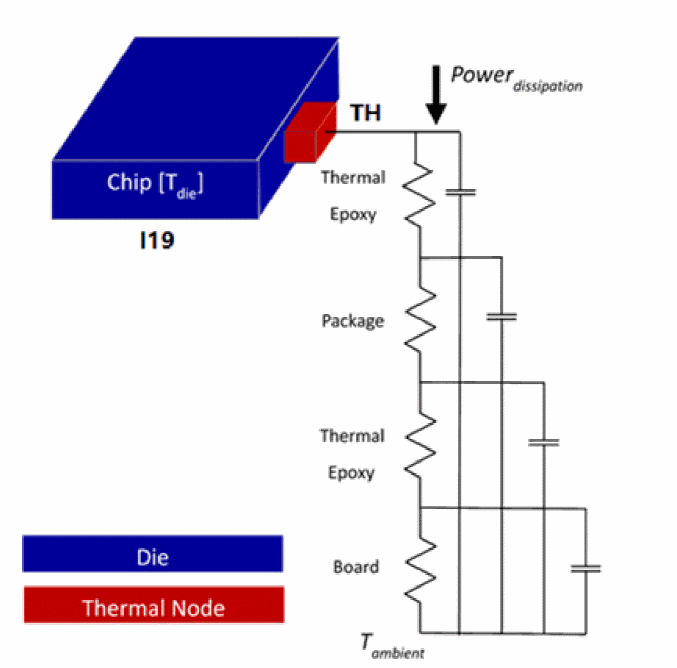
You can use the Spectre tempnode statement to create thermal nodes. In the following example, a thermal node TH is created for the subcircuit instance I19 and is connected to the ambient through the JEDEC package modeled by the subcircuit JEDEC_package:
subckt dc2dc_updated_core_1 VDD Switcher VSS Vfb Vosc Vref inh_bulk_n
. . . . . .
ends dc2dc_updated_core_1
subckt JEDEC_package JUNCTION AMBIENT
. . . . . .
ends JEDEC_package
tn1 (TH) tempnode sub=I19
I16 (TH 0) JEDEC_package
I19 (net070 Switcher_Out 0 net051 net026 net021 0) dc2dc_updated_core_1
The following figure displays the simulation results for the external thermal node:
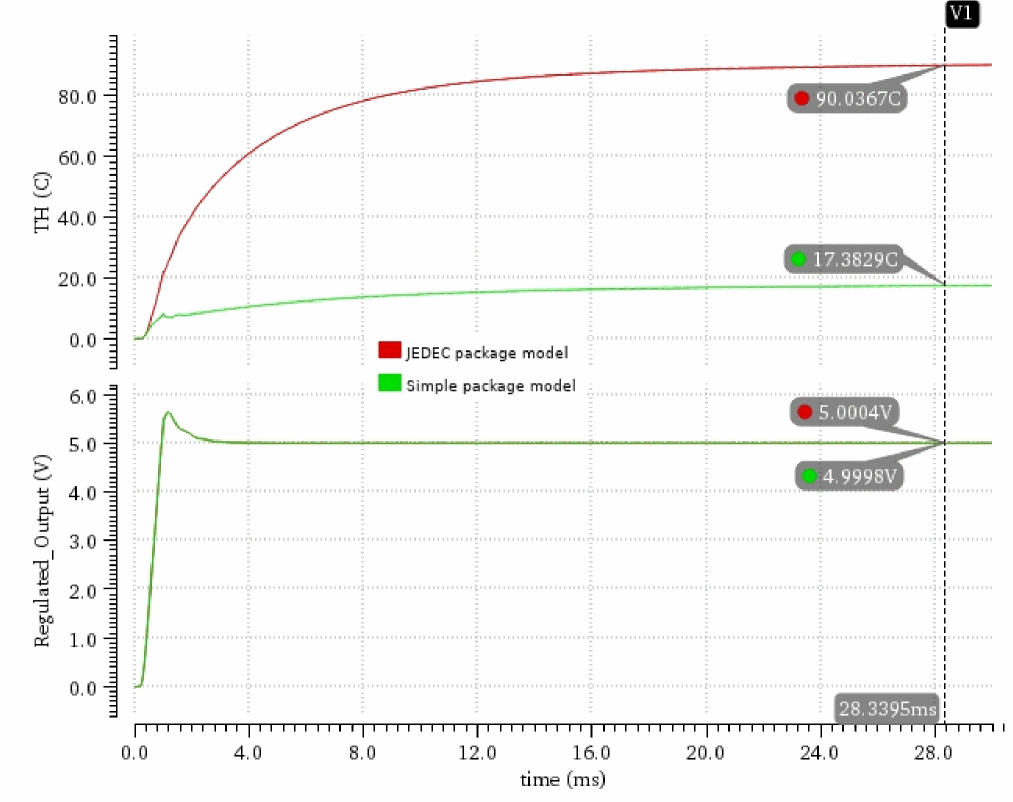
During simulation, the power dissipated within the subcircuit I19 is output at the thermal node defined by the tempnode statement (sub=I19). It is applied to the thermal package model and the result is the temperature rise from the ambient temperature of the subcircuit I19. The temperature at TH is applied to the dTemp instance properties of all the instances in the subcircuit I19. You can save the simulation results by adding the thermal node TH to the Spectre save statement:
save TH
Spectre also supports the Spice syntax for thermal node creation. The Spice equivalent of the above Spectre tempnode statement is shown below.
.tempnode TH sub=I1s9
The simulation example shows the simulation results for a DC-to-DC Converter with two different package models. The simple model is a shunt R [1 Ohm] || C [1 mF] to represent the package. The JEDEC model is more complex with longer thermal time constants. In this simulation, the electrical characteristics are not greatly affected by the 20C temperature rise due to the packaging.
Internal Thermal Node
Thermal nodes can also be created at nodes within a subcircuit or a device model to allow modeling simulation of the self-heating effect.
In the following example, a thermal node TH is created inside a subcircuit test by adding the tempnode statement. However, unlike the external thermal node example, the sub keyword is not used, therefore, the temperature at TH will modify the dTemp value of all the instances inside the subcircuit. As a result, the resistor ra will now operate at a temperature of ambient temperature, tnom, + temperature rise, dTemp, where dTemp is the product of the resistor power and thermal self-impedance (rthn || cthn).
subckt test a b
ra (a b) resistor r=1k tc1=0.1
tn1 (TH) tempnode
rthn (TH 0) resistor r=10
cthn (TH 0) capacitor c=0.1
ends test
x1 (a b) test
Spectre recognizes rthn and cthn as thermal elements because they are connected to the thermal node. They are treated as thermal elements, not as electrical elements. Thermal elements are described in terms of power and temperature instead of current and voltage.
SpectreThermal Analysis
Spectre APS thermal analysis, Spectre Thermal, performs electrothermal simulation using Cadence® Thermal Extractor and delivers true electrothermal co-simulation. In the Spectre thermal analysis flow, the thermal extractor is used to extract a thermal model of the die, based on the chip structure and thermal properties of the die stack.
Spectre thermal analysis is different from self-heating (SHE) analysis because it considers the thermal interactions between devices. In addition, it considers all the power sources in the chip, including transistors, resistors, and other devices.
This section discusses the following topics:
- Spectre Thermal Analysis Technology, Product, and Flow Overview
- Thermal Control Files
- Getting Started with Spectre Thermal Analysis
Spectre Thermal Analysis Technology, Product, and Flow Overview
Technology Overview
In the Spectre thermal analysis flow, the first step is to generate a thermal model, which is a description of the thermal characteristics of a design. The thermal model is created using the chip structure, physical design and die stack, and thermal conductivity of materials. It is a thermal equivalent circuit of the die. Spectre thermal analysis uses the electrical and thermal descriptions of the circuit, the netlist, and the thermal model to perform electrothermal simulation.
Spectre thermal analysis starts with an electrical simulation and uses the instance power to drive a thermal solution to calculate the temperature of the instances on the die. If the temperatures converge, the simulation is complete. If not, the thermal and electrical simulation process continues until the results converge to a stable solution that satisfies both the circuit electrical power and the circuit temperature condition. This process is called electrothermal co-simulation or electrothermal simulation.
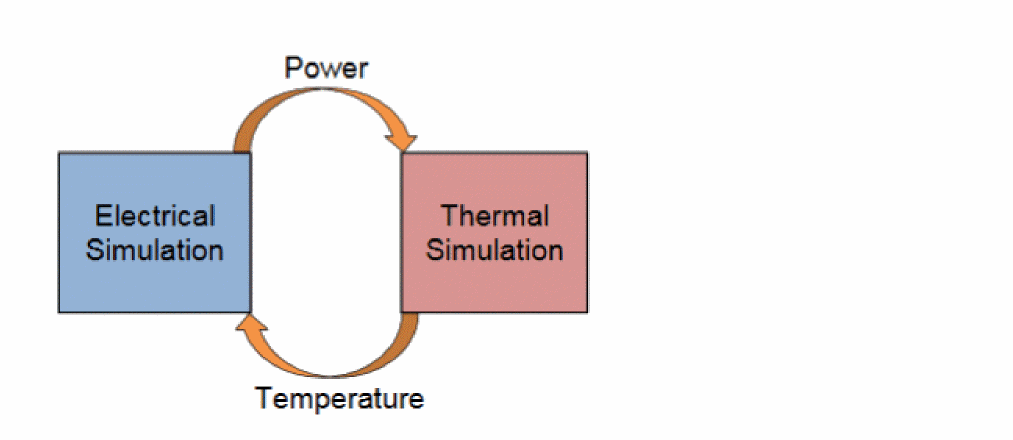
The Spectre thermal analysis flow requires a complete testbench including stimuli, device models, and all files required for a regular Spectre simulation. The circuit information is included in the DSPF file (with instances and/or parasitic sections). To enable Spectre thermal analysis, add the testbench netlist in the reliability block using the thermal analysis statement, as shown below.
rel reliability
{
myThermal thermal config “thermal.conf” <options>
{
tran_thermal tran stop=100n
}
}
Most of the thermal analysis control settings are specified as options in the thermal analysis statement. A config option is required to further specify the location of the thermal technology file and the location of the thermal package file.
Spectre thermal analysis supports both steady state and dynamic thermal analysis, which is controlled by the method option.
You can use the following options to specify the control settings for the Spectre thermal analysis. These options may be relevant to the steady state thermal analysis, dynamic thermal analysis, or both.
Once the reliability block is set up in the input netlist, Spectre thermal analysis is automatically invoked when running Spectre APS simulation. For example, if the name of the input netlist is input.scs, you can use the following command to invoke Spectre thermal analysis:
% spectre -64 +aps input.scs
Product Overview and Spectre Thermal Analysis Flow
The Spectre thermal analysis consists of the following three components:
-
Spectre APS for electrical simulation
Spectre APS is used for electrical simulation, which computes the power of each power dissipating instances in the circuit: MOS transistors, resistors, diodes, and bipolar transistors. -
Cadence® Thermal Extractor
Cadence® Thermal Extractor is called internally by Spectre APS to perform thermal extraction of the die and to create the thermal model used in electrothermal simulation. -
Spectre APS for thermal simulation
Spectre APS is used for thermal simulation. It calculates the instance temperatures based on the power consumption of the instances. The thermal solver is built into the electrothermal simulation and is not available as a standalone offering.
In addition to these components, Spectre thermal analysis also includes enhancement to Spectre APS for electrothermal simulation. Spectre APS automatically maps the information from the electrical simulator, power, to the thermal solver and maps the information from the thermal solver, temperature, back to the electrical simulator. After defining where the data is stored and how to perform the simulation, the electrothermal simulation runs automatically until completion.
Spectre Steady State Analysis Flow
For steady-state thermal simulation, electrothermal simulation starts with an electrical simulation with the device temperatures initially set to the ambient value.
Upon completion of the electrical simulation, the average power of all the devices is computed and sent to the thermal solver to compute the temperature rise for each device as a result of the steady-state instance power. The calculated instance temperatures are then used to update the instance temperatures for the next iteration of the electrothermal simulation. The process continues until the user-specified iteration count is reached. The output of the steady-state thermal simulation is a text report, which lists the temperature rise and the average power of each device in the DSPF netlist.
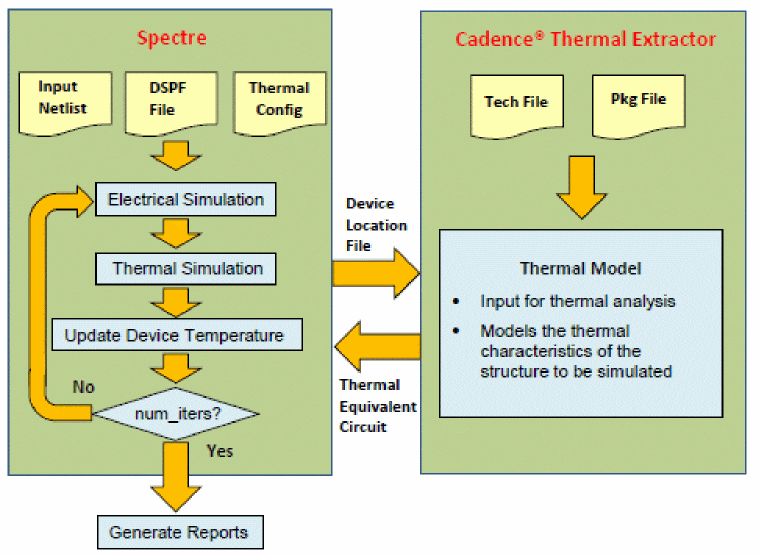
Spectre Dynamic Thermal Analysis Flow
Dynamic thermal analysis is run by performing thermal solving at each time step of the Spectre transient analysis. Because thermal variation is usually much slower than electrical variation, it is assumed that convergence of electrothermal co-simulation is always achieved with just one iteration at each time step. Therefore, no iterations are needed for the electrothermal co-simulation during dynamic thermal analysis. This greatly increases the efficiency of the dynamic thermal analysis algorithm without introducing significant errors.

DSPF Requirements
The Spectre thermal analysis flow is based on using DSPF. A DSPF file is required to include all electrical and geometric information needed for thermal analysis. The following figure shows a representative DSPF netlist with all important information for thermal model generation being marked in color.
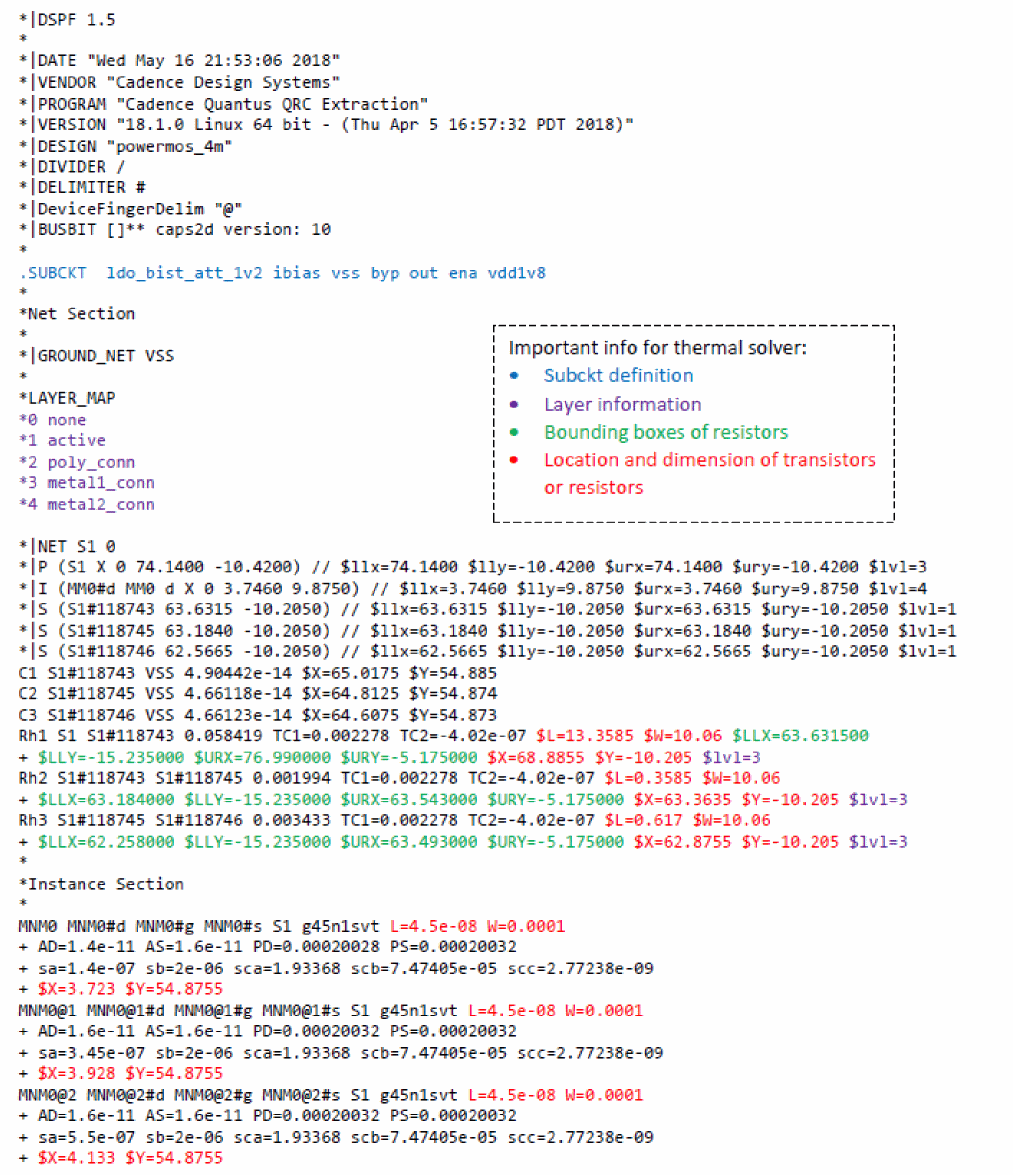
The location and dimension of parasitic resistors can be defined by one or both of the following two sets of data:
-
Bounding box (
$LLX,$LLY,$URX,$URY) -
Box center location (
$X,$Y) and dimension$L(length) and$W(width)
For thermal simulation, the bounding box information is usually more accurate than location/dimension information because the dimension data often contains scaling factors that are intended for electrical modeling/computation and are not relevant for thermal modeling. Therefore, when both sets of information is provided in the DSPF file for parasitic resistors, the bounding box information is used and the location/dimension information is ignored. It is recommended that when generating DSPF files for Spectre thermal simulation, proper control switches are turned on so that bounding boxes are created for parasitic resistors. If Quantus QRC is used for DSPF netlist extraction, you can use the following options for the generation of parasitic resistor bounding boxes:
-
include_parasitic_res_bonding_box -
include_parasitic_res_via_array_bounding_box -
include_parasitic_res_counductor_bounding_box
Thermal Control Files
Electrothermal analysis is performed based on the information contained in the reliability block of the testbench. The reliability block must contain a thermal statement that defines the thermal configuration file as well as other information, such as the tran analysis statement.
Thermal Configuration File
The thermal configuration file consists of two parts, the location of the data files required for thermal analysis, and additional options. The following two files are required for thermal analysis:
The thermal technology file is defined with the keyword tech_file in the thermal configuration file and describes the die stack. It is the thermal equivalent of the ICT file and contains the thickness and the thermal properties of the materials of the die stack.
The thermal package file is defined with the keyword package_file in the thermal configuration file and describes the thermal characteristics of the package, which define the boundary conditions for thermal analysis. The following is the content of a sample thermal configuration file, where the location of the thermal technology and thermal package files are specified:
thermal tech_file = "tech.txt"
thermal package_file = "pkg.txt"
In addition to the technology file and package file, the thermal configuration file can also include other options, as shown in the following table:
Setting the values for geounit, geounit_xy, and geounit_wl
Normally, the device dimensions in the DSPF file are expected to be provided in the following units:
| Parameters | Units |
|---|---|
If the device geometries in the DSPF file are provided in the above units, using the default setting for geounit, geounit_xy, and geounit_wl is sufficient without any overrides for the default.
If the units in the DSPF file are different from the above, the default setting needs to be overwritten to convert the geometry values into the correct units. The following table lists a few scenarios of the geometry units in the DSPF file and the corresponding overrides for geounit, geounit_xy, or geounit_wl, that will convert the geometry values into the correct units:
| L, W Unit (instances) | $X, $Y unit (instances & resistors) | $L, $W unit (resistors) | geounit, geounit_xy, and geounit_wl setting |
Thermal Technology File
The thermal technology file is defined by the tech_file keyword in the thermal configuration file. It contains the chip stackup and the corresponding thermal materials. The following is an example of the thermal technology file (tech.txt):
*Thermal_Layers
Substrate 804.5 (silicon 148 1658960)
Channel 0.33 (silicon 148 1658960)
poly_conn 0.10 (silicon 148 1658960) (oxide 12.4 2440000)
cont_poly 0.05 (copper 390 3439205) (oxide 2.4 440000)
cont_ndiff_conn 10 (copper 390 3439205) (oxide 2.4 440000)
cont_pdiff_conn 10 (copper 390 3439205) (oxide 2.4 440000)
metal1_conn 0.15 (copper 390 3439205) (oxide 2.4 440000)
Via1 0.03 (copper 390 3439205) (oxide 2.4 440000)
metal2_conn 0.15 (copper 390 3439205) (oxide 2.4 440000)
Via2 0.15 (copper 390 3439205) (oxide 2.4 2440000)
metal3_conn 0.40 (copper 390 3439205) (oxide 2.4 440000)
Via3 0.15 (copper 390 3439205) (oxide 2.4 440000)
metal4_conn 0.15 (copper 390 3439205) (oxide 2.4 440000)
Via4 0.30 (copper 390 3439205) (oxide 2.4 2440000)
metal5_conn 0.15 (copper 390 3439205) (oxide 2.4 440000)
The definition of each layer, such as the following line is:
poly_conn 0.10 (silicon 148 1658960) (oxide 12.4 2440000)
- conductor layer name (name of the layer in which a device resides)
- conductor layer thickness (um)
- conductor layer material name
- conductor layer thermal conductivity W / (m * K)
- conductor layer mass_density * specific_heat kg/m3 * J / (kg * K)
- dielectric layer name
- dielectric layer thermal conductivity W / (m * K)
-
dielectric layer
mass_density*specific_heatkg/m3* J/(kg*K)
Thermal Package File
The thermal package file is defined by the package_file keyword in the thermal configuration file. The thermal package file contains the thermal boundary conditions between the die and the ambient. The following is an example of a thermal package file with thermal boundary conditions specified:
CUSTOM_IC_THERMAL_SIMULATION_SETUP
TR_bottom 1
TR_top 1000
TR_left 530000
TR_right 530000
TR_back 200000
TR_front 200000
END_CUSTOM_IC_THERMAL_SIMULATION_SETUP
In this example, the heat flows vertically into the die attach since the sidewall thermal resistances are much higher than the die attach thermal resistance on the top and bottom. The file starts with the keyword, CUSTOM_IC_THERMAL_SIMULATION_SETUP, and ends with the keyword, END_CUSTOM_IC_THERMAL_SIMULATION_SETUP. Each line of the file contains a keyword and a thermal resistance value. The boundary conditions are expressed as thermal resistance connected between the ambient temperature and one of the six sides of the die. In addition to the six boundary conditions, additional parameters can be specified in the package file. The following table lists supported parameters and their descriptions:
Trench Structure Support
Trench structures can be specified in the package file using the following syntax:
trench x0 y0 delta_x delta_y depth (trench material properties)
trench is the keyword to specify the trench structure
x0 and y0 are the coordinates of lower-left corner of the rectangular shape (the coodinates use DSPF coordinates as reference)
delta_x specifies the length of the trench in the X direction
delta_y specifies the length of the trench in the Y direction
depth specifies the thickness of the trench
trench material properties specify the properties of the trench material, such as material name, thermal conductivity, mass density * specific heat.
A trench structure is usually made up of several rectangular shaped pieces, each of which can be specified with the above syntax.
For example, consider a 10um trench structure shown below.
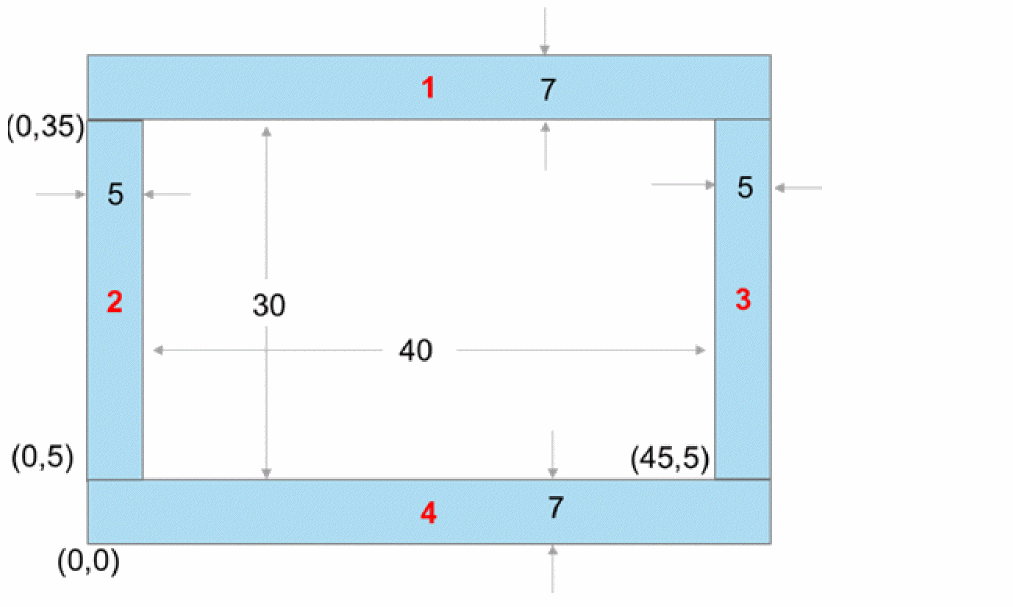
The above trench structure can be broken into the following rectangular pieces:
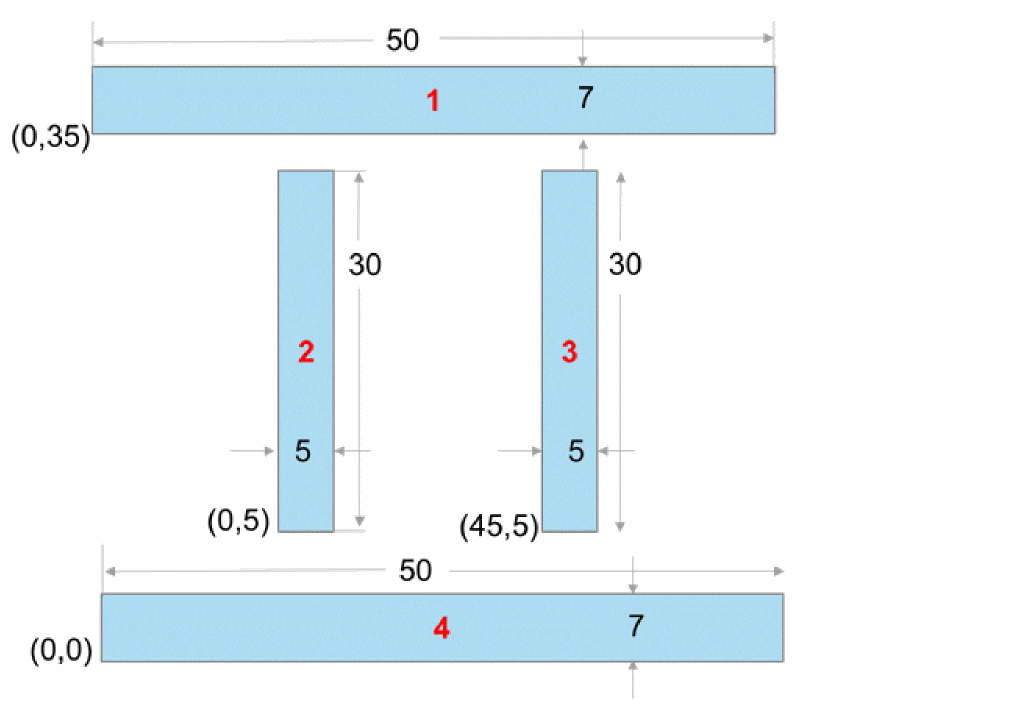
Given that the trench walls are 10um in depth, you can specify the trench structure in the package file, as shown below:
trench 0 35 50 7 10 (siliconoxide 148 1658960)
trench 0 5 5 30 10 (siliconoxide 148 1658960)
trench 45 5 5 30 10 (siliconoxide 148 1658960)
trench 0 0 50 7 10 (siliconoxide 148 1658960)
Cauer and Foster Model Support in Package File
You can specify Cauer and Foster models for chip packages by using the TOP_MODEL or BOTTOM_MODEL parameter in the package file, as shown in the following example.
CUSTOM_IC_THERMAL_SIMULATION_SETUP
TOP_MODEL model_file.txt
NX 100
NY 100
NZ_Substrate 10
END_CUSTOM_IC_THERMAL_SIMULATION_SETUP
In the example above, the TOP_MODEL parameter specifies a file name model_file.txt, which in turn contains the Cauer or Foster model of the package, as shown below.
| Cauer Model | Foster Model |
Getting Started with Spectre Thermal Analysis
To perform Spectre thermal analysis, the first step is to prepare the simulation testbench including the postlayout data of the design, and the DSPF files with device location and dimension information for the transistors, resistors, diodes, and so on, in the instance section. A dspf_include statement is required in the Spectre thermal analysis flow to identify the DSPF data.
dspf_include “sram.spf” (Spectre syntax)
.dspf_include “sram.spf” (SPICE syntax)
dspf_include provides special features for reading the DSPF format data, for example, port order adjustments, or handling of duplicated subcircuits. Do not use the include/.include commands to read the DSPF format data because these commands do not have the special functions of the dspf_include/.dspf_include command.
After setting up the testbench, you should perform a regular (non-electrothermal) postlayout simulation with the spectre command to ensure that the testbench contains no error, and the circuit behaves as expected.
% spectre +aps input.scs (Spectre test bench)
To perform electrothermal simulation on the same design, to add a reliability block containing the thermal analysis statement which defines the thermal configuration file (see Technology Overview) and invoke the Spectre command the same way as a regular postlayout simulation:
% spectre +aps input.scs (electrothermal analysis)
The electrothermal analysis is enabled by the presence of the reliability block. All electrothermal related options are defined either as options to the thermal analysis statement or in the thermal configuration file.
Following the Progress of Spectre Steady-State Thermal Analysis
As the simulation runs, Spectre outputs messages to the screen and the simulation log file that shows the progress of the simulation and provides statistical information. The following sections describe the information that may be significant to you when using the steady-state thermal analysis flow.
Hardware Configuration and Run-Time Machine Loading
At the beginning of a simulation session, Spectre prints the hardware configuration (physical memory, CPU core specification) and runtime machine status (available memory, CPU core operating frequency, CPU loading). When running electrothermal analysis on large designs, ensure there is sufficient memory available, with CPU operating at full speed (not in power saving mode), and the machine loading is light.
User: abc Host: xpspeneh8c-1 HostID: 14AC0820 PID: 1920
Memory available: 88.2909 GB physical: 202.6861 GB
Linux : Red Hat Enterprise Linux Client release 5.8 (Tikanga)
CPU Type: Intel(R) Xeon(R) CPU X5680 @ 3.33GHz
All processors running at 3333.6 MHz
Socket: Processors
0: 0, 1, 2, 3, 4, 5
1: 6, 7, 8, 9, 10, 11
System load averages (1min, 5min, 15min) : 7.8 %, 7.5 %, 9.3 %
Reading the Thermal Configuration File
Spectre reads the thermal configuration file before processing the circuit being analyzed. All valid options are reported in the following summary:
Reading THERMAL configuration file: .../thermal.conf
~~~~~~~~~~~~~~~~~~~~~~~~~~~~~~
THERMAL Analysis Configuration
~~~~~~~~~~~~~~~~~~~~~~~~~~~~~~
Thermal tech_file = "tech.txt"
Thermal package_file = "pkg.txt"
If one of the specified thermal configuration options is not displayed in the summary, check the related warnings and correct the syntax.
Processing the DSPF Files
Spectre processes the DSPF files and prepares a reduced circuit to be simulated if there are RC parasitics. This often includes identifying the power nets and reducing them to only include parasitic capacitors, as well as identifying the signal nets and reducing the parasitic resistors and capacitors according to accuracy requirement.
Time for Processing DSPF file: CPU = 9.31258 s, elapsed = 10.6095 s.
Time accumulated: CPU = 9.32858 s, elapsed = 10.6095 s.
Peak resident memory used = 320 Mbytes.
Time for Creating Parasitic Database: CPU = 3.62345 s, elapsed = 3.61969 s.
Time accumulated: CPU = 12.952 s, elapsed = 14.2293 s.
Peak resident memory used = 586 Mbytes.
Running Electrical Simulation to Produce Device Power Values
At this point, Spectre is ready to perform electrical simulation to produce device power values required for electrothermal simulation. This step is simply a regular circuit simulation, where Spectre first parses the circuit, reports circuit inventory, initiates a DC analysis, and finishes the step with a transient analysis.
************************************************************************************
Transient Analysis `myThermal-000_runThermal-001_tran_thermal': time = (0 s -> 1 ns)
************************************************************************************
......
......9......8......7......6......5......4......3......2......1......0
Number of accepted tran steps = 635
......
Initial condition solution time: CPU = 1.32797 ks, elapsed = 670.625 s.
Intrinsic tran analysis time: CPU = 103.104 s, elapsed = 35.0529 s.
The resulting device power values are stored in a file with the extension .thermal_rpt1 in the output directory, and used as an input for the subsequent thermal simulation.
This step of the electrothermal simulation is fully multi-threaded. It uses the number of cores specified using +mt on the Spectre command line.
Calling Cadence® Thermal Extractor to Generate Thermal Model
During the first iteration, Cadence® Thermal Extractor is invoked to build the thermal model of the structure being analyzed using the device location information extracted from the DSPF file and the material and boundary conditions defined in the thermal technology and package files. Spectre reports the chip bounding box information and the thermal package file content as the information is read into Cadence® Thermal Extractor, as well as the time spent building the thermal model:
Initializing data base for thermal solver of electrical-thermal co-simulation...
Die size in x, y and z direction: 7um 8um 101um
HTC value at right(xmax) bounadry: 2335.14W/m^2-K 530000K/W 40
HTC value at left(xmin) boundary: 2335.14W/m^2-K 530000K/W 40
HTC value at back(ymax) boundary: 2668.73W/m^2-K 530000K/W 40
HTC value at front(ymin) boundary: 2668.73W/m^2-K 530000K/W 40
HTC value at top surface of layer channel: 41528.2W/m^2-K 430000K/W 200
HTC value at bottom surface of layer substrate: 357143W/m^2-K 50000K/W 200
Wave3D engine finished normally.
Time for initiating and create thermal database: CPU = 149.8s (0h 2m 29s),
elapsed = 166.0s (0h 2m 46s).
This step of the electrothermal simulation is executed only once during the first iteration of the run. The resulting thermal model is reused for subsequent iterations of the thermal solver.
Running Thermal Simulation to get the Temperature Rise on Devices
Once the thermal model is built, Spectre performs thermal simulation using the thermal model generated by Cadence® Thermal Extractor:
Solving for temperature in electrical-thermal co-simulation...
Time for solving thermal: CPU = 3.6s (0h 0m 3s), elapsed = 3.6s (0h 0m 3s).
The resulting temperature rise on each device is then used to set the device temperature on each device for the next iteration of the electrothermal simulation.
At the end of each iteration, Spectre reports the runtime statistics, such as total and accumulated run times and memory usage. These are important measures when optimizing performance:
Total time required for tran analysis
`myThermal-000_runThermal-000_tran_thermal': CPU = 1.48324 ks (24m 43.2s),
elapsed = 879.193 s (14m 39.2s).
Time accumulated: CPU = 1.87758 ks (31m 17.6s), elapsed = 1.28742 ks (21m 27.4s).
Peak resident memory used = 13.2 Gbytes.
Spectre Steady-State Thermal Analysis Data Flow
The following figure shows the flow of a two-iteration run of electrothermal simulation with the number of iterations defined in the thermal analysis options as numiter=2. Note that the number of iterations is defined as the number of electrothermal simulations after the initial round of simulation. Therefore, with numiter=2, the total number of both electrical and thermal simulations is three.
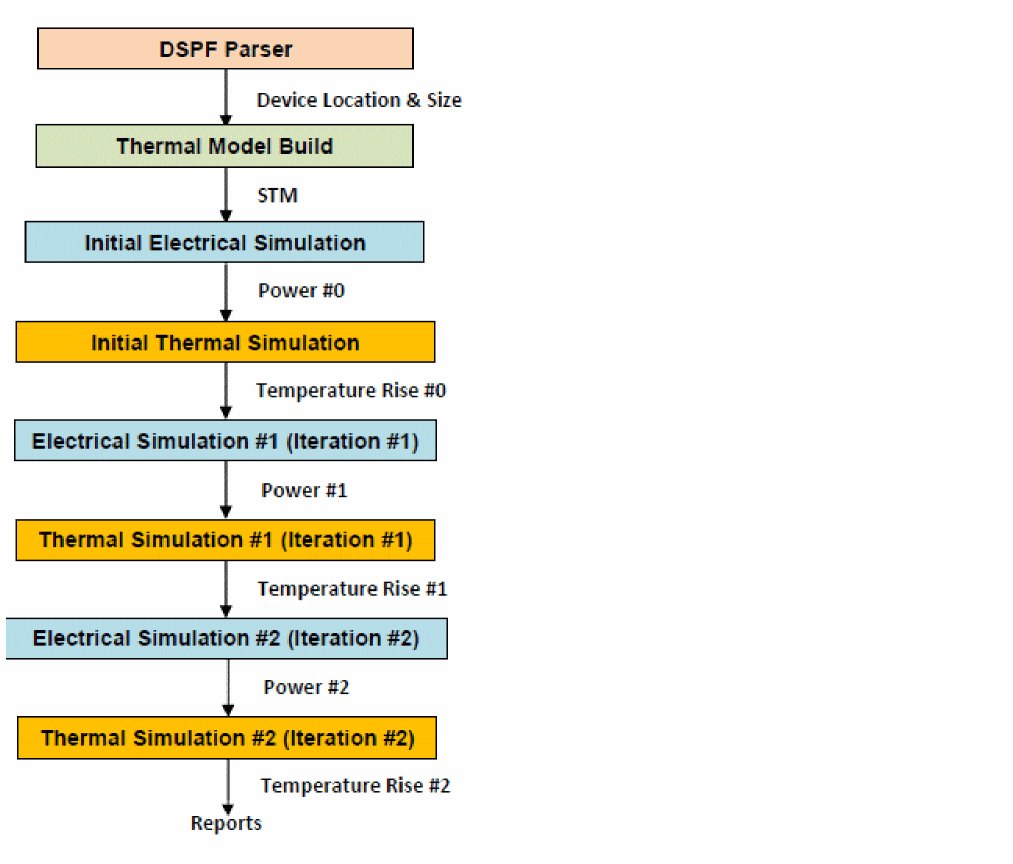
Three copies of thermal report are generated in the raw file directory, each corresponding to the result from one iteration, with the initial iteration number in the file name suffix being 0.
Spectre Steady-State Thermal Analysis Output Reports
Spectre thermal analysis generates a report file with the extension .thermal_rpt and the iteration count in the raw file directory after each iteration. It reports the temperature rise and power value on each device in the DSPF file. The last of these reports can be used as the final result of the electrothermal analysis. The following is a sample report that is generated:
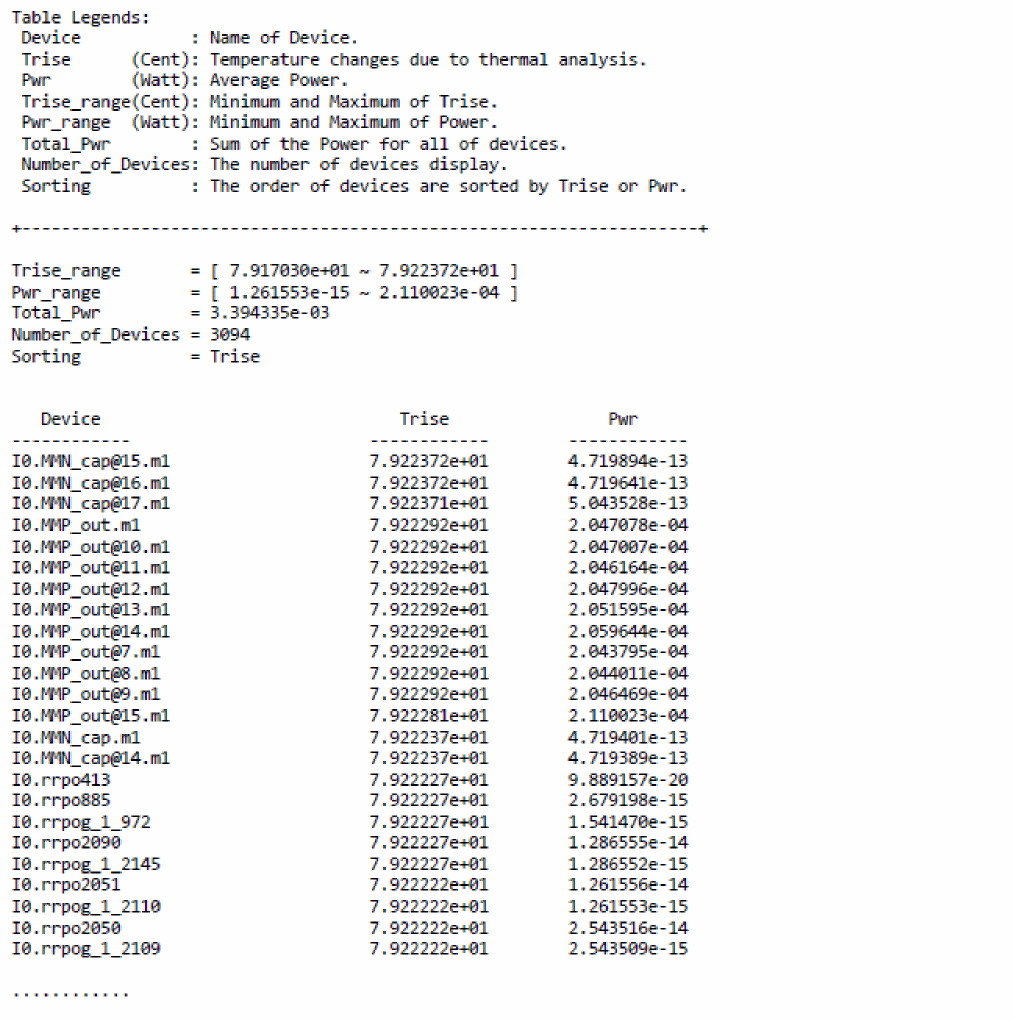
Spectre Dynamic Thermal Analysis Output
With Spectre dynamic thermal analysis, the transient temperature waveforms on the designated instances are saved in a file in the raw file directory with the extension .temp_probe.tran.tran. The instances for which the temperature waveforms are desired are defined with the save_inst option to the thermal analysis statement in the testbench. Along with the temperature waveform, the instantaneous power waveform of the designated instances is also saved in the same file. Without providing a list of instances with the save_inst option, no instance temperature and power waveforms are saved. However, Spectre always save the minimum or maximum instance temperature rise and the total power of the entire design in the .temp_probe.tran.tran file regardless of whether any instance is provided in the save_inst option. The following is a temperature waveform of a device in a design plotted along with the input signal waveform:
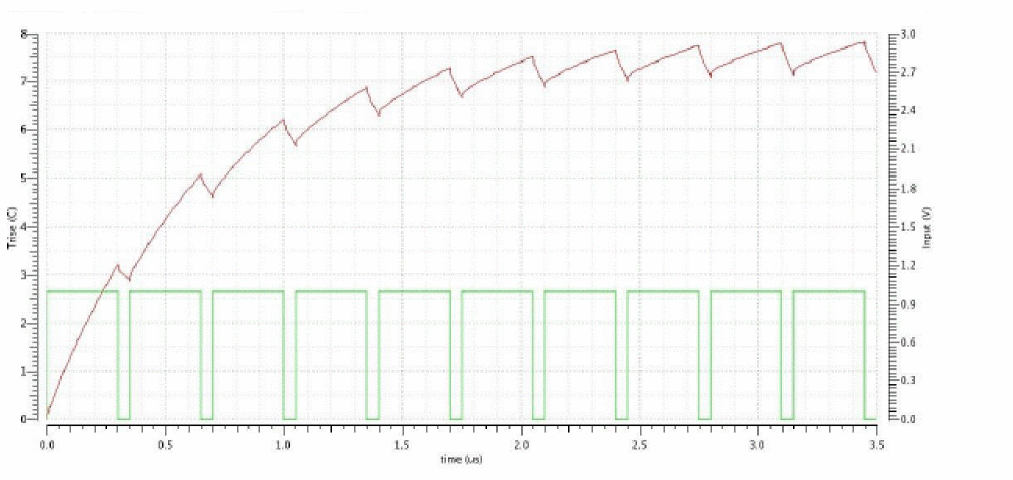
Generating the Thermal Analysis Database and Plotting the Results
When you run the Spectre thermal analysis, a thermal analysis database is created that is similar to the simulation waveform data. The thermal database consists of the thermal database (.tdb) and temperature (.temp_grid) files. The Virtuoso ADE heat map viewer can read these .tdb and .temp_grid files to generate a thermal map of the thermal simulation results.
The following is the syntax to generate the thermal database file (.tdb):
rel reliability {
mythermal thermal config=./thermal.conf method=<method> thermal_db_type=<type> thermal_data_format=<format> frame_freq=<value>
}
You can specify save_channelonly=yes to save the temperature of only the channel layer in the generated temperature file. By default, Spectre saves the temperature of all layers.
Plotting the Thermal Map Results
The Virtuoso ADE thermal map viewer supports the following capabilities:
- Temperature distribution for each layer and layer switching
- Overlay of thermal map on top of device shapes and chip bounding box
- Zoom in and out to check the details or overview of the temperature distribution
- Isotherm lines
- Animation of dynamic analysis simulation result
The ADE thermal map viewer enables you to view and interactively navigate through the thermal results.
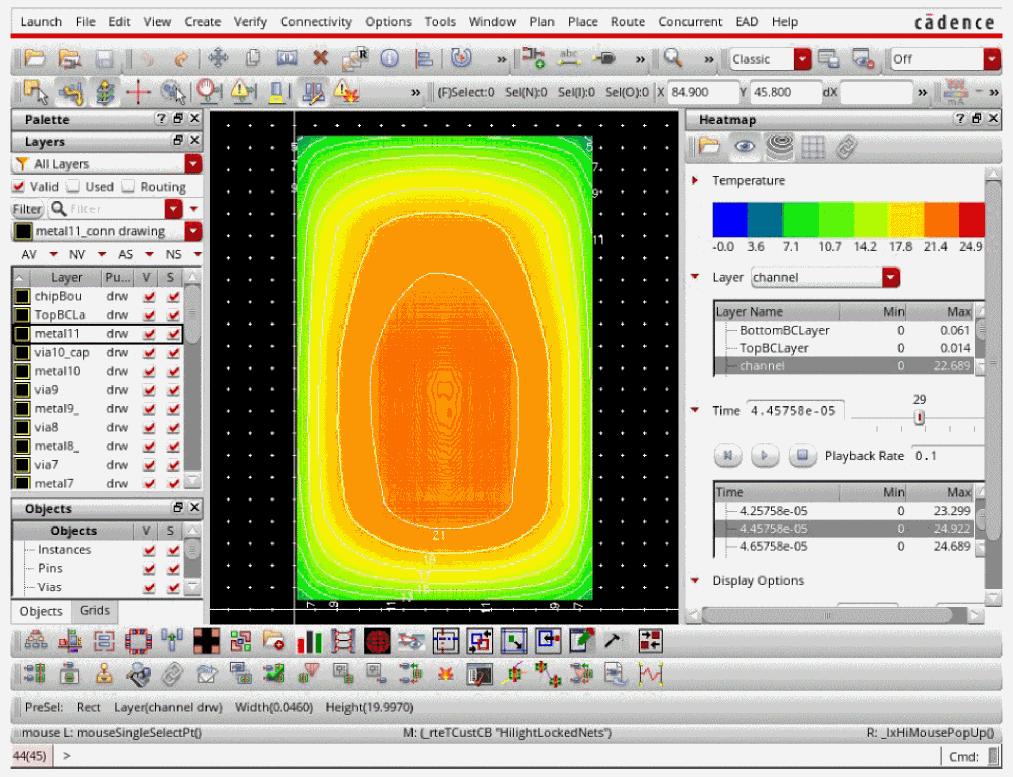
Return to top