
C
Electrically Aware Design Functions
This section provides syntax, descriptions, and examples for the Cadence SKILL functions associated with the Virtuoso Electrically Aware Design (EAD) flow.
Only the functions documented in this chapter are supported for public use. Any other functions, and undocumented aspects of the functions described below, are private and subject to change or removal at any time.
- elecCreateDataSetCSVTemplate
- elecDeleteDataSets
- eadDeleteScratchLib
- elecGetEnableEADMode
- elecSetEnableEADMode
- elecGetCurrentData
- elecGetDataSetNames
- elecGetDataSetParamsPropValue
- elecMakeDefaultDatasetName
- elecUpdateDataSetParamsPropValue
- elecGetVoltageData
- elecGetVsyncEnabled
- elecSetVsyncEnabled
- elecVdrCreateConstraints
- elecVdrCreateDeltaV
- eadAddNetsToNetGroup
- eadCreateDataSetFromLayCSV
- eadCreateDataSetFromSchCSV
- eadCreateDataSetLayCSVTemplate
- eadCreateNetGroup
- eadDeleteNetGroup
- eadDeleteScratchLib
- eadExtractParasiticsForDesign
- eadExtractParasiticsForDesign
- eadGetAllEMDatasets
- eadGetNetsInNetGroup
- eadGetTriggerDesc
- eadGetLocCurrentLimit
- eadJobClose
- eadJobStatus
- eadJobSubmit
- eadLoadSetup
- eadPreEMSetUserStopCVList
- eadRegTrigger
- eadRegisterCustomEMVariable
- eadRemoveNetsFromNetGroup
- eadRemoveParasitics
- eadRemoveParasitics
- elecTransferDataSets
- eadUnregTrigger
- eadInitializeDesign
- eadExtractParasitics
- eadRemoveDesignParasitics
- eadRunEM
- eadSaveSummaryTableToCSV
- eadSetCurrentDataset
List of EAD-related OCEAN Commands
- ocnxlEADAddMeasurement
- ocnxlEADCreateDataSet
- ocnxlEADEnableLiveProcessing
- ocnxlEADEnableVoltageConstraints
- ocnxlEADSelectAllSignals
- ocnxlEADSetDutMaster
- ocnxlEADSetHierarchyLevel
- ocnxlEADSetWaveFormClipping
elecCreateDataSetCSVTemplate
elecCreateDataSetCSVTemplate(t_libName t_cellName t_viewName t_fileName[?resultTypesl_resultTypes] [?maxHierLeveln_maxHierLevel] [?scaleFactorsl_scaleFactors] ) =>t/ nil
Description
Creates a CSV template file for a given schematic cellview in a format that can be later used to fill in the current or voltage values, and to create an EAD dataset from it.
Arguments
Value Returned
Examples
The following examples show the different ways in which you can save CSV templates:
- elecCreateDataSetCSVTemplate("Two_Stage_Opamp" "OpAmp" "schematic" "./templateForDataset.csv") ==> t elecCreateDataSetCSVTemplate("Two_Stage_Opamp" "OpAmp" "schematic" "./templateForDataset.csv" ?resultTypes list("Idc" "Iavg" "Vmin" "Vmax")) ==> t elecCreateDataSetCSVTemplate("Two_Stage_Opamp" "OpAmp" "schematic" "./templateForDataset.csv" ?resultTypes list("Idc" "Iavg" "Vmin" "Vmax") ?scaleFactors list(2.0 3.0 1.0 1.0)) ==> t elecCreateDataSetCSVTemplate("Two_Stage_Opamp" "OpAmp" "schematic" "./templateForDataset.csv" ?resultTypes list("Idc" "Iavg" "Vmin" "Vmax") ?scaleFactors list(2.0 3.0 1.0 1.0) ?maxHierLevel 0) ==> t elecCreateDataSetCSVTemplate("Two_Stage_Opamp" "OpAmp" "schematic" "./templateForDataset.csv" ?resultTypes list("Idc" "Iavg" "Vmin" "Vmax") ?scaleFactors list(2.0 3.0 1.0 1.0) ?maxHierLevel 99) ==> t
elecDeleteDataSets
elecDeleteDataSets(t_libName t_cellName t_viewName[?dataSetListl_dataSetList] [?dataSetTypel_dataSetType] ) =>t/ nil
Description
Deletes electrical data from the specified design. This function can be used for both layout and schematic view of a design.
Arguments
Value Returned
Example
The following example shows how to use this function to delete datasets:
;The following example deletes all the datasets saved in the layout view of the given cellview
elecDeleteDataSets("Two_Stage_Opamp" "OpAmp" "layout")
=> t

;The following example deletes all the datasets saved in the schematic view of the given cellview
elecDeleteDataSets("Two_Stage_Opamp" "OpAmp" "schematic")
=> t

;The following example deletes the dataset named 'worstcase' form the layout view of the given cellview
elecDeleteDataSets("Two_Stage_Opamp" "OpAmp" "layout" ?dataSetList list("worstcase"))
=> t
eadDeleteScratchLib
eadDeleteScratchLib(
)
=> t / nil
Description
Deletes all data from the scratch library that contains data related to the scratch layout.
See the Running EM Analysis on Power Grids section for more information
Arguments
Value Returned
Example
The following example deletes all data from the scratch library:
eadDeleteScratchLib()
=> t
elecGetEnableEADMode
elecGetEnableEADMode(t_sessionName[ ?historyNamet_historyName]) =>t/nil
Description
Returns the current status of the Enable Electrical Data Capture for EAD Flow check box in the EAD Setup form for the specified session and history name.
Arguments
Value Returned
|
When the Enable Electrical Data Capture for EAD Flow check box is selected. |
|
|
When the Enable Electrical Data Capture for EAD Flow check box is not selected. |
Example
The following example shows how to use this function to get the current status of the Enable Electrical Data Capture for EAD Flow check box in the EAD Setup form:
session = (axlGetWindowSession (hiGetCurrentWindow))
=> "fnxSession0"
elecGetEnableEADMode(session ?historyName "Interactive.0")
=> t
elecSetEnableEADMode
elecSetEnableEADMode(t_sessionName g_value[ ?historyNamet_historyName]) =>t/nil
Description
Selects or deselects the Enable Electrical Data Capture for EAD Flow check box in the EAD Setup form for the specified session and history name.
Arguments
Value Returned
|
If value of the check box is set according to the value specified by the argument g_value. |
|
Example
The following example shows how to select the Enable Electrical Data Capture for EAD Flow check box in the EAD Setup form:
session = (axlGetWindowSession (hiGetCurrentWindow))
=> "fnxSession0"
elecSetEnableEADMode(session t ?historyName "Interactive.0")
=> t
The following example shows how to deselect the Enable Electrical Data Capture for EAD Flow check box in the EAD Setup form:
session = (axlGetWindowSession (hiGetCurrentWindow))
=> "fnxSession0"
elecSetEnableEADMode(session nil ?historyName "Interactive.0")
=> t
elecGetCurrentData
elecGetCurrentData(t_libName t_cellName t_viewNamet_dataSetNamet_terminalName[t_measurementType] ) =>t/ nil
Description
Gets the electrical data for the specified terminal in the given cellview. The data is retrieved from the specified dataset.
Arguments
|
The measurement type for which you need to get the current or voltage data. If not specified, the data for all the measurement types saved in the dataset is returned. |
|
Value Returned
Example
The following example shows how to use this function to get the electrical data:
; The following example code shows how to get the Idc data for terminal "/I2/I0/
; PM0:B" in the schematic view of cell 'hier_buffer'. The dataset use is
; 'check_0_I':
elecGetCurrentData("testLib" "hier_buffer" "schematic" "check_0_I" "/I2/I0/PM0:B" "Idc")
=>("Idc" 1.710235e-14)

; In the following example code measurement data for all the available types is
; returned for terminal "/I2/I0/PM0:B" in the schematic view of cell 'hier_buffer'.
elecGetCurrentData("testLib" "hier_buffer" "schematic" "check_0_I" "/I2/I0/PM0:B")
=> ("Iavg" 7.77565e-07 "Idc" 1.710235e-14 "Isignal" "I2.I0.PM0:4" )

; The following example code shows how to get the Idc data for terminal '/PM0:B'
; in the layout view of cell 'buffer':

elecGetCurrentData("testLib" "buffer" "layout" "check_0_I" "/PM0:B" "Idc")
=> ("Idc" 1.710407e-14)
In the following example code measurement data for all the available types is returned for terminal '/PM0:B' in the layout view of cell 'buffer':
elecGetCurrentData("testLib" "buffer" "layout" "check_0_I" "/PM0:B")
=> ("Iavg" -1.213794e-06 "Idc" 1.710407e-14 "Isignal" "I3.I0.PM0:4" )
The following example code shows how to get the voltage data for terminal '/I3/I5/I0/I0/IN' in the schematic view of cell 'INV_TOP':
elecGetCurrentData("testLib" "INV_TOP" "schematic" "pp_1_V" "/I3/I5/I0/I0/IN")
=>("Vmin" 0.00401131 "Vmax" 2.9869 "Vsignal" "I3.OUT1_P\\<0\\>")
elecGetDataSetNames
elecGetDataSetNames(t_libName t_cellName t_viewName[t_dataSetType] ) =>l_dataSetNames/ nil
Description
Gets the list of available result datasets for a given design. Also see EM Dataset.
Arguments
|
Name of the view. You can specify the name of a schematic or layout view. |
|
Value Returned
Example
The following example shows how to use this function to get the list of dataset names:
elecGetDataSetNames("TestLib" "buffer" "schematic" "currentData")
=> ("buffer3_0_I" "buffer3_1_I" "buffer3_2_I" "buffer3_3_I" "buffer6_I" "new_I" )
elecGetDataSetParamsPropValue
elecGetDataSetParamsPropValue(t_libName t_cellName t_viewName t_dataSetName t_paramName) =>t_paramValue/ nil
Description
Gets the value for the given parameter from the property list of the given dataset saved for the given cellview.
If you had updated the paths to the results database and the psf directory by using the elecUpdateDataSetParamsPropValue function, you can use this function to verify the paths. Also see
Arguments
Value Returned
Example
The following example code shows how to retrieve value of parameters simResDB and simResDir for schematic view of a given cellview.
elecGetDataSetParamsPropValue("em_test" "route_em_test" "schematic" "myDataset" "simResDB")
=> "/home/test/libs/em_test/route_em_test/adexl/results/data/Interactive.1.rdb"

elecGetDataSetParamsPropValue("Two_Stage_Opamp" "DiffOpAmp" "schematic" "myDataset" "simResDir")
=> "/home/test/libs/em_test/route_em_test/adexl/results/data/psf"
elecMakeDefaultDatasetName
elecMakeDefaultDatasetName(t_sessionName t_historyName t_dutLibName t_dutCellName t_dutViewName t_dutInstance t_cornerName t_temperature t_designPoint t_testName) =>t_defaultDatasetName
Description
Returns the user-defined default name of the dataset to be displayed in the DUT Dataset field of the EAD results view.
Arguments
Value Returned
Examples
The following example sets the default name of DUT Dataset field to dutCellName "_" dutInstance "_" historyName "_" cornerName "_" designPoint "_" temperature.
procedure( elecMakeDefaultDatasetName( session @key historyName dutLibName dutCellName dutViewName dutInstance cornerName temperature designPoint testName)
let( (retVal)
retVal = strcat( dutCellName "_" dutInstance "_" historyName "_" cornerName "_" designPoint "_" temperature )
retVal
)
)
=> buffer_I2_I1_Interactive.0_Nominal_1_27
The following example sets the default name of DUT Dataset field to testName "_" topCellName "_" dutCellName "_" dutInstance "_" historyName "_" cornerName "_" designPoint "_" temperature
procedure( elecMakeDefaultDatasetName( session @key historyName dutLibName dutCellName dutViewName dutInstance cornerName temperature designPoint testName)
let( (retVal checkPoint testSdb toolArgs topCellName)
checkPoint = axlGetHistoryCheckpoint( axlGetCurrentHistory( session ))
testSdb = axlGetTest( checkPoint testName )
toolArgs = axlGetTestToolArgs( testSdb )
topCellName = cadr(assoc( "cell" toolArgs ))
retVal = strcat( testName "_" topCellName "_" dutCellName "_" dutInstance "_" historyName "_" cornerName "_" designPoint "_" temperature )
retVal
)
)
=> Creating Dataset TRAN_buffer_test_buffer__I0_Interactive.5_Nominal_1_27 on DUT Master: "sample_test", "buffer", "schematic"
Where testName is TRAN, topCellName is buffer_test, and dutCellName is buffer.
-
When any of the drop-down lists is set to
ALL,ALLis replaced by$variableName in the DUT Dataset field, which is replaced by the corresponding values at the time of dataset creation.
Default name of the dataset in the DUT Dataset field:
$dutCellName_$dutInstance_Interactive.3_$cornerName_1_$temperature
Name of the dataset created:
OpAmp__I0_Interactive.3_C4_0_1_M40 -
Negative temperature is represented with a prefix
M. For example,-40is represented asM40. -
dutInstance
/I2/I1is represented as_I2_I1.
elecUpdateDataSetParamsPropValue
elecUpdateDataSetParamsPropValue(
t_libName
t_cellName
t_viewName
t_dataSetName
t_paramName
t_paramValue
)
=> t / nil
Description
Updates the value for a parameter/property of the given dataset saved for the given cellview. You can use this function to modify the value of a dataset property for a schematic or layout view.
This function is helpful when you need to change the paths speified in the simResDB and simResDir properties from where the datasets are read. For more details, see
Arguments
Value Returned
Example
The following example code shows how to update the simResDir parameter (the simulation results directory path) for schematic view of a given cellview.
elecUpdateDataSetParamsPropValue("em_test" "route_em_test" "schematic" "myDataset" "simResDir" "em_test/route_em_test/adexl/results/data/Interactive.1/1/tran/psf")
=>t
elecGetVoltageData
elecGetVoltageData(t_libName t_cellName t_viewName t_dataSetName t_terminalName[t_measurementName] ) =>
Description
Returns the Vmin and Vmax values for the specified terminal in a dataset.
To calculate the Vmin and Vmax values for a worst-case dataset, you must set the following environment variables before running this function:
envSetVal("ei.dataSet" "excludeCurrentsInCI" 'boolean nil)
envSetVal("ei.setup" "enableWorstCaseDatasetForVoltages" 'boolean t)
Arguments
|
The measurement type for which you need to get voltage data. If not specified, data for all the measurement types saved in the specified dataset is returned. |
Value Returned
|
Vmin and Vmax values cannot be calculated because of an error. |
Examples
The following examples returns the Vmin and Vmax values of the instance terminal "/I0/R0/PLUS" in the dataset "dataset_V".
elecGetVoltageData("em_test" "route_em_test" "schematic" "dataset_V" "/I0/R0/PLUS")
=> ("Vmin" 6.034015 "Vmax" 28.74936)
The following examples returns the Vmin and Vmax values of the instance terminal "/I0/R0/PLUS" in the worst-case dataset "data_worstcase_V".
elecGetVoltageData("em_test" "route_em_test" "schematic" "data_worstcase_V" "/I0/R0/PLUS")
=> ("Vmin" 6.034015 "Vmax" 28.74936)
elecGetVsyncEnabled
elecGetVsyncEnabled(t_adeSession) =>t/nil
Description
Returns whether the creation of post-simulation voltage constraints is enabled or disabled.
Arguments
Value Returned
Example
The following example shows how to use this function to get the status of voltage constraints:
elecGetVsyncEnabled (session)
=> t
elecSetVsyncEnabled
elecSetVsyncEnabled(t_adeSession g_value) =>t/nil
Description
Enables or disables the creation of post-simulation voltage constraints.
Arguments
Value Returned
Example
The following example enables the creation of post-simulation voltage constraints:
elecSetVsyncEnabled (session t)
=> t
The following example disables the creation of post-simulation voltage constraints:
elecSetVsyncEnabled (session nil)
=> t
elecVdrCreateConstraints
elecVdrCreateConstraints(inputToUserFunction outputFromUserFunction) =>l_constraintID/nil
Description
Creates a post-simulation voltageSyncedNet constraint at the DUT level when called from a user-defined function, which has been specified using the customVoltageConstraintFunc environment variable.
By default, a user-defined function can create constraints automatically using the Constraints Manager SKILL functions because these functions provide control on where to create constraints in the hierarchy. The elecVdrCreateDeltaV function helps in providing the same functionality.
Arguments
Value Returned
Example
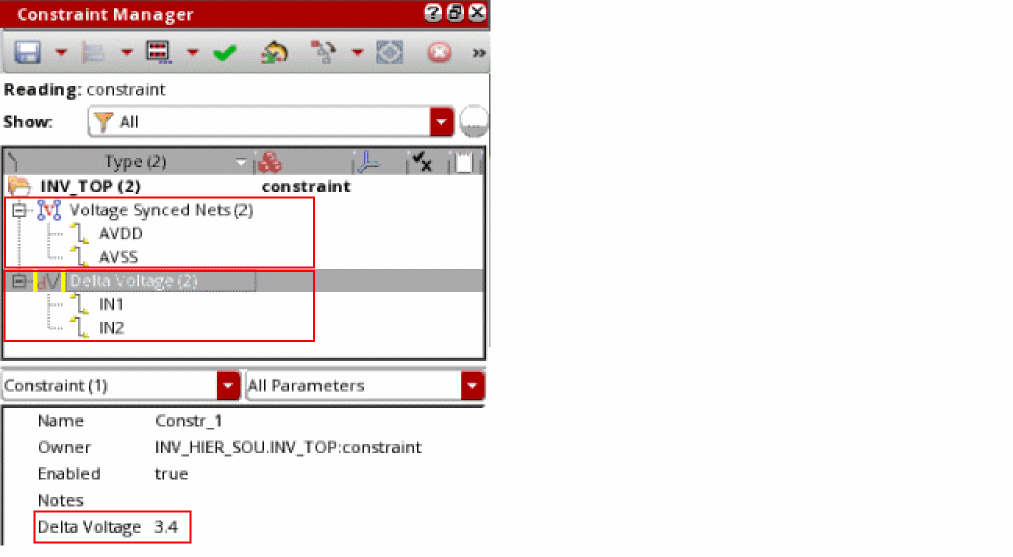
The following example shows how to call the elecVdrCreateConstraints and elecVdrCreateDeltaV functions from a user-defined function userDefinedElecFunc, which has been specified by using the environment variable customVoltageConstraintFunc.
(envSetVal "elec.gui" "customVoltageConstraintFunc" 'string "userDefinedElecFunc")
(define (userDefinedElecFunc @rest args)
(printf "userDefinedElecFunc called with args :%L" args)
(elecVdrCreateConstraints args
(list nil 'constraintsLCV (car args)->dutLCV
'syncedNets '(("AVDD" "AVSS"))))
(elecVdrCreateDeltaV args
(list nil 'constraintsLCV (car args)->dutLCV
'deltaVNets '(("IN1" "IN2" 3.4))))
)
When you run a simulation after adding this code in your .cdsinit file, the Voltage Synced Nets and Delta Voltage constraints are created at the DUT level in the Constraint Manager.
elecVdrCreateDeltaV
elecVdrCreateDeltaV(inputToUserFunction outputFromUserFunction) =>l_constraintID/nil
Description
Creates a post-simulation deltaVoltage constraint at the DUT level when called from a user-defined function, which has been specified using the customVoltageConstraintFunc environment variable.
By default, a user-defined function can create constraints automatically using the Constraints Manager SKILL functions because these functions provide control on where to create constraints in the hierarchy.
Arguments
Value Returned
Example
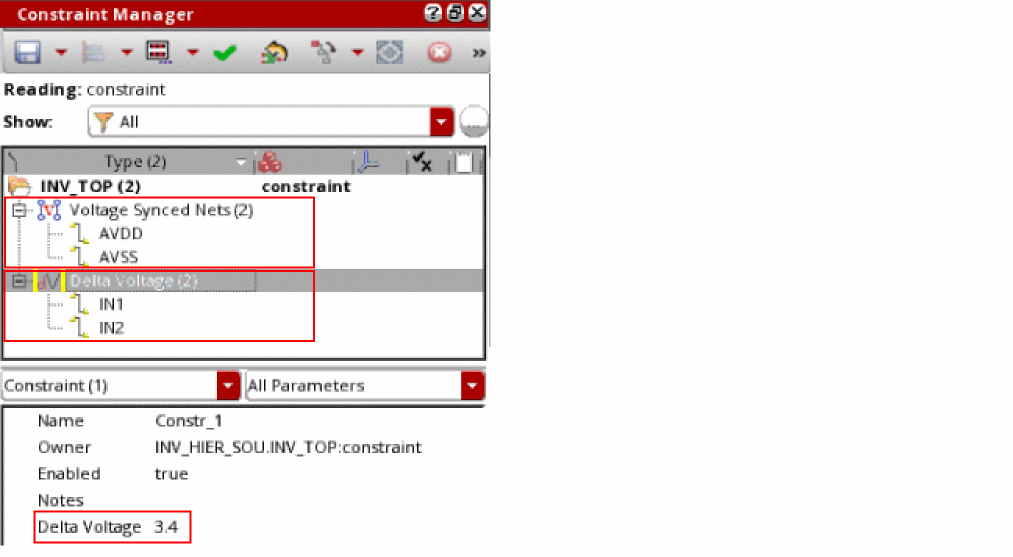
The following example shows how to call the elecVdrCreateConstraints and elecVdrCreateDeltaV functions from a user-defined function userDefinedElecFunc, which has been specified by using the environment variable customVoltageConstraintFunc.
(envSetVal "elec.gui" "customVoltageConstraintFunc" 'string "userDefinedElecFunc")
(define (userDefinedElecFunc @rest args)
(printf "userDefinedElecFunc called with args :%L" args)
(elecVdrCreateConstraints args
(list nil 'constraintsLCV (car args)->dutLCV
'syncedNets '(("AVDD" "AVSS"))))
(elecVdrCreateDeltaV args
(list nil 'constraintsLCV (car args)->dutLCV
'deltaVNets '(("IN1" "IN2" 3.4))))
)
When you run a simulation after adding this code in your .cdsinit file, the Voltage Synced Nets and Delta Voltage constraints are created in the Constraint Manager.
eadAddNetsToNetGroup
eadAddNetsToNetGroup(x_cellViewID t_groupName?netNamesl_netNames?regExpt_regExp?filet_fileName) => t / nil
Description
Adds the specified nets to an existing net group for the given cellview.
Arguments
Value Returned
Example
The following example code shows how to add nets contained in file test.il to a group groupX in the current cellview. It also verifies the list of net names using eadGetNetsInNetGroup.
cvId = geGetEditCellView()
list netNames = nil
if(eadAddNetsToNetGroup(cvId "groupX" ?file "./test.il") then
    netNames = eadGetNetsInNetGroup(cvId "groupX")
    printf("netNames: %L\n" netNames)
else
    warn("Failed to create netGroup correctly\n")
)
eadCreateDataSetFromLayCSV
eadCreateDataSetFromLayCSV(d_cvId t_datasetName t_fileName) =>t/nil
Description
Creates a user-defined dataset, with the specified name, in the given layout cellview using the electrical current values from the specified layout CSV file.
Arguments
|
The name of the layout CSV file containing the values of the electrical currents. |
Value Returned
Examples
The following example creates a user-defined dataset, exampleDataset, using the electrical current values from the specified layout CSV file, currents.csv, for the specified layout cellview:
eadCreateDataSetFromLayCSV(cvId "exampleDataset" "./currents.csv")
==> t
Where cvId = geGetEditCellView(window)and window = hiGetCurrentWindow().
See Also: eadCreateDataSetLayCSVTemplate
eadCreateDataSetFromSchCSV
eadCreateDataSetFromSchCSV(d_cvId t_datasetName t_fileName) =>t/nil
Description
Creates a user-defined dataset, with the specified name, in the given layout cellview using the electrical current values from the specified schematic CSV file.
Arguments
|
The name of the schematic CSV file containing the values of the electrical currents. |
Value Returned
Examples
The following example creates a user-defined dataset, exampleDataset, using the electrical current values from the specified schematic CSV file, currents.csv, for the specified layout cellview:
eadCreateDataSetFromSchCSV(cvId "exampleDataset" "./currents.csv")
==> t
Where cvId = geGetEditCellView(window)and window = hiGetCurrentWindow().
eadCreateDataSetLayCSVTemplate
eadCreateDataSetLayCSVTemplate(d_cvId t_fileName) =>t/nil
Description
Creates a CSV template file for a given layout cellview in a format that can be used later to fill in current values and to create a user-defined EAD dataset from it.
Arguments
|
The name of the CSV template filefor the given layout cellview. A new file is created with the given name if it does not exist already. |
Value Returned
Examples
The following examples creates the exampleTemplate CSV file for the specified cellview:
eadCreateDataSetLayCSVTemplate(cvId"./exampleTemplate.csv")
==> t
Where cvId = geGetEditCellView(window)and window = hiGetCurrentWindow().
See Also: eadCreateDataSetFromLayCSV
eadCreateNetGroup
eadCreateNetGroup(x_cellViewID t_groupName?netNamesl_netNames?regExpt_regExp?filet_fileName) => t / nil
Description
Creates a new net group by the given name in the given cellview. If given, it can also contain the nets.
Arguments
Value Returned
Example
The following example code creates a new net group named groupX and adds two nets, AVDD and AVSS, to it:
cvId = geGetEditCellView()

list netNames = nil
if(eadCreateNetGroup(cvId "groupX" ?netNames list("AVDD" "AVSS")) then
    netNames = eadGetNetsInNetGroup(cvId "groupX")
    printf("netNames: %L\n" netNames)
else
    warn("Failed to create netGroup correctly\n")
)
eadDeleteNetGroup
eadDeleteNetGroup(x_cellViewID t_groupName) =>t/ nil
Description
Deletes a net group from the given cellview.
Arguments
Value Returned
Example
The following example code deletes the net group gropuX from the current cellview. Then, it verifies the deletion by using the eadGetNetsInNetGroup function:
cvId = geGetEditCellView()
list netNames = nil

if(eadDeleteNetGroup(cvId "groupX") then
    netNames = eadGetNetsInNetGroup(cvId "groupX")
    ;should warn about non-existing netGroup
else
    warn("Failed to delete the net group.\n")
)
eadExtractParasiticsForDesign
eadExtractParasiticsForDesign(w_winId) =>t/nil
Description
Extracts parasitics for the specified layout window if the EAD Browser is initialized. You can configure extraction options on the EAD Options form.
Arguments
Value Returned
|
Returns |
Example
The following example extracts the parasitics for the layout in the current window.
eadExtractParasiticsForDesign(hiGetCurrentWindow())
=> t
eadGetAllEMDatasets
eadGetAllEMDatasets(
)
=> l_emDatasets / nil
Description
Returns a list of all EM datasets present in the current design
Arguments
Value Returned
Examples
The following examples returns a list of all EM datasets present in the current design.
eadGetAllEMDatasets()
=>
("myDataset_I" "dataSet_8_I" "dataSet_7_I" "dataSet_6_I" "dataSet_4_I"
"dataSet_1_I" "dataSet_0_I" "EMData"
)
eadGetNetsInNetGroup
eadGetNetsInNetGroup(t_eventName) =>t_eventDescription/ nil
Description
Lists all the nets contained in the specified net group of the given cellview.
Arguments
|
Name of the net group for which the net names are to be displayed |
Value Returned
Example
The following example code deletes the net group gropuX from the current cellview. Then, it verifies the deletion by using the eadGetNetsInNetGroup function:
cvId = geGetEditCellView()
list netNames = nil

if(eadDeleteNetGroup(cvId "groupX") then
    netNames = eadGetNetsInNetGroup(cvId "groupX")
    ;should warn about non-existing netGroup
else
    warn("Failed to delete the net group.\n")
)
eadGetTriggerDesc
eadGetTriggerDesc(t_eventName) =>t_eventDescription/ nil
Description
Provides a description about the given event and the arguments required by the SKILL triggers registered for that event.
Arguments
Value Returned
Example
The following example code shows how the eadGetTriggerDesc function can be used to get the details of the PreLoadSetup event.
eadGetTriggerDesc("PreLoadSetup")
=> "This event takes place after the design is initialized and before any EAD related setup is loaded. Mandatory arguements for the functions registered against PreLoadSetup event are WindowId and cellViewId."
eadGetLocCurrentLimit
eadGetLocCurrentLimit(w_winId l_point t_layerName[?directiont_direction] [?pulseWidthn_pulseWidth] [?dutyCycleRation_dutyCycleRatio] [?rmsMetalLineNumn_rmsMetalLineNum] [?hiEMn_hiEM] ) =>l_limit/nil
Description
Returns the current carrying EM limit of a resistor on the specified location. Additional arguments, such as ?pulseWidth and ?hiEM can be specified to match specific EM rules in the EAD technology file or the ICT-EM file.
Arguments
|
Ratio of the time for which the signal remains ‘high’ to the time period of the signal. |
|
|
RMS metal line number for nets. This number is used to search the metal line rating tables in the EM models. |
|
Value Returned
|
Returns |
Example
The following example returns the extraction or EM limit for the specified location in the layer Via1 of the layout in the current window.
eadGetLocCurrentLimit(hiGetCurrentWindow() list(29.49 9.155) "Via1")
eadJobClose
eadJobClose(x_windowID t_jobConfigurationFile) =>t/ nil
Description
Collects results from the batch jobs submitted to computer farms or dedicated servers for distributed computation. When all the distributed jobs are completed successfully, you can use this command to collect extraction results from each job. The parasitic results from individual batch run are combined into one OA database and automatically displayed in the EAD browser summary table.
Arguments
|
Window ID of the layout view window on which the extraction is being performed. |
|
Value Returned
Example
The following example shows how to run and close jobs for distributed extraction:
;Start extraction using the eadJobSubmit function

eadJobSubmit( hiGetCurrentWindow() "NULL" )
=> t
; check status using the eadJobStatus function
eadJobStatus( hiGetCurrentWindow() "NULL" )


; After the eadJobStatus command returns t, run the following command:
eadJobClose( hiGetCurrentWindow() "NULL" )
; The tool will collect results from all finished jobs, combine
; the results into one OA database and display results in the EAD browser.
Also see: Distributed Computation of Extraction Process
eadJobStatus
eadJobStatus(x_windowID t_jobConfigurationFile) =>t/t_jobStatus
Description
Returns the status of batch jobs submitted to computer farms or dedicated servers for distributed computation.
Arguments
Value Returned
Example
The following example shows how to check the status of jobs submitted using the eadJobSubmit command:
The following example shows how to check the status of jobs submitted using the eadJobStatus command:

;Start extraction using the eadJobSubmit function

eadJobSubmit( hiGetCurrentWindow() "NULL" )
=> t
; check status using the eadJobStatus function

eadJobStatus( hiGetCurrentWindow() "NULL" )
=> t
Also see: Distributed Computation of Extraction Process
eadJobSubmit
eadJobSubmit(x_windowID t_jobConfigurationFile) =>t/ nil
Description
Submits batch jobs to computer farms or dedicated servers for distributed computation.
Arguments
Value Returned
Example
The following example shows how to submit jobs for distributed extraction:
The following example shows how to submit jobs for distributed extraction:
ead_dp_net_group_number = 5
ead_dp_batch_command = "/grid/sfi/farm/bin/bsub"
ead_dp_batch_command_option = "-W 3:00 -q lnx64 -R \"OSREL==EE50 || OSREL==EE60
span[hosts=1] rusage[mem=8000]\" -P IC:6.1.6:RD:QUAL"

; Run the following command to submit batch jobs:

eadJobSubmit( hiGetCurrentWindow() "NULL")
=> t
; The tool will automatically divide all nets into 5 groups, using command
;"/grid/sfi/farm/bin/bsub" to send each job to LSF farm,
;with command option ""-W 3:00 -q lnx64 -R \"OSREL==EE50 … …"
Also see: Distributed Computation of Extraction Process
eadLoadSetup
eadLoadSetup(w_winId t_setupFile) =>t/nil
Description
Initializes the EAD Browser in the specified layout window with the given setup file.
Arguments
Value Returned
|
Returns |
Example
The following example loads the EAD setup environment using the setup_test.ini file.
eadLoadSetup(hiGetCurrentWindow() "./.cadence/dfII/EAD/1/setup/setup_test.ini")
=> t
eadPreEMSetUserStopCVList
eadPreEMSetUserStopCVList(l_libraryCells) =>t/nil
Description
Sets all or the specified cells of user-specified libraries as stop views. The instances of the specified cells are not descended further during the pre-EM checks.
Arguments
|
A list of library cells that are to be set as stop views during pre-EM checks. |
|
Value Returned
Examples
The following example sets all the cellviews of the libraries lib1 and lib2 as stop views during pre-EM check:
eadPreEMSetUserStopCVList(list("lib1" "lib2"))
The following example sets the following cellviews as stop views:
eadPreEMSetUserStopCVList(list(list("lib1" "cell1" "cell2") "lib2" list("lib3" "cell1" "cell2") "lib4"))
eadRegTrigger
eadRegTrigger(
t_eventName
t_callbackProcName
n_priority
)
=> t / nil
Description
Registers a user-defined callback SKILL function for the specified event or trigger with the given priority. You can create custom callback functions to perform necessary updates when these events are triggered.
You can register multiple triggers for an event. When the specified event occurs, the SKILL triggers registered for that event are executed in the order of their priority. Triggers registered without any priority are executed in the order of their registration.
Arguments
|
For details about the events for which you can register callbacks, refer to the Events table. |
|
|
Name of the callback SKILL procedure to be registered for the given event or trigger. |
|
|
(Optional) Priority level at which the registered trigger is to be executed when the given event occurs. You can use an integer value to specify the priority level. A lower value indicates a higher priority. |
Value Returned
|
The trigger function is successfully registered for the given event |
|
Examples
The following example registers four triggers for the PreLoadSetup event. trigger2 gets the highest priority followed by trigger1, trigger3, and trigger4 in the given order.
eadRegTrigger("PreLoadSetup" "trigger1" 10)
=> t
eadRegTrigger("PreLoadSetup" "trigger2" 5)
=> t
eadRegTrigger("PreLoadSetup" "trigger3")
=> t
eadRegTrigger("PreLoadSetup" "trigger4")
=> t
;; registration of a trigger for an unsupported event shows a warning message

eadRegTrigger("LoadSetup" "trigger6")
=> *WARNING* Specified event "LoadSetup" is not supported.
The following example code registers a callback for the PostDatasetTransfer event:
eadRegTrigger("PostDatasetTransfer" "CDNS_PostDatasetTransfer_Update")

procedure( CDNS_PostDatasetTransfer_Update(cvId datasets)
    printf("Target Layout : '%s/%s/%s'.\n" cvId->libName cvId->cellName cvId-    >viewName)
        foreach( ds datasets
                printf("Dataset Transferred : '%s'.\n" ds)
        )
)
eadRegisterCustomEMVariable
eadRegisterCustomEMVariable(
t_varName
)
=> t / nil
Description
Registers a variable as a custom variable for the purpose of EM calculation. By using the eadSetEMVariable function, you can vary the value of the registered variable before running EM checks. If a variable is not registered, modifying its values does affect EM calculations.
Related Topic: Using Custom Variables in ICT-EM Files
Arguments
Value Returned
Example
The following example code register a custom variable named myCustomVariable:
eadRegisterCustomEMVariable("myCustomVariable")
eadRemoveNetsFromNetGroup
eadRemoveNetsFromNetGroup(x_cellViewID t_groupName?netNamesl_netNames?regExpt_regExp?filet_fileName) =>t/ nil
Description
Removes the given nets from the specified net group of the given cellview.
Arguments
Value Returned
|
If the net group does not exist or deletion of nets from the net group fails. |
Example
The following example code uses a regular expression to identify and remove nets from net group groupX in the current cellview. After removal, it verifies the list of net names using the eadGetNetsInNetGroup function:
cvId = geGetEditCellView()
list netNames = nil
if(eadRemoveNetsFromNetGroup(cvId "groupX" ?regExp "AV*") then
    netNames = eadGetNetsInNetGroup(cvId "groupX")
    printf("netNames: %L\n" netNames)
else
    warn("Failed to create netGroup correctly\n")
)
eadRemoveParasitics
eadRemoveParasitics(
t_libName
t_cellName
t_viewName
)
=> t / nil
Description
Deletes the parasitic information associated with the specified layout design and saves the design (provided there were no other unsaved changes prior to calling the function).
Arguments
Value Returned
|
Parasitic information was removed from the specified cellview. |
|
Example
The following example removes parasitic information from a layout design called via_em_test in library em_test.
eadRemoveParasitics("em_test" "via_em_test" "layout")
=> t
eadSetEMVariable
eadSetEMVariable(g_varName[g_varValue] [g_layerName] [g_analysisPointName] ) => t / nil
Description
Sets the value of a custom variable registered by eadRegisterCustomEMVariable. The value is used by the EM limit calculation expressions in the ICT-EM file.
Arguments
Value Returned
Example
The following example sets the value for a custom variable myCustomVar for layer mt3:
eadRegisterCustomEMVariable("myCustomVar" "10.3" "mt3" "nom")
=> t
elecTransferDataSets
elecTransferDataSets(t_libName t_cellName t_viewName[?dataSetListl_dataSetList] [?dataSetTypet_dataSetType] [?schLCVg_schLCV] [?needToSaveg_needToSave] ) => t / nil
Description
Transfers datasets from schematic to layout. By default, the function transfers all the datasets from schematic to layout. You can use the key arguments to transfer specific datasets.
Arguments
Value Returned
Example
The following examples show different ways in which datasets can be transfered.
elecTransferDataSets("test1" "buffer" "layout")
=> t

elecTransferDataSets("test1" "buffer" "layout" ?dataSetList list("buffer_0_I" "buffer_1_V"))
=> t

elecTransferDataSets("test1" "buffer" "layout" ?dataSetType "currentData")
=> t

elecTransferDataSets("test1" "buffer" "layout" ?schLCV list("test1" "buffer" "schematic"))
=> t

elecTransferDataSets("test1" "buffer" "layout" ?dataSetList list("buffer_0_I" "buffer_1_V") ?schLCV list("test1" "buffer" "schematic"))
=> t

; The following example transfers the datasets that store current data from the schematic view of test2:buffer to the layout view of test1:buffer:

elecTransferDataSets("test1" "buffer" "layout" ?dataSetType "currentData" ?schLCV list("test1" "buffer" "schematic"))
=> t

elecTransferDataSets("test1" "buffer" "layout" ?dataSetList list("buffer_0_I" "buffer_1_V") ?dataSetType "currentData" ?schLCV list("test1" "buffer" "schematic"))
=> t

; The following example transfers the datasets that store current data using the object ID of a schematic view:
elecTransferDataSets("test1" "buffer" "layout" ?dataSetList list("buffer_0_I" "buffer_1_V") ?dataSetType "currentData" ?schLCV dbOpenCellViewByType("test2" "buffer" "schematic"))
=> t
eadUnregTrigger
eadUnregTrigger(t_eventName t_triggerName) =>t/nil
Description
Removes the entry for the specified SKILL trigger from the registered list of triggers for the given event. When the specified event occurs, the remaining registered triggers, if any, for that event get executed in their order of priority.
Arguments
Value Returned
|
The trigger is successfully unregistered for the given event. |
|
Example
The following example removes trigger1 from the list of registered triggers for the PreLoadSetup event.
eadUnregTrigger("PreLoadSetup" "trigger1")
=> t
eadInitializeDesign
eadInitializeDesign(t_layoutDesignCellViewId t_eadSetupFile t_cornerName) =>t/nil
Description
Initializes the specified layout design with the specified EAD setup and corner name.
Arguments
Value Returned
Example
Opens the cellview in append mode.
cv = (dbOpenCellViewByType "Two_Stage_Opamp" "OpAmp" "layout_user" "maskLayout" "a")
=> db:0xb697de9a
Initializes the design specified in the cellview with the specified EAD setup file for the nominal corner:
eadInitializeDesign(cv ".cadence/dfII/EAD/1/setup/gpdk090.ini" "nominal")
=> t
eadExtractParasitics
eadExtractParasitics(t_layoutDesignCellViewId[l_netNames] ) =>t/nil
Description
Extracts parasitics from the specified layout design.
Before extracting parasitics using the eadExtractParasitics function, ensure that:
- Cellview must be open in append mode.
-
The layout design is initialized using the
eadInitializeDesignfunction.
Arguments
|
List of nets for which parasitics are to be extracted. This is an optional argument. If you do not specify this argument, parasitics are extracted for all nets in the specified design. |
|
Value Returned
Example
Opens the cellview in append mode.
cv = (dbOpenCellViewByType "Two_Stage_Opamp" "OpAmp" "layout_user" "maskLayout" "a")
=> db:0xb697de9a
Extracts parasitics for nets net14 and Ibias in the specified layout design:
eadExtractParasitics(cv '("net14" "Ibias"))
=> t
Extracts parasitics for all nets in the specified layout design.
eadExtractParasitics(cv)
=> t
eadRemoveDesignParasitics
eadRemoveDesignParasitics(t_layoutDesignCellViewId) =>t/nil
Description
Removes the parasitics extracted from the specified layout design.
Before removing parasitics using the eadRemoveDesignParasitics function, ensure that:
- Cellview must be open in append mode.
-
The layout design is initialized using the
eadInitializeDesignfunction.
Arguments
Value Returned
Example
Opens the cellview in append mode.
cv = (dbOpenCellViewByType "Two_Stage_Opamp" "OpAmp" "layout_user" "maskLayout" "a")
=> db:0xb697de9a
Removes parasitics from the specified layout design.
eadRemoveDesignParasitics(cv)
=> t
eadRunEM
eadRunEM(d_cellViewID[l_netNames] ) => t / nil
Description
Runs EM analysis on all nets or on a list of specified nets in the specified layout design.
Arguments
Value Returned
Examples
The following example runs EM analysis on the nets, net14, net17, and net019 in the specified design.
cvID=dbOpenCellViewByType("Two_Stage_Opamp" "DiffOpAmp" "mostly_routed_backup_00001")
; Opens the specified cellview
eadRunEM(cvID list("net14" "net17" "net019"))
;Runs the EM analysis on the nets, net14, net17, and net019
=> db:0x3fa3169a
=> t
The following example runs EM analysis on all the nets in the specified design.
cvID=dbOpenCellViewByType("Two_Stage_Opamp" "DiffOpAmp" "mostly_routed_backup_00001")
; Opens the specified cellview
eadRunEM(cvID)
;Runs EM analysis on all nets
=> db:0x3fa3169a
=> t
eadSaveSummaryTableToCSV
eadSaveSummaryTableToCSV(
t_csvFileName
)
=> t / nil
Description
Exports data from the Net Summary table of the EAD Browser to the specified CSV file.
Arguments
Value Returned
Examples
The following example exports data from the Net Summary table of the EAD Browser to the CSV file at the specified location.
eadSaveSummaryTableToCSV("/home/user/export/myNetSummaryTabletoCSV.csv")
=> t
The contents of the CSV file are:
Net,R Count,EM Viol,J/Jmax,Max Drop
AVDD,338,0,0,0
AVSS,141,,,
Ibias,402,0,0,0
inm,32,0,0,0
inp,36,,,
net14,276,9,2.615,4.055e-3
net17,36,0,0,0
net019,39,21,5.702,2.746e-3
net021,76,0,0,0
net22,240,23,6.084,19.94e-3
net035,0,,,
net036,189,0,0,0
net044,243,24,6.084,19.96e-3
outm,123,43,15.41,36.76e-3
outp,122,41,12.24,37.23e-3
The following example exports data from the Net Summary table ofthe EAD Browser to the specified CSV file in the current working directory:
eadSaveSummaryTableToCSV("myNetSummaryTabletoCSV.csv")
=> t
eadSetCurrentDataset
eadSetCurrentDataset(
d_cellViewID
t_datasetName
)
=> t / nil
Description
Sets the specified dataset as the active electrical dataset in the EAD Browser of the specified layout cellview.
|
Name of the dataset to be set as the active electrical dataset. |
|
The specified dataset is set as the active electrical dataset. |
|
|
The dataset cannot be set as the active electrical dataset because of an error. |
The following example sets the dataset "dataSet_7_I" as the active electrical dataset in the EAD Browser of the specified cellview.
cvID=dbOpenCellViewByType("Two_Stage_Opamp" "DiffOpAmp" "mostly_routed_backup_00001")
; Opens the specified cellview
eadGetAllEMDatasets()
;Returns a list of all available EM datasets in the current cellview
eadSetCurrentDataset(cvID "dataSet_7_I")
; Sets the dataset "dataSet_7_I" as the active electrical dataset in the EAD Browser of the current cellview
=> db:0x3fa3169a
=>
("myDataset_I" "dataSet_8_I" "dataSet_7_I" "dataSet_6_I" "dataSet_4_I"
"dataSet_1_I" "dataSet_0_I" "EMData"
)
=> t
The following example sets the dataset "All" as the active electrical dataset in the EAD Browser of the specified cellview.
cvID=dbOpenCellViewByType("Two_Stage_Opamp" "DiffOpAmp" "mostly_routed_backup_00001")
; Opens the specified cellview
eadGetAllEMDatasets()
;Returns a list of all available EM datasets in the current cellview
eadSetCurrentDataset(cvID "All")
; Sets the dataset "All" as the active electrical dataset in the EAD Browser of the current cellview
=> db:0x3fa3169a
=>
("myDataset_I" "dataSet_8_I" "dataSet_7_I" "dataSet_6_I" "dataSet_4_I"
"dataSet_1_I" "dataSet_0_I" "EMData"
)
=> t
Return to top