
B
Environment Variables
The following sections describe the environment variables used in the electromigration flow:
- elec.gui
- elec.results
- ei.dataSet
- ei.setup
- msps.layout
- layoutEAD
- layoutEAD.calc
- layoutEAD.em
- layoutEAD.gui
- layoutEAD.pex
- layoutEAD.solver
- p2t
elec.gui
The following environment variables provide default values to the EAD Setup form in Design Environment XL:
- createVoltageConstraints
- customVoltageConstraintFunc
- customVminCalc
- customVmaxCalc
- enableCustomVminVmaxCalc
- enableEADMode
- saveAll
- useHierarchyLevel
- hierarchyLevel
- enableIdc
- idcScaleFactor
- enableIavg
- iavgScaleFactor
- enableIsignal
- saveWaveforms
- clipWaveforms
- clipFrom
- clipTo
- showOnlyTopLevelNets
- skipLibListForDataset
- vdrcPerf
- vdrcPerfSigCount
- vdrCsvDatasetDir
- vdrCsvDatasetFileSuffix
- vdrCsvDatasetNameSuffix
- warnOnCacheEdit
- warnOnCacheSave
- warnOnDatasetOverwrite
createVoltageConstraints
elec.gui createVoltageConstraints boolean { t | nil }
Description
Specifies whether to create voltage constraints. The default value is nil, which indicates that voltage constraints are not created. Set this value to t, if you want to create voltage constraints.
GUI Equivalent
EAD Setup – Voltage Dependent Rules – Create voltage constraints
Examples
envGetVal("elec.gui" "createVoltageConstraints")
envSetVal("elec.gui" "createVoltageConstraints" 'boolean t)
Related Topics
customVoltageConstraintFunc
elec.gui customVoltageConstraintFunc string nameOfTheUserDefinedFunction
Description
Specifies the name of the user-defined function to be called to create deltaVoltage and voltageSyncedNet constraints.
GUI Equivalent
Examples
envGetVal("elec.gui" "customVoltageConstraintFunc")
envSetVal( "elec.gui" "customVoltageConstraintFunc" 'string "userDefinedElecFunc")
Related Topics
customVmaxCalc
Specifies the name of a user-defined SKILL procedure to be used in the calculation of the maximum voltage value during simulation.
elec.gui customVmaxCalc string "demoCalcVmax" |
||
envSetVal("elec.gui" "customVmaxCalc" 'string "demoCalcVmax") |
||
|
|
Name of a user-defined SKILL procedure to be used to calculate the maximum voltage value |
|
"" |
||
vdsinit file for custom voltage-dependent rules.
For more information, see
customVminCalc
Specifies the name of a user-defined SKILL procedure to be used in the calculation of the minimum voltage value during simulation.
elec.gui customVminCalc string "My_Vmin" |
||
envSetVal("elec.gui" "customVminCalc" 'string "My_Vmin") |
||
|
|
Name of a user-defined SKILL procedure to be used to calculate the minimum voltage value |
|
"" |
||
vdsinit file for custom voltage-dependent rules.
For more information, see
enableCustomVminVmaxCalc
Enables or disables the feature to use custom SKILL procedures for the calculation of the minimum and maximum voltage values to be used in the voltage dependent rules flow.
vdsinit file for custom voltage-dependent rules.
For more information, see
enableEADMode
Enables or disables the EAD mode for the current design. When the EAD mode is enabled, the current data is saved with the simulation results. This data is further used in electromigration analysis.
EAD mode can be enabled in SKILL scripts using the following codes:
sess=axlGetWindowSession()
sdb=axlGetMainSetupDB(sess)
elecSetup=axlSDBGetExtension(sdb "ElectricalSetup")
when(elecSetup>0
design=axlSDBGetChild(elecSetup "Design")
elecMode=axlSDBGetChild(design "ElectricalMode")
axlSDBSetValue(elecMode "True")
)
You can use the following command to disable EAD mode:
axlSDBSetValue(elecMode "False")
elec.gui enableEADMode boolean t |
||
envSetVal("elec.gui" "enableEADMode" 'boolean t) |
||
t |
||
nil |
||
nil |
||
saveAll
Specifies if the current data is to be saved for all the signals in the selected design.
elec.gui saveAll boolean t |
||
envSetVal("elec.gui" "saveAll" 'boolean t)
|
||
t |
||
nil |
Specifies that the current data is to be saved only for the selected signals. To know more about how to select signals, refer to Selecting Signals to Save Currents. |
|
t |
||
useHierarchyLevel
Specifies if the current data is to be saved only upto a given hierarchy level in the selected design.
elec.gui useHierarchyLevel boolean t |
||
envSetVal("elec.gui" "useHierarchyLevel" 'boolean t)
|
||
t |
Saves the current data for all the signals upto a level specified by the hierarchyLevel environment variable. |
|
nil |
Saves the current data for all the signals in the complete hierarchy of the selected design. |
|
t |
||
|
Field: Save Signal Selection – All Signals – Hierarchy Stop Level |
||
hierarchyLevel
Specifies the level of hierarchy upto which the current data is to be saved for all the signals.
elec.gui hierarchyLevel int 5 |
||
envSetVal("elec.gui" "hierarchyLevel" 'int 4)
|
||
99 |
||
|
Field: Signal Selection – All Signals – Hierarchy Stop Level |
||
enableIdc
Saves the DC current data for the specified signals with the results database. In this case, ensure that DC analysis has been enabled for the test.
idcScaleFactor
Specifies the scale factor for the DC current data. This scale factor is used to scale the current data only while transferring the currents from schematic to the layout view.
elec.gui idcScaleFactor float 1.0 |
||
envSetVal("elec.gui" "idcScaleFactor" 'float 2.0)
|
||
1.0 |
||
enableIavg
Saves the average current data for the specified signals with the simulation results. In this case, ensure that transient analysis has been enabled for the test.
elec.gui enableIavg boolean t |
||
envSetVal("elec.gui" "enableIavg" 'boolean t)
|
||
t |
||
nil |
Does not save the average current data with the simulation results. |
|
t |
||
iavgScaleFactor
Specifies the scale factor for the average current data.
elec.gui iavgScaleFactor float 1.0 |
||
envSetVal("elec.gui" "iavgScaleFactor" 'float 2.0)
|
||
1.0 |
||
enableIsignal
Saves the transient waveform data for the selected signals so that it can be used for dynamic EM analysis.
elec.gui enableIsignal boolean t |
||
envSetVal("elec.gui" "enableIsignal" 'boolean t)
|
||
t |
||
nil |
Does not save the transient waveform data for the selected signals. |
|
nil |
||
saveWaveforms
Saves the current waveforms with the simulation data to disk so that it can be processed later while performing electromigration checks.
elec.gui saveWaveforms boolean t |
||
envSetVal("elec.gui" "saveWaveforms" 'boolean t)
|
||
t |
||
nil |
Does not save the current waveforms with the simulation data. |
|
t |
||
clipWaveforms
If you choose to save the current waveforms with the simulation data, this option specifies whether the currents are to be compiled for a specific time interval or for the complete simulation run.
The time interval can be specified using the clipFrom and clipTo environment variables.
elec.gui clipWaveforms boolean nil |
||
envSetVal("elec.gui" "clipWaveforms" 'boolean t)
|
||
t |
||
nil |
||
nil |
||
clipFrom
Specifies a start time of the time interval for which the waveform clip of the current data is to be saved.
elec.gui clipFrom string "" |
||
envSetVal( "elec.gui" "clipFrom" 'string "10u") |
||
|
A string value specifying a start time for the waveform clip. |
||
"" |
||
clipTo
Specifies an end time of the time interval for which the waveform clip of the current data is to be saved.
elec.gui clipTo string "" |
||
envSetVal("elec.gui" "clipTo" 'string "40u")
|
||
|
A string value specifying an end time for the waveform clip. |
||
"" |
||
skipLibListForDataset
elec.gui skipLibListForDataset string space-separatedLibraryNames
Description
Specifies the space-separated library names for which you do not want to create datasets. The default value is "", which indicates that datasets are created for all libraries.
You can also use regular expressions. The following example uses regular expressions to skip dataset creation for all libraries whose name start with testLib and myLib:
envSetVal("elec.gui" "skipLibListForDataset" 'string "testLib* myLib*")
GUI Equivalent
Examples
envGetVal("elec.gui" "skipLibListForDataset")
envSetVal("elec.gui" "skipLibListForDataset" 'string "myLib1 myLib2")
vdrcPerf
elec.gui vdrcPerf boolean { t | nil }
Description
Specifies whether to select All in the DUT Masters drop-down list.
The default is nil, which indicates that the current DUT is selected in the DUT Masters drop-down list. If a DUT master has constraint cache, viewing results also opens the constraints cache associated with the DUT master. Therefore, opening results may take a lot of time for large datasets.
When you set this environment variable to t, All is selected in the DUT Masters drop-down list and opening results does not open constraint cache. This helps in improving performance. Note that all signals are still saved.
GUI Equivalent
Examples
envGetVal("elec.gui" "vdrcPerf")
envSetVal("elec.gui" "vdrcPerf" 'boolean t)
vdrcPerfSigCount
elec.gui vdrcPerfSigCount int numberOfSignals
Description
Specifies the threshold count of signals, exceeding which all instances for a DUT master are listed in DUT Instance drop-down list, even if an instance has no signals saved to them.
When number of signals is very large, it takes time to determine which instances have signals saved to them.
The default value is 10000, which indicates that if there are more than 10000 signals saved, all instances will be listed in the DUT Instance drop-down list, including the ones that do not have any signals.
If the number of signals saved are less than the specified value, only the instance that have at least one signal saved are displayed in the DUT Instance drop-down list.
GUI Equivalent
Examples
envGetVal("elec.gui" "vdrcPerfSigCount")
envSetVal("elec.gui" "vdrcPerfSigCount" 'int 30000)
vdrCsvDatasetDir
elec.gui vdrCsvDatasetDir string pathToTheDirectoty
Description
Specifies the path to the directory where the edited simulation dataset is saved as the CSV file. The default is ".", which indicates that the file is saved in the current working directory.
GUI Equivalent
Examples
envGetVal("elec.gui" "vdrCsvDatasetDir")
envSetVal("elec.gui" "vdrCsvDatasetDir" 'string "/home/user/simulation")
vdrCsvDatasetFileSuffix
elec.gui vdrCsvDatasetFileSuffix string suffixOfTheCSVFile
Description
Specifies the suffix of the CSV file containing information about the edited simulation dataset that is being saved as the CSV dataset. The default is "csv", which indicates that the CSV file is saved with the suffix csv.
GUI Equivalent
Examples
envGetVal("elec.gui" "vdrCsvDatasetFileSuffix")
envSetVal("elec.gui" "vdrCsvDatasetFileSuffix" 'string "testCSV")
vdrCsvDatasetNameSuffix
elec.gui vdrCsvDatasetNameSuffix string suffixOfTheDatasetName
Description
Specifies the suffix to be added to the name of the CSV dataset. The default is "csv", which indicates that the name of the CSV Dataset is saved with the suffix csv.
GUI Equivalent
Examples
envGetVal("elec.gui" "vdrCsvDatasetNameSuffix")
envSetVal("elec.gui" "vdrCsvDatasetNameSuffix" 'string "csvDataset")
showOnlyTopLevelNets
elec.gui showOnlyTopLevelNets boolean { t | nil }
Description
Specifies whether to display only top-level nets for Vmin and Vmax calculations in the simulation datasets on the VDR Dataset form. The default is nil, which indicates that all nets are displayed.
GUI Equivalent
Examples
envGetVal("elec.gui" "showOnlyTopLevelNets")
envSetVal("elec.gui" "showOnlyTopLevelNets" 'boolean t)
warnOnCacheEdit
Specifies if a warning message is to be displayed before making the constraint view editable while creating a dataset in ADE Assembler.
elec.gui warnOnCacheEdit boolean t |
||
envSetVal("elec.gui" "warnOnCacheEdit" 'boolean t)
|
||
t |
A warning message is displayed in the GUI to confirm that ADE Assembler can make the constraint view editable before creating the dataset. |
|
nil |
No warning message is displayed in the GUI. ADE Assembler makes the constraint view editable and creates the dataset. In addition, an info message is displayed in the CIW. For more details, see Creating Datasets. |
|
t |
||
warnOnCacheSave
Specifies if a warning message is to be displayed while saving a dataset in the constraint view.
elec.gui warnOnCacheSave boolean t |
||
envSetVal("elec.gui" "warnOnCacheSave" 'boolean t)
|
||
t |
A warning message is displayed to confirm if ADE Assembler can save the dataset in the constraint view. |
|
nil |
No warning message is displayed in the GUI. ADE Assembler saves the dataset in the constraint view and displays an info message in the CIW. For more details, see Creating Datasets. |
|
t |
||
warnOnDatasetOverwrite
Specifies if a warning message needs to be displayed when an existing dataset is being overwritten by the dataset being saved.
elec.gui warnOnDatasetOverwrite boolean t |
||
envSetVal("elec.gui" "warnOnDatasetOverwrite" 'boolean t)
|
||
t |
||
nil |
No warning is displayed and the existing dataset is overwritten. For more details, see Creating Datasets. |
|
t |
||
elec.results
dcResultName
Specifies the result name for DC data that can be passed to the "dcOp". If that too is not found, uses "dc"as the result name.
elec.results dcResultName string "" |
||
envSetVal("elec.results" "dcResultName" 'string "")
|
||
"" |
||
tranResultName
Specifies the result name for transient data that can be passed to the "tran".
elec.results tranResultName string "" |
||
envSetVal("elec.results" "tranResultName" 'string "")
|
||
|
A string value specifying the result name for transient data. |
||
"" |
||
ei.dataSet
excludeCurrentsInCI
Specifies if the current data is to be saved as part of the constraint view where a dataset is being saved. By default, when a dataset is saved in the constraint view, the current data is not saved in it. Instead, only the paths to the simulation results directory are saved.
storeRelativePaths
Saves the paths of the results database and the simulation directory as relative paths. By default, absolute paths are saved for these directories.
transferPerf
Enables you to improve the performance when updating electrical data. By default, this environment variable is set to t so that you do not face any performance-related issues when updating electrical data. However, if this causes any issues in creating datasets, you can set it to nil.
ei.dataSet transferPerf boolean t |
||
envSetVal("ei.dataSet" "transferPerf" 'boolean t)
|
||
t |
||
nil |
||
t |
||
ei.setup
- enableWorstCaseDatasetForVoltages
- expandIteratedInstancesForCurrents
- expandIteratedInstancesForVoltages
enableWorstCaseDatasetForVoltages
ei.setup enableWorstCaseDatasetForVoltages boolean {t | nil}
Description
Specifies whether to create a single worst-case simulation voltage dataset having worst Vmin and Vmax values for all nets. The dataset is saved in the constraint view.
Worst Vmin value is the minimum voltage value across all corners, sweep points, and DUT instances. Worst Vmax value is the maximum voltage value across all corners, sweep points, and DUT instances.
The dataset with the net names and worst voltage values (Vmin and Vmax) are displayed in the Simulation Dataset tab of the VDR Dataset form.
The default value is nil, which indicates that simulation datasets are created for unique combinations of values in the Point, Corner, DUT Masters, and DUT Instance drop-down lists.
This environment variable works only if the environment variable ei.dataSet excludeCurrentsInCI is set to nil.
GUI Equivalent
Examples
envGetVal("ei.setup" "enableWorstCaseDatasetForVoltages")
envSetVal("ei.setup" "enableWorstCaseDatasetForVoltages" 'boolean t)
Related Topics
expandIteratedInstancesForCurrents
Specifies whether iterated instances are to be expanded when saving the current data. For example, if there is a hierarchical instance terminal /I1<0:2>/I2<0:1>/OUT, the current data will be saved as described below.
When the expandIteratedInstancesForCurrents variable is set to t, the data would be saved for the terminals of all the iterated instances:
/I1<0>/I2<0>/OUT
/I1<1>/I2<0>/OUT
/I1<2>/I2<0>/OUT
/I1<0>/I2<1>/OUT
/I1<1>/I2<1>/OUT
/I1<2>/I2<1>/OUT
When the expandIteratedInstancesForCurrents variable is set to nil, only the first instance of the iterated instance is taken into account, ignoring the rest. In this example, the current would be saved only for/I1<0>/I2<0>/OUT.
expandIteratedInstancesForVoltages
Specifies whether iterated instances are to be expanded when saving the voltage data. For example, if there is a hierarchical instance voltage /I1<0:2>/I2<0:1>/net4, the voltage data will be saved as described below.
When the expandIteratedInstancesForVoltages variable is set to t, the data would be saved for the nets connected toall the iterated instances:
/I1<0>/I2<0>/net4
/I1<1>/I2<0>/net4
/I1<2>/I2<0>/net4
/I1<0>/I2<1>/net4
/I1<1>/I2<1>/net4
/I1<2>/I2<1>/net4
When the expandIteratedInstancesForVoltages variable is set to nil, only the first instance of the iterated instance is taken into account, ignoring the rest. In this example, the voltage would be saved only for/I1<0>/I2<0>/net4.
Also see: expandIteratedInstancesForCurrents
msps.layout
- expandSchematicDevices
- fingeringNames
- ignoreBackAnnotatedDummyDevices
- includeLayoutParasitics
- includeSchematicEstimates
- individualInstCdfCallbacks
- mfactorNames
- mixSchEstWithLayoutParasitics
- netlistView
- referenceNet
individualInstCdfCallbacks
When expanding an m-factor or fingered device in the parasitic/LDE view, the tool executes a CDF callback associated with that device. This variable specifies if the CDF callback is to be executed for each instance of a device or only once for a device.
By default, this variable is set to nil and while building a parasitic/LDE view, Virtuoso does not execute the CDF callback for each instance of a device. Instead, it executes the callback only once for a device and the result is applicable to all the instances. This helps in optimizing the build process.
To execute the callback for each cell instance separately, set this variable to t.
t.
msps.layout individualInstCdfCallbacks boolean nil |
||
envSetVal("msps.layout" "individualInstCdfCallbacks" 'boolean nil)
|
||
t |
Executes the CDF callback for each instance of a device separately. |
|
nil |
||
nil |
||
layoutEAD
- auxSearchPaths
- checkEM
- defaultJobPolicy
- doAutoLayerMapping
- excludedNets
- excludedNetsExceptions
- extractConnectivity
- extractNetsWithConstraints
- flattenOtherInstances
- highlightNetShapes
- includeEmptyNets
- loadSubconductorLayers
- processSettings
- processStrappedMosfets
- resistancePathLimit
- stampNullNetTiles
- updateMode
- updateStyle
- useCorner
- useSetup
- xlNetsOnly
auxSearchPaths
Specifies additional directories that are to be searched for EAD setup and process settings files.
.cadence directory structure in the specified directories. For example, if you set auxSearchPaths to "/home/login/my_ead", EAD looks for setup and process setting files in "/home/login/my_ead/.cadence/dfII/EAD/1".
layoutEAD auxSearchPaths string "
|
||
envSetVal("layoutEAD" "auxSearchPaths" 'string "
|
||
|
Paths to search EAD setup and process settings files. Separate multiple paths using a colon. |
|
checkEM
Disables EM checking and display for subsequent changes to the layout. EM checking and all EM-related options are disabled.
layoutEAD checkEM boolean t |
||
envSetVal("layoutEAD" "checkEM" 'boolean t)
|
||
t |
||
nil |
||
t |
||
|
Command: Run EM Check – Disable EM Checker (EAD Browser toolbar)  |
||
defaultJobPolicy
Specifies the default job policy to be used to run extraction.
doAutoLayerMapping
Controls whether to automatically map a design layer to a layer in the EAD technology file if both the layers have the same name.
For example, if you set this environment variable to t, and both the design and EAD technology file have a layer named, 'Metal1', these layers will be automatically mapped without any explicit mapping defined in the EAD setup.
excludedNets
Lists the nets that are to be excluded from parasitic extraction. Use this to specify any net (complete, incomplete, power, etc) that you do not want to extract.
excludedNetsExceptions
Lists the nets that are exceptions to the list of excluded nets specifed using excludedNets. Basically, the extraction setting is overriden for the nets given in this list and they are displayed or extracted.
extractConnectivity
Controls whether layout shapes that are not explicitly assigned to a net, but need to be extracted with a net for accurate extraction results, are assigned the same net as any shape they touch. This assignment is used for parasitic extraction purposes only.
When C extraction is done, any shape with no net is treated as connected to ground.
Important Points to Note
- This variable is helpful in assigning nets to the null net shapes only in Pcells. It does not stamp null net shapes with sources other than Pcells. For non-Pcell shapes, you can use stampNullNetTiles.
-
By setting this variable to
none, you can prevent the extraction of incorrect shapes when the device instances, which are not to be extracted, are not distinguishable from the interconnect. Therefore, it is recommended to be careful when changing the value to"pcells". -
If your design have guard rings, set this variable to
none. -
This variable does not assign nets to the null net shapes on the derived layers or the local interconnect layers.
Also see: stampNullNetTiles
extractNetsWithConstraints
Controls extraction of nets displayed in the EAD Browser. If this environment variable is set to t, the EAD Browser shows only those nets that have an EAD constraint defined on them. If the EAD Browser is already open and an EAD constraint is added to or deleted from a net, the Summary Pane is dynamically updated to show or hide that net.
flattenOtherInstances
Specifies whether the interconnect instances in the layout need to be flattened.
highlightNetShapes
Controls which types of net shapes (see hierarchyShapeType) are highlighted in the layout canvas when you click a net in the EAD Browser.
includeEmptyNets
Enables or disables display of empty nets, that is, the nets without any terminal, instance terminal, shape, or via on them, in the Summary pane of the EAD Browser.
layoutEAD includeEmptyNets boolean t |
||
envSetVal("layoutEAD" "includeEmptyNets" 'boolean t)
|
||
|
||
|
Does not display empty nets in the Summary pane of the EAD Browser. |
|
t |
||
loadSubconductorLayers
Controls whether to include the sub_conductor layers in the ICT file. When included, the sub_conductor layers are available to create the mapping from Virtuoso layers to ICT layers in the EAD Process Settings form. Any geometry mapped to a sub_conductor layer is extracted according to the corresponding parameters in the ICT file. When not included, only the parent conductor layer is available for mapping and extraction.
layoutEAD loadSubconductorLayers boolean t |
||
envSetVal("layoutEAD" "loadSubconductorLayers" 'boolean t)
|
||
t |
||
nil |
||
t |
||
processSettings
Specifies the process settings file to be used in the current session.
layoutEAD processSettings string "
|
||
envSetVal( "layoutEAD" "processSettings" 'string "
|
||
|
||
processStrappedMosfets
EAD splits the current across multiple fingers of a transistor except when the transistor Pcell source or drain terminals are strapped together inside the Pcell. In that case, there is only one terminal defined for source and drain, respectively. When transferring the currents for EM analysis, EAD assigns all the current to the device terminal, which may not be correct. Set this variable to t to force EAD to split the current evenly between the fingers.
layoutEAD processStrappedMosfets boolean t |
||
envSetVal( "layoutEAD" "processStrappedMosfets" 'boolean t) |
||
|
Current is divided evenly between the fingers of the device. |
|
|
||
resistancePathLimit
Specifies the maximum number of resistance paths to evaluate and show in the EAD Browser.
layoutEAD resistancePathLimit int 100 |
||
envSetVal( "layoutEAD" "resistancePathLimit" 'int 100) |
||
|
Positive integer value specifying the maximum number of resistance paths to evaluate. |
|
100 |
||
stampNullNetTiles
Specifies whether shapes that are not assigned to a net in the layout will be extracted because they physically connect to some shape other that does have a net.
Setting this variable to t is particularly helpful on layouts that contain subcells with only routing shapes (no devices).
During C extraction, any shape with no net is treated as connected to ground.
layoutEAD stampNullNetTiles boolean t |
||
envSetVal("layoutEAD" "stampNullNetTiles" 'boolean t)
|
||
|
||
|
The unassigned shapes are not extracted as part of a source net |
|
t |
||
Also see: extractConnectivity
updateMode
Specifies whether the extraction and EM checking results displayed in the EAD Browser are updated automatically as the layout is altered, or manually by clicking the Update Parasitics & EM button in the EAD Browser toolbar.

updateStyle
Specifies whether parasitic extraction is performed continuously, in discrete steps, or only after the current action completes.
layoutEAD updateStyle cyclic "discrete" |
||
envSetVal("layoutEAD" "updateStyle" 'cyclic "discrete")
|
||
discrete |
||
continuous |
||
actionComplete |
||
discrete |
||
useCorner
Specifies the extraction corner which is mapped to an ICT file or eadTechFile to be used for extraction and the source of the EM models to be used for EM Checking. This variable is used to initialize EAD in non-GUI flows, such as the pre-EM flow.
layoutEAD useCorner string "C0" |
||
envSetVal("layoutEAD" "useCorner" 'string "C0")
|
||
|
||
useSetup
Specifies the name of the file containing the setup options.
layoutEAD useSetup string "
|
||
envSetVal("layoutEAD" "useSetup" 'string "
|
||
|
Path to the setup file to be used when EAD is invoked; for example: "./cadence/dfII/EAD/1/setup/gpdk45.ini" |
|
xlNetsOnly
Specifies that EAD examines only those nets that are part of an OpenAccess design.
layoutEAD xlNetsOnly boolean t |
||
envSetVal("layoutEAD" "xlNetsOnly" 'boolean t)
|
||
t |
EAD examines only nets that are part of an OpenAccess design. |
|
nil |
||
t |
||
layoutEAD.calc
showEstimatedResistance
layoutEAD.calc showEstimatedResistance boolean {t | nil}
Description
Specifies whether to display the Est. Resistance column in the results table of the EM Calculator.
The default value is nil, which indicates that the Est. Resistance column is hidden.
The Est. Resistance column displays the estimated resistance of the layer.
Resistance of a metal layer depends on the Length, Width, and EM Temperature fields, whereas resistance of a via layer depends on the Via Type, Cuts, and EM Temperature fields.
If the Length field is specified as a condition, for example:
-
L < 5orL <= 5, the length is considered as5when calculating estimated resistance. -
L > 5orL >= 5, the length is considered as5when calculating the estimated resistance. -
5 < L < 7or5 <= L <= 7, the length is considered as(5+7)/2when calculating the estimated resistance.
GUI Equivalent
The Est. Resistance column in the results table of EM Calculator.
Examples
envGetVal("layoutEAD.calc" "showEstimatedResistance")
envSetVal("layoutEAD.calc" "showEstimatedResistance" 'boolean t)
Related Topics
layoutEAD.em
- autoDatasetCustomProc
- autoDatasetDeviceLengthPropList
- autoDatasetMacroProp
- autoDatasetDeviceWidthPropList
- autoDatasetDistributionMethod
- adjustedCurrentMsgRelTol
- currentDensityMPVDefault
- customSHESetupFile
- cdfPercentage
- computeIRDropWhenLoadingSetup
- checkResWidthAndEMLength
- defaultCurrent
- deltaT
- distributeTermCurrent
- dynamicAnalysis
- eadVerbosityLevel
- emViolThresholdPercent
- enableDynamicRead
- enableSelfHeatingEffects
- enableViaElseRule
- forceSegmentTotal
- ictemLayerMapFile
- includeDeltaT_Margin
- lifetime
- lifetimeUnits
- metalRegionSearchExtent
- minCurrent
- odRegionSearchExtent
- preloadWaveforms
- preserveResistorCurrents
- printAdjustedCurrents
- resistorLimit
- resPathsResistorLimit
- rmsMetalLineNumAC
- rmsMetalLineNumDC
- scale
- scalingFactor
- scratchLib
- segmentLength
- sheSetupFile
- setTermNodeAsReference
- skipViaStackMetalResistor
- sumThreshold
- termPinLayersForEMCheck
- useDatasetClipInfo
- useDatasetTemperature
- useMaxRule
- viaOverlapPercentage
- warnOnEmLayer
- warnOnEmLimit
- writeEMResultsToOA
- preEMCheckLayers
- preEMDescendIntoPCell
- preEMDetailReport
- preEMLogFile
- preEMViolThresholdPercent
- minResistorCurrent
autoDatasetCustomProc
layoutEAD.em autoDatasetCustomProc string nameOfTheUserDefinedFunction
Description
Specifies the name of the user-defined function to be called for custom current distribution strategy.
Consider that you have defined a custom procedure named, autoDatasetUserFunc as follows:
(define (autoDatasetUserFunct_dataSetNamed_masterCellViewIdd_instIdt_deviceTermNamet_termName)aspectRatio=userFuncToComputeAspectRatio(d_InstId)aspectRatio;returnValue)
This user-defined function is run for each device terminal connected to the net and returns a floating-point value. The current among the device terminals is distributed in the proportion of the values returned by the user-defined function.
Consider that there are three device terminals, M0:D, M1:D, M2:S, connected to a net N0. Now, if the function returns 1, 2, 3 values for these device terminals respectively, then current is distributed in the proportion of 1/6, 2/6, 3/6, respectively, as described in the following table.
| Total current | |||
|---|---|---|---|
| Device terminals | |||
| Return values for each terminal | |||
| Ratio of current distribution | |||
| Current distribution | |||
GUI Equivalent
Examples
envGetVal("layoutEAD.em" "autoDatasetCustomProc")
envSetVal( "layoutEAD.em" "autoDatasetCustomProc" 'string "autoDatasetUserFunc")
Related Topics
autoDatasetDeviceLengthPropList
autoDatasetDeviceWidthPropList
autoDatasetDeviceLengthPropList
layoutEAD.em autoDatasetDeviceLengthPropList string "listOfLengthProperties"
Description
Specifies a list of length properties for a device. These properties are used to find out the device length, which is then used to calculate the aspect ratio (width/length) for the device. The aspect ratio can be used as a current distribution strategy in case of automatic dataset creation.
The default value is "l L", which indicates property l is searched first to find the device length. If the property l is not found, then property L is used.
GUI Equivalent
Examples
envGetVal("layoutEAD.em" "autoDatasetDeviceLengthPropList")
envSetVal( "layoutEAD.em" "autoDatasetDeviceLengthPropList" 'string "length Length")
Related Topics
autoDatasetDeviceWidthPropList
autoDatasetMacroProp
layoutEAD.em autoDatasetMacroProp string "listOfLengthProperties"
Description
Specifies the property name that is read on a macro Pcell to find out aspect ratio of devices inside the Pcell.
GUI Equivalent
Examples
envGetVal("layoutEAD.em" "autoDatasetMacroProp")
envSetVal("layoutEAD.em" "autoDatasetMacroProp" 'string "macroCellProp")
Related Topics
autoDatasetDeviceLengthPropList
autoDatasetDeviceWidthPropList
autoDatasetDeviceWidthPropList
layoutEAD.em autoDatasetDeviceWidthPropList string "listOfWidthProperties"
Description
Specifies a list of width properties for a device. These properties are used to find out the device width, which is then used to calculate the aspect ratio (width/length) for the device. The aspect ratio can be used as a current distribution strategy in case of automatic dataset creation.
The default value is "w W", which indicates property w is searched first to find the device width. If the property w is not found, then property W is used.
GUI Equivalent
Examples
envGetVal("layoutEAD.em" "autoDatasetDeviceWidthPropList")
envSetVal( "layoutEAD.em" "autoDatasetDeviceWidthPropList" 'string "width Width")
Related Topics
autoDatasetDeviceLengthPropList
autoDatasetDistributionMethod
layoutEAD.em autoDatasetDistributionMethod cyclic {Aspect ratio| Equal | Custom}
Description
Specifies the current distribution method to use when generating EAD datasets.
-
Aspect ratio: Distributes the specified current among the devices in proportion to their aspect ratio, that is width/length. For example, if the devicesM10andM5have aspect ratios150and75, respectively, theM10gets twice as much current asM5does. -
Equal: Distributes the specified current equally among different device terminals connected to the net. -
Custom: Distributes the specified current among different device terminals according to the custom current distribution defined in the user-defined function specified by the environment variable autoDatasetCustomProc.
The default value is Aspect ratio.
GUI Equivalent
Examples
envGetVal("layoutEAD.em" "autoDatasetDistributionMethod")
envSetVal("layoutEAD.em" "autoDatasetDistributionMethod" 'cyclic "Equal")
envSetVal("layoutEAD.em" "autoDatasetDistributionMethod" 'cyclic "Custom")
Related Topics
autoDatasetDeviceLengthPropList
autoDatasetDeviceWidthPropList
adjustedCurrentMsgRelTol
Specifies the relative tolerance limit to determine whether to print the adjusted current message if adjustment is not within the specified relative tolerance.
When source and sink currents for a net do not sum up to zero, EAD adjusts these current values to make them KCL compliant and displays a warning message in CIW. The warning message also prints the original and adjusted values for each terminal, if the printAdjustedCurrents environment variable is set to t.
When the number of terminals printed in the message are too high, you may want to selectively view only those terminals for which the difference between the original and adjusted currents is significantly high. Such terminals can be filtered based on a user-specified relative tolerance value.
Consider the following example, where a non-KCL compliant terminal, Ibias, is printed in the warning message:
Adjusted currents for 'Iavg (AVG)' are as follows:
Term Name Specified Value Adjusted Value
Ibias 1A 0.9A
Here, the difference between the specified and adjusted current values is 0.1A (=1A-0.9A), which is 10% of the specified value 1A. If you do not want to print such terminals for which the difference between the specified and adjusted value is within 10% of the specified value, set the relative tolerance value to 0.1, as follows:
envSetVal("layoutEAD.em" "adjustedCurrentMsgRelTol" 'float 0.1)
customSHESetupFile
layoutEAD.em customSHESetupFile string "pathToCustomSHESetupFile"
Description
Specifies the path to the custom setup file that contains constant values and custom equations to be used while calculating delta-T in the custom self-heating effects (SHE) flow.
The default value is an empty string.
When using the custom SHE flow, custom equations are applied on the simDeltaT temperature that is obtained from the simulator.
To use the custom SHE flow, ensure that both the environment variables, sheSetupFile and customSheSetupFile, are defined.
GUI Equivalent
Examples
envGetVal("layoutEAD.em" "customSHESetupFile")
envSetVal("layoutEAD.em" "customSHESetupFile" 'string "/servers/user/SHE/custom.sh")
Related Topics
currentDensityMPVDefault
By default, the unit for current density limit for via layers depends on the value of currentDensityMPV in the EM rules. If the EM rules contain currentDensityMPV=true, the current density unit is mA/via. If the EM rules contain currentDensityMPV=false, the current density unit is mA/um.
If currentDensityMPV is not set in the EM rules, unit to be used for current density limit depends on the value of this environment variable.
cdfPercentage
Defines the value to be used by the cdf_percentage variable for the calculation of CDF (Cumulative Distribution Factor) required for determining the maximum current limit.
cdf_percentage variable, ensure that the value of the environment variable, cdfPercentage, is set to a value greater than zero.For more details, refer to Rules for Defining EM Parameters in the Voltus-Fi Custom Power Integrity Solution XL User Guide.
layoutEAD.em cdfPercentage float 0.0 |
||
envSetVal("layoutEAD.em" "cdfPercentage" 'float 0.0)
|
||
0.0 |
||
computeIRDropWhenLoadingSetup
When the environment variable writeEMResultsToOA is set to t, electromigration results are saved to the OA database while saving the layout view. When you reopen the design in Virtuoso Layout EAD, the saved results are loaded and IR drop is also calculated for all resistance paths.
For designs that have nets with large number of resistors, this calculation may take time. The environment variable computeIRDropWhenLoadingSetup enables you to choose whether to calculate IR drop along resistance paths in the layout when the EAD Browser is initialized.
checkResWidthAndEMLength
layoutEAD.em checkResWidthAndEMLength boolean {t | nil}
Description
Specifies whether to compute the width for a single-tile resistor in the orthogonal direction of the EM length or in the same direction of the EM length.
The default value is nil, which indicates that width of a single-tile resistor is computed in the orthogonal direction of the EM length.
GUI Equivalent
Examples
envGetVal("layoutEAD.em" "checkResWidthAndEMLength")
envSetVal("layoutEAD.em" "checkResWidthAndEMLength" 'boolean t)
defaultCurrent
Specifies the default terminal current to use when computing EM effects.
1mA as the default current value, all the terminals will become non-KCL compliant and the currents will be adjusted to value 0. In this case, EM checks will not be run.
layoutEAD.em defaultCurrent float 0.0 |
||
envSetVal("layoutEAD.em" "defaultCurrent" 'float 0.0)
|
||
|
||
0.0 |
||
deltaT
Specifies in degrees Celsius the increase in junction temperature due to joule heating.
layoutEAD.em deltaT float 5 |
||
envSetVal("layoutEAD.em" "deltaT" 'float 5)
|
||
|
Floating point value specifying the increase in junction temperature due to joule heating. |
|
5 |
||
distributeTermCurrent
Produces a more accurate modeling of the terminal region, especially with wide source/drain terminals that are strapped by a row of vias. Set this variable to t if there is a suspected false EM violation in or near a terminal geometry.
dynamicAnalysis
layoutEAD.em dynamicAnalysis boolean nil |
||
envSetVal("layoutEAD.em" "dynamicAnalysis" 'boolean nil)
|
||
t |
||
nil |
||
nil |
||
eadVerbosityLevel
layoutEAD.em eadVerbosityLevel cyclic {low | high}
Description
Specifies whether to display multiple warning messages for each layer or a single warning message per unsupported rule for all layers.
The default value is low, which indicates that only a single warning message per unsupported layer is displayed for all the layers.
This environment variable works only if the warnOnEmLimit is set to t.
GUI Equivalent
Examples
envGetVal("layoutEAD.em" "eadVerbosityLevel")
envSetVal("layoutEAD.em" "eadVerbosityLevel" 'cyclic "high")
Related Topic
emViolThresholdPercent
Specifies the threshold value of J/Jmax ratio in percentage beyond which the EM analysis reports them as EM violations.
layoutEAD.em emViolThresholdPercent float 100.0 |
||
envSetVal("layoutEAD.em" "emViolThresholdPercent" 'float 100.0)
|
||
float |
||
100.0 |
||
enableDynamicRead
Specifies that currents for terminals that do not have datasets are dynamically read and transferred from the schematic source before an EM check is run.
Switch on this option when working with partial layouts that have incomplete nets to ensure that currents are loaded for any new terminals added to the resistor network since the last EM check.
layoutEAD.em enableDynamicRead boolean nil |
||
envSetVal("layoutEAD.em" "enableDynamicRead" 'boolean nil)
|
||
t |
||
nil |
||
nil |
||
enableSelfHeatingEffects
Enables the self-heating flow in EAD.
enableViaElseRule
Controls how EM limits are calculated when applying a PWL-based rule if no exact match of via area is found in the EM rule file.
forceSegmentTotal
Overrides the blech length calculation methods defined in the ICT file or specified by the segmentLength variable and sets the calculation method to total. In this method, the blech length is calculated as the accumulated length of all the resistors associated with a contiguous metal geometry.
layoutEAD.em forceSegmentTotal boolean t |
||
envSetVal("layoutEAD.em" "forceSegmentTotal" 'boolean t)
|
||
|
Sets the blech length calculation method to |
|
|
Uses the blech length calculation method as defined in the ICT file or as specified by the segmentLength variable. |
|
|
||
ictemLayerMapFile
Specifies the path to EM Layer Map file that contains the layer mapping information.
includeDeltaT_Margin
Enables or disables addition of the delta-T value specified on the EAD Options form to the EM temperature while finding the temperature derating factor.
lifetime
The lifetime to be used for risk-based EM analysis. In risk-based EM analysis, MTTF (Mean Time To Failure) is first calculated using Black's equation. The calculated value is then used together with the specified lifetime to determine the probability of EM failure. Specify the units using the lifetimeUnits environment variable.
layoutEAD.em lifetime float 10 |
||
envSetVal("layoutEAD.em" "lifetime" 'float 10)
|
||
|
Floating point value specifying the number of lifetimeUnits. |
|
10 |
||
ignoreResistorLimit
Controls the comparison of the resistor count against the specified resistor limit while running EM checks.
lifetimeUnits
The units for the lifetime value for EM analysis.
layoutEAD.em lifetimeUnits cyclic "years" |
||
envSetVal("layoutEAD.em" "lifetimeUnits" 'cyclic "years")
|
||
years |
The lifetime value is measured in years. |
|
hours |
The lifetime value is measured in hours. |
|
years |
||
metalRegionSearchExtent
Used to identify the extent of the search region around a resistor to find any other resistor that reports the maximum change in temperature (delta T) due to RMS current. To get the dimensions of the search region, EAD multiplies the value specified for this variable with the minimum pitch (minimum width + minimum spacing) for the conductor layer on which the resistor is extracted. If EAD finds any other resistor with a higher delta T value, that value is used in the computation of the final delta T for the conductor.
layoutEAD.em metalRegionSearchExtent float 15 |
||
envSetVal("layoutEAD.em" "metalRegionSearchExtent" 'float 15)
|
||
|
Floating point value specifying the search extent for the metal region. |
|
15 |
||
minCurrent
The minimum threshold limit for Idc and Iavg currents of the terminals and instance terminals of a net for using the net in EM calculation. If the current of all terminals and instance terminals of a net is below the threshold, then EM calculation is skipped for that net.
layoutEAD.em minCurrent float 0.0 |
||
envSetVal("layoutEAD.em" "minCurrent" 'float 0.0)
|
||
|
Floating point value specifying the minimum terminal current for computing EM effects. |
|
0 |
||
odRegionSearchExtent
Specifies the dimensions (in microns) by which the bounds of a diffusion shape needs to extended to check the overlap with the metal layer on which resistor is extracted. This variable is considered while calculating the delta T values for the conductor.
preloadWaveforms
Specifies whether all waveforms for dynamic EM analysis are loaded at the start, or are loaded only during the EM analysis and then unloaded again afterwards.
preserveResistorCurrents
Preserves intermediate currents for resistors during dynamic EM analysis so that you can plot these in a Virtuoso Visualization and Analysis XL window. The default is nil, which means that currents are not preserved. When set to t, you can view the currents through any resistor in the parasitic network by clicking the right mouse button on one of the values in either the Dynamic-Rms or Dynamic-Peak column and selecting Plot Resistor Currents. For example, you might first run an EM check without preserving currents (the default setting) and then enable this option to rerun the check on selected nets of interest.
printAdjustedCurrents
Enables printing of messages in CIW that inform about the current adjustments done by the solver to correct KCL non-compliance during EM checking. In case of incomplete routing, or when EM currents are entered manually, EAD adjusts the current values to make them KCL compliant and displays a warning message in the CIW, as shown below:
*WARNING* Current sources or sinks for net outp do not sum to zero (possibly due to incomplete routing). Some currents have been adjusted to present the most accurate information possible for dataset dataset_0.
In addition to this message, the original and adjusted value for each terminal are also displayed when this environment variable is set to t.
Adjusted currents for 'Iavg (AVG)' are as follows:
Term Name        Specified Value    Adjusted Value
outp               -3.24805e-11A               0A
|M18.7:G           -3.24805e-11A               0A
|M18.6:G           -3.24805e-11A               0A
|M18.5:G           -3.24805e-11A               0A
|M12.6:G            8.87067e-10A               0A
resistorLimit
Specifies the maximum number of resistors that EM checking can handle on a particular net. If the number of resistors exceeds this value, EM checking is not run for the net.
layoutEAD.em resistorLimit int 50000 |
||
envSetVal("layoutEAD.em" "resistorLimit" 'int 50000)
|
||
|
||
50000 |
||
Related environment variable: ignoreResistorLimit
resPathsResistorLimit
Specifies the resistor limit up to which the resistance paths are resolved for a net while populating details in the Resistance Paths table on the R tab in EAD Browser For more details, refer to
layoutEAD.em resPathsResistorLimit int 50000 |
||
envSetVal("layoutEAD.em" "resPathsResistorLimit" 'int 50000)
|
||
|
Positive integer value specifying the maximum resistor limit. |
|
50000 |
||
rmsMetalLineNumAC
Specifies the RMS metal line number for signal nets. You can set this value to override the default value of the metal line number taken from the header section of an ICT file.
This number is used to look up the metal line rating tables in the EM models.
layoutEAD.em rmsMetalLineNumAC int 2 |
||
envSetVal("layoutEAD.em" "rmsMetalLineNumAC" 'int 2)
|
||
|
||
0 |
||
rmsMetalLineNumDC
Specifies the RMS metal line number for the power or ground nets. You can set this value to override the default value of the metal line number taken from the header section of an ICT file.
This number is used to look up the metal line rating tables in the EM models.
layoutEAD.em rmsMetalLineNumDC int 2 |
||
envSetVal("layoutEAD.em" "rmsMetalLineNumDC" 'int 2)
|
||
|
||
0 |
||
scale
Specifies that terminal currents are to be scaled when computing EM effects. You specify the factor using the scalingFactor environment variable.
layoutEAD.em scale boolean t |
||
envSetVal("layoutEAD.em" "scale" 'boolean t)
|
||
t |
Terminal currents are to be scaled using the scalingFactor. |
|
nil |
||
t |
||
scalingFactor
Specifies the scaling factor to be used when computing EM effects. All terminal currents are scaled by this value. This factor is considered only when the scale environment variable is set to t.
layoutEAD.em scalingFactor float 1 |
||
envSetVal("layoutEAD.em" "scalingFactor" 'float 1)
|
||
|
Floating point value specifying the scaling factor to be used. |
|
1 |
||
scratchLib
Specifies the library in which the scratch layout is created when performing EM analysis on power grids. See the Running EM Analysis on Power Grids section for more information.
layoutEAD.em scratchLib string "
|
||
envSetVal("layoutEAD.em" "scratchLib" 'string "
|
||
|
||
"" |
||
segmentLength
Specifies the default method for EM length calculation to be used when no method is specified in the ICT file. If a method is specified in the ICT file, that is used instead of the default method.
total by setting the forceSegmentTotal variable to t.sheSetupFile
layoutEAD.em sheSetupFile string "pathToSHESetupFile"
Specifies the path to the setup file that contains the constant values to be used wihle calculating delta-T in the self-heating effects flow.
Description
Specifies the path to the setup file that contains constant values to be used while calculating delta-T in the self-heating effects flow.
The default value is an empty string.
GUI Equivalent
Examples
envGetVal("layoutEAD.em" "sheSetupFile")
envSetVal("layoutEAD.em" "sheSetupFile" 'string "/servers/user/SHE/sheSetup.sh")
Related Topics
setTermNodeAsReference
Specifies whether to set the top-level term as the voltage reference node when running EM analysis.
layoutEAD.em setTermNodeAsReference boolean nil |
||
envSetVal("layoutEAD.em" "setTermNodeAsReference" 'boolean nil)
|
||
t |
||
nil |
The default behavior of selecting voltage reference node will continue. |
|
nil |
||
skipViaStackMetalResistor
Specifies whether to skip the minor metal resistor part introduced between the two vias of a stacked via for EM analysis.
sumThreshold
Specifies the tolerance for the Kirchoff’s Current Law (KCL) compliance check.
This environment variable is used only when there is no voltage source defined in the input electrical dataset, in which case, if the network is either incomplete or not KCL-compliant, the EM checker chooses the best voltage source to use for EM analysis.
layoutEAD.em sumThreshold float 1e-8 |
||
envSetVal("layoutEAD.em" "sumThreshold" 'float 1e-8)
|
||
|
Floating point value specifying the tolerance to be applied when checking KCL compliance. |
|
1e-8 |
||
termPinLayersForEMCheck
layoutEAD.em termPinLayersForEMCheck boolean {t | nil}
Description
Specifies whether to enable mapping between nets and pin layers for EM check. The nets or terminals serve as the voltage source only for the pin layers defined in the mapping.
The default value is nil, which indicates that you cannot specify mapping between nets and pin layer for EM check.
If you set this environment variable to t, the PinLayer column is displayed in the EM tab of the EAD Browser where you can specify the name of the metal layer against a net.
GUI Equivalent
The PinLayer column in the EM tab.
Examples
envGetVal("layoutEAD.em" "termPinLayersForEMCheck")
envSetVal("layoutEAD.em" "termPinLayersForEMCheck" 'boolean t)
Related Topics
Specifying Mapping between Nets and Pin Layers for EM Check
useDatasetClipInfo
Specifies if the information about the time interval for which the clipped waveform is to be used for EM analysis is to be taken from the dataset.
useDatasetTemperature
Specifies that the temperature specified in the simulation dataset is to be used when computing EM effects.
layoutEAD.em useDatasetTemperature boolean nil |
||
envSetVal("layoutEAD.em" "useDatasetTemperature" 'boolean nil)
|
||
t |
||
nil |
||
nil |
||
useMaxRule
Specifies whether the rule for which the Jmax value is maximum is used to calculate EM limits, if more than one EM rules are satisfied for that resistor.
viaOverlapPercentage
Specifies the threshold value of overlapping area (in percentage) between vias based on which it is decided whether to consider them as stacked vias. If this environment variable is specified, stack_up_via and stack_down_via rules will be applied only to such vias.
For example, if the value of viaOverlapPercentage is set to 30.0, only those vias which have at least 30% of overlapping areas are considered as stacked vias.
warnOnEmLayer
Displays a warning message when Layout EAD encounters EM rules that are defined on a layer for which there is no matching layer in the ICT-EM file. Messages are displayed by default; set the environment variable to nil to suppress them.
layoutEAD.em warnOnEmLayer boolean t |
||
envSetVal("layoutEAD.em" "warnOnEmLayer" 'boolean t)
|
||
t |
||
nil |
||
t |
||
warnOnEmLimit
Displays a warning message when Layout EAD encounters EM limits that are not supported. You can also use this environment variable to control whether to display warning messages related to unsupported power rules in the ICT-EM file. Messages are displayed by default; set the environment variable to nil to suppress them.
layoutEAD.em warnOnEmLimit boolean t |
||
envSetVal("layoutEAD.em" "warnOnEmLimit" 'boolean t)
|
||
t |
||
nil |
||
t |
||
writeEMResultsToOA
Enables writing of the electromigration results to the OA database while saving the layout view. When you reopen the design in Virtuoso Layout EAD, the saved results are also loaded and displayed in the Summary pane of the EAD Browser.
preEMCheckLayers
Specifies the layer on which pre-EM check is performed.
layoutEAD.em preEMCheckLayers string <name-of-the-layer> |
||
envSetVal("layoutEAD.em" "preEMCheckLayers" 'string "<name-of-the-layer")
|
||
string |
||
"" |
||
preEMDescendIntoPCell
Specifies whether to descend into a Pcell during the pre-EM check.
layoutEAD.em preEMDescendIntoPCell boolean nil |
||
envSetVal("layoutEAD.em" "preEMDescendIntoPCell" 'boolean nil)
|
||
t |
Pcell instances are further descended during the pre-EM checks. |
|
nil |
||
nil |
||
preEMDetailReport
Specifies whether to generate the detailed report of pre-EM analysis.
layoutEAD.em preEMDetailReport boolean t |
||
envSetVal("layoutEAD.em" "preEMDetailReport" 'boolean t)
|
||
t |
||
nil |
||
t |
||
preEMLogFile
Name of the log file containing the report of pre-EM analysis.
/simulation/<LibraryName>/<CellName>/<ViewName>/results/maestro/<SimulationHistoryName>/<PreEMLogFileName>
preEMViolThresholdPercent
Specifies the threshold value of J/Jmax ratio in percentage reaching which the pre-EM check starts reporting EM violations.
layoutEAD.em preEMViolThresholdPercent float 100.0 |
||
envSetVal("layoutEAD.em" "preEMViolThresholdPercent" 'float 100.0)
|
||
float |
||
100.0 |
||
minResistorCurrent
Specifies the threshold value for the minimum resistor current. If the actual resistor current is less than the specified threshold value, it is considered as ‘zero’ during EM analysis.
layoutEAD.pex
- autoInjectionPointFile
- autoInjectionPointDebug
- capacitanceMethod
- checkInterrupt
- couplingCThreshold
- coupleToBulkNets
- doSlotting
- dspfCapUnits
- dspfCouplingCapPrefix
- dspfFileName
- dspfGroundCapPrefix
- dspfResistorPrefix
- dspfResUnits
- dspfSubNodeDelimiter
- dspfWriteInstances
- dspfWriteSubNodes
- enableErosionEffects
- enableLoadingEffects
- enableWbeEffects
- enableWeeEffects
- excludePolyDiffusionCap
- extractDegenerateNets
- extractLocalInterconnectVias
- extractNetsWithOpens
- extractNonOrthoNets
- extractResOnDiffusion
- extractToPins
- extractionPrimitives
- enableCapOnlyModels
- fillPurposeNames
- fillType
- forceExtraction
- groundNetName
- hideDummyResistors
- hierarchyLevels
- hierarchyShapeType
- insertResNodeLabelPurpose
- insertResNodes
- instTermHierarchyLevels
- instTermSuperconductive
- maxResistorLength
- netHierarchyLevels
- nonTermDiffusionShapeType
- promotePorts
- recordCoupledCap
- relativeCThreshold
- resScaleFactor
- gndCapScaleFactor
- couplingCapScaleFactor
- slottingPurposeNames
- stackViaArrayHandling
- skipPowerGround
- supportSDRDynamicDataset
- swapLithoBiasDirection
- temperature
- threads
- type
- unusedInstTermShapeType
- viaInstanceMode
- viaShapesScanMode
- warnOnLayerMapping
autoInjectionPointFile
layoutEAD.pex autoInjectionPointFile string fileName
Description
Specifies the name of the text file that contains the details of the nodes to be inserted with respect to the defined pitch and offset on net shapes for calculation of current. The file is used when extraction is run on nets.
The default value is "" (an empty string).
-
The text file must contain data in the following format:
grid_est=-net
For example:netName-layermetalName-pitchpitchValue-offsetoffsetValuegrid_est=-net vcch_io -layer m7 -pitch 1.632 -offset 0
-
The value of pitch must be greater than
0and that of offset must be greater than or equal to0. - There can be multiple entries for a net with distinct metal name.
- Based on the values of pitch and offset, injection points are created only in preferred layer routing directory defined in the technology file.
- It is assumed that prBoundary is defined, and the net has an associated terminal.
GUI Equivalent
Examples
envGetVal("layoutEAD.pex" "autoInjectionPointFile")
envSetVal("layoutEAD.pex" "autoInjectionPointFile" 'string ./injectionPointFile)
Related Topics
Modifying EM Analysis for Wide Pins
autoInjectionPointDebug
layoutEAD.pex autoInjectionPointDebug boolean { t | nil }
Description
Specifies whether to enable debugging for the auto-injection points.
The default value is nil, which indicates that debugging is not performed.
GUI Equivalent
Examples
envGetVal("layoutEAD.pex" "autoInjectionPointDebug")
envSetVal("layoutEAD.pex" "autoInjectionPointDebug" 'boolean t)
Related Topics
Modifying EM Analysis for Wide Pins
capacitanceMethod
Specifies whether to use the built-in capacitance models (profile) or external tile-based parasitic extraction (tile) when performing capacitance extraction.
"tile" and the tileExtractor environment variable to "sparce".
layoutEAD.pex capacitanceMethod cyclic "profile" |
||
envSetVal("layoutEAD.pex" "capacitanceMethod" 'cyclic "profile")
|
||
profile |
||
tile |
Use external tile-based extraction. To use the high-precision solver, you must also set the tileExtractor environment variable to |
|
profile |
||
checkInterrupt
Specifies whether Layout EAD needs to check for the Ctrl + C command that you can use to interrupt the extraction process. This check can increase the extraction run time. Therefore, if you are sure that you do not need to interrupt the extraction, disable the check by setting this variable to nil.
couplingCThreshold
Specifies a minimum coupling capacitance value in femtoFarad (fF). Capacitance values that fall below the threshold are excluded from parasitic extraction. This lets you filter out small capacitance values that are likely to be inconsequential in any analysis.
layoutEAD.pex couplingCThreshold float 0.1 |
||
envSetVal("layoutEAD.pex" "couplingCThreshold" 'float 0)
|
||
|
Floating point value specifying the minimum coupling capacitance threshold. |
|
0 |
||
coupleToBulkNets
Specifies whether High Precision C and Fast C extraction need to extract coupling to any substrate or well shapes that have net assignments. Typically, these shapes are tied to the power or ground nets, and affect the capacitances of these nets the most. Therefore, the ground capacitance (and total capacitance) of the power nets gets reduced because of the presence of these shapes. Set this variable to t for an accurate calculation of capacitance of these nets.
doSlotting
Specifies whether Layout EAD needs for slotting shapes and use them to cut holes in the routing shapes to be extracted. By default, EAD does not recognize any slot shape. Set this variable to t to enable search for slotting shapes in specific layers that use the purpose names recognized by EAD for slotting. Related env var: slottingPurposeNames
layoutEAD.pex doSlotting boolean t |
||
envSetVal("layoutEAD.pex" "doSlotting" 'boolean t)
|
||
|
||
|
||
nil |
||
dspfCapUnits
Specifies the default unit to be used for the capacitance values in the DSPF file.
layoutEAD.pex dspfCapUnits cyclic "ff" |
||
envSetVal("layoutEAD.pex" "dspfCapUnits" 'cyclic "ff")
|
||
|
||
|
||
|
Parasitics & LDE Setup – DSPF tab – Format For Capacitance Values – Unit |
||
dspfCouplingCapPrefix
Specifies the default prefix to be used for the coupling capacitance values in the DSPF file.
dspfFileName
Specifies the name of the DSPF file saved with parasitic details.
layoutEAD.pex dspfFileName string "dspfProj1" |
||
envSetVal("layoutEAD.pex" "dspfFileName" 'string "dspfProj1")
|
||
"" |
||
dspfGroundCapPrefix
Specifies the default prefix to be used for the ground capacitance values in the DSPF file.
dspfResistorPrefix
Specifies the default prefix to be used for the resistance values in the DSPF file.
layoutEAD.pex dspfResistorPrefix string "R" |
||
envSetVal("layoutEAD.pex" "dspfResistorPrefix" 'string "R")
|
||
"" |
||
|
Parasitics & LDE Setup – DSPF tab – Format For Capacitance Values – Resistance Prefix |
||
dspfResUnits
Specifies the default unit to be used for the resistance values in the DSPF file.
layoutEAD.pex dspfResUnits cyclic "ohm" |
||
envSetVal("layoutEAD.pex" "dspfResUnits" 'cyclic "ohm")
|
||
|
||
|
||
|
Parasitics & LDE Setup – DSPF tab – Format For Resistance Values – Resistance Prefix |
||
dspfSubNodeDelimiter
Specifies the delimiter to be used while writing sub nodes in the DSPF file.
layoutEAD.pex dspfSubNodeDelimiter string "#" |
||
envSetVal("layoutEAD.pex" "dspfSubNodeDelimiter" 'string "#")
|
||
"#" |
||
dspfWriteInstances
Specifies whether to write instances in the DSPF file.
layoutEAD.pex dspfWriteInstances boolean t |
||
envSetVal("layoutEAD.pex" "dspfWriteInstances" 'boolean t)
|
||
|
||
|
||
t |
||
dspfWriteSubNodes
Specifies whether to write subnodes in the DSPF file.
layoutEAD.pex dspfWriteSubNodes boolean t |
||
envSetVal("layoutEAD.pex" "dspfWriteSubNodes" 'boolean t)
|
||
|
||
|
||
t |
||
enableErosionEffects
Specifies whether erosion effects are applied only to resistances, only to capacitances, to resistances and capacitances, or to neither resistances nor capacitances.
enableLoadingEffects
Controls whether dielectric layer loading effects are applied to capacitance values.
layoutEAD.pex enableLoadingEffects boolean t |
||
envSetVal("layoutEAD.pex" "enableLoadingEffects" 'boolean t)
|
||
t |
||
nil |
||
t |
||
enableWbeEffects
Controls whether wire bottom etching effects are applied during parasitic extraction at advanced process nodes. You can specify that wire bottom etching effects are applied only to resistances, only to capacitances, to both resistances and capacitances (the default), or to neither resistances nor capacitances.
enableWeeEffects
Controls whether wire edge enlargement (WEE) effects are applied during parasitic extraction. You can specify that WEE effects are applied only to resistances, only to capacitances, to resistances and capacitances (the default), or to neither resistances nor capacitances.
Turning on WEE effects automatically applies any lithoBias rules that are present in the EAD technology file. In the lithoBias flow, base WEE effects are specified in lithoBias rules and a higher order WEE table is specified in the ICT file. The lithoBias rules are based on the drawn wire width and spacing and the higher order WEE effects are based on silicon width and spacing parameters after the lithoBias rules are applied.
For more information on wire edge enlargement effects and lithoBias, see Chapters 3 and 11 of the Quantas QRC Techgen Reference Manual.
excludePolyDiffusionCap
This variable is considered by both the High Precision C solver and the fast C models. For the fast C models, it controls the inclusion of both gate-to-diffusion overlap and fringing capacitance. For the High Precision C solver, it controls the inclusion of only the gate-to-diffusion overlap capacitance (also see includePolyFringingCap for High Precision C solver).
extractDegenerateNets
Specifies that degenerate nets (nets with zero or one instance terminal) are to be extracted.
layoutEAD.pex extractDegenerateNets boolean t |
||
envSetVal("layoutEAD.pex" "extractDegenerateNets" 'boolean t)
|
||
t |
||
nil |
||
t |
||
extractLocalInterconnectVias
Specifies that the extractor derives via connections between local interconnect layers and other layers by overlap instead of relying on layout data. The EM checker applies the vertical EM limit to these connections.
extractNetsWithOpens
Controls whether the extractor extracts nets that are not fully routed.
layoutEAD.pex extractNetsWithOpens boolean t |
||
envSetVal("layoutEAD.pex" "extractNetsWithOpens" 'boolean t)
|
||
t |
||
nil |
||
t |
||
extractNonOrthoNets
Controls whether the extractor extracts non-orthogonal nets.
layoutEAD.pex extractNonOrthoNets boolean t |
||
envSetVal("layoutEAD.pex" "extractNonOrthoNets" 'boolean t)
|
||
t |
||
nil |
||
t |
||
extractResOnDiffusion
Controls whether the extractor extracts resistance on diffusion layers.
regular.
layoutEAD.pex extractResOnDiffusion boolean nil |
||
envSetVal("layoutEAD.pex" "extractResOnDiffusion" 'boolean nil)
|
||
t |
||
nil |
The extractor does not extract resistance on diffusion layers. |
|
nil |
||
extractToPins
Controls how multiple pins on a resistive network of a net are handled during RC extraction.
extractionPrimitives
Specifies the cells to be excluded from parasitic extraction. Parasitics are extracted up to and including the terminals of the excluded cells, but no extraction s performed inside the specified devices.
enableCapOnlyModels
Controls whether to extract capacitor-only layers.
Some processes have specially designated capacitor-only layers that are used to create capacitor devices. These capacitor devices have some predetermined estimated capacitance values assigned by the Pcell.
Using this environment variable, you can extract a more accurate capacitance value for the capacitor-only layers in these devices from the actual layout for a given design.
layoutEAD.pex enableCapOnlyModels boolean t |
||
envSetVal("layoutEAD.pex" "enableCapOnlyModels" 'boolean t)
|
||
t |
||
nil |
||
t |
||
fillPurposeNames
Registers the layer purpose names in which Layout EAD needs to search for fill shapes. By default, EAD recognizes the fill shapes on the layer purpose "fill" or "opcFill".
fillType
Controls how the EAD extraction treats fill shapes in the layout.
layoutEAD.pex fillType cyclic "none" |
||
envSetVal("layoutEAD.pex" "fillType" 'cyclic "none")
|
||
none |
||
floating |
||
grounded |
||
none |
||
forceExtraction
Forces parasitic extraction for all nets when updating results, even if the nets in question have not been affected since the last extraction was run.
layoutEAD.pex forceExtraction boolean nil |
||
envSetVal("layoutEAD.pex" "forceExtraction" 'boolean nil)
|
||
t |
||
nil |
||
nil |
||
groundNetName
Specifies the net name to use for the ground net when writing directly from the extractor to a netlist.
layoutEAD.pex groundNetName string "0" |
||
envSetVal("layoutEAD.pex" "groundNetName" 'string "0")
|
||
|
||
0 |
||
hideDummyResistors
layoutEAD.pex hideDummyResistors boolean { t | nil }
Description
Specifies whether to hide dummy resistor having 1m ohm resistance from the detailed parasitics table.
The default value is nil, which indicates that these dummy resistors are displayed in the detailed parasitics table.
GUI Equivalent
Examples
envGetVal("layoutEAD.pex" "hideDummyResistors")
envSetVal("layoutEAD.pex" "hideDummyResistors" 'boolean t)
hierarchyLevels
Specifies the layout hierarchy depth from which layout shapes are to be extracted during RC extraction. For example, if you specify 0, only top-level routing is extracted; if you specify 99, all hierarchy levels are extracted (nets that are wholly contained in lower levels are also extracted and reported). Decoupled capacitance is extracted to shapes for levels greater than the Hierarchy Levels setting.
Note: This option also works in conjunction with the promotePorts option.
Also see: instTermHierarchyLevels
hierarchyShapeType
Controls how non-terminal shapes in sub-cells are handled during parasitic extraction. This applies only to hierarchy levels greater than the hierarchyLevels setting.
insertResNodeLabelPurpose
Specifies the name of the purpose to be used while creating labels to to insert nodes for R extraction in wide pins.
layoutEAD.pex insertResNodeLabelPurpose string "forLabels" |
||
envSetVal("layoutEAD.pex" "insertResNodeLabelPurpose" 'string "forLabels")
|
||
"" |
||
Related Topics
Modifying EM Analysis for Wide Pins
insertResNodes
Specifies the name of the text file that provides the details of the nodes to be inserted on wide pins for the purpose of calculation of current.
layoutEAD.pex insertResNodes string "labelDetails.txt" |
||
envSetVal("layoutEAD.pex" "insertResNodes" 'string "labelDetails.txt")
|
||
"" |
||
Related topic: Modifying EM Analysis for Wide Pins
instTermHierarchyLevels
Specifies the layout hierarchy depth from which the instance terminals are to be extracted during RC extraction. By default, the instance terminals at the bottom of the hierarchy are extracted. You can set this variable to extract instance terminals from upto a certain level only.
Also see: hierarchyLevels
instTermSuperconductive
Specifies whether to consider a top pin or terminal shape as a superconductor that does not have any resistance. If a terminal shape is considered as a superconductor, Layout EAD uses a small resistance value of less than 0.001 ohms to connect it to a non-terminal shape.
maxResistorLength
Specifies the maximum length of resistor (in microns) that can be extracted. Resistors that are longer than the specified maximum length are fractured into multiple resistors.
infinite" for the CCL parameter extraction_setup -max_fracture_length. This value is triggered by the environment variable layoutEAD.pex maxResistorLength set to 0.0 or by the keyword maxResLen=0 in the setup.ini file. In addition, Quantus allows a numeric value for the CCL parameter max_fracture_length, but a value greater than 800 is considered an error and the extraction stops. However, when running Quantus/Pegasus setup for parasitic extraction in EAD, if the value of the environment variable maxResistorLength is set to greater than 800, it writes -max_fracture_length 800 to the CCL file without printing any error message in the CIW. Therefore, the extraction will run, but the fracturing behavior may not be as expected.Related Topics
Creating Pegasus/Quantus Setup for Parasitics Extraction
Extracting Parasitics from a Partial Layout
netHierarchyLevels
Controls the layout hierarchy depth for net lookup for parasitic extraction.
nonTermDiffusionShapeType
Controls how non-terminal diffusion layer shapes contribute to parasitic extraction.
layoutEAD.pex nonTermDiffusionShapeType cyclic "background" |
||
envSetVal("layoutEAD.pex" "nonTermDiffusionShapeType" 'cyclic "background")
|
||
regular |
Both the coupling to the shape and the shape itself are extracted |
|
background |
Coupling capacitance is calculated to the shapes but extraction of the shape is not performed |
|
invisible |
||
default |
The value of hierarchyShapeType is used |
|
background |
||
promotePorts
Controls whether EAD extracts parasitics for shapes that are part of device terminals; for example, metal shapes in the source/drain regions of a transistor. This applies for instances at the level specified by the hierarchyLevels environment variable.
By default, EAD extracts parasitics for such shapes. But when this option is switched on, extraction stops at the device boundary, which means that terminals on Pcells and instances are treated as background shapes and are not extracted.
layoutEAD.pex promotePorts boolean t |
||
envSetVal("layoutEAD.pex" "promotePorts" 'boolean t)
|
||
t |
||
nil |
||
t |
||
recordCoupledCap
Records how much of the total capacitance was due to coupling (for decoupled capacitance extraction types).
relativeCThreshold
Specifies a threshold for the ratio of the coupling between the extracted net and a neighbor net divided by the total capacitance of the extracted net. If the ratio is smaller than relativeCThreshold, then coupling capacitances to the neighbor net are not written. This lets you filter out small capacitance values that are likely to be inconsequential in any analysis.
layoutEAD.pex relativeCThreshold float 0.00 |
||
envSetVal("layoutEAD.pex" "relativeCThreshold" 'float 0.00)
|
||
|
Floating point value specifying the relative capacitance threshold. |
|
0.00 |
||
resScaleFactor
layoutEAD.pex resScaleFactor float scalingFactor
Description
Specifies the scaling factor to be applied on the extracted resistances.
The default value is 1, which indicates that no scaling is applied to the extracted value of the resistance.
GUI Equivalent
The Resistance Scaling Factor field on the Extraction tab of the EAD Options form.
Examples
envGetVal("layoutEAD.pex" "resScaleFactor")
envSetVal("layoutEAD.pex" "resScaleFactor" 'float "2")
gndCapScaleFactor
layoutEAD.pex gndCapScaleFactor float scalingFactor
Description
Specifies the scaling factor to be applied on the extracted ground capacitance.
The default value is 1, which indicates that no scaling is applied to the extracted value of the ground capacitance.
GUI Equivalent
The Gnd Cap Scaling Factor field on the Extraction tab of the EAD Options form.
Examples
envGetVal("layoutEAD.pex" "gndCapScaleFactor")
envSetVal("layoutEAD.pex" "gndCapScaleFactor" 'float "3")
couplingCapScaleFactor
layoutEAD.pex couplingCapScaleFactor float scalingFactor
Description
Specifies the scaling factor to be applied on the extracted coupling capacitance.
The default value is 1, which indicates that no scaling is applied to the extracted value of the coupling capacitance.
GUI Equivalent
The Coupling Cap Scaling Factor field on the Extraction tab of the EAD Options form.
Examples
envGetVal("layoutEAD.pex" "couplingCapScaleFactor")
envSetVal("layoutEAD.pex" "couplingCapScaleFactor" 'float "4")
slottingPurposeNames
Registers the layer purpose names in which Layout EAD needs to search for slotting shapes if the doSlotting environment variable is enabled. By default, EAD searches the purpose "slot" for slotting shapes. Use this environment variable to specify a list of purpose names in which EAD can search for slotting shapes.
layoutEAD.pex slottingPurposeNames string "slotA" |
||
envSetVal("layoutEAD.pex" "slottingPurposeNames" 'string "slotA slotB")
|
||
|
A string value containing a space-separated list of layer purpose names |
||
stackViaArrayHandling
Specifies how via arrays are to be handled while calculating EM violations.
skipPowerGround
Controls whether power and ground nets are extracted or skipped.
layoutEAD.pex skipPowerGround boolean nil |
||
envSetVal("layoutEAD.pex" "skipPowerGround" 'boolean nil)
|
||
t |
||
nil |
||
nil |
||
supportSDRDynamicDataset
layoutEAD.pex supportSDRDynamicDataset boolean { t | nil }
Description
Controls whether or not the peak and RMS current scalar values are visible in EAD browser. These peak and RMS current scalar values are used by SDR for current estimation and for the conversion of design intent information into a dataset. When set to t, design intent scalar peak and RMS values are visible in the EAD browser and can be used by SDR to size the wires according to the current estimation. The default value is nil.
GUI Equivalent
Examples
envGetVal("layoutEAD.pex" "supportSDRDynamicDataset")
envSetVal("layoutEAD.pex" "supportSDRDynamicDataset" 'boolean t)
Related Topics
swapLithoBiasDirection
Swaps the edge directions of the shapes when applying lithoBias effects during parasitic extraction. Use this when the layout being extracted will be rotated 90 (or 270) degrees in the final layout, meaning that the horizontal edges of the shapes will be the vertical edges in the final implementation.
For more details on lithoBias, see Chapter 11, “LithoBias Flow” in the Quantas QRC Techgen Reference Manual”.
temperature
Specifies the extraction temperature in degrees Celsius.
layoutEAD.pex temperature float 25 |
||
envSetVal("layoutEAD.pex" "temperature" 'float 25)
|
||
|
Floating point value specifying a temperature in degrees Celsius. |
|
25 |
||
threads
Specifies the number of threads to use in multi-threaded R and C engines, both Fast and High Precision. It applies only when multiple nets are being processed or for High Precision R extraction.
layoutEAD.pex threads int 1 |
||
envSetVal("layoutEAD.pex" "threads" 'int 1)
|
||
int |
Positive integer value specifying a number of execution threads. |
|
1 |
||
type
Controls the type of parasitic networks produced by the EAD extractor.
unusedInstTermShapeType
The connectivity extractor assigns connectivity from top to bottom through the design hierarchy. While doing this, if it finds a break in the hierarchical net assignment, there can be instance terminals without any net assignment. This variable determines how to handle the shapes of the instance terminals with no net assignment.
viaInstanceMode
Specifies the default via instance mode.
viaShapesScanMode
Controls the way in which via shapes are scanned while creating clusters.
warnOnLayerMapping
Displays a warning message when Layout EAD encounters a missing layer and via mappings between OpenAccess technology files and ICT files. Set the environment variable to nil to suppress these warning messages since they are displayed by default.
layoutEAD.pex warnOnLayerMapping boolean t |
||
envSetVal("layoutEAD.pex" "warnOnLayerMapping" 'boolean t)
|
||
t |
||
nil |
||
t |
||
layoutEAD.solver
- convergenceCThreshold
- finWidth
- finSpacing
- hpcMetalFillDefFileName
- hprDisableViaClustering
- hprStampDataFileName
- includePolyFringingCap
- modelNonGateFormingPolyCap
- modelViaCapacitanceEffect
- resistanceMeshDensity
- resistanceMeshDensityFileName
- resistanceMeshFileName
- resistanceMesherThreadCount
- resistanceMesherTimeOut
- resistancePathThreshold
- resistanceFieldFileName
- showVoltageDropViolation
- tileExtractor
- tileExtractorThreadCount
- useNumberOfGPU
- qrcTechFileName
- qrcLayerSetupFileName
- qrcCapgenFileName
- hpcEngine
autoThreadsPerNetOverride
Overrides the Threads Per Net setting from Auto to an integer value. Override this setting to a non-zero integer value is important if you want to use distributed processing jobs for multi-threaded extraction.
layoutEAD.solver autoThreadsPerNetOverride int 0 |
||
envSetVal("layoutEAD.solver" "autoThreadsPerNetOverride" 'int 0)
|
||
0 |
||
|
Command: Layout EAD Options – Extraction tab – High Precision R Solver section |
||
convergenceCThreshold
Specifies the convergence goal (standard deviation) of the high precision C solver.
layoutEAD.solver convergenceCThreshold float 2.0 |
||
envSetVal("layoutEAD.solver" "convergenceCThreshold" 'float 2.0)
|
||
|
||
2.0 |
||
finWidth
(Advanced Nodes Only) Specifies the width of fins used to create fin geometries in high-precision capacitance models. The unit of this value is  .To enable finFET modeling, set this variable to a value greater than
 0.0.
layoutEAD.solver finWidth float 0.012 |
||
envSetVal("layoutEAD.solver" "finWidth" 'float 0.012)
|
||
|
||
0.0 |
||
finSpacing
(Advanced Nodes Only) Specifies the spacing between the fins used to create fin geometries in high-precision capacitance models. The unit of this value is  . To enable finFET modeling, set this variable to a value greater than
 0.0.
layoutEAD.solver finSpacing float 0.040 |
||
envSetVal("layoutEAD.solver" "finSpacing" 'float 0.040)
|
||
|
||
0.0 |
||
hpcMetalFillDefFileName
Enables the virtual metal fill modeling capability in the high precision C extraction flow. By default, the value of this variable is an empty string "", and the virtual metal fill modeling capability is disabled.
Set this variable to the name and path of the file that contains the virtual metal fill definition to be used by the flow. For details about the syntax of the virtual metal fill, refer to the Virtual Metal Fill section in the Quantas QRC Techgen Reference manual.
If an ICT file contains virtual metal fill definitions and you want to read the details from that file, specify a single line with "0" in your virtual metal definition file. This implies that no custom virtual fill definition is to be used. Instead, the virtual metal fill modeling parameters are to be read from the ICT file.
Also see: Customizing High precision R and C Extraction
hprDisableViaClustering
Specifies whether the High Precision Resistance extraction flow needs to disable via clustering. By default, the value of this variable is nil, and High Precision Resistance extraction flow will observe the via clustering rules defined on the
layoutEAD.solver hprDisableViaClustering boolean nil |
||
envSetVal("layoutEAD.solver" "hprDisableViaClustering" 'boolean nil)
|
||
t |
High Precision Resistance extraction will not perform via clustering and will ignore the rules defined on the EAD Process Settings form. |
|
nil |
High Precision Resistance extraction will perform via clustering and will consider the rules defined on the |
|
nil |
||
hprStampDataFileName
Specifies whether cell identification information should be used to construct data or mesh file names along with the resistanceFieldFileName and resistanceMeshFileName environment variables. When this variable is set to t, the cell information is included in the file names in the following format:
<prefix>_<libName>_<cellName>_<viewname>_<seqenceID> where, <prefix> is set by resistanceFieldFileName or resistanceMeshFileName.
For example, if the mesh file name set by variable resistanceMeshFileName is ./HPR/mesh.bin, the mesh file names for the layout view of cell INVX1 in library INV_HIER are named as mesh.bin_INV_HIER_INVX1_layout_000001 , mesh.bin_INV_HIER_INVX1_layout_000002, and so on.
Adding cell information to the file names helps in avoiding files from being overwritten when resistanceFieldFileName and resistanceMeshFileName are not changed while you extract data from multiple cellviews.
layoutEAD.solver hprStampDataFileName boolean nil |
||
envSetVal("layoutEAD.solver" "hprStampDataFileName" 'boolean nil)
|
||
t |
||
nil |
||
nil |
||
includePolyFringingCap
Specifies that the fringing capacitance between the side walls of polysilicon and diffusion shapes is to be considered by the High Precision C solver. Also see excludePolyDiffusionCap.
layoutEAD.solver includePolyFringingCap boolean nil |
||
envSetVal("layoutEAD.solver" "includePolyFringingCap" 'boolean nil)
|
||
t |
||
nil |
||
nil |
||
modelNonGateFormingPolyCap
Specifies if the high precision C solver needs to include the non-gate forming poly shapes in the modeling for poly to diffusion capacitance extraction.
modelViaCapacitanceEffect
Specifies if the high precision C solver needs to include vias in the modeling for capacitance extraction. When this variable is set to t, vias are included in capacitance extraction models and vias in the standard cells are clustered using the rules defined on the Vias tab of the EAD Process Settings form. When this variable is set to nil, vias are not included in the capacitance extraction model, therefore, the via clustering rules do not have any effect on high precision C extraction.
resistanceMeshDensity
Specifies the default mesh density to be used by the high precision R solver.
resistanceMeshDensityFileName
Specifies the name of the file that provides layer-wise mesh density values to be used by the high precision R solver. By default, the mesh density specified by the resistanceMeshDensity variable is used for all the layers. However, you can use different mesh density values for different layers by adding those details in a space-separated text file and providing the name of the file using this environment variable.
resistanceMeshFileName
Specifies the name of the file to be used by the high precision R solver to save the binary mesh data for selected nets. The data from this file is used to overlay mesh on the selected net on the layout canvas.
.cdsinit file or in the CIW, for extraction of each net, a new file is created with a unique file name that consists of the string specified by this environmental variable suffixed by an index number. The file will be overwritten if users re-extract the same net.- hprStampDataFileName
-
Viewing Mesh for Selected Nets
layoutEAD.solver resistanceMeshFileName string "mesh.bin"
envSetVal("layoutEAD.solver" "resistanceMeshFileName" 'string "mesh.bin")"./HPR/mesh.bin"
resistanceMesherThreadCount
Specifies the number of processing threads to be used by the high precision R solver for each net.
The default value of resistanceMesherThreadCount is 0, which means that you want to use as many threads as supported by the current machine. For example, on a 16-core machine, 16 threads will be used.
If you set this variable to a non-zero value, it will use the specified number of threads. The maximum number of threads that can be used will always be equal to the number of cores on the machine, regardless of the user setting.
For example, on a 16-core machine, if you set this variable to 8, only 8 threads will be used. But on the same machine, if you set this variable to 32, a maximum of 16 threads will be used regardless of the user setting.
layoutEAD.solver resistanceMesherThreadCount int 0 |
||
envSetVal("layoutEAD.solver" "resistanceMesherThreadCount" 'int 0)
|
||
0 |
||
resistanceMesherTimeOut
Specifies the threshold time (in minutes) allocated to high precision resistance extraction for one single net.
During field solving for a net, Layout EAD keeps tracking and estimates the run time to finish the high precision R extraction for the current net. If the run time consumed or estimated time is longer than the threshold time specified by this variable, high precision R extraction is stopped. A warning message is displayed and the extraction for the remaining parts (if any) of that net are skipped.
layoutEAD.solver resistanceMesherTimeOut int 5 |
||
envSetVal("layoutEAD.solver" "resistanceMesherTimeOut" 'int 10)
|
||
Valid Values: |
||
A positive integer value |
||
5 |
||
resistancePathThreshold
Specifies the maximum resistance value in ohms that can be reported by the high precision R solver and displayed in the EAD Browser. If this limit exceeds, the high precision R solver does not report any resistance.
0.0 (zero), the high precision R solver reports all computed resistance values and R counts without any limitation of the threshold value.resistanceFieldFileName
Specifies the name of the file to be used by the high precision R solver to save the current density and voltage drop field data for selected nets. The data from this file is used to overlay current density and voltage drop field data on the selected net on the layout canvas.
Once this variable is set in a Virtuoso session, for every subsequent extraction, a new file is created. Unique file names are created by suffixing an incremental number.
- hprStampDataFileName
-
Running EM Checks with High Precision R and C Extraction
layoutEAD.solver resistanceFieldFileName string "data.bin"
envSetVal("layoutEAD.solver" "resistanceFieldFileName" 'string "data.bin")"./HPR/data.bin"
showVoltageDropViolation
Specifies if voltage drop highlight should show the absolute voltage drop values or the violation levels calculated using the voltage drop tolerance data provided in a reference ASCII text file. The name of the reference file should be <field-data-file-name>.ref_voltage, where <field-data-file-name> is the field data file name specified by the resistanceFieldFileName environment variable.
layoutEAD.solver showVoltageDropViolation boolean t |
||
envSetVal("layoutEAD.solver" "showVoltageDropViolation" 'boolean t)
|
||
|
Voltage drop highlight shows the voltage drop violation levels |
|
|
||
nil |
||
Also see:
tileExtractor
Enables the high precision C solver for all nets.
"tile". Use tileExtractorThreadCount to specify the number of processing threads to be used.
layoutEAD.solver tileExtractor string "
|
||
envSetVal("layoutEAD.solver" "tileExtractor" 'string "
|
||
|
Enables the high precision solver for all nets (assuming the capacitanceMethod environment variable is set to |
|
"" |
||
tileExtractorThreadCount
Specifies the number of processing threads per net to be used by the high precision C solver.
The default value of this environment variable is 0, which corresponds to the auto setting of the field Threads Per Net in the High Precision C Solver section of the Extraction tab.
Total number of extraction threads to be used by the high precision C solver depends upon the values of the environment variables layoutEAD.pex threads and layoutEAD.solver tileExtractorThreadCount, as follows:
Total number of extraction threads = Value of layoutEAD.pex threads x Value of layoutEAD.solver tileExtractorThreadCount
Therefore, if the values of the environment variables layoutEAD.pex threads and layoutEAD.solver tileExtractorThreadCount are set to 2 and 4 respectively, the high precision C solver will use a total of 8 (2 x 4) processing threads.
The default number of extraction threads to be used by the high precision C solver = Default value of layoutEAD.pex threads x Default value of layoutEAD.solver tileExtractorThreadCount => 1 x auto, which means that you want to use all the threads on the machine.
useNumberOfGPU
Enables Graphical Processing Unit (GPU) computing for high precision C extraction and specifies the number of GPUs to be used. By default, this variable is set to 0, and GPU computing is disabled. When this variable is set to a value greater than 0, GPU computing is enabled for the nets selected for high precision C extraction.
qrcTechFileName
Specifies the path to the QRC technology file to be used by the iQuantus FS engine to perform high precision C extraction. This file must be aligned with the EAD technology file.
layoutEAD.solver qrcTechFileName string "<path_to_the_QRC_tech_file>" |
||
envSetVal("layoutEAD.solver" "qrcTechFileName" 'string "<path_to_the_QRC_tech_file>")
|
||
qrcLayerSetupFileName
Specifies the path to the file in which the QRC layer setup data is saved. This file is used by the iQuantus FS engine to perform high precision C extraction.
layoutEAD.solver qrcLayerSetupFileName string "<path_to_the_QRC_layer_setup_file>" |
||
envSetVal("layoutEAD.solver" "qrcLayerSetupFileName" 'string "<path_to_the_QRC_layer_setup_file>")
|
||
qrcCapgenFileName
Specifies the path to the Quantus capgen (also called Techgen) command file. Techgen is a Quantus program that creates the QRC technology file.
layoutEAD.solver qrcCapgenFileName string "<path_to_the_QRC_Cap_Gen_File>" |
||
envSetVal("layoutEAD.solver" "qrcCapgenFileName" 'string "<path_to_the_QRC_Cap_Gen_File>>")
|
||
hpcEngine
Specifies the high precision C extraction engine to be used.
layoutEAD.gui
- autoHideParasiticHighlights
- applyLayerFilterOnCanvasHighlight
- capacitanceFixedSuffix
- clickClickUpdateDelay
- clickClickUseNetCache
- detailedParasiticTables
- dualPaneMode
- emResultsShowAllResistors
- enableEMCalculator
- enableFindNet
- emTableResultType
- fitToSelected
- fitToSelectedZoomScale
- hideCheckLayerMapping
- hideHPRCExtraction
- highlightSelectedNets
- layerFilterOnEMCanvas
- loadStateOnOpen
- includeSkippedNets
- maxTooltipLength
- netGroupsPath
- parasiticHighlightColor
- P2PSnapping
- resistanceDisplay
- displayP2PResistancePath
- resistancePathsTableTimeout
- saveStateOnClose
- saveUserSpecificSetups
- selectNetsInLayout
- selectedParasiticHighlightColor
- significantDigits
- showEMPlannerWindow
- showRecommendedTracks
- showTracksWithoutWSP
- statePath
- strikeOutDeletedDatasets
- updateP2POnDrag
- useWSPGroupNames
- violationLevels
- violationPacketStipple
- violationTransparency
- warnOnDatasetOverwrite
- warnOnTemperatureMismatch
- warnOnTemperatureOutOfRange
- warnWhenEMDataSourceIsInvalid
- warnWhenNoParasiticsForDSPF
autoHideParasiticHighlights
Automatically hides any parasitic highlighting in the layout window when the mouse cursor moves away from the parasitic and EM tables in the EAD Browser. By default, parasitic highlighting in the layout canvas is persistent, i.e., it remains visible even if the mouse cursor is moved away from the browser tables.
applyLayerFilterOnCanvasHighlight
Enables layer-based filtering for IR Drop heat map or EM violation. When this feature is enabled, you can view heat maps for selected layers by selecting layers from the Select which layers are displayed in the table drop-down command list.
capacitanceFixedSuffix
Specifies that all capacitance values are displayed in fF. When set to nil, the units vary depending on the magnitude of the capacitance value.
layoutEAD.gui capacitanceFixedSuffix boolean t |
||
envSetVal("layoutEAD.gui" "capacitanceFixedSuffix" 'boolean t)
|
||
t |
||
nil |
Units for capacitance values depend on the magnitude of the value |
|
t |
||
clickClickUpdateDelay
Specifies the delay in seconds after a mouse cursor pause before info balloon data is updated. Set this variable to a higher value to prevent any updates while you are moving the mouse to select the second point for info balloon.
layoutEAD.gui clickClickUpdateDelay float 0.5 |
||
envSetVal( "layoutEAD.gui" "clickClickUpdateDelay" 'float 0.5) |
||
|
||
0.5 |
||
Also see: Using Point-To-Point Info Balloons
clickClickUseNetCache
Specifies whether to process all the shapes found on a net while selecting points for the creation of point-to-point info balloons. When this variable is set to t, all shapes present on a net are properly stamped and extracted.
nil.Also see: Using Point-To-Point Info Balloons
detailedParasiticTables
Displays detailed resistance and capacitance tables in the EAD Browser. When enabled, if you select a capacitance value, the browser shows an extra table of individual coupling capacitance values; if you select a resistance value, the browser shows an additional table of individual resistance values along each path. The default is nil.
layoutEAD.gui detailedParasiticTables boolean nil |
||
envSetVal("layoutEAD.gui" "detailedParasiticTables" 'boolean t)
|
||
t |
||
nil |
||
nil |
||
dualPaneMode
Toggles the dual pane view, with the summary view on top and detailed view underneath it.
layoutEAD.gui dualPaneMode boolean t |
||
envSetVal("layoutEAD.gui" "dualPaneMode" 'boolean t)
|
||
t |
||
nil |
||
t |
||
|
Toggle dual pane view button on the EAD Browser toolbar  |
||
emResultsShowAllResistors
Shows all resistors in the EM results table (by default, the table shows only those resistors with violations; that is, a ratio of greater than 1 or the minimum violation level whichever is lower).
emTableResultType
Specifies the default EM result type to show in the EM violation table.

enableFindNet
Specifies that results can be found for a specific net.
layoutEAD.gui enableFindNet boolean nil |
||
envSetVal("layoutEAD.gui" "enableFindNet" 'boolean nil)
|
||
t |
||
nil |
||
nil |
||
|
Find results for a specific net button on the EAD Browser toolbar  |
||
fitToSelected
Automatically pans and zooms to the correct area of the layout view when you select a net or parasitic in the EAD Browser tables.

hideCheckLayerMapping
layoutEAD.gui hideCheckLayerMapping boolean {t | nil}
Description
Specifies whether to show the Check Layer Mapping check box in the Options menu of the EAD Browser.
The default value is t, which indicates the Check Layer Mapping options is hidden by default.
GUI Equivalent
The Check Layer Mapping check box in the Options menu of the EAD Browser.
Examples
envGetVal("layoutEAD.gui" "hideCheckLayerMapping")
envSetVal("layoutEAD.gui" "hideCheckLayerMapping" 'boolean nil)
hideHPRCExtraction
layoutEAD.gui hideHPRCExtraction boolean {t | nil}
Description
Specifies whether to show the High Precision C Extraction and High Precision R Extraction options in the context menu when you right-click any net in the Net Summary Table of the EAD Browser.
The default value is t, which indicates the High Precision C Extraction and High Precision R Extraction options are hidden by default.
GUI Equivalent
The High Precision C Extraction and High Precision R Extraction options in the context menu
Examples
envGetVal("layoutEAD.gui" "hideHPRCExtraction")
envSetVal("layoutEAD.gui" "hideHPRCExtraction" 'boolean nil)
fitToSelectedZoomScale
Specifies the zoom factor to be used when you have chosen to zoom the layout display to the selected network or parasitic, that is, when the Automatically zoom display to selected network or parasitic button on the EAD Browser toolbar is selected.
layoutEAD.gui fitToSelectedZoomScale float 0.25 |
||
envSetVal("layoutEAD.gui" "fitToSelectedZoomScale" 'float 0.25)
|
||
|
||
|
||
highlightSelectedNets
Automatically highlights nets in the layout when they are selected in the EAD Browser.
layoutEAD.gui highlightSelectedNets boolean nil |
||
envSetVal("layoutEAD.gui" "highlightSelectedNets" 'boolean nil)
|
||
t |
||
nil |
||
nil |
||
layerFilterOnEMCanvas
Specifies whether to use layer filter to selectively display heat map only for the selected layers on the layout canvas.
layoutEAD.gui layerFilterOnEMCanvas boolean nil |
||
envSetVal("layoutEAD.gui" "layerFilterOnEMCanvas" 'boolean nil)
|
||
t |
Displays heat map only for the selected layers on the layout canvas |
|
nil |
||
nil |
||
loadTablesOnDemand
layoutEAD.gui loadTablesOnDemand boolean {t | nil}
Description
Specifies whether to enable on-demand loading of the capacitance and resistance tables when you select a net in the EAD Browser.
The default value is nil, which indicates that the on-demand loading of the tables in the EAD Browser is disabled by default.
You can use set this environment variable to improve performance when loading resistors and capacitance for the net selected in the EAD Bowser.
GUI Equivalent
Examples
envGetVal("layoutEAD.gui" "loadTablesOnDemand")
envSetVal("layoutEAD.gui" "loadTablesOnDemand" 'boolean t)
includeSkippedNets
Specifies that skipped nets are displayed in the summary table.
layoutEAD.gui includeSkippedNets boolean nil |
||
envSetVal("layoutEAD.gui" "includeSkippedNets" 'boolean nil)
|
||
t |
||
nil |
||
nil |
||
maxTooltipLength
Specifies the maximum number of lines to be displayed in the tooltip. This variable is especially helpful in adjusting the size of tooltips that display the constraint results (violations and warnings) for nets. For example, the tooltips for cells in the Total R column on the R tab of the EAD Browser. If the tooltip text gets truncated, you can either increase the number of lines to be displayed in the tooltip or use the View Constraint Data command in the context-sensitive menu of the net to view complete results.
layoutEAD.gui maxTooltipLength int 25 |
||
envSetVal("layoutEAD.gui" "maxTooltipLength" 'int 25)
|
||
|
||
20 |
||
netGroupsPath
Specifies the path to the net group state .ini files for saving and reading the net group data. The net groups are saved in the <library-name>/<cell-name> directory in the specified path. By default, the net groups are saved in the .cadence directory.
layoutEAD.gui netGroupsPath string "/usr/groupPath" |
||
envSetVal("layoutEAD.gui" "netGroupsPath" 'string "/usr/groupPath")
|
||
|
A string value defining the path to save the net group paths. |
||
"" |
||
parasiticHighlightColor
Specifies the color used to dynamically highlight resistance paths in the layout canvas. Dynamic highlights are drawn when the pointer is moved over a resistance value in the parasitic and EM tables in the EAD Browser. By default, these are drawn in a different color than the resistance paths that are selected in the EAD Browser (see selectedParasiticHighlightColor for more information).
layoutEAD.gui parasiticHighlightColor string "white" |
||
envSetVal("layoutEAD.gui" "parasiticHighlightColor" 'string "white")
|
||
|
Any color defined in the display resources file loaded in the current session. For more information, see the Virtuoso Technology Data User Guide. |
||
white |
||
P2PSnapping
Specifies where to snap the points created for
layoutEAD.gui P2PSnapping cyclic "term" |
||
envSetVal("layoutEAD.gui" "P2PSnapping" 'cyclic "node")
|
||
"node" |
||
"term" |
||
"off" |
Does not snap the points. They are created at the selected point. |
|
"node" |
||
resistanceDisplay
Specifies how to highlight resistance paths and resistors on the layout canvas.
displayP2PResistancePath
Specifies whether to show resistance paths while displaying a point-to-point info balloon. If the resistance paths are shown, you can choose to show all the paths or only the shortest path containing the limiting resistor.
- Displaying Resistance Paths Between the Start and End Points of an Info Balloon
- clickClickUpdateDelay
- updateP2POnDrag
resistancePathsTableTimeout
Specifies the time (in second) to be allocated for searching the resistance paths for the net selected in the summary pane. If all the resistance paths are not resolved, you can use the Search feature to explicitly select and resolve the required paths.
saveStateOnClose
Automatically restores EAD to a state in which the design was last exited.
layoutEAD.gui saveStateOnClose boolean nil |
||
envSetVal("layoutEAD.gui" "saveStateOnClose" 'boolean nil)
|
||
t |
||
nil |
||
nil |
||
saveUserSpecificSetups
Stores setups in user-specified locations instead of the default location in the .cadence directory.
layoutEAD.gui saveUserSpecificSetups boolean nil |
||
envSetVal("layoutEAD.gui" "saveUserSpecificSetups" 'boolean nil)
|
||
t |
||
nil |
||
nil |
||
selectNetsInLayout
Automatically selects nets in the layout when they are selected in the EAD Browser.
layoutEAD.gui selectNetsInLayout boolean nil |
||
envSetVal("layoutEAD.gui" "selectNetsInLayout" 'boolean nil)
|
||
t |
||
nil |
||
nil |
||
selectedParasiticHighlightColor
Specifies the color used in the layout canvas to highlight resistance paths selected in the EAD Browser. By default, paths that are selected are drawn in a different color than the dynamic highlights that appear when the pointer moves over a value in the EAD Browser tables (see parasiticHighlightColor for more information).
layoutEAD.gui selectedParasiticHighlightColor string "tan" |
||
envSetVal("layoutEAD.gui" "selectedParasiticHighlightColor" 'string "tan")
|
||
|
Any color defined in the display resources file loaded in the current session. For more information, see the Virtuoso Technology Data User Guide. |
||
tan |
||
significantDigits
Specifies the number of significant digits to use throughout the EAD Browser tables.
layoutEAD.gui significantDigits int 4 |
||
envSetVal("layoutEAD.gui" "significantDigits" 'int 4)
|
||
|
Positive integer value specifying the number of significant digits to use |
|
4 |
||
statePath
Specifies the path to the directory to be used to save or load EAD state data. See the Working with EAD States section for more information.
layoutEAD.gui statePath string "" |
||
envSetVal("layoutEAD.gui" "statePath" 'string "<path_to_the_directory")
|
||
|
A string value specifying the directory path to save or load EAD state data. |
||
"" |
||
strikeOutDeletedDatasets
Specifies whether the names of datasets deleted from the constraint view should appear in the strikethrough font style in the context-menu of column headers on the EM tab. You can remove such datasets from this list by using the Delete Electrical Data command on the EAD toolbar.
updateP2POnDrag
Enables or disables update of point-to-point info balloons while you move the pointer over a net after selecting the first point.
layoutEAD.gui updateP2POnDrag boolean t |
||
envSetVal("layoutEAD.gui" "updateP2POnDrag" 'boolean t)
|
||
|
After the first point is selected, EAD updates the data in info balloons while you move the pointer as per the delay (in seconds) specified using the clickClickUpdateDelay environment variable. |
|
|
Info balloons are updated only after the second point is selected. They are not updated while you move the pointer towards the second point. |
|
t |
||
Also see: Using Point-To-Point Info Balloons
violationLevels
Specifies the ranges and colors used for EM violation highlighting.
violationPacketStipple
Specifies the stipple pattern to use when highlighting EM violations.
layoutEAD.gui violationPacketStipple string "solid" |
||
envSetVal("layoutEAD.gui" "violationPacketStipple" 'string "solid")
|
||
string |
||
solid |
||
violationTransparency
Specifies the default value for the Highlight Transparency slider in the EM tab toolbar. Choose a percentage value between 1 and 60.
See Highlighting and Fixing Violations in the Layout Window for more information.
warnOnTemperatureMismatch
Specifies that a warning popup is displayed if EM, extraction, or dataset temperatures do not match.
layoutEAD.gui warnOnTemperatureMismatch boolean t |
||
envSetVal("layoutEAD.gui" "warnOnTemperatureMismatch" 'boolean t)
|
||
t |
||
nil |
||
t |
||
warnOnTemperatureOutOfRange
During EM checks, Virtuoso compares the user-specified EM temperature at which the current limit is to be calculated with the reference temperature range specified by the EM rules in eadTechFile or emDataFile. If the user-specified EM temperature is out of the range boundaries specified by the EM rules, a warning pop-up message is displayed with the names of layers for which the temperature values will be readjusted to the nearest reference value. This environment variable enables or disables the display of such warning messages.
layoutEAD.gui warnOnTemperatureOutOfRange boolean t |
||
envSetVal("layoutEAD.gui" "warnOnTemperatureOutOfRange" 'boolean t)
|
||
t |
||
nil |
||
t |
||
warnWhenEMDataSourceIsInvalid
When initializing the EAD environment using the given setup information, EAD checks for the existence of the given EM data source file (EM data file, ICT file, or ICT-EM file). If the specified file is not found at the given location or is not readable, a warning message is displayed. This variable enables or disables the display of that warning message.
warnWhenNoParasiticsForDSPF
EAD displays the following warning message if you try to generate a DSPF file when there are no parasitic results saved in the OA database:
"Cannot generate a DSPF file because parasitics have not been extracted from the layout. Run the 'Extract Parasitics' command to extract the parasitics and then generate a DSPF file."
This variable enables or disables the display of this warning message.
loadStateOnOpen
Automatically loads an EAD state on startup.
layoutEAD.gui loadStateOnOpen boolean nil |
||
envSetVal("layoutEAD.gui" "loadStateOnOpen" 'boolean nil)
|
||
t |
||
nil |
||
nil |
||
enableEMCalculator
layoutEAD.gui enableEMCalculator boolean {t | nil}
Description
Specifies whether to show the EM Calculator command in the context-sensitive menu when you right-click a net in the summary pane of the EAD Browser.
The default value is nil, which indicates that the EM Calculator command is hidden by default.
GUI Equivalent
Examples
envGetVal("layoutEAD.gui" "enableEMCalculator")
envSetVal("layoutEAD.gui" "enableEMCalculator" 'boolean t)
showEMPlannerWindow
layoutEAD.gui showEMPlannerWindow boolean {t | nil}
Description
Specifies whether to open the EM Calculator as a floating window or as a docked widget inside the EAD Browser.
The default value is t, which indicates that the EM Calculator opens as a floating window.
GUI Equivalent
Examples
envGetVal("layoutEAD.gui" "showEMPlannerWindow")
envSetVal("layoutEAD.gui" "showEMPlannerWindow" 'boolean nil)
Related Topics
showRecommendedTracks
layoutEAD.gui showRecommendedTracks boolean {t | nil}
Description
Specifies whether to display the Tracks column in the EM Results table.
The default value is nil, which indicates that the Tracks column is not displayed in the EM Results table.
The Track column in the EM Results table shows the addition number of tracks recommended to fix the reported EM violations.
The total number of recommended tracks is calculated using the following formula.
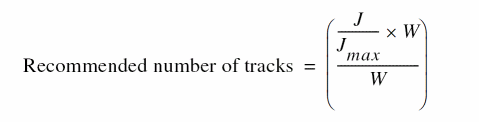
-
(
J/Jmax)*Wis the ratio of actual current to maximum current multiplied by the resistor width. -
Wis drawn width.
If the expression of the recommended tracks evaluates to a floating point number, the value is rounded to the next integer. For example, if the expression evaluates to 10.45, it is rounded to the next integer, 11. The value displayed in the Tracks column is one less than the calculated value of the recommended number of tracks.
GUI Equivalent
The Tracks column in the EM Results table
Examples
envGetVal("layoutEAD.gui" "showRecommendedTracks")
envSetVal("layoutEAD.gui" "showRecommendedTracks" 'boolean t)
showTracksWithoutWSP
layoutEAD.gui showTracksWithoutWSP boolean {t | nil}
Description
Specifies whether to display the Tracks column in the results table of the EM Calculator.
The default value is nil, which indicates that the Tracks column is not displayed in the results table of the EM Calculator.
GUI Equivalent
Examples
envGetVal("layoutEAD.gui" "showTracksWithoutWSP")
envSetVal("layoutEAD.gui" "showTracksWithoutWSP" 'boolean t)
Related Topics
useWSPGroupNames
layoutEAD.gui useWSPGroupNames boolean {t | nil}
Description
Specifies whether to use widths from a WSP group or from an RSP group when calculating EM limits for a net.
The default value is nil, which indicates that the widths are used from the RSP group.
GUI Equivalent
|
The drop-down list displayed next to the RSP/WSP check box in the EM Calculator |
Examples
envGetVal("layoutEAD.gui" "useWSPGroupNames")
envSetVal("layoutEAD.gui" "useWSPGroupNames" 'boolean t)
Related Topics
p2t
- EMStackTwigs
- EMFillStackedTrunksWithVias
- EMAllowDRCViolations
- EMOptimizationMode
- EMTrunkStrandMode
- EMTrunkTapering
EMStackTwigs
Adjusts the width of a twig that has an EM violation by performing stacked stranding.
p2t EMStackTwigs boolean t |
||
envSetVal("p2t" "EMStackTwigs" 'boolean t)
|
||
t |
Stacked stranding is performed for twigs with EM violations. |
|
nil |
||
nil |
||
EMFillStackedTrunksWithVias
Applies to trunks that are optimized using the Stacked Stranding trunk optimization style.
EMAllowDRCViolations
Allows DRC violations (shorts and spacing errors) when trunks, twigs, and vias are expanded to remove EM violations.
p2t EMAllowDRCViolations boolean t |
||
envSetVal("p2t" "EMAllowDRCViolations" 'boolean t)
|
||
t |
Allows DRC violations (shorts, spacing errors) when trunks, twigs, and vias are expanded. |
|
nil |
||
nil |
||
EMOptimizationMode
Specifies the EM trunk optimization command.
EMTrunkStrandMode
Selects the style for optimizing a trunk to resolve EM violations.
p2t EMTrunkStrandMode cyclic "Parallel" |
||
envSetVal("p2t" "EMTrunkStrandMode" 'cyclic "Parallel")
|
||
None |
||
Parallel |
||
Stack |
||
None |
||
EMTrunkTapering
Enables trunk tapering during trunk widening. Trunk tapering works for only the widen style and not for parallel or stacked stranding.
p2t EMTrunkTapering boolean t |
||
envSetVal("p2t" "EMTrunkTapering" 'boolean t)
|
||
t |
||
nil |
||
nil |
||
Fixing Violations Using EM Driven Trunk Optimization
Return to top