Voltus-XFi Flow Overview
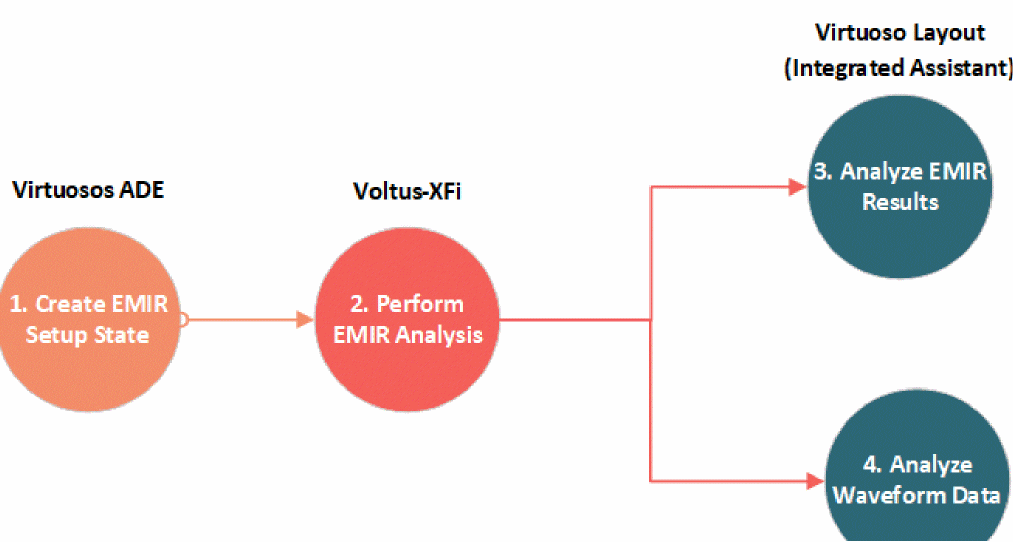
The flow of the Voltus-XFi EM-IR solution is represented in the following diagram:
The following table describes the steps of the Voltus-XFi workflow:
|
Workflow Step
|
Description
|
|
In Virtuoso ADE Assembler, create an EM-IR setup state.
|
-
Create a simulation testbench.
-
Set up simulation corners.
-
Save an EM-IR setup state.
|
|
Perform EM-IR analysis in Voltus-XFi.
|
-
Generate xDSPF using Quantus or point to an existing xDSPF.
-
Import the simulation setup state or active setup.
-
Specify EM-IR analysis to run Power IR/EM analysis and Signal IR/EM analysis.
-
Run the static, dynamic, and static power grid solver (SPGS) analyses and generate text reports and results database.
|
|
Load EM-IR results in Voltus-XFi Results Browser.
|
-
Analyze IR drop, electromigration, SPGS, and least-resistive path (LRP) analysis results directly on the Virtuoso layout.
-
Run region-based queries.
-
Debug regions of high IR drop and/or EM violation.
|
|
Analyze waveform data.
|
-
Display current and voltage waveforms in VIVA Waveform Viewer.
|
Related Topics
Return to top