
Checking Routability Using Batch Checker
Routability checks let you identify the problems with your data before the router is run. By independently using routing check, you can check the width, spacing, and accessibility of pins, and other issues that may affect routing. Because it checks the data against foundry rules, user constraints, and Wire Assistant overrides, it is important to set up the routability check options in the Wire Assistant before running Routability Check.
Routability checks are designed primarily for the Chip Assembly routing mode. Therefore, if you set the routing mode to Chip Assembly in the Wire Assistant, the whole suite of routing checks is available. However, if you set the routing mode to ASIC or Device Style mode, only pin access checks are available.
-
To perform routability checks on a design, select the Routability option. The routability checks are displayed on the right panel of the form, as shown in the following figure.
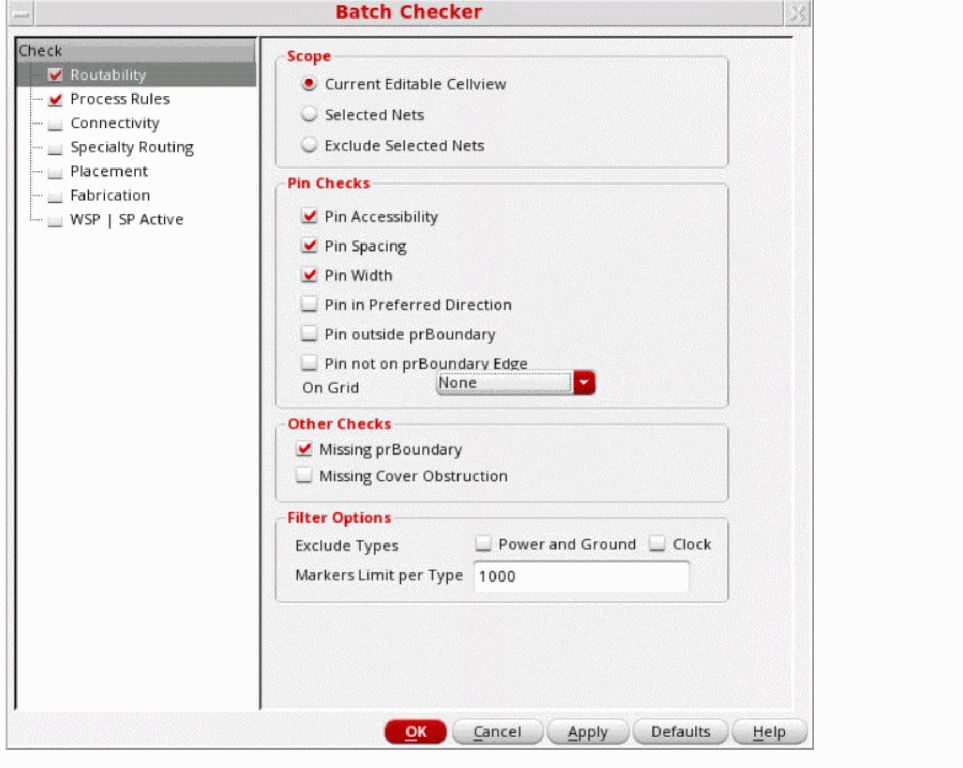
- In the Scope group box, select
For the other routability checks, such as pin checks, missing prBoundary, cover obstructions, and filter options, see
Related Topics
Checking Process Rules Using Batch Checker
Checking Connectivity Using Batch Checker
Checking Specialty Routing Using Batch Checker
Checking Fabrication Using Batch Checker
Checking WSP | SP Active Using Batch Checker
Return to top