
H
Troubleshooting Schematic Connectivity
When connectivity updates result in violations, a flashing marker is displayed on each object that generates an error or warning and a corresponding message is displayed in the CIW. This appendix contains additional information about the connectivity error and warning messages issued. Each error message in the CIW is associated with a message ID. This ID can be used to locate in this appendix any relevant troubleshooting information to help you understand and resolve the issues.
The messages have been grouped as follows:
- Wire Naming
- Shorts and Misconnections
- Incompatible Connection Widths
- Tapping and Repeating
- Inherited Connections
- Patch Cords
- Indirect Shorts between Global Signals
- Indirect Shorts between Pins
- Indirect Shorts between Pins and Global Signals
- Unexpected Schematic Content
- Other Errors
You can use any of the following methods to view and manage the violation markers in a design:
- The Check – Find Marker command
-
The Navigator assistant
Inspect the problematic objects by selecting them in the Navigator assistant with Dynamic Net Highlighting enabled. -
The Annotation Browser
Right-click a violation marker in the Annotation Browser and choose Select Nets. You can trace the source of the nets to determine the cause of the problem. - Virtuoso log files. See the Virtuoso Design Environment User Guide.
Related Topics
Finding Errors and Warnings in a Design
Highlighting Errors and Warnings in the CIW
Find Marker (form)
Wire Naming
The following error messages are included in this group:
- SCH-7060, SCH-7071, SCH-7072, SCH-7088: Incorrect Wire Label Syntax
- SCH-7064: Conflicting Labels on the Same Wire
- SCH-7065: Syntax Error in Wire Label
- SCH-7067: Incorrect Alias Label Syntax
- SCH-7068: Alias Width Does Not Match Net Width
- SCH-7069 and SCH-7084: Alias Label Not Glued to a Wire
- SCH-7070 and SCH-7077: Unconnected Wire Labels and Net Expression
- SCH-7078: Base Name Already in Use by Another Net
- SCH-7902: System-generated Net Prefix Cannot Be Used
- SCH-7903: Unexpected Format for Wire Label Glue Distance Setting
SCH-7060, SCH-7071, SCH-7072, SCH-7088: Incorrect Wire Label Syntax
The labels on the specified wires either have incorrect syntax or contain an empty label or alias.
Messages
Error: (SCH-7060) Incorrect syntax found in '<labelName>'. Used net name '<netName>'.
Warning: (SCH-7071) Ignored empty label on net '<netName>'.
Warning: (SCH-7072) Ignored empty alias on net '<netName>'.
Error: (SCH-7088) Cannot create net '<name>' because this net name is reserved for system use. Used net name '<netName>'.
Suggestions
Correct the syntax or provide the missing labels or aliases on the reported wires.
SCH-7064: Conflicting Labels on the Same Wire
There are multiple conflicting name labels attached to the same wire.
Message
Error: (SCH-7064) Ignored label '<labelName>' because multiple labels exist on wire '<labelName>'.
Suggestions
Ensure that the labels on a wire all have the same name.
SCH-7065: Syntax Error in Wire Label
The reported wire label does not follow the supported naming rules.
Message
Error: (SCH-7065) Incorrect syntax found in '<labelName>'. Used net name '<netName>'.
Suggestions
Add a correct wire name. For more information on naming conventions, see
SCH-7067: Incorrect Alias Label Syntax
An alias label acts like a patch cord, establishing an alias between the signals of two different nets. The syntax of the specified alias label is incorrect.
Message
Error: (SCH-7067) Incorrect syntax found in alias '<labelName>'.
Suggestions
Correct the syntax of the alias label.
SCH-7068: Alias Width Does Not Match Net Width
The alias label and the net it is attached to have different widths (that is, different numbers of bits).
Message
Error: (SCH-7068) Alias '<labelName>' and net '<netName>' have different widths.
Suggestions
Ensure that the label and the net it is attached to have the same width.
Related Topics
Wire Connections and Wire Naming Conventions
SCH-7069 and SCH-7084: Alias Label Not Glued to a Wire
An alias label acts like a patch cord, establishing an alias between the signals of two different nets. Labels or wire names that are unconnected to a wire are considered to be unglued. During Check operations, any unglued labels within a specified distance of a wire are glued to the wire. When an unglued alias label is beyond the specified distance from the wire, a marker is placed on the alias label.
Message
Warning: (SCH-7069) Label '<labelName>' is unconnected.
Error: (SCH-7084) Label '<labelName>' is unconnected.
Suggestions
Rerun the checking command after doing one of the following operations:
- Move the label closer to the wire.
-
Adjust the specified distance set on the Maximum Offset From Wire field on the Schematic Rules Check Setup form.
Related Topics
Patch Cord Connections and Patch Cord Naming Conventions
maxLabelOffsetUU (environment variable)
SCH-7070 and SCH-7077: Unconnected Wire Labels and Net Expression
A wire name or a net expression is defined as an alias but the label is not attached to anything. Labels or wire names that are unconnected to a wire are considered to be unglued. During Check operations, any unglued labels within a specified distance of a wire are glued to the wire. When an unglued alias label is beyond the specified distance from the wire, a marker is placed on the alias label.
Messages
Warning: (SCH-7070) Alias '<labelName>' is unconnected.
Warning: (SCH-7077) Net expression '<netExpression>' is unconnected.
Suggestions
Open the Edit – Properties – Object form, select the alias label, and use the Attachment button to glue it to another net in the design. If the alias label is not required, delete it.
SCH-7078: Base Name Already in Use by Another Net
The same base name is used for different net types, for example, x for scalar and x<1:2> for bus.
Messages
Error: (SCH-7078) Cannot create net '<name>' because this net name is already in use by net '<netName>'. Used net name '<netName>'.
Suggestions
- Rename one of the nets. It is likely that a wire label mentions one of the problematic names.
- Split the design across multiple schematics if you want to use the same base name in different contexts.
- Check for typos in tap labels.
SCH-7902: System-generated Net Prefix Cannot Be Used
The name prefix is set to a reserved prefix, for example N__, under Options – Editor – Connectivity – Net Name Prefix.
Message
Error: (SCH-7902) Cannot use prefix '<string>' to create bus nets because it is reserved for system use. Specify a different prefix.
Suggestions
Prefix N__ is reserved for system use. Use a different prefix.
SCH-7903: Unexpected Format for Wire Label Glue Distance Setting
The value for glue distance property has an invalid data type.
Message
Warning: (SCH-7903) Cellview label glue distance property '<propName>' should be a float.
Suggestions
Ensure that the glue distance property is specified as a floating point number.
Related Topics
Shorts and Misconnections
Wire labels, pins, and global symbols name the nets and signals carried by portions of a circuit. When multiple objects use the same name or a single object uses multiple names , the system cannot determine which name should be used. In these cases, the schematic editor propagates each name as far as possible and then marks the points where conflicting names meet.
The following error messages are included in this group:
SCH-7003: Short between Nets
Two conflicting wire names cannot appear on different parts of the same wire. You can add the same wire label at multiple places on the same wire. This is useful if the wire is very long.
SCH-7064: Conflicting Labels on the Same Wire.Message
Error: (SCH-7003) Short between 'y' and 'x'.
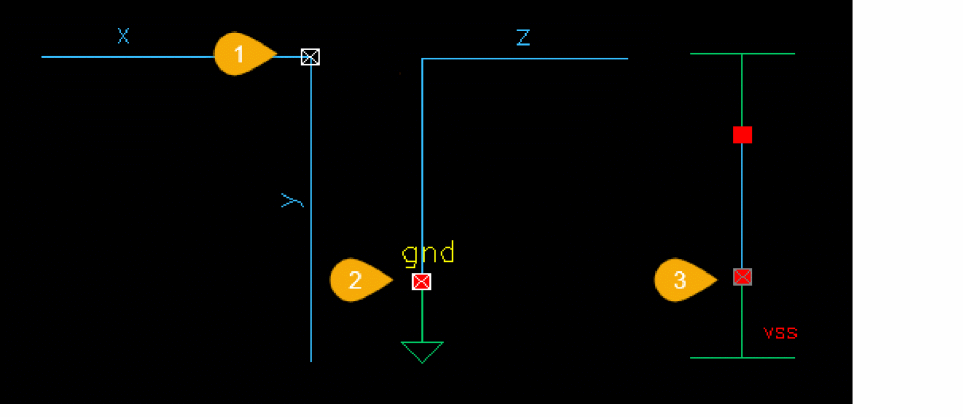
1. Short between 'y' and 'x'
2. Short between 'gnd!' and 'z'
3. Short between 'vss!' and 'vdd!'
Suggestions
- To assign multiple names to a net, see Patch Cord Connections and Patch Cord Naming Conventions.
- To pull out bits from a multi-bit net, see Bus Tapping.
Related Topics
SCH-7005 to 7008: Shorted Signals across a Feed-through Pin
Multiple pins are using the same pin name, and the system cannot determine which should be used.
Messages
Error: (SCH-7005) Short between y and x through common pin b in a,b and b,a on instance I0.

The connection of the common pin on the specified instance terminal is causing a short circuit.
Error: (SCH-7006) Short between y and x through common pin P in P and PQ.
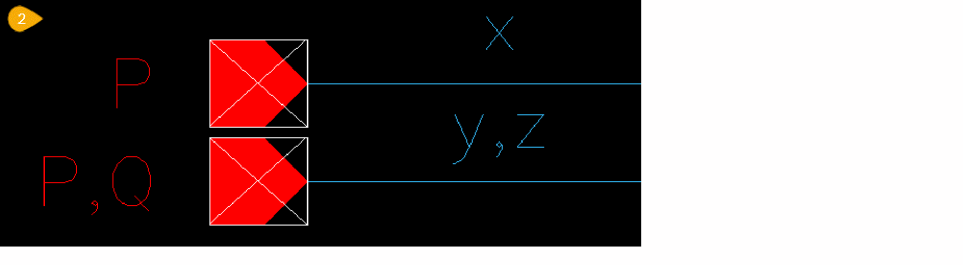
Make sure that the same signal is connected to each pin. In this case, change x to y or y,x to x,y.
However, when the pin P,Q was created, the intention might have been to create multiple pins. You can create multiple pins by separating each name with a space in the Create Pin form. Rename p in one of the pins. See Create Pin – Schematic and Create Pin – Symbol for more information.
Error: (SCH-7007) Short between z and x through pin a in a,b,a on instance I0.

The same bit name, a, appears multiple times in the instance pin a,b,a, and the net x,y,z has different nets in the corresponding positions causing a short. Ensure that the net connected to the pin has a name with the same pattern as the pin name.
Error: (SCH-7008) Short between 'z' and 'x' through pin 'P' in 'P,Q,P'.
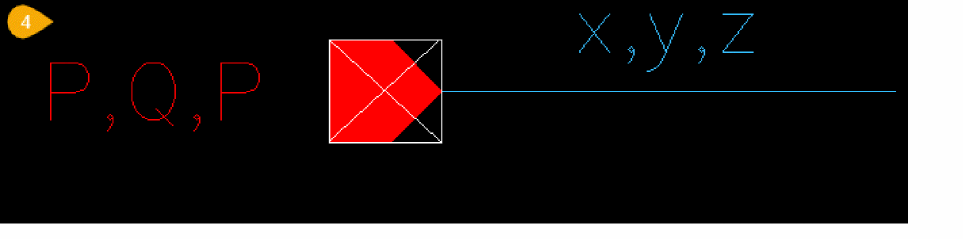
The reported wires are causing a short circuit to the named pin.
Suggestions
- Make sure that the same signal is connected to each pin.
- Check the area on the schematic for wires overlapping the pin connection. Reconnect or replace the wire as required.
- Check the area on the schematic for instances where the wire has not fully connected with the pin. Locate the source of the electrical misconnection on the instance terminals between the nets specified in the message. Reconnect or replace the wire as required.
- Make a direct connection between two pins without an intermediate wire by placing the pins so that they touch each other, they partially or fully overlap, or one pin is contained within another. Unlike wires, pins cannot be connected by name.
- Create multiple pins by separating each name with a space in the Create Pin form.
- Tapping pins: A tap cannot be drawn directly from an instance (symbol) pin. To tap a multiple-bit connection to an instance pin, you must attach a wire named with a bus name to the instance pin. You can then draw taps from the named bus.
- To connect two pins on the same net, use a cds_alias instance.
Related Topics
- Using Wire Draw, Width, and Route Options
- Using Wire Snap and Gravity Options
- Understanding Connectivity and Naming Conventions
- Resolving Check Errors
Incompatible Connection Widths
The following error messages are included in this group:
SCH-7004 and SCH-7080: Misconnection between Unrelated Nets of Different Widths
Two nets with different widths are connected in a way that the system cannot interpret as a tap. For example, this can happen when trying to connect a multi-bit instance pin to a net.
Messages
Error: (SCH-7004) Misconnection between 'P<0:1>' (2 bits) and 'x<2:10>' (9 bits).

Error: (SCH-7080) Instance '<instanceName>' pin '<termName>' width (<numBits>) does not match '<netName>' (<numBits>).
Suggestions
- Ensure that the number of bits in the symbol pin is an exact multiple of the number of bits in the net.
- Connect the onPageConn symbol to the wire endpoint to prevent the dangling wire being highlighted as an error.
- When trying to tap certain bits of a net, ensure that all the bits being tapped are present on both sides of the connection.
-
Single-bit instance pins can only connect to multi-bit nets if the multi-bit net is a repeat net (for example,
"<*4>gnd!"). - When connecting a net to an instance pin with a larger number of bits, the net name must have the same number of bits as the pin name, not the instance name.
Related Topics
Tapping and Repeating
The following error messages are included in this group:
- SCH-7020 to SCH-7035, SCH-7050 and SCH-7051: Tapped Bits Out of Range
- SCH-7061: Unexpected Repeat Label
- SCH-7062: Unexpected Tap Label
- SCH-7116: Ambiguous Connection at Tap
SCH-7020 to SCH-7035, SCH-7050 and SCH-7051: Tapped Bits Out of Range
A tap must specify a member of the net from which it is tapped. If not, a corresponding message from the list below is displayed.
Error: (SCH-7020) Tap 'BUS<0>' is before the start bit of 'Bus<1:10>'.
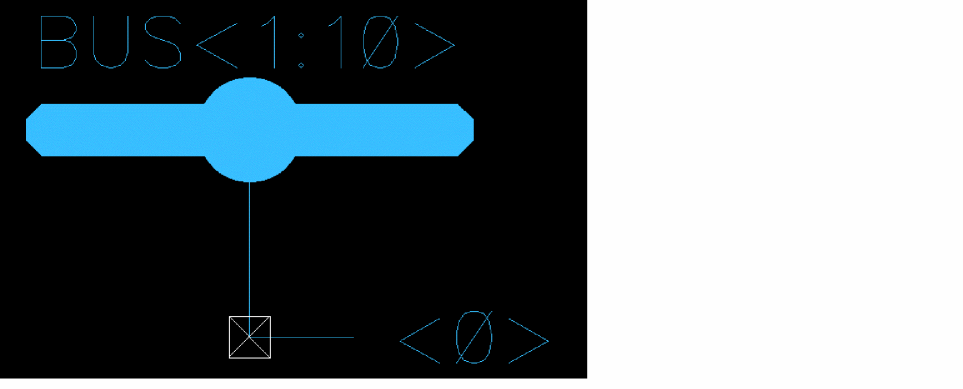
The net BUS<1:10> from which the tap 0 is named does not contain a signal named BUS<0>.
Error: (SCH-7021) Tap 'Bus<10>' is after the stop bit of 'Bus<1:9>'.
The net BUS<1:9> from which the tap 10 is named does not contain a signal named BUS<10>.
Error: (SCH-7022) Tap 'Bus<4>' is between the step bits of 'Bus<1:9>'.
Although the tapped bit value is within the range, it does not match the step bits in which the range increments.
In the vector notation <1:9:3> below, 3 is the incremental value. Every third value between 1 and 9 is a valid value or step bit in the range. Tap bit 4 is not valid because only the bits 3, 6, and 9 are valid.

Error: (SCH-7023) Tap 'Bus<1:3>' start bit is before the start bit of 'Bus<2:10>'.
The tapped bit is not within the bus bit range. The first number (start bit) in the tapped bit range is lower than the start bit of the bus bit range.
The remaining messages in this section report variations of the same problem.
Error: (SCH-7024) Tap '<netName>' stop bit is before the start bit of '<netName>'.
Error: (SCH-7025) Tap '<netName>' start bit is after the stop bit of '<netName>'.
Error: (SCH-7026) Tap '<netName>' stop bit is after the stop bit of '<netName>'.
Error: (SCH-7027) Tap '<netName>' start and stop bits are before the start bit of '<netName>'.
Error: (SCH-7028) Tap '<netName>' start and stop bits are after the stop bit of '<netName>'.
Error: (SCH-7029) Tap '<netName>' straddles '<netName>'.
Error: (SCH-7030) Tap '<netName>' start bit is between the step bits of '<netName>'.
Error: (SCH-7031) Tap '<netName>' stop bit is between the step bits of '<netName>'.
Error: (SCH-7032) Tap '<netName>' start and stop bits are between the step bits of '<netName>'.
Error: (SCH-7033) Tap '<netName>' step bits are between the step bits of '<netName>'.
Error: (SCH-7034) Tap '<netName>' not in '<netName>'.
Error: (SCH-7035) Tap '<netName>' cannot tap from vector bit '<netName>'.
Error: (SCH-7050) Tap '<netName>' is not in bundle '<netName>'.
Error: (SCH-7051) Tap '<netName>' has bits other than '<netName>'.
Suggestion
In the schematic, rename the tap to a valid wire segment in the multiple-bit range that forms the bus.
Related Topics
- Tapping Multiple Bits of a Bus
- Finding the Range of Bits in a Bus
- Understanding Connectivity and Naming Conventions
SCH-7061: Unexpected Repeat Label
A tap is labeled without enough context, for example, <*8>, and the system cannot determine what you intend to repeat.
Message
Error: (SCH-7061) Cannot determine what to repeat for '<labelName>'. Used net name '<netName>'.
Suggestions
Provide the full name of the net you want to use, for example, <*8>(a,b).
Alternatively, make sure the tap is connected to a labeled net.
SCH-7062: Unexpected Tap Label
A wire is labeled with a name that looks like a tap, for example, "<1>", "3", "<a,b,c>" but does not appear in a tapping context.
Message
Error: (SCH-7062) Cannot determine what to tap for '<labelName>'. Used net name '<netName>'.
Suggestions
Provide the full name of the net you want to use and check your drawing to see if you are missing any other wire labels that give context to the tap label.
SCH-7116: Ambiguous Connection at Tap
There is a connection between two multi-bit nets whose names are permutations of each other (that is, they have the same bits but in a different order). The extractor cannot determine which name to use for the tap.
Messages
Error: (SCH-7116) Ambiguous connection at tap between nets 'A<2:0>' and 'A<0:2>' which are permutations of each other.
Suggestions
Remove the ambiguity in the net names.
Inherited Connections
The following messages are included in this group:
- SCH-7015: Conflicting Net Expressions on the Same Net
- SCH-7074 and SCH-7075: Conflict between Net Expression and Wire Label
- SCH-7079 to SCH-7087: Incomplete Net Expression Label
- SCH-7111 to SCH-7115: Circular References
- SCH-7280: Non-inherited Pin with Net Expression
- SCH-7281: Global Schematic Pin Name Inconsistent with Net Expression Default
- SCH-7282 to SCH-7284: Net Expression with Non-global Default Net
SCH-7015: Conflicting Net Expressions on the Same Net
A short circuit has been identified between the specified net expressions.
Message
Error: (SCH-7015) Short between net expression '[@power:%:vdd!]' and '[@vdd:%:vdd!]'.
Suggestion
In the schematic, locate the source of the electrical misconnection between the net expressions specified in the message. Reconnect or replace the wire as required.
Related Topics
SCH-7074 and SCH-7075: Conflict between Net Expression and Wire Label
A wire name is attached to a segment of wire that already has an attached net expression label.
Message
Error: (SCH-7074) Ignored label '<labelName>' because multiple labels exist on wire with net expression '<netExpression>'.
Error: (SCH-7075) Ignored net expression '<netExpression>' because multiple labels exist on wire with net expression '<netExpression>'.
Suggestions
Make sure each wire segment has only one label by deleting the incorrect label.
SCH-7079 to SCH-7087: Incomplete Net Expression Label
There is a malformed net expression label present. This may have been created using SKILL or by a non-Virtuoso tool.
Message
Error: (SCH-7079) Label '<labelName>' has the labelType of an evaluated label but it does not contain an expression that can be evaluated either by Virtuoso Schematic Editor or by the SKILL language to determine which is the resulting value that should be used to name a net. Used net name '<netName>'.
Error: (SCH-7082) Label '<labelName>' does not have the netExpression property so it cannot be used to name a net. Used net name '<netName>'.
Error: (SCH-7083) Label '<labelName>' has the netExpression property but it is not of NLPExpr type so it cannot be used to name a net. Used net name '<netName>'.
Error: (SCH-7085) Label '<labelName>' has the labelType of an evaluated label but it does not contain an expression that can be evaluated either by Virtuoso Schematic Editor or by the SKILL language to determine which is the resulting value that should be used to name a net. Used net name '<netName>'.
Error: (SCH-7086) Label '<labelName>' does not have the netExpression property so it cannot be used to name a net. Used net name '<netName>'.
Error: (SCH-7087) Label '<labelName>' has the netExpression property but it is not of NLPExpr type so it cannot be used to name a net. Used net name '<netName>'.
Suggestions
Delete the label and recreate it using Create – Net Expression or schCreateNetExpression().
Related Topics
SCH-7111 to SCH-7115: Circular References
A netSet property value can be either a simple value, such as vdd, or a redirecting netSet, which is another net expression, such as [@vdd:%:vdd!].
The redirecting expression requests that the search for netSets continue using the alternative property name specified in the redirecting net expression. Circular references arise when the same netSet property is specified containing the redirecting expression, which creates a loop.
A circular reference can also be between two netSets on the same instance. For example,
An instance with net expression [@a:%:a!] has three redirecting netSets:
a = [@b:%:c!]
b = [@c:%:d!]
c = [@b:%:e!]
The circular reference occurs between b = [@c:%:d!] and c = [@b:%:e!].
A circular reference can also be achieved in multiple indirect steps.
Messages
Error: (SCH-7111) Circular reference on instance I0 between net expression [@a:%:b!] on property b and net expression [@a:%:d!] on CDF parameter a.
Error: (SCH-7112) Circular reference on instance I0 between net expression [@a:%:b!] on property b and net expression [@a:%:d!] on property a.
Error: (SCH-7113) Circular reference on instance I0 between net expression [@a:%:b!] on instance pin it and net expression [@a:%:d!] on CDF parameter a.
Error: (SCH-7114) Circular reference on instance I0 between net expression [@a:%:b!] on CDF parameter a and net expression [@a:%:d!] on CDF parameter c.
Error: (SCH-7115) Circular reference on instance I0 with net expression [@a:%:b!] on property a.
Suggestions
-
Avoid direct or transitive circular references:
Direct:a=[@a:%:vdd!]
Transitive:a=[@b:%:vdd!]andb=[@a:%:vdd!] - Rewrite the net expression to avoid circular references.
Related Topics
SCH-7280: Non-inherited Pin with Net Expression
A pin without an attached net expression connects to a net with a net expression.
Message
Error: (SCH-7280) Non-inherited pin '<termName>' connected to inherited net '<netExpression>'.
Suggestions
Move the net expression from its current position on a wire to the pin. Alternatively, add a matching net expression to the pin or remove the net expression.
Related Topics
Inherited Connections Restrictions
Adding Schematic and Offsheet Pins
SCH-7281: Global Schematic Pin Name Inconsistent with Net Expression Default
The specified pin uses a global net expression and its name is different from the default net name.
Message
Error: (SCH-7281) Pin name 'P!' uses global syntax and is inconsistent with the default net name 'b!' from its net expression '[@a:%:b!]'.
Suggestions
Such inconsistencies are permitted, but each instance is flagged for review.
If the net expression is as you intended, ignore this message. If this is not intended, change the default net name or remove the net expression.
SCH-7282 to SCH-7284: Net Expression with Non-global Default Net
Net expressions with a non-global default net name are not valid.
Messages
Error: (SCH-7282) Net name 'local2' has a net expression '[@z:%:local2]' that does not have a global default net name.
Error: (SCH-7283) Pin name 'IN' has a net expression '[@x:%:local]' that does not have a global default net name.
Error: (SCH-7284) Instance 'I1' with pin 'Y' has a net expression '[@z:%:local2]' that does not have a global default net name.
Suggestions
Change the default net name or remove the net expression.
Patch Cords
The following error messages are included in this group:
- SCH-7090 to SCH-7092: Incorrectly Constructed Patch Cord Symbol
- SCH-7093 to SCH-7094: Incorrectly Connected Patch Cord Instance
- SCH-7095 to SCH-7102: Problems with Patch Cord Connection Expressions
- SCH-7103 to SCH-7110 and SCH-7286 Ripper Property Issues
SCH-7090 to SCH-7092: Incorrectly Constructed Patch Cord Symbol
A valid patch cord must have a single source pin and a single destination pin. When a patch cord has multiple source or destination pins, it is marked as an error.
Messages
Error: (SCH-7090) Patch cord '<instanceName>' has unrecognized terminal '<termName>'.
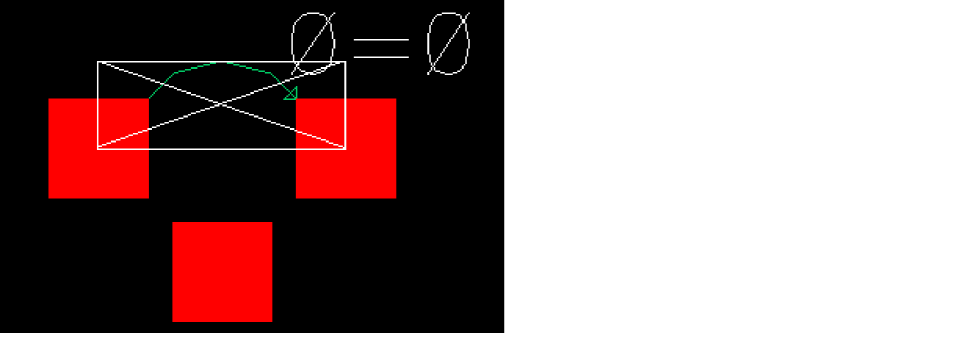
Error: (SCH-7091) Patch cord '<instanceName>' must have a single source pin, but has <numPins>.
Error: (SCH-7092) Patch cord '<instanceName>' must have a single destination pin, but has <numPins>.
Suggestions
Ensure that each patch cord has a single source pin and a single destination pin.
Related Topics
Create Patchcord (form)
SCH-7093 to SCH-7094: Incorrectly Connected Patch Cord Instance
You must connect both the source and destination pins of a patch cord.
Messages
Error: (SCH-7093) Patch cord '<instanceName>' requires a source net.
Error: (SCH-7094) Patch cord '<instanceName>' requires a destination net.
Suggestions
Connect both the source and destination pins of the given patch cord.
Related Topics
SCH-7095 to SCH-7102: Problems with Patch Cord Connection Expressions
These messages point out specific issues with patch cord connection expressions.
Messages
Error: (SCH-7095) Patch cord '<instanceName>' requires a '<propName>' connection expression property.
The patch cord is missing a connection expression property.
Error: (SCH-7096) Patch cord '<instanceName>' connection expression property '<propName>' must be a string."
The connection expression property for the patch cord is incorrect.
Error: (SCH-7097) Patch cord '<instanceName>' has incorrect syntax in connection expression '<expression>'.
There is a syntax error in the patch cord property.
Error: (SCH-7098) Patch cord '<instanceName>' width mismatch between <numBits>-bit source and <numBits>-bit destination sides of expression '<expression>'.
There is a width mismatch between the different bits of the patch cord.
Error: (SCH-7099) Patch cord '<instanceName>' source index '<index>' in connection expression '<expression>' exceeds width of net '<netName>'.
The source for the named patch cord expression is too wide for the net.
Error: (SCH-7100) Patch cord '<instanceName>' source index '<index>' in connection expression '<expression>' exceeds width of <numBits>-bit net.
The source for the named patch cord expression is too wide for the unique net.
Error: (SCH-7101) Patch cord '<instanceName>' destination index '<index>' in connection expression '<expression>' exceeds width of net '<netName>'.
The destination for the named patch cord expression is too wide for the net.
Error: (SCH-7102) Patch cord '<instanceName>' destination index '<index>' in connection expression '<expression>' exceeds width of <numBits>-bit net.
The destination for the named patch cord expression is too wide for the unique net.
The number of bits in srcVectorExpression must equal the number of bits in dstVectorExpression.
Suggestions
Correct the specified error in the reported patch cord expression.
Related Topics
SCH-7103 to SCH-7110 and SCH-7286 Ripper Property Issues
Rippers are a special type of patch cord used in designs imported in Electronic Design Interchange Format (EDIF).They introduce explicit equivalences between the bits of two or more nets in a design.
When the system identifies an issue with a property name or property type of a ripper, it marks the issue with an appropriate message.
Messages
Error: (SCH-7103) Bus ripper '<ripperName>' requires a '<propName>' connection expression property.
The ripper is missing a connection expression property.
Error: (SCH-7104) Bus ripper '<ripperName>' connection expression property '<propName>' must be a string.
The connection expression property for the ripper must be a string.
Error: (SCH-7105) Bus ripper '<ripperName>' connection expression property '<propName>' has incorrect syntax in '<expression>'.
There is a syntax error in the ripper connection expression property.
Error: (SCH-7106) Bus ripper '<ripperName>' has width mismatch between external (SCH-<numBits>) and internal (SCH-<numBits>) sides of connection expression '<expression>'.
There is a width mismatch between the different bits of the ripper.
Error: (SCH-7107) Bus ripper '<ripperName>' requires a '<propName>' net name property.
The ripper is missing a net name.
Error: (SCH-7108) Bus ripper '<ripperName>' net name property '<propName>' must be a string.
The net name property for the ripper must be a string.
Error: (SCH-7109) Bus ripper '<ripperName>' net name property '<propName>' has incorrect syntax in '<netName>'.
There is a syntax error in the ripper net name.
Error: (SCH-7110) Bus ripper '<ripperName>' destination index <index> in connection expression '<expression>' exceeds width of net '<netName>'.
The index for the named expression is too wide for the net.
Error: (SCH-7286) Bus ripper '<ripperName>' cannot patch net '<netName>' to net '<netName>'. Use a patch cord.
A ripper between the nets cannot be created. Use a patch cord instead.
Suggestion
Correct the specified error in the ripper.
Related Topics
Virtuoso EDIF 200 Reader User Guide
Indirect Shorts between Global Signals
Global nets make connections across the design hierarchy without using pins and wires to explicitly pass the signal through the hierarchy. Global nets are used primarily for power and ground connections.
The following error messages are included in this group:
- SCH-7200 to SCH-7203: Shorted Global Signals through a Patch Cord
- SCH-7220 to SCH-7223: Shorted Global Signals through an Alias Label
- SCH-7240 to SCH-7242 and SCH -7260: Shorted Globals across a Feed-through Pin
SCH-7200 to SCH-7203: Shorted Global Signals through a Patch Cord
Patch cord symbols establish an alias between the signals of two different nets by combining them into a single logical net with multiple names. Unlike tap names, where you extract bits of a single net, you use patch cords to copy one net to another. You can also use a patch cord to map bits from one net to different bits of another net.
The arrow on a patch cord points to the net name that is used when a single name is required for a net with multiple names. Each logical net must have only one global name. Connecting two global nets with a patch cord is therefore marked as a problem.
When multiple object names conflict with each other, the system cannot determine which should be used. In this case, each name is propagated as far as possible and a marker is placed on the patch cord.
Messages
Error: (SCH-7200) Global signal x is aliased to global signal y by patch cord I0.

By using the vector expression 0=0, the first bit of each net is made equivalent, and the patch cord does not have any effect on any of the other bits of either net.
Error: (SCH-7201) Global signal x! is aliased to global signal y! by patch cord P to s.
Error: (SCH-7202) Global signal x! is aliased to global signal y! by patch cord P from t.
Error: (SCH-7203) Global signal x! is aliased to global signal y! by patch cord P between s and t.
Suggestions
- Either of the nets may be connected to a schematic pin (I/O pin). An input pin cannot be connected to an output pin even if a patch cord is used in between.
-
If the short between two terminals or a terminal and a global signal is intended, you can create a pseudo-short using the cds_thru component from the
basiclibrary. - If the net names contradict each other, check whether multiple names to a net have been assigned correctly.
Related Topics
- Resolving Check Errors
- Bus Tapping
- Patch Cord Connections and Patch Cord Naming Conventions
- Understanding Connectivity and Naming Conventions
- Indirect Shorts between Pins and Global Signals
- Patch Cords
- Basic Library Symbols
SCH-7220 to SCH-7223: Shorted Global Signals through an Alias Label
An alias label acts like a patch cord. It establishes an alias between the signals of two nets. When multiple object names conflict with each other, the system cannot determine which should be used. In this case, each name is propagated as far as possible and a marker is placed on the alias label.
Message
Error: (SCH-7220) Global signal x is aliased to global signal y by alias label.
Error: (SCH-7221) Global signal x is aliased to global signal y through alias '<alias>'.
Error: (SCH-7222) Global signal x is aliased to global signal y through net '<netName>' alias '<alias>'.
Error: (SCH-7223) Global signal x is aliased to global signal y through net '<netName>'.
Suggestions
- Either of the nets may be connected to a schematic pin (I/O pin). An input pin cannot be connected to an output pin even if an alias label is used.
- If the short between two terminals or a terminal and a global signal is intended, you can create a pseudo-short using the cds_thru component from the basic library.
-
If the net names contradict each other, check if multiple names on a net have been assigned correctly.
Related Topics
- Resolving Check Errors
- Bus Tapping.
- Patch Cord Connections and Patch Cord Naming Conventions
- Understanding Connectivity and Naming Conventions
- Indirect Shorts between Pins and Global Signals
- Patch Cords
- Basic Library Symbols
SCH-7240 to SCH-7242 and SCH -7260: Shorted Globals across a Feed-through Pin
Two global signals are connected through instance pins that share common bits.
Messages
Error: (SCH-7240) Global signal '<netNameX>' is aliased to global signal '<netNameY>' by common pin '<termName>' in '<termName1>' and '<termName2>' on instance '<instanceName>'.
Error: (SCH-7241) Global signal '<netNameX>' is aliased to global signal '<netNameY>' through '<netName>' by common pin '<termName>' in '<termName1>' and '<termName2>' on instance '<instanceName>'.
Error: (SCH-7242) Global signal '<netNameX>' is aliased to global signal '<netNameY>' through '<netName1>' and '<netName2>' by common pin '<termName>' in '<termName1>' and '<termName2>' on instance '<instanceName>'.
Error: (SCH-7260) Global signal '<netNameX>' is aliased to global signal '<netNameY>' by common pin '<termName>' in '<termName1>' and '<termName2>'.
Suggestions
- Check that you intended to have common pins on your symbol.
- Disconnect one of the reported global signals.
- Use the cds_thru component to explicitly connect global nets.
Related Topics
- Resolving Check Errors
- Bus Tapping
- Patch Cord Connections and Patch Cord Naming Conventions
- Understanding Connectivity and Naming Conventions
- Indirect Shorts between Pins and Global Signals
Indirect Shorts between Pins
The following error messages are included in this group:
- SCH-7204 to SCH-7207: Shorted Pins through Patch Cord
- SCH-7224 to SCH-7227: Shorted Pins through Alias Label
- SCH-7243 to SCH-7245: Shorted Pins across a Feed-through Pin
- SCH-7270: Shorted Pins on Different Parts of the Same Net
SCH-7204 to SCH-7207: Shorted Pins through Patch Cord
Patch cord symbols establish an alias between the signals of two nets. Unlike tap names, where you extract bits of a single net, you use patch cords to copy one net to another. You can also use the patch cord to map bits from one net to different bits of another net.
Multiple pins are using the same patch cord, and the system cannot determine which should be used. In this case, each name is propagated as far as possible and markers are added at the points where conflicting names meet.
Messages
Error: (SCH-7204) Pin b is aliased to pin c by patch cord P.
Error: (SCH-7205) Pin b is aliased to c by patch cord P to netA.
Error: (SCH-7206) Pin b is aliased to pin c by patch cord P from netB.
Error: (SCH-7207) Pin b is aliased to pin c by patch cord P between NETA and NETB.
Suggestions
-
Each patch cord has a single source (src) and destination (dst) pin. If the patch cord uses vector expressions, logically, each object on
NETAis also connected toNETB, and the patch cord connects the first bit named in srcVectorExpression to the first bit named in dstVectorExpression. Check that the patch cord has been created correctly. - To connect all the bits of the net to all the bits of the nets attached to the dst pin in the same order as they are attached to the src pin, omit the src vector expression and the equals sign ( = ) from the connection expression. For example, to connect two single-bit nets called NET1 and NET2 with a patch cord, a connection expression of 0 is sufficient.
- Check that the number of bits in the src vector expression equals the number of bits in the dst vector expression.
- If the net names contradict each other, check that multiple names on a net have been assigned correctly.
-
If the short between two terminals is intended, you can create a pseudo-short using the cds_thru component from the
basiclibrary. - Check if either of the nets are connected to a schematic pin (I/O pin). An input pin cannot be connected to an output pin even if a patch cord is used in between.
Related Topics
- Resolving Check Errors
- Patch Cord Connections and Patch Cord Naming Conventions
- Understanding Connectivity and Naming Conventions
- Adding Patch Cords Using the Add Instances Form
- Indirect Shorts between Pins and Global Signals
- Patch Cords
- Basic Library Symbols
SCH-7224 to SCH-7227: Shorted Pins through Alias Label
Two global signals are connected because of an alias label.
Messages
Error: (SCH-7224) Pin '<termNameX>' is aliased to pin '<termNameY>' by alias label.
Error: (SCH-7225) Pin '<termNameX>' is aliased to pin '<termNameY>' through alias label '<alias>'.
Error: (SCH-7226) Pin '<termNameX>' is aliased to pin '<termNameY>' through net '<netName>' alias label '<alias>'.
Error: (SCH-7227) Pin '<termNameX>' is aliased to pin '<termNameY>' through net '<netName>'.
Suggestions
Use the cds_thru component if you want to explicitly connect two different pins together.
Related Topics
- Resolving Check Errors
- Understanding Connectivity and Naming Conventions
- Indirect Shorts between Pins and Global Signals
SCH-7243 to SCH-7245: Shorted Pins across a Feed-through Pin
Two pins are connected through instance pins that share common bits.
Messages
Error: (SCH-7243) Pin '<termNameX>' is aliased to pin '<termNameY>' by common pin '<termName>' in '<termName1>' and '<termName2>' on instance '<instanceName>'.
Error: (SCH-7244) Pin '<termNameX>' is aliased to pin '<termNameY>' through '<netName>' by common pin '<termName>' in '<termName1>' and '<termName2>' on instance '<instanceName>'.
Error: (SCH-7245) Pin '<termNameX>' is aliased to pin '<termNameY>' through '<netName1>' and '<netName2>' by common pin '<termName>' in '<termName1>' and '<termName2>' on instance '<instanceName>'.
Suggestions
- Check that you have the pin arrangement you intended.
- Disconnect one of the reported pins.
- Use the cds_thru component if you want to connect multiple pins.
Related Topics
- Resolving Check Errors
- Understanding Connectivity and Naming Conventions
- Indirect Shorts between Pins and Global Signals
SCH-7270: Shorted Pins on Different Parts of the Same Net
Pins located in different sections of the same net are connected by the specified net causing a short.
Message
Error: (SCH-7270) Pins '<termNameX>' and '<termNameY>' connected through net '<netName>'.
Suggestion
Remove the net that connects the two pins on the same net.
Related Topics
- Resolving Check Errors
- Understanding Connectivity and Naming Conventions
- Indirect Shorts between Pins and Global Signals
Indirect Shorts between Pins and Global Signals
The following error messages are included in this group:
- SCH-7208 to SCH-7215: Shorted Pin and Global through Patch Cord
- SCH-7228 to SCH-7235: Shorted Pin and Global through Alias Label
- SCH-7246 to SCH-7251: Shorted Pin and Global across a Feed-through Pin
- SCH-7271: Non-global Pin Connected to Global Net
- SCH-7299: Short between Global Nets or Pins
SCH-7208 to SCH-7215: Shorted Pin and Global through Patch Cord
Global signals make connections across the design hierarchy without using pins and wires to explicitly pass the signal through the hierarchy. Global signals are used primarily for power and ground connections.
Patch cord symbols establish an alias between the signals of two different nets. Unlike tap names, where you extract bits of a single net, you use patch cords to copy one net to another. You can also use a patch cord to map bits from one net to different bits of another net.
When multiple object names conflict with each other, the system cannot determine which should be used. In this case, each name is propagated as far as possible and markers are added at the points where conflicting names meet.
Messages
Error: (SCH-7208) Pin P is aliased to global signal a! by patch cord I0.
Error: (SCH-7209) Pin P is aliased to global signal a! by patch cord '<instanceName>' to '<netName>'.
Error: (SCH-7210) Pin P is aliased to global signal a! by patch cord '<instanceName>' from '<netName>'.
Error: (SCH-7211) Pin P is aliased to global signal a! by patch cord '<instanceName>' between '<netName>' and '<netName>'.
Error: (SCH-7212) Global signal b! is aliased to S by patch cord '<instanceName>'.
Error: (SCH-7213) Global signal b! is aliased to S by patch cord '<instanceName>' to '<netName>'.
Error: (SCH-7214) Global signal b! is aliased to pin S by patch cord '<instanceName>' from '<netName>'.
Error: (SCH-7215) Global signal b! is aliased to pin S by patch cord '<instanceName>' between '<netName>' and '<netName>'.
Suggestions
-
Each patch cord has a single source (src) and destination (dst) pin. If the patch cord uses vector expressions, logically, each object on
NETAis also connected toNETB, and the patch cord connects the first bit named in srcVectorExpression to the first bit named in dstVectorExpression. Check that the patch cord has been created correctly. - To connect all the bits of the net to all the bits of the nets attached to the dst pin in the same order as they are attached to the src pin, omit the src vector expression and the equals sign ( = ) from the connection expression. For example, to connect two single-bit nets called NET1 and NET2 with a patch cord, a connection expression of 0 is sufficient.
- Check that the number of bits in the src vector expression equals the number of bits in the dst vector expression.
- If the net names contradict each other, check that multiple names to a net have been assigned correctly.
-
If the short between two terminals is intended, you can create a pseudo-short using the cds_thru component from the
basiclibrary. - Check if either of the nets are connected to a schematic pin (I/O pin). An input pin cannot be connected to an output pin even if a patch cord is used in between.
Related Topics
- Resolving Check Errors
- Patch Cord Connections and Patch Cord Naming Conventions
- Understanding Connectivity and Naming Conventions
- Adding Patch Cords Using the Add Instances Form
- Indirect Shorts between Global Signals
- Indirect Shorts between Pins
- Patch Cords
- Basic Library Symbols
SCH-7228 to SCH-7235: Shorted Pin and Global through Alias Label
A pin is connected to a global signal through one or more alias labels.
Messages
Error: (SCH-7228) Pin '<termNameX>' is aliased to global signal '<netNameY>' by alias label.
Error: (SCH-7229) Pin '<termNameX>' is aliased to global signal '<netNameY>' through alias label '<alias>'.
Error: (SCH-7230) Pin '<termNameX>' is aliased to global signal '<netNameY>' through net '<netName>' alias label '<alias>'.
Error: (SCH-7231) Pin '<termNameX>' is aliased to global signal '<netNameY>' through net '<netName>'.
Error: (SCH-7232) Global signal '<netNameX>' is aliased to pin '<termNameY>' by alias label.
Error: (SCH-7233) Global signal '<netNameX>' is aliased to pin '<termNameY>' through alias label '<alias>'.
Error: (SCH-7234) Global signal '<netNameX>' is aliased to pin '<termNameY>' through net '<netName>' alias label '<alias>'.
Error: (SCH-7235) Global signal '<netNameX>' is aliased to pin '<termNameY>' through net '<netName>'.
Suggestions
- Check the marked alias labels to ensure that your net equivalence relationships are as intended.
-
Check that you have the intended global suffix
!on pins and wire labels. - Select View – Net Highlighting to inspect the full set of connected objects. If your intention was to short two pins, or a pin to global, use the cds_thru component instead of alias labels.
Related Topics
- Resolving Check Errors
- Understanding Connectivity and Naming Conventions
- Indirect Shorts between Global Signals
- Indirect Shorts between Pins
- Dynamic Net Highlighting
SCH-7246 to SCH-7251: Shorted Pin and Global across a Feed-through Pin
A schematic pin is connected to a global signal through one or more shared bits across multiple instance pins.
Messages
Error: (SCH-7246) Pin '<termNameX>' is aliased to global signal '<netNameY>' by common pin '<termName>' in '<termName1>' and '<termName2>' on instance '<instanceName>'.
Error: (SCH-7247) Pin '<termNameX>' is aliased to global signal '<netNameY>' through '<netName>' by common pin '<termName>' in '<termName1>' and '<termName2>' on instance '<instanceName>'.
Error: (SCH-7248) Pin '<termNameX>' is aliased to global signal '<netNameY>' through '<netName1>' and '<netName2>' by common pin '<termName>' in '<termName1>' and '<termName2>' on instance '<instanceName>'.
Error: (SCH-7249) Global signal '<netNameX>' is aliased to pin '<termNameY>' by common pin '<termName>' in '<termName1>' and '<termName2>' on instance '<instanceName>'.
Error: (SCH-7250) Global signal '<netNameX>' is aliased to pin '<termNameY>' through '<netName>' by common pin '<termName>' in '<termName1>' and '<termName2>' on instance '<instanceName>'.
Error: (SCH-7251) Global signal '<netNameX>' is aliased to pin '<termNameY>' through '<netName1>' and '<netName2>' by common pin '<termName>' in '<termName1>' and '<termName2>' on instance '<instanceName>'.
Suggestions
- Check the marked pins to ensure that your net equivalence relationships are as intended.
-
Check that you have the intended global suffix
!on pins and wire labels. - Select View – Net Highlighting to inspect the full set of connected objects. If your intention was to short two pins, or a pin to global, use the cds_thru component instead of pins.
Related Topics
- Resolving Check Errors
- Understanding Connectivity and Naming Conventions
- Indirect Shorts between Global Signals
- Indirect Shorts between Pins
SCH-7271: Non-global Pin Connected to Global Net
A regular schematic pin (for example, DATA), connects to a wire labeled with a global wire label (for example, gnd!).
Messages
Error: (SCH-7271) Pin '<termName>' connected to global net '<netName>'.
Suggestions
- Remove the pin or wire label.
-
Check for a missing
!suffix on the pin. - Check that you intended to have a global connection.
SCH-7299: Short between Global Nets or Pins
The checker detected shorted globals or pins, but was unable to give any specific information about why this happened. It may be that a pre- or post-check trigger changed connectivity.
Messages
Error: (SCH-7299) Net '<netName>' shorts together multiple global nets and/or schematic pins.
Suggestions
- Select View – Net Highlighting to display connected objects.
- Check if your design environment has SKILL customizations that affect schematic check and save.
Unexpected Schematic Content
The following error messages are included in this group:
- SCH-7066: Unexpected Missing Instance Terminal
- SCH-7285: Unexpected Pins on Sheet Border Instance
- SCH-7286: Unsupported Ripper Configuration
- SCH-7287: No-connection Annotation with Global Pin
- SCH-7288: No-connection Annotation with Net Expression
- SCH-7289: No-connection Annotation is Not Ignored by Netlister
SCH-7066: Unexpected Missing Instance Terminal
There is no extended help available for this message.
Message
Error: (SCH-7066) Instance '<instanceName>' is missing an instTerm for terminal '<termName>'.
Suggestions
SCH-7285: Unexpected Pins on Sheet Border Instance
The specified instance master has the property schType=border, suggesting that it represents a cosmetic sheet border. However, the master also has pins.
Message
Error: (SCH-7285) Invalid pin '<termName>' on sheet border instance '<instanceName>'.
Suggestions
-
If the master is not supposed to be a sheet border, remove the schType property by the using the SKILL API
'dbDeletePropByName(master "schType")'. - If the master is supposed to be a border, remove the pins. For more information, see Drawing a Sheet Border.
Related Topics
SCH-7286: Unsupported Ripper Configuration
An EDIF 2.0 design is imported which contains ripper objects that function as patches, not as bus taps. This is not supported.
Message
Error: (SCH-7286) Ripper '<ripperName>' cannot patch net '<netName>' to net '<netName>'. Use a patch cord.
Suggestions
For more information, see
SCH-7287: No-connection Annotation with Global Pin
The specified instance master has the property schType=noConn, indicating that it is an annotation to mark an instance pin as intentionally not connected to anything else. However, the instance master has a global pin, which creates global connectivity.
Message
Error: (SCH-7287) No-connection annotation '<instanceName>' has global pin '<pinName>'.
Suggestions
-
"If the master is not supposed to be a no-connection annotation (for example, because it is supposed to indicate a supply rail connection), remove the
schTypeproperty by using the SKILL API'dbDeletePropByName(master "schType")'. -
"If the master is supposed to be a no-connection annotation, turn the symbol pin into a regular scalar pin by ensuring that the pin name does not end with "
!".
SCH-7288: No-connection Annotation with Net Expression
The specified instance master has the property schType=noConn, indicating that it is an annotation to mark an instance pin as intentionally not connected to anything else. However, the instance master has a pin with a net expression, which creates global connectivity.
Message
Error: (SCH-7288) No-connection annotation '<instanceName>' has a pin '<pinName>' with a net expression.
Suggestions
-
If the master is not supposed to be a no-connection annotation (for example, because it is supposed to indicate a supply rail connection configurable through an inherited connection), remove the
schTypeproperty by using the SKILL API'dbDeletePropByName(master "schType")'. -
"If the master is supposed to be a no-connection annotation, turn the symbol pin into a regular scalar pin by ensuring that the pin name does not end with "
!".
SCH-7289: No-connection Annotation is Not Ignored by Netlister
The specified instance master has the property schType=noConn, indicating that is an annotation to mark an instance pin as intentionally not connected to anything else. However, the instance master does not have the property nlAction=ignore, meaning that it represents an object that should be included in the netlist, creating a connection.
Message
Warning: (SCH-7289) Instance '<instanceName>' is ambiguous because its master cellview has the schType property with value 'noConn', but does not have the nlAction property with value 'ignore'.
Suggestions
-
If the master is not supposed to be a no-connection annotation, remove the
schTypeproperty by using the SKILL API'dbDeletePropByName(master "schType")'. -
"If the master is supposed to be a no-connection annotation, add the property
nlAction=ignore.
Other Errors
The following error messages are included in this group:
Ungrouped Messages
An unexpected problem occurred while updating connectivity.
Error: (SCH-7999) Internal error while updating database: <exception>
Suggestions
Investigate and resolve the issue, then select Run Check – Current Cellview. If you are unable to isolate the problem, contact Cadence Customer Support for assistance.
Finding the Range of Bits in a Bus
To find the range of bits in a bus:
- Select a bus wire on the canvas.
-
Open the Navigator assistant.
The bus is selected in the Navigator. -
Click the
+icon to see the range of bits in the bus.
- Select a bus wire on the canvas.
-
In the CIW, enter
car(geGetSelectedSet())->net~>signals~>name
The bus bits are listed.
Return to top