
D
Digital Vector File Format
This chapter describes how to perform vector checks and apply stimuli according to digital vectors using the Spectre circuit simulator. To process digital vector file formats, the following statement needs to be specified in the netlist file:
vec_include“vector_filename” [HLCheck= 0| 1] [autostop=yes|no] [insensitive=yes|no]
.vec“vector_filename” [HLCheck= 0| 1] [autostop=true|false] [insensitive=yes|no]
Description
HLCheck is a special flag that you need to set to generate the vector output check for H and L states of input signals. Bidirectional and output signals always check H and L states and are unaffected by the HLCheck flag. Normally, you do not need to use the HLCheck flag unless it is necessary to check if input signals are shorted in the netlist file. The output resistance of H and L states for input signals can be specified by the hlz statement.
Each vec card can specify only one vector file. If a netlist file needs to include multiple vector files, multiple vec cards can be used. For example, if a netlist file needs to include three vector files, then it needs to use three vec cards.
Card 1: vec_include “file1.vec”
Card 2: vec_include “file2.vec”
Card 3: vec_include “file3.vec”
Card 1: .vec “file1.vec”
Card 2: .vec “file2.vec”
Card 3: .vec “file3.vec”
Arguments
Example
vec_include “vec1.vec” autostop=yes
.vec “vec1.vec” autostop=yes
tells Spectre to replace the end time with the time from the vec1.vec file (that is, the time from the vec1.vec file is used as the transient simulation end time).
The digital vector file is described in detail in the following sections:
- General Definition
- Options for Digital Vector
- Vector Patterns
- Signal Characteristics
- Tabular Data
- Vector Signal States
- Example of a Digital Vector File
- Frequently Asked Questions
General Definition
A comment line begins with a semicolon ‘(;).
A continuous line is indicated by a plus sign ‘(+).
The maximum length of a line is 1024 characters. If a card is longer than 1024 characters, you need to use the continuous line for the card.
\ sign after the last bit. Do not use a space between the last bit and the \ sign. The other way to continue a line is by using a plus sign (+) sign at the beginning of the line. If you use a + sign, the continuous vector is treated as another vector bus.
A signal mask can be used to specify the effective range of the current statement in a vector file (statement applies to specific signals). Spectre matches the signals according to the signal definition order in the radix, vname, and io statements. For the corresponding signal, a value of 1 indicates the statement is valid and a value of 0 indicates the statement is ignored. Based on the size of the vector specified in the radix statement, the signal mask value can range from 0 to 1 for 1bit, 0 to 3 for 2bit, 0 to 7 for 3bit, and 0 to 9 or A to F for 4bit.
radix 1 2 2 4
io i i i o
vname EN A[1:0] B[1:0] P[3:0]
tunit ns
trise 1
tfall 1
vih 2.5
vil 0.0
vol 0.25
voh 2.25
vih 1.8 1 0 0 0
vih 3.3 0 0 3 0
trise 0.5 0 1 2 0
chk_window -1 5 1 0 0 0 F
The above example contains a single bit vector EN, and multiple bit vectors A, B, P. The mapping between the vectors and analog signals are as follows:
A[1:0] ==> A1 A0
A[[1:0]] ==> A[1] A[0]
When you specify a mask value to a 2-bit vector it expands as follows:
A[1:0] -> A1 A0
1 -> 0 1
3 -> 1 1
P[3:0] -> P3 P2 P1 P0
1 -> 0 0 0 1
F -> 1 1 1 1
In above example, the global value of vih is 2.5V. With masks, vih is set to 1.8V for signal EN, and 3.3V for B1 and B0. Other signals use the global value of 2.5V.
The chk_window statement specifies a window for vector checking. Spectre only checks the signal states within this window. The signal states outside the window are ignored. You can provide a mask to specify which vector and bit to apply. If the mask is not specified, the setting applies to all output vectors. The first parameter is start_time and defines the window, which starts at time vec_time-start_time. The second parameter is end_time and defines the window, which ends at time vec_time+end_time. In this example, the start_time is negative which means the checking window starts 1ns after vector time.
For more information about the statements used in this example, refer to “Vector Patterns” and “Signal Characteristics”.
Options for Digital Vector
In this section, options for digital vector format are introduced.
Spectre supports the following vector checks (such as x state and z state) using the options statement:
vector_chk_zstate
Spectre Syntax
Opt options vector_chk_zstate=0|1
SPICE Syntax
.option vector_chk_zstate=0|1
Description
If set to 1, performs z state check. If the value is set to 0, z state checking is ignored. While performing z state checking, if the expected output is z, while the real output is not z state, the vector check generates an error in the netlist.vecerr report. The vector_chk_zstate statement is supported only in Spectre XPS S mode.
vth < vgs < breakdown voltage, the MOSFET is considered to be working either in triode region or saturation region and is considered as conducting, otherwise it is considered in z state. vector_chk_xstate
Spectre Syntax
Opt options vector_chk_xstate=0|1|2
SPICE Syntax
.option vector_chk_xstate=0|1|2
Description
If set to 1, x state check is performed and node voltage between vol and voh is considered as x state. If set to 2, x state check is performed and node with multi-drive (more than one conducting path to drive the node) is considered as x state. It means that the logic value of such node may be uncertain in digital simulation. For vector_chk_xstate=2, the node value is not checked. If set to 0, the x state check is not performed.
Vector Patterns
In this section, vector patterns (such as signal sizes, directions, names, and check windows) are defined. Spectre supports the following digital vector pattern statements:
radix
radixvector1_size1 vector2_size2 ...vector_sizeN
Description
Specifies the size (in bits) of the vector. This statement must be located before any other statements, and can only be specified once. Valid vector sizes include 1 (binary), 2, 3 (octal), or 4 (hexadecimal).
radix of the vector is larger than 1, the name of this vector specified in vname must be indexed as [msb:lsb] or [lsb:msb]. If the radix is 4, the vname can use names such as name[3:0] and name[0:3].Examples
radix 2 2 4
contains three vectors: Two 2-bit vectors and one 4-bit vector.
radix 2 11 1111
also contains three vectors, two 2-bit vectors and one 4-bit vector, but in a different format.
sig_type
sig_type L | R
Description
The sig_type statement defines the signal type. It can be L (logic) or R (real). The R (real) type signal can be defined as input or output. If a signal is defined as two different sig_type, it can be defined twice as output signal. This feature allows you to create two output check windows for the same signal, as logic value and real number value.
Example
radix 1 1 1
vname vout vout vin
io o o i
sig_type r l l
tunit 10ns
chk_window -10 30 1 period=100 first=5 duration=2 reltol=0.1 abstol=0.01 ; duration is 2*10ns=20ns, reltol is 10% and abstol is 10mV.
; data
0 0 01
100 1.2 10 ; For signal 'vout', it is expected high in logic value and 1.2V in real value
200 1.3 10 ; The expected real value of signal 'vout' is 1.3V, still high as logic value
io
iotype1 type2 ...typeN
Description
The io statement defines the type of vector. It can be the i (input), o (output), or b (bidirectional), or u (unused) type. If the vector type is u, it will always be converted to the value specified in vil. If this statement is specified more than once, the last value is used.
Notes
-
Use the
enablestatement to specify the control signal for the bidirectional vector (b). If this specified control signal is not found, Spectre issues an error. -
If the control signal of the bidirectional vector is not specified by the
enablestatement, Spectre treats it as an input signal.
Example
radix 2 2 4
io i i o
The first and second vectors are input vectors, and the third vector is an output vector.
vname
vname name1 name2 ... nameN
Description
The vname statement assigns a name to each vector. For a single bit vector, it can have the following naming format: Va, Va[0:0], or Va[[0:0]]. For multiple bit vectors, the naming formats include: Va[2:0], Va[[2:0]], Va[0:2], or Va[[0:2]]. Each naming format is given a different resulting name. If multiple brackets are used, then the following rule is applied:
- The outer brackets define the bus notation. They are kept as bus delimiter in the signal name.
- The inner brackets define the range of the bus signal. They are not used as part of the signal name.
If the vname statement is specified more than once, the last value is used.
Hierarchical signal names are also supported by vname. That is, you can apply vector stimuli or perform a vector check on the internal signals of instances. When mapping hierarchical signal names, the default delimiter is a period (.). You can change the value of the delimiter using the hier_delimiter option in the analog netlist file (see Specifying Hierarchical Delimiters). The hier statement can be used to enable or disable this option.
| Naming Format | Resulting Names |
|---|---|
vname must be indexed as [msb:lsb] or [lsb:msb]. If radix is 4, vname can use names such as name[3:0] and name[0:3]. Examples
radix 2 2 4
io i i i
vname va[1:0] vb[[1:0]] vc[[0:3]]
tells Spectre that the voltage sources in the first vector are named va1 and va0. Voltage sources in the second vector are connected to vb[1] and vb[0]. The third vector has voltage sources with the names vc[0], vc[1], vc[2], and vc[3].
radix 2 2 4
io i i o
vname X1.va[1:0] X2.vb[[1:0]] X1.X3.vc<[0:3]>
hier 1
tells the simulator the voltage sources in the first vector are mapped to internal signals va1 and va0 of instance X1. Voltage sources in the second vector are connected to v[1] and vb[0] of instance X2. The third vector defines the output vector check for signals vc<0>, vc<1>, vc<2>, and vc<3> of instance X1.X3.
hier
hier 0|1
Description
This option is used to specify whether or not the hierarchical signal name mapping feature is enabled. If hier is set to 0, the hierarchical delimiter (for example, signal period or .) is considered to be part of the signal name. The default value is 1 (hierarchical signal name mapping enabled). If this statement is specified more than once, the last value is used.
Example
radix 2
io i
hier 0
vname X1.va[1:0]
tells Spectre to connect the voltage sources with the X1.va1 and X1.va0 signals located in the top level of the analog netlist file.
tunit
tunittime_unit
Description
Sets the time unit for all time related variables. The time unit can be one of the following: fs (femto-second), ps (pico-second), ns (nano-second), us (micro-second), and ms (milli-second). The default time unit is 1 ns. If this statement is specified more than once, the last value is used.
Example
tunit 1.5ns
chk_ignore
chk_ignore start_time end_time [mask1 mask2 ... maskN]
Description
The chk_ignore statement specifies a window for ignoring output vector checks. A mask can be provided to specify which vector and bit to apply. If the mask is not specified, the setting applies to all output vectors. The start_time and end_time arguments must be specified. To define multiple time windows for ignoring output vector checks, use multiple chk_ignore statements.
Arguments
|
Defines the start time for the window used to ignore the output vector checks (use tunit to define the |
|
|
Defines the end time for the window used to ignore the output vector checks (use tunit to define the |
Example
tunit 1n
chk_ignore 0 100 0F30 ; 0F30 is a signal mask
chk_ignore 3e+2 500 0F30
chk_ignore 0 -1 F000 ; F000 is a signal mask
tells Spectre to ignore the output vector check for signals specified by the mask 0F30 in the time windows 0 ns to 100 ns and 300 ns to 500 ns, and to ignore the entire transient time for the signals specified by the mask F000.
chk_window
chk_window start_time end_timesteady[period=const [first=const] ] [mask1mask2...maskN] [duration=duration] [abstol=voltage] [reltol=value]
Description
The chk_window statement specifies a window for vector checking. Spectre only checks the signal states within this window. The signal states outside the window are ignored. You can provide a mask to specify which vector and bit to apply. If the mask is not specified, the setting applies to all output vectors. The checks occur at every time point specified in the vector file or as defined by the period and first arguments.
Setting the period argument activates periodic window checking. If period is not defined, the first argument is ignored by the simulator.
-
To activate periodic window checking, you need to include the
"period="and"first="keywords. -
Parameters and expressions are supported for the
start_time,end_time,period, andfirstarguments (see “Examples” for more information about parameters and expressions syntax).
Arguments
Normally, it is recommended that the length of the check window is less than the data period. This means that for one time window, the expected value does not change. Spectre XPS has been enhanced to separate the check window when the expected data value changes. As a result, two values are supported now, and it is still valid for real number in the vector. Changing the values more than twice in a check window is not supported.
For example, the following is not supported:
The check window is 100ns. However, for every 10ns, the output of vector real number changes.
Here, you need to change the length of check_window too, for example to 10ns.
Examples
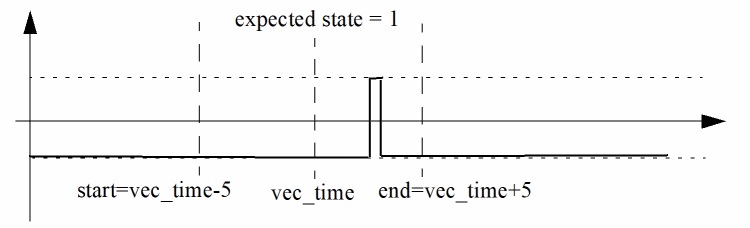
chk_window 5 5 0
tells Spectre to set the steady state to 0, so the waveform passes the vector check (see Figure D-1).
Figure D-1 Vector Check with chk_window Steady State Set to 0
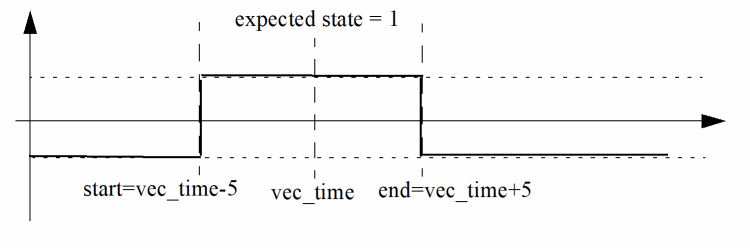
chk_window 5 5 1
tells Spectre to set the steady state to 1, which means the signal needs to stay at state 1 for the whole window period to pass the vector check, as shown in Figure D-2. If the signal is as shown in Figure D-1, the vector check fails.
Figure D-2 Vector Check with chk_window Steady State Set to 1
radix 1 1 1 1
vname ph1 d q qb
io i i o o
tunit 10ns
chk_window -10 30 1 period=100 first=5 0 0 1 0
tells Spectre to activate periodic window check for signal q. The vector check points start at 50 ns and repeat every 1 us.
chk_window -10 30 1 first=5 0 0 1 0
tells Spectre to ignore the first argument because a valid period argument has not been specified.
tunit 1ns
param myfadd(x,y)=’x + y’
param mystartt=1.5 mystopt=’(myfadd(mystartt, 50.5)’
chk_window mystartt mystopt 1
tells Spectre to set the steady state to 1, the start time for chk_window to 1.5 ns, and the end time to 52 n (this example shows the chk_window parameters and expressions syntax).
radix 1 1 1 1 1
vname ph1 d q qb q_real
sig_type l l l l r
io i i o o o
tunit 10ns
chk_window -10 30 1 period=100 first=5 duration=2 reltol=0.1 abstol=0.01 ; duration is 2*10ns=20ns, reltol is 10% and abstol is 10mV.
; data
0 0000 0
100 1110 1.2 ; the expected value is 1.2V, so 1.2±(1.2*10%+0.01) (1.2-0.13)V~(1.2+0.13)V is a pass.
200 1110 1.3 ; the expected value is 1.3V, so 1.3±(1.3*10%+0.01) (1.3-0.14)V~(1.3+0.14)V is a pass.
enable
enable‘enable_signal_expr’[mask1mask2...maskN]
Description
The enable statement connects the enable signal, or enable signal expression, to the bidirectional vector. The resulting value 1 (H) enables the output signal. The controlled bidirectional signal is regarded as an input for other values.
You can provide a mask to specify to which vector and bit the enable signal expression applies. If the mask is not specified, the setting applies to all bidirectional vectors. Also, if this statement is specified more than once, the last value is used.
The enable signal can be used in a vector or an analog netlist file. When an enable signal is used in an analog netlist file, it can also be defined as an output signal for a vector check or only used as an enable signal. The avoh and avol statements can be used to define the logic high and low voltage thresholds for the analog signal.
Bit-wise logic operators are supported in an enable signal expression: & (AND), | (OR), ^ (XOR), and ~ (NOT). Additional operators can be created using a combination of the supported operators. The order of processing for the logic operators is NOT > AND > OR, XOR (OR and XOR are processed at the same time). You can use parentheses () around the operators to change the processing order.
Examples
radix 1 1 1 1
io i i b o
vname en in bi out
enable en 0 0 1 0
tells Spectre to set en as the enable signal for bi, and when en is in 1 (or H) state, bi becomes the output signal. When en is in 0 (or L, X, U) state, bi changes to the input signal. When en is in Z state, the bi (input and output) signal also changes to Z state.
radix 1 1 1
io i b o
vname en bi out
enable ~en 0 1 0
tells Spectre to set en as the enable signal for bi. Unlike the ~ sign, which reverses the state to control the bidirectional signal. Now when the enable signal is in 1 (or H) state, the bi becomes an input signal.
radix 1 1 1
io b b o
vname bi_1 bi_2 out
enable ana_en1 0 1 0
enable ‘(ana_en1 | X1.ana_en2) & out’ 1 0 0
tells Spectre that the ana_en1 and X1.ana_en2 enable signals originate in the analog netlist file, and X1.ana_en2 is a hierarchical signal. Although the out signal is used as an enable signal, the simulator still performs a vector check.
period
periodtime
Description
The period statement is used to specify the time interval for tabular data, so that the absolute time is not needed.
If period is not specified, then the absolute time must be specified in the tabular data. If it is specified more than once, the last value is used.
Example
period 10.0
tells Spectre that the signal period is 10 ns and the absolute time points are unnecessary.
mask
mask mask_name mask_pattern
mask mask_name name1 name2 … nameN
Description
The mask statement defines the mask name to represent a user-defined mask pattern.
The statement starts with the keyword mask, followed by a mask name and the mask pattern. The mask pattern can be specified using either the values or the signal names. If the signal nodes are used to describe the mask pattern, a logic 1 is set to each signal node at the corresponding column location. Any unspecified column defaults to logic 0.
Arguments
|
Defines the signal names being part of the pattern. Bus signals are supported in the name definition. |
signal n1 n2 n3 n4 bus<[0:3]>
radix 1111 4
mask mask1 0101
mask mask2 n1 n2
mask mask3 bus<[0:3]>
trise 0.05
trise 0.1 mask1
tfall 0.08
tfall 0.15 mask2
tfall 0.2 mask3
In the above example mask1 is assigned pattern 0101 which enables signals n2 and n4. mask2 contains signal n1 and n2. trise=100ps is assigned to signal n2 and n4, while all other signals use a trise of 50ps. tfall=150ps is assigned to signal n1 and n2 and tfall=200ps is assigned to bus signal bus<0>, bus<1>, bus<2>, bus<3>, and bus<4>, while all other signals use 80ps.
Signal Characteristics
In this section, signal characteristics containing various attributes for input or output signals (such as delay, rise or fall time, voltage thresholds for logic low and high, and driving ability) are defined. For most of these statements, the mask can be used to apply the specified characteristics to the corresponding signals. The statements are organized into three groups:
Timing
Timing characteristics of input or output signals (such as delay, rise time, and fall time) can be specified using the following statements. The values of these statements can be positive or negative. For the delay timing characteristics, the negative value is used to advance the signals by a specified time. For the rise and fall timing characteristics, the negative value is the same as the positive one.
trise, tfall, and slope statements are reasonable (warning message is issued when the defined value is too small or large).idelay
idelaytime_value [mask1 ... maskN]
Description
The idelay statement specifies the delay time for the corresponding input signal. If a bidirectional signal is specified, this applies only to the input stage of the bidirectional signal. The default value is 0.0, if idelay or tdelay is not set.
Example
idelay 5.0
tells Spectre to delay all input signals by 5 ns, whereas
idelay -5.0
tells Spectre to advance all input signals by 5 ns.
odelay
odelaytime_value [mask1 ... maskN]
Description
The odelay statement specifies the time delay for the corresponding output signal. If a bidirectional signal is specified, this applies only to the output stage of the bidirectional signal. The default value is 0.0, if odelay or tdelay is not set.
Example
odelay 5
tells Spectre to delay all output signals by 5 ns, whereas
odelay -5.0
tells the simulator to advance all output signals by 5 ns.
tdelay
tdelaytime [mask1 mask2 ... maskN]
Description
The tdelay statement specifies the delay time for corresponding vectors. You can provide a mask to specify which vector and bit to apply. If the mask is not specified, the setting applies to all vectors (input, output, and bidirectional).
If tdelay is not specified, the default value is 0.0. If this statement is specified more than once, the last value is used for the active mask. This statement can also overrule the value previously set by the idelay or odelay statements.
Examples
tdelay 5.0
tells Spectre to advance all signals by 5 ns.
tdelay -5.5 3 0 F
tells Spectre to advance all signals, specified with a mask, by 5.5 ns.
slope
slopetime [mask1 mask2 ... maskN]
Description
The slope statement sets the input vectors rise and fall time. You can provide a mask to specify which vector and bit to apply. If the mask is not specified, the setting applies to all input vectors.
If this statement is not specified, then the default value of 0.1 ns is used. If this statement is specified more than once, the last value is used for the active mask. This statement can also overrule the value previously set by the trise or tfall statements.
Examples
slope 0.05
vname va[1:0] vb[[1:0]] vc[[0:3]]
io i i o
slope .025 1 3 5
The least significant bit, va0, of the first input vector and the two bits, vb[1] and vb[0], of the second input vector have a trise and tfall of 0.025 ns. The third vector is an output vector (specified in the io statement), so it is not affected by the slope statement.
tfall
tfalltime [mask1 mask2 ...maskN]
Description
The tfall statement specifies the falling time of the input vector. You can provide a mask to specify which vector and bit to apply. If the mask is not specified, the setting applies to all input vectors.
The value from the slope statement is used, if tfall is not specified. If this statement is specified more than once, the last value is used for the active mask. This statement can also overrule the value previously set by the slope statement.
Examples
tfall 0.05
tells Spectre that all input vectors have a fall time of 0.05 ns.
vname va[1:0] vb[[1:0]] vc[[0:3]]
tfall 0.1 0 2 0
the most significant bit, vb[1], of the second input vector has a fall time of 0.1 ns. The fall time of vb[0] and other input vectors remains the same.
trise
trise time [mask1 mask2 ...maskN]
Description
The trise statement specifies the rise time of the input vector. You can provide a mask to specify which vector and bit to apply. If the mask is not specified, the setting applies to all input vectors.
If trise is not specified, the value from the slope statement is used. If this statement is specified more than once, the last value is used for the active mask. This statement can also overrule the value previously set by the slope statement.
Examples
trise 0.1
trise -0.1
tells Spectre that all input vectors have a rise time of 0.1 ns.
vname va[1:0] vb[[1:0]] vc[[0:3]]
trise 0.1 0 3 0
the two bits of the second input vector has a rise time of 0.1 ns and the trise of the other input vector remains the same.
Voltage Threshold
When converting input vectors to stimuli or performing an output vector check, the voltage threshold for logic low and high can be specified using the following statements:
vih
vihvoltage [mask1 mask2 ...maskN]
Description
The vih statement specifies the logic high voltage of the input vector. You can provide a mask to specify which vector and bit to apply. If the mask is not specified, the setting applies to all input vectors.
If vih is not specified, the default voltage is 3.3. If this statement is specified more than once, the last value is used for the active mask.
Examples
vih 5.0
vih 5.5 3 1 0
vil
vilvoltage [mask1 mask2 ... maskN]
Description
The vil statement specifies the logic low voltage of the input vector. You can provide a mask to specify which vector and bit to apply. If the mask is not specified, the setting applies to all input vectors.
If vil is not specified, the default voltage is 0.0. If this statement is specified more than once, the last value is used for the active mask.
Examples
vil 0.25
vil 0.5 3 0 0
voh
vohvoltage [mask1 mask2 ... maskN]
Description
The voh statement specifies the logic high voltage of the output vector. You can provide a mask to specify which vector and bit to apply. If the mask is not specified, the setting applies to all output vectors.
If voh is not specified, the default voltage is 3.3. If this statement is specified more than once, the last value is used for the active mask.
Examples
voh 5.0
voh 5.5 0 0 F
vol
volvoltage [mask1 mask2 ... maskN]
Description
The vol statement specifies the logic low voltage of the output vector. You can provide a mask to specify which vector and bit to apply. If the mask is not specified, the setting applies to all output vectors.
If vol is not specified, the default voltage is 0.0. If this statement is specified more than once, the last value is used for the active mask.
Example
vol = 0.05
voh = 1
tells Spectre to interpret all output signals with values below 0.05 V as 0, print all signals above 1 V as 1, and all signals between 0.05 V and 1 V are U.
avoh
avoh voltage [signal_name1signal_name2...signal_nameN]
Description
The avoh statement specifies the logic high voltage of the signal from the analog netlist file, which is not defined in the radix, vname, or io statements. You can provide signal names to specify the valid scope for avoh (wildcards are supported). A period (. ) can be used as the hierarchical delimiter to specify the hierarchical signal. If a signal name is not used, the setting applies to all analog signals used in the vector file.
Example
avoh = 1 ana_en* X1.Enanble
tells Spectre that analog signals ana_en* and X1.Enanble have a logic high voltage of 1.0.
avol
avol voltage [signal_name1signal_name2...signal_nameN]
Description
The avol statement specifies the logic low voltage of the signal from the analog netlist file, which is not defined in the radix, vname or io statements. You can provide signal names to specify the valid scope for avol (wildcards are supported). A period (.) can be used as the hierarchical delimiter to specify the hierarchical signal. If a signal name is not used, the setting applies to all analog signals used in the vector file.
Example
avol = 0.5 ana_en* X1.Enanble
tells Spectre that analog signals ana_en* and X1.Enanble have a logic low voltage of 0.5.
vref
vrefnode_name [mask1 mask2 ... maskN]
Description
The vref statement sets the reference node of the input vector. You can provide a mask to specify which vector and bit to apply. If the mask is not specified, the setting applies to all input vectors.
If vref is not specified, the default value is 0 (that is, the ground). If this statement is specified more than once, the last value is used for the active mask.
Examples
vref 0
tells Spectre to set the negative node of the vector source to ground.
vref vss
tells the simulator to set the negative node of the vector source to vss.
vth
vthvoltage [mask1 mask2 ... maskN]
Description
The vth statement sets the threshold voltage of the output vector. You can provide a mask to specify which vector and bit to apply. If the mask is not specified, the setting applies to all output vectors.
If vth is not specified, the default value is 1.65. If this statement is specified more than once, the last value is used for the active mask.
Examples
vth 2.5
vth 2.7 0 0 8
Driving Ability
For input stimuli, the output resistance of vector sources can affect Spectre simulation results. To specify the driving ability of vector sources, use the following statements:
hlz
hlzresistance [mask1 mask2 ... maskN]
Description
The hlz statement specifies the output resistance for the corresponding input vector, but unlike outz, this output resistance only applies to the H and L states of the vector. This resistance overwrites the resistance for the H and L states set by outz.
You can provide a mask to specify which vector and bit to apply. If the mask is not specified, the setting applies to all input vectors.
If hlz is not specified, the default value follows outz. If hlz is set to 0, Spectre uses 0.01 instead. If this statement is specified more than once, the last value is used for the active mask.
Examples
hlz 1meg
hlz 4.7k 2 2 0
outz
outzresistance[ mask1 mask2 ... maskN ]
Description
The outz statement specifies the output resistance for the corresponding input vector. You can provide a mask to specify which vector and bit to apply. If the mask is not specified, the setting applies to all input vectors.
If outz is not specified, the default value is 0.01. If outz is set to 0, the default value is used. If this statement is specified more than once, the last value is used for the active mask.
Examples
outz 1meg
outz 5.5meg 2 2 0
triz
trizresistance [mask1 mask2 ... maskN]
Description
The triz statement specifies the output impedance when the corresponding input vectors are in tri-state. You can provide a mask to specify which vector and bit to apply. If the mask is not specified, the setting applies to all input vectors.
If triz is not specified, the default value is 1,000 Meg. If triz is set to 0, Spectre uses 0.01 instead. Also, if this statement is specified more than once, the last value is used for the active mask.
Examples
triz 2000meg
triz 550meg 2 2 0
Tabular Data
This section describes the values of signals at specified times (absolute or period time modes). For periodic signals, it is unnecessary to specify the absolute time at each time point. The period statement can be used to specify the signal period.
Absolute Time Mode
Time1vector1_value1 vector2_value1 vector3_value1Time2vector1_value2 vector2_value2 vector3_value2
...
TimeN vector1_valueN vector2_valueN vector3_valueN
Period Time Mode
vector1_value1 vector2_value1 vector3_value1
vector1_value2 vector2_value2 vector3_value2
...
vector1_valueN vector2_valueN vector3_valueN
vector_value can be 0-9, A-F, Z, X, L, H, or U, and is dependent on how radix is set.
Tabular data is used to describe the waveform of voltage sources.
; format: time vector
0 000101010
10 011010101
20 000101010
; format: vector
00101010
11010101
00101010
; format: time vector
10 02A
20 315
30 02A
Valid Values
The valid values in tabular data depend on the radix statement setting.
| Value Specified in radix Statement | Valid Value |
|---|---|
The values specified in the table above are converted into 0 and 1 states by Spectre. The simulator also accepts L, H, Z, X, and U values when radix=1.
Vector Signal States
Input
Spectre accepts the following signal states for input vector signals.
| Signal State | Description |
|---|---|
The resistance values of L and H are set by the hlz statement, and the impedance value of Z is set by the triz statement.
Output
Spectre accepts the following signal states for output vector signals.
| Signal State | Description |
|---|---|
Example of a Digital Vector File
This is a basic digital vector file that shows how each Spectre statement is used.
; radix specifies the number of bit of the vector.
radix 2 2 4
; io defines the vector as an input or output vector.
io i i o
; vname assigns the name to the vector.
vname A[1:0] B[1:0] P[3:0]
; tunit sets the time unit.
tunit ns
; trise specifies the rise time of each input vector.
trise 1
; tfall specifies the fall time of each input vector.
tfall 1
; vih specifies the logic high voltage of each input vector.
vih 2.5
; vil specifies the logic low voltage of each input vector
vil 0.0
; voh specifies the logic high voltage of each output vector
voh 2.0
; vol specifies the logic low voltage of each output vector
vol 0.5
0 0 0 x
200 3 3 x
400 1 2 0
600 2 1 9
800 3 1 2
1000 1 3 2
1200 2 2 3
1400 3 2 3
1600 2 3 4
1800 0 0 6
2000 0 0 7
Frequently Asked Questions
Can I replace the bidirectional signal with an input and output vector?
Bidirectional signals can be divided into two columns, one for an input vector and the other for an output vector (the enable signal is no longer needed). The same vname and signal name is used for the input and output vectors.
For the input stage, the value of the output vector must be X or x (output vector check is not performed). For the output stage, the value of the input vectors must be Z or z (no stimulus for this signal). For example:
radix 1 1 1 1
io i o i o
vname DI DO DQ DQ
tunit ns
0 0 1 0 x
100 1 0 1 x
200 0 1 0 x
300 0 0 z 1
400 1 1 z 0
500 0 0 z 1
How do I verify the input stimuli?
Use .probe tran v(*) depth=1 to probe the top-level signals and then check the waveform outputs with the Virtuoso Visualization and Analysis or SimVision viewers.
Review the log file to check if the signals defined in the digital vector file match those defined in the analog netlist file.
- When the signal is defined in the vector file, but not in the analog netlist file, a warning message appears stating that the VCD or VEC file is not defined in the netlist file.
- When the input signal is used in the analog netlist file, but does not match the one located in the vector file, check the list of dangling nodes or no DC path to ground in the log file.
How do I verify the vector check?
A <netlistName>_<tranName>.veclog file is generated at the location specified by Spectre option-raw statement if there are any vector checks. A <netlistName>_<tranName>.vecerr file is also generated when errors occur during the vector check. Refer to these two files for detailed information about the vector check. Here, <netlistName> is the name of the netlist and <tranName> is the name of the transient analysis.
When the signal is defined in the vector file, but not in the analog netlist file, the simulator issues a warning message in the log file that states the signal node is missing from the netlist file.
Return to top