
16
Device and Circuit Checks
This chapter contains the following topics:
Device Checks
The Spectre assert statement enables you to perform checks on design parameters, node voltages, element currents, model parameters, operating point parameters, and expressions. Use of wildcards and subcircuit scoping are supported.
When multiple assert checks are used, the check and checklimit statements enable you to manage which check is active during which analysis.
assert, check, and checklimit statements are supported only in Spectre, Spectre APS, Spectre X, Spectre XPS-SPICE, and Spectre XPS-MS. Spectre XPS-SRAM, Spectre XPS-FLASH and Spectre XPS-DRAM do not support this functionality.The following topics provide more details:
The assert Statement
With the assert statement, you can set custom characterization checks to specify the safe operating conditions for your circuit. The Spectre circuit simulator then issues messages telling you when parameters move outside the safe operating area and, conversely, when the parameters return to the safe area, peak value and duration of violations. When a variable changes from an above-max value directly to a below-min value in one simulation step (that is, no stay within bounds), the Spectre simulator uses a middle bound solution (min+max)/2 to report the peak value and the duration of violations.
By default, Spectre reports the margin value as value - boundValue. However, if the ASSERT_PEAKMARGIN environment variable is set to 1, Spectre reports the margin value as peakValue - boundValue.
The four types of checks that are supported in the device checking flow are described below.
Assert statements, which you specify in the netlist, are supported for transient, AC, DC, DC sweep, noise, pz, sp, and pss analyses.
You can set checks for any of the following:
- Top-level netlist parameter
- Model parameter
- Instance parameter
- Operating point parameter
- Expressions
The syntax for defining a check is
Nameassert [ sub=subcircuit_master] [ subs=subcircuit_masters] { primitive=primitive| mod=model| dev=instance} { param=param| modelparam=mod_param| expr="[var_list;]mdl_expr" } [ min=value] [ max=value] [ duration=independentvar_limit] [ message=”message”] [ level= none | notice | warning | error | fatal ] [ info= yes | no ] [ values=[enum_list] ] [ boolean=true | false ] [ anal_types=[analysis_list] ] [ check_windows=[start1 stop1 start2 stop2...] ] [ maxvio_perinst=value] [ maxvio_all=value] [ extreme=yes|no ] [ safecheck=none|func|check ] [ skip_dev_inside_subckt ] [ min_peak=value] [ max_peak=value]
|
Name of the check statement. The name must not start with a number or contain invalid characters like space, dot, comma, slash, etc. |
|
|
Subcircuit over which the check is to be applied. |
|
|
Primitive whose model or instance parameter is to be checked. For a complete list of primitives, see |
|
|
Model type whose model or instance parameter is to be checked. If the parameter to be checked is an instance parameter (specified using the |
|
|
Device or subcircuit instance whose instance parameter is to be checked. A name is first looked up as a subcircuit instance and then as a device instance. If an inline subcircuit and inline device inherits the same hierarchical name, the assert is applied to the subcircuit instance. If, however, the parameter specified is a device instance parameter, the assert is applied to the device instance. Wildcards are supported. |
|
|
Device instance parameter, netlist parameter, operating point parameter, subcircuit parameter, node voltage or device terminal current to be checked. It is checked within the scope of the specified |
|
|
The var_list is optional and allows the Spectre simulator to return the value of specified variables. For example,
An MDL expression can contain instance parameters, operating point parameters, netlist parameters, subcircuit parameters, node voltages, device terminal currents, or boolean expressions. The expression is checked within the scope of the specified
The Spectre circuit simulator displays an error message when a boolean expression is true (by default) or when a non-boolean expression crosses the maximum or minimum value. You do not need to specify the |
|
|
Lower limit of the parameter to be checked. |
|
|
Upper limit of the parameter to be checked. |
|
|
|
|
Time period over which the check has to be violated before a warning is displayed. Applicable to transient analyses only. |
|
|
Severity level of the message if the check fails. |
|
|
When |
|
|
List of values of enumeration type parameters. By default, violations are reported when an enumeration parameter has a value inside |
|
|
This is used to choose report style for boolean violations. When set to |
|
|
The list of analysis types for which the check is to be applied. By default, the check is applied to all the analyses specified in the netlist. Possible values are |
|
|
The time windows within which the assert is to be enabled or disabled. Sweep windows are not supported. Therefore, this parameter should not be used with sweep analysis. |
|
|
Limit the violation number to a specified value <value> for each particular checked instance. This means that if the violation count reaches the number specified by <value> then that instance is not checked during the remaining steps of the analysis. |
|
|
Limit the violation number to a specified value <value> for all the checked instances during the analysis. |
|
|
Specify the group to which the assert belongs to. The default value is |
|
|
When |
|
|
Specify the assert type for fault detection. When |
|
|
Skips subcircuits or device instances inside the subcircuit. For example, |
|
|
Specify the maximum threshold based on which the violation is reported. |
|
|
Specify the minimum threshold based on which the violation is reported. |
|
The following table displays some ways to use the assert parameters.
If you define an assert statement within a subcircuit block without the sub parameter, the check is applied to that block only. If you use the sub parameter, the specified subcircuit master must be defined within the block.
You can use the defwave parameter to define a new waveform by relating previously defined waveforms and nodes and also specify the parameter in the assert statement as an expression. For example:
defwave comp1=v(1)-v(2)
defwave comp2=m1:vds + m1:vds + comp1
assert1 assert expr="comp1>0" info=yes level=warning message="v(1)>v(2) out of bound."
testdev22 assert expr="comp2 - m3:vds" min=0.0 max=1.0
The name of defwave should be different from instance parameters, model parameters, operating point parameters, netlist parameters, or subcircuit parameters. For example, consider M1 as an instance of an inline subcircuit mos_r, as shown below.
inline subckt mos_r (d g s b)
parameters p1=1u p2=2u
mos_r (dp g sp b) mos_mod l=p1 w=p2// "inline" component
rd (d dp) resistor r=10 // series drain resistance
rs (s sp) resistor r=10 // series source resistance
ends mos_r
In addition, consider the following assert statement:
defwave vds=v(d) - v(s)
assert2 assert expr="vds" sub=mos_r min=0.0 max=1.0
Here, assert2 will check the oppoint parameter vds of mos_r that is different from terminal voltages (v(d) - v(s)) for subcircuit mos_r.
Violations are reported at the following three stages:
- At initial setup stage.
- On the occurrence of a violation when the assert is evaluated.
- At the end of an analysis.
All assert statement violations are written to the Spectre log file by default, irrespective of the maxwarnstologfile and maxnotestologfile parameter settings. You can use the checklimitfile option to write the violations to a dedicated file. A message during simulation indicates where the violations are being written. For more information, see spectre -h options.
Examples of the assert Statement
Example 1
vtho_check assert primitive=bsim3 modelparam=vtho min=-0.2 max=0.2
   message=”vtho exceeds bound” level=warning
Checks for model parameter vtho over all device instances of the primitive type BSIM3 and prints a warning vtho exceeds bound if the value of vtho is less than -0.2 and higher than 0.2.
Example 2
m1vgs_check assert sub=inv dev=m1 param=vgs min=0.0 max=2.5
   message=”vgs exceeds bound” level=notice
Checks for operating point vgs in the device m1 over all instances of the subcircuit type inv in the netlist and prints a notice vgs exceeds bound if the value of vgs is less than 0 and higher than 2.5.
Example 3
subckt mysubckt a b c
parameters adNum=0.0
.......//contents of the subcircuit
ends mysubckt
Check defined for the above netlist:
adNum_check assert dev=X1 param=adNum min=0.0 max=5.0
   message=”Drain parasitic resistor is too high” level=warning
Checks the parameter adNum in the subcircuit instance X1 and prints a warning Drain parasitic resistor is too high if the value of adNum is higher than 5.0.
Example 4
Parameters p1=0.8
...
M1_powercheck assert expr="(max(m1:ids*m1:vds))" max=(p1*0.5e-3)"
   message=”power of M1 exceeds expected load power”
Checks that (max(m1:ids*m1:vds)) is less than (p1*0.5e-3). If not, it prints the warning power of M1 exceeds expected load power.
Example 5
MAX_powercheck assert expr="max(m1:pwr) < max(abs(vin:dc*I(r1)))"
   message="power of M1 exceeds expected load power" boolean=false
Checks that maximum power max (m1:pwr) is less than max (abs(vin:dc*I(r1))). If not, it prints the warning power of M1 exceeds expected load power.
Example 6
voltage_check assert subs=[inv? dff*] dev=m1 expr="V(d,s)" min=0.0 max=2.5
Checks for voltage across terminals d and s of device m1 in all instances of subcircuits: whose names match dff* or inv? and prints a warning when the value of V(d,s) is less than 0 or higher than 2.5.
Example 7
Op_check assert mod=nch dev=m1 expr="vds" min=0.0 max=2.5 anal_types=[dc]
Checks for the operating point drain-source voltage in all instances of the model nch for DC and DC sweep analyses only, and prints a warning when the value of vds is less than 0 or higher than 2.5.
Example 8
boolean_check assert dev=I0 expr="Id=I(d); len=l; (I(d) >=2m) || (l > 1u)" anal_types=[dc tran]
Checks for the boolean expressions I(d) >=2m or length > 1u in the instance I0 for DC, DC sweep and transient analyses only, prints a warning when the boolean expression is true, and returns the value of Id and len.
Example 9
cap_voltage_check assert primitive=capacitor expr="V(1)-V(2)" max=1
Checks for the voltage difference across the terminals of all capacitors and prints a notice if the value of V(1)-V(2) is higher than 1.
Example 10
current_check assert expr="I(I2:1)" max=1m message="test current!"
Checks for the current flowing through terminal I2:1 and prints a notice test current! if the value is larger than 1mA.
Parameters bvca=9.1
...
Not_chk assert sub=in1 expr=" !(V(d,s) > (bvca-0.5))" level=notice message = "Testing Not!"
Checks the voltage across terminals d and s in the instances of subcircuit in1, and prints a notice Testing Not! when V(d,s) is not greater than (bvca-0.5).
Example 12
sub res n1 n2 n3
assert_i assert sub=res expr="V(index(2), index(1))" min=-1 max=1 level=warning
The above example checks index 2 - index 1 for subckt res which is equivalent to n2 - n1.
Example 13
subckt mysubckt1 D G S B
MN0 (net5 G S B) my_nch w=(120n) l=45n
MN1 (D G net7 B) my_nch w=(120n) l=45n
MN2 (net7 G net6 B) my_nch w=(120n) l=45n
MN3 (net6 G net5 B) my_nch w=(120n) l=45n
ends mysubckt1
I1 (D G S B) mysubckt1
stacked_device assert dev=I3 param=id max=-100
For the case with stacked FETs, Spectre now supports asserts to check for a violating device.
Example 14
assertAbsTime assert expr="abstime()" max=-1 info=yes
The above example checks the transient time and prints the value if it is greater than -1. For example, the above statement will print the following:
Warning from spectre at time = 4.122041315 ns during transient analysis ’trans’.
 WARNING (SPECTRE-4107): assertAbsTime: Instance, Expression ’abstime() has
value 4.122041315e-09
Warning from spectre at time = 7.596470186 ns during transient analysis ’trans’.
 WARNING (SPECTRE-4107): assertAbsTime: Instance, Expression ’abstime() has
value 7.596470186e-09
Warning from spectre at time = 11.7083856 ns during transient analysis ’trans’.
 WARNING (SPECTRE-4107): assertAbsTime: Instance, Expression ’abstime() has
value 11.7083856e-09
Warning from spectre at time = 19.92157532 ns during transient analysis ’trans’.
 WARNING (SPECTRE-4107): assertAbsTime: Instance, Expression ’abstime() has
value 19.92157532e-09
Example 15
tran tran step=1e-12 pstep=1e-12 stop=2e-08
check_full_simu_tim assert message="CHECK_FULL_SIMU_TIME"
expr="full_simu_time=stoptime(); full_simu_time>10n"
The above example checks the transient stop time and prints a warning if it is greater than 10n. For example, the above statement will print the following:
Warning from spectre during transient analysis ’tran’.
WARNING (SPECTRE-4056): check_full_simu_time: CHECK_FULL_SIMU_TIME.
Expression ‘full_simu_time=stoptime(); full_simu_time>10n’ is getting true where full_simu_time=20e-09. Total duration of overshoot was 19.999e-09.
The check Statement
You can perform a check analysis by adding the check statement after the analysis statement in your netlist. The check analysis checks the values of the component parameters to be sure that the values of component parameters are reasonable. You can perform checks on input, output, or operating-point parameters. The Spectre simulator checks parameter values against parameter soft limits. For information on the default soft limits, see
To use the check analysis, you must also enter the +param command line argument with the spectre command to specify a file that contains the soft limits.
The following example illustrates the syntax of the check statement. It tells the Spectre simulator to check the parameter values for instance statements.
ParamChk check what=inst
-
ParamChkis your unique name for thischeckstatement. -
The keyword
checkis the component keyword for the statement. -
The
whatparameter tells the Spectre simulator which parameters to check.
The what parameter of the check statement gives you the following options:
| Option | Action |
|---|---|
|
Checks input and output parameters for all models and all instances |
|
|
Checks operating-point parameters for all models and all instances |
The checklimit Statement
You can enable or disable an assert or a group of asserts with the checklimit statement. You can define one or more checklimit statements in the netlist, each enabling or disabling individual asserts. The statement is applied to subsequent transient, DC, and DC sweep analyses until the next checklimit statement appears.
If there is no checklimit statement before all the analyses, a default checklimit statement enabling all asserts is added. In other words, by default, all asserts are enabled. The first checklimit statement that specifically enables asserts also disables the remaining asserts. The checklimit statements are cumulative in effect except when the checkallasserts parameter is specified. The subsequent checklimit statements disable the asserts specified in the disable parameter and then enable the asserts specified in the enable parameter based on the first checklimit statement. Note that you cannot disable the check on constant parameters that Spectre runs during initial setup.
When multiple checklimit statements refer to the same assert, the last checklimit statement overrides the previous statements.
The syntax for a checklimit statement is
Namechecklimit [ enable=["check1""check2"..."checkn"]] [ disable=["check1""check2"..."checkn"]] [ start=value][ stop=value] [ check_windows=[start1stop1start2stop2...] ] [ boundary_type= time | sweep ] [ severity= none | notice | warning | error | fatal ] [ checkallasserts= yes | no ] [ asserts=[assert1 assert2...] [ param= name[ [ value= value] ] [ filter= none | progressive | extreme]
For information on defining asserts, see The assert Statement.
Examples of checklimit Statement
Example1
This section displays the cumulative effect of the checklimit statements. By default, all asserts are enabled.
//assert1, assert2, assert3, assert4, and
//Mychecklimit1 appear in include file “model1”
//assert5, assert6, and assert7, and Mychecklimit2
//appear in include file "model2"
//Mychecklimit3 and Mychecklimit4 appear in the netlist containing
//include files "model1" and "model2"
Mychecklimit1 checklimit disable=["assert2""assert5"]
disables assert2 and assert5 and keeps assert1, assert3, assert4, assert6, and assert7 enabled. This condition remains in effect until the next checklimit statement is found.
Mychecklimit2 checklimit enable=["assert2""assert6"] disable=["assert7"] start=1ns stop=5ns severity=warning
specifically enables assert2 and assert6 thereby disabling all the other asserts. assert2 and assert6 are run within 1ns and 5ns, and a warning is displayed if the asserts are violated.
Mychecklimit3 checklimit disable =["assert2"] start=5ns stop=10ns severity=none
dcOp dc
Now assert6 is checked within 5ns and 10ns. The severity level is disabled in this checklimit statement, so assert6 determines the severity level if this check is violated. The simulator runs the DC analysis and checks only assert6. Since this is a DC analysis, the start and stop parameters are ignored.
Mychecklimit4 checklimit checkallasserts=yes disable =["assert1"]
start=1ns stop=10ns
tran1 tran stop=10ns
enables all asserts except assert1 and checks them within 1ns and 10ns.
Mychecklimit5 checklimit checkallasserts=no enable=[ "assert7" ] check_windows=[ 1 3 5 7 9 10 ] boundary_type=sweep
dcswp dc param=vdc start=1 stop=10 step=1
checks assert7 when the netlist parameter vdc is varied from 1 to 3, 5 to 7, 9 to 10 for the DC sweep analysis.
Mychecklimit6 checklimit checkallasserts=no enable=[ "assert3" "assert4" ] check_windows=[ 1n 3n 5n 7n 9n 10n ] boundary_type=time
tran1 tran stop=10ns
checks assert3 and assert4 from 1ns to 3ns, 5ns to 7ns, 9ns to 10ns for the transient analysis with stop time at 10ns.
Example2
set1 checklimit asserts=[ assert1 assert2 assert3] param=check_windows value=[0 20n]
set2 checklimit asserts=[ assert3 assert4 assert5] param=check_windows value=[20n 40n]
set3 checklimit checkallasserts=yes check_windows=[0n 30n]
set4 checklimit checkallasserts=yes check_windows=[10n 30n]
In the above example, the set1 checklimit statement sets the check_windows parameter for the asserts assert1, assert2, and assert3 to [0 20n]. The set2 checklimit statement sets the check_windows parameter for the asserts assert3, assert4, and assert5 to [20n 20n]. Note that the set2 checklimit statement will override the value of assert3 specified in the set1 checklimit statement. Therefore, the value of check_windows for assert3 will be [20n 40n].
The set3 checklimit statement sets the check_windows parameter for all asserts to [0n 30n] but the set4 checklimit statement overrides the set3 statement and sets the check_windows parameter for all asserts to [10n 30n].
If all the above checklimit statements are specified together, the check_windows setting for assert1 and assert2 will be [0 20n] and the check_windows setting for assert3, assert4, and assert5 will be [20n 40n]. The check_windows setting for all other asserts would be [10n 30n].
Global Options
You can customize the behavior of the assert, check, and checklimit statements by setting the following options in the options statement:
- asserts_silent_init
- checklimit_skip_insts
- checklimit_skip_insts_file
- checklimitdest
- devcheck_stat
- expr_reltol
- mod_assert_expand_sub
- wfdebug
asserts_silent_init
Enables or disables printing of warning messages during initialization in the log file. You can selectively enable or disable warnings for different types of asserts.
For example, you can disable warnings from PDK assert when a PDK subckt is not placed in the schematic and enable the warnings for custom asserts.
Asserts in PDK (subckt) generate the following warnings whenever a PDK subckt is NOT placed in the schematic:
WARNING (SPECTRE-16460): assert_PDK:Specified subcircuit master `xxx was not found.
WARNING (SPECTRE-16462): assert_PDK:Error in specification of subcircuit master. Assert is ignored.
There can be thousands of such warning messages in the log file. You can disable these warnings from PDK assert by using this global option along with an assert name or a group name.
When multiple types of asserts are used, use the group parameter to distinguish PDK asserts from custom asserts.
The default value of group is default. Therefore, assert assert_PDK in the following example belongs to a group called default.
assert_PDK assert sub=xxx expr="v(1,0) >2.5" message="<<<<< PDK assert >>>>>" level=warning
The following example adds the assert_custom assert to a group called custom and enables warning messages.
assert_custom assert group=custom sub=res expr="V(in) >2.5" message="<<<<< custom assert >>>>>" level=warning
assert_1 assert group=pdk_other sub=inv expr="V(out) >2.5" message="<<<<< group=default assert >>>>>" level=warning
assert_2 assert group=pdk_other sub=inv expr="V(out) >2.5" message="<<<<< group=default assert >>>>>" level=warning
The global option asserts_silent_init can be used to the disable warning messages by group name or assert name. The following example disables warnings from assert_PDK and assert_1 during initialization.
opts options asserts_silent_init=[ "group=default" assert_1 ]
= is a meta character.
checklimit_skip_ins
Specifies the subcircuit instances that need to be skipped from assert verification. This option supports wildcards.
The following example skips subcircuit instance XINV1 during assert checking.
assertopt options checklimit_skip_insts=[XINV1]
checklimit_skip_insts_file
Specifies the name of the file that contains the names of the subcircuit instances to be skipped during assert checking. This option supports wildcards.
assertopt1 options checklimit_skip_insts_file=assert_skip.txt
checklimitdest
Specifies the destination where violations are to be written in the raw directory.
checklimitdest=file | psf | sqldb | both
The values for the checklimitdest option are described below.
| Value | Description |
|---|---|
|
Writes the violations information to a file. You can use the |
|
|
Writes the detailed violations information for each analysis type into the
For example, the violations information for a transient analysis run is written to a |
|
|
Writes the violations information to both file and |
|
|
Writes the detailed violations information for each analysis type into a
The default value for the For more information about the format of violations in the sqldb file, see Format of Violations in the sqldb File. |
none, notice, or warning, the violations are written according to value specified for the checklimitdest option. However, for assert level error and fatal, the violation information is always written to a file regardless of the setting of the checklimitdest option. Format of Violations in the .violations File
The following example of a violation written in the.violations file describes how you can find the instance name for which the violation is reported, the violation start value, margin value, violation start point, violation end point and violation status. Click on the links next to each line in the example for more information:
"check6.I1.Q0.violation1" "violation" <-- Violation name
-4.955361033925568e-02 <-- Violation Start Value
4.955361033925568e-02 <-- Margin
1.237567063989001e-08 <-- Violation Start Point
1.588944803644453e-08 <-- Violation End Point
4.744540579920873e-02 <--Violation End Value
1.237567063989001e-08 <--Peak Step Value
-4.955361033925568e-02 <--Peak Value
3.513777396554524e-09 <--Duration Value
0.000000000000000e+00 <--Minimum Bound Value
NaN <--Maximum Bound Value
-4.955361033925568e-02 <--Average Value
) PROP(
"assert" "check6"
"instance" "I1.Q0" <-- Instance name
"model" ""
"severity" "warning"
"status" "failed" <-- Violation status
The description of the violation is given below.
Format of Violations in the sqldb File
The following example of a violation written in the .sqldb file describes how you can find the instance name for which the violation is reported, the violation start time, violation start value, duration, end value, and violation end time.
% sqlite3 input.sqldb
% select * from assert_0View;
|
|
|||
|
Contains part of the boolean assert expression which was dissatisfied |
The detailed schema can be found at the following location:
<MMSIM_install_dir>/tools.lnx86/spectre/etc/ade/mmSQLSchema.sql
devcheck_stat
Specifies whether to display device-checking statistics on the terminal and added to the log file. By default, this option is set to none and statistics messages are not displayed. Set this option to inst or sub to display statistics messages while keeping the checks on.
Possible values for this option are:
-
none: Does not print any information related to asserts on the screen or in the log file. -
inst: Displays the asserts on an instance basis. In addition, information related to whether an assert is on or off is also printed on the screen and in the log file. -
sub: Displays the number of enabled asserts only per subcircuit per assert name. For asserts outside the subcircuit, only the assert name is printed. For asserts inside the subcircuit, the name of the subcircuit, followed by the assert name, and the number of occurrences of the enabled assert are printed. For asserts inside a nested subcircuit, the subcircuit hierarchy is prefixed before the assert name.
For example, when devcheck_stat=inst, Spectre displays the following device-checking statistics before the analysis:
The following asserts will be enabled for all subsequent analyses until the next checklimit analysis statement is found:
assert1 : ON
X1.assert2 : ON
X1.assert3 : ON
X2.assert2 : ON
X2.assert3 : ON
Consider X1 and X2 are instance of subckt sub1. When devcheck_stat=sub, the following statistics will be printed:
The following asserts will be enabled for all subsequent analyses until the next checklimit analysis statement is found:
assert1 : ON
X1.X2:assert2 : ON
You can disable the display of these statistics by setting none.
expr_reltol
Defines the relative tolerance for expressions. The default value of expr_reltol is 1e-12. Set this option in scenarios when the evaluation of equations that compare numbers may generate wrong results because the simulator introduces numerical noise.
For example, the following assert statement checks for the device length l of 6nm. However, if l is stored with the value 5.99999999999 in the simulator database, the assert is not be triggered.
check_l assert primitive=nmos expr="(l==6n)" level=warning
opt1 options expr_reltol=1e-12
mod_assert_expand_sub
Specifies whether to automatically detect the mod or sub usage for the model card and subcircuit.
Spectre asserts use the mod=nch parameter to apply asserts to devices with the device model name nch. By default, the mod parameter does not apply to device model subcircuit or inline subcircuit names. You can set the value of the mod_assert_expand_sub netlist option to yes so that Spectre assert automatically detects the mod or sub usage for the model card and subcircuit.
opt1 options mod_assert_expand_sub=yes
With the mod_assert_expand_sub option set to yes, the mod parameter is applied to the device model or inline subcircuit names if no model statement with the specified name is found.
assert_mod mod=nch expr="V(inm)" max=-100
A warning is generated if nch is not a model or a subcircuit name.
wfdebug
Specifies whether to store all time-varying current (R1:in) and voltage (M1.d) waveforms used in an assert expression. Differential voltages like V(d,s) used in asserts are saved as individual voltage signals V(d) and V(s).
Spectre starts saving a waveform only when the assert criteria is satisfied.
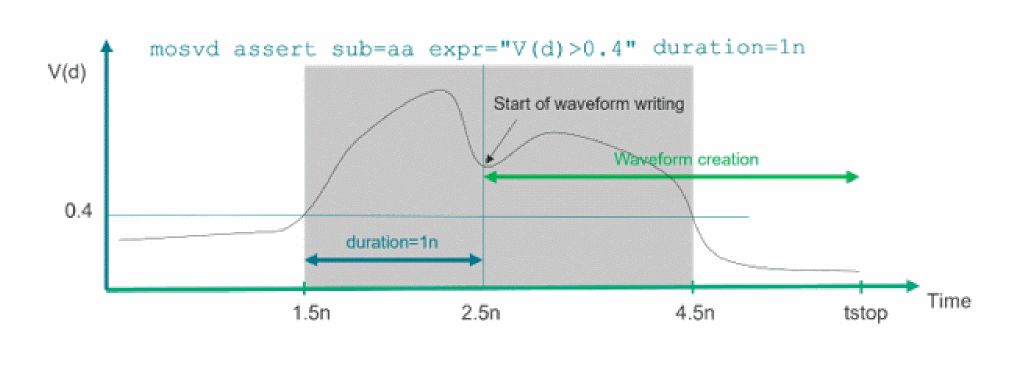
When the waveform writing is enabled, it remains enabled till the simulation ends. For any assert without violation, no waveform is saved. For large designs and many asserts, the wfdebug=assert option may save a large number of waveforms, which may significantly degrade Spectre performance.
Any expression using the avg() and rms() functions will only be triggered at the end of transient analysis. There is no violation during transient analysis. Therefore, the related signal will not be saved because wfdebug will not know until at the end of transient analysis if violation criteria is satisfied or not.
assertopt options wfdebug=assert
Circuit Checks
Circuit checks enable you to analyze typical design problems, such as high impedance nodes, leakage paths between power supplies, timing errors, power issues, connectivity problems, or extreme rise and fall times. They can be separated into dynamic and static checks. Dynamic checks are performed during transient analysis. Static checks are topology checks which do not require any simulation.
Circuit Check Scoping
Most circuit checks can be applied either globally to the entire design, or locally to specific blocks of a design. The scoping options are available to define the scope of each circuit check. The circuit checks can be applied to a specific subcircuit instance (inst), or to all instances of a subcircuit definition (subckt). Exclusion of a specific subcircuit instance (xinst), or all instances of a subcircuit (xsubckt) is supported. All scoping options support wildcards, and the hierarchy level of the scope can be defined by the depth option.
inst and xinst arguments can only be used to specify subcircuit instances, and not device instances.
Combination of inst/xinst and subckt/xsubckt is not allowed.
Following wild cards are allowed for node, dev, model, inst, xinst, subckt, and xsubckt:
- * – matches any character including an empty string and . (dot)
- ? – matches any single character including space and . (dot)
Depth and inst/subckt Scoping
When using a combination of the inst/subckt scoping with wildcarding and the depth option, the following rules apply:
-
Depth is applied first.
The number defined in depth (depth=n) defines the number of maximum dots in the selected net or element names. Basically, the top level andnadditional levels are selected. For example, fordepth=3: - inst (or subckt) scope is applied second
Circuit Check Scoping Examples
Specifying the Output Format for the Checker Violation Report
To specify the output format for the checker violation reports:
-
Set the
check_formatparameter of theoptionsstatement
Possible values of thecheck_formatparameter are:-
sql: Saves the report in sqldb format that is saved in a file with extension.sqldb. -
xml: Saves the report in both sql and XML formats. The report in the XML format is saved in a file with extension.xml. This the default value of thecheck_formatparameter. -
text: Saves the report in both sql and text formats. The report in the text format is saved in a file with extension.rpt. -
all: Saves the report in all formats: sqldb, text, and XML
-
All the reports are saved in the raw directory.
Spectre syntax to specify the output format:
opt options check_format=text
SPICE syntax to specify the output format:
.option check_format=text
Circuit Check SpiceVision PRO Integration
The dynamic and static circuit checks report design errors on circuit nodes, devices, and elements. A SpiceVision PRO integration is available that enables you to quickly browse the schematic for nodes, devices, and elements reported in the design check error report. SpiceVision PRO, a product of Concept Engineering GmbH, reads the SPICE or Spectre netlists and generates clean, easy-to-read transistor-level schematics, and circuit fragments to speed up circuit debugging. Use the workshop database located under <MMSIM>/tools.lnx86/SpiceVision to learn more about the integration. The integration requires a SpiceVision PRO license which can be obtained from Concept Engineering GmbH.
MonteCarlo Sweep and Alter Support in Dynamic Checks
Dynamic design checks support multiple simulations due to MonteCarlo, sweep, and alter. The design check is applied to each individual MonteCarlo, sweep, and alter simulation. Following are the limitations:
- Altering the design check parameters between (MC, altered, or swept) simulations is not supported.
- While the text report shows the individual run that caused the check error, the XML report does not report the individual run.
Changing Default Value of Parameters
Most circuit check parameters have an associated default value. To change the default value, you need to specify a different value for the parameter in the circuit check statement. However, if you want to a use a different default value for a parameter every time you run a circuit check, specify the value in a file and use the +paramdefault <filename> command-line option to enable Spectre to read and apply the default values from the specified file.
Here, <filename> is the name of the file containing the default value of parameters. The file should only contain the primitive circuit check name, parameter name, and the parameter value in one line. For example:
dyn_floatdcpath ith 1n
static_highz vnth 0.3
For more information, see Specifying Parameter Defaults in a File.
Circuit Check Syntax
All circuit checks follow Spectre syntax and can be written only in Spectre syntax (not SPICE syntax). Therefore, you must follow the syntax rules that apply to Spectre (see Basic Syntax Rules). If using design checks in a SPICE format netlist, you must specify simulator lang=spectre before any circuit check statement (see Spectre Language Modes). For example, the following is the syntax for the dyn_highz check in Spectre format with line continuation:
simulator lang=spectre
chk1 dyn_highz node=[*] inst=[alpha beta gamma pll]
A mathematical expression can be used by encapsulating the expression in round brackets (Expressions). You can also use .PARAM in the mathematical statements. For example:
simulator lang=spice
.param PER = 50n
simulator lang=spectre
parameter NUM = 10
dcpath1 dyn_dcpath duration=(1n+PER/2) time_window=[0n (NUM*PER/2)] ….
The rules of referencing SPICE syntax in the circuit check statements are the same as referencing SPICE syntax in Spectre save statement. For example:
simulator lang=spice
r1 node<1> node[2] 1k
simulator lang=spectre
save node\<1\>
save node\[2\]
chk1 dyn_highz node=[node\<1\>] ….
Chk2 dyn_subckpwr port=[AD\[1\]] …
Dynamic Checks
Dynamic checks are performed during transient simulation and are dependent on the stimuli. The checks use the dyn_ prefix as part of the circuit check keyword, and write the report into a file with the extension .dynamic.xml. The xml file can be viewed with any Web browser.
The following table lists the checks that are supported in Spectre®, Spectre® APS, Spectre X, Spectre® XPS SPICE mode, Spectre® XPS FastSPICE mode, and Spectre® MS mode (see Chapter 4, “The Spectre XPS Circuit Simulator”):
Table 16-1 Dynamic Checks Supported in Various Modes
| Name | Spectre, Spectre APS, Spectre X | Spectre XPS SPICE | Spectre XPS FastSPICE (SRAM, DRAM, Flash) | Spectre MS | |
|---|---|---|---|---|---|
|
Two approaches. See Transient and Leakage Analysis Based Approaches |
|||||
|
Two approaches. See Transient and Leakage Analysis Based Approaches |
|||||
Dynamic High Impedance Node Check
Syntax
title dyn_highz node=[n1 n2 ...] duration=<value> time_window=[start1stop1 start2 stop2 ....] <inst=[inst1 inst2...]> <xinst=[xinst1 xinst2...]> <subckt=[subckt1 subckt2....]> <xsubckt=[xsubckt1 xsubckt2....]> <depth=n> error_limit=<value> rest_th_va=<value> res_th=<value> isource_ith=<value> bjt_vbe=<value> bjt_ith=<value> diode_vth=<value> <inverse=no|yes> <sort=no|duration] <fanout=all|gate|bulk|gate_has_driver_no_moscap|gate_no_moscap> <filter=[no|rc]> <xnode=[node1 node2...]> xnode_file=<value> <nonconducting_subckt=[subckt1 subckt2...]> <conducting_subckt=[subckt1 subckt2...]> <debug_net=[net1 net2...]> <debug_time=[t1 t2..]> <debug_format=txt|sql|both> <debug_report=lowz|highz|both>
Description
Reports the nodes that are in high impedance state (also known as floating) for a duration longer than the user-defined threshold. A high impedance state occurs when there is no conducting path from the node to any power supply or ground.

The following device conditions are used:
-
MOSFET is conducting if
regionis eithertriodeorsaturation. -
Resistors, controlled resistors, phy_res, relay, and inductors are conducting if
R<=res_th. -
BJT is conducting if
vbe>bjt_vbeoric>bjt_ith. -
Diode is considered to be conducting if
v>diode_vth. - Vsource and iprobes are conducting.
-
Isource, VCCS, and CCCS are conducting if
i>isource_ith. - JFET is considered to be conducting.
- Mutual inductor and controlled capacitors are considered to be non conducting.
- Verilog-A: Conducting path depends on the module details.
The results are written to the dynamic.xml file, which can be viewed in a Web browser.
Arguments
Example
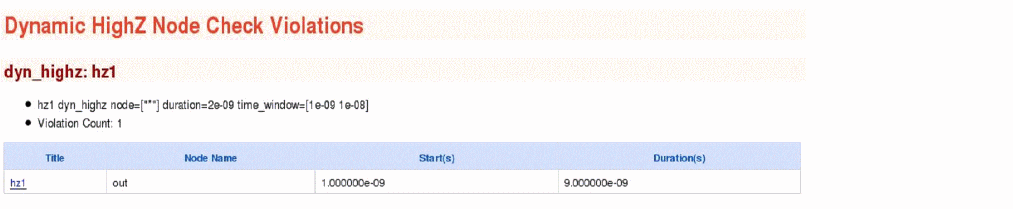
hz1 dyn_highz node=["*"] duration=2e-09 time_window=[1e-09 1e-08]
The above command will report all nodes that were in a high impedance state for a duration longer than 2e-09s within the time window between 1e-09s and 1e-08s. The following is an example of the report that is displayed in the Web browser:
Dynamic DC Leakage Current Path Check
Syntax
title dyn_dcpath net=[n1 n2 ...] duration=<value> ith=<value> time_window=[start1stop1 start2 stop2 ....] <leaki_times=[t1 t2 …]> <xinst=[xinst1 xinst2...]> error_limit=<value> <sort=no|current>
Description
Reports the conductance paths between user-specified nets. This check can be used in two ways. One is based on transient-analysis and the other is based on leakage analysis. The check based on transient analysis reports qualifying paths carrying an absolute current higher than the parameter ith for a duration longer than the specified duration, within the specified time_window. The check based on leakage analysis reports qualifying paths carrying an absolute current higher than the parameter ith at specified leaki_times. leaki_times should be carefully selected in standby or power-down mode (see XPS SRAM Leakage Current Simulation). Both methods cannot be used in one check statement. If you specify both methods in one check statement, then leakage analysis gets higher priority than transient analysis.
The following table shows the Spectre modes in which the two methods are supported.
Table 16-2 Transient and Leakage Analysis Based Approaches
| Method | Spectre, Spectre APS, Spectre X | Spectre XPS SPICE | Spectre XPS FastSPICE (SRAM, DRAM, Flash) | Spectre MS |
If more than two nets are specified, Spectre checks the leakage path between each net combination. For example, if net=[vdc1 vdc2 0] is specified, then the conducting path between vdc1 and vdc2, vdc1 and 0, and vdc2 and 0 is checked.
High accuracy settings are recommended when using the Spectre XPS FastSPICE solver (+cktpreset=sram_pwr).
The results are written to a file with the extension dynamic.xml.
dyn_dcpath report can also list the iprobes added by the simulator. You can set the global option check_dcpath_igniprobes=yes to include the iprobes in the report. Only the iprobes added by the simulator (through save statement or options statement) are controlled by the check_dcpath_igniprobes option.
By default, bulk current through the MOSFET is not traced. You can set the global option dcpath_bulk_current=yes to trace the bulk current.

Arguments
Example 1
dcpath1 dyn_dcpath ith=200u net=[vdd 0] duration=1n time_window=[1n 20n]
The above command will report the DC conductance path between vdd and 0. The command will report the paths that carry current higher than 200u for a duration longer than 1n within the time window between 1n and 20n. The following is an example of the report that is displayed in the Web browser:
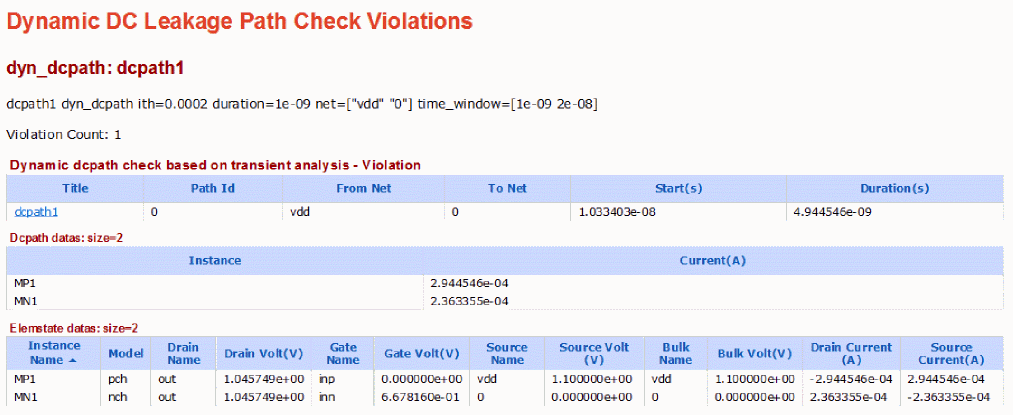
The path report has three sections. Each section is explained below.
-
The first section shows that a path is found starting from net
vddto net0. Since this is a check based on transient-analysis, the name of the table is Dynamic dcpath check based on transient analysis. - The second section shows the actual instances in the path. The first column Instance contains instances in the path. The second column contains the current through the instances. The current is taken at the end of violation, that is, at 1.52e-8 seconds (start + duration = 1.03e-8 + 4.94e-9).
- The third section shows the state of MOSFETs in the path. It does not report anything other than MOSFETs. The first column Instance Name is the MOSFET name. The second column is the model name. The following columns are the terminal names and voltages. The last two columns show the drain and source terminal currents. The values are taken at the end of violation.
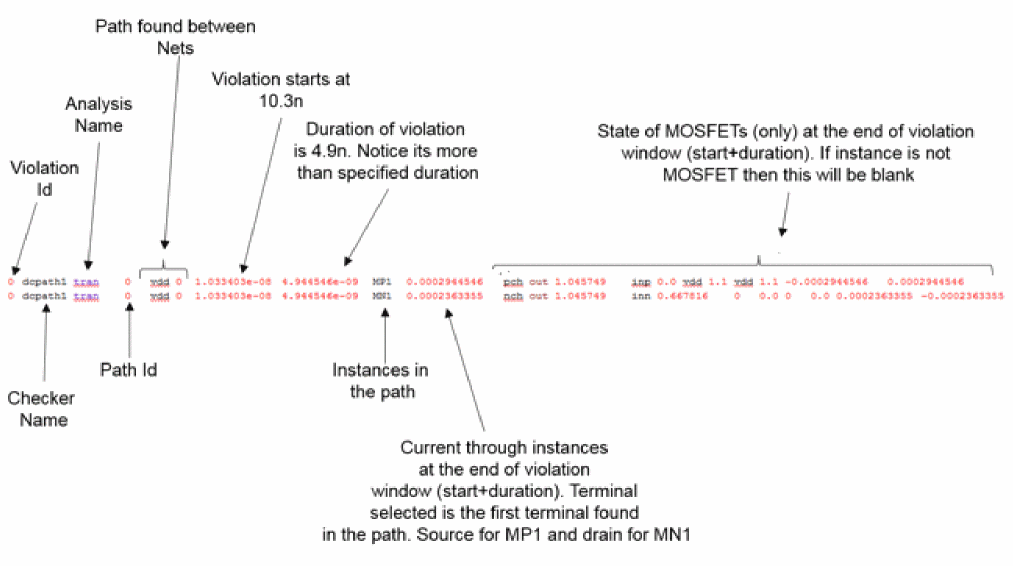
Similar to xml report, the text report is shown below:
Example 2
dcpath2 dyn_dcpath ith=200u net=[vdd 0] leaki_times=[12.5n]
The above command will report the DC conductance path between vdd and 0. The command will report the paths that carry current higher than 200u based on the leakage analysis done at time 12.5ns. In the report, Total Current is the summation of all branch currents exiting from the net vdd. The following is an example of the report that is displayed in the Web browser:
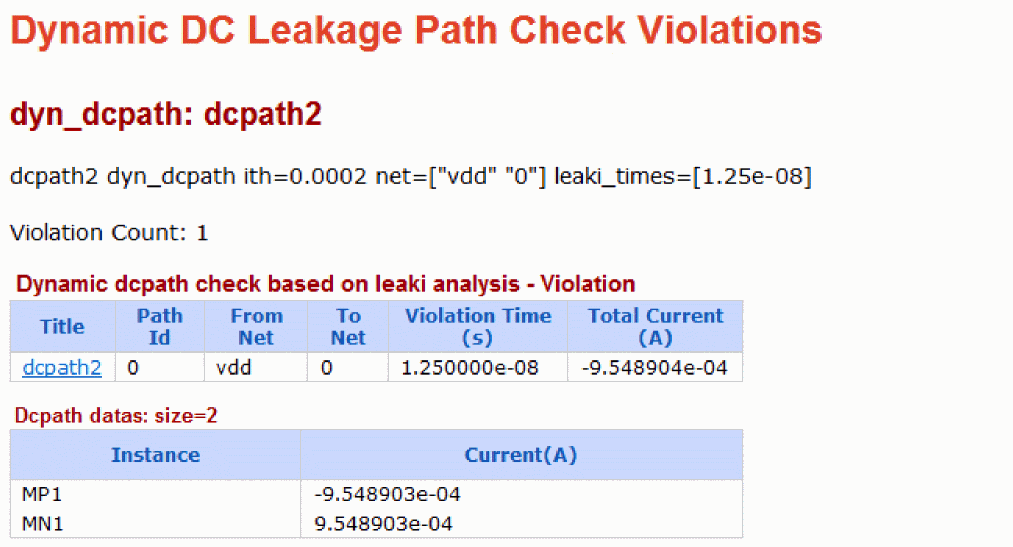
Since this check is based on leakage analysis, the name of table is Dynamic dcpath check based on leaki analysis.
Dynamic Floating Gate Induced Leakage Path Check
Syntax
title dyn_floatdcpath net=[n1 n2 ...] node=[n1 n2...] xnode=[n1 n2...] <leaki_times=[t1 t2 …]> duration=<value> error_limit=<value> time_window=[start1stop1 start2 stop2 ....] res_th_va=<value> res_th=<value> isource_ith=<value> bjt_vbe=<value> bjt_ith=<value> diode_vth=<value> <floatgate=[yes|no|gate_has_driver_no_cap]> <filter=[no|rc]> <detailed_path=[yes|per_fm|per_fn]> <sort=[no|current]> numprocesses=<value> <distribute=[no|fork]> ith=<value> <sweep=[no|single|all|all_once] points=<value> vmin=<value> vmax=<value> rforce=<value> time_window=[start1 stop1 start2 stop2 ....] <inst=[inst1 inst2...]> <xinst=[xinst1 xinst2...]> <subckt=[subckt1 subckt2....]> <xsubckt=[xsubckt1 xsubckt2....]> <nonconducting_subckt=[subckt1 subckt2...]> <conducting_subckt =[subckt1 subckt2...]> <float_vpn=[vpn1 vpn2...]> <debug_net=[net1 net2...]>
Description
Reports the DC leakage paths that are caused by floating gate. This check can be used in two ways. One is based on transient analysis and the other is based on leakage analysis. Both methods cannot be used in one check statement. If you specify both methods in one check statement, then, leakage analysis gets higher priority than transient analysis.
The following table shows the Spectre modes in which the two methods are supported:
Table 16-3 Transient and Leakage Analysis Based Approaches
The two methods are explained below.
Transient-based Method
The check based on transient analysis is evoked when parameters time_window or/and duration are specified. It reports the qualifying paths carrying an absolute current higher than the parameter ith for a duration longer than the specified duration (duration), within the specified time window (time_window). This qualifying path must also have a MOSFET with gate floating for duration longer than the specified duration (duration), within the specified time window (time_window). The violations are a union of dyn_highz and dyn_dcpath, if you use the same setting. This methodology does not generate the worst case leakage path. If the settings of dyn_dcpath and dyn_floatdcpath are same, the violations of dyn_floatdcpath will be a subset of dyn_dcpath. The following parameters are irrelevant: vmin, vmax, points, rforce, leaki_times, sweep, floatgate, detailed_report, debug_net, distribute, and numprocesses. The floating node detection is similar to dyn_highz and the path detection is similar to dyn_dcpath.
Leakage Analysis-based Method
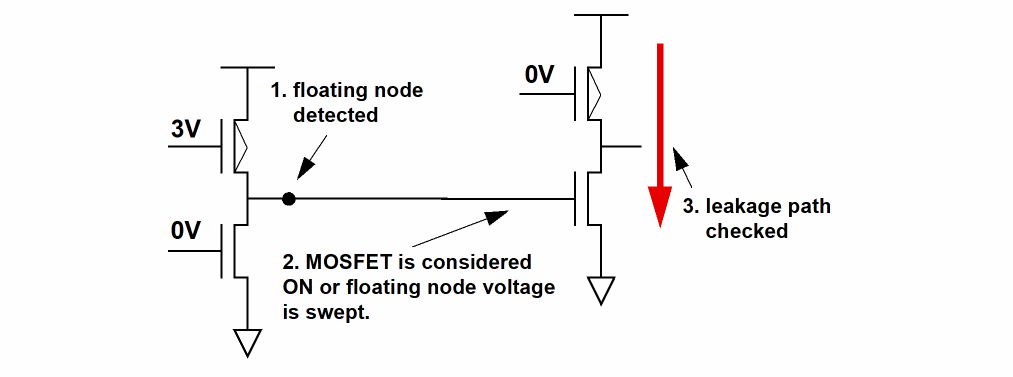
The check based on leakage analysis is evoked when parameter leaki_times is specified. leaki_times should be carefully selected in standby or power-down mode (see XPS SRAM Leakage Current Simulation). The check is performed at specified times (leaki_times) of a transient simulation. Floating nodes and MOSFET devices with floating gates are detected. Potential leakage paths (sweep=no) or worst leakage paths (sweep=all|single|all_once) caused by floating gate MOSFET devices are reported. The leakage paths are checked between the specified power supply nodes (net). The floating node detection and path detection in the leakage analysis based method are explained below:
Floating node detection (leaki_times)
A node is considered floating (or in high impedance state) if it has no conducting path to a power supply or ground. A report of all MOSFETs with floating gates can be printed by using the parameter floatgate. The following device conducting rules are used for floating node detection:
-
MOSFET is considered to be conducting if
regionis eithertriodeorsaturation. -
Resistors, controlled resistors, phy_res, relay, and inductors are considered to be conducting if
R<= res_th. -
BJT is considered to be conducting if
vbe>bjt_vbeoric>bjt_ith. -
Diode is considered to be conducting if
v>diode_vth. - Vsource, and iprobes are considered to be conducting.
-
Isources, VCCS, and CCCS are considered to be conducting if
i>isource_ith. - JFET is considered to be conducting.
- Mutual inductors and controlled capacitors are considered to be non-conducting.
- Verilog-A: conducting path depends on the module details
Once the floating nodes are identified, the leakage paths caused by the floating nodes need to be detected. You can use the current-based method or the conducting-rule-based method to detect the leakage path.
When the sweep parameter is set to single, all, or all_once, the leakage path detection is based on current. In the current-based path detection method, floating node voltage is swept, and the current in the path is measured. After the measurement, the current-based method reports the qualifying paths carrying an absolute current higher than the parameter ith. Either all floating nodes are swept at once (sweep=all), or each floating node is swept individually (sweep=single). The following parameters are relevant to the current-based path detection method: vmin, vmax, points, and rforce.
When the sweep parameter is set to no, the leakage path detection is based on following conducting rules:
- MOSFET devices with floating gates are always considered to be conducting.
-
Resistors, controlled resistors, and inductors are considered to be conducting if
R<= res_th -
BJT is considered to be conducting if
vbe>bjt_vbeoric>bjt_ith. -
Diode is considered to be conducting if
v>diode_vth. -
Vsources is considered to be conducting if
v=0; otherwise, it is not conducting. - Iprobes are considered to be conducting.
-
Isources, VCCS, and CCCS are considered to be conducting if
i>isource_ith. - VerilogA: conducting path depends on the module details
The following parameters are irrelevant with sweep=no: vmin, vmax, points, and rforce.
If more than two nets are specified, then Spectre checks the leakage path between each pair of nets. For example, if net=[vdc1 vdc2 0] is specified, then the conducting path between vdc1 and vdc2, vdc1 and 0, and vdc2 and 0 is checked.
Higher accuracy settings are recommended when using the Spectre XPS FastSPICE solver (+cktpreset=sram_pwr).
For Spectre MS mode, the results of the check are written to a file with the extension dynamic.leaki_<leaki>.xml, where <leaki> is the leaki_times specified in the check statements. For example, for leak_times=[7.5n], two files will be generated; a regular file with the extension dynamic.xml and a dyn_floatdcpath file with extension the extension dynamic.leaki_7.5e-9.xml.
For Spectre, Spectre APS, Spectre X, Spectre XPS SPICE, and Spectre XPS FastSPICE, the results of the check are written to a single file with the extension dynamic.xml.
dyn_floatdcpath report can also list the iprobes added by the simulator. You can set the global option check_dcpath_igniprobes=yes to include the iprobes in the report. Only the iprobes added by the simulator (through save statement or options statement) are controlled by the check_dcpath_igniprobes option.
By default, bulk current through the MOSFET is not traced. You can set the global option dcpath_bulk_current=yes to trace the bulk current.
Arguments
Example 1
dyn1 dyn_floatdcpath net=[vdd 0] leaki_times=[7.5n]
The above command will report the high impedance node induced DC leakage paths between the nets vdd and 0 at the specified leaki times (based on leakage analysis). The following is an example of the report that is displayed in the Web browser:
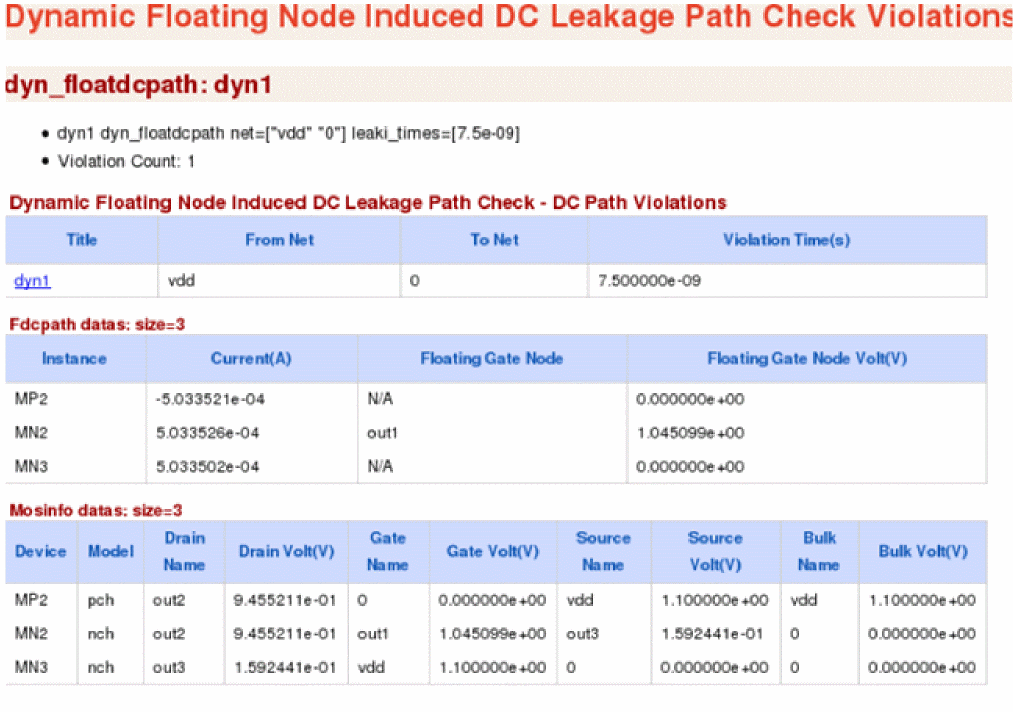
This path report contains the following three sections:
-
The first section shows the path that is found starting From Net
vddTo Net0. - The second section shows the actual instances in the path. The first column Instance contains instances in the path. The second column contains the current through the instances. The third column establishes the link between the floating node and MOSFET. The third column may contain either a node name or N/A. If it contains a node name, it means that the corresponding element is a MOSFET whose gate is floating. The fourth column shows the voltage of the floating gate.
- The third section shows the state of MOSFETs in the path. It does not report anything other than MOSFET. The first column Device is the MOSFET name. The second column is the model name. The following columns show the terminal names and voltages.
dyn3 dyn_floatdcpath net=[vdd2 0] duration=1n ith=1u time_window=[0n 20n]
The above command will report the high impedance node induced DC leakage paths between the nets vdd2 and 0. The command will report the paths that carry current higher than 200u for a duration longer than 1n within the time window between 1n and 20n.The following is an example of the report that is displayed in the Web browser:
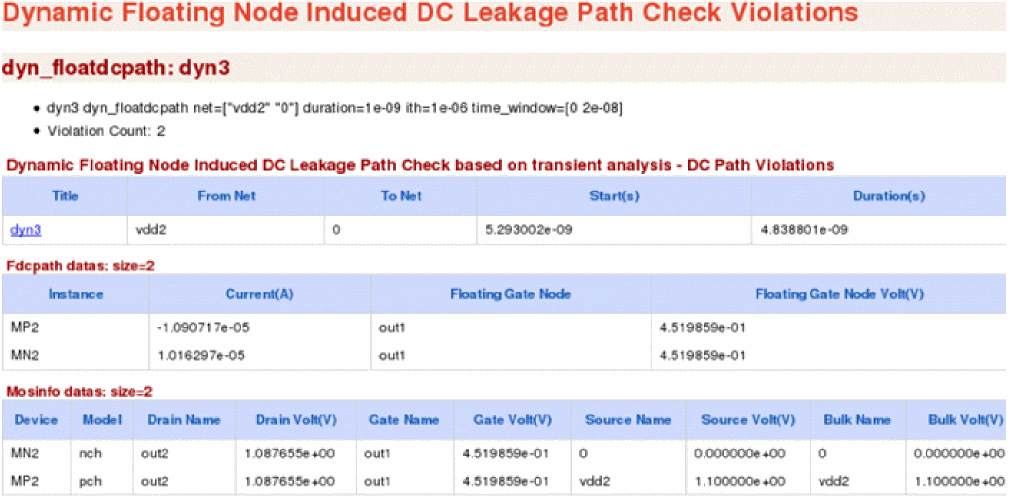
Since this check is based on transient analysis, the name of table is Dynamic Floating Node Induced DC Leakage Path Check based on transient analysis.
Dynamic MOSFET Voltage Check
Syntax
title dyn_mosv model=[m1 m2 ...] cond=<expression> <sample=extreme|start> duration=<value> <sort=[no|duration]> time_window=[start1stop1 start2 stop2 ....] <inst=[inst1 inst2...]> <xinst=[xinst1 xinst2...]> <subckt=[subckt1 subckt2....]> <xsubckt=[xsubckt1 xsubckt2....]> <depth=n> error_limit=<value>
Description
Reports MOSFET devices fulfilling the conditional expression on device voltages and device size (w, l) for a duration longer than the user-defined duration threshold (duration).
Supported MOSFET variables are: v(g,s), v(g,d), v(g,b), v(d,s), v(d,b), v(s,b), v(g), v(d), v(s), v(b), l, and w.
Supported operators are: +, -,*, /, ==,!=, <, <=, >, >=,||, &&, and !.
When sample is set to extreme, the extreme value of voltage function is reported. If the expression contains > or >=, the max value is reported as the extreme value. If the expression contains < or <= the min value is reported as the extreme value. Expressions having voltage function to the right and left of the comparison operator such as v(g)>v(s) are not supported. However, v(g,s)>0 is supported.
In Spectre, Spectre APS, Spectre X, and Spectre XPS SPICE, the expression specified in cond can have multiple key-expressions. For example, cond="v(g,s)>0.4 && v(d,s)>0.4".
In Spectre XPS FastSPICE, the expression specified in cond should contain only one key-expression. For example, cond="v(g,s)>0.4".
The results are written to a file with the extension dynamic.xml, which can be viewed with a Web browser.

Arguments
Example
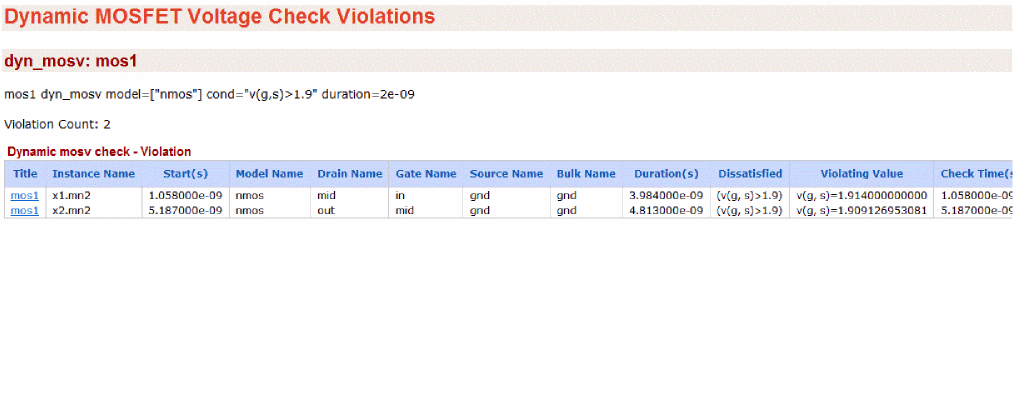
mos1 dyn_mosv model=[nmos] cond=" v(g,s)>1.9" duration=2n
The above command will report a MOSFET instance of NMOS that fulfills the condition v(g,s)>1.9 for a duration longer than 2n. The following is an example of the report that is displayed in the Web browser:
Dynamic Resistor Voltage Check
Syntax
title dyn_resv cond=<expression> duration=<value> time_window=[start1stop1 start2 stop2 ....] <inst=[inst1 inst2...]> <xinst=[xinst1 xinst2...]> <subckt=[subckt1 subckt2....]> <xsubckt=[xsubckt1 xsubckt2....]> <depth=n> error_limit=<value>
Description
Reports resistor elements fulfilling the conditional expression on element voltages for a duration longer than the user-defined duration threshold (duration).
Supported resistor variables are: V(1,2), V(1), and V(2).
Supported operators are: +, -,*, /, ==,!=, <, <=, >, >=,||, &&, and !.
The results are written to a file with the extension dynamic.xml, which can be viewed with a Web browser.

Arguments
Example
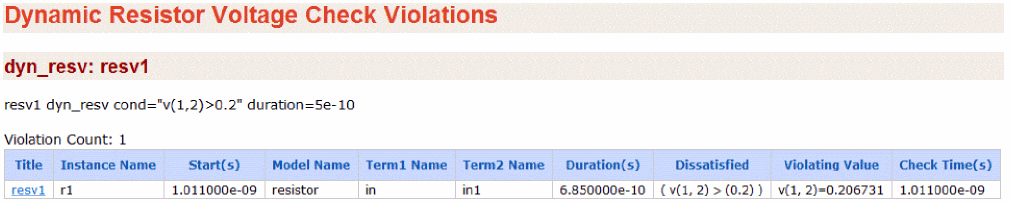
resv dyn_resv cond="V(1,2)>0.2" duration=5n
The above command will report the resistor elements that fulfill the condition V(1,2)>0.2V for a duration longer than 5e-10s. The following is an example of the report that is displayed in the Web browser:
Dynamic Capacitor Voltage Check
Syntax
title dyn_capv cond=<expression> duration=<value> time_window=[start1stop1 start2 stop2 ....] <inst=[inst1 inst2...]> <xinst=[xinst1 xinst2...]> <subckt=[subckt1 subckt2....]> <xsubckt=[xsubckt1 xsubckt2....]> <depth=n> error_limit=<value>
Description
Reports capacitor elements fulfilling the conditional expression on element voltages for a duration longer than the user-defined duration threshold (duration).
Supported capacitor variables are: V(1,2), V(1), and V(2).
Supported operators are: +, -,*, /, ==,!=, <, <=, >, >=,||, &&, and !.
The results are written to a file with the extension dynamic.xml, which can be viewed with a Web browser.

Arguments
Example
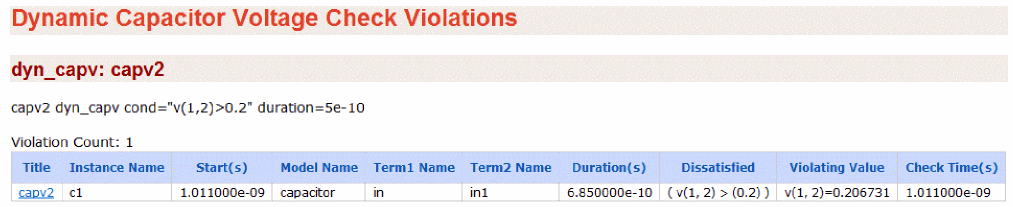
capv dyn_capv cond="V(1, 2)>0.2 duration=0.5n
The above command will report the capacitor elements that fulfill the condition V(1,2)>0.2V for a duration longer than 5e-10s. The following is an example of the report that is displayed in the Web browser:
Dynamic Diode Voltage Check
Syntax
title dyn_diodev model=[m1 m2 ...] cond=<expression> duration=<value> time_window=[start1stop1 start2 stop2 ....] <inst=[inst1 inst2...]> <xinst=[xinst1 xinst2...]> <subckt=[subckt1 subckt2....]> <xsubckt=[xsubckt1 xsubckt2....]> <depth=n> error_limit=<value>
Description
Reports diode devices fulfilling the conditional expression on device voltages for a duration longer than the user-defined duration threshold (duration).
Supported diode variables are: v(a,c), v(a), and v(c).
Supported operators are: +, -,*, /, ==,!=, <, <=, >, >=,||, &&, and !.
The results are written to a file with the extension dynamic.xml, which can be viewed with a Web browser.

Arguments
Example
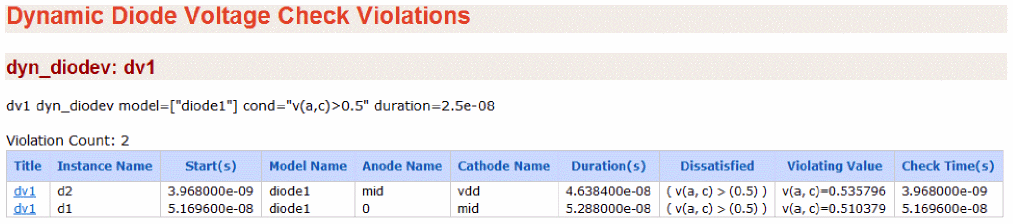
dv1 dyn_diodev model=["diode1"] cond="v(a,c)>0.5" duration=2.5e-08
The above command will report the instances of diode1 that fulfill the condition v(a,c)>0.5 for a duration longer than 25n. The following is an example of the report that is displayed in the Web browser:
Dynamic Excessive Element Current Check
Syntax
title dyn_exi dev=[d1 d2 ...] duration=<value> ith=<value> <inst=[inst1 inst2...]> <xinst=[xinst1 xinst2...]> <subckt=[subckt1 subckt2....]> <xsubckt=[xsubckt1 xsubckt2....]> <depth=n> error_limit=<value> time_window=[start1stop1 start2 stop2 ....]
Description
Reports elements and devices carrying currents (absolute value) above a threshold specified by ith for a time longer than the duration threshold specified by duration. The results are written to a file with the extension dynamic.xml, which can be viewed with a Web browser.

This design check is not supported in Spectre MS mode. See Spectre Mixed-Signal Design Simulation.
Arguments
Example
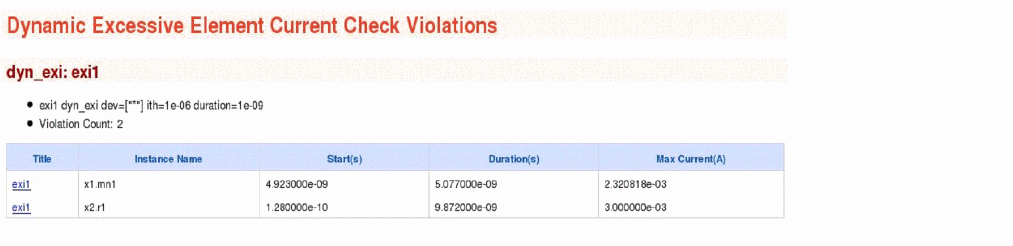
exi dyn_exi dev=["*"] ith=1e-06 duration=1e-09
The above command will report all device instances that carry excessive currents higher than 1e-06 for a duration longer than 1e-09s. The following is an example of the report that is displayed in the Web browser:
Dynamic Excessive Rise and Fall Time Check
Syntax
title dyn_exrf node=[n1 n2 ...] rise=<value> fall=<value> utime=<value> vlth=<value> vhth=<value> time_window=[start1stop1 start2 stop2 ....] <inst=[inst1 inst2...]> <xinst=[xinst1 xinst2...]> <subckt=[subckt1 subckt2....]> <xsubckt=[xsubckt1 xsubckt2....]> <fanout=all|gate|bulk|gate_has_driver_no_moscap|gate_no_moscap> <filter=[no|rc]> <inverse=[no|yes]> <sort=[no|duration]> <depth=n> error_limit=<value>
Description
Reports nodes with excessive rise and fall times, or nodes with an undefined state. The results are written to a file with the extension dynamic.xml, which can be viewed with a Web browser.

This design check is not supported in Spectre MS mode. See Spectre Mixed-Signal Design Simulation.
Arguments
Example
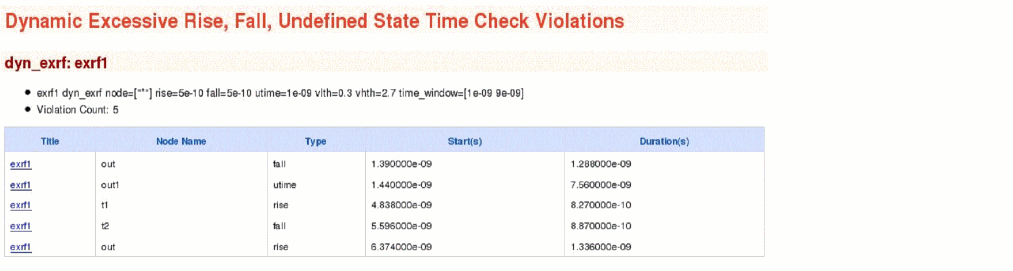
exrf1 dyn_exrf node=["*"] rise=5e-10 fall=5e-10 utime=1e-09 vlth=0.3 vhth=2.7 time_window=[1e-09 9e-09]
The above command will report nodes with rise and fall times larger than 5e-10s and nodes with undefined states longer than 1e-09s. Measurements are performed between the voltage thresholds 0.3V and 2.7V and within the time window between 1e-09s and 9e-09s. The following is an example of the report that is displayed in the Web browser:
Dynamic Glitch Check
Syntax
title dyn_glitch node=[n1 n2 ...] duration=<value> min_duration=<value> max_duration=<value> time_window=[start1 stop1 start2 stop2 ....] high=<value> low=<value> mid=<value> <inst=[inst1 inst2...]> <xinst=[xinst1 xinst2...]> <subckt=[subckt1 subckt2....]> <xsubckt=[xsubckt1 xsubckt2....]> <fanout=all|gate|bulk> <depth=n> error_limit=<value>
Description
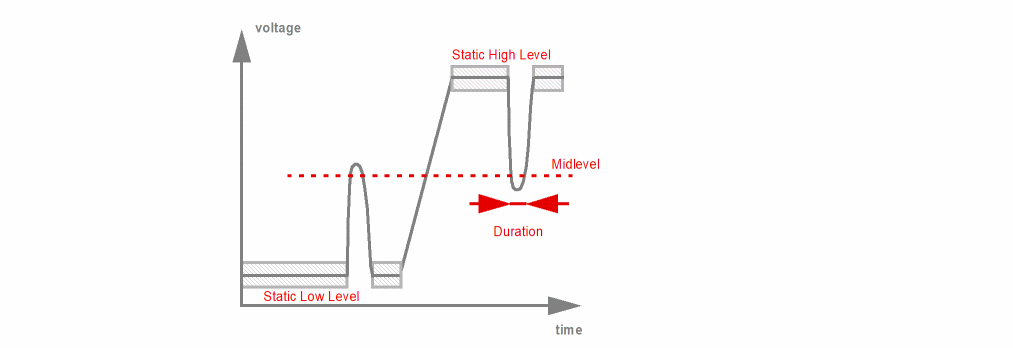
- A low signal goes above the mid level, and crosses the mid level again in a time less than the user-defined duration.
- A high signal goes below mid level, and crosses the mid level again in a time less than the user-defined duration.
The check applies only to blocks with single and constant power supply.
The results are written to a file with the extension dynamic.xml, which can be viewed with a Web browser.
This design check is not supported in Spectre MS mode. See Spectre Mixed-Signal Design Simulation.
Arguments
Example
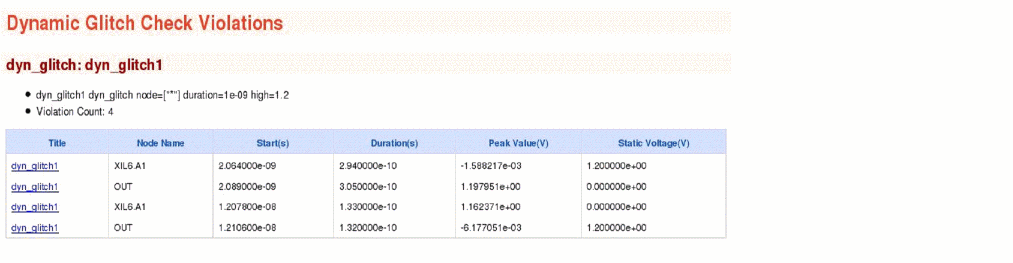
dyn_glitch1 dyn_glitch node=["*"] duration=1e-09 high=1.2
The above command will report all nodes with glitches. The glitch duration is defined to be smaller than 1ns. The high voltage level is 1.2V. The following is an example of the report that is displayed in the Web browser:
Dynamic Setup and Hold Check
Syntax
title dyn_setuphold node=[node] ref_node=[node] setup_time=<value> hold_time=<value> setup_chk_time=<value> setup_hold_time=<value> delay=<value> edge=[rise|fall|both] ref_edge=[rise|fall|both] vlth=<value> ref_vlth=<value> vhth=<value> ref_vhth=<value> time_window=[start1stop1 start2 stop2 ....] margin_stats=[yes|no] <subckt=[subckt1 subckt2....]> <fanout=all|gate|bulk> error_limit=<value> report=[violation|all]
Description
Measures the timing of a signal net in comparison to a referenced (clock) net. It reports the setup or hold timing errors if the signal net transition happens within the specified violation window.
The violation window of the setup timing check is refTime + delay - setup_time and refTime + delay. The violation window for the hold timing check is refTime + delay and refTime + delay + hold_time. refTime is the transition time of the reference net.
ref_vhth and vhth parameters trigger the rising edge measurements, whereas ref_vlth and vlth parameters trigger the falling edge measurements.
If subcircuit parameter (subckt) is specified then the node (node) and reference node (ref_node) are considered local nodes to that subcircuit. That is, the nodes and reference nodes will belong to the instances of the specified subcircuit. Only one subckt value can be specified per check, with no wildcard.
If the subckt parameter is not specified then node and ref_node are considered as global nodes with hierarchical names starting from the top level.
The results are written to a file with the extension dynamic.xml, which can be viewed with a Web browser.
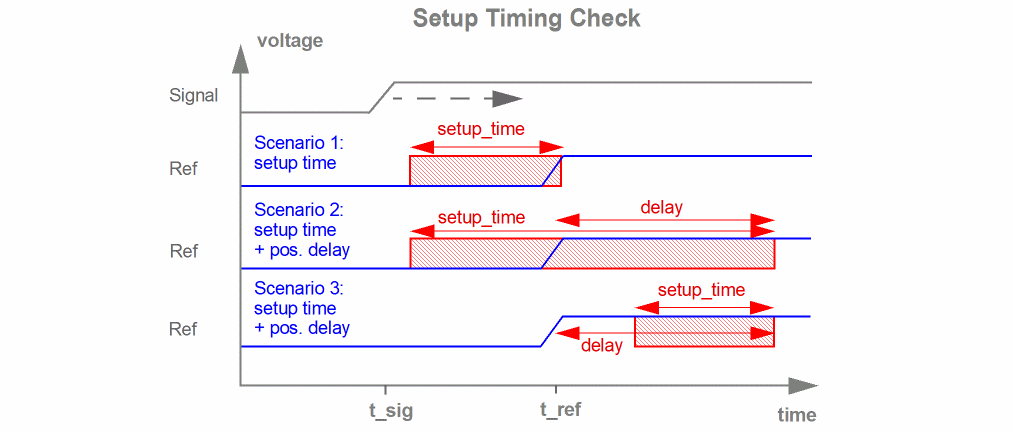
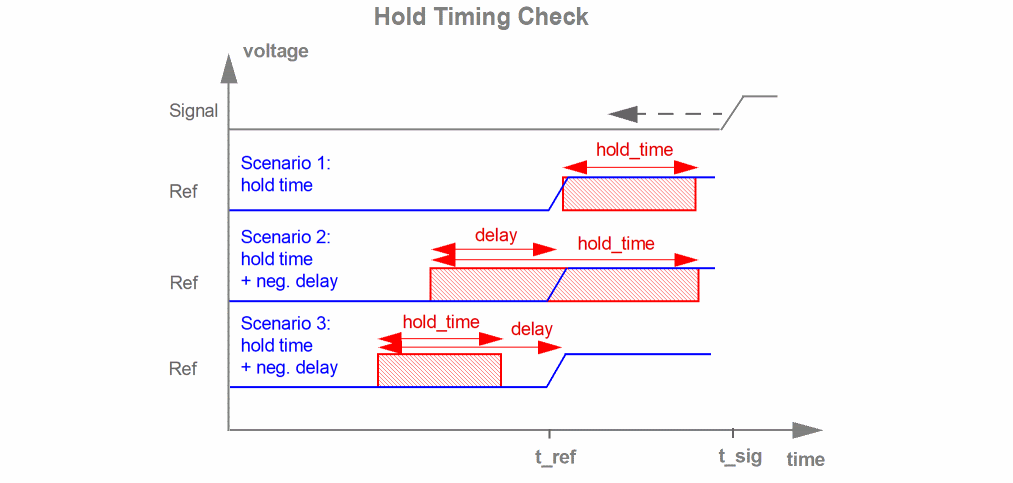
In the figure above, a setup or hold error is reported if the signal net transition occurs in the red marked area.
This design check is not supported in Spectre MS mode. See Spectre Mixed-Signal Design Simulation.
Arguments
Example 1
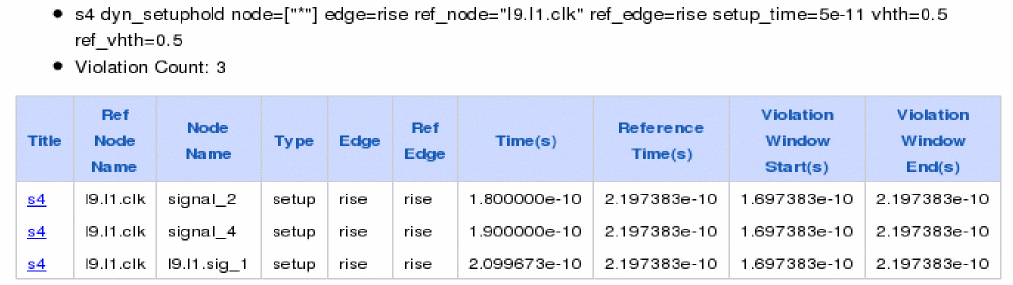
s4 dyn_setuphold node=["*"] edge=rise ref_node=“I9.I1.clk" ref_edge=rise setup_time=5e-11 vhth=0.5 ref_vhth=0.5
The above command reports any transition of signal node in the time window between 0.5ns before the signal clk rises.
Since subckt parameter is not specified, it will compare all nodes with ref_node I9.I1.sig_2 and report any violations.
The following is an example of the report that is displayed on the Web browser.
Example 2
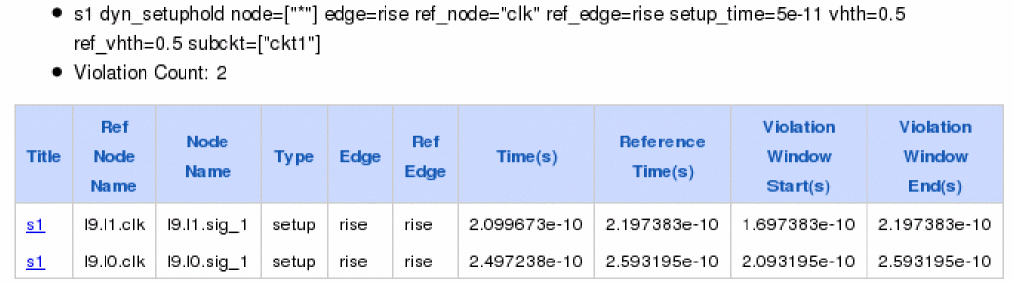
s1 dyn_setuphold node=["*"] edge=rise ref_node=“clk" ref_edge=rise setup_time=5e-11 vhth=0.5 ref_vhth=0.5 subckt=ckt1
The above command reports any transition of the signal data in the time window between 0.5ns before the signal clk rises.
Since subckt=ckt1 is specified, it will compare all nodes in subckt ckt1 with ref_node sig_2 and report any violations. Note that node and ref_node belongs to same subckt ckt1.
The following is an example of the report that is displayed on the Web browser.
Dynamic Noisy Node Check
Syntax
title dyn_noisynode node=[node] time_window=[start1stop1 start2 stop2 ....] duration=<value> <inst=[inst1 inst2...]> skip =<value> e1=<value> e2=<value> <xinst=[xinst1 xinst2...]> <subckt=[subckt1 subckt2....]> <xsubckt=[xsubckt1 xsubckt2....]> <fanout=all|gate|bulk> <depth=n> error_limit=<value>
Description
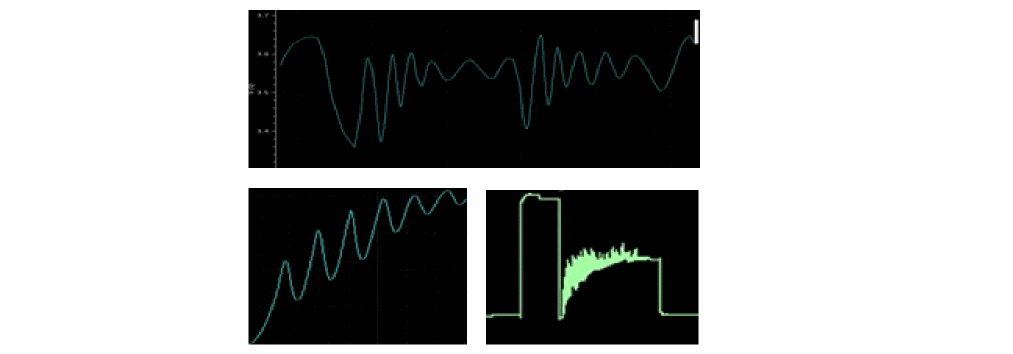
Identifies the nodes with unstable or noisy node conditions. A node is considered unstable or noisy if its voltage fulfills the condition abs(dV/dt)>e1 and abs(d(dV/dt)dt>e2 for a time longer than duration. Stable periods shorter than skip are ignored. The results are written to a file with the extension dynamic.xml, which can be viewed with a Web browser.
This design check is not supported in Spectre MS mode. See Spectre Mixed-Signal Design Simulation.
Arguments
Example
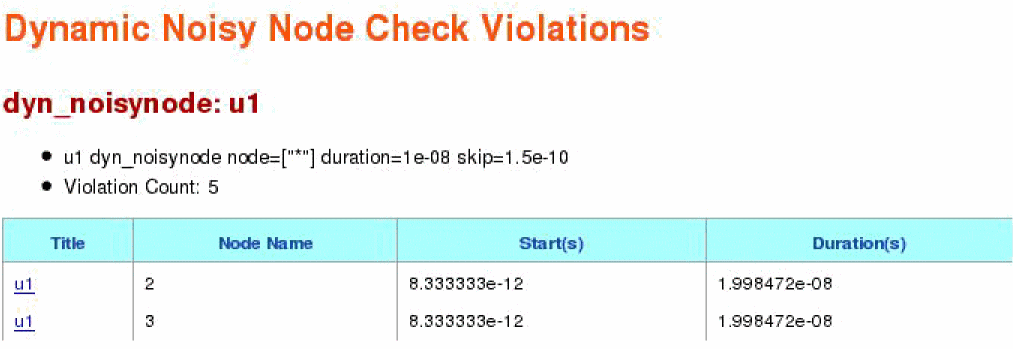
u1 dyn_noisynode node=["*"] duration=1e-08 skip=1.5e-10 time_window=[0 20n]
The above command reports all nodes with unstable or noisy node conditions for a duration longer than 1e-08 seconds. Stable periods shorter than 1.5e-10 are ignored. The circuit check is active between 0 and 20ns.
The following is an example of the report that is displayed on the Web browser.
Dynamic Node Capacitance Check
Syntax
title dyn_nodecap <node=[node1 node2...]> <time=[t1 t2...]> <inst=[inst1 inst2...]> <xinst=[xinst1 xinst2...]> <subckt=[subckt1 subckt2....]> <xsubckt=[xsubckt1 xsubckt2....]> <fanout=all|gate|bulk> <depth=n> error_limit=<value><intrinsic_cap_merge=no|yes>
Description
Reports the node capacitance at specified times (time) of a transient simulation. Device capacitances, voltage dependent capacitances, grounded and coupling caps are combined into one value. The results are written to a file with the extension dynamic.xml, which can be viewed with a Web browser.
This design check is not supported in Spectre MS mode. See Spectre Mixed-Signal Design Simulation.
Arguments
Example
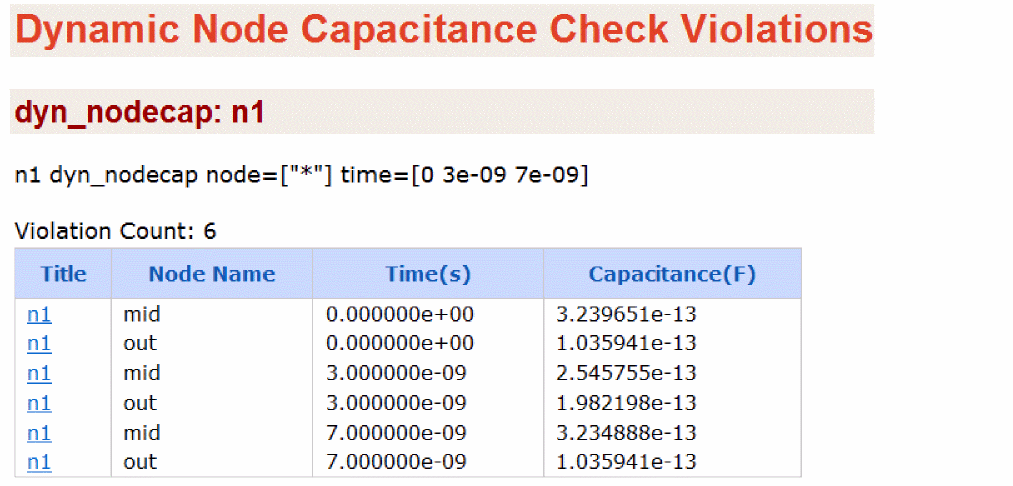
n1 dyn_nodecap node=[*] time=[0 3n 7n]
The above command will report the node capacitance for all nodes at times 0, 3ns and 7ns.
The following is an example of the report that is displayed in the Web browser:
Dynamic Subcircuit Port Power Check
Syntax
title dyn_subcktpwr <port=[port1 port2...]> <inst=[inst1 inst2...]> <net=[n1 n2...]> <power=[on|off]> error_limit=<value> time_window=[start1stop1 start2 stop2 ....] <depth=n> filter=[none|gates] ith=<value>
Description
Reports port currents, port powers, and subcircuit powers.
The port current is positive when the current is going into a subcircuit. This check will report average, RMS, and maximum values of the current entering a port.
This check can be used in two ways. One is tree-based and other is instance-based. Both methods cannot be combined in one check statement. If you specify both methods in one check statement, then the tree-based method gets higher priority than the instance-based method.
In the tree-based method, the root of a tree is selected by the parameter net. From this root, port current is traced down the hierarchy until depth or device is reached. The port, inst, and power parameters are irrelevant in tree-based approach.
In the instance-based method, any port name matching inst and port parameters are reported.
Power analysis can be done by using the parameter power. This parameter is supported only in the instance-based method. When the parameter power is set to on, then two additional sections are generated. The first section reports the average, RMS and the maximum power entering the ports, specified using the parameter port. The second section reports the average, RMS, and the maximum power consumed by each instance of a subcircuit, specified using the parameter inst.
port parameter only considers the ports defined in the subcircuit definition. For global nodes, you need to add the ports manually.Arguments
Example
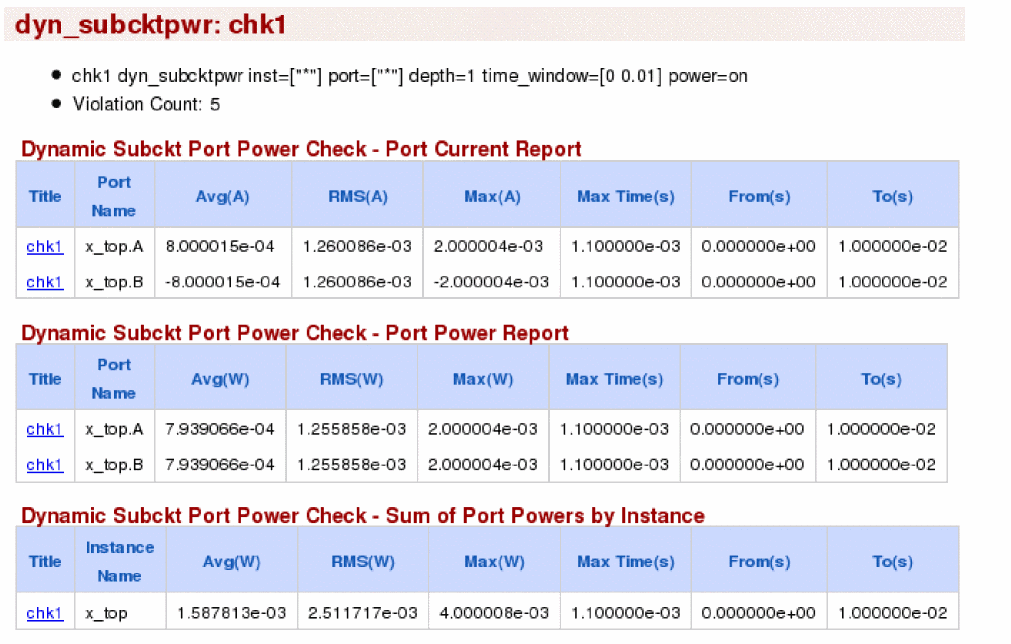
chk1 dyn_subcktpwr inst=[*] port=[*] depth=1 time_window=[0 10m] power=on
The above command reports the port current for all ports of all instances in the time window between 0 and 10ms. The report includes the current and power information for all subcircuit instances one level down the hierarchy.
The following is an example of the report that is displayed in the Web browser:
Dynamic Pulse Width Check
Syntax
title dyn_pulsewidth node=[n1 n2 ...] pwmin_low=<value> pwmax_low=<value> pwmin_high=<value> pwmax_high=<value> vlth=<value> vhth=<value> time_window=[start1 stop1 start2 stop2 ....] <inst=[inst1 inst2...]> <xinst=[xinst1 xinst2...]> <subckt=[subckt1 subckt2....]> <xsubckt=[xsubckt1 xsubckt2....]> <fanout=all|gate|bulk> <depth=n> error_limit=<value>
Description
The pulse width of a logic low state signal is the duration between which the signal crosses the low voltage threshold (vlth) while falling and again crosses vlth while rising. If this duration is outside the range specified using the pwmin_low and pwmax_low parameters, the dyn_pulsewidth check reports the pulse width of such signals.
Similarly, the pulse width of a logic high state signal is the duration between which the signal crosses the high voltage threshold (vhth) while rising and again crosses vhth while falling. If this duration is outside the range of pwmin_high and pwmax_high parameters, the dyn_pulsewidth check reports the pulse width of such signals.
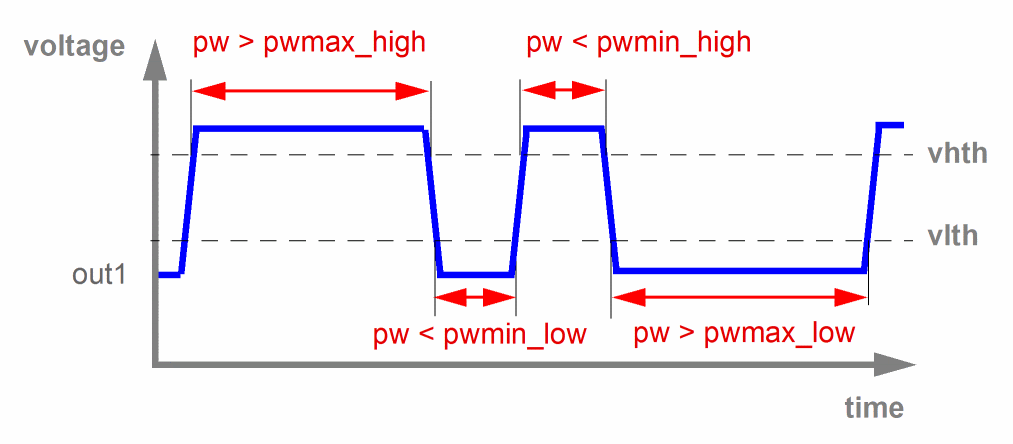
The results are written to a file with the extension dynamic.xml, which can be viewed with a Web browser.
This design check is not supported in Spectre MS mode. See Spectre Mixed-Signal Design Simulation.
Arguments
Example
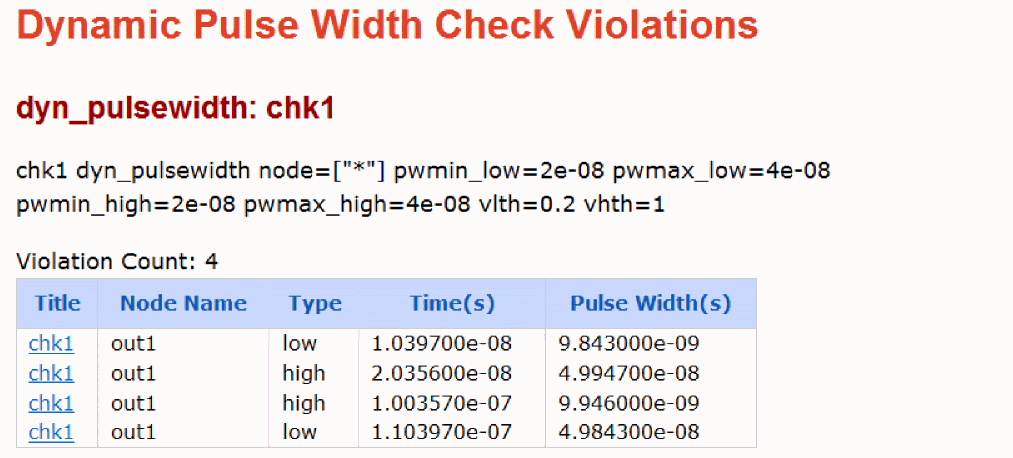
chk1 dyn_pulsewidth node=[*] pwmin_low=20n pwmax_low=40n pwmin_high=20n pwmax_high=40n vlth=0.2 vhth=1.0
The above command reports all nodes that specify either of the following conditions:
-
The pulse width in logic low state is outside the range of parameters
pwmin_low(20n) andpwmax_low(40n). -
The pulse width in logic high state is outside the range of parameters
pwmin_high(20n) andpwmax_high(40n).
The following is an example of the report that is displayed in the Web browser.
Dynamic Power Density Check
Syntax
title dyn_powerdensity time_window=[start1 stop1 start2 stop2 ....] window=<value> shift=<value> <inst=[inst1 inst2...]> <xinst=[xinst1 xinst2...]> <subckt=[subckt1 subckt2....]> <xsubckt=[xsubckt1 xsubckt2....]> <depth=n>
Description
Device and circuit reliability heavily depend on how much power is consumed by the individual MOSFET devices and how much heat is generated in a short period of time. To ensure improved reliability and lifetime, circuit designers need to optimize the power consumption of devices in the given design.
The power density check reports the average window with the highest power consumption for each MOSFET. It is based on shifting the measuring window over the operating time window.
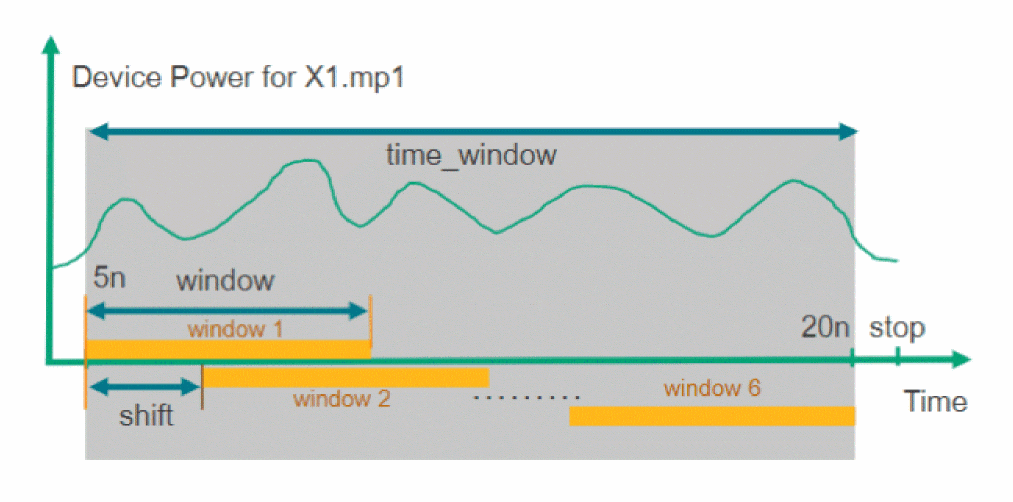
The results are written to a file with the extension dynamic.xml, which can be viewed with a Web browser.
Parameters
Example
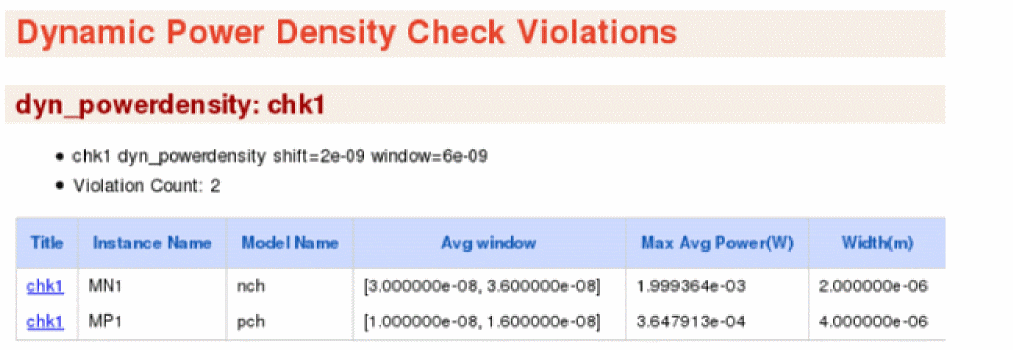
The following statement reports the average window with the highest power consumption for each MOSFET. The power consumption will be checked in 6n seconds average windows, shifted by 2n seconds.
chk1 dyn_powerdensity shift=2n window=6n
The report of this example is displayed in the Web browser, as shown below.
Dynamic Active Node Check
Syntax
title dyn_actnode node=[n1 n2 ...] dv=<value> type=<value> time_window=[start1 stop1 start2 stop2 ....] <inst=[inst1 inst2...]> <xinst=[xinst1 xinst2...]> <subckt=[subckt1 subckt2....]> <xsubckt=[xsubckt1 xsubckt2....]> <fanout=all|gate|bulk> <depth=n> error_limit=<value>
Description
The dynamic active node check detects nodes with voltage changes that exceed the user-defined threshold dv. The voltage change is defined as peak-to-peak voltage (Vpp) within a time window.
The results are written to the dynamic.xml file, which can be viewed in a Web browser.
Arguments
Example
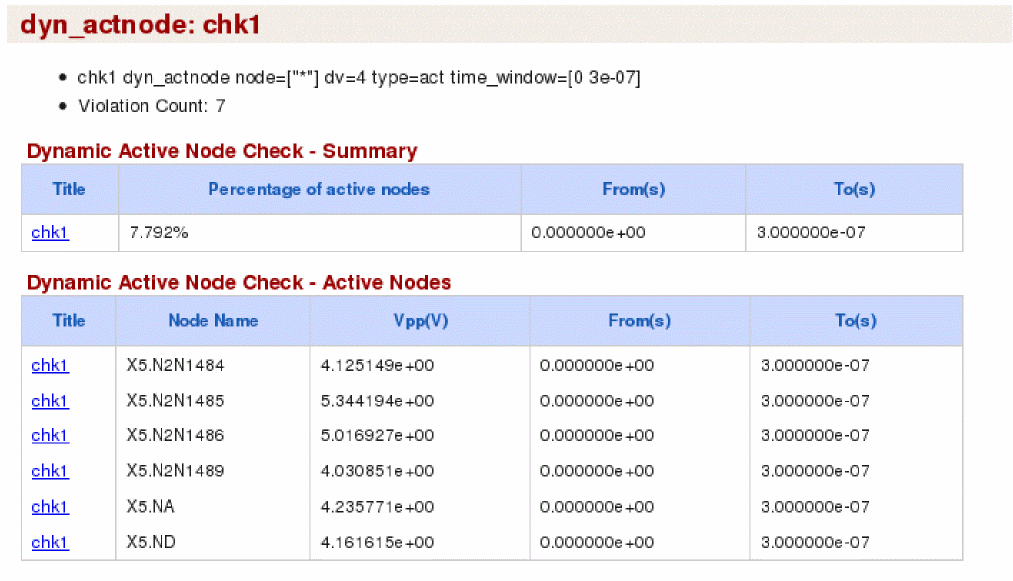
chk2 dyn_actnode node=[*] dv=4 type=act time_window=[0 3e-07]
The above command reports all nodes that are active. These active nodes will have peak-to-peak voltage above 4V between 0s to 300ns. In addition, the command prints a summary report that lists the percentage of active nodes having peak-to-peak voltage above 4V between 0s to 300ns.
The following is an example of the report that is displayed on the Web browser.
Dynamic Subcircuit Instance Activity Check
Syntax
title dyn_activity min_activity=<value> time_window=[start1 stop1 start2 stop2...] <inst=[inst1 inst2...]> <xinst=[xinst1 xinst2...]> <subckt=[subckt1 subckt2....]> <xsubckt=[xsubckt1 xsubckt2....]> <depth=n> error_limit=<value>
Description
This check reports the activity percentage of an instance relative to a circuit. The activity percentage is the ratio of events in the instance versus the events in the entire circuit.
The check reports the activity for instances specified using the inst parameter and all its child instances.
The results are written to the dynamic.xml file, which can be viewed in a Web browser.
Arguments
Example
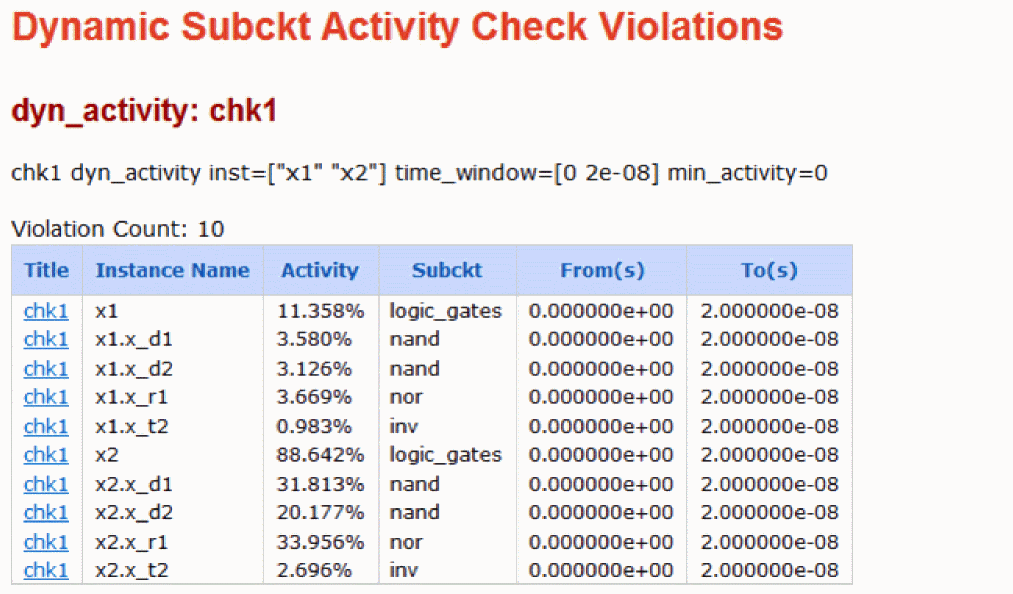
chk1 dyn_activity inst=[x1 x2] time_window=[0n 20n] min_activity=0
The above command will check the activity percentage of instances X1 and X2. The events start recording between the specified time window of 0ns and 20ns.
The following is an example of the report that is displayed on the Web browser:
Dynamic Subcircuit Port Voltage/Current Check
Syntax
title dyn_subcktport cond=<expression> duration=<value> time_window=[start1 stop1 start2 stop2...] subckt=<value> error_limit=<value>
Description
Reports instances of the user-specified subckt fulfilling the conditional expression on port voltages and port currents for a time longer than the user-specified duration. Only one subcircuit is allowed per statement.
Voltages and currents of a port can be referenced by the port name of a subcircuit. For example, consider the subcircuit definition .subckt INV port_A port_B. Here, supported port names are: v(port_A), v(port_B), v(port_A,port_B), i(port_A), and i(port_B). The port current is positive when the current is flowing into a subcircuit.
Supported operators are: +, -,*, /, ==,!=, <, <=, >, >=,||, &&, and !.
All design instances of the subcircuit specified using subckt are checked.
The results are written to the dynamic.xml file, which can be viewed in a Web browser.
Arguments
Example
vol1 dyn_subcktport subckt="decwl64b" cond="v(inh_VDD)>1.7" duration=10n
The above command will report all instances of subcircuit decwl64b satisfying the condition v(inh_VDD)>1.7 for a duration longer than 10n.
The following is an example of the report that is displayed on the Web browser:

Dynamic Delay Check
Syntax
title dyn_delay node=[node] ref_node=[node] min_time=<value> max_time=<value> edge=[rise|fall|both] ref_edge=[rise|fall|both] vlth=<value> ref_vlth=<value> vhth=<value> ref_vhth=<value> time_window=[ start1 stop1 start2 stop2 .... ] <subckt=[subckt1]> <fanout=all|gate|bulk> error_limit=<value>
Description
Checks timing delays between two signals and reports nodes with edge delay errors.
The delay is measured between user-specified nodes and a reference node. A timing delay error occurs when the transition time of a signal falls outside the range of refTime + min_time and refTime + max_time, where refTime is the transition time of the reference signal. In other words, a timing delay error occurs when the delay between the signal and the reference signal is outside the range of min_time and max_time.
The ref_vhth and vhth parameters are used for triggering rising edge measurements, while ref_vlth and vlth parameters are used for triggering falling edge measurements. For example, a delay measurement from a rising reference signal to a falling signal includes measuring the delay from the time the reference signal crosses ref_vhth to the time the signal crosses vlth.
If the subckt parameter is specified, then node and ref_node are considered as local nodes to the specified subcircuit. In other words, node and ref_node belong to the instances of the specified subcircuit. Only one subckt value can be specified per check, with no wildcard.
If the subckt parameter is not specified, node and ref_node are considered as global nodes with hierarchical names starting from the top level.
The results are written to the dynamic.xml file, which can be viewed in a Web browser.
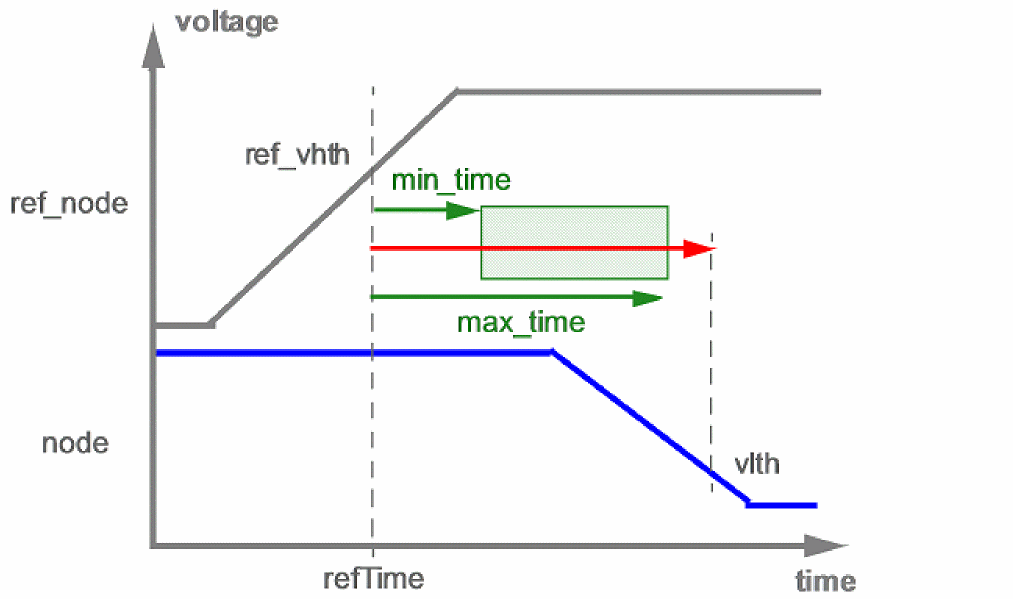
In the figure above, an error is reported if the signal net transition occurs outside the green marked area.
Arguments
Example
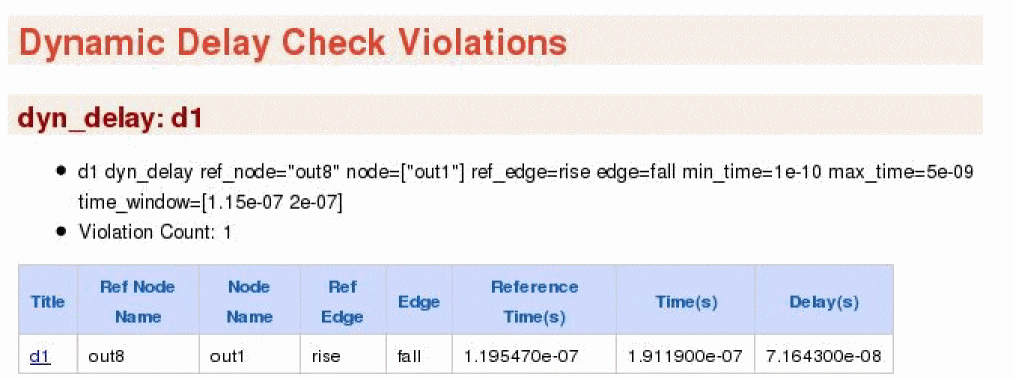
d1 dyn_delay ref_node=out8 node=out1 ref_edge=rise edge=fall min_time=100p max_time=5n time_window=[115n 200n]
The above command reports any transition of signal data having delay of more than 5n seconds or having delay of less than 100p seconds. The delay is evaluated from the rising edge of out8 node to the falling edge of out1 node.
If the subckt parameter is not specified, then node and ref_node are considered as global nodes with the hierarchical names starting from the top level.
The following is an example of the report that is displayed on the Web browser:
Dynamic Floating Node Statistical Check
Syntax
title dyn_float_tran_stat domains=[domain_pair_1 domain_pair_2...] ping_start=<value> ping_count=<value> ping_duration=<value> ping_ibias=<value> ping_iabsthresh=<value> ping_iabsthresh_ramp=<value> ping_irelthresh=<value> seed=<value> domain_voltage_thresh=<value> save=[no|all|ping] distribute=[no|fork] numprocesses=<value> report_top_current=<value> ping_resistor_max=<value> ping_duration_max=<value> ping_resistor_min=<value> time_constant=<value> node=[node1 node2...] xnode=[node1 node2...] <inst=[inst1 inst2...]> <xinst=[xinst1 xinst2...]> <subckt=[subckt1 subckt2....]> <xsubckt=[xsubckt1 xsubckt2....]> ping_voltage_thresh=<value> ping_index =[value1 value2 ...] domain_detection_voltage_atol=<value>
Description
The dyn_float_tran_stat check reports leaky MOSFETs/BJTs caused by floating nodes. It also detects floating nodes caused by other floating nodes.
The check deploys a statistical method of forcing (pinging) different voltages on the gate of MOSFET and the base of BJT. Ping refers to randomly forcing a node to 0 or VDD, or ramping from 0 to VDD. Only MOSFET gates or BJT base nodes are pinged. Ping is realized by applying a voltage source in series with a large resistor (ping_resistor) on each node. The strength of a ping is weaker (because of large ping_resistor) than other drivers on each node.
dyn_float_tran_stat Algorithm
-
Transient simulation is run till
ping_start. - Qualified nodes are identified to exercise pings according to domains
-
For each qualified node,
domain_voltageis evaluated - Pings are created randomly using seed value. One third of the qualified nodes are selected for HIGH. One third of qualified nodes are selected for LOW. One third of qualified nodes are selected for RAMP.
-
ping_durationandping_resistorare evaluated -
Pings are applied sequentially at
ping_start. -
For each ping:
-
All MOSFET drain currents and BJT collector currents are stored as reference current (
Iref) right before applying the ping -
For the first half of
ping_duration: -
For the second half of
ping_duration:-
The RAMP is forced to each node through a resistor with the
ping_resistorvalue and the maximum (Iping,max) and minimum (Iping,min) device current is checked during the RAMP. A fail is detected in any of the following cases:
|Iref-Iping,max| > max(pingiabsthresh_ramp, pingirelthresh*min(|Iref|,|Iping,max|))
|Iref-Iping,min| > max(pingiabsthresh_ramp, pingirelthresh*min(|Iref|,|Iping,min|))
-
The RAMP is forced to each node through a resistor with the
-
All MOSFET drain currents and BJT collector currents are stored as reference current (
The results are written to the dynamic.xml file, which can be viewed in a Web browser.
Arguments
Example
dynSta1 dyn_float_tran_stat domains=["vdd" "vss"] ping_start=[5n] ping_count=27 ping_duration=6e-06 ping_ibias=1.1e-07 ping_iabsthresh=1e-07 ping_iabsthresh_ramp=1e-07 ping_irelthresh=1000 save=all
The above command statistically forces (ping) certain voltages on all MOSFET gates in vdd-vss domain. If there is current difference before (Ref Current) and after (Current at Failure) the application of ping, then it is considered as violation.
The following is an example of the report that is displayed on the Web browser:
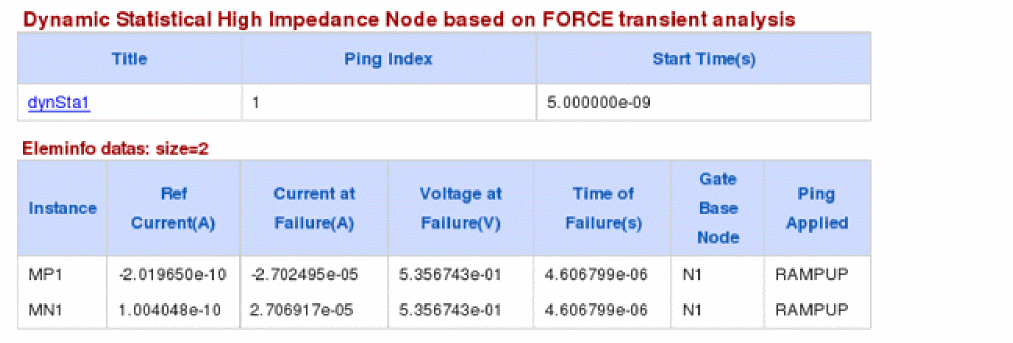
Dynamic Uninitialized Check
Syntax
title dyn_uninilatch_check node=[node1 node2...] <inst=[inst1 inst2...]> <xinst=[xinst1 xinst2...]> <subckt=[subckt1 subckt2....]> <xsubckt=[xsubckt1 xsubckt2....]> error_limit=<value>
Description
The dyn_uninilatch check detects the uninitialized latch nodes that have more than one DC solution. The check reports all nodes in a potential loop.
The results are written to the dynamic.xml file, which can be viewed in a Web browser.
The dyn_uninilatch check is supported only in Spectre XPS FastSPICE. See Chapter 4, “The Spectre XPS Circuit Simulator”.
Arguments
Example
chk2 dyn_uninilatch node=[*] inst=[x1 x2] time_window=[0n 20n]
Static Checks
Static checks are performed after parsing, using the topology information and voltage propagation. They apply to digital and SRAM circuits only and do not require a transient simulation. Static checks use the static_ keyword prefix and write the results into a file with the extension.static.xml. The xml file can be viewed with any Web browser.
- Static High Impedance Node Check
- Static DC Leakage Path Check
- Static NMOS/PMOS Forward Bias Bulk Check (NMOS, PMOS)
- Static Voltage Domain Device Check
- Static Transmission Gate Check
- Static Always Conducting NMOS/PMOS Check (NMOS, PMOS)
- Static MOSFET Voltage Check
- Static Resistor Voltage Check
- Static Capacitor Voltage Check
- Static Diode Voltage Check
- Static Resistor Check
- Static Capacitor Check
- Static ERC Check
- Static RC Delay Check
- Static Subcircuit Port Voltage Check
- Static Stack Count
- Static Coupling Impact Check
- Static PMOS to GND Count Check
- Static NMOS to VDD Count Check
- Static Highfanout Check
Static High Impedance Node Check
Syntax
title static_highz node=[n1 n2 ...] vnth=<value> vpth=<value> vsrcnodefile=[[subckt]...] "NV_FILE1" [subckt2 "NV_FILE2" subckt3 "NV_FILE3" …]]] <inst=[inst1 inst2...]> <xinst=[xinst1 xinst2...]> <subckt=[subckt1 subckt2....]> <xsubckt=[xsubckt1 xsubckt2....]> <fanout=all|gate|bulk|gate_has_driver_no_moscap|bulkgate_no_moscap> pwl_time=<value> <depth=n> error_limit=<value> <rpt_node=no|all|top|selected>
Description
Reports nodes without a possible conducting path to a DC power supply or ground. The results are written to a file with the extension static.xml, which can be viewed with a Web browser.

Arguments
Example
static_hz1 static_highz node=["*"]
The above command will report all possible high impedance nodes. The following is an example of the report that is displayed in the Web browser:
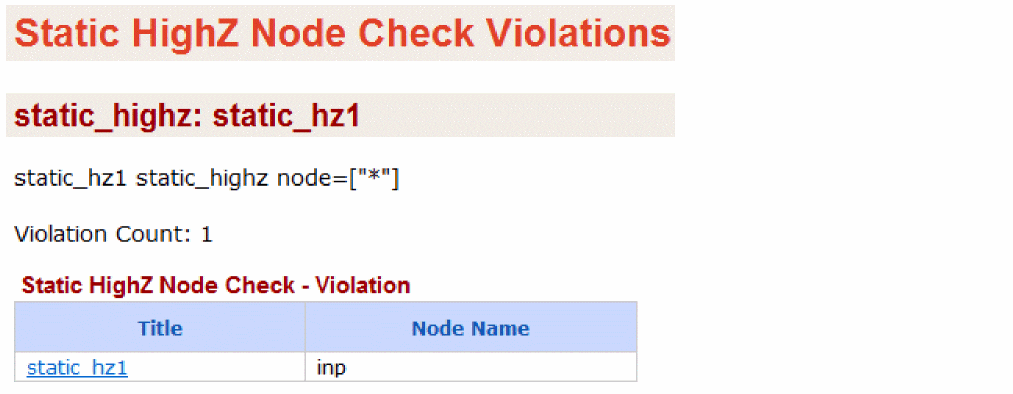
Static DC Leakage Path Check
Syntax
title static_dcpath net=[n1 n2 ...] vnth=<value> vpth=<value> vsrcnodefile=[[subckt]...] pwl_time=<value> error_limit=<value> <rpt_node=no|all|top|selected>
Description
Reports the always conducting paths between the power supply nodes. If more than two nets are specified, Spectre checks the leakage path between each net combination. For example, if net=[vdc1 vdc2 0] is specified, then the conducting path between vdc1 and vdc2, vdc1 and 0, and vdc2 and 0 is checked.
The results are written to a file with the extension static.xml, which can be viewed with a Web browser.

Arguments
Example
dc1 static_dcpath net=["vdd 0"]
The above command will report potential DC leakage paths between the power supply nodes vdd and 0.The following is an example of the report that is displayed in the Web browser:
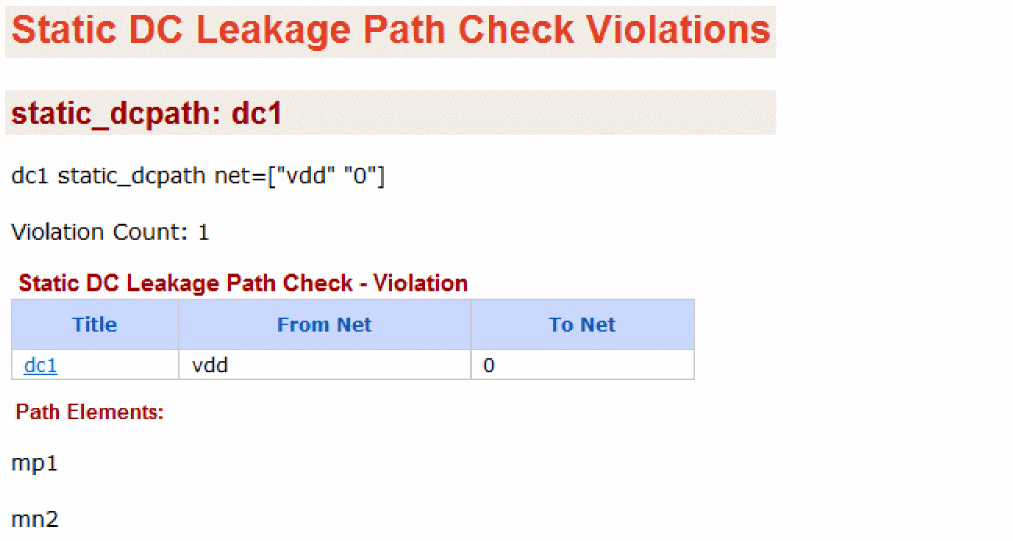
Static NMOS/PMOS Forward Bias Bulk Check (NMOS, PMOS)
Syntax
title static_nmosb model=[m1 m2 ...] mode=[definite|possible] vt=<value> vnth=<value> vpth=<value> <inst=[inst1 inst2...]> <xinst=[xinst1 xinst2...]> <subckt=[subckt1 subckt2....]> <xsubckt=[xsubckt1 xsubckt2....]> pwl_time=<value> vsrcnodefile=[[subckt]...] <depth=n> <rpt_node=no|all|top|selected> error_limit=<value>
title static_pmosb model=[m1 m2 ...] mode=[definite|possible] vt=<value> vnth=<value> vpth=<value> <inst=[inst1 inst2...]> <xinst=[xinst1 xinst2...]> <subckt=[subckt1 subckt2....]> <xsubckt=[xsubckt1 xsubckt2....]> pwl_time=<value> vsrcnodefile=[[subckt]...] <depth=n> <rpt_node=no|all|top|selected> error_limit=<value>
Description
Reports MOSFET devices with forward biased bulk condition. The results are written to a file with the extension static.xml, which can be viewed with a Web browser. A violation is generated when the bulk bias voltage meets the following conditions:
-
When
mode=definite:min( Vb ) >= min( Vd, Vs ) + abs( vt ) -
When
mode=possible:max( Vb ) >= min( Vd, Vs ) + abs( vt )
-
When
mode=definite:max( Vb ) <= max( Vd, Vs ) - abs( vt ) -
When
mode=possible:min( Vb ) <= max( Vd, Vs ) - abs( vt )

Arguments
Example
nmosb1 static_nmosb model=["nmos"]
The above command will report all instances of the nmos model with potential forward bias bulk conditions. The following is an example of the report that is displayed in the Web browser:
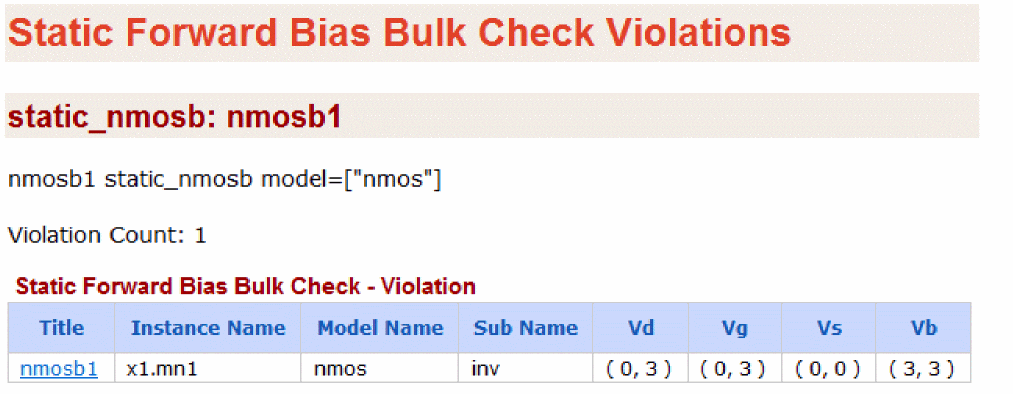
Static Voltage Domain Device Check
Syntax
title static_voltdomain model=[m1 m2 ...] <inst=[inst1 inst2...]> <xinst=[xinst1 xinst2...]> <subckt=[subckt1 subckt2....]> <xsubckt=[xsubckt1 xsubckt2....]> pwl_time=<value> vsrcnodefile=[[subckt]...] <depth=n> <rpt_node=no|all|top|selected> error_limit=<value>
Description
Reports high voltage driving the low-voltage MOSFETS and low voltage driving the high-voltage MOSFETs.
The results are written to a file with the extension static.xml, which can be viewed with a Web browser.
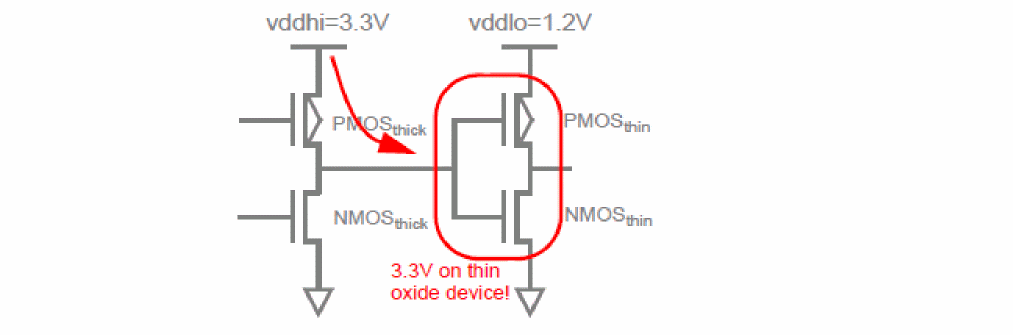
Arguments
Example
chk1 static_voltdomain model=[*]
The above command will check all instances of MOSFETS. The HighV Driving LowV table reports MOSFETs whose gate voltage is higher than the drain/source voltage. The LowV Driving HighV table reports MOSFETs whose gate voltage is lower than the drain/source voltage.
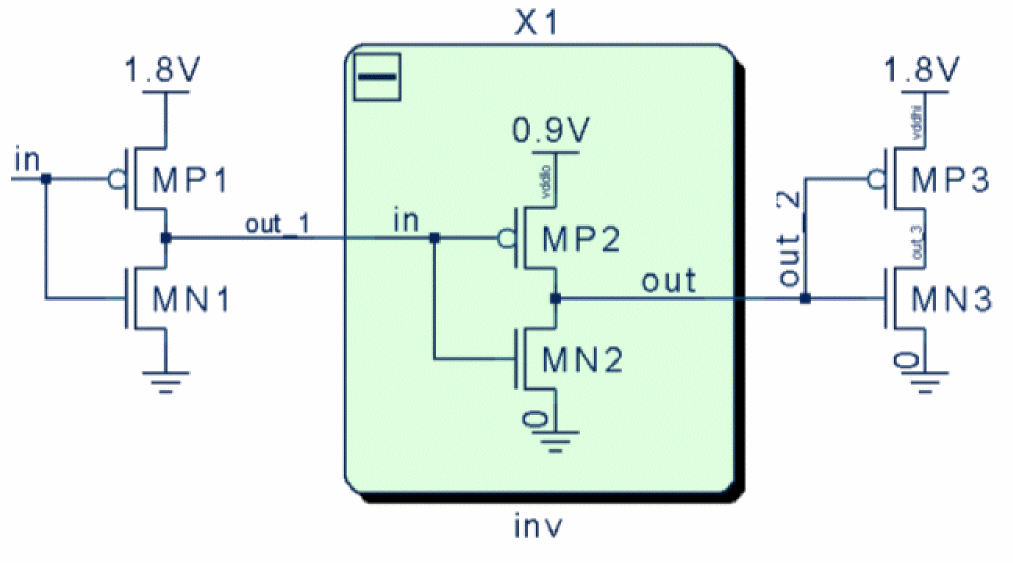
The following is an example of the report that is displayed in the Web browser:
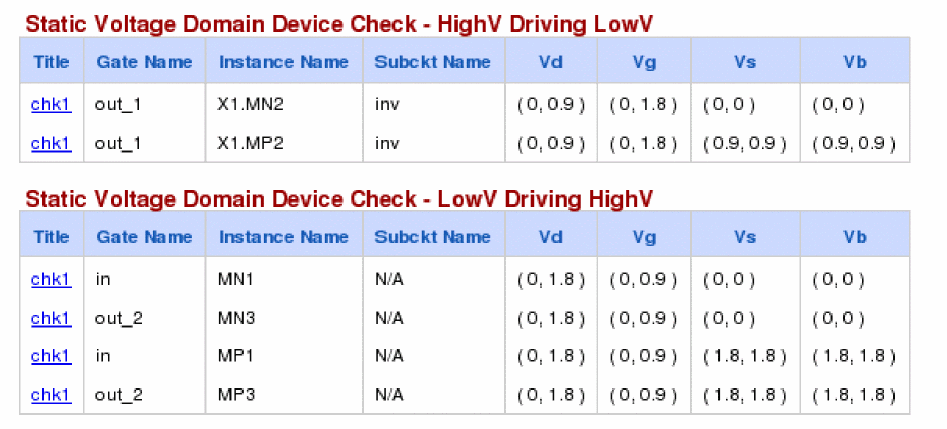
Note that the Subckt Name is the name of subcircuit containing the instance X1.MN2. This helps in locating level-shifters. If an instance is at the top-level then Subckt Name will show N/A.
Static Transmission Gate Check
Syntax
title static_tgate node=[n1 n2 ...] <inst=[inst1 inst2...]> <xinst=[xinst1 xinst2...]> <subckt=[subckt1 subckt2....]> <xsubckt=[xsubckt1 xsubckt2....]> <depth=n> error_limit=<value>
Description
Reports transmission gates which may cause potential leakage currents between power supplies. Such gates can be characterized by their node connectivity, based on the following:
- Nodes which connect to gate and NMOS drain/source terminals, but not to PMOS drain/source terminals
- Nodes which connect to gate and PMOS drain/source terminals, but not to NMOS drain/source terminals
The results are written to a file with the extension static.xml, which can be viewed with a Web browser.
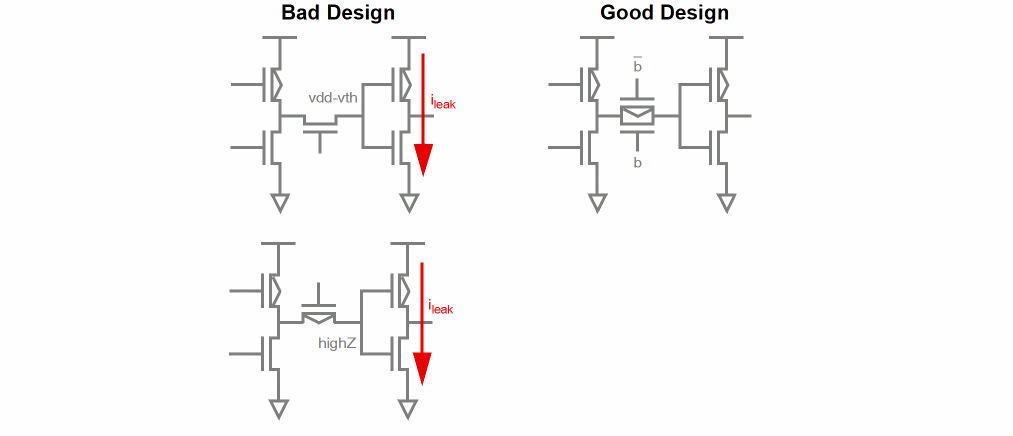
Arguments
Example
tgate1 static_tgate node=["*"]
The above command will report all nodes connecting to transmission gates that may cause design problems like leakage currents. The following is an example of the report that is displayed in the Web browser:
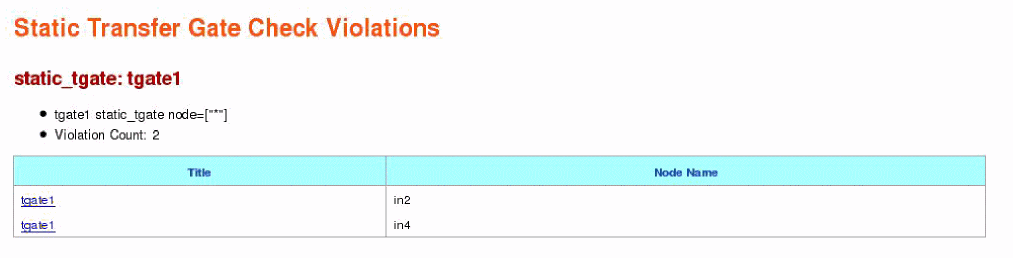
Static Always Conducting NMOS/PMOS Check (NMOS, PMOS)
Syntax
title static_nmosvgs model=[m1 m2 ...] vnth=<value> vpth=<value> vt=<value> <inst=[inst1 inst2...]> <xinst=[xinst1 xinst2...]> <subckt=[subckt1 subckt2....]> <xsubckt=[xsubckt1 xsubckt2....]> pwl_time=<value> vsrcnodefile=[[subckt]...] <depth=n> <rpt_node=no|all|top|selected> error_limit=<value>
title static_pmosvgs model=[m1 m2 ...] vnth=<value> vpth=<value> vt=<value> <inst=[inst1 inst2...]> <xinst=[xinst1 xinst2...]> <subckt=[subckt1 subckt2....]> <xsubckt=[xsubckt1 xsubckt2....]> pwl_time=<value> vsrcnodefile=[[subckt]...] <depth=n> <rpt_node=no|all|top|selected> error_limit=<value>
Description
Reports MOSFET devices potentially always conducting due to connectivity problems. The following conditions are checked, and an error is reported if they are fulfilled:
The results are written to a file with the extension static.xml, which can be viewed with a Web browser.

Arguments
Example
mos1 static_nmosvgs model="nmos" vt=0.5
The above command will check all instances of the nmos device for a potential "always on" state. The NMOS vt is defined with 500mV.
The following is an example of the report that is displayed in the Web browser:
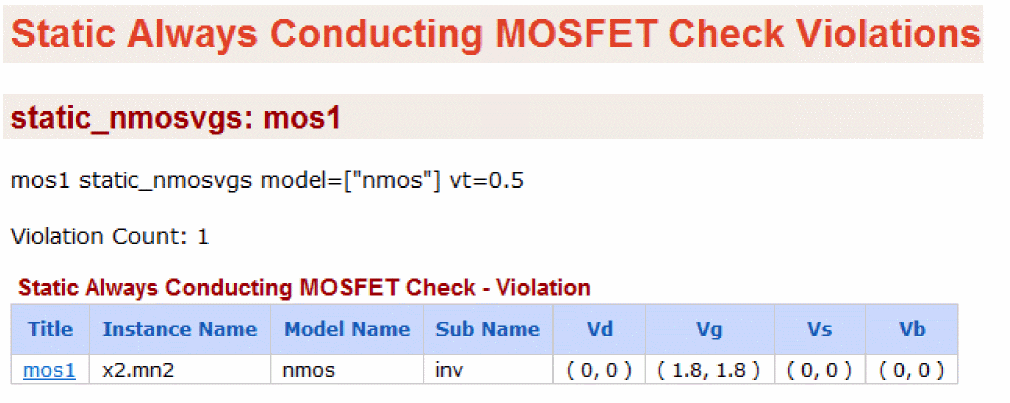
Static MOSFET Voltage Check
Syntax
title static_mosv model=[m1 m2 ...] cond=<expression> <rpt_node=no|all|top|selected> vnth=<value> vpth=<value> pwl_time=<value> vsrcnodefile=[[subckt]...] vsrcnodefile=[[subckt1] "NV_FILE1" [subckt2 "NV_FILE2" subckt3 "NV_FILE3" …]]] error_limit=<value> <inst=[inst1 inst2...]> <xinst=[xinst1 xinst2...]> <subckt=[subckt1 subckt2....]> <xsubckt=[xsubckt1 xsubckt2....]> <depth=n>
Description
Reports MOSFET devices fulfilling the conditional expression on device voltages and device size (w, l).
Supported MOSFET variables are: v(g,s), v(g,d), v(g,b), v(d,s), v(d,b), v(s,b), v(g), v(d), v(s), v(b), l, and w.
Supported operators are: +, -,*, /, ==,!=, <, <=, >, >=,||, &&, and !.
The results are written to a file with the extension static.xml, which can be viewed with a Web browser.

Design Check Parameters
Digitize Parameters
Filtering Parameters
Wildcard Scoping
Example
mos1 static_mosv model="nmos" cond="v(g,s)>1.9"
The above command will report the instances of nmos that fulfill the condition v(g,s)>1.9.
The following is an example of the report that is displayed in the Web browser:
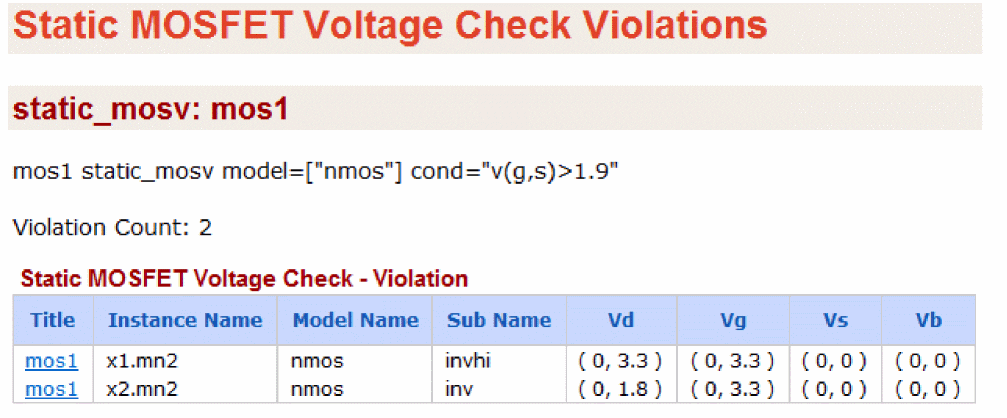
Static Resistor Voltage Check
Syntax
title static_resv cond=<expression> <inst=[inst1 inst2...]> vnth=<value> vpth=<value> <xinst=[xinst1 xinst2...]> <subckt=[subckt1 subckt2....]> <xsubckt=[xsubckt1 xsubckt2....]> pwl_time=<value> vsrcnodefile=[[subckt]...] <depth=n> <rpt_node=no|all|top|selected> error_limit=<value>
Description
Reports resistor elements fulfilling the conditional expression on device voltages.
Supported resistor variables are: v(1,2), v(1), and v(2).
Supported operators are: +, -,*, /, ==,!=, <, <=, >, >=,||, &&, and !.
The results are written to a file with the extension static.xml, which can be viewed with a Web browser.

Arguments
Example
resv1 static_resv cond="v(1,2)>0
The above command will report the resistor elements that fulfill the condition v(1,2)>0.
The following is an example of the report that is displayed in the Web browser:
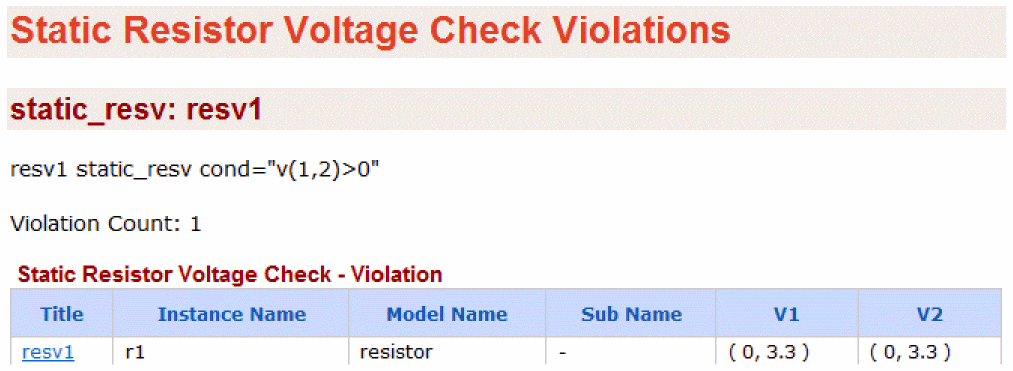
Static Capacitor Voltage Check
Syntax
title static_capv cond=<expression> <inst=[inst1 inst2...]> vnth=<value> vpth=<value> <xinst=[xinst1 xinst2...]> <subckt=[subckt1 subckt2....]> <xsubckt=[xsubckt1 xsubckt2....]> pwl_time=<value> vsrcnodefile=[[subckt]...] <depth=n> <rpt_node=no|all|top|selected>
error_limit=<value>
Description
Reports capacitor elements fulfilling the conditional expression on device voltages.
Supported capacitor variables are: v(1,2), v(1), and v(2).
Supported operators are: +, -,*, /, ==,!=, <, <=, >, >=,||, &&, and !.
The results are written to a file with the extension static.xml, which can be viewed with a Web browser.

Arguments
Example
capv1 static_capv cond="v(1,2)>0
The above command will report the capacitor elements that fulfill the condition v(1,2)>0.
The following is an example of the report that is displayed in the Web browser:
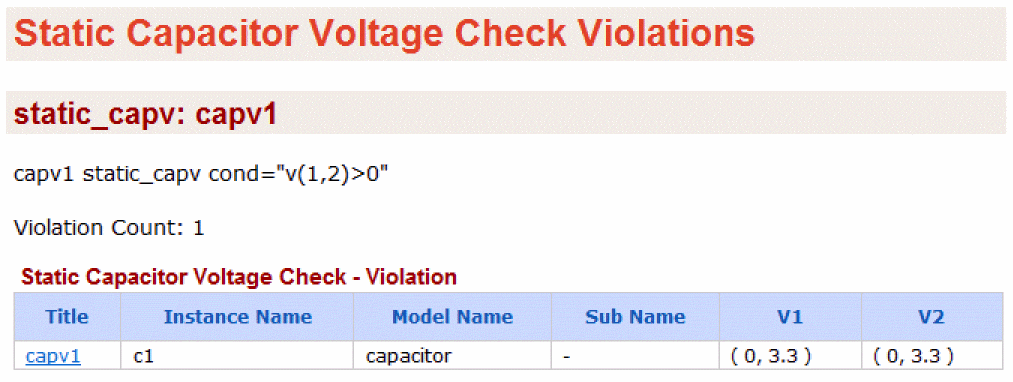
Static Diode Voltage Check
Syntax
title static_diodev model=[m1 m2 ...] cond=<expression> vnth=<value> vpth=<value> <inst=[inst1 inst2...]> <xinst=[xinst1 xinst2...]> <subckt=[subckt1 subckt2....]> <xsubckt=[xsubckt1 xsubckt2....]> pwl_time=<value>
vsrcnodefile=[[subckt]...]<depth=n> <rpt_node=no|all|top|selected>
error_limit=<value>
Description
Reports diode elements fulfilling the conditional expression on device voltages.
Supported diode variables are: v(a,c), v(a), and v(c).
Supported operators are: +, -,*, /, ==,!=, <, <=, >, >=,||, &&, and !.
The results are written to a file with the extension static.xml, which can be viewed with a Web browser.

Arguments
Example
dv1 static_diodev model=["diode1"] cond="v(a,c)>0"
The above command will report the instances of diode1 that fulfill the condition v(a,c)>0. The following is an example of the report that is displayed in the Web browser:
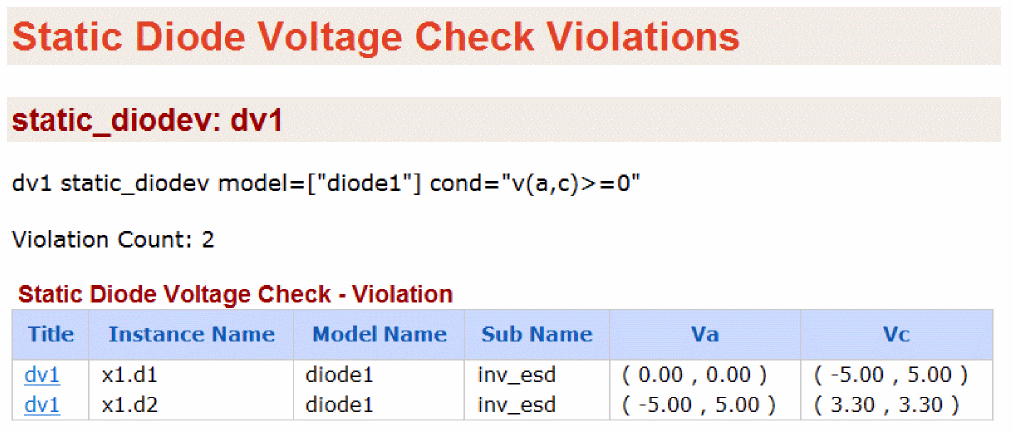
Static Resistor Check
Syntax
title static_resistor type=[range|distr|print] rmin=<value> rmax=<value> error_limit=<value>
Description
Reports all resistors within or outside the range rmin and rmax. Moreover, it also generates a distribution list of all resistors in the circuit.
If the parameter type is set to range, then all resistors outside the range of rmin and rmax will be reported.
If the parameter type is set to print, then all resistors between rmin and rmax will be reported. The resistor names can be sorted by clicking the Device name header.
If the parameter type is set to distr then a distribution report will be generated for all resistors. There are 12 bins that are:
-Inf - 0, 0 - 1m, 1m - 10m, 10m - 0.1, 0.1 - 1, 1 - 10, 10 - 100, 100 - 1k, 1k - 10k, 10k - 100k, 100k - 1Meg, and1Meg - Inf
However, if two or more consecutive bins are empty then they will merge into one bin, reducing the number of bins. The parameters rmin, rmax and error_limit are ignored when the parameter type is set to distr.
The results are written to a file with the extension static.xml, which can be viewed with a Web browser.
Arguments
Example
chk1 static_resistor type=distr
The simulator generates a resistor value distribution report, as shown below.
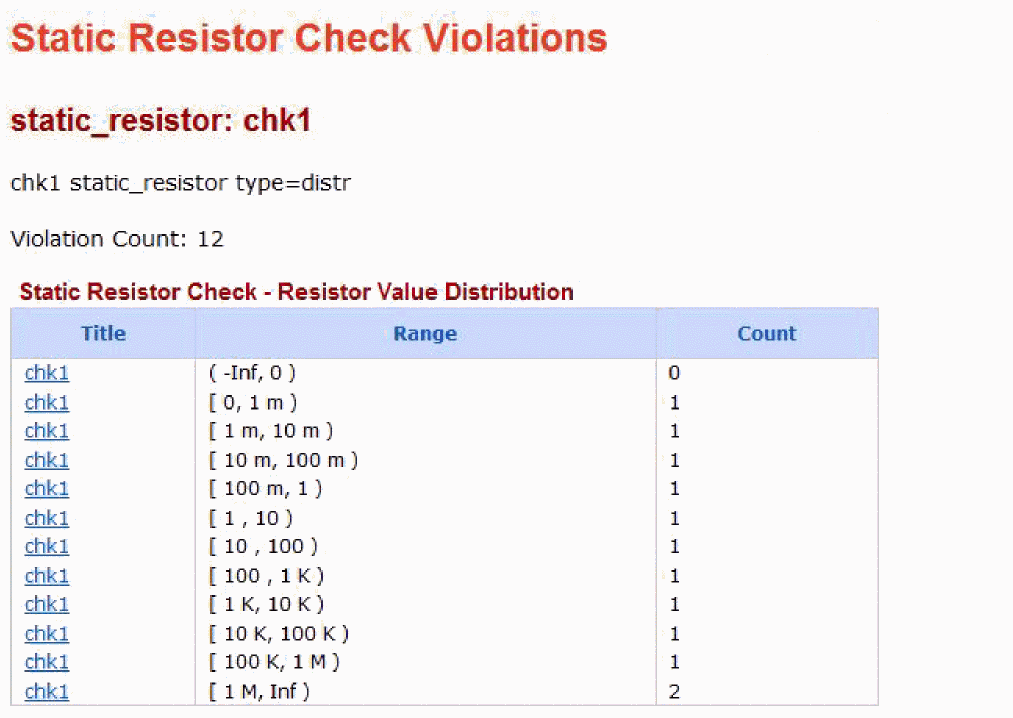
Static Capacitor Check
Syntax
title static_capacitor type=[range|distr|print] cmin=<value> cmax=<value> error_limit=<value>
Description
Reports all capacitors within or outside the range cmin and cmax. Moreover, it also generates a distribution list of all capacitors in the circuit.
If the parameter type is set to range, then all capacitors outside the range of cmin and cmax will be reported.
If the parameter type is set to print, then all capacitors between cmin and cmax will be reported. The capacitor names can be sorted by clicking the Device name header.
If the parameter type is set to distr, then a distribution report will be generated for all capacitors. There are 9 bins that are:
-Inf - 0, 0 - 10a, 10a - 100a, 100a - 1f, 1f - 10f, 10f - 100f, 100f - 1p, 1p - 10p, 10p - Inf
However, if two or more consecutive bins are empty then they will merge into one bin, reducing the number of bins. The parameters cmin, cmax, and error_limit are ignored when the parameter type is set to distr.
The results are written to a file with the extension static.xml, which can be viewed with a Web browser.
Arguments
Example
chk1 static_capacitor type=distr
The simulator reports a capacitor distribution based on their value, as shown below.
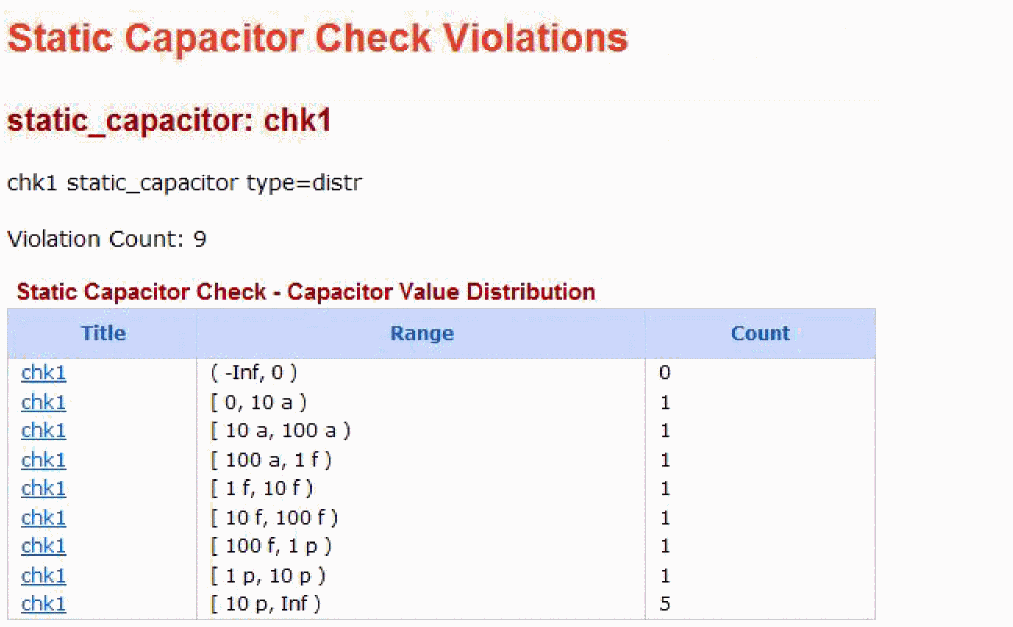
Static ERC Check
Syntax
title static_erc hotwell=[off|on] dangle=[off|all|no_top] floatgate=[off|all|no_top|no_moscap|no_top_moscap|pode] <gate2power=off|on> <gate2ground=on|off> floatbulk=[off|all|no_top <inst=[inst1 inst2...]> vnth=<value> vpth=<value> vlth=<value> vhth=<value> pwl_time=<value> vsrcnodefile=[[subckt]...] <xinst=[xinst1 xinst2...]> <subckt=[subckt1 subckt2....]> <xsubckt=[xsubckt1 xsubckt2....]> error_limit=<value> <depth=n> <rpt_node=no|all|top|selected>
Description
Enables you to detect the following electrical design rule violations without running the simulation:
- MOSFET with bulk not hard-wired to power supply.
- Unconnected MOSFET gate.
- Unconnected MOSFET bulk.
- Dangling node.
The results are written to a file with the extension static.xml, which can be viewed with a Web browser.
Arguments
Example
chk1 static_erc floatgate=all
The above command reports all MOSFETs with a floating gate.
The following is an example of the report that is displayed in the Web browser:
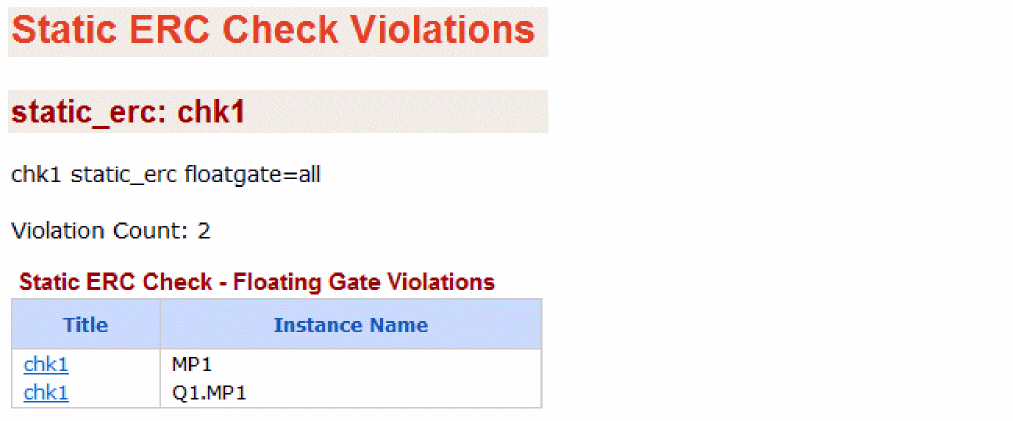
Static RC Delay Check
Syntax
title static_rcdelay node=[n1 n2 ...] <detailed_path=[yes|no]> fanoutmargin=[lower_marginhigher margin] cmin=<value> maxnrise=<value> minnrise=<value> maxnfall=<value> minnfall=<value> maxtrise=<value> mintrise=<value> maxtfall=<value> mintfall=<value> <inst=[inst1 inst2...]> <xinst=[xinst1 xinst2...]> <subckt=[subckt1 subckt2....]> <xsubckt=[xsubckt1 xsubckt2....]> <depth=n>
Description
Reports nodes with excessive rise or fall times. Rise and fall times are based on estimation.
The static_rcdelay check analyzes only the fanout nodes. It does not check nodes that connect to MOSDIODEs or MOSCAPs. The check reports either the top worst case rise/fall times (maxnrise, maxnfall) or nodes with rise/fall times above the user-defined thresholds (maxtrise, maxtfall). In addition, the check reports the driving MOSFETs and the receiving MOSFET (gate connected to the analyzed node) for each node.
For postlayout netlist, the check supports only the backannotation (stitching) flow.
The results are reported into a file with the extension static.xml, which can be read with a Web browser.
Arguments
Example
chk static_rcdelay node=[*] maxnrise=10 cmin=1e-14 detailed_path=no
The above command will estimate the RC delay for all nodes. It will report four tables, one table for each parameter. It will report the maximum (highest) two rise delays.
The following is an example of the report that is displayed in the Web browser:
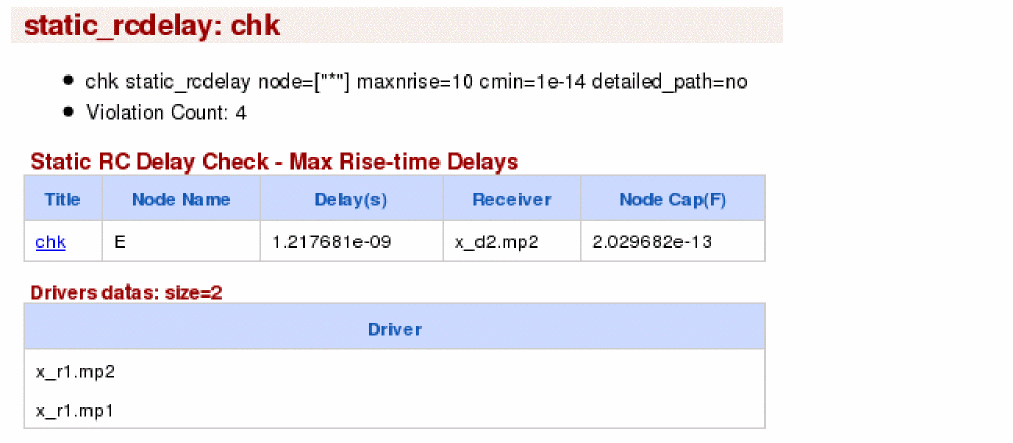
Static Subcircuit Port Voltage Check
Syntax
title static_subcktport cond=<expression> vnth=<value> vpth=<value> subckt=<value> pwl_time=<value> vsrcnodefile=[[subckt]...] error_limit=<value>
Description
Reports instances of the user-specified subckt fulfilling the conditional expression on port voltages. Only one subcircuit is allowed per statement.
Voltages of a port can be referenced by the port name of a subcircuit. For example, consider the subcircuit definition .subckt INV port_A port_B. Here, supported port names are: v(port_A), v(port_B) and v(port_A,port_B).
Supported operators are: +, -,*, /, ==,!=, <, <=, >, >=,||, &&, and !.
All design instances of the subcircuit, specified using subckt are checked.
The results are written to the static.xml file, which can be viewed in a Web browser.
Arguments
Example
sp1 static_subcktport subckt="decand3_pre" cond="v(Z)>1.7"
The above command will report all instances satisfying the condition v(Z)>1.7. The following is an example of the report that is displayed in the Web browser:
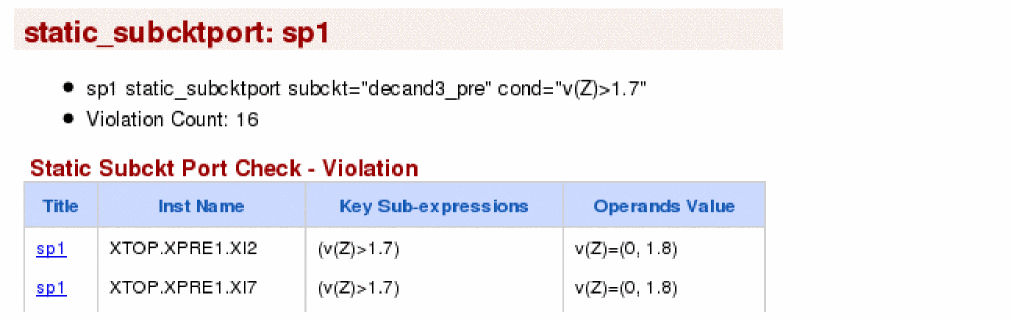
Static Stack Count
Syntax
title static_stack model=<expression> count=<value> <inst=[inst1 inst2...]> <xinst=[xinst1 xinst2...]> <subckt=[subckt1 subckt2....]> <xsubckt=[xsubckt1 xsubckt2....]> <depth=n> error_limit=<value>
Description
This check counts PMOS and NMOS transistor stacks and then reports stacks larger than specified count.
The results are written to the static.xml file, which can be viewed in a Web browser.
Arguments
Example
Consider the following example design:
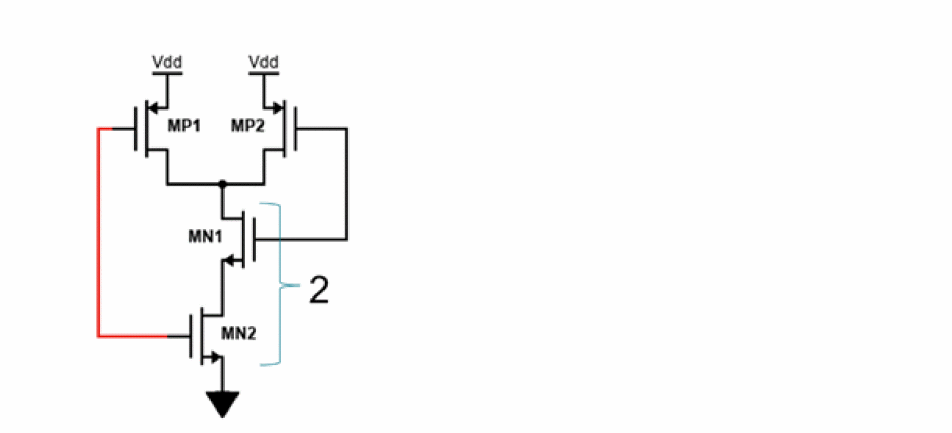
For this design, the following command checks stacks consisted of nch and reports if the stack count is more that 1:
chk2 static_stackcount=1 model=[nch]
The report is displayed in the Web browser, as shown below.
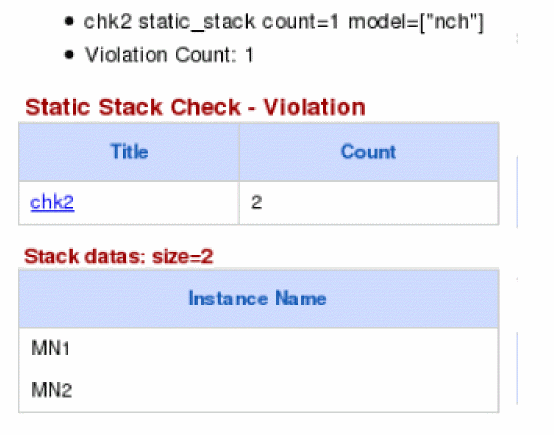
Static Coupling Impact Check
Syntax
title static_coupling node=[n1 n2 ...] vnth=<value> vpth=<value> <inst=[inst1inst2...]> <xinst=[xinst1 xinst2...]> <subckt=[subckt1 subckt2....]> <xsubckt=[xsubckt1 xsubckt2....]> pwl_time=<value> <vsrcnodefile=[[subckt]...] depth=n> error_limit=<value>
Description
Evaluates the possible coupling effects in the circuit.
For each victim node, the check identifies its coupling impact from aggressor(s) by dividing the total charge of the aggressor with its node capacitance (including cc+gc+device cap). The charge of each aggressor is calculated by multiplying the voltage level of the coupling aggressors (using Vmax for worst case analysis) with the coupling capacitance. In this check, only the capacitors written in netlist are counted.
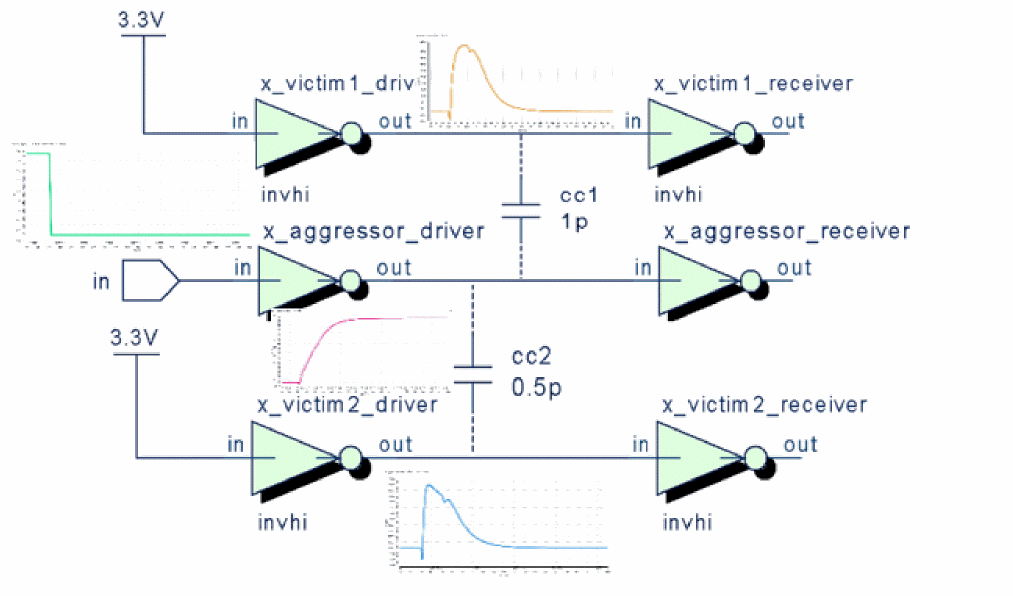
The results are written to a file with the extension static.xml, which can be viewed with a Web browser.
Arguments
Example
coup static_coupling node=[*]
The above statement reports all victims that are impacted by aggressors. The following is an example of the report that is displayed in the Web browser:
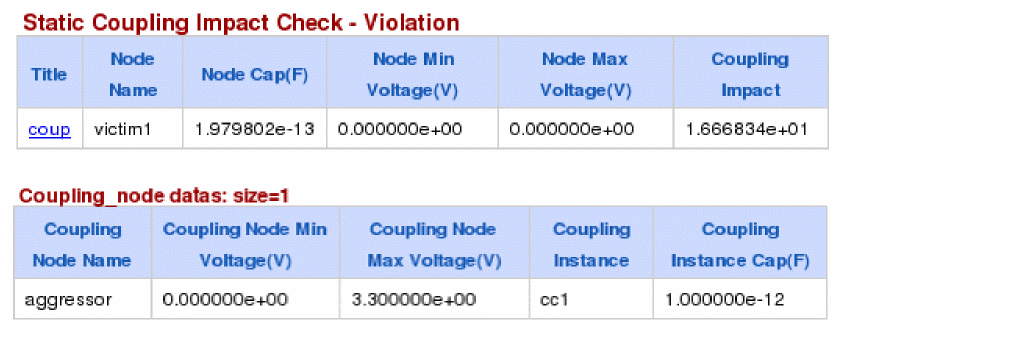
This report has the following two sections:
- The first section displays the node name of the victim. Next, the node capacitance (with respect to ground) of the victim is shown. The min/max voltage columns display the possible voltage range for this node. The coupling impact is a gauge used to measure the coupling impact of aggressor(s) on the victim. The coupling impact is a relative term and does not have any physical meaning.
- The second section displays the list of aggressors. The min/max voltage columns display the possible voltage range for this node. The coupling instance name (and its capacitance) is the capacitor connected between the aggressor and the victim. This section can have multiple rows for multiple aggressors.
Static PMOS to GND Count Check
Syntax
title static_pmos2gnd node=[n1 n2 ...] count=<value> <inst=[inst1 inst2...]> <xinst=[xinst1 xinst2...]> <subckt=[subckt1 subckt2....]> <xsubckt=[xsubckt1 xsubckt2....]> <depth=n> error_limit=<value>
Description
Counts unpaired PMOS in the discharging path from a fanout node to GND and reports paths having PMOS count greater than the specified count.
The check only analyzes the fanout nodes. It does not check the nodes connecting only to MOSDIODEs or MOSCAPs.
The check counts PMOS from a fanout node to gnd. It does not include PMOS in the count under the following conditions but does report them.
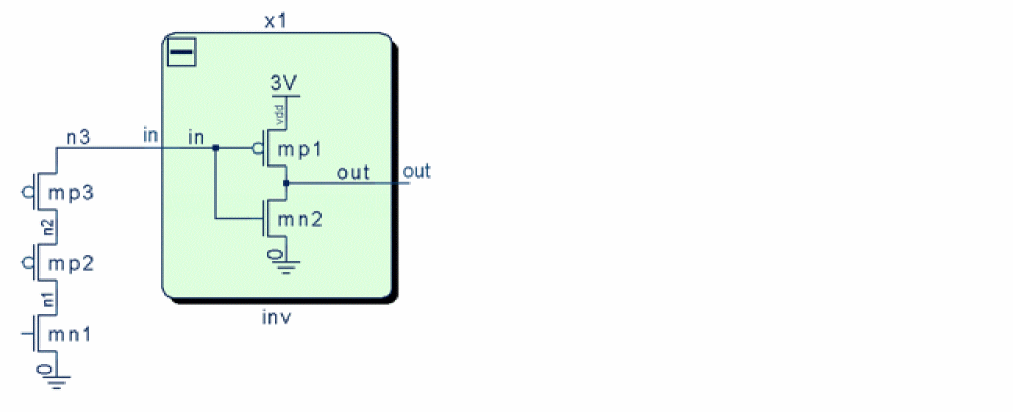
The results are written to the static.xml file, which can be viewed in a Web browser.
Arguments
Example
chk1 static_pmos2gnd node=[*] count=0
The above statement reports all paths from all fanout nodes having PMOS count greater than 0. The following is an example of the report that is displayed in the Web browser:
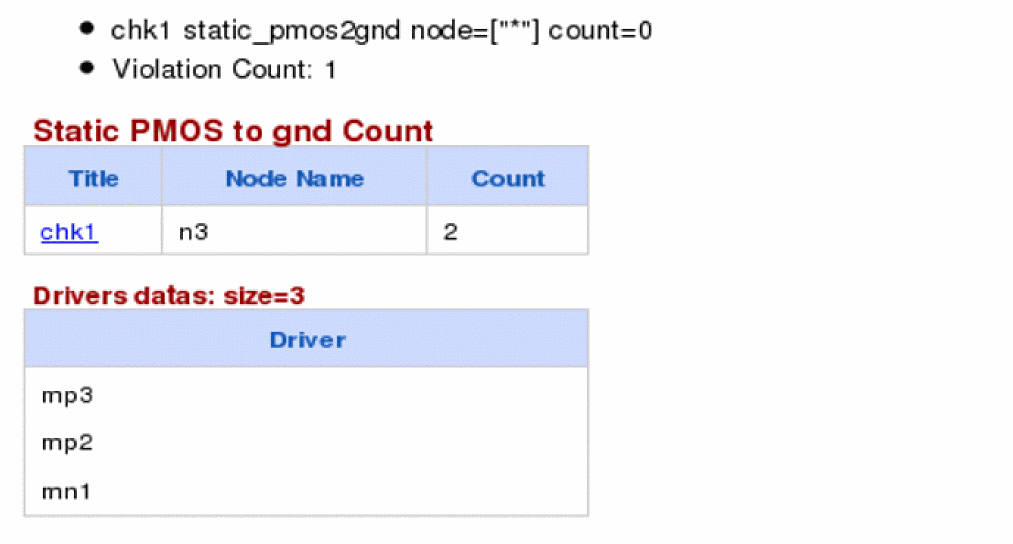
It reports one path from fanout n3 to gnd. The number of PMOS found in this path is two. Note that mn1 is an NMOS therefore does not contribute in the count.
Static NMOS to VDD Count Check
Syntax
title static_nmos2vdd node=[n1 n2 ...] count=<value> <inst=[inst1 inst2...]> <xinst=[xinst1 xinst2...]> <subckt=[subckt1 subckt2....]> <xsubckt=[xsubckt1 xsubckt2....]> <depth=n> error_limit=<value>
Description
Counts unpaired NMOS in the charging path from a fanout node to VDD and reports paths having NMOS count greater than the specified count
The check only analyzes the fanout nodes. It does not check the nodes connecting only to MOSDIODEs or MOSCAPs.
The check counts NMOS from a fanout node to VDD. It does not include NMOS in the count under the following conditions but does report them.
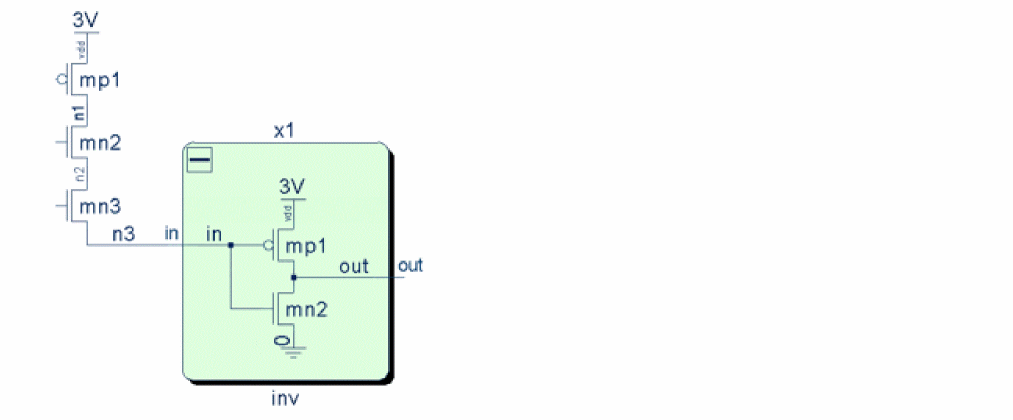
The results are written to the static.xml file, which can be viewed in a Web browser.
Arguments
Example
chk1 static_nmos2vdd node=[*] count=1
The above statement reports all paths from all fanout nodes having NMOS count greater than 1. The following is an example of the report that is displayed in the Web browser:
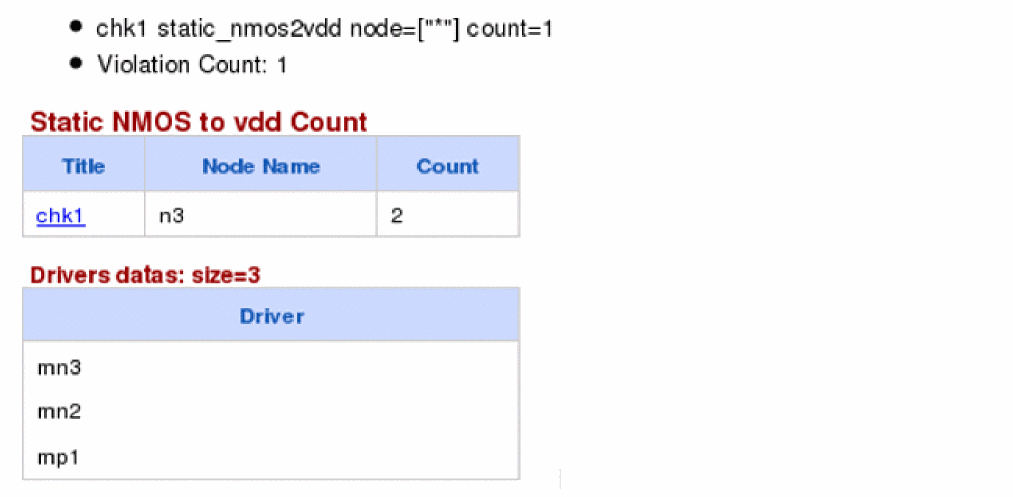
It reports one path from fanout n3 to vdd. The number of NMOS found in this path is two. Note that mp1 is a PMOS therefore does not contribute in the count.
Static Highfanout Check
Syntax
title static_highfanout node=[n1 n2 ...] upth=<value> downth=<value> rcut=<value> <inst=[inst1 inst2...]> <xinst=[xinst1 xinst2...]> <subckt=[subckt1 subckt2....]> <xsubckt=[xsubckt1 xsubckt2....]> <depth=n> error_limit=<value>
Description
The static_highfanout check detects MOSFETs that have a gate connected to a high fanout node. The check reports nodes that have a count greater than the specified count.
The results are written to the static.xml file, which can be viewed in a Web browser.
Arguments
Example
chk1 static_highfanout node=["*"] upth=10 downth=20
The above statement reports pMOSFETs whose loading-width to driving-width ratio is more than 10. In addition nMOSFETs whose loading-width to driving-width ratio is more than 20 are reported. The report includes the violation type, displaying if it is a pull-up violation, pull-down violation, or both.
The following is an example of the report that is displayed in the Web browser:
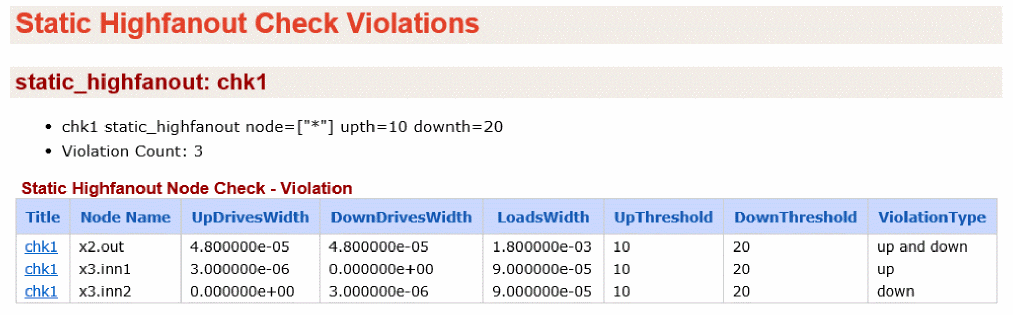
Workshop
A workshop or rapid adoption kit (RAK) is available that demonstrates the static and dynamic checks in Spectre. This RAK/workshop can be accessed from the following locations:
-
Cadence support website http://support.cadence.com
Go to Support Home > Resources > Rapid Adoption Kits > Virtuoso Custom IC and Sign-off Flow > Static and Dynamic Checks -
SPECTRE installation
Go to<SPECTRE_install_dir>/tools.lnx86/spectre/examples/SpectreCircuitChecks
Return to top