
Design Partition Options in Designer Mode
The following design partition options are available:
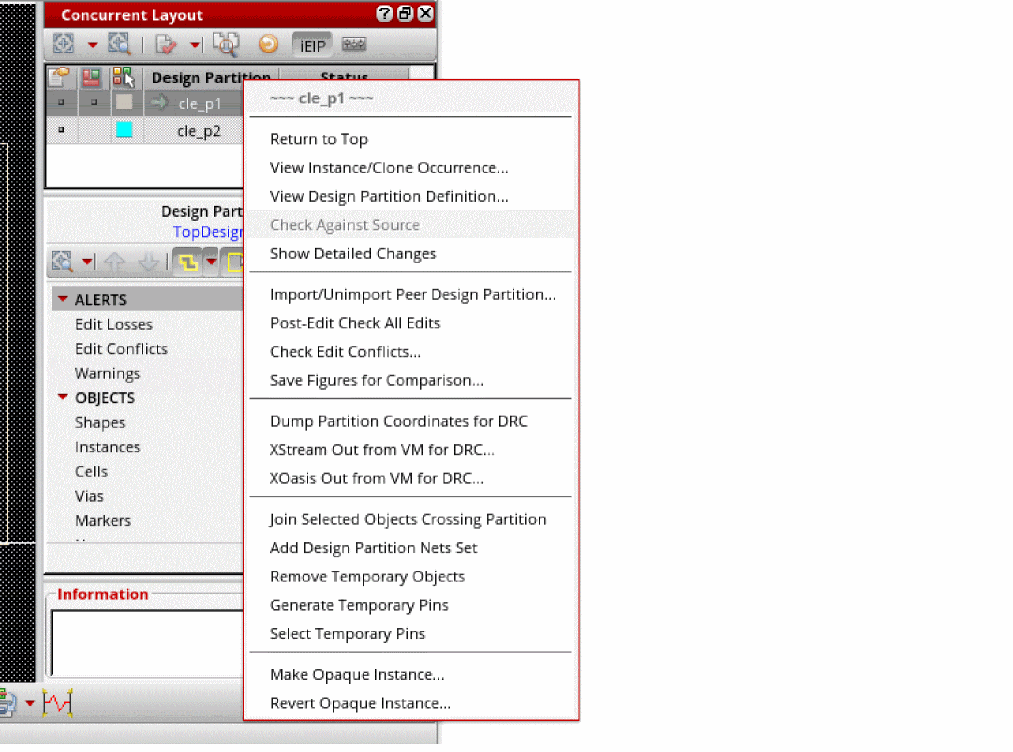
|
Saves the edits made and returns to the top design. |
|
|
Displays the View Instance Occurrence Form or View Clone Occurrence Form that lets you view occurrences of an instance or a clone in the design hierarchy. |
|
|
Displays the View Design Partition Form that lets you check design partition definitions. |
|
|
Returns to edit in the figure group of an object-based design partition. The option is available when you return from the figure group of the design partition to the top level. |
|
|
Displays the Import Peer Design Partition Form form that lets you import updates made by a peer designer in your Design Partition view. |
|
|
Touches all changed objects to allow the interactive checkers, such as post-edit DRD or connectivity extraction, to verify these edits. |
|
|
Displays the Check Edit Conflicts Form form that lets you view a log file that lists any edit conflicts that might have occurred due to changes made in the selected design partition. |
|
|
Displays the Save Figures for Comparison Form form that lets you specify the views that you want to save and compare the updates made. |
|
|
Generates the window rule file to restrict the batch Pegasus or PVS to check only within the design partition area. |
|
|
Translates the current design partition view to a stream file from virtual memory for running DRC checks. |
|
|
Translates the current design partition view to an OASIS file from virtual memory for running DRC checks. |
|
|
Switches to the Navigator assistant and displays the list of nets crossing or inside the current design partition under the CONCURRENT LAYOUT category. |
|
|
Deletes temporary objects, such as virtual pins created by Virtuoso Space-based Router (VSR) for routing inside area boundaries of the design partition. |
|
|
Generates temporary pins at the area boundaries of the design partitions. |
|
|
Selects all temporary pins for deleting or cross-selecting their nets. |
|
|
Displays the Make Opaque Form that lets you convert instance selected in the design to opaques instances. |
|
|
Displays the Revert Opaque Instances Form that lets you convert selected opaque instances into normal instances. |
Related Topics
Concurrent Layout Toolbar in Designer Mode
Design Partition View Contents Section in Designer Mode
Return to top