
Fluid Guard Ring Frequently Asked Questions
This document contains the following frequently asked questions and answers related to fluid guard ring (FGR):
- Which technology rules are used for installing FGRs?
- Which technology rules are used for creating FGRs?
- Which technology rules are used while editing FGRs?
- How can geometry changes be avoided when existing FGRs are opened in a new Virtuoso release?
- Why do contacts at the corners of an FGR instance disappear in releases above IC6.1.5 ISR14?
- Why are the contacts inconsistently distributed in some areas when two or more FGRs are merged?
- Can an FGR device hidden from the Install Guard Ring form be re-installed?
- Can an FGR device hidden from the Create Guard Ring form be re-installed from the Install Guard Ring form?
- Is it possible to install an FGR device with implant layer enclosure value less than technology default?
- What should I do if a third party tool issues error and warning messages while using a customized FGR?
- Can I make changes to the procedure for initializing customized FGR devices?
- Is it acceptable to call the procedure for initializing customized FGR devices from a file other than libInit.il?
- Do the fields displayed on the Create Guard Ring form have corresponding prompt names?
Advanced Nodes Only Features
Which technology rules are used for installing FGRs?
The following table lists the technology rules that are applicable during FGR installation:
| Install Guard Ring Form Field | Applicable Technology Rule(s) |
|
viaSpacing(4 …) |
|
|
Maximum of minOppExtension rule (a, b) |
|
Which technology rules are used for creating FGRs?
The following table lists the technology rules that are applicable during the creation of an FGR:
| Create Guard Ring Form Field | Applicable Technology Rule(s) |
|
viaSpacing(4 …) |
|
|
minOppExtension rule (a, b) |
|
The other technology rules that are considered while creating a FGR include:
For more details on the technology rules considered for creating the FGR instances, refer to the Technology Rules Considered During Fluid Guard Ring Creation section in the Creating Fluid Guard Rings chapter of the Virtuoso Fluid Guard Ring User Guide.
Which technology rules are used while editing FGRs?
While editing an FGR, the following technology rules, which are also applicable during FGR creation, are used:
|
viaSpacing of Cut layer |
|
minSpacing(One layer) of Cut layer |
|
minWidth of Cut layer |
|
maxWidth of Cut layer |
In addition, while using an overlapping shape to create a tunnel through an FGR, the following table rules are considered:
For detailed information, refer to the Creating Tunnel By Using an Overlapping Shape section in the Editing Fluid Guard Rings chapter of the Virtuoso Fluid Guard Ring User Guide.
How can geometry changes be avoided when existing FGRs are opened in a new Virtuoso release?
Virtuoso evaluates FGRs, which are fluid pcells, dynamically. Opening a layout containing FGRs in a newer release of Virtuoso may result in geometry changes in the existing FGRs, due to bug fixes or enhancements implemented in the FGR code of the newer release of Virtuoso.
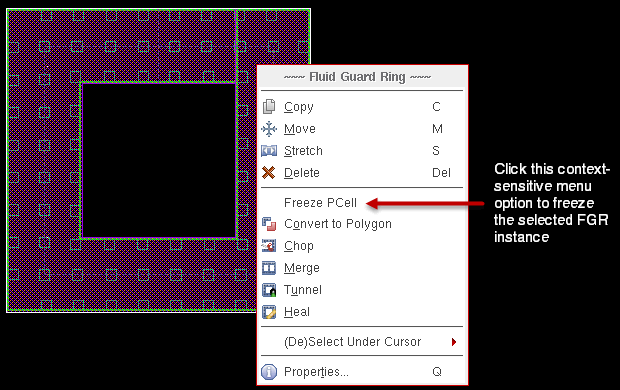
To avoid such geometry changes, you can use the leFreezeInst function to convert an FGR instance to a non-fluid pcell instance of a new master created on the disk. Alternatively, you can achieve this by choosing Freeze PCell from the context-sensitive menu displayed when you select an FGR instance and right-click on it.
Why do contacts at the corners of an FGR instance disappear in releases above IC6.1.5 ISR14?
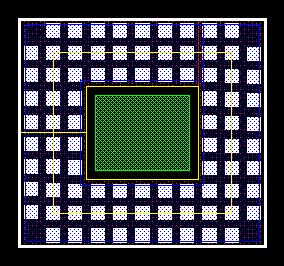
Until IC6.1.5 ISR14, you could see the contacts placed at the corners of all FGR instances in the design. This is because if rules similar to the following were found in the technology file, the FGR instance was not created using the smaller of the two minOppExtension values for its enclosure:
(minOppExtension "Metal1" "Cont" (0.01 0.06))
However, from IC6.1.5 ISR15 onwards, you might not see the contacts at the corners of newly created FGR instances. The following image illustrates an FGR where the contacts from the corners were removed:
For detailed information, refer to the Using minOppExtension for Placing Contacts in the Corners of a Fluid Guard Ring section in the Creating Fluid Guard Rings chapter of the Virtuoso Fluid Guard Ring User Guide.
Why are the contacts inconsistently distributed in some areas when two or more FGRs are merged?
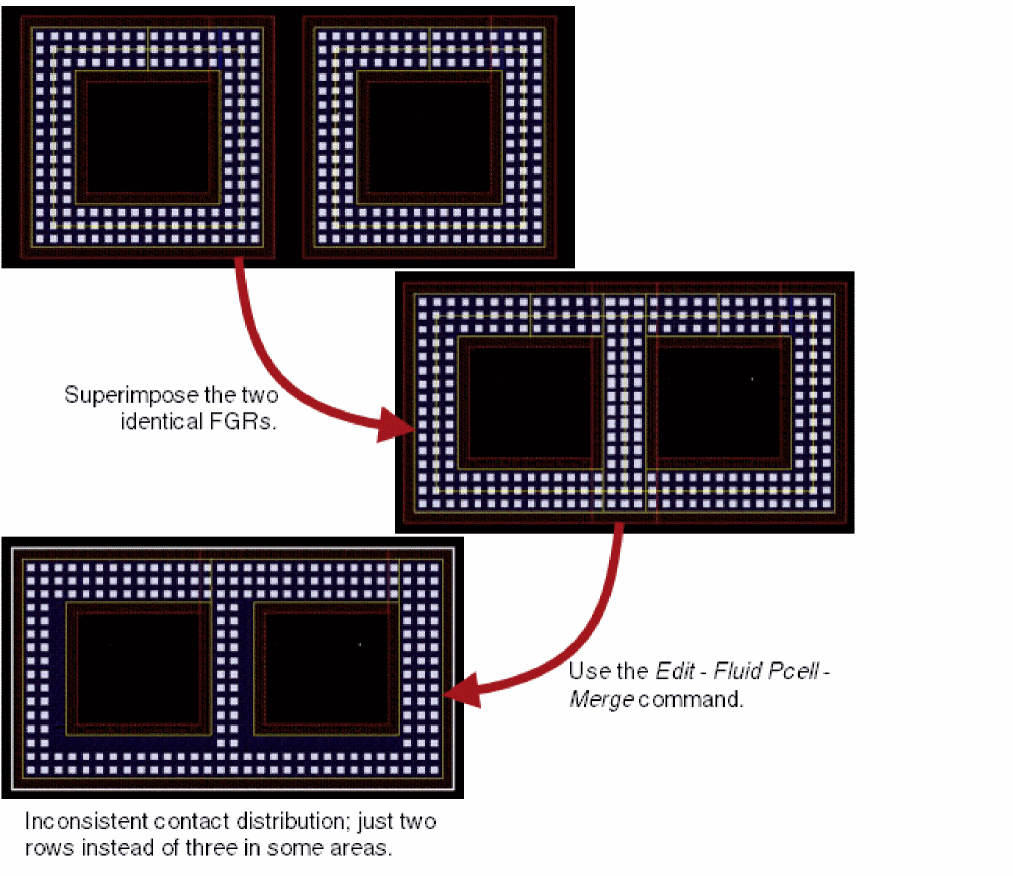
Suppose, you have two identical FGRs with three rows of contacts each. When you superimpose these (as shown in the figure below), you can see some contacts that coincide partially or wholly.
If you use the Edit – Fluid Pcell – Merge command on these superimposed FGRs, some sections of the resulting merged FGR have only two columns of contacts in some sections.
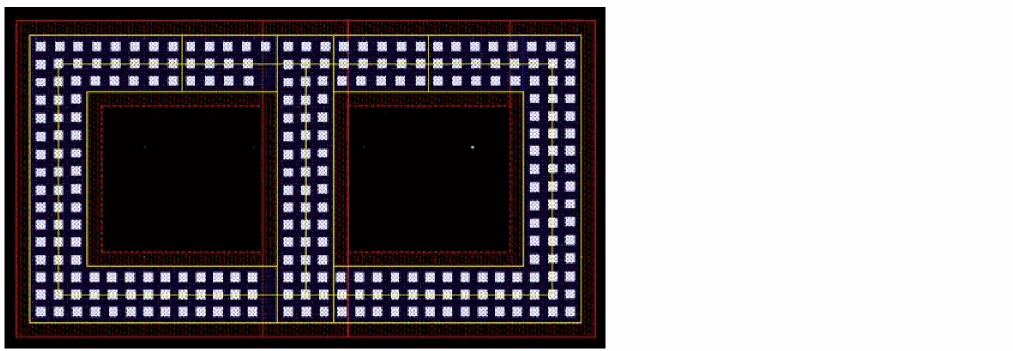
In such scenarios, to get the correct contact distribution as shown below, it is recommended you use the Edit – Fluid Pcell – Clean Overlapping Contacts command instead.
Can an FGR device hidden from the Install Guard Ring form be re-installed?
FGR devices can be hidden from the Install Guard Ring form using the device hiding techniques described in the Hiding Fluid Guard Ring Devices appendix of Virtuoso Fluid Guard Ring User Guide.
While trying to install a hidden FGR device, the following happens:
- A prompt message is displayed stating that the FGR device is already installed and is hidden.
- You are not allowed to re-install the hidden FGR device.
To re-install such FGR devices, first remove the associated vfoGRHideDeviceInForms property from the technology file and then reload the file in Virtuoso. Alternatively, you can use the dbDeletePropByName SKILL function in the CIW and then run the dbSave SKILL function to set the modified setting.
Can an FGR device hidden from the Create Guard Ring form be re-installed from the Install Guard Ring form?
You can re-install an FGR device that was initially hidden from the Create Guard Ring form, but this makes it visible on the form once again. In addition, this might result in geometry changes to the existing instances of the FGR device in the layout. A question message is displayed seeking your confirmation to continue updating the FGR device. You can choose to click the Yes or No button on the message.
Is it possible to install an FGR device with implant layer enclosure value less than technology default?
You can install an FGR with the implant layer enclosure value less than the default set in the technology file.
What should I do if a third party tool issues error and warning messages while using a customized FGR?
A third party tool issues error and warning messages when it is unable to access SKILL and SKILL++ code files written for a customized FGR and thus fails to evaluate it. To allow use of customized FGRs in third party tools, you need to manually load the .il and context files that have the VFO infrastructure definitions as explained in the Loading VFO Infrastructure in Third Party Tools appendix of Virtuoso Fluid Guard Ring User Guide.
Can I make changes to the procedure for initializing customized FGR devices?
The procedure for initializing customized FGR devices should not be changed. Use it exactly as given in the Procedure for Initializing Customized FGR Devices section of the Loading VFO Infrastructure in Third Party Tools appendix.
Is it acceptable to call the procedure for initializing customized FGR devices from a file other than libInit.il?
Ensure the procedure for initializing customized FGR devices is called only from the libInit.il file.
Do the fields displayed on the Create Guard Ring form have corresponding prompt names?
The fields displayed on the Create Guard Ring form have associated prompt names that can be used with the promptName argument of the vfoGRSetCreateFormFieldProp and vfoGRGetCreateFormFieldProp SKILL functions. For a list of valid prompt names, refer to the Create Guard Ring Form Field Names and Associated Prompt Names section of the
Advanced Node Features (Advanced Nodes Only)
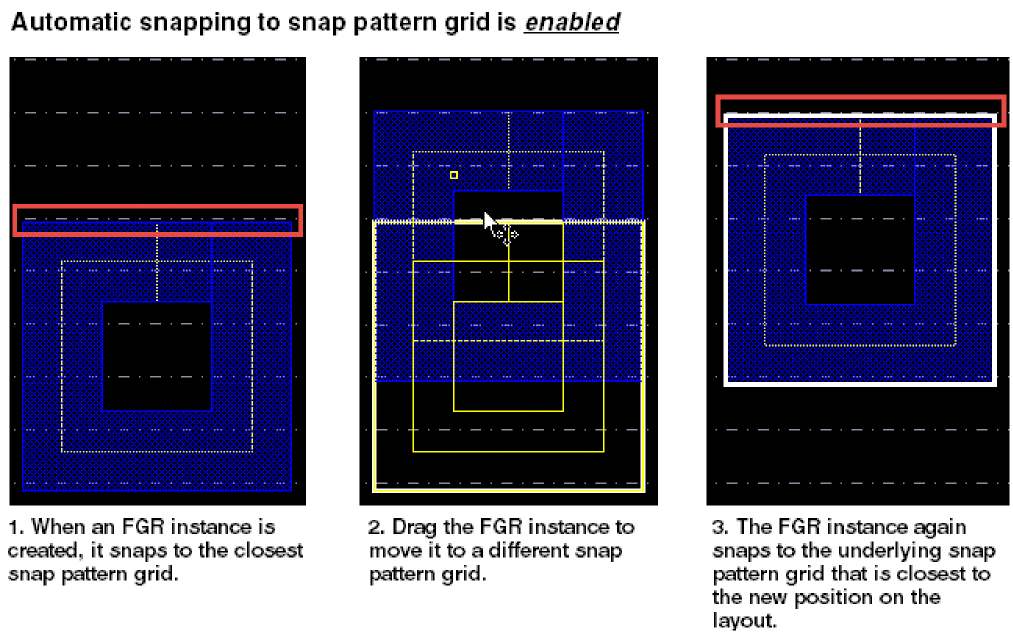
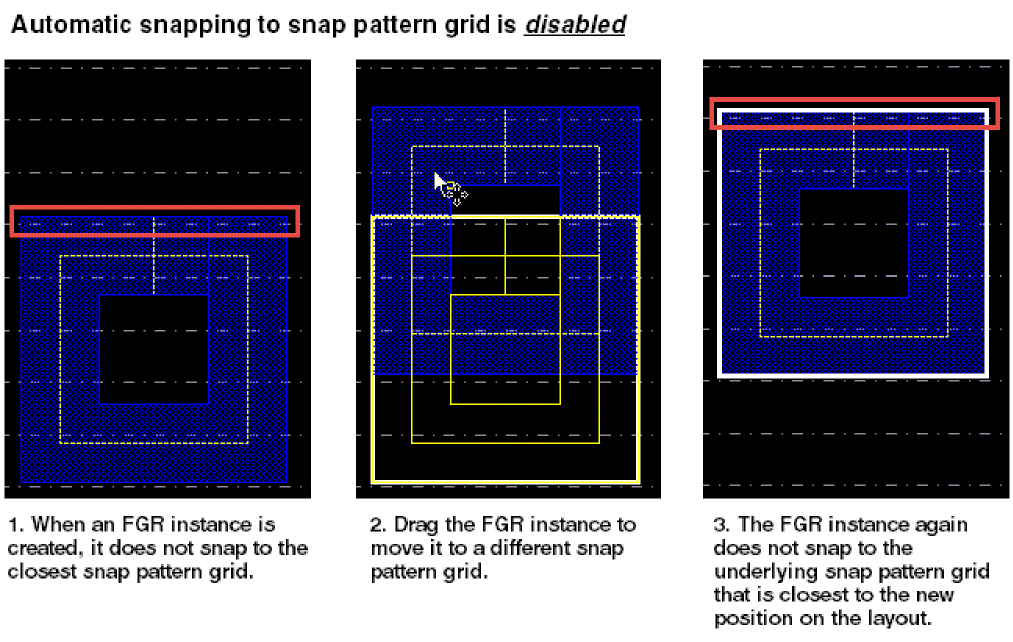
Can a newly created FGR for a FinFET device snap to the fin grids?
Before creating an FGR for a FinFET device, if you select the Snap Pattern Snapping check box in the
Return to top