

Our custom design solution just got better with Virtuoso® Studio ushering into the future of custom or analog design. Leveraging 30 years of industry experience to provide broader support for RF, photonics, mixed-signal, and advanced heterogeneous designs. The new AI-powered Virtuoso Studio advances productivity via automation and innovative features, reimagined infrastructure and new levels of integration that stretch beyond classic design boundaries.
Virtuoso Studio offers the same great experience you are accustomed to, but with added benefits to support accelerating design complexity:
- Improved infrastructure to overcome the exponential changes in design size and complexity
- Scalability and improved performance for 100s to 10,000s of simulations
- Advancements in cloud support
- Enhanced performance for core editing in Virtuoso Schematic Editor and Virtuoso Layout Suite
- Deeper integration to provide access to the best-in-class platforms and engines within the Cadence portfolio
- Continued addition of the latest Spectre® advancements to the Virtuoso ADE Suite, including
- Integration with the new Fast Monte Carlo engine
- Spectre FX simulator support for transistor-level and AMS designs
- Latest advances in Spectre X RF Option
- Tighter integration across Cadence platforms, including
- Allegro® PCB tools to provide support for 2.5D and 3D heterogeneous design implementation and analysis using the EMX®, Clarity™ and Celsius™ engines
- Innovus™ Implementation System NanoRoute™ and GigaPlace™ engines natively integrated within the Virtuoso layout cockpit to provide quick turn around on standard cell designs
- Virtuoso iPegasus DRC that integrates the Pegasus™ engine for DRC and Fill to provide an interactive sign-off quality verification experience as part of Virtuoso Layout Suite, without any additional licenses
- Continued addition of the latest Spectre® advancements to the Virtuoso ADE Suite, including
- Tool innovation for higher productivity
- Layout automation techniques, including new device- and block-level auto routing solutions
- New circuit design optimization algorithms incorporating some of the latest techniques in the industry
- Support for the latest advanced nodes down to 2nm, including support for the gate-all-around (GAA) topology in layout
- Generative AI for design migration
- Foundry-supported solutions to ease the burden of migration of schematics and layouts
- Ability to quickly re-center and validate designs post migration to achieve aggressive time-to-market goals
- AI-enabled tools to transform existing IP for next-generation designs
Related Topics
Products Enhanced in Virtuoso Studio IC23.1
Key Features in Virtuoso Studio IC23.1
Products and Features Removed from Virtuoso Studio IC23.1
Documentation Updates in Virtuoso Studio IC23.1
Products Enhanced in Virtuoso Studio IC23.1
- Analog Library
- Cadence Application Infrastructure
- Cadence Library Manager
- Cadence SKILL IDE
- Component Description Format
- Design Data Translators
- Open Simulation System
- Virtuoso Abstract Generator
- Virtuoso ADE Explorer and ADE Assembler
- Virtuoso ADE Verifier
- Virtuoso Automated Device Placement and Routing Flow
- Virtuoso Concurrent Layout
- Virtuoso Custom Design Migrate
- Virtuoso Design Intent
- Virtuoso Design Planning and Analysis
- Virtuoso Design Rule Driven Editing
- Virtuoso Electrically Aware Design
- Virtuoso Floorplanner
- Virtuoso Fluid Guard Ring
- Virtuoso Hierarchy Editor
- Virtuoso Import Tools
- Virtuoso Interactive and Assisted Routing
- Virtuoso Layout Suite EXL
- Virtuoso Layout Suite MXL
- Virtuoso Layout Suite XL
- Virtuoso Module Generator
- Virtuoso MultiTech Framework
- Virtuoso Multi-Patterning Technology
- Virtuoso NC-Verilog Environment
- Virtuoso Photonics Solution
- Virtuoso RF Solution
- Virtuoso Schematic Editor
- Virtuoso Simulation Driven Interactive Routing
- Virtuoso Studio Design Environment
- Virtuoso Studio Design Environment SKILL
- Virtuoso Studio Licensing and Configuration
- Virtuoso SystemVerilog Netlister
- Virtuoso Technology Data
- Virtuoso Unified Custom Constraints
- Virtuoso Virtuoso Visualization and Analysis XL
- Voltus-Fi Custom Power Integrity Solution L
- Voltus-Fi Custom Power Integrity Solution XL
- Voltus-XFi
What’s New in Other Products
If a product is not listed above, it means that there are no significant enhancements to be documented in the IC23.1 release for that product.
Key Features in Virtuoso Studio IC23.1
Virtuoso® Layout Suite MXL
Virtuoso® Layout Suite MXL is the advanced Virtuoso Studio application introduced in IC23.1 that offers a unified interface to support design styles across both mature and advanced process nodes, including GAAFETs. Due to its heterogeneous design capabilities, such as co-design and multi-fabric electromagnetic and thermal analysis, the Layout MXL cockpit is also the default cockpit for integrated circuit designs for large system-level designs.
For more information, see .
Products and Features Removed from Virtuoso Studio IC23.1
- The following Virtuoso products and their documentation have been removed:
- Virtuoso Analog Design Environment L
- Virtuoso Analog Design Environment XL
- Virtuoso Analog Design Environment GXL
Use the more efficient and powerful environments, Virtuoso ADE Explorer and Virtuoso ADE Assembler, to run simulations for your analog or mixed-signal designs. - The following Virtuoso features and their documentation have been removed:
- Setting Outputs form from Virtuoso ADE Explorer-Virtuoso Schematic Editor workspace
- EDIF Out form from Virtuoso Schematic Editor and Virtuoso Layout Suite
- DRD compactor from Virtuoso Design Rule Driven (DRD) editing tool
- The following features and their documentation have been removed from Virtuoso ADE Explorer and Virtuoso ADE Assembler:
- Points submission to sweep variables and parameters
- Integrated history management
- Point troubleshooting
- Feasibility analysis
Documentation Updates in Virtuoso Studio IC23.1
Restructured Documentation
The environment variables for Virtuoso ADE Explorer and Virtuoso ADE Assembler have been repackaged in the following reference guides:
- appendix in Virtuoso ADE Explorer User Guide
- appendix in Virtuoso ADE Assembler User Guide
The SKILL functions for Virtuoso ADE Explorer and Virtuoso ADE Assembler have been documented in a single reference guide, .
Removed Documentation
The documentation for the following products is removed from the IC23.1 release:
- AMS Design and Model Validation
- Virtuoso Analog Design Environment L User Guide
- Virtuoso Analog Design Environment XL User Guide
- Virtuoso Analog Design Environment GXL User Guide
Help and Support Enhancements
Doc Assistant — A New Documentation Viewer for Cadence Tools
Starting from IC23.1, Virtuoso ships with a brand-new documentation viewer, Doc Assistant.
Doc Assistant provides the following advantages over the previous documentation viewer, Cadence Help:
- Presents content in the form of individual, easy-to-read topics.
- Integrates an advanced search engine that offers better search speed and relevance.
- Operates in two modes, Online, in which documents are stored in the cloud, and Offline, in which documents are stored in the installation directory. You can search for content in both Online and Offline modes.
- Provides the facility to store documents in the cloud, with a basic minimum set shipped along with the software. This significantly reduces the documentation footprint in the tool installation.
In IC23.1, Virtuoso is being shipped with the complete documentation set in the installation directory (Offline mode).
Launching Doc Assistant
You can launch Doc Assistant in one of the following ways:
- Windows systems: Choose Doc Assistant from the Start menu.
- Linux systems: Navigate to the
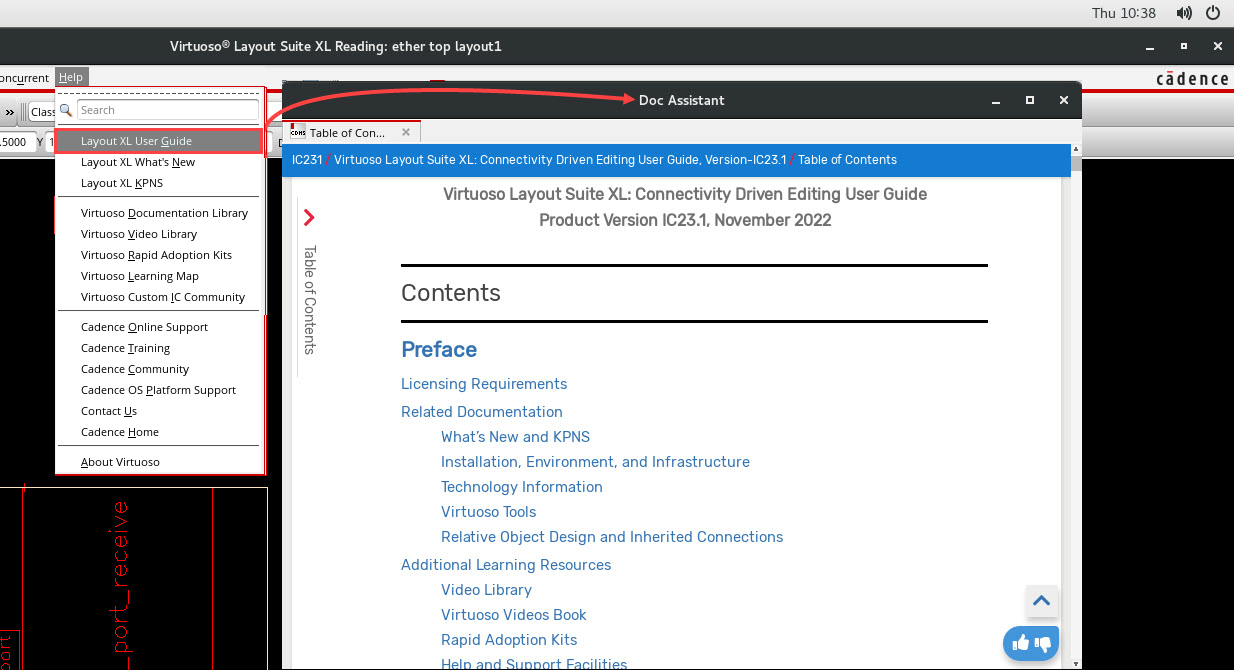
<cadence_doc_assistant_install_directory>/bindirectory and run thecdacommand. - Product Help menu: As shown in the following example:
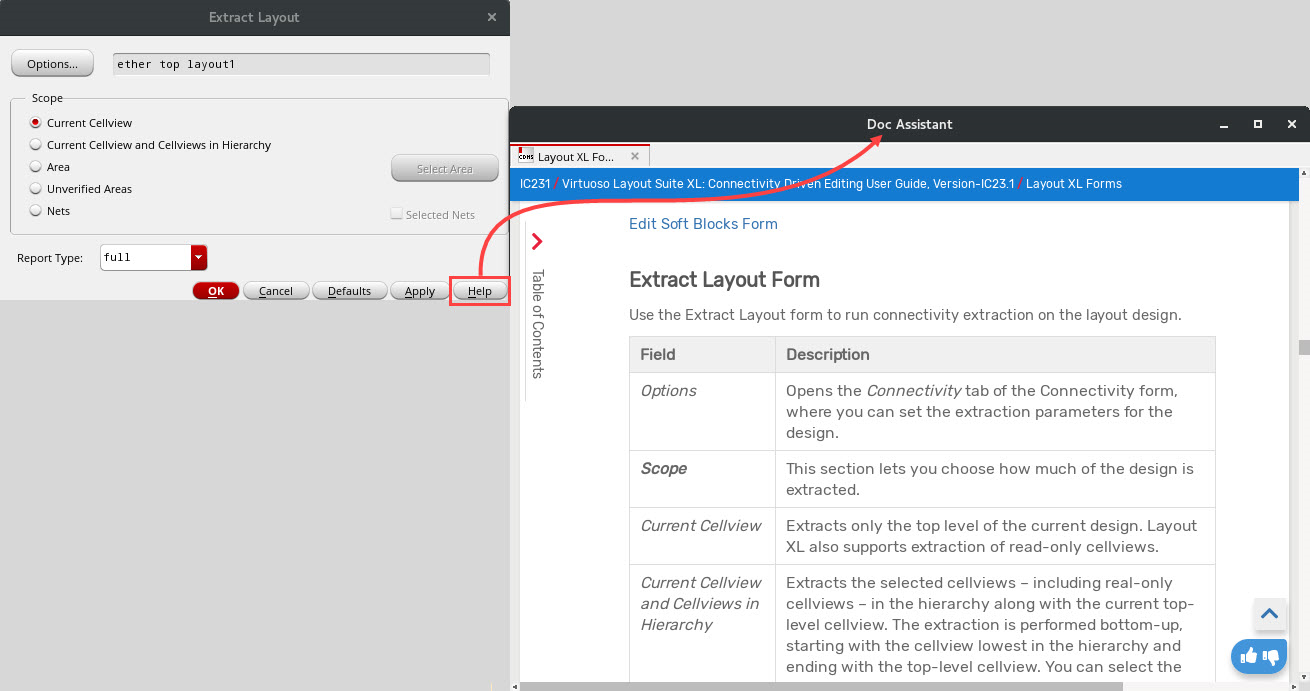
- Tool Help button: As shown in the following example:
We Value Your Feedback!
Did the documentation resolve your query? Were you looking for additional information? Share your feedback. We'll address it.
We strongly believe in continuous improvement by gathering user feedback. The Doc Assistant provides multiple options to share your feedback on the content, product, and the documentation viewer.
- Want to share your feedback on the topic content? Use the
 and
and  buttons in the topic viewer.
 - Want to share your feedback about the product? Click the How was your product experience? link at the bottom of the TOC.
- Want to share your feedback about Doc Assistant? Select Application Feedback from the hamburger
 menu.
menu.
Related Topics
Doc Assistant — Known Problems and Solutions
Training Courses
Cadence provides a number of training courses developed to teach a specific tool or design discipline. These courses are delivered through instructor-led live, virtual classes, or online training. You can view the Cadence Learning Maps to understand the recommended course flows according to tool knowledge levels.
To explore the full range of training courses provided by Cadence in your region, visit Cadence Training or contact training locations near you.
Videos
Cadence provides a comprehensive set of videos that help you intuitively learn about a tool feature or a flow. This set includes the following:
- Videos included in the Virtuoso installation
- Videos in conjunction with the relevant topic accessible from the Doc Assistant
- The Video Library on the Cadence Online Support website, which includes recommended videos.
To view a list of videos related to a specific product, you can use the Filter Results feature available in the pane on the left. For example, click the Virtuoso Layout Suite product link to view a list of videos available for the product. You can also save your product preferences in the Product Selection form, which opens when you click the Edit icon located next to My Products.
Blogs
Cadence publishes a number of blogs under different series to highlight the most exciting new features of Virtuoso. These blogs are published on cadence.community.com. We recommend that you take a look at these blogs and, if you like what you see, subscribe to the Custom IC Design blog category to have them delivered directly to your mailbox.
We are now also translating some of our blog content to Chinese and publishing them in the Custom IC Design (Chinese) blog category. To get these blogs delivered directly to your mailbox, subscribe to the blog category.
Virtuoso Release Announcement Blog Series
The Release Announcement blogs are published immediately after a new Virtuoso release is available for download. These blogs not only announce new release arrivals but also point you to key features to look out for in the release, related documentation, and other release collateral.
- Virtuoso Studio IC23.1 ISR2 Now Available (New)
- Virtuoso Studio IC23.1 ISR1 Now Available
- Virtuoso Studio IC23.1 Now Available
Virtuoso Studio Blog Series
The Virtuoso Studio blogs highlight the key features to look out for in Virtuoso Studio IC23.1 release. Keep watching this space for links to new blogs.
- iPegasus for Signoff DRC and Fill (New)
- In-Design Verification with iPegasus (New)
- Design, Planning, and Analysis - 3 Sides of a Coin, Episode 2 (New)
- Organize Your Designs Better with Navigator Queries (New)
- Design, Planning, and Analysis - The 3 Sides of a Coin, Episode 1
Virtuosity Blog Series
The Virtuosity blogs give you an overview of important and useful Virtuoso features, both old and new, along with supporting links to a range of associated resources including RAKs, videos, application notes, and product manuals.
The latest blogs in this series are listed below. Blogs about features that are available only in the IC23.1 release will be added in due course.
- Debugging like a Pro Using Voltus-XFi Result Browser: Strategies to Boost Efficiency (New)
- Accelerate Your EM-IR Closure with Voltus-XFi Custom Power Integrity Solution
- Annotating Scalar Outputs for Single-Point Simulation in Virtuoso Visualization and Analysis XL
- Custom IC Design Flow/Methodology - Post-Layout Circuit Simulation and GDSII Generation
- Driving Super-efficient Chip Design with Voltus-XFi Custom Power Integrity Solution
Virtuoso Video Diary Blog Series
The Virtuoso Video Diary blogs cover new and important Virtuoso features and provide links to related video content and other resources.
The latest blogs in this series are as follows:
- Knowledge Booster Training Bytes - Part 13: Analog Fault Simulation (New)
- Do More With eyeHeightAtXY and eyeWidthAtXY Calculator Functions in Virtuoso Visualization and Analysis XL
- Knowledge Booster Training Bytes - Part 12 - Using Quview and Connectivity Checker in Quantus
- Usability of the Graph Summary Label in Virtuoso Visualization and Analysis XL Levels Up
- Knowledge Booster Training Bytes - Part 11 - Navigating Through the Training Byte Channels
Knowledge Booster Training Bytes Blog Series
The Knowledge Booster Training Bytes blogs give you an insight into some useful Virtuoso features, both old and new, along with supporting links to a range of associated resources including RAKs, videos, application notes, and product manuals.
The latest blogs in this series are as follows:
- Switched Capacitor and C2V Converter-Based Circuits (New)
- Virtuoso CLE Webinar Recording Available
- Routing Techniques for Custom IC Layout Design in Virtuoso Layout Suite
- The Spectre FX Circuit Simulator
- The Spectre X Simulator
Virtuoso Meets Maxwell Blog Series
The Virtuoso Meets Maxwell blogs explore the capabilities and potential of Virtuoso RF and Virtuoso Multi-Technology Solution.
The latest blogs in this series are listed below. Blogs about features that are available only in the IC23.1 release will be added in due course.
- Virtuoso and Allegro SKILL for Efficient Co-Design (New)
- Viewing Your Mesh in EMX Planar 3D Solver (New)
- Custom Passive Device Authoring - Part 2 (LVS)
- Virtuoso Electromagnetic Solver Assistant -Support for Iterated Instances
- Custom Passive Device Authoring - Part 1 (Automatic Marker Shape Generation)
Spectre Tech Tips Blog Series
Spectre Tech Tips is our blog series that focuses on the capabilities of Spectre® and its integration and interactions with Virtuoso® Analog Design Environment (ADE).
The latest blogs in this series are as follows:
- Selecting Limits for Parameter Value Warnings (New)
- Introducing Spectre FMC Analysis
- GPU Integration with Analog Circuit Simulation
- Spectre X High-Capacity Circuit Simulation
- Addressing Common Spectre EMIR Problems